
Consent Policy for Signup Forms
A signup form that changes without review is a consent problem. Someone edits the checkbox label, removes the required flag or points the form at another list. From then on, contacts join under wording they never saw, with no record of what they agreed to.
The consent policy module locks the route from Core Forms to MailerPress. Only a form you’ve registered can add contacts, and its consent checkbox has to carry the exact wording on record. Every new contact gets proof of what they agreed to, and when. Anything that doesn’t match fails closed, so no contact is created.
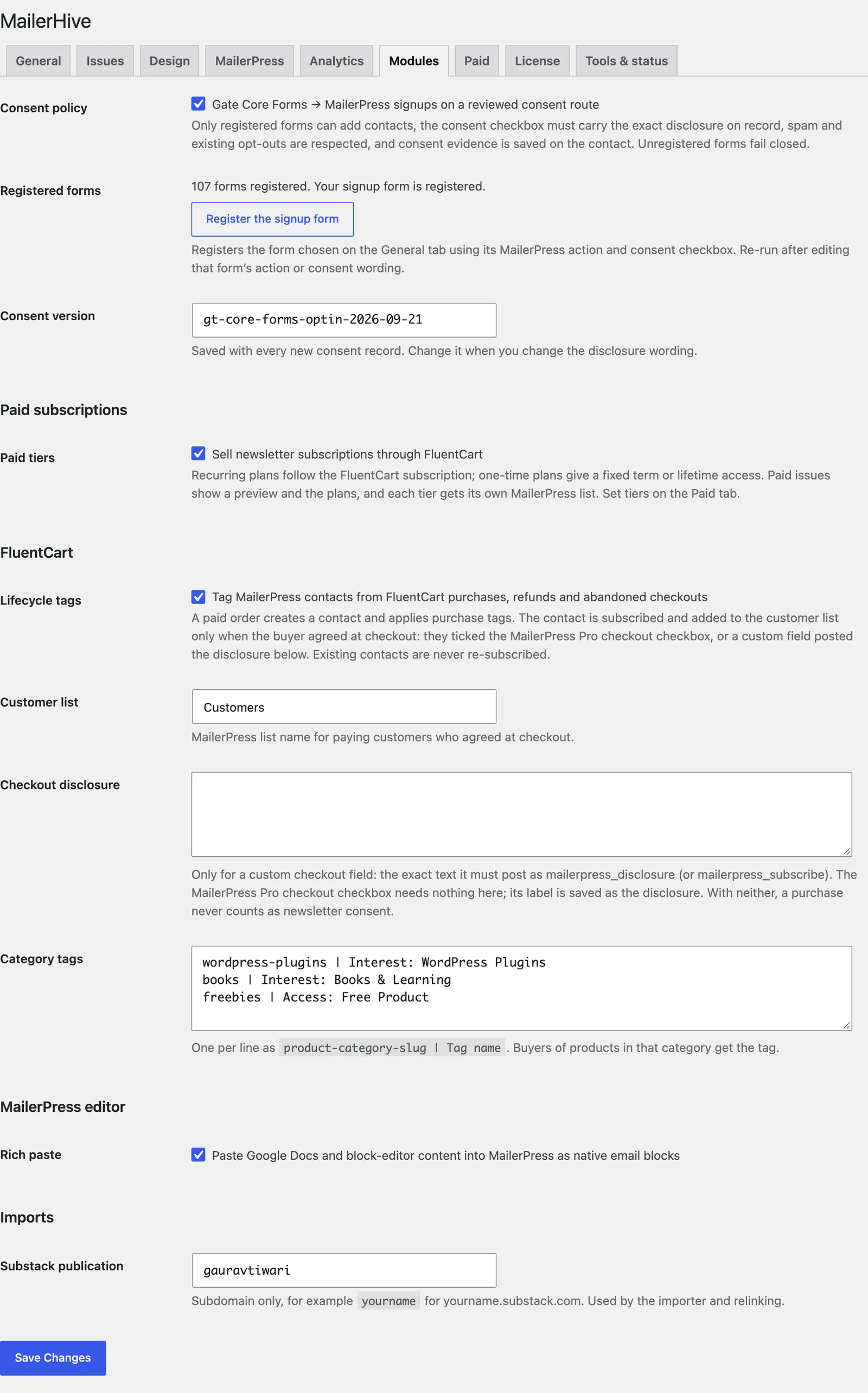
Before You Start
Your signup form needs 2 things in Core Forms:
- A MailerPress action, with the list and, optionally, a tag for new contacts.
- A required consent checkbox. Its label is the disclosure readers agree to, so write it exactly as you want it on record.
Choose that form under Signup form on Newsletter → Settings → General.
Turn On the Policy
- Go to Newsletter → Settings → Modules.
- Tick Consent policy and select Save Changes.
- Select Register the signup form.
MailerHive confirms with “‘{Form name}’ is registered with the consent policy.” The Registered forms row then shows “Your signup form is registered.”
While the policy is on, every Core Forms form with a MailerPress action needs registration, and Register the signup form registers only the form chosen on the General tab. Other forms that send contacts to MailerPress stop adding them until you switch the policy off.
If registration fails, the message says why:
- “Choose a Core Forms signup form on the General tab first.”
- “The signup form has no MailerPress action.”
- “The signup form needs a required consent checkbox.”
What Every Signup Has to Pass
MailerHive checks each submission before MailerPress sees it:
- The form is registered. Otherwise: “MailerPress capture requires a reviewed site consent route.”
- The MailerPress action is unchanged: the same list, tag, field mapping, double opt-in setting and conditions as when you registered it.
- The consent checkbox is unchanged: still required, not pre-checked and with the exact label on record.
- The box was ticked. Otherwise no contact is created.
- The email is valid, and the MailerPress list and tag still exist under the same names.
- Existing opt-outs stay. A contact who bounced, complained, was suppressed or carries a “Suppression:” tag isn’t touched.
Spam submissions, Core Forms test runs and submissions from before you registered the form are skipped.
What Gets Saved on the Contact
Each new contact carries proof of consent in MailerPress:
- consent_form: the form’s slug
- consent_recorded_at: when they agreed
- consent_version: the Consent version from the Modules tab,
v1by default - acquisition_source:
core_forms, for new contacts only - Opt-in details: the consent field, its value and the full disclosure text
The same evidence is attached to the Core Forms submission.
Double Opt-In
The policy follows MailerPress’s own sign-up confirmation setting:
- Confirmation on: every signup gets MailerPress’s confirmation email, and the contact stays pending until they click it. A returning contact who had unsubscribed goes back to pending, never straight to subscribed.
- Confirmation off: signups are added straight away. Because nothing confirms them, MailerHive refuses signups while any MailerPress automation is active, so an automation can’t email people who haven’t confirmed. Turn confirmation on, or keep automations as drafts or disabled.
When You Change the Form
Any change to the form’s MailerPress action or its consent checkbox makes signups fail with “The MailerPress route changed and needs consent/mapping review.” or “The MailerPress consent control is missing or changed.” That’s deliberate. After you edit the form:
- Select Register the signup form again on the Modules tab.
- If you changed the disclosure wording, change Consent version too, such as from
v1tov2, so each contact’s record shows which wording they saw.