
 by
by
The chair is the part of a study setup that most students replace last and should replace first. A desk that’s slightly wrong costs you a few inches of reach. A chair that’s wrong costs you your lower back by hour 3, every single night, for 4 years.
What separates the best study chairs from the rest is narrow, and it comes down to the same 3 failures every time. The lumbar curve sits too high or too low for your spine and can’t be moved. The armrests are welded at one height, so your shoulders either hunch or hang. The seat is narrower than your hips, which you only notice in the second hour. None of that shows up in a product photo. All of it shows up on a Tuesday night.
My disclosure before you read another line: I haven’t sat in all 6 of these chairs. What I did was pull the current manufacturer specifications for every one of them, confirm each is genuinely in stock rather than a dead listing, and line up the numbers that decide whether a chair fits your body and your room. Where a maker doesn’t publish a figure, I say so instead of filling the gap with a guess. Every pick is a US listing, and the guide is written for dorm rooms and small bedrooms.
4 specs decide almost every chair purchase, so here they are in plain words:
- Weight capacity is the rated static load. It isn’t only about your body. It’s the margin that keeps the gas lift and the base from being the first things to fail.
- Lumbar adjustment is whether the support in the small of your back moves to meet your spine, or expects your spine to come to it.
- Recline range decides whether the chair has more than one working position. One position for 5 hours is the problem, not the solution.
- Footprint is the floor space the chair claims, and it’s always wider than the seat. A 28 inch chair needs more than 28 inches of room to turn in.
The 6 chairs below cover the jobs students actually buy a chair for, in order:
- A chair that adjusts to you instead of the other way round
- The cheapest chair that’s still worth owning
- A chair that tucks fully under a desk with a lip or a keyboard tray
- A chair for a room where the desk and the bed are already touching
- A chair you can change position in during a 5 hour block
- A chair built for a bigger body rather than adapted to one
Find your situation in the table, then jump to that pick.
| Chair | Best for | Capacity | Size (W x D x H) | Lumbar | Recline | Armrests |
|---|---|---|---|---|---|---|
| Shintenchi High-Back Mesh | Most students | 330 lb | 28.7 x 28.7 x 53 in | Adjusts in height and depth | 90 to 135 degrees | Height adjustable |
| FDW Mid-Back Mesh | A tight budget | 250 lb | 22 x 21 x 38 in | Fixed, waist pillow included | Locks, angle not published | Fixed |
| NEO CHAIR Flip-Up Arms | A desk with a lip or tray | Not published | 24 x 22 x 35 in | Contoured back, no adjustment | Tilt tension only | Padded, flip up |
| AFO Armless Task Chair | A very small room | 200 lb | 16.5 x 16.3 x 29.5 in | Y-shaped back, no adjustment | Not published | None |
| SITPRO with Footrest | Sessions past 4 hours | 300 lb | 22 x 17.9 x 53 in | Moves 1.18 in in and out, 2 in up and down | 90 to 160 degrees, locks | Not published |
| FAMSINGO Big and Tall | Larger students | 400 lb | 28.3 x 21.6 x 43.1 in | High-back mesh, no adjustment | 90 to 120 degrees, stepless | Height adjustable |

Fit the Chair to Your Body Before You Shop
Most chairs that get returned were bought on looks and a price. Someone saw a mesh back and a headrest, pictured themselves working late in it, and never checked a single measurement against their own body. 10 minutes with a tape measure prevents almost all of it.
Take these 5 numbers before you shop:
- Floor to the back of your knee, in socks. That’s the seat height the chair has to be able to reach.
- Hip width, seated, at the widest point. Add 2 inches. That’s your minimum seat width.
- Back of your buttocks to the back of your knee. The seat should support most of your thigh without pressing into the back of your knee.
- Floor to the underside of your elbow, seated, shoulders relaxed. Armrests and desk surface both aim at this.
- Clear floor space around the desk, including the swing of the door and the edge of the bed.
Those aren’t arbitrary. OSHA’s computer workstation guidance on chairs puts the same tests in plain terms: the chair height is right when the whole sole of your foot rests on the floor with the back of your knee slightly higher than the seat, the seat should be wide enough for the majority of hip sizes, the seat pan should support most of the thigh without touching the back of the knee, and the backrest should follow the natural curve of your spine with a lumbar support that adjusts in height.
That last one is the test that eliminates most cheap chairs, and it’s the one nobody applies. A lumbar pad bolted at a fixed height is correct for the people whose spines happen to match it. For everyone else it’s a lump in the wrong place.

Write the 5 numbers down. Every pick below gets judged against them.
The 6 Best Study Chairs for Students in 2026
Each pick is here for one job. Where a chair is wrong for you I say who should skip it, because that half of a recommendation is usually the more useful one.
Best study chair for most students: Shintenchi High-Back Mesh Chair

If you want one chair that adjusts to you rather than the other way round, this is where I’d start.
- Size: 28.7 wide x 28.7 deep x 53 inches high
- Seat: 19.3 x 19.3 inches
- Weight capacity: 330 pounds
- Chair weight: 29 pounds
- Lumbar support: adjustable in height and in depth
- Headrest: multi-directional, adjustable
- Armrests: height adjustable
- Backrest tilt: 90 to 135 degrees, 3 locking levels
- Base: reinforced stainless steel, 5 point, non-marring PU casters
- Assembly: 15 to 30 minutes, tools included
The lumbar support moves in 2 directions, and that is the whole argument for this chair. Height is the adjustment everyone knows about. Depth is the one that decides whether the support actually reaches you. Two people can have their lumbar curve at the same height off the seat and still sit 2 inches apart from the backrest, because torso depth varies as much as torso length does. A pad at the right height but the wrong depth is a pad you never touch.
OSHA’s chair guidance asks for a lumbar support that is height adjustable so it can be placed to fit the lower back, and a backrest that reclines at least 15 degrees from vertical. This chair clears both, at a price where most chairs clear neither. The armrests move too, which matters more than the spec sheet suggests, since armrests fixed too high are the standard reason a student’s shoulders sit up near their ears by the end of a session.
330 pounds of rated capacity on a stainless steel base is generous headroom for a chair in this class. That headroom is not about your body weight. It’s the margin that stops the gas lift sinking and the base flexing after a year of somebody dropping into the seat.
Who should skip it: anyone in a genuinely tight room. At 28.7 inches wide this is the widest chair here, and a chair needs room to swing, not just room to park. Measure the gap between your desk and whatever is behind you before you order. If that gap is under 30 inches, take the AFO instead.
Best study chair on a tight budget: FDW Mid-Back Mesh Chair
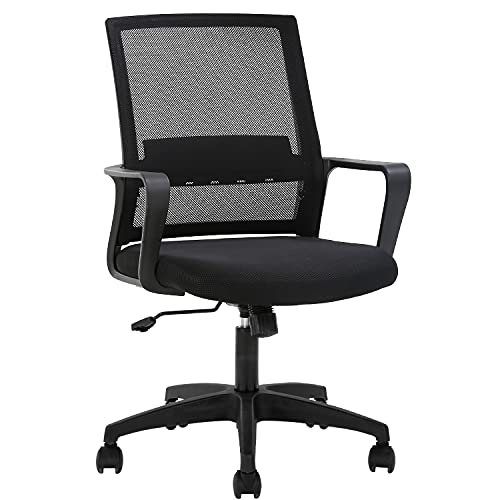
The cheapest chair here that I’d still call a chair rather than a seat with wheels.
- Size: 22 wide x 21 deep x 38 inches high
- Weight capacity: 250 pounds
- Chair weight: 18 pounds
- Back: mid-back mesh with a padded mesh seat
- Lumbar support: fixed, with a waist pillow included
- Armrests: fixed
- Backrest: locking, angle not published by FDW
- Certification: components tested to BIFMA
- Assembly: all tools and instructions in the box, with spare screws
BIFMA-tested components are worth more at this price than any feature you can see. The parts that kill a budget chair are the gas lift and the base, not the upholstery, and those are exactly the parts a furniture standard covers. A chair sitting at the bottom of this list’s price range that still puts its load-bearing hardware through a recognized test is spending its money in the right place.
The waist pillow in the box is a real inclusion rather than a bonus-item line. On a chair with no lumbar adjustment, a strap-on pillow is how you move the support to where your spine needs it. It’s the low-tech version of what the Shintenchi does mechanically, and it works, right up until the strap loosens.
Understand what mid-back means before you buy, though. The backrest stops below your shoulder blades. There’s nothing behind your upper back and nothing at all behind your head, so leaning back to read is a position this chair doesn’t offer.
Who should skip it: anyone above 250 pounds, anyone who reads leaning back rather than typing upright, and anyone whose desk has a lip that fixed armrests will collide with. The NEO CHAIR below solves that last one for very little extra.
Best study chair for a narrow desk: NEO CHAIR Mesh Chair with Flip-Up Arms
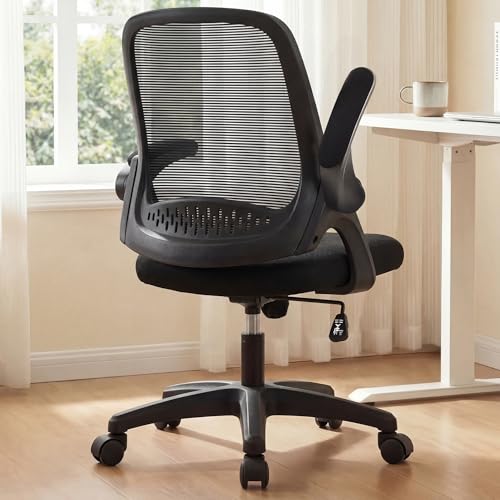
My pick when the desk has a keyboard tray, a drawer, or an apron that ordinary armrests hit before the chair is anywhere near the edge.
- Size: 24 wide x 22 deep x 35 inches high
- Chair weight: 20.06 pounds
- Armrests: padded, flip up out of the way
- Back: contoured mid-back elastic mesh
- Adjustments: seat height, tilt tension, 360 degree swivel
- Frame: FSC-certified wood internal frame
- Certification: BIFMA-approved components
- Weight capacity: not published by NEO CHAIR
Flip-up arms sound like a convenience feature and are actually a posture feature. OSHA lists it plainly: armrests that are too large or badly placed stop the chair getting close enough to the keyboard, and then you reach and lean forward for the rest of the session. Folding the arms up moves the whole problem out of the way in a second, and unlike an armless chair you still get arm support when you want it.
The wood internal frame is the other reason this one is here. Most chairs at this price build the seat pan out of unsupported plastic, which is fine on day one and slowly develops the flex you feel as a soft spot under one thigh. A wood-reinforced pan doesn’t do that. It also means a heavier chair for the size, and at 20 pounds this is not a chair you’ll be carrying up a stairwell often.
Now the honest gap. NEO CHAIR does not publish a weight capacity for this model, and capacity is the first number I want on any chair. I’m not going to invent one for them. Treat this as a chair for average loads and look elsewhere if you’re near the top of any range.
Who should skip it: anyone who needs a stated capacity figure before buying, anyone who wants head or neck support, and anyone whose main complaint is lower back pain. This is a mid-back chair with a contoured shell rather than an adjustable lumbar system, so it manages posture instead of correcting it.
Best study chair for a very small room: AFO Armless Mesh Task Chair

9 pounds and a 16.5 inch footprint. Nothing else here is close, and in a room where the desk and the bed are already touching, that’s the only spec that matters.
- Size: 16.5 wide x 16.3 deep x 29.5 inches high
- Weight capacity: 200 pounds
- Chair weight: 9 pounds
- Back: double-layer mesh on a Y-shaped backrest
- Armrests: none
- Adjustments: seat height by lever, 360 degree casters
- Base: nylon
- Assembly: 10 to 15 minutes
Armless is not a compromise in a small room. It’s the point. The chair rolls all the way under the desk and stops existing when you aren’t in it, which is the difference between a room you can walk through and a room you edge around. At 9 pounds you can also lift it with one hand to get to whatever is behind the desk, and that turns out to matter more often than anyone expects.
Double-layer mesh is worth calling out separately from the single-layer mesh on most budget chairs. Single-layer lets air through. Double-layer moves air, because the gap between the 2 layers gives it somewhere to go. In a room where the radiator is under the window and the window stays shut, that difference is felt.
The 200 pound capacity is the lowest here, and AFO states it directly on the listing rather than burying it. Respect that number instead of testing it, because a nylon base at its limit is where a chair stops being safe.
Who should skip it: anyone near or above 200 pounds, and anyone typing in 4 hour blocks. No armrests means your shoulders carry the weight of your arms for the entire session, which is fine for reading and annotating and gets old fast when you’re writing code or essays. If your room is tight and you type all day, the flip-up arms on the NEO CHAIR give you both. This is also the chair I’d put in a living room study corner where the chair has to disappear between sessions.
Best study chair for long sessions: SITPRO Reclining Chair with Footrest

The only chair here that gives you a genuinely different position to move into without standing up.
- Size: 22 wide x 17.9 deep x 53 inches high
- Weight capacity: 300 pounds
- Chair weight: 36 pounds
- Recline: 90 to 160 degrees, locks at the angle you choose
- Footrest: retractable and padded
- Headrest: 3.94 inches of height travel, 2.35 inches in and out, 60 degrees of swivel
- Lumbar support: 1.18 inches in and out, 2 inches up and down
- Seat height: 4 inches of lift
- Base: 5 point metal
- Warranty: 1 year
Here is the part that gets misunderstood about ergonomics. There is no single correct posture you find once and then hold for 5 hours. OSHA’s own framing is adjustability that allows variability of sitting positions through the day, and every physiotherapy version of the same advice says change position, not freeze in a better one. A chair with 1 usable position is a problem no matter how good that position is.
160 degrees plus a footrest is what a second position looks like in practice. Type upright at 90 for the problem set, drop back to 130 with the footrest out to read the chapter, come back up to write it. That’s 3 postures in one session on furniture you never left. Compare that to the FDW, where every hour of the session happens in the same shape.
Both the headrest and the lumbar support move in 2 axes, which is unusual outside chairs that cost several times this. The lumbar range is modest at 1.18 inches in and out, but modest and adjustable beats generous and fixed every time.
Who should skip it: anyone in a small room. This is 53 inches tall and 36 pounds, and a chair that tall reads as furniture rather than as a desk chair. Skip it too if you know yourself well enough to know that a chair which reclines to 160 degrees at 11pm is a chair you’ll fall asleep in. If you want the recline without pretending it’s for studying, the gaming recliner picks are the honest version of that purchase.
Best study chair for larger students: FAMSINGO Big and Tall Office Chair

Built for a bigger body rather than adapted to one, and the difference shows up in the seat before it shows up in the capacity rating.
- Size: 28.3 wide x 21.6 deep x 43.1 inches high
- Weight capacity: 400 pounds
- Chair weight: 37.6 pounds
- Seat: U-shaped, 22.5 inches wide, 5.5 inches of high-resilience foam
- Back: high-back breathable mesh
- Recline: 90 to 120 degrees, stepless, locks anywhere in the range
- Armrests: height adjustable
- Base: reinforced metal 5 star with a Class 4 gas lift
- Certification: BIFMA and SGS
- Assembly: 20 to 30 minutes, tools included
- Warranty: 1 year
Capacity is the number people shop on. Seat width is the number that decides whether they’re comfortable. OSHA says the seat should be wide enough to accommodate the majority of hip sizes and that oversize seat pans should be provided for larger users, which is a polite way of saying a standard seat pinches. At 22.5 inches this is more than 3 inches wider than the Shintenchi’s 19.3, and 3 inches across the hips is not a small difference at hour 4.
The 5.5 inch foam does something similar in the other axis. Thick high-resilience foam spreads load instead of bottoming out onto the seat pan, and bottoming out is what produces the numbness people blame on circulation. Below that sits a Class 4 gas lift and a reinforced metal base, both certified to BIFMA and SGS, which is a genuinely uncommon pairing under 400 pounds of rating.
The tradeoff is the recline. 90 to 120 degrees is the shallowest of the ranges published here, though it still clears the 15 degrees from vertical that OSHA asks for. It’s stepless and it locks anywhere, which I’d take over the 3 fixed stops on the Shintenchi, but you don’t get anything close to the SITPRO’s lounging position.
Who should skip it: anyone comfortably inside a standard chair’s range who’s in a small room. You’d be paying for 28.3 inches of width you don’t need and giving up recline to get it.
What Actually Matters in a Study Chair
How much weight capacity do you need?
More than your body weight, and the margin is the point. A rating describes an evenly distributed static load, which is not what a chair actually experiences. Real chairs get dropped into, leaned back in, pushed off from with one foot, and sat on sideways on the front corner while somebody talks to a roommate.
My rule is to leave at least 50 pounds of headroom over your own weight, and more if you’re rough on furniture. Under that margin the gas lift starts sinking mid-session and the base develops a flex you can feel through the seat. Those 2 parts fail first on every cheap chair, which is also why a BIFMA or SGS mark on the lift is worth more than an extra feature.
Mesh or padded?
Mesh for anywhere warm, padded for pressure relief, and mesh wins for most students. A dorm room in a building with one thermostat for the whole floor is a heat problem more often than a comfort problem, and all 6 picks here have mesh backs for exactly that reason.
The case for padding is narrower than it looks. Foam feels better in the first 20 minutes and worse in the fourth hour, because heat builds and the pad compresses to a shape you can’t change. Where padding does earn its place is under you rather than behind you. A thick, high-resilience seat like the FAMSINGO’s 5.5 inch cushion spreads load properly, and a padded seat with a rounded waterfall front edge is exactly what OSHA describes.
Do you need a headrest?
Only if you recline. That’s the whole test.
Sitting upright at 90 degrees, your head sits over your spine and a headrest is a thing your skull never touches. Lean back past about 110 and your head needs somewhere to go, or your neck muscles hold it there for you. So a headrest is a recline accessory rather than a posture feature, and a chair with a headrest and no meaningful recline range is selling you a shape.
Are adjustable armrests worth it?
Yes, and the reason is that badly placed armrests are worse than no armrests at all. OSHA is specific about the failure modes. Too low and you lean sideways to rest one forearm. Too high and your shoulders stay raised for the whole session. Too wide and you reach for them. Too large and the chair can’t get close enough to the keyboard, so you lean forward instead.
Every one of those produces a posture you’d never choose on purpose. Which is why armless chairs like the AFO aren’t the compromise they look like: no armrest can’t be at the wrong height. If you want arm support, pay for the version that moves. If you don’t want to pay for it, take a chair with none rather than a chair with fixed ones at somebody else’s elbow height.
The mistakes that cost students the most money
These are the patterns worth avoiding, in rough order of how expensive they turn out to be:
- Buying a gaming chair for the aesthetic and discovering the bucket seat and fixed lumbar bolster fit exactly one body shape, which may not be yours.
- Reading a capacity figure as a comfort rating. Capacity tells you what the base survives. Seat width tells you what you survive.
- Paying for a headrest on a chair that doesn’t recline far enough to ever use it.
- Buying the chair before measuring the floor space it needs to turn in, not just the space it parks in.
- Treating a lumbar pillow as a permanent fix. It’s the right temporary answer, and OSHA suggests exactly that when a chair has no lumbar support, but a strap-on cushion moves every time you stand up.
- Spending the whole budget on the chair when the desk is 4 inches too tall. Then the chair gets blamed for a problem that lives in the desk.
How to Set the Chair Up So It Doesn’t Hurt
A well-specified chair set up badly is just an expensive version of the chair you already had. The setup costs nothing but 15 minutes, and there are measurable targets to aim at:
- Whole sole of each foot flat on the floor, or on a footrest if the seat can’t come down far enough
- Back of the knee slightly higher than the seat, never pressed against the front edge of it
- Lumbar support set into the small of your back, not above it and not down on your belt line
- Elbows at roughly 90 to 120 degrees with your hands on the keyboard
- Shoulders relaxed and down, with armrests supporting your forearms rather than lifting them
- Backrest tension set so it resists you, and locked wherever you actually work
Then there’s the part that matters more than any of those numbers, and it isn’t a setting. Change position through the session instead of holding one. Stand up. Walk to the kitchen. Recline for the reading and come back upright for the writing. The point of adjustability is variability, not the discovery of a single correct pose you then freeze in for 5 hours.
And check the desk before you blame the chair. If the surface sits above your seated elbow height, no chair setting fixes it. That’s a desk problem wearing a chair problem’s clothes, and I’ve covered the measurements in the guide to study desks for students. The 2 pieces are one system, and the cheapest correction is usually a footrest.
The Pick I’d Actually Make
For most students I’d take the Shintenchi. It’s the only chair here that moves its lumbar support in both height and depth, and it clears OSHA’s recline and lumbar tests while doing it. That combination is rare enough that the rest of this list mostly exists for people the Shintenchi doesn’t physically fit.
Past that, the routing is short. Room too tight for a 28 inch chair? The AFO. Desk with a tray or a lip in the way? The NEO CHAIR. Sessions that run past 4 hours in one sitting? The SITPRO, for the second position rather than the footrest itself. Bigger body? The FAMSINGO, and buy it for the 22.5 inch seat rather than the 400 pound number. Budget that genuinely won’t stretch? The FDW, with the waist pillow actually strapped on.
One thing I’d push back on. Don’t buy the most adjustable chair you can afford and then never adjust it, which is what most people do. Spend the 15 minutes. A mid-priced chair set to your body beats an expensive one set to the factory default, every time, and the students who stay focused through a long session are usually the ones who stopped noticing their chair an hour ago.
Measure yourself first. The 5 numbers do most of the deciding, and the rest is which job you’re buying for.
Best of luck.
Frequently Asked Questions
What is the best study chair for students?
For most students I’d take the Shintenchi high-back mesh chair. It’s the only pick here whose lumbar support adjusts in both height and depth, its backrest tilts from 90 to 135 degrees across 3 locking levels, and it’s rated to 330 pounds on a stainless steel 5-point base. The exception is anyone in a room too tight for a 28.7 inch chair to turn in, who should take the 16.5 inch AFO armless chair instead.
How much should a student spend on a study chair?
Less than most guides suggest, because the specs that matter are not the expensive ones. A lumbar support that adjusts, a seat wide enough for your hips, and 50 pounds of capacity headroom are not what drives a chair’s price. What you pay extra for is width, a footrest, and a deeper recline range, and those are worth buying only if the job you’re buying for needs them. Check current prices on Amazon before deciding, since they move constantly.
Are gaming chairs good for studying?
Usually not, and the reason is structural rather than aesthetic. A racing-style bucket seat has raised side bolsters and a fixed lumbar cushion built for one body shape, so it either fits you or it presses on you, with no adjustment in between. A study chair with a lumbar support that moves and a seat pan wide enough for your hips will serve you better over a semester. If you want the recline and the footrest without the bucket seat, a reclining office chair like the SITPRO gets you there.
Is mesh or a padded chair better for long study sessions?
Mesh for the back, padding for the seat. A mesh backrest moves air instead of trapping it, which matters in any room you can’t control the temperature of, and every pick here has a mesh back. Foam behind you feels better for the first 20 minutes and worse by the fourth hour, because it heats up and compresses into a shape you can’t change. Under you it’s the opposite: a thick high-resilience seat cushion spreads load rather than bottoming out onto the seat pan.
What weight capacity should a study chair have?
At least 50 pounds above your own weight. A capacity rating describes an evenly distributed static load, and real chairs get dropped into, leaned back in, and pushed off from, so the margin is what actually protects the gas lift and the base. The picks here run from 200 pounds on the AFO armless chair to 400 pounds on the FAMSINGO. If you’re near the top of any chair’s range, move up a chair rather than testing the rating.
Do I need a chair with a headrest?
Only if the chair reclines far enough for you to use it. Sitting upright at 90 degrees your head sits over your spine and never touches the headrest. Past roughly 110 degrees your head needs somewhere to rest, or your neck muscles hold it in place instead. So a headrest is a recline accessory, and a chair that advertises one but tilts barely past vertical is selling you a shape rather than support.
What chair height should I set for studying?
Set it so the whole sole of each foot rests flat on the floor with the back of your knee slightly higher than the seat, which is the test OSHA uses. If the seat won’t go low enough for that, use a footrest rather than perching. Then check the other end: with your hands on the keyboard your elbows should sit at roughly 90 to 120 degrees and your shoulders should be relaxed rather than lifted. If the desk forces your shoulders up no matter what the chair does, the desk height is the problem.
Are armless chairs bad for studying?
No, and in one specific way they’re safer than the alternative. Armrests fixed at the wrong height are worse than none at all: too low and you lean sideways to reach one, too high and your shoulders stay raised all session, too large and the chair can’t get close enough to the keyboard. An armless chair can’t be at the wrong height. The real cost is that your shoulders carry the weight of your arms during long typing sessions, so armless suits reading and annotating more than writing code. Flip-up armrests, like the NEO CHAIR’s, give you both options.
Tell Google you want more of this.
Add Gaurav Tiwari as a preferred sourceOne tap, and this site shows up more often in your own Top Stories, AI Overviews and AI Mode. Remove it any time.
Disclaimer: This site is reader-supported. If you buy through some links, I may earn a small commission at no extra cost to you. I only recommend tools I trust and would use myself. Your support helps keep gauravtiwari.org free and focused on real-world advice. Thanks. - Gaurav Tiwari