
 by
by
So, you have a laptop, a stack of textbooks, and one corner of a room to put them in. You assume the desk is the easy part of that setup. It isn’t.
Most study desks for students fail in the same three ways. Too shallow, and your monitor sits close enough to give you a headache. Too tall, and your shoulders creep toward your ears by hour two. Too flimsy, and the surface rocks every time you type.
My disclosure before you read another line: I haven’t assembled all five of these myself. What I did was pull the current manufacturer specifications for every desk here, confirm each one is actually in stock rather than a dead listing, and compare the numbers that decide whether a desk fits your room and your body. Where a manufacturer doesn’t publish a number, I say so instead of filling the gap with a guess. Every pick is a US listing, and the guide is written for dorm rooms and small bedrooms.
Four terms decide almost every desk purchase, so here they are in plain words:
- Depth is the front-to-back measurement. It decides whether a monitor can sit far enough from your eyes, and it’s the number most people never check.
- Weight capacity is the total load the surface holds, not just your laptop. Books, a monitor, and the elbow you lean on all count.
- Fixed or adjustable height decides whether the desk adapts to you, or you adapt to the desk.
- Footprint is the floor space the desk eats once a chair is pulled out behind it. Always bigger than the desktop.
The 5 below cover the jobs students actually buy a desk for, in order:
- A general-purpose desk for a laptop, an open notebook, and a mug
- A desk that replaces the bookshelf your room didn’t come with
- A desk for a wall that’s barely wider than a doorway
- A desk you can stand at during a long revision block
- A desk you can fold flat and carry out in May
Find your situation in the table, then jump to that pick.
| Desk | Best for | Desktop (W x D) | Height | Storage | Capacity | Assembly |
|---|---|---|---|---|---|---|
| Sweetcrispy 47-Inch | Most students | 47.2 x 19.7 in | 29.6 in fixed | 1 removable drawer | 200 lb | Tools included |
| SEDETA L-Shaped | Storage without a bookshelf | 58 x 21.6 in | 61 in with tower | 7 shelves, 1 cabinet | Not published | Numbered parts |
| Lufeiya 31.5-Inch | Rooms under 10 ft wide | 31.5 x 15.7 in | 31 in fixed | 2 fabric drawers | Not published | 20 to 30 min |
| FEZIBO 48 x 24 | Standing through long sessions | 47.2 x 23.6 in | 28.3 to 46.5 in | None | 176 lb | About 30 min |
| TEMI 35.8-Inch Folding | Moving every year | 35.8 x 15.7 in | 28.7 in fixed | None, folds to 2.9 in | 200 lb | None |
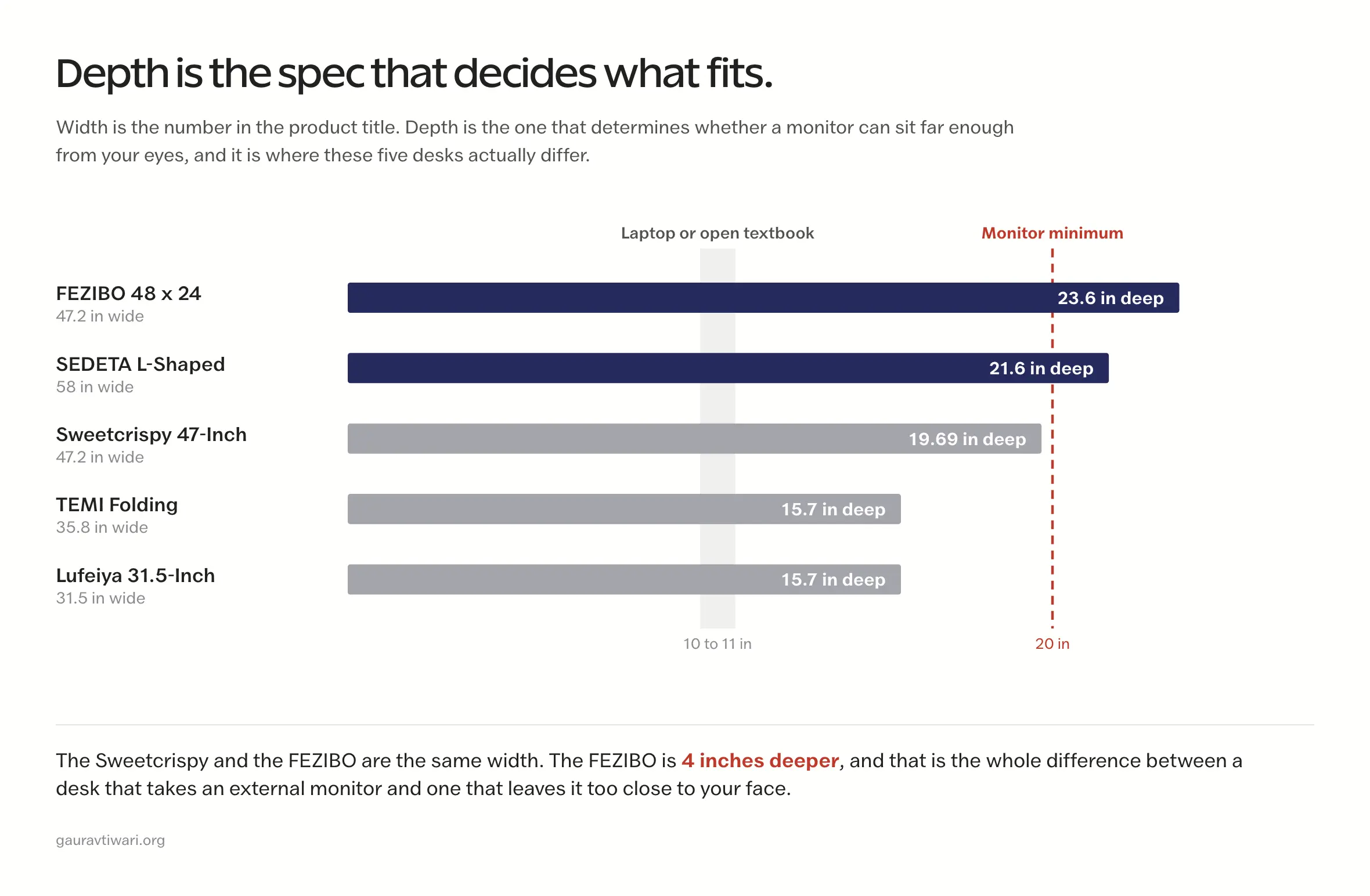
Depth is the spec nobody checks and everybody regrets. Six inches too shallow is a desk you replace.
Measure your room before you open a single product page
Almost every desk that gets returned was bought on width alone. Someone read 47 inches in a product title, pictured it against the wall, and never thought about how far the surface reaches toward them or where the chair goes. Ten minutes with a tape measure prevents all of it.
Take these six numbers before you shop:
- Wall width where the desk will sit, minus any radiator, trim, or door swing
- Maximum depth you can give up, measured front to back from that wall
- Chair pullback space behind the desk edge, roughly 30 inches for a standard chair
- Door and hallway width, which decides whether an assembled or folding desk can physically reach the room
- Depth of your monitor stand, if you use one, since it pushes the screen forward
- Height from the floor to the underside of your elbow, seated in the chair you already own
That last one is the number that matters most and the one nobody takes. Sit down, relax your shoulders, and measure from the floor to the bottom of your elbow. A desk surface should land within about an inch of that height. If the desk is taller, you need a chair that raises or a footrest to bring your body up to it.
Write the six numbers down. Every pick below gets judged against them.
The 5 best study desks for students in 2026
Each pick is here for one job. Where a desk is wrong for you, I say who should skip it, because that’s usually the more useful half of a recommendation.
Best study desk for most students: Sweetcrispy 47-Inch Computer Desk

If you want one desk that takes a laptop, an open textbook, and a mug without wobbling, this is where I’d start.
- Desktop: 47.24 x 19.69 inches
- Height: 29.57 inches, fixed
- Weight capacity: 200 pounds
- Desk weight: 26.9 pounds
- Storage: one removable fabric drawer, mountable on either side, plus side hooks
- Frame: steel tubing with an X-brace, MDF surface
- Assembly: parts and tools included in the box
The X-brace is why this beats the four-leg desks selling at the same price. A plain four-leg frame has nothing resisting side-to-side movement, so it develops a sway you feel through your wrists within a few months of daily use. A triangulated brace does resist it. That one structural difference separates a desk that still feels solid in year three from one that doesn’t.
The removable drawer matters more than it sounds. Mount it on your non-dominant side, or take it off entirely when you need the full 47 inches to spread out. Most desks at this price make that decision for you at the factory.
Who should skip it: anyone running an external monitor. At 19.69 inches deep this desk falls just under the 20 inches OSHA suggests as a minimum screen viewing distance, and that’s before the monitor’s own stand claims 6 to 8 inches of it. A screen ends up too close to your face here. If a monitor is part of your setup, the FEZIBO further down is 4 inches deeper and solves exactly this.
For a laptop-and-books setup in a normally sized room, though, this is my default answer.
Best study desk for storage: SEDETA L-Shaped Desk with Bookshelf

My pick when the room came without a bookshelf and buying one separately isn’t in the budget.
- Desktop: 58 x 21.6 inches, L-shaped
- Overall height: 61 inches including the shelf tower
- Storage: 7 open shelves plus 1 glass-front cabinet
- Assembled weight: 81.4 pounds
- Frame: powder-coated steel with P2 particle board
- Weight capacity: not published by SEDETA
- Assembly: numbered parts, multi-stage
Seven shelves and a cabinet is a bookshelf bolted to a desk, which is a genuinely different proposition from the desks marketed on storage that turn out to have one floating shelf and a tower stand. The reversible design lets you flip the L to either side depending on which wall your outlet is on, and in a corner it claims space that would otherwise hold nothing at all.
Two honest problems. It weighs 81.4 pounds assembled, which makes it the one desk here I’d tell you not to buy if you move every year. And it ships with an RGB light strip and app control, a gaming feature you may not want in a room you also sleep in. You can leave it unplugged, but you’re paying for it either way.
Check your housing agreement before ordering, too. A 61-inch tower is tall enough that some dorms restrict furniture at that height near sprinkler heads.
Who should skip it: anyone in a room under about 10 feet wide, and anyone whose address changes annually. Both of those readers want the Lufeiya or the TEMI below.
Best study desk for a tiny room: Lufeiya 31.5-Inch Desk with Drawers
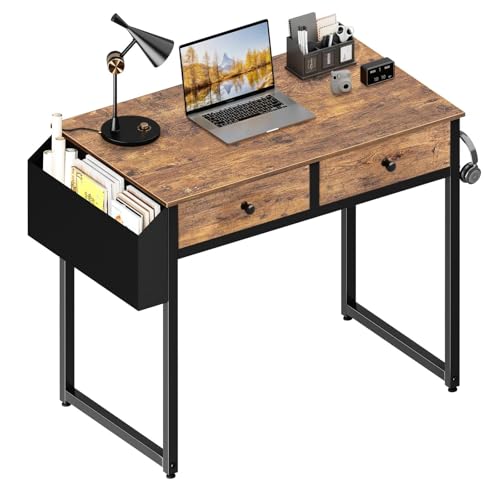
When the wall you have is barely wider than a doorway, this is the desk that fits it.
- Desktop: 31.5 x 15.7 inches
- Height: 31 inches, fixed
- Storage: 2 fabric drawers with wooden fronts
- Desk weight: 16.3 pounds
- Frame: steel brackets with adjustable leg pads, P2 particle board
- Weight capacity: not published by Lufeiya
- Assembly: 20 to 30 minutes, tools included
At 16.3 pounds one person carries this up a stairwell without help, and the adjustable leg pads let you level it on the uneven floors that old dorm buildings are full of. Getting two real drawers into a 31-inch footprint is more than most desks this size manage.
Now the part the product page doesn’t lead with. This desk stands 31 inches tall. Standard desk height is 28 to 30 inches, so it sits an inch or more above the norm. If you’re shorter than about 5 foot 6, or your chair doesn’t raise, your elbows will sit below the surface and your shoulders will climb to meet it. That is precisely the posture problem a desk is supposed to prevent. Take your seated elbow measurement before you order this one. If it lands under 29 inches, buy a chair that raises or choose a different desk.
Who should skip it: monitor users, again. At 15.7 inches deep this is a laptop-only surface. An open textbook runs about 11 inches front to back, which leaves you under 5 inches for everything else.
Small, light, and honest about what it is.
Best standing desk for students: FEZIBO 48 x 24 Electric Standing Desk

The one I’d buy if my study sessions ran 3 hours and I wanted to spend part of that on my feet.
- Desktop: 47.2 x 23.6 inches, sold under the name “48 x 24”
- Height range: 28.3 to 46.5 inches, electric
- Memory presets: 3
- Weight capacity: 176 pounds
- Motor: under 45 dB, rated to 50,000 lift cycles
- Surface: FSC-certified wood
- Assembly: mostly pre-assembled, about 30 minutes
Note that the desktop measures 47.2 x 23.6 inches, not the 48 x 24 the product name implies. That gap is normal for the category, but it matters if you’re measuring against a tight alcove. The 23.6-inch depth is the most useful number on the page: this is the only desk here that clears the 20-inch minimum screen distance with a monitor stand’s own depth accounted for.
The height range is what earns it the spot rather than the standing feature itself. A bottom of 28.3 inches is genuinely low, low enough for a shorter student to sit properly, which a surprising number of standing desks aren’t. The top of 46.5 inches covers standing for most people up to around 6 feet.
On the health claim I’d be careful, and I’d rather say so than sell you something. Systematic reviews of sit-stand workstations find they may modestly reduce lower-back discomfort, and the researchers themselves note that more work is needed to establish how long you should actually stand. Standing all day is not the goal and is not better than sitting all day. Changing position is the point, and a desk that moves in 10 seconds makes changing position realistic in a way a fixed desk never does.
Who should skip it: anyone who needs storage, because there is none, and anyone whose study blocks run 40 minutes rather than 3 hours. At that length you’d never touch the range you paid for.
Best study desk if you move every year: TEMI 35.8-Inch Folding Desk

My pick for anyone whose housing changes every August.
- Desktop: 35.8 x 15.7 inches
- Height: 28.7 inches, fixed
- Weight capacity: 200 pounds
- Folded thickness: 2.9 inches
- Frame: one-piece steel, arc-welded joints, high-tension springs
- Storage: none
- Assembly: none, ships ready to use
Zero assembly and a 2.9-inch folded profile is the entire argument. It slides behind a door, under a bed, or into a car boot without tools, and 200 pounds of capacity out of a folding frame is unusual. Most folding desks trade rigidity for the hinge. Arc-welded joints are the reason this one doesn’t.
Its 28.7-inch height also sits squarely in the standard band, which is worth pointing out right after the Lufeiya. For most seated adults this height simply works with the chair they already have.
Who should skip it: anyone who needs storage or runs a monitor. At 15.7 inches deep it has the same shallow-surface ceiling as the Lufeiya, without the drawers to show for it. This is a work surface, not a workstation.
If you’ll be carrying your own furniture down a stairwell in nine months, though, that’s the trade I’d make every time.
What actually matters in a study desk
How deep does a study desk need to be?
Twenty inches at minimum, and more than that if you use a monitor. OSHA’s computer workstation guidance recommends placing a monitor at least 20 inches from your eyes, with enough surface left over for the screen, keyboard, mouse, and whatever you’re reading. A monitor stand consumes 6 to 8 inches of depth by itself, which is why a 19-inch desk pushes a screen into your face no matter how cleverly you arrange it.
Laptop-only, you can go shallower without paying for it. A laptop’s screen sits at the back edge of its own base, so 16 inches of depth works fine. Add a monitor and 16 inches stops working the same afternoon.
Do you need drawers, or just a surface?
Less than you’d think, and the tradeoff deserves saying out loud: drawers cost you knee clearance. A fixed drawer mounted under the desktop takes space your legs were using, and on a shallow desk that’s the difference between comfortable and cramped by hour two.
My rule is simple. If the room already has a dresser or a closet shelf, skip drawers and spend the money on depth instead. If the desk has to be your only storage, open shelving like the SEDETA’s beats under-desk drawers, because vertical storage doesn’t cost you legroom.
Fixed height or adjustable?
Fixed is fine, provided the fixed height matches you. That’s the whole test, and it’s why the seated elbow measurement comes before everything else. A 29-inch desk isn’t universally correct. It’s correct for people whose elbows land near 29 inches.
Adjustable earns its extra cost in two situations: your sessions run long enough that changing position genuinely matters, or you’re at one end of the height range and no fixed desk fits you properly.
How much weight does a study desk really need to hold?
More than the sum of your gear, but probably less than the marketing implies. A laptop is 3 to 5 pounds and a monitor is 8 to 15, so an honest total for most students lands under 25 pounds. Capacity ratings describe evenly distributed static load, though, and real desks get leaned on, loaded unevenly at one corner, and sat on during a move.
Anything rated 150 pounds or higher carries enough margin for student use. Below about 80, I’d want to know why.
The mistakes that cost students the most money
These are the patterns worth avoiding, in rough order of how expensive they turn out to be:
- Buying on width and ignoring depth. Width is the number in the product title. Depth is the number that decides whether the desk works.
- Ordering before measuring seated elbow height, then blaming the chair for the shoulder pain that follows.
- Paying for drawers that cost more knee clearance than they return in storage.
- Buying heavy furniture into a housing situation that changes every single year.
- Treating a standing desk as a health purchase rather than a position-changing one.
- Reading a “200 lb capacity” figure as a stability rating. It isn’t. Capacity and wobble are separate problems, and frame geometry decides the second one.
How to set up the desk so it doesn’t hurt
The desk is one component of a system, and the rest of the system costs nothing but 15 minutes of adjustment. Start with the measurable targets:
- Elbows at roughly 90 to 120 degrees with your hands on the keyboard
- Wrists and forearms close to straight, not bent upward over the desk edge
- Feet flat on the floor, or on a footrest when the desk can’t come down to you
- Shoulders relaxed rather than lifted toward your ears
- Top of the monitor at or slightly below eye level
- Monitor at least 20 inches from your eyes, further for a large screen
Then there’s the part that matters more than any of those numbers, and it isn’t a measurement at all. Change position regularly instead of holding one posture, whether that posture is sitting or standing. Get up and walk periodically. Stretch. OSHA’s guidance is built around changing working positions and making small adjustments through the day, not around finding a single correct pose and freezing in it. A perfect setup you never move in is still a problem.
Then pair the desk with a chair that actually adjusts. I have said this in the guide to study chairs and it holds here: a good chair fixes more posture problems than an expensive desk does. If the budget only stretches to one upgrade, upgrade the chair.
The three accessories that change how the desk works
Keeping this deliberately short, because a desk guide that turns into a general shopping list stops being useful. Three items change how the desk itself performs:
- An adjustable desk lamp, which matters more on a shallow desk where a screen sits close to your eyes
- A laptop stand or monitor riser, the cheapest available fix for a screen that sits too low
- A cable tray or a handful of clips, so the cables aren’t hanging into your knee space
Everything past that is a separate purchase with its own tradeoffs, and it belongs in its own guide rather than this one. I have covered reading light in the book lights guide, software and hardware in study tools for college students, and the full room in the home office setup guide.
The pick I’d actually make
Here’s the deflating part. All five of these desks are fine. At this level you aren’t choosing between a good desk and a bad one, you’re choosing between a desk that fits your room and one that doesn’t, and that’s a measurement problem rather than a quality problem.
For most students the Sweetcrispy 47-inch is where I’d start. It gives you the widest genuinely usable surface here at a price that doesn’t hurt, and the X-brace is real engineering rather than a spec-sheet line.
Past that, the routing is simple. Running an external monitor? Depth overrides everything else and the FEZIBO is your answer. Genuinely tiny room? The Lufeiya, with your elbow height checked first. Moving every year? The TEMI. Need the desk to be your bookshelf as well? The SEDETA.
Don’t over-buy, either. A student who spends modestly on the right size and puts the rest toward a chair that adjusts will be more comfortable than one who spends triple on a desk that’s 4 inches too shallow. If you’re building the whole room rather than just the desk, the full setup walkthrough covers the order I’d buy things in.
Measure first. The rest follows from six numbers and a tape measure.
Best of luck.
Frequently asked questions
What is the best study desk for students?
For most students I’d pick the Sweetcrispy 47-inch desk. It gives you a 47.24 by 19.69 inch surface, a 200 pound capacity, and an X-braced steel frame that resists the side-to-side sway cheap four-leg desks develop. The exception is anyone running an external monitor, who should take the deeper FEZIBO instead, because 19.69 inches doesn’t leave enough room to sit a screen 20 inches from your eyes.
How deep should a study desk be for a monitor?
At least 20 inches, and realistically closer to 24. OSHA recommends positioning a monitor a minimum of 20 inches from your eyes, and a monitor stand takes up 6 to 8 inches of desk depth before the screen even starts. A 24-inch deep desk like the FEZIBO handles this comfortably. A 16-inch desk cannot, regardless of how you arrange it.
Is a 31-inch desk wide enough to study on?
For a laptop, yes. For a laptop plus an open textbook, it’s tight. A 31.5 by 15.7 inch desk gives you roughly 495 square inches, and an open textbook alone occupies about 19 by 11 inches of that. It works if you’re mostly typing and you keep one reference open at a time. It doesn’t work for spreading out several sources at once.
What desk height should I use?
Match the desk to your seated elbow height rather than to a standard number. Sit in the chair you own, relax your shoulders, and measure from the floor to the underside of your elbow. Your desk surface should land within about an inch of that. Standard desks run 28 to 30 inches, which suits many people but not everyone, and a desk that sits above your elbow height will push your shoulders up every session.
Is a standing desk worth buying for a dorm room?
It depends on how long your sessions are. Systematic reviews of sit-stand workstations suggest they may modestly reduce lower-back discomfort, though researchers note more evidence is needed on how long people should stand. The real benefit is the ease of changing position, so it pays off if you study in multi-hour blocks. For 40-minute sessions you’d rarely use the adjustment, and a fixed desk at the correct height serves you better.
Do desk drawers reduce legroom?
Yes, and it’s the tradeoff people notice last. A drawer mounted under the desktop takes vertical space your knees were using, which is most noticeable on a shallow desk. If your room already has a dresser or closet shelf, skipping drawers and buying extra depth is usually the better trade. Where the desk must be your only storage, vertical shelving costs you nothing in legroom.
Is a folding desk stable enough for daily use?
It depends entirely on how the joints are built. The weak point on a folding desk is the hinge, and cheap ones flex there. Look for welded joints and a one-piece frame rather than bolted brackets. The TEMI folding desk is rated to 200 pounds with arc-welded joints, which is the same capacity as fixed desks in this guide.
Should I buy a desk if my dorm already provides one?
Often not. Check the supplied desk’s depth and height first, because those are the two specs that decide whether it works, and many institutional desks are perfectly adequate. Buy your own when the provided desk is too shallow for your monitor, sits at a height your chair can’t accommodate, or when you need storage the room doesn’t include. A riser or a better chair fixes more problems than a replacement desk in a lot of rooms.
Tell Google you want more of this.
Add Gaurav Tiwari as a preferred sourceOne tap, and this site shows up more often in your own Top Stories, AI Overviews and AI Mode. Remove it any time.
Disclaimer: This site is reader-supported. If you buy through some links, I may earn a small commission at no extra cost to you. I only recommend tools I trust and would use myself. Your support helps keep gauravtiwari.org free and focused on real-world advice. Thanks. - Gaurav Tiwari
