
Native to the Block Editor
Insert Page Block from the Page Blocks category. It is gt-page-block/page-block. Gutenberg stays the source of truth.
Build custom WordPress sections with HTML, CSS, and JavaScript. Edit in a live workbench, reuse sections from your library, and keep working in the Block Editor.
$0 forever. GPL. This site runs on it.
Live demo: no signup, your own 2-hour workspace.
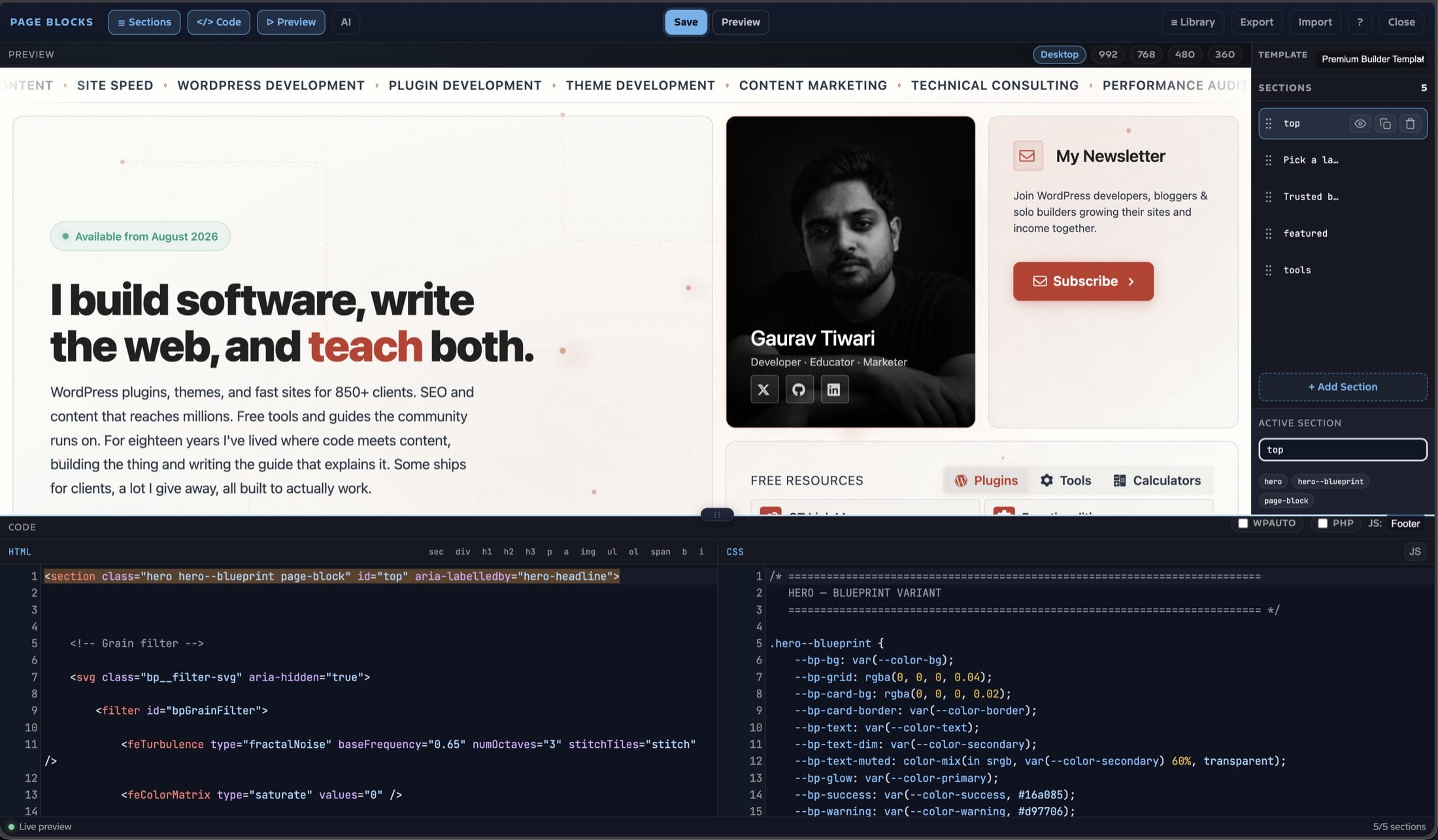
Those three are the product. Agents and MCP clients sit on the same REST surface. Everything else is how you place and reuse the sections.
Insert Page Block from the Page Blocks category. It is gt-page-block/page-block. Gutenberg stays the source of truth.
HTML, CSS and JS tabs, a live theme-styled preview, viewport presets, and a dark-scheme toggle that sets data-theme="dark".
OpenAI, Anthropic, or Gemini on your keys. Agents and MCP clients use pbb/v1 with an application password. Off until you connect one.
Edit the HTML, CSS, or JavaScript below to try the preview loop. For the full builder, reusable library, and a real WordPress page, open the live demo.
Insert Page Block into any allowed post type. Preview is the default when the block has content. Code mode is one toolbar toggle away.
data-theme="dark"class=" then Ctrl or Cmd + Space<?phpThe toolbar opens a searchable modal of published library blocks. Insert copy pulls the code and settings into the current Page Block.
JavaScript in the footer or inline. Optional wpautop. Execute PHP is opt-in per block and gated at render.
Page Block content is included in Rank Math content analysis, so the SEO score sees the section you actually ship.
Launch it from the admin bar on any enabled post type. Sections map 1:1 to gt-page-block/page-block in post_content. Other blocks stay in place.
Drag to reorder. Duplicate, delete, hide, and rename with a double-click. Add a section from the list.
Type section.hero>h1+p and press Tab. Tags, classes, ids, attributes, text, children, siblings, and multiply all expand.
Click a heading, paragraph, link, or list item in the preview and change the text without a full reload.
Text edits patch the preview. Only structural changes trigger a full iframe reload, so the canvas does not flicker on every keystroke.
HTML snippet buttons wrap the selection. Cmd+S saves, Cmd+K opens AI, Cmd+N adds a section. A shortcuts overlay lists the rest.
Download sections as JSON. Upload to append or replace. Useful for moving a page between sites without a database dump.
Enabled post types live under Page Blocks → Settings. The builder URL is /?build=page-blocks&post_id=ID&pb_nonce=NONCE on the frontend.
Keys live in Page Blocks → Settings. Chat requests go from your WordPress site to your provider. MCP and other agents use the same REST API you would call by hand.
<style id="ai-generated"> and <script id="ai-generated"> into the CSS and JS editorspbb/v1edit_posts. Writes need manage_options and an application passwordReusable blocks live in {prefix}gt_page_blocks. The admin screen is a REST-driven card grid. The classic list table is still at ?view=list for bulk work.
Each card shows a lazy-loaded, scaled iframe of the block HTML and CSS with your theme stylesheet.
Debounced search. Tabs for All, Published, Drafts, and Trash, with counts.
Edit, Duplicate, Copy shortcode, Trash. Restore or delete forever from Trash. Chips mark HTML, CSS, JS, PHP, and assigned position.
Assign a library block to Header, Hero, Before content, After content, Sidebar, Footer, or 404. A blank hybrid theme can be little more than region calls.
<?php gt_pb_region( 'header' ); ?>

<main>
  <?php /* the loop */ ?>
</main>

<?php
gt_pb_region( 'footer', array(
  'wrap' => false
) );
?>
gt_pb_region( $name, $args ) renders published blocks for region:$name, ordered by prioritygt-pb-region gt-pb-region--{name}. Pass 'wrap' => false to skip itgt_pb_has_region( $name ) is for conditional markupNo theme file required. Blocks can attach to core actions, ordered by priority.
wp_head, wp_body_open, wp_footerloop_start, loop_endget_header, get_footer, get_sidebargt_pb_positions filter[page_block id="42"][page_block slug="cta-footer"]wp gt-pb migrate-blockswp gt-pb migrate-blocks --dry-runmarketers-delight/page-block delimiters to gt-page-block/page-blockpbb/v1Read needs edit_posts. Writes need manage_options. Authenticate with an application password or a REST nonce.
| Method | Route | What it does |
|---|---|---|
| GET | /wp-json/pbb/v1/blocks | List. Search, status, page, per_page up to 100, orderby, order. Totals in X-WP-Total and status headers. |
| POST | /wp-json/pbb/v1/blocks | Create. Title is required. |
| GET | /wp-json/pbb/v1/blocks/<id> | One block. |
| PUT / PATCH | /wp-json/pbb/v1/blocks/<id> | Update fields, including restoring trash via status. |
| DELETE | /wp-json/pbb/v1/blocks/<id> | Trash. ?force=true deletes permanently. |
| POST | /wp-json/pbb/v1/blocks/<id>/duplicate | Copy with a new slug and “(Copy)” title. |
| GET | /wp-json/pbb/v1/blocks/<id>/render | Server-rendered html, css, and js. |
Item fields include id, title, slug, status, content, css, js, js_location, output, php_exec, format, position, priority, created_at, and updated_at. The plugin does not ship a bundled MCP server. If you want an agent in the loop, point it at this API.
There is no builder framework on the public page. Section CSS is collected into one head style, or written to cacheable files in uploads.
Per block, CSS and JS can be inline or written to wp-content/uploads/gt-page-blocks/. JS can sit in the footer or next to the section.
Execute PHP is opt-in on the block. Render also checks gt_pb_can_execute_php. When it fails, tags are stripped, never printed.
manage_options. AJAX endpoints are nonce-protected.The plugin started as the Page Blocks dropin (2018–2026). 2.6.0 renamed the block to gt-page-block/page-block. Existing content keeps rendering.
marketers-delight/page-block name stays registered server-sidewp gt-pb migrate-blocks [--dry-run]save_post side effectsIf you need a drag canvas for clients who never open code, this is the wrong tool. If the page has to outlive the plugin, it is the right one.
Turn a lean theme into editable, versioned regions without locking the site to a builder format.
Ship client sites whose sections remain ordinary post_content after you leave.
Keep Gutenberg as the host. Write the section, or draft it with your own AI key and then own the result.
One zip. The Gutenberg block, the visual builder, the library, theme regions, REST, WP-CLI, and optional AI.
$0 once, forever
gt-page-block/page-block in Gutenbergpbb/v1 for agents you already runDivi Yearly is $89 a year for unlimited sites. Divi Lifetime is $249 once. Elementor Pro is sold as a yearly subscription on Elementor’s public pricing page. This plugin is $0 and GPL. Checked on elegantthemes.com/join and elementor.com/pricing on August 17, 2026. Those products are visual builders. This one is a code workbench native to the Block Editor.
Free checkout. Pick the zip after the order screen. No card required for a $0 product.
gt-page-block/page-block in the Page Blocks category. The visual builder writes the same block into post_content.pbb/v1 REST API. The plugin does not bundle an MCP server binary. Point Claude, Cursor, or any MCP client at that API with an application password.gt_pb_can_execute_php. When execution is off, tags are stripped, never printed.This is a code workbench inside Gutenberg, not a replacement for Elementor or Divi. You still write or review the HTML. If you would not trust someone with a theme file, do not give them block-editing access with PHP enabled.
I run this site on it. That proves the workflow, not that every AI draft is ready to publish. Staging still comes first. There is no bundled MCP server in this version. Use REST if you want an agent in the loop.

I got tired of page builders that own the markup the moment you need to leave. So I built a plugin that stores sections as ordinary HTML in Gutenberg and uses it on this site.
A native Block Editor section, a CodePen-like workbench, optional AI on your keys, and MCP-ready REST so an agent can list, write, and render the same blocks.
v3.0.0 · WordPress 6.0+ · PHP 8.1+ · any theme · source on GitHub