
Why Not Every PC Gamer Adjusts Well to Mobile Gaming
 by
by
PC gamers don’t struggle with mobile gaming because they suddenly become worse players. They struggle because nearly every familiar input changes at once. A mouse becomes a thumb swipe, a full keyboard becomes a few virtual buttons, and a large monitor becomes a display partly covered by your hands.
That shift affects precision, visibility, communication, pacing, and even how long a device can sustain peak performance. Mobile gaming can still be enjoyable, but it works better when you treat it as a different platform instead of a smaller version of a PC.
Years of Muscle Memory
One of the biggest obstacles for PC gamers is muscle memory.
Many players have spent years mastering keyboard and mouse controls. Competitive gamers become used to precise mouse aiming, customizable keyboard shortcuts, and fast reactions. After thousands of hours, those movements happen without much conscious thought.
Switching to a touchscreen removes those familiar reference points. Instead of pressing physical keys, players rely on virtual buttons with no tactile feedback. That can feel awkward during fast-paced games because you must look at controls you previously found by touch.
Whether someone enjoys strategy games, first-person shooters, or casual entertainment like Bingo PH, adapting to a different control scheme takes patience. Players exploring titles through GameZone may notice the same shift: mobile interactions depend on tapping and swiping instead of keyboard inputs.
Precision Is Harder on Touchscreens
PC gamers often expect a high degree of control.
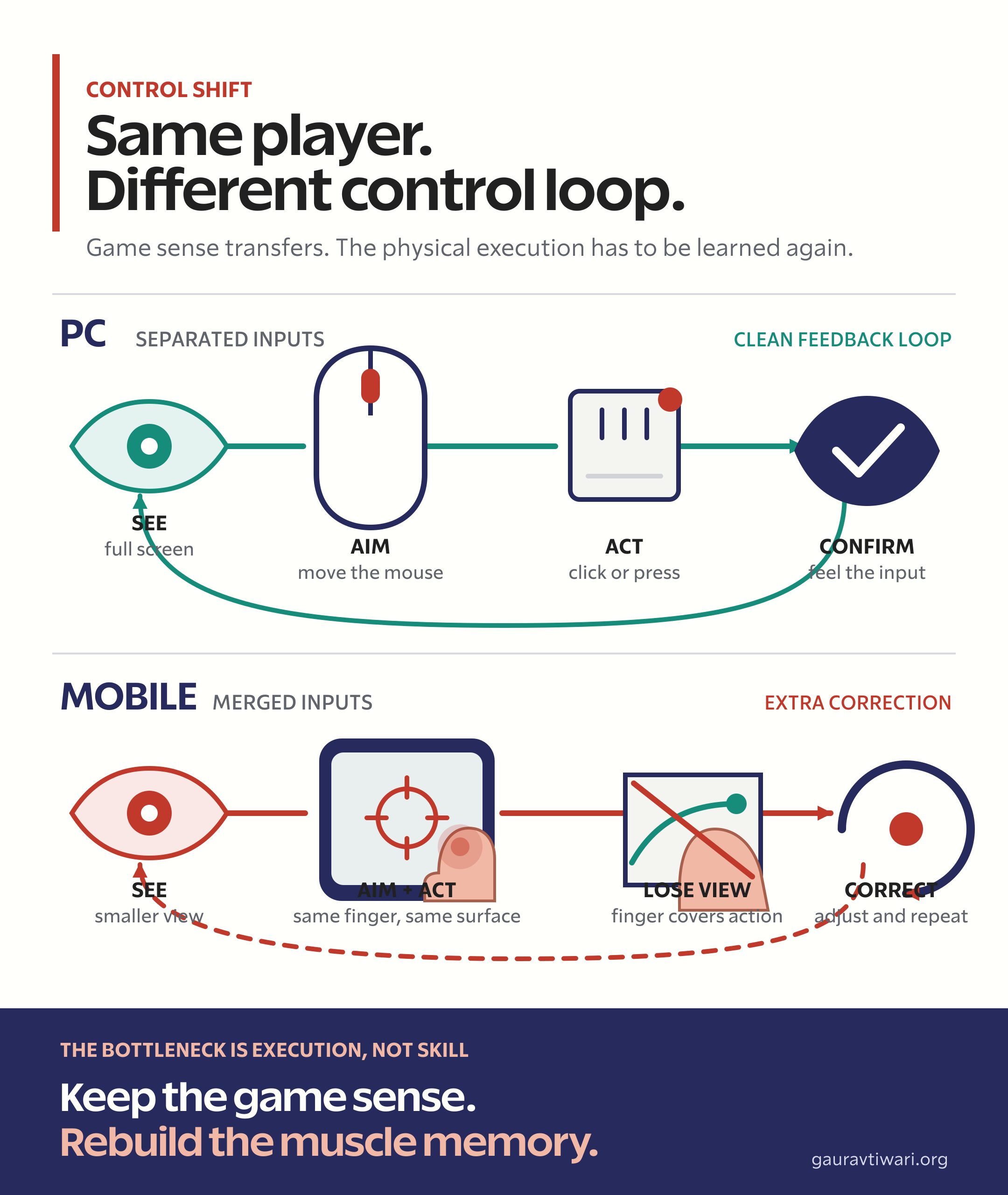
A mouse separates aiming from the action that confirms it. You can move the pointer with your hand, click with a finger, and keep the screen completely visible. Touch controls ask the same fingers to move, aim, tap, and sometimes cover the target.
Touchscreens introduce a few practical limits:
- Fingers cover parts of the screen
- Virtual buttons can overlap gameplay
- Fine aiming can become harder
- Accidental touches happen more often
Modern mobile games use aim assist and customizable layouts to reduce this friction. But those tools don’t make a touchscreen feel identical to a mouse, and experienced PC players may need time to rebuild their accuracy.
Smaller Displays Change the Experience
Screen size matters more than it first appears.
Desktop monitors leave room for detailed interfaces, minimaps, inventories, and multiple information panels. Mobile devices compress those elements onto a much smaller display while also reserving space for touch controls.
As a result, players may find themselves:
- Zooming in more often
- Missing notifications
- Misreading interface elements
- Tapping a nearby button by mistake
The adjustment is more noticeable for someone used to an ultrawide monitor or a multi-monitor setup. The game may contain the same information, but it no longer has the same room to present it.
Hardware Expectations Differ
PC gamers often invest heavily in their systems because the advantages of a PC for gaming extend beyond raw frame rates.
Powerful processors, dedicated graphics cards, high-refresh-rate monitors, mechanical keyboards, and gaming mice all shape what a player expects. Moving to a smartphone involves tradeoffs, even when the phone itself is fast.
Mobile processors are capable, but phones must balance performance with battery life, storage, and heat. During sustained workloads, thermal limits can force a game to reduce frame rate or visual fidelity. That makes long sessions feel less consistent than they might on a well-cooled desktop.
Different Game Design Philosophies
PC games and mobile games are often built around different player behavior.
Many PC titles encourage long sessions that last several hours. Role-playing games, simulations, and strategy titles often reward extended play and complex controls.
Mobile games usually prioritize shorter sessions that fit into daily routines. Quick matches, simpler interactions, and fast access let players start during a commute or a short break.
Neither approach is automatically better. But the pacing can surprise a player who expects a phone game to reproduce the rhythm of a desktop title.
User Interface Adjustments
Developers design interfaces for the limits and strengths of each platform.
PC interfaces can support:
- Multiple menus
- Detailed settings
- Keyboard shortcuts
- Extensive customization
Mobile interfaces simplify or reorganize those elements for smaller screens and touch controls. For experienced PC gamers, that can initially feel limiting even when the change makes the game easier to use on a phone.
As entertainment shifts toward mobile devices, platforms like Bingo PH and GameZone reflect the same demand for interfaces that work comfortably on smartphones.
Communication Works Differently
Online multiplayer games depend on communication.
Typing on a physical keyboard is fast, and many PC gamers run a separate voice chat app alongside the game. On a phone, opening a virtual keyboard can cover the action or interrupt play.
Not every mobile title offers the same voice communication tools, either. Teamwork can feel slower until players learn shortcuts such as quick-chat messages, pings, or platform-specific voice systems.
Performance Expectations
Frame rate changes how responsive a game feels.
Many PC enthusiasts prioritize:
- High refresh rates
- Stable frame rates
- Low input delay
- High graphics settings
Flagship smartphones can support high refresh rates, but gaming performance on Android still varies by device, game, temperature, and battery settings. Thermal throttling and power management may be barely noticeable in a short match, then become obvious during a longer session.
Players used to consistent desktop performance tend to notice these changes immediately because their timing depends on a stable response.
Competitive Habits Need Time to Adapt
Competitive gaming depends on repetition and routine.
PC players build habits around:
- Mouse sensitivity
- Keyboard position
- Shortcut combinations
- Hand placement
Touchscreen controls require a new set of habits. Even experienced gamers may perform below their normal level until they learn a new layout and stop thinking about every tap.
This learning curve explains why some players avoid competitive mobile games at first despite years of experience elsewhere. Their game sense may transfer, but their physical execution needs practice.
Mobile Gaming Prioritizes Convenience
Convenience is mobile gaming’s clearest advantage.
Players can launch a game almost anywhere without a dedicated setup. A phone makes short sessions possible while waiting for transport, taking a lunch break, or sitting away from a desk.
That convenience also explains the popularity of platforms such as Bingo PH, where users can play in short sessions during the day. GameZone follows the same mobile-first pattern without requiring the preparation of a PC gaming session.
For gamers used to scheduled desktop sessions, spontaneous play can feel fragmented at first. The benefit appears once they stop expecting every session to be long or immersive.
Adaptation Is Different for Everyone
Not every PC gamer struggles with mobile gaming.
Many players enjoy both platforms once they stop forcing the same expectations onto each one. They may value:
- The flexibility of mobile gaming
- Access while traveling
- Short gaming sessions
- Cross-platform experiences
- Touch-optimized gameplay
Others continue to prefer desktop setups because those systems better match their habits. Neither choice is wrong. Comfort usually reflects the controls, pacing, and performance a player has learned over time.
Finding the Right Balance
PC and mobile gaming work best as complementary experiences, not direct replacements.
A player might choose an immersive role-playing game on a desktop during the weekend, then use a phone for shorter sessions during the week. It is also common to alternate between traditional PC games, casual experiences like Bingo PH, and community-driven platforms such as GameZone.
The useful mindset is simple: don’t expect your PC habits to transfer overnight. Adjust the touch layout, start with slower or more forgiving games, and give your hands time to learn. Mobile gaming becomes easier once you judge it by what it does well instead of by how closely it copies a PC.
Frequently Asked Questions
Why do PC gamers struggle with mobile gaming controls?
Keyboard and mouse controls provide tactile feedback, fixed key positions, and precise pointer movement. Touchscreens replace those cues with virtual buttons that can move, overlap the game, or sit beneath a player’s fingers.
Can a PC gamer become good at mobile gaming?
Yes. Game knowledge, timing, and strategy often transfer, but the physical controls require practice. Starting with a customized touch layout and a slower game can make the adjustment easier.
Is mobile gaming less precise than PC gaming?
Touch controls are usually less precise for aiming and rapid input because the same finger may move, aim, and tap. Aim assist and customizable controls can narrow the gap, but they don’t reproduce a mouse exactly.
Why does mobile game performance change during long sessions?
Phones must manage heat and battery use. Under sustained load, the operating system or game may reduce frame rate or graphics quality to keep temperatures at a safe level.
Should PC and mobile gaming be compared directly?
Only with context. PC gaming favors tactile controls, larger displays, and sustained performance. Mobile gaming favors portability, fast access, and shorter sessions. Each platform solves a different problem.
Tell Google you want more of this.
Add Gaurav Tiwari as a preferred sourceOne tap, and this site shows up more often in your own Top Stories, AI Overviews and AI Mode. Remove it any time.