
 by
by
The best AI product photography tools can turn one plain product shot into a clean listing image or a lifestyle scene in a few minutes. The trouble starts when the output changes the product itself. A bottle with a changed dosage or a bundle with an accessory you don’t sell has to be rejected, however good the background looks, and every retry spends credits you’ve already paid for.
Photoroom is where I’d start for everyday store editing. Its cleanup and AI background tools sit in the same app as its batch editor, so a seller can take a phone photo to a finished listing image without moving it through several apps.
Claid is the better starting point when your images need to run through an API into a catalog. The other three each do a narrower job:
- Rewarx turns one product image into model photos and mockups as well as product scenes.
- Pebblely creates quick scene variations from a clean product cutout.
- Flair builds composed campaign scenes on a canvas.
I compared these five on what their current plans and usage terms include. I haven’t run the same products through every tool, so the order below is a shortlist for your own trial, and your hardest products should still decide the purchase.
Quick Comparisons
Entry prices aren’t directly comparable, because these vendors bill differently and some quote a yearly plan as a monthly figure. Each price below names its billing basis, and the last column names the limit most likely to change your choice.
| Tool | Best for | Free access | Entry price | Watch for |
|---|---|---|---|---|
| Photoroom | Everyday store editing | Free version and Pro trial | Pro $7.50/month billed yearly (US); ₹299/month (India) | Video needs Max; 4K needs Ultra |
| Rewarx | Several content formats | 10 credits | Starter $29.90/month for 100 credits | 4K photos use about 3 times the credits |
| Pebblely | Quick scene variations | No free plan shown | Lite $9/month for 30 images | Bulk starts on Basic at $19 |
| Flair | Composed campaign scenes | 5 images and 1 video | Pro $10/month, or $8 billed yearly | Commercial license starts on Pro+ |
| Claid | API and catalog automation | 50 web and 50 API credits | Essentials $15/month for 500 credits | Batch and 4K need Pro at $49 |
A cheap entry plan can still turn out expensive. What matters is the price of each image you actually publish after retries and fixes, and I’ve worked through that arithmetic further down.
Best AI Product Photography Tools
Photoroom comes first because it covers the most everyday store work in one app. The rest are ordered by how specialized their job is, ending with Claid for API work.
Photoroom
Photoroom is the first editor I’d evaluate for a small store that needs cleanup and product scenes in one workflow. Its core tools include Product Fixer, which repairs areas the AI got wrong by using your original photo as the reference, and for listing images that matters more than any scene template.
Feature access depends on the plan you choose, so the tier matters more than the headline price:
- Pro covers the core tools, AI Backgrounds and AI Fashion Models, but not the Video Generator.
- Max adds the Video Generator.
- 4K image and video output starts on Ultra.
- In the US, Pro costs $7.50 a month billed yearly. In India, the web app lists Pro at ₹299 a month on monthly billing.
- API usage is billed on separate API pricing, so an app plan isn’t an automation budget.
Photoroom’s July 2026 product update also documents Batch AI for up to 250 images and more than 300 product-video templates. Those numbers describe capacity rather than accuracy, so you should still check every generated scene for label and shape changes. If a plain white background is all you need, one of the dedicated background remover tools may do the job for less.
Rewarx
Rewarx is worth a trial if you want several kinds of content from one product image. Its Shopify listing covers:
- AI product scenes and lifestyle images
- AI model photos that show your product on a person
- Mockups that wrap a pattern or graphic onto a 3D item
- Ghost-mannequin images for garments
- Vibe Match, which builds scenes from a reference style you upload
Pricing runs on credits:
- The free plan includes 10 credits.
- Starter is $29.90 a month for 100 credits, which Rewarx puts at about 100 Standard photos or 33 4K photos.
- Growth is $54.90 and Scale is $129.90 a month.
Its Shopify app launched on May 11, 2026. That date tells you the app is young, and it says nothing either way about output quality, so I’d spend the free credits on your trickiest packaging and reflective products before standardizing on it.
Pebblely
Pebblely is the simplest option here for turning a clean product cutout into lifestyle or studio scenes. It suits a job where the product stays central and only the setting changes, and you don’t want to learn a full canvas editor to get there.
Its pricing is set per image:
- Lite is $9 a month for 30 images.
- Basic is $19 a month for 200 images.
- Pro is $39 a month for 500 images.
- Bulk generation is available on Basic and Pro, not on Lite.
- The pricing page doesn’t show a free plan.
Pebblely’s 2026 text-extraction update aims to keep labels and packaging copy intact. It reduces label damage without guaranteeing accurate text. A skincare bottle with good lighting and a changed dosage is still a rejected image, so the label and its measurements need a full-size check before publishing.
Pebblely is a poor fit if you need deep campaign composition or want to test batches before paying.
Flair
Flair suits brands and creative teams that need composed campaign scenes rather than a quick background swap. Its canvas lets you arrange the product and its props yourself, with control over lighting and models, instead of relying on a single prompt.
The billing toggle on Flair’s pricing page changes every number, so these are the monthly-billing prices with the yearly rate beside each:
- The free plan gives you 5 images and 1 video, and instant or ad generation uses 4 times the image quota.
- Pro is $10 a month, or $8 a month billed yearly.
- Pro+ is $35 a month, or $26 billed yearly, and it’s the first tier with a company commercial license.
- Scale Tier 1 is $55 a month, or $38 billed yearly, with early access to the product photography API.
- Unlimited API access sits on Enterprise, which is custom-priced.
Do not upload unreleased, confidential or client-owned products until you have checked the plan’s storage, gallery, privacy, commercial-use and output-ownership terms. Flair’s current terms say Free, Pro and Pro+ images may appear in its Gallery, while private and exclusive output is tied to Scale. The same terms conflict on whether free output may be used commercially, so get clarification before production use.
Claid
Claid is the strongest fit here when image work has to run through an API or repeat across a catalog. Automation can pay off for a small store too, if it takes over a job you repeat every week.
Its web plans sell credits that you spend per operation. On monthly billing, Essentials is $15 for 500 credits and Pro is $49 for 2,000 credits, or $9 and $35 a month when billed yearly. Pro adds 4K output and batch processing. Each operation has its own cost:
- Background removal uses 1 credit.
- Outpainting and AI Shadows use 2 credits each.
- Upscaling uses 2-8 credits.
- An AI Photoshoot uses 4 credits at Standard quality and 10 at Studio quality.
- A 5-second AI video uses 60 credits, and Claid’s image-to-video guide notes that the starting image is charged separately.
The free trial gives you 50 web credits and 50 API credits, and the two pools are separate. A developer can buy a dedicated API plan without a paid web plan. An API saves time only after someone builds the workflow and decides what happens to a rejected image, so that setup belongs in the cost too.
Product Accuracy Checks
An AI product image is usable only when it shows the item a customer will receive. Good styling can’t make up for a changed product, so I’d start any trial with the products most likely to fail:
- A box or bottle with small printed text and a logo
- A reflective watch, jewelry item or polished metal surface
- A transparent or translucent container
- Fabric, fur, thin straps, handles or fine edges
- A multi-product bundle with exact included parts
Each output then needs a full-size comparison against the original photo:
- Labels, logos and small print match the original.
- Shape and proportions hold, especially on handles and thin parts.
- Color and texture match a properly lit source photo.
- The item count and included accessories are correct.
- Cutout edges and reflections stay clean at the export size.
A background remover can fix a rough edge. It can’t put back a label or a handle the generator changed, so those images need regenerating from the original photo or rejecting outright.
What Does an Accepted Image Cost?
A plan’s allowance tells you how much you can generate. What you actually pay depends on how many outputs pass those checks and how long the rest take to fix. Take a hypothetical batch:
- You put $30 of subscription cost against the batch.
- You generate 25 candidates and accept 10.
- Review and fixes take 80 minutes across the batch.
- You value that time at $20 an hour, which adds $26.67.
That batch costs $56.67, or $5.67 per accepted image, before any extra credit packs or API charges. Counting generations alone would have put it at $1.20 an image. The numbers are illustrative and don’t come from any tool on this list.
Writing down why each image was rejected is worth the extra minute. A rough edge is a quick fix, while a tool that keeps changing your labels makes even a cheap subscription poor value.
Rights and Privacy
Permission to generate an image, the right to use it in ads and the right to keep it private are separate questions, and a cheap plan can answer each one differently. Before you upload a client’s product, you should check:
- Whether the plan’s commercial-use terms cover your store, your agency’s clients and your ad channels.
- Whether the provider can show the image in a public gallery or let other users reuse it.
- Whether uploads can train future models, and how long source files are kept.
- Which plan keeps unreleased products private.
- Which watermark, resolution, transparency and format limits apply to exports on your plan.
A commercial-use license is separate from copyright, too. The US Copyright Office says AI output needs enough human-determined expression to be protected, and prompting alone doesn’t get there, so a vendor’s ownership clause can’t promise exclusivity by itself.
For client work, keep a copy of the terms and plan details that applied when you generated the asset. If the language contradicts itself, ask the vendor for written clarification before you upload the client’s product.
Marketplace Images
Marketplace rules decide which image can be your main listing photo, and an image tool’s commercial-use permission doesn’t change them.
Etsy’s listing-image policy ordinarily requires original photos of the actual item. For personalized items, the first image has to show a finished customized example, and computer-generated mockups can appear in the additional images to show customization options.
Amazon applies main-image and category rules on top of accurate representation, often including a pure-white main image. Its product-photo guide sets the technical floor for exports:
- 500 to 10,000 pixels on the longest side
- JPEG, TIFF, PNG or non-animated GIF
- Larger than 1,000 pixels preferred, so shoppers can zoom
Keep at least one accurate source photograph for every listing, and use controlled photography for the main image of regulated products or anything transparent or highly reflective. Once an image passes, compress it for the web before uploading. If your store runs on WordPress, my WebP guide shows how to serve lighter files without losing the detail shoppers zoom into.
FAQs on AI Product Photography
Can AI product photography tools replace a photographer?
They can replace part of the workflow for simple catalog images, background variations, social creatives and quick concept tests. They don’t replace controlled photography when color accuracy, texture, transparency, reflections, exact geometry or legal product representation matters. Inspect every output at full resolution before publishing it.
Do you need a real product photo?
For an item you already sell, yes. A clear photo of the actual product gives the tool a reference and gives you something to check the output against. A scene generated from a text description alone shouldn’t be treated as the exact item a customer will receive.
Does one credit equal one product image?
Usually not. Credits vary by operation, output size and quality tier, and retries spend them too. Claid, for example, charges 4 credits for a Standard AI Photoshoot and 60 for a 5-second video. Count accepted images separately from generated ones.
How much do AI product photography tools cost?
Monthly entry plans in this comparison run from $9 for Pebblely Lite to $29.90 for Rewarx Starter, and Photoroom Pro is $7.50 a month in the US when billed yearly. Plans with batches, video, 4K or team features cost more: Claid Pro is $49, Flair Scale starts at $55 and Rewarx Scale is $129.90 a month. Compare cost per accepted image as well as the plan price.
Which plans support batch editing?
Pebblely lists bulk generation on Basic and Pro, and Claid includes batch processing on Pro and Business. Photoroom documents Batch AI for up to 250 images. Check the plan page for the exact tier before you buy for a batch workflow.
Does an app subscription include API usage?
Usually not. Photoroom bills its API on separate pricing, and Claid sells dedicated API plans that don’t need a paid web plan. Flair puts API early access on Scale and unlimited API access on Enterprise. An app’s image allowance shouldn’t be assumed to cover automated calls.
Which Tool Should You Choose?
Photoroom is where I’d start for everyday store editing, and Claid is where I’d start for an API workflow. Rewarx, Pebblely and Flair are worth a trial when their narrower job is exactly yours.
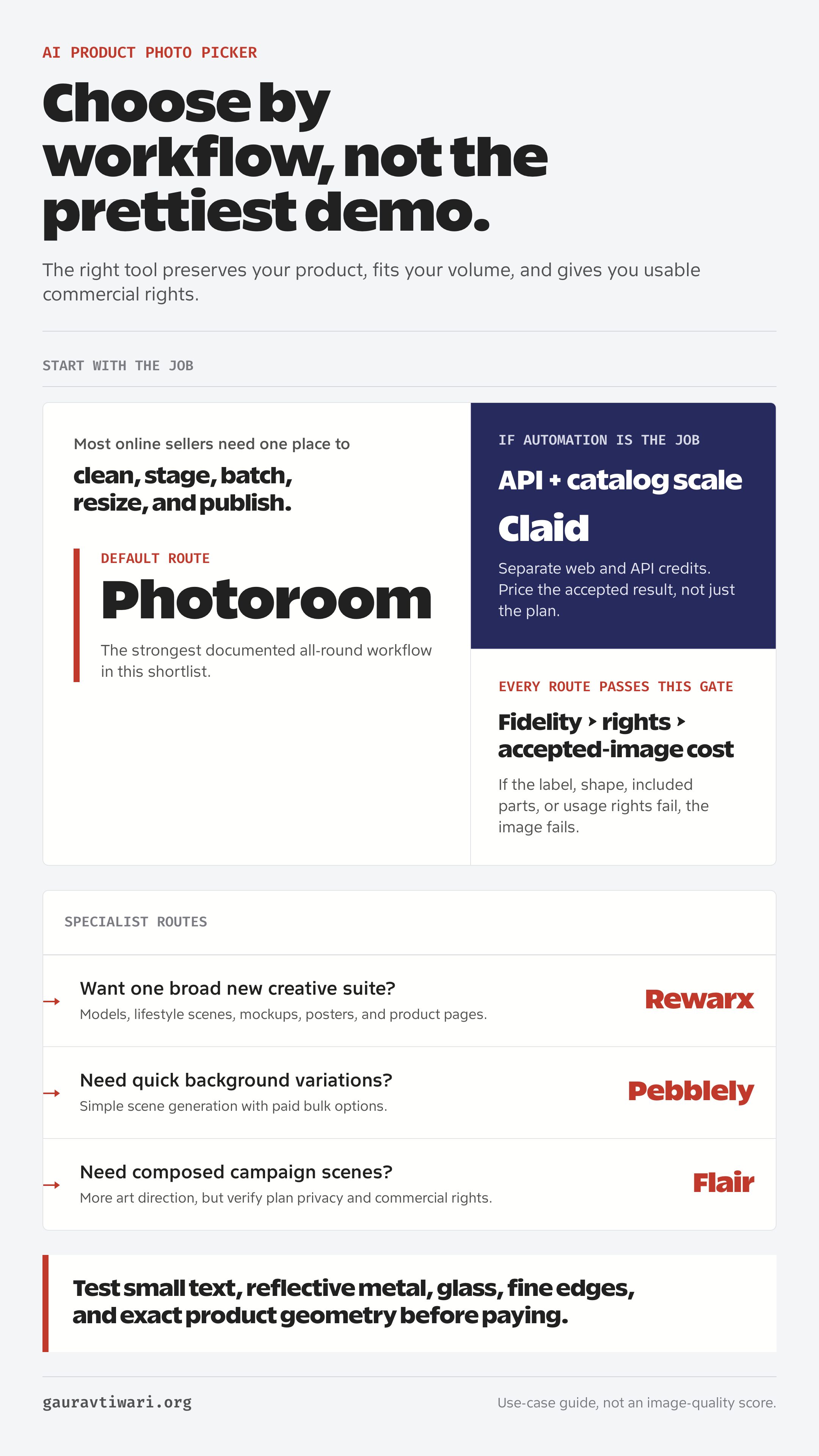
Before paying for a year, put your 5 hardest products through the plan you’re considering, count the accepted images and work out what each one cost. A tool earns its place when accurate images take less work at a price you can justify.
After the new images go live, compare them with the old set on add-to-cart rate and returns as part of your ecommerce SEO work. Keep price and promotions steady while you compare, or the numbers won’t tell you much.
Tell Google you want more of this.
Add Gaurav Tiwari as a preferred sourceOne tap, and this site shows up more often in your own Top Stories, AI Overviews and AI Mode. Remove it any time.
Disclaimer: This site is reader-supported. If you buy through some links, I may earn a small commission at no extra cost to you. I only recommend tools I trust and would use myself. Your support helps keep gauravtiwari.org free and focused on real-world advice. Thanks. - Gaurav Tiwari
