
 by
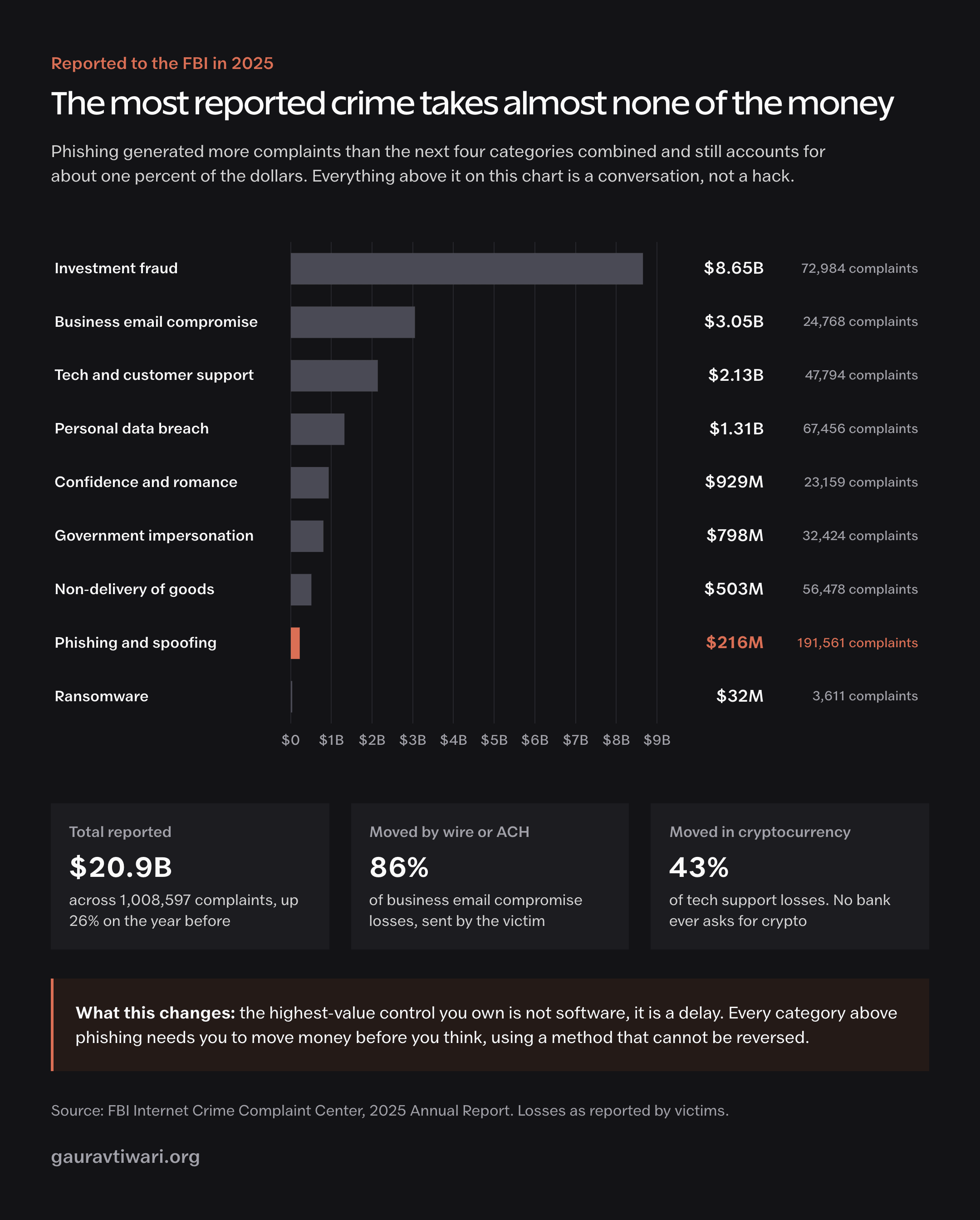
byAmericans filed 1,008,597 internet crime complaints in 2025 and lost $20.877 billion doing it. Phishing was the most reported crime on that list by a wide margin, 191,561 complaints, and it accounted for roughly $216 million of the damage. Investment fraud accounted for $8.6 billion.
Put those two numbers next to each other and the standard advice about how to stay safe online starts to look sideways.
The thing that fills the complaint forms is not the thing that empties the bank accounts.
Most online safety guides are still written for a threat model that expired around 2015: a virus in an attachment, a fix called antivirus, and a strong password with a number and a symbol in it. Three things have changed since then, and all three matter.
Broken software passed stolen passwords as the most common way attackers get in, for the first time in the nineteen years Verizon has been counting. Phishing kits now sit between you and the real login screen and take the session after you finish two-factor. And the single largest pile of money is lost by people who were never hacked at all.
Someone talked to them for a few weeks, and then they made the transfer themselves.
So this isn’t a list of everything you could theoretically do. It’s nine habits that still work, roughly in the order I’d set them up, plus an honest section on the internet safety advice that has quietly stopped being true.
None of it turns you into a security professional.
Most of it is one focused afternoon, and then a set of defaults you never think about again.
1. Turn on passkeys for the accounts that actually matter
If you take one thing from this article, take this one.
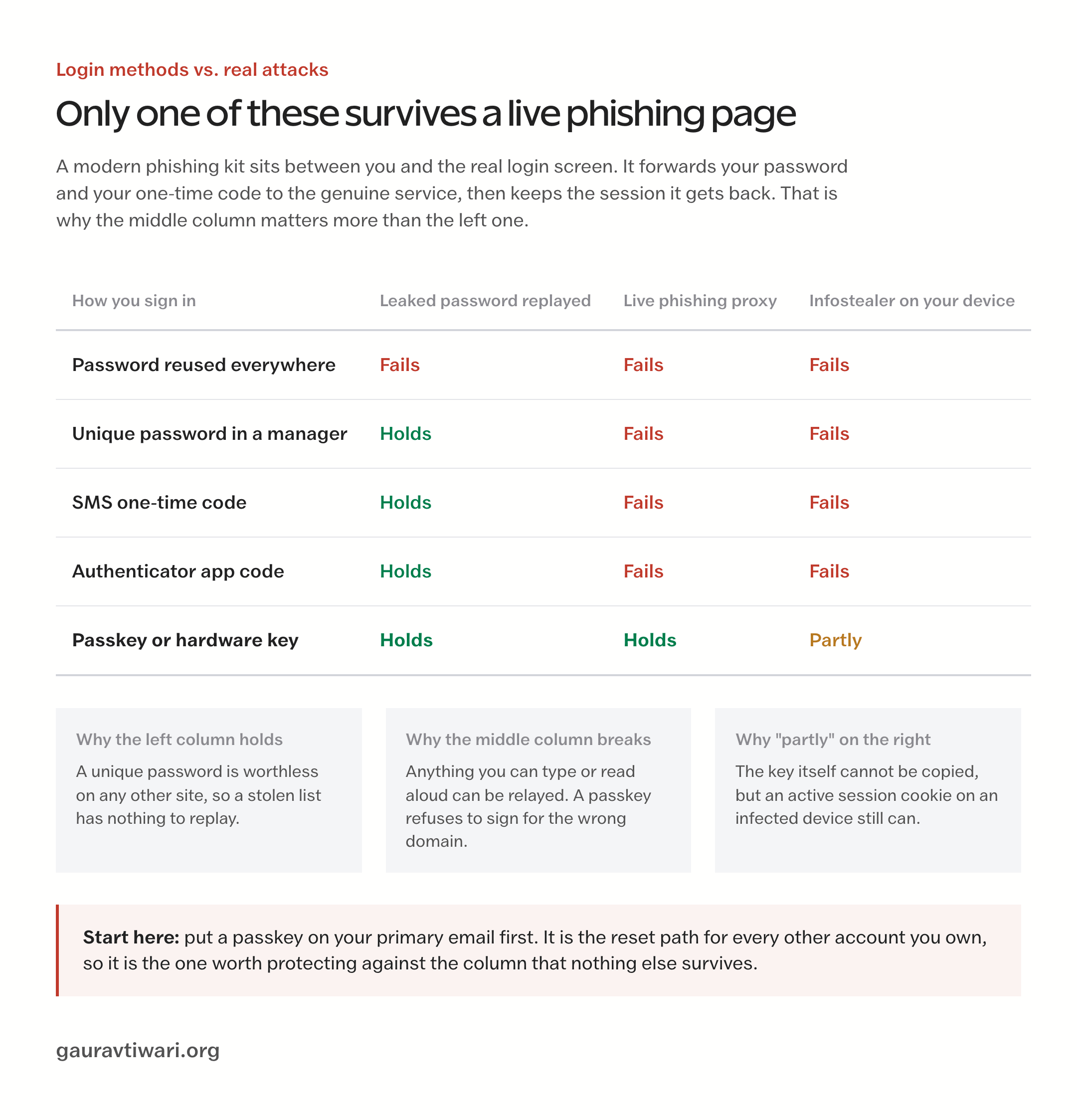
A passkey replaces your password with a key that lives on your phone, laptop, or hardware key, unlocked by your face or fingerprint, and cryptographically tied to the real site’s domain. That last part is the entire point.
A password can be typed into a convincing fake page.
A passkey cannot. The fake page has the wrong domain, and the key simply refuses to sign.
Compare that with what happens today when you use a password plus an authenticator code. You get an email, you land on a login page that looks exactly right, you type your password, you type the six-digit code, and it all works.
It works because the page you’re on is a proxy. It handed your password to the real Google or Microsoft, passed your code along too, and captured the session cookie that came back.
You’re logged in. So is whoever built the page, in a session that will never ask for a code again.
Microsoft measured a 146% jump in these adversary-in-the-middle attacks across 2024, and the toolkits behind them are now rented by the month like any other software.
Passkeys stopped being an early-adopter thing somewhere in the last two years. The FIDO Alliance’s May 2026 numbers, drawn from a survey of 11,000 people across ten countries:
- About 5 billion passkeys are now in use worldwide
- 75% of people have enabled a passkey on at least one account
- 49% use passkeys regularly wherever they’re offered
- 68% of organizations have deployed them or are deploying them for staff sign-in
- Of the organizations that did deploy, 32% reported fewer phishing incidents afterward
Start with the accounts whose loss would ruin a month: your primary email, your Apple or Google account, your password manager, your main bank if it supports them, and any account tied to money moving out. Google, Microsoft, Apple, Amazon, PayPal, GitHub, LinkedIn, and WhatsApp all support passkeys now.
Banks are the laggards. That’s a fair thing to be annoyed about.
Passkeys are not magic, and the gaps are worth knowing. Account recovery usually still falls back to email or a phone number, which means your fallback is only as strong as the weakest thing sitting behind it. And if every passkey you own syncs to one cloud account, that account becomes the thing worth attacking. Keep a second factor on the recovery path, or hold a hardware key as your backup.
2. Give a password manager every password you have left
Passkeys won’t cover everything for years, so you still have a few hundred passwords. The only sane way to hold them is a password manager, because the failure you’re defending against isn’t someone guessing your password.
It’s credential stuffing: a site gets breached, the list gets sold, and software tries those same pairs against three hundred other services overnight.
Unique passwords turn one breach into one problem instead of thirty.
Where those lists come from has changed, and it’s the part almost nobody updates. In June 2026, Have I Been Pwned loaded a dataset of 56 million unique email addresses and 124 million unique passwords.
It wasn’t a breach of any single company. It was accumulated infostealer logs, which is to say passwords lifted straight out of browsers on ordinary people’s own laptops.
Nobody had to break into a service. The malware just read what the browser had helpfully saved.
That’s the practical argument against letting Chrome remember everything. Browser password stores are the first thing an infostealer reads, and they’re readable by anything running as you. A dedicated manager keeps its vault encrypted with a key the browser doesn’t hold, and it locks.
- Bitwarden if you want free, open source, and audited. The free tier is genuinely usable, not a demo.
- 1Password if you’re setting this up for a family and want the sharing and recovery story to be boring.
- Proton Pass if you already live in Proton’s mail and drive, and want one account for all of it.
- NordPass if you want breach monitoring bundled with the rest of Nord’s tools.
Then stop doing the thing your old IT department taught you.
NIST finalized SP 800-63B-4 in August 2025, and it says plainly that verifiers shall not impose composition rules and shall not require periodic password changes except on evidence of compromise. Forced quarterly rotation produced Summer2025! then Autumn2025!, which is worse than one long password nobody ever touches.
What the standard asks for instead is length, at least 15 characters for a password doing the work alone, and screening against known breached lists. Your manager does the screening for you.
For the master password, use four or five random words you can picture. Length beats punctuation, and a phrase you can actually recall beats a clever string you’ll write on a sticky note. If you’re migrating off something you no longer trust, the export and import path between managers is well worn at this point and takes about twenty minutes.
3. Change how you arrive, not how carefully you read
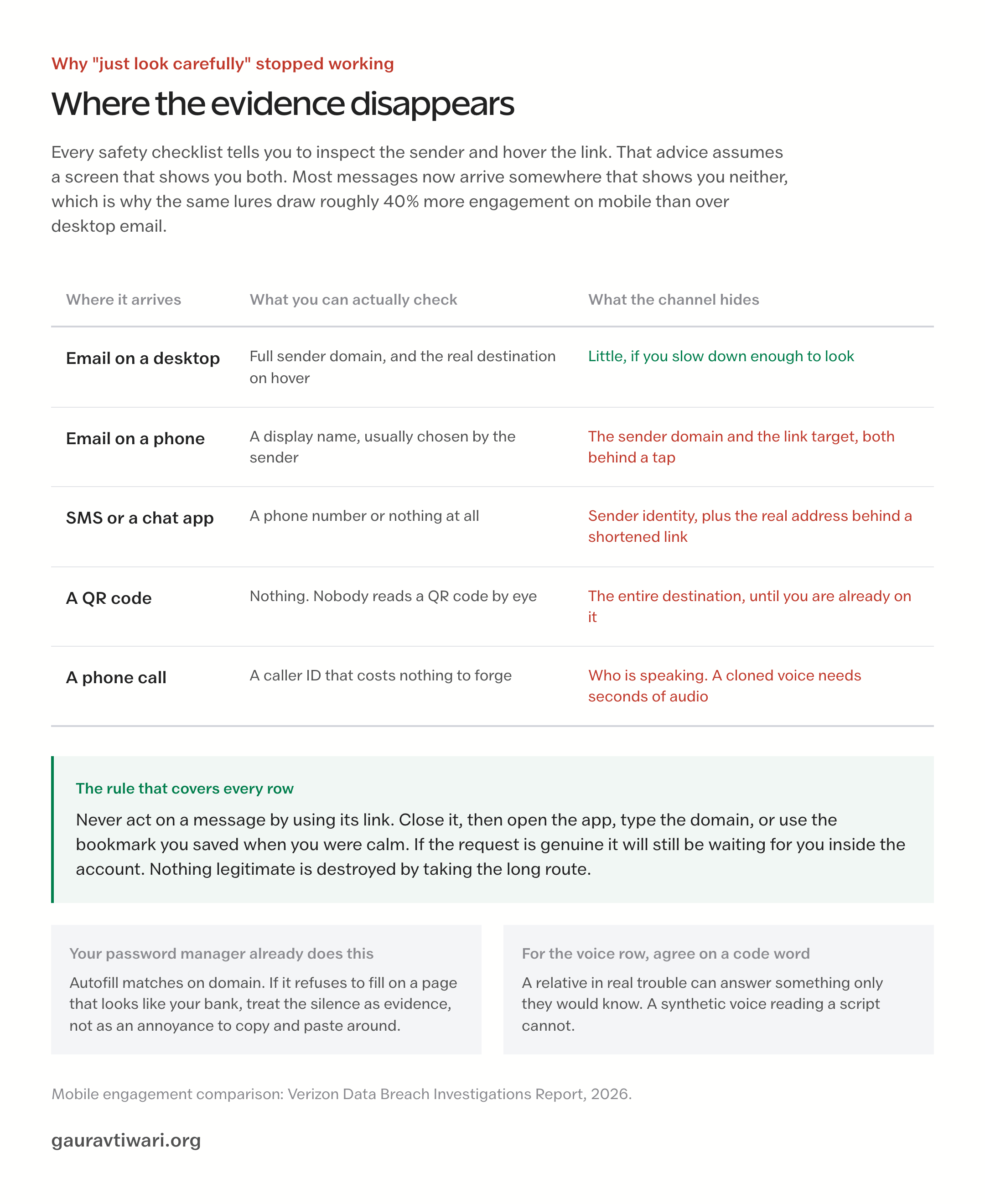
You are not going to out-read a modern phishing page.
Nobody is.
That’s not a confidence problem, it’s an arithmetic one. The attacker gets unlimited attempts to make one page convincing, and you get about two seconds of attention while walking to a meeting.
The old checklist, spot the typo, notice the generic greeting, look for the padlock, was written when phishing pages were sloppy. They aren’t anymore, and the padlock only ever meant the connection was encrypted. Criminals encrypt things too.
So stop trying to judge messages and change how you arrive instead. One rule covers almost all of it: never act on a message by using its link.
Close the message, open the app, or type the domain you know, or use the bookmark you saved when you were calm. If your bank actually needs something, it’ll still be there when you log in the normal way.
Nothing legitimate is destroyed by taking the long route.
Your password manager quietly enforces this for you, which is a benefit people miss. Autofill matches on domain. If you’re on a page that looks like your bank and the manager won’t fill, that silence is information.
Treat a failed autofill as a stop sign rather than an annoyance to work around by copying and pasting.
Phones are now the softer target, and the reason is physical. Verizon’s 2026 report found mobile social engineering simulations drew engagement about 40% higher than the same lures over desktop email. A small screen truncates the sender address and hides the real URL behind a tap.
Same message, less visible evidence. Which is also why QR codes deserve suspicion now: a sticker over a parking meter or a code in a PDF invoice moves you to a browser with no address bar to speak of.
Voice has the same problem. The FBI’s IC3 tracked AI as a complaint descriptor for the first time in 2025 and logged 22,364 complaints worth $893 million. A cloned voice needs only a few seconds of audio, and most of us have posted more than that.
Agree on a family code word now, out loud, not over text. A relative in genuine trouble can answer a question only they’d know. A synthetic voice reading a script cannot.
4. Never paste a command a web page hands you
This one is new enough that most safety guides haven’t caught up, and it’s the fastest-growing way people get malware onto their own machines. It goes by ClickFix.
You hit a page, and it shows you something ordinary and mildly irritating: a CAPTCHA that won’t pass, a video that won’t play, a document that won’t render. Then it offers a fix. Press Windows and R, paste this, hit enter. Or on a Mac, open Terminal and run this one line.
It’s phrased as a verification step, which is the clever part.
The command downloads an infostealer. And because you ran it, no download warning fired, no attachment got scanned, and no browser sandbox got in the way.
ESET measured a 517% surge in these detections in the first half of 2025, at which point the technique made up nearly 8% of everything the company blocked, second only to conventional phishing. It works on Windows, macOS, and Linux, because the trick isn’t technical.
It’s you.
No legitimate website has ever needed you to paste a command into Run, Terminal, or PowerShell to prove you’re human or to fix a video. Not one. If a page asks, the page is the attack, and closing the tab is the whole defense.
What these payloads take is worth understanding, because it changes what recovery looks like. They sweep saved browser passwords across dozens of browsers, crypto wallet files, VPN configuration files, and session cookies.
Those cookies are the valuable part. A stolen session cookie means an attacker doesn’t need your password or your second factor, because they’re carrying proof that you already authenticated.
So if you ever suspect you ran something you shouldn’t have, changing passwords is only half the job. You also have to sign out of all sessions everywhere, on every account, which kills the cookies.
Every major service has that button buried in security settings, and almost nobody uses it.
5. Patch fast, because broken software is now the front door
Updates used to be housekeeping. They’re the front line now, and there’s a specific number behind that claim.
Verizon’s 2026 Data Breach Investigations Report found that about 31% of breaches began with someone exploiting a known software vulnerability, which is the first time in the report’s nineteen-year history that vulnerability exploitation beat stolen credentials as the top way in. Meanwhile the median time organizations took to patch stretched from 32 days to 43.
That gap is the entire business model. A vendor ships a security update, which publicly announces that a hole exists. Attackers read the patch, work backward to the bug, and go hunting for everyone who hasn’t applied it yet.
You aren’t racing the discovery of the flaw. You’re racing everyone else’s laziness, and you only have to be faster than average.
For a household, that means automatic updates on everything, with no exceptions you’ve been meaning to revisit:
- Operating system and browser. Both update quietly now. Restart when asked instead of clicking “later” for six weeks.
- Your phone. Security patches ship separately from feature releases on Android, and they’re the ones that matter.
- Your router. This is the forgotten one. It’s always on, always exposed to the internet, and typically running firmware from whenever it was unboxed. Log in, check for updates, turn on automatic ones if the model supports it, and change the admin password if it’s still the sticker default.
- Browser extensions. These update themselves, which sounds good until you remember extensions get sold. A popular one changing hands means new code with old permissions, running on every page you visit. Delete what you don’t actively use.
If you run a website of your own, the same clock applies with worse consequences, because an unpatched plugin is exposed to the whole internet rather than to whatever wandered onto your home network. A scheduled update routine beats good intentions, and a layered set of WordPress security plugins will catch what the routine misses.
6. Put a delay between a message and your money
This is the section that deserves the most attention and usually gets the least. Sort the FBI’s 2025 losses by dollars instead of by complaint count and the picture inverts completely:
- Investment fraud: $8.65 billion, with cryptocurrency investment scams alone accounting for $7.2 billion
- Business email compromise: $3.05 billion across 24,768 complaints
- Tech and customer support scams: $2.13 billion
- Personal data breach: $1.31 billion
- Confidence and romance scams: $929 million
- Government impersonation: $798 million
- Ransomware: $32 million
Read that list again. Slowly.
Ransomware, the thing that gets the documentaries, sits at the bottom by two orders of magnitude.
Nothing in the top six is a hacking technique. They’re all conversations, run patiently, ending with the victim performing the transfer personally because at that moment it was the obvious thing to do. Cyber-enabled fraud made up 45% of complaints in 2025 and 85% of the losses.
Which means the highest-value security control you own is not software.
It’s a delay.
Every one of these scams needs you to act before you think, and every one of them steers you toward a payment method that can’t be clawed back. The transaction data makes that unmistakable: 86% of business email compromise money moved by wire or ACH, and 43% of tech support losses moved in cryptocurrency.
Your bank will never ask you to resolve anything in Bitcoin. Neither will Microsoft, the IRS, or a police officer. Ever.
The one-way doors, in plain terms:
- Cryptocurrency of any kind, to any address, for any reason someone else supplied
- Wire transfers, especially to a new account on updated instructions
- Gift cards, which no institution on earth accepts as payment
- Cash or metals handed to a courier. The IC3 logged roughly 725 gold courier complaints worth $311.8 million in 2025, where someone drove to the victim’s house to collect the bars.
So the rule is embarrassingly simple and works better than anything technical. When a request combines urgency with an irreversible payment method, that combination is the tell, regardless of how plausible the story is.
Put a hold on it. Overnight.
Then call the person or institution on a number you looked up yourself, not the one in the message.
If it’s real, a day costs nothing. If it isn’t, a day is the whole difference.
Set this up as a rule for the household rather than a resolution, because these scams are aimed disproportionately at older relatives. People over 60 filed 201,266 complaints in 2025 and lost $7.75 billion, more than a third of the national total.
A standing family agreement that no money moves on the same day it’s requested does more good than any lecture about spotting the most common money scams.
7. Lock the two accounts that unlock everything
Almost every account you own has a back door labeled “forgot password,” and that door opens onto two things: your email inbox and your phone number.
Secure those two properly and a compromise elsewhere stays contained. Leave them soft and everything else you did was decoration.
Start with email, because it’s the master key. Put a passkey on it. Then go through the settings people never open and look for things you didn’t put there:
- Forwarding rules and filters. A standard move after an inbox compromise is a quiet rule that forwards anything containing “invoice” or “bank” to an outside address and archives it so you never see the original.
- Recovery email and phone. Confirm both are yours and current. An attacker who adds a second recovery address keeps access even after you change the password.
- Connected apps and app passwords. Revoke anything you don’t recognize or haven’t used in a year.
- Active sessions. Sign out of everything you don’t recognize, on every device.
Then call your mobile carrier and ask for a port-out PIN or number lock.
This takes about five minutes and it’s the fix for SIM swapping, where someone convinces a store rep to move your number to their SIM and then collects every SMS code you own.
Worth calibrating the fear here: the IC3 logged only 971 SIM swap complaints and $17.4 million in 2025, so it’s rarer than the coverage suggests. But the blast radius when it lands is total, and the fix is a phone call.
Do it anyway.
While you’re in there, turn on transaction alerts at your bank and card issuer. Instant notifications turn a drained account into a fifteen-minute inconvenience, because you catch the first small test charge instead of discovering the whole thing on a statement four weeks later.
8. Encrypt your devices and back up like you’ll need it
Full-disk encryption is the one control that costs nothing, needs no maintenance, and completely changes the outcome of a stolen laptop.
Without it, a thief pulls the drive and reads everything. With it, they have a laptop-shaped brick and your data never left.
Turn on FileVault on macOS, BitLocker or Device Encryption on Windows, and set a passcode on your phone, which encrypts it automatically.
Check rather than assume, particularly on Windows. Home editions have historically shipped with device encryption off depending on hardware and how the machine was set up, and plenty of people who believe they’re encrypted are not. It’s one settings screen.
Go look.
Backups are the other half, and the rule is still 3-2-1: three copies of anything you’d grieve over, on two different kinds of media, with one stored somewhere else.
The 2026 addition is that one of those copies has to be offline or immutable. Ransomware encrypts every drive it can reach, and a permanently connected external disk or a live-syncing cloud folder is reachable.
Sync is not backup.
Sync faithfully replicates the encryption to every device you own. Instantly.
Then restore something. Pick one file, restore it, open it. An untested backup is a belief, and the moment you need it is a bad time to discover the job has been silently failing since March.
Any of the mainstream backup tools will handle scheduling for you once it’s configured. Today.
9. Shrink what’s collectable about you
Everything above defends accounts. This last habit reduces the raw material that makes targeted attacks possible in the first place, because spear phishing runs on details, and most of those details were published voluntarily.
Start in the browser, since that’s where the collection happens. Use Firefox or Brave as a daily driver, keep tracking protection on, and install uBlock Origin.
That last one is a security control as much as a privacy one, because it blocks the ad networks that malvertising rides in on. Pair it with a filtering DNS resolver if you want the same protection on devices where you can’t install extensions.
Then do a permissions pass on your phone. Sort apps by permission rather than opening them one at a time, and revoke anything that doesn’t need what it’s asking for. Both iOS and Android now show you when something reaches for the camera, microphone, or location, which makes the offenders obvious once you start watching.
On social platforms, disconnect the third-party apps you authorized years ago, tighten who can see your posts, and stop posting travel in real time. Vacation photos are a fine thing to share the week after.
A VPN belongs in this section rather than the security ones, and I want to be straight about why.
The old pitch, that public Wi-Fi lets anyone read your traffic, is far weaker than it was, because effectively every site worth logging into is on HTTPS and has been for years. Someone sniffing a coffee shop network sees which domains you reached, not what you did there.
So a VPN like NordVPN is worth paying for, but for the jobs it actually does:
- Hides which sites you visit from the network operator and from your ISP, which in many countries can log and sell that record
- Protects DNS lookups on networks you have no reason to trust, including hotel and airport captive portals
- Keeps your home IP address, and the rough location attached to it, out of the hands of every site you visit
- Gives you your home region while traveling, for banking apps and streaming that get strange abroad
- Blocks known-malicious domains through Threat Protection, which is the one feature that genuinely overlaps with security rather than privacy
What it does not do is stop phishing, stop malware you installed yourself, or protect an account whose password is already for sale. None of those are network problems.
If you’re weighing options, the honest comparison of what actually separates VPN providers matters more than any speed chart, and the tighter Wi-Fi settings most people skip will do more for your home network than any subscription.
The online safety advice that hasn’t aged well
Security advice accumulates. It rarely gets retired, so people end up spending real attention on threats that were solved years ago while the live ones go unattended.
These are the ones I’d stop worrying about, and what to do instead.
“Never use public USB charging ports.” Juice jacking has been a warning for over a decade with no publicly documented case of an actual traveler being compromised at an actual charging station. Researchers at Graz University of Technology did demonstrate a working version in 2025, called ChoiceJacking, which faked the approval tap. Apple and Google closed it in iOS and iPadOS 18.4 and in Android 15 by requiring your PIN or biometric before any USB data connection is allowed.
Carry your own cable if it makes you comfortable. Just don’t spend worry here that belongs on your email account.
“Change your passwords every 90 days.” Formally obsolete. NIST’s SP 800-63B-4 says verifiers shall not require periodic change without evidence of compromise. Rotation on a calendar makes people choose predictable variations, which is strictly worse than one long password left alone.
“Look for the padlock icon.” It confirms the connection is encrypted. That’s all it confirms. It says nothing about who owns the site, and phishing pages get certificates for free in about ninety seconds.
“Any two-factor is good enough.” Partly true, and the ranking matters. SMS codes beat nothing. An authenticator app beats SMS. A passkey or hardware key beats both by a wide margin, because it’s the only option a proxy page cannot relay.
And any code you can read aloud is a code you can be talked into reading aloud.
“Clear your cookies regularly.” Largely theater in 2026. Tracking moved to fingerprinting and first-party data years ago, and neither cares about your cookie jar. A content blocker does more in one install than a lifetime of clearing history.
“A free VPN is a reasonable place to start.” A couple are honest about the tradeoff and simply limit you, Proton VPN’s free tier being the usual example. Most of the rest fund themselves by monetizing exactly the traffic you installed them to protect.
If a VPN isn’t worth a few dollars a month to you, you’re better off with no VPN and good habits than with a free one and false confidence.
If it already happened, the first hour is the whole game
Most people assume stolen money is gone. It often isn’t, and the window is measured in hours.
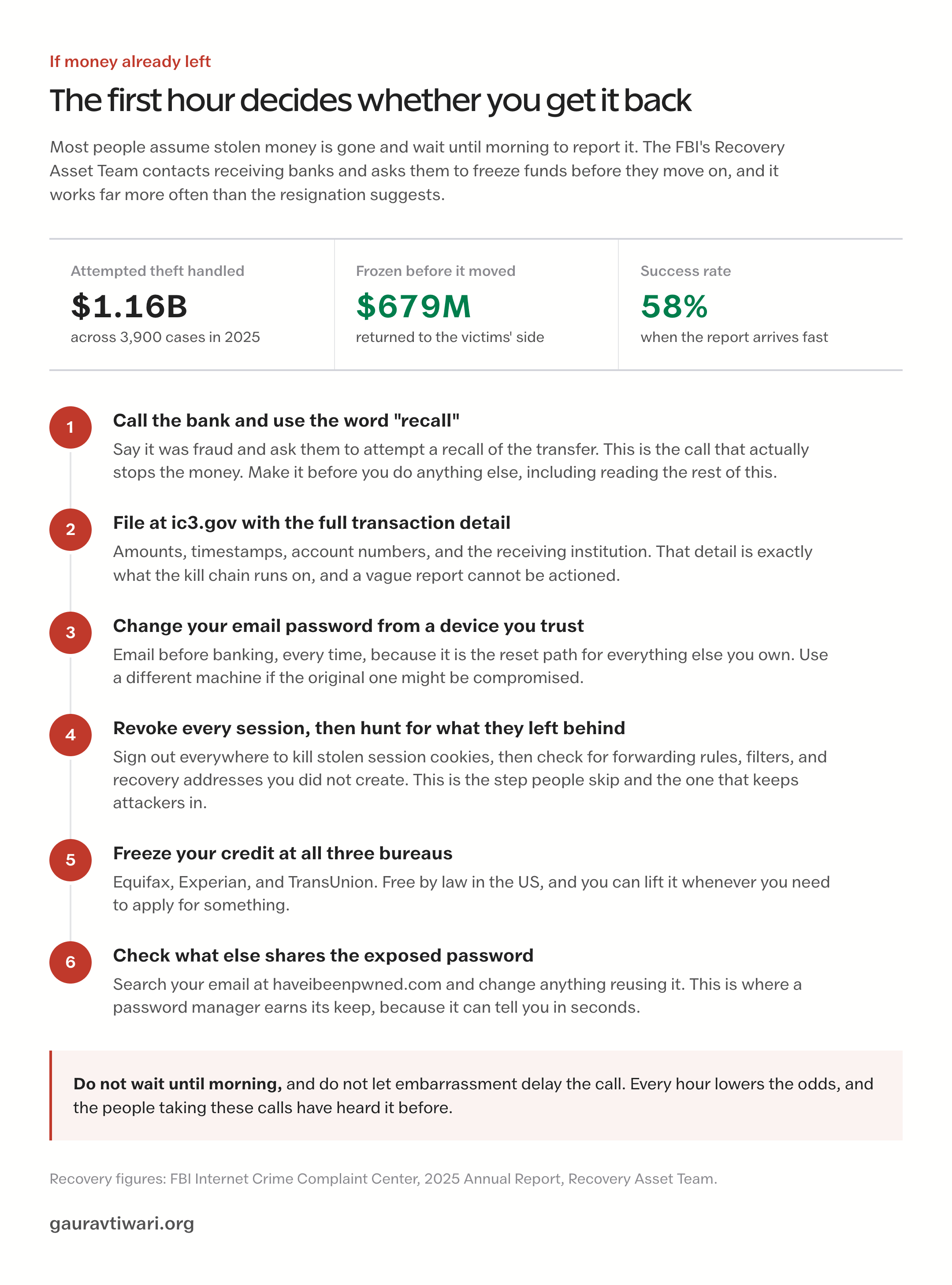
The IC3’s Recovery Asset Team runs something called the Financial Fraud Kill Chain, which contacts receiving banks and asks them to freeze funds before they move on. In 2025 the team ran it on 3,900 incidents covering $1.16 billion in attempted theft and froze $679 million of it.
That’s a 58% success rate, and the single biggest variable is how fast the report arrives.
So if it happens, work in this order and don’t stop to feel embarrassed about it:
- Call your bank first and use the word “recall.” Ask them to attempt a recall of the transfer and tell them it was fraud. Minutes matter more than completeness here.
- File at ic3.gov with the full transaction detail. Account numbers, amounts, timestamps, receiving institution. That detail is what the kill chain runs on.
- Change your email password from a device you trust, then revoke every active session. Email first, always, because it’s the reset path for everything else.
- Check for forwarding rules, filters, and recovery addresses you didn’t create. This is the step people skip, and it’s how attackers keep access after a password change.
- Freeze your credit at all three bureaus. Equifax, Experian, and TransUnion, free by law in the US, and reversible whenever you need to apply for something.
- Check haveibeenpwned.com and change anything that shares the exposed password.
If you’re working through an active compromise rather than reading ahead, the step-by-step version of this is in the 60-minute recovery plan, which covers device cleanup and the account-by-account order in more detail.
None of this is about becoming unhackable, which isn’t a thing.
It’s about the shape of the effort. Passkeys on the accounts that matter, a manager holding everything else, a habit of arriving at sites the long way, a refusal to paste commands, updates on automatic, and a standing rule that money waits a day.
That’s a weekend. Then defaults.
Attackers work on volume, and volume means moving on from anyone who takes more than a few minutes. Most of staying safe online is just being slightly more trouble than the next person.
Frequently Asked Questions
What is the single most effective thing I can do to stay safe online?
Put a passkey on your primary email account.
Email is the reset path for every other account you own, so whoever controls it controls the rest, and a passkey is the only common login method that a fake page cannot relay. It takes about two minutes in your Google, Apple, or Microsoft security settings.
If your provider does not support passkeys yet, move that account to an authenticator app instead of SMS and check the forwarding rules while you are in there.
Are passkeys actually safer than two-factor authentication?
Yes, and the reason is structural rather than a matter of degree.
A passkey is bound to the real site’s domain, so if you land on a convincing copy, the key refuses to sign and nothing happens. Passwords and one-time codes have no such check, which is why adversary-in-the-middle phishing kits work: the fake page relays your password and your code to the real service in real time, then steals the session cookie it gets back. Microsoft recorded a 146% rise in those attacks across 2024.
Hardware security keys give you the same protection as passkeys and are worth the $25 to $50 for accounts that hold money.
Do I need a VPN if I only use my home Wi-Fi?
Not for security.
Almost every site worth logging into uses HTTPS, so nobody on your network is reading your banking session. The reason to run a VPN at home is privacy from your internet provider, which can log every domain you visit and in many countries sell that record.
If that does not bother you, skip it and spend the money on a password manager instead. A VPN becomes genuinely useful on networks you do not control, when you want your home region while traveling, or when you want its malicious-domain filtering as a backstop.
How do I know if my password has been leaked?
Enter your email address at haveibeenpwned.com, which indexes over 14 billion compromised accounts. Every serious password manager also runs continuous breach monitoring and flags saved credentials that appear in new dumps, which is more useful because it catches leaks as they land instead of when you remember to check. Worth knowing where the newer leaks come from: a June 2026 dataset added 56 million email addresses and 124 million unique passwords harvested by infostealer malware directly from people’s browsers, not from any company breach.
Someone in my family just sent money to a scammer. Is it gone?
Often not, if you move within hours.
Call the bank immediately and ask them to attempt a recall, then file at ic3.gov with the full transaction detail: amounts, timestamps, account numbers, and the receiving institution. The FBI’s Recovery Asset Team ran its Financial Fraud Kill Chain on 3,900 incidents in 2025, covering $1.16 billion in attempted theft, and froze $679 million of it, a 58% success rate.
Speed is the variable that matters most. Do not wait until morning, and do not let embarrassment delay the call.
Is public Wi-Fi still dangerous?
Much less than the advice suggests.
The classic public Wi-Fi attack meant reading unencrypted traffic, and that mostly stopped working once the web moved to HTTPS. What remains is the network operator seeing which domains you connect to, hostile DNS on captive portals, and the ordinary risk of shoulder surfing.
Use a VPN on networks you do not control if you want the DNS and domain-level privacy. Just do not treat coffee shop Wi-Fi as the main threat to your accounts. Phishing and infostealer malware are the ones taking money.
What should I do first if I think I have been hacked?
Work from a device you trust and go in this order: change your email password and revoke every active session, check for forwarding rules or recovery addresses you did not create, then move to banking, then cloud storage, then social accounts. Revoking sessions matters as much as changing passwords now, because stolen session cookies let an attacker stay logged in without ever needing your password or your second factor. If money moved, call the bank before you do any of this. Then freeze your credit with all three bureaus, which is free in the US and reversible.
Are free password managers and free VPNs safe to use?
They split in opposite directions.
Free password managers are generally fine, because the business model is upselling you to a paid tier rather than monetizing your data. Bitwarden’s free plan is open source, audited, and genuinely complete.
Free VPNs are mostly the reverse. Running servers costs money, and if you are not paying, the traffic usually is. The honest exceptions limit you instead of monetizing you, with Proton VPN’s free tier the standard example.
A free VPN that gives you unlimited data, high speeds, and no restrictions is telling you where its revenue comes from.
Tell Google you want more of this.
Add Gaurav Tiwari as a preferred sourceOne tap, and this site shows up more often in your own Top Stories, AI Overviews and AI Mode. Remove it any time.
Disclaimer: This site is reader-supported. If you buy through some links, I may earn a small commission at no extra cost to you. I only recommend tools I trust and would use myself. Your support helps keep gauravtiwari.org free and focused on real-world advice. Thanks. - Gaurav Tiwari