

Skip to content

Stackless Lite for WooCommerce 17 Free Store Tools in One Plugin

Give your customers wishlists, saved carts and back-in-stock alerts, and give your store quantity rules, buy links and a cleaner checkout. It’s one free plugin. You switch on only what your business needs, and the modules you leave off load no code.

  • Version 1.7.0
  • WordPress 6.7+
  • PHP 7.4+
  • WooCommerce 9.9+

Need subscriptions, licensing or Stripe? Stackless for WooCommerce adds them from $39 a year.

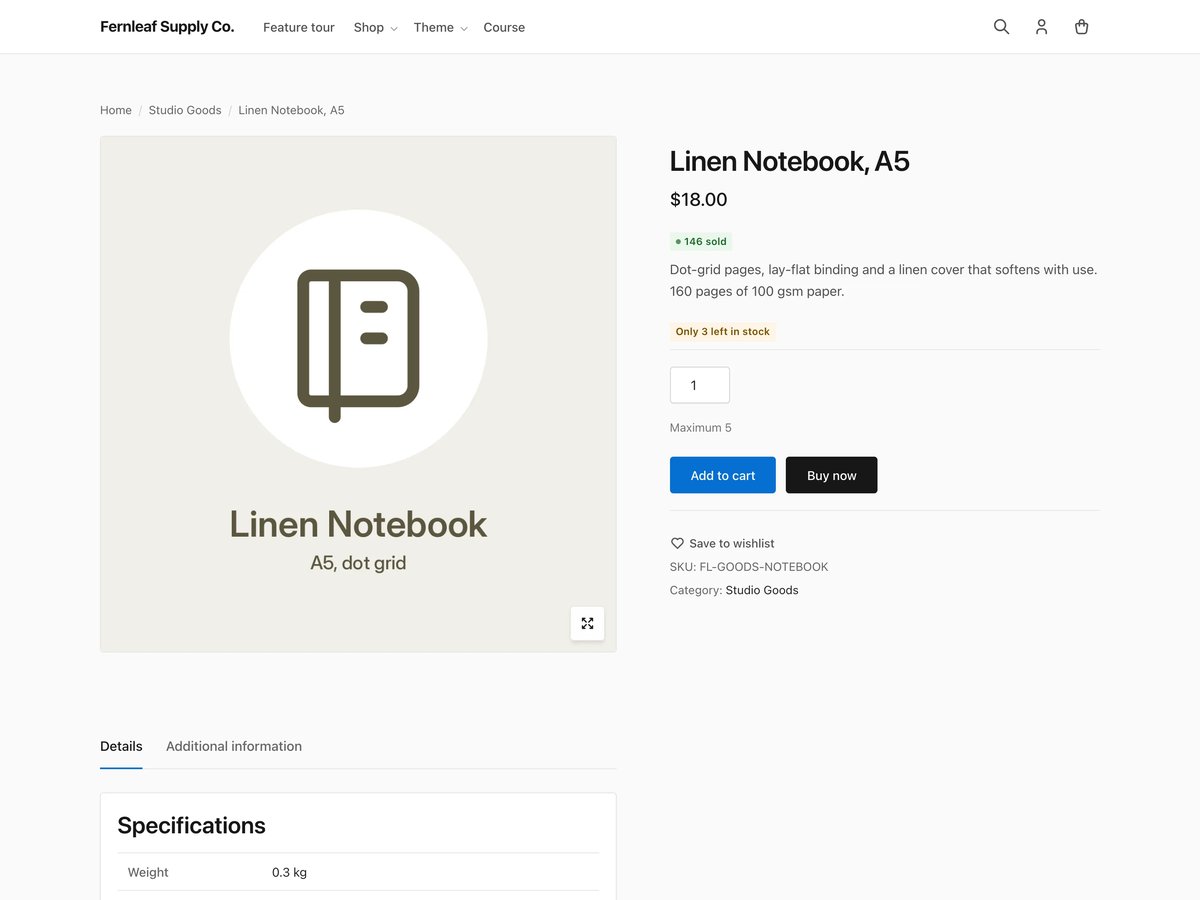
A WooCommerce product page with a 146 sold badge, an Only 3 left in stock label, a maximum quantity of 5, Add to cart and Buy now buttons and a Save to wishlist link
Free lifetime license
It comes with the free checkout. You never have to enter it.
Updates without a key
Your site gets new versions on the normal Updates screen.
Upgrade keeps your data
Stackless picks up your settings and your customers’ records.
GPL-2.0-or-later
Use it on your client sites. The source is on GitHub.

What Lite Adds to Your Store Turn On Only What You Need

I made Lite because your store probably needs a few of these tools long before it needs subscriptions or another payment gateway. You get them in one plugin instead of installing a separate plugin for each job.

  • Catalog Labels

    Show your customers what sells and what’s running out: free price text, your own Add to cart text, sold counts, low-stock labels and a specs table that feeds product schema.

  • Wishlist and Saved Carts

    Your customers save products as guests, keep the list when they sign in and share it by link. They can also name saved carts and reorder any past order.

  • Back-in-Stock Alerts

    Your customers ask to be told when a product returns, confirm by email and get one email when it’s back. You get a second chance at a sale you would have lost.

  • Quantity Rules and Hidden Prices

    Set minimum, maximum and step quantities on block and classic carts, and hide prices from guests across your store, a category or a single product.

  • Buy Links and Pay What You Like

    Send your customers signed links that fill the cart and open checkout, add a Buy now button, and let buyers choose a price above your minimum. Lite checks every amount on the server.

  • Leaner Checkout

    Add consent checkboxes, give free and digital orders a shorter checkout, limit payment methods per product, and load WooCommerce scripts only on your store pages.

Lite or the Full Plugin

Lite covers the catalog, wishlist and checkout tools your store uses every day. Stackless for WooCommerce is the paid plugin. It adds what your business needs to take payments and bill your customers over time.

Every paid module appears in your Lite dashboard with a short description, so you can see what it does before you decide.

See Stackless for WooCommerce

Free in Lite

  • Free price text, Add to cart text, sold counts and stock labels
  • Wishlist, saved carts and Order again
  • Back-in-stock alerts and service products
  • Min/max quantities and Hide Price Until Login
  • Buy links, Pay What You Like and external product extras
  • Checkout tweaks and the WooCommerce Optimizer

Added in Stackless for WooCommerce

  • Subscriptions and software licensing
  • Stripe, PayPal, Polar, Paddle and Dodo Payments
  • Multi-currency with a currency switcher
  • Invoices, quotes and coupon affiliates
  • Order bumps, product add-ons and delivery slots
  • On-page and modal checkout, page access and FluentCRM

Upgrade to Stackless for WooCommerce All 43 Modules, Same Settings

I’d upgrade the day your store needs recurring payments, license keys or a second payment gateway. Stackless for WooCommerce does those jobs inside one plugin, so your business skips the separate subscription, licensing and currency plugins a growing store usually collects.

What the upgrade adds

  • Subscriptions with renewals, trials and switching
  • Stripe, PayPal, Polar, Paddle and Dodo Payments
  • Software licensing for your plugins and themes
  • Multi-currency, invoices, quotes and order bumps

Moving up from Lite

  1. Buy a license and download Stackless for WooCommerce from your account.
  2. Upload and activate it. Lite goes idle on its own, and you can remove it.
  3. Every Lite setting, wishlist, saved cart and stock alert is already there.

Annual

Regular price $69Sale price $39per year

Updates and support while your subscription is active.

  • All 43 modules
  • Unlimited site activations
  • Renews yearly until you cancel
Get Annual for $39/Year

$39 a year and $99 lifetime are limited-time prices. They go up to $69 a year and $399 when the offer ends. Every license has a 14-day unconditional refund period. See everything in Stackless for WooCommerce.

Install and Update Without a Key Four Steps, a Few Minutes

Your site gets Lite updates from gauravtiwari.org without a license key. The free checkout still gives you a lifetime license, so the download stays in your account, but you never paste it into WordPress.

  1. Get the ZIP

    Complete the free checkout and download Lite from your account, or use the Download the ZIP button on this page. Both give you the same file.

  2. Upload and activate

    In WordPress, go to Plugins, Add New, Upload Plugin, then activate Stackless Lite.

  3. Switch on your modules

    Open Stackless, Dashboard and turn on the modules you need. Each one has its settings under Stackless, Settings.

  4. Let updates arrive

    New versions show up on your Updates screen. WordPress installs a package only after Lite checks its SHA-256 checksum.

  • Updates without a key
  • Checksum verified
  • Data kept on upgrade

I Build Tools That Pay for Themselves And Give Away the Ones That Can’t

Everything here is quick to set up, light on your pages and built to do one real job well. I only charge for the tools that can make you money. The rest are free.

Gaurav Tiwari

Hi, I’m Gaurav

I design, build and support every product on this site myself. When you email me, the person reading it is the one who wrote the code.

I’d rather ship one tool you’d miss if it vanished than ten that sit in your plugin list doing nothing.

  • You talk to me, not a ticket queue
  • Paid tools have to earn their price
  • Free tools stay free
More about me

18+years building websites, plugins and stores, since 2008

I obsess over performance

Switch a feature off and it loads nothing. What does load stays small. A tool that replaces a plugin shouldn’t make your pages slower.

I care how it feels

Clear screens, sensible defaults and settings written in plain English. If you need a tutorial for the basics, that’s my design mistake, not yours.

I build for everyone

Full keyboard support, visible focus, proper labels and text you can actually read. When more people can use your store, more people can buy from it.

I build tools that earn

My paid tools help you sell, renew, license or convert. If one just sits in your stack, I haven’t done my job.

If it can’t earn, it’s free

I won’t charge for anything that can’t make you money. The free tools get the same care as the paid ones, down to the last setting.

Stackless Lite for WooCommerce Questions

Updates, upgrading and what Lite works with.

Have a question that isn’t here? Ask me directly.

Is Stackless Lite really free?

Yes. The checkout costs nothing, and there is no trial or time limit. Every Lite module works fully. The paid modules in the dashboard are descriptions only.

Do I need a license key for updates?

No. Lite updates from gauravtiwari.org without one. The free checkout gives you a lifetime license anyway, so the download stays in your account.

What does the update check send?

It sends no license key and none of your store or customer data. It is the standard request WordPress makes, which includes your WordPress version and site address. Lite does no tracking.

What happens when I upgrade to Stackless?

Activate Stackless for WooCommerce and Lite goes idle. Both plugins use the same settings, tables and hooks, so your settings and your customers’ wishlists, saved carts and back-in-stock requests carry over. You can then remove Lite.

Can I go back to Lite later?

Yes. Deactivate Stackless and activate Lite. The settings and records of the paid modules stay in the database for the day you upgrade again.

Does deleting Lite remove my data?

No. Deleting the plugin keeps your settings and records. To remove them as well, define STACKLESS_REMOVE_ALL_DATA as true in wp-config.php before you delete it.

Does it work with the Cart and Checkout blocks?

Yes, and with the classic cart and checkout. Lite supports HPOS and needs WooCommerce 9.9 or later.

Can I install it from GitHub?

Yes, from the latest release. GitHub’s green Download ZIP button names the folder after the branch, and updates need the folder named stackless-lite.

Start With the Tools You Need Free, With Updates and No Key

I’d switch on the 3 or 4 modules your store needs today and leave the rest off. If the store later needs subscriptions or another gateway, Stackless picks up where Lite left off.

Need payments or subscriptions later? Upgrade to Stackless and everything you set up in Lite comes with you.