
My WordPress Block Editor Setup: ACF Blocks, Custom Styles, and More
The WordPress block editor (Gutenberg) is more powerful than most developers realize. With the right setup, it delivers page-builder-level flexibility with a fraction of the overhead. I’m talking 15-20KB of JavaScript instead of 300KB+. Same design control. Better performance. No vendor lock-in. Also see my Perfmatters for removing bloat.
I’ve spent two years building a block editor workflow that handles everything from simple blog posts to complex landing pages. This setup powers my WordPress freelancing business and every client site I build. Here’s the complete technical breakdown: custom blocks, registered styles, CSS framework, and the hooks that tie it all together.
Why I Chose the Block Editor Over Page Builders
The block editor wasn’t always this capable. But after years of development, it now handles complex layouts natively. Here’s what made me commit to this approach.
- Performance is controllable: Page builders load their entire framework on every page. The block editor outputs static HTML. A complex landing page I built recently: 156KB total page weight, 18KB JavaScript, PageSpeed mobile score of 92. The same design in Elementor would be 600KB+ with scores in the 40s. Even the best WordPress caching plugin can’t fix bloated source code.
- No vendor lock-in: Block content is stored as HTML comments in
post_content. Switch themes? Content stays. Stop using a plugin? Blocks gracefully degrade. Compare that to page builder shortcodes that become gibberish when you deactivate the plugin. - WordPress core investment: Automattic is pouring resources into Gutenberg development. Full Site Editing, block themes, the Interactivity API. The block editor is WordPress’s future. Building on it means building on a stable, improving foundation. Plus, Block Editor add-ons are getting better by every passing day.
- Cleaner client editing: Fewer options means fewer mistakes. Clients pick from dropdown styles instead of dragging sliders. They insert patterns instead of building from scratch. Support calls dropped significantly.
- Transferable skills: Understanding blocks, hooks, and patterns makes you a better WordPress developer. Page builder knowledge is vendor-specific. Block editor knowledge applies everywhere WordPress runs.
Remark: I still use page builders like Bricks, Elementor & Divi wherever required as I have layouts, templates and CSS frameworks readymade for these.
The Performance Advantage
I built the same marketing homepage two ways for comparison on identical WordPress hosting on a popular page builder and also on Block Editor with GenerateBlocks Pro. Also see my Kadence Blocks vs GenerateBlocks comparison.
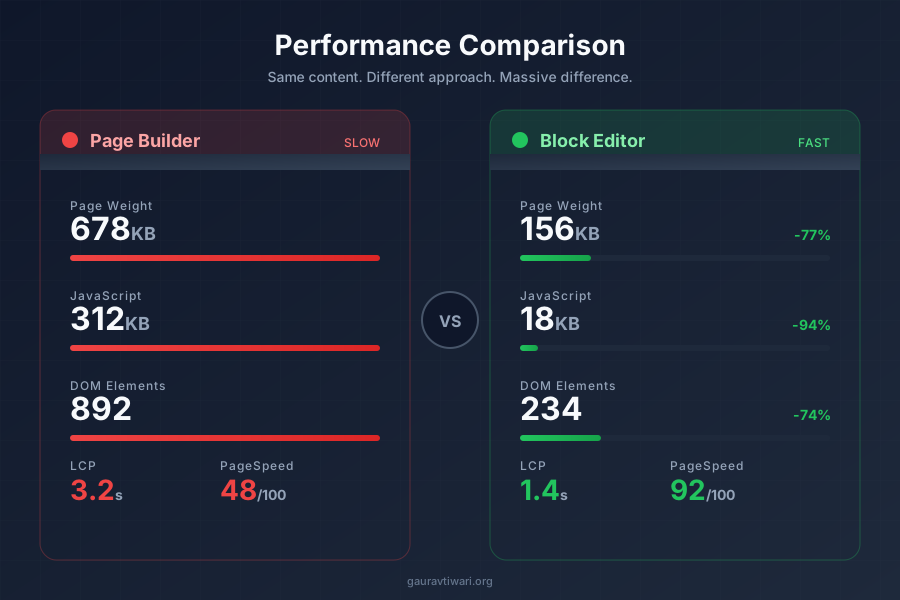
Same visual design. Same content. The difference is architectural.
Why blocks are lighter: The block editor outputs static HTML with CSS classes. No JavaScript framework initializes on page load. No widget library loads “just in case.” The should_load_separate_core_block_assets filter means WordPress only loads CSS for blocks actually on the page. A WordPress CDN amplifies these gains further.
My Complete Block Editor Stack
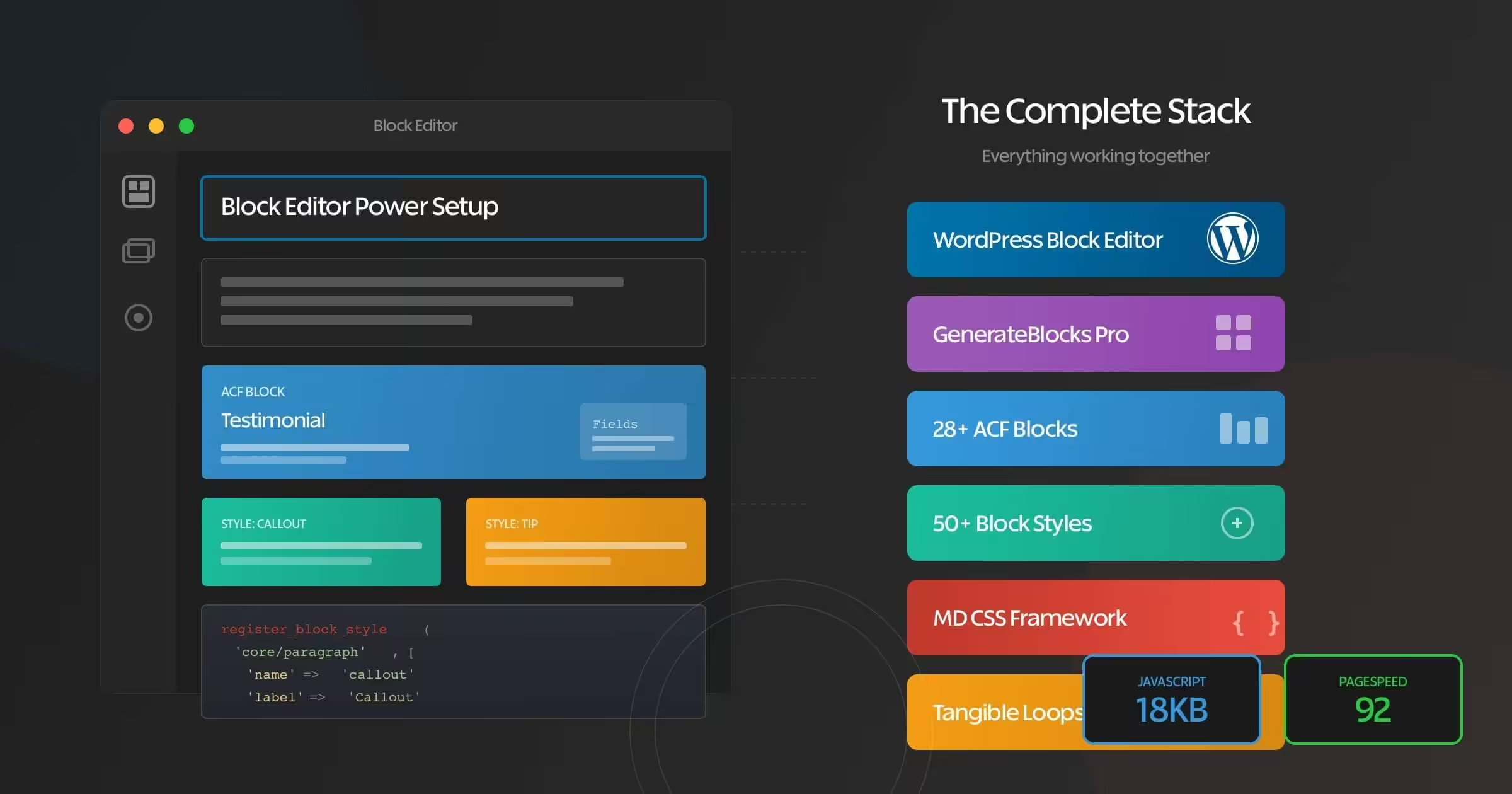
Here’s the technical architecture that powers every site I build. Each component serves a specific purpose.
The Core Foundation
Block editor + Marketers Delight (my active theme, v6.10.0 with a custom child theme) handles 90% of layouts. You could also use a block theme like OllieWP or TwentyTwentyFive. See my migrating to block themes guide for more details.
- Columns and layouts (Group, Columns blocks)
- Media (Image, Gallery, Cover blocks)
- Calls-to-action (Buttons block)
- Typography and spacing control via theme.json
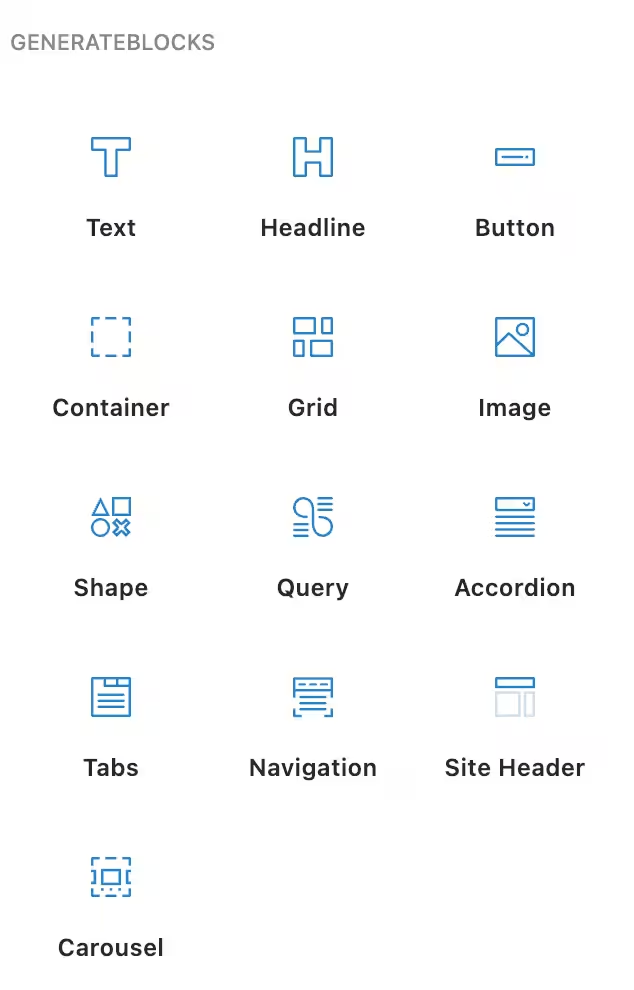
GenerateBlocks Pro fills the advanced layout gaps. CSS Grid and Flexbox controls without writing code. Query loops with design control. It adds 15-20KB instead of 300KB+. I pair it with GeneratePress (review) for a complete lightweight stack that rivals any GeneratePress alternative.
I love GenerateBlocks so much that I have even created an HTML to GenerateBlocks for my own needs and opened it for anyone to use.
The Marketers Delight Theme and MD_dropins
The theme running this site is Marketers Delight (MD) v6.10.0 with a custom child theme I built on top. MD is a typography-first theme framework with modular CSS architecture. It’s not a block theme in the FSE sense, but it’s fully block-ready with align-wide support, custom color palette, and theme.json integration.
What makes MD different from other themes is MD_dropins, the plugin framework that ships with it. MD_dropins adds 20+ native Gutenberg blocks to the editor: callouts, key takeaways, FAQ sections with schema markup, inline polls, CTAs, content upgrades, spoiler blocks, related content panels, and more. These blocks use ES5 JavaScript with no build step. They register via wp.blocks.registerBlockType() and render server-side through PHP callbacks.
The MD blocks complement my ACF blocks. Where ACF blocks handle structured data (product boxes, testimonials, comparison tables), MD blocks handle editorial content (callouts, steps, FAQs). Each MD block has a 60+ icon library, multiple color presets, and popup integration built in. The CSS compiles to /wp-content/uploads/md-blocks/ so each block’s stylesheet loads only when the block is present on the page.
The theme.json integration means I control spacing, typography, and colors from a single config file. The editor color palette (Primary #C0392B, Secondary #2D3748, Tertiary #16A085, Action #2563EB, Accent #F59E0B) stays consistent across core blocks, MD blocks, and ACF blocks.
My Own WordPress Plugins
I’ve built several plugins that are part of this setup. These aren’t third-party dependencies. I maintain the code, so there’s no waiting for vendor updates or dealing with feature bloat.
- ACF Blocks (v2.2.9) contains all 30+ custom ACF blocks I use across my sites: product boxes, accordions, galleries, testimonials, comparison tables, and more. Each block auto-registers its field groups.
- Dynamic Functionalities (v1.3.0) is an all-in-one optimization toolkit with 15+ modules for performance, security, SEO, and content management. Instead of installing 15 separate plugins for small tweaks, everything lives in one place with individual toggles.
- Dynamic Month & Year (v1.7.3) inserts dynamic dates into content and meta using shortcodes and blocks. Every article that says “2026” uses this plugin to render the current year automatically.
- GT Link Manager (v1.3.1) handles affiliate link redirects with direct database lookups. No external API calls, no tracking overhead. Just fast
/go/product-slug/redirects. - Core Forms (v3.5.0) is a lightweight forms plugin I built because every other forms plugin loaded 200KB+ of JavaScript. This one renders clean HTML forms with minimal overhead.
Performance and SEO Stack
The block editor setup only delivers those PageSpeed scores because of the performance stack behind it.
- FlyingPress (v5.3.3) handles page caching, CSS/JS optimization, image lazy loading, and critical CSS generation. It replaced three separate plugins I used to run.
- Perfmatters (v2.5.9) disables unused WordPress features: emojis, embeds, dashicons on frontend, XML-RPC, and per-page script/style management. See my Perfmatters review for the full breakdown.
- Redis Object Cache (v2.7.0) provides persistent object caching. Database queries that WordPress repeats on every page load get served from Redis instead. On a content-heavy site with 2,000+ posts, this cuts TTFB significantly.
- Rank Math SEO PRO handles schema markup, sitemaps, redirects, and SEO analytics. Paired with CrawlWP SEO and Instant Indexing for pushing new content to Google and Bing within minutes of publishing.
Commerce and Community
Two recent additions to the stack that extend what the site can do beyond content publishing.
- FluentCart Pro handles digital product sales, subscriptions, and software licensing directly inside WordPress. No WooCommerce dependency, no 50-plugin ecosystem. Clean checkout, license key management, and order tracking.
- FluentCommunity Pro powers a members-only community with messaging, content spaces, and user profiles. It runs inside WordPress without external platforms. Combined with FluentSMTP for transactional emails, the entire member experience stays on one stack.
The admin side runs Admin Columns Pro for customizing post list views, HappyFiles Pro for organizing the media library into folders, and DevKit Pro for debugging during development. Total active plugin count: 29. Every one serves a specific purpose.
Custom Block Styles Architecture
This is where the real power comes from. I use register_block_style() to add 50+ design variations to core blocks:
add_action('init', function() {
    // Helper function for batch registration
    $register_styles = function($block, $styles) {
        foreach ($styles as $name => $label) {
            register_block_style($block, [
                'name'  => $name,
                'label' => __($label, 'theme-textdomain')
            ]);
        }
    };
    // Paragraph styles - 20 variations
    $register_styles('core/paragraph', [
        'note'                => 'Note',
        'notice'              => 'Notice',
        'info'                => 'Info',
        'minimal'             => 'Minimal',
        'intro'               => 'Intro',
        'serif'               => 'Serif',
        'card'                => 'Card',
        'aside'               => 'Aside L',
        'aside-right'         => 'Aside R',
        'callout'             => 'Callout',
        'highlight-box'       => 'Highlight Box',
        'cta-box'             => 'CTA Box',
        'urgent'              => 'Urgent',
        'success-box'         => 'Success Box',
        'tip'                 => 'Tip',
        'premium'             => 'Premium',
        'stats'               => 'Stats',
        'testimonial-snippet' => 'Testimonial Snippet',
        'feature'             => 'Feature',
        'offer'               => 'Offer',
        'bordered'            => 'Bordered',
        'dark'                => 'Dark',
    ]);
    // Heading styles - 16 variations
    $register_styles('core/heading', [
        'serif'              => 'Serif',
        'h1'                 => 'H1',
        'h2'                 => 'H2',
        'h3'                 => 'H3',
        'label'              => 'Label',
        'numbered'           => 'Numbered',
        'centered-heading'   => 'Centered',
        'underline-gradient' => 'Underline Gradient',
        'thick-border'       => 'Thick Border',
        'accent-bar'         => 'Accent Bar',
        'box-heading'        => 'Box Heading',
        'ribbon'             => 'Ribbon',
        'highlight'          => 'Highlight',
        'sticker'            => 'Sticker',
        'brackets'           => 'Brackets',
        'section'            => 'Section',
    ]);
    // List styles
    $register_styles('core/list', [
        'numbered'           => 'Numbered',
        'list-checkmark'     => 'Checkmark',
        'list-cross'         => 'Cross',
        'checked'            => 'Checked Card',
        'cancel'             => 'Cancel Card',
        'list'               => 'List',
        'arrow-square-right' => 'Arrow Right',
    ]);
    // Image styles
    $register_styles('core/image', [
        'rounder'      => 'Rounder',
        'shadow'       => 'Shadow',
        'shadow-round' => 'Shadow Round',
        'browser-shot' => 'Browser Shot',
    ]);
    // Post featured image - same styles as images
    $register_styles('core/post-featured-image', [
        'rounder'      => 'Rounder',
        'shadow'       => 'Shadow',
        'shadow-round' => 'Shadow Round',
        'browser-shot' => 'Browser Shot',
    ]);
    // Group styles
    $register_styles('core/group', [
        'shadow-round' => 'Shadow Round',
        'card'         => 'Card',
        'overlay'      => 'Overlay',
        'aside'        => 'Aside L',
        'aside-right'  => 'Aside R',
    ]);
    // Quote styles - 8 variations
    $register_styles('core/quote', [
        'newstyle'     => 'New Style',
        'testimonial'  => 'Testimonial',
        'gradient'     => 'Gradient',
        'large-quotes' => 'Large Quotes',
        'elegant'      => 'Elegant',
        'bold'         => 'Bold',
        'soft-card'    => 'Soft Card',
        'success'      => 'Success',
    ]);
    // Button styles
    $register_styles('core/button', [
        'link'      => 'Link',
        'primary'   => 'Primary',
        'secondary' => 'Secondary',
        'outline'   => 'Outline',
    ]);
    // Separator styles - 13 variations
    $register_styles('core/separator', [
        'gradient-sep' => 'Gradient',
        'dotted-sep'   => 'Dotted',
        'dashed-sep'   => 'Dashed',
        'double-sep'   => 'Double Line',
        'thick-sep'    => 'Thick',
        'fade-sep'     => 'Fade',
        'diamond-sep'  => 'Diamond',
        'star-sep'     => 'Stars',
        'numbered-sep' => 'Numbered',
        'wave-sep'     => 'Wave',
        'arrows-sep'   => 'Arrows',
        'slash-sep'    => 'Slash',
        'ornament-sep' => 'Ornament',
    ]);
    // Table styles
    $register_styles('core/table', [
        'small-table' => 'Small Table',
        'ratings'     => 'Ratings',
    ]);
});
When a user selects “Callout” style for a paragraph, WordPress adds is-style-callout class. My CSS targets that class. Zero JavaScript execution at runtime. The style appears in a dropdown in the block sidebar. Clients pick from a menu instead of fighting with padding sliders.
Editor-Frontend Style Synchronization
The CSS for these block styles loads identically in both the block editor and frontend:
function gt_enqueue_styles_everywhere() {
    // Grid layout system
    wp_enqueue_style(
        'grid-style-css',
        '/static/css/grid.css',
        array(),
        7
    );
    // Block style variations
    wp_enqueue_style(
        'custom-block-styles-css',
        '/static/css/block-styles.css',
        array(),
        7
    );
}
// Load on frontend
add_action( 'wp_enqueue_scripts', 'gt_enqueue_styles_everywhere' );
// Load in Gutenberg editor
add_action( 'enqueue_block_editor_assets', 'gt_enqueue_styles_everywhere' );
// Optimize core block CSS loading
add_filter( 'should_load_separate_core_block_assets', '__return_true', 11 );
The enqueue_block_editor_assets hook is key. It injects stylesheets into the iframe-based block editor. What I see while editing is what renders on the frontend. No more “it looked different in the builder” issues.
The should_load_separate_core_block_assets filter with priority 11 (after default) tells WordPress to only load CSS for blocks actually present on each page. A blog post with paragraphs and images doesn’t load table, code block, or calendar styles. On a typical page, this cuts 15-30KB of unused CSS.
ACF Blocks: The Custom Block System
When core blocks and GenerateBlocks don’t cover a use case, I build ACF blocks using the Block v3 API. I’ve created 30+ production blocks for my sites:
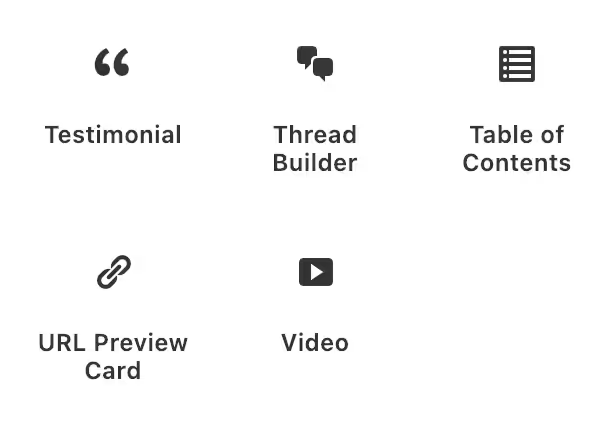
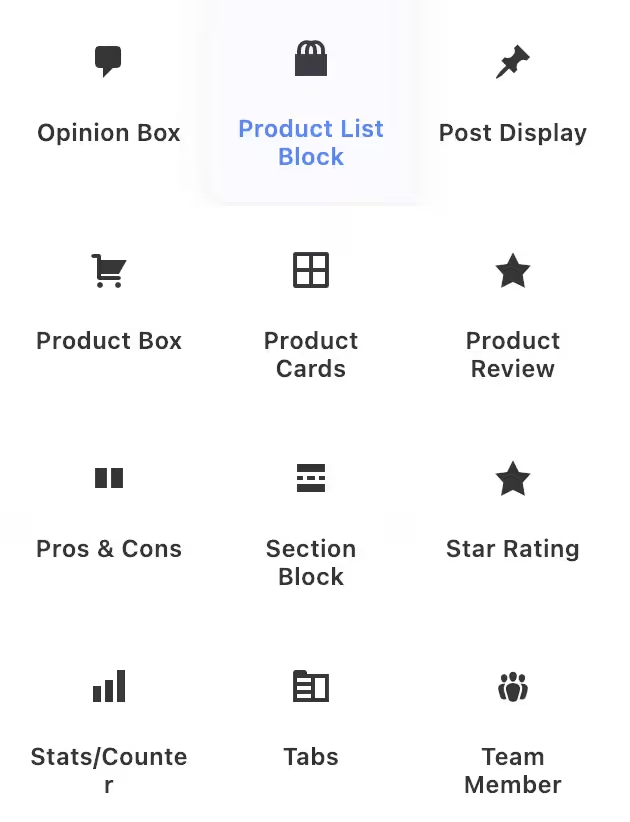
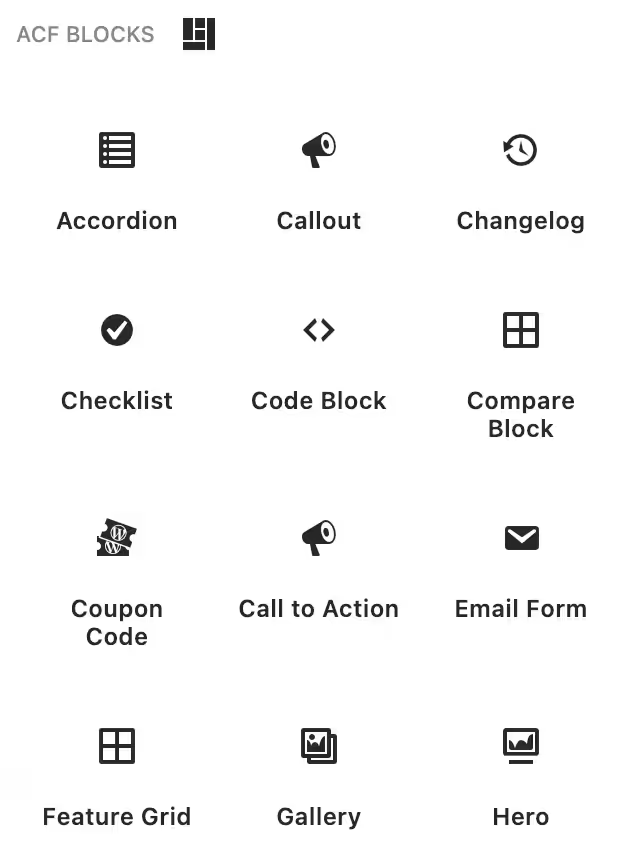
Content & Layout:
- Accordion (native
<details>element, no JavaScript) - Hero sections with configurable backgrounds
- Feature Grid with icon support
- Tabs with accessible markup
- Callout boxes with multiple style presets
- Opinion Box for editorial content
Media & Embeds:
- Video block with lazy loading
- Gallery with lightbox integration
- URL Preview (fetches Open Graph data)
E-commerce & Affiliate:
- Product Cards with schema markup
- Product Box for single product features
- Product Review with
AggregateRatingschema - Coupon Code with copy-to-clipboard
- Comparison tables
Social Proof:
- Testimonial with
Reviewschema - Team Member cards
- Star Rating (outputs valid schema)
Conversion:
- CTA sections with A/B test support
- Email capture forms
Data Display:
- Stats counters
- Pros & Cons lists
- Code Block with syntax highlighting
- Table of Contents (auto-generated from headings)
Each block uses ACF’s Block v3 API with automatic field registration. Example structure for a testimonial block:
// block.json
{
    "name": "acf/testimonial",
    "title": "Testimonial",
    "category": "theme",
    "acf": {
        "mode": "preview",
        "renderTemplate": "blocks/testimonial/render.php"
    },
    "supports": {
        "align": ["wide", "full"],
        "jsx": true
    }
}
The render template outputs semantic HTML. The ACF fields provide a form interface. Clients fill in “Quote,” “Author Name,” “Company,” “Photo” fields. They don’t drag boxes around. The output is controlled, consistent, and fast.
The above code block that you are seeing is also an ACF Block.
Tangible Loops & Logic: Dynamic Templates Without PHP

For dynamic content that queries the database, I use Tangible Loops & Logic. It’s an HTML-based templating language that runs inside the block editor. No PHP files to edit. No theme modifications. Just markup that queries and displays content dynamically.
The template syntax:
<Loop type=post post_type=testimonial count=6 orderby=date order=DESC>
  <article class="testimonial-card box block-single">
    <blockquote class="mb-half">
      <Field content />
    </blockquote>
    <footer>
      <If field=author_photo>
        <img src="{Field author_photo url}" alt="{Field author_name}" class="avatar">
      </If>
      <cite><Field author_name /></cite>
      <span class="company"><Field author_company /></span>
    </footer>
  </article>
</Loop>
This queries testimonials, loops through results, and outputs styled HTML. The <Field> tags pull ACF field values. The <If> tags handle conditional logic. My MD framework classes (box, block-single, avatar) style the output.
What it can query:
- Posts, pages, any custom post type
- Users and user meta
- Taxonomy terms
- ACF fields including repeaters and flexible content
- Menu structures
- Site options and URL parameters
Why this fits my workflow:
The Template block drops into the block editor like any other block. I write the loop markup with my CSS framework classes. Dynamic content renders without touching the theme’s PHP files. It bridges static blocks and dynamic templates.
Real implementations:
- My Tangible template examples showing practical use cases
- Related posts sections querying by category
- Team member grids from a custom post type
- Pricing tables with ACF repeater data
- Dynamic navigation from menu structures
- Recent posts with custom layouts
The syntax is readable. The output is clean HTML. No page builder lock-in. Templates are portable because they’re just markup with query logic.
Block Patterns for Reusable Layouts
Block patterns are pre-built block configurations that clients can insert and customize. I use register_block_pattern() for complex layouts:
register_block_pattern(
    'theme/hero-cta',
    array(
        'title'       => 'Hero with CTA',
        'description' => 'Full-width hero section with heading, text, and button',
        'categories'  => array( 'featured', 'hero' ),
        'keywords'    => array( 'hero', 'banner', 'cta' ),
        'blockTypes'  => array( 'core/group' ),
        'content'     => '<!-- wp:group {"align":"full","className":"hero-section"} -->
            <div class="wp-block-group alignfull hero-section">
                <!-- wp:heading {"level":1} --><h1>Headline Here</h1><!-- /wp:heading -->
                <!-- wp:paragraph --><p>Supporting text goes here.</p><!-- /wp:paragraph -->
                <!-- wp:buttons -->
                <div class="wp-block-buttons">
                    <!-- wp:button --><div class="wp-block-button"><a class="wp-block-button__link">Get Started</a></div><!-- /wp:button -->
                </div>
                <!-- /wp:buttons -->
            </div>
            <!-- /wp:group -->',
    )
);
Patterns are static block markup. No JavaScript. No PHP execution on render. The client inserts the pattern, edits the text, done. Same ease as page builder templates, zero runtime cost.
The MD Theme CSS Framework
The MD theme ships with a 3,200+ line utility-first CSS framework that integrates seamlessly with the block editor. MD_dropins loads these styles in both the frontend and editor via enqueue_block_editor_assets, so every utility class works identically in both contexts.
CSS variables for everything:
:root {
    /* Layout widths */
    --site-width: 1366px;
    --content-width: 850px;
    /* Colors */
    --color-primary: #C0392B;
    --color-secondary: #262A5D;
    --color-text: #212121;
    --color-bg: #FFFFFC;
    --color-border: #DDDDDD;
    /* Typography */
    --font-body: -apple-system, BlinkMacSystemFont, Inter, "Segoe UI"...;
    --font-head: GTReallySans, Inter...;
    --fs-base: 1.1875rem;
    --fs-xl: 1.5625rem;
    --fs-2xl: 2rem;
    --fs-3xl: 2.75rem;
    --fs-4xl: 4.625rem;
    /* Spacing scale */
    --space-half: 0.9375rem;
    --space-single: 1.875rem;
    --space-mid: 2.8125rem;
    --space-double: 3.75rem;
    --space-triple: 5.625rem;
    --space-quad: 7.5rem;
    /* Shadows */
    --shadow: 0 2px 8px rgba(0, 0, 0, 0.1);
    --shadow-md: 0 4px 16px rgba(0, 0, 0, 0.12);
    --shadow-lg: 0 8px 32px rgba(0, 0, 0, 0.15);
    /* Border radius */
    --radius-m: 0.5rem;
    --radius-l: 0.75rem;
    --radius-xl: 1rem;
    /* Transitions */
    --transition: 0.2s ease;
}
Grid system that works with blocks:
<!-- Equal columns -->
<div class="columns-3 columns-gap-mid">
    <div class="col">Column 1</div>
    <div class="col">Column 2</div>
    <div class="col">Column 3</div>
</div>
<!-- Asymmetric layouts -->
<div class="columns-40-60 columns-align-center columns-gap-double">
    <div class="col">40% width</div>
    <div class="col">60% width</div>
</div>
The grid system uses CSS Grid under the hood with grid-template-columns: repeat(N, 1fr). It’s responsive by default: 3+ column layouts collapse to 2 columns on tablet, single column on mobile.
Spacing utilities:
<!-- Block padding -->
<div class="block-single">1.875rem padding all sides</div>
<div class="block-double-tb">3.75rem top & bottom only</div>
<!-- Margins -->
<div class="mb-single">1.875rem bottom margin</div>
<div class="mt-double">3.75rem top margin</div>
Typography classes:
<h1 class="huge-title">4.625rem, 900 weight</h1>
<h2 class="main-title text-sep">With underline accent</h2>
<p class="intro">Larger intro paragraph</p>
Component classes:
<div class="box block-single shadow">Card with shadow</div>
<ul class="list-check">Checkmark list</ul>
<a href="#" class="button button-large button-arrow">CTA with arrow</a>
<span class="badge badge-primary">Badge</span>
The key is that all these classes work in the block editor because I load the same CSS via enqueue_block_editor_assets. When I add a Group block and give it class="columns-3 columns-gap-mid", I see the three-column grid immediately in the editor. No preview needed.
How it integrates with block patterns:
register_block_pattern(
    'theme/feature-grid',
    array(
        'title'   => 'Feature Grid',
        'content' => '<!-- wp:group {"className":"block-double"} -->
            <div class="wp-block-group block-double">
                <!-- wp:heading {"className":"main-title text-center text-sep mb-double"} -->
                <h2 class="main-title text-center text-sep mb-double">Features</h2>
                <!-- /wp:heading -->
                <!-- wp:group {"className":"columns-3 columns-gap-mid"} -->
                <div class="wp-block-group columns-3 columns-gap-mid">
                    <!-- wp:group {"className":"col box block-single text-center"} -->
                    <div class="wp-block-group col box block-single text-center">
                        <!-- wp:heading {"level":3,"className":"med-title mb-half"} -->
                        <h3 class="med-title mb-half">Feature Title</h3>
                        <!-- /wp:heading -->
                        <!-- wp:paragraph -->
                        <p>Feature description here.</p>
                        <!-- /wp:paragraph -->
                    </div>
                    <!-- /wp:group -->
                </div>
                <!-- /wp:group -->
            </div>
            <!-- /wp:group -->',
    )
);
The pattern uses MD framework classes. Client inserts it, edits the text, sees the styled result immediately. No page builder needed.
Theme Customizations
Beyond blocks, I use hooks for theme-level customization:
Removing unnecessary assets:
// Remove block library theme styles if using custom
add_action( 'wp_enqueue_scripts', function() {
    wp_dequeue_style( 'wp-block-library-theme' );
}, 100 );
// Remove global styles if managing manually
add_action( 'wp_enqueue_scripts', function() {
    wp_dequeue_style( 'global-styles' );
}, 100 );
Currently, I am not removing global-styles as it is rendered from my theme.json, which is kinda the customizer for the Block Editor. See my theme.json here.
Custom render callbacks:
// Modify core block output
add_filter( 'render_block_core/image', function( $content, $block ) {
    // Add lazy loading, custom classes, etc.
    return $content;
}, 10, 2 );
Block variations via PHP:
// Register block variations server-side
add_filter( 'get_block_type_metadata', function( $metadata ) {
    if ( 'core/group' === $metadata['name'] ) {
        $metadata['variations'] = array_merge(
            $metadata['variations'] ?? array(),
            array(
                array(
                    'name'  => 'card-group',
                    'title' => 'Card Group',
                    'attributes' => array(
                        'className' => 'is-style-card',
                    ),
                ),
            )
        );
    }
    return $metadata;
});
Client Editing: Controlled Flexibility
Instead of page builder’s “everything is possible” approach, I provide curated options:
- Block patterns: Pre-built layouts clients insert and customize
- Block styles: Design variations via dropdown, not sliders
- ACF blocks: Form-based editing with labeled fields
- Locked templates: Page templates with fixed structure, editable content
- Allowed blocks: Per-post-type block restrictions
// Restrict blocks for a custom post type
add_filter( 'allowed_block_types_all', function( $allowed, $context ) {
    if ( 'testimonials' === $context->post->post_type ) {
        return array(
            'core/paragraph',
            'core/image',
            'acf/testimonial',
        );
    }
    return $allowed;
}, 10, 2 );
Clients get exactly the tools they need. Nothing more. Fewer options means fewer mistakes and faster editing. This is generally not needed, as I train my clients well on how to use the backend.
Want to Follow My Workflow?
- Read the Block Editor Handbook
- Understand theme.json configuration
- Register your first block styles with
register_block_style() - Create block patterns for common layouts
- Set up
enqueue_block_editor_assetsfor editor CSS - Explore
allowed_block_types_allfor client restrictions - Build your first ACF block
- Use
@wordpress/create-blockfor JavaScript blocks - Learn the
render_blockfilter for output modification - Build a CSS framework or adopt one
- Create a pattern library for your common needs
- Document your system for team use
The WordPress developer resources are comprehensive. The best WordPress blogs cover advanced techniques. Two weeks of focused learning replace years of page builder dependency.
Common Questions About This Approach
Here is what clients and developers generally ask me.
“Can clients still edit their sites?”
Yes, often more easily. The block editor is intuitive. Patterns give them professional layouts to insert. Block styles appear as dropdown options. ACF blocks present form fields with clear labels. I use the allowed_block_types_all filter to show only relevant blocks per post type.
“Is the block editor truly WYSIWYG?”
It is close enough. With shared CSS via enqueue_block_editor_assets, editor and frontend render identically. I preview occasionally for complex layouts, but rarely see surprises.
“Does building take longer?”
Initially, yes. After the learning curve, I’m faster. No waiting for builder interfaces. No hunting through widget libraries. Once you have patterns and block styles built, new pages come together quickly.
“What about complex animations?”
CSS handles most animations now. For scroll-triggered effects, lightweight libraries like GSAP and WordPress Interactivity API work well. One 5KB script beats 300KB of page builder framework.
“What about accessibility?”
The block editor outputs semantic HTML by default. Core blocks follow WordPress accessibility standards. The best accessibility plugins for WordPress complement this foundation.
What I Miss (And Don’t)
Being honest about tradeoffs.
What I occasionally miss:
- Complex scroll-triggered animations (CSS
@scroll-timelineis coming, but not production-ready) - Visual mega menu builders (my custom-coded theme handles this, though.)
That’s the complete list. The gaps have essentially closed:
- Pre-built widget libraries? My 28+ ACF blocks cover testimonials, CTAs, product boxes, accordions, tabs, comparison tables, and more.
- Absolute positioning? GenerateBlocks Pro has full positioning controls with CSS Grid and Flexbox.
- Design variations? 50+ registered block styles give clients design options via dropdown.
- Visual editing?
enqueue_block_editor_assetshook loads identical CSS in editor and frontend.
What I don’t miss at all:
- Performance debugging with no solution
- Update anxiety and regression testing
- Vendor lock-in and migration nightmares
- 300KB+ of JavaScript executing on every page
- Plugin conflicts from builder ecosystem dependencies
- DOM bloat (800+ elements for simple layouts)
- Client calls about broken layouts after accidental edits
The things I miss are edge cases with workarounds. The things I don’t miss were fundamental problems with no solutions. That’s an easy trade.
Results After Two Years
Measurable improvements across the board.
Site performance:
- Average PageSpeed mobile: 48 → 92 (Core Web Vitals passing consistently)
- Average page weight: 1.8MB → 340KB
- Performance complaints: Essentially eliminated
Project efficiency:
- Debugging time: Down 60% (cleaner code, fewer dependencies)
- Maintenance time: Down 40% (fewer plugin conflicts)
- Pattern reuse: 70% of new pages use existing patterns
Client satisfaction:
- “My site is fast” comments: Regular feedback now
- Support requests: Down significantly
- Editing confidence: Clients feel comfortable making changes
Professional development:
- WordPress core understanding: Much deeper
- Code quality: Follows WordPress coding standards
- Skills: Transferable to any WordPress project
When Page Builders Still Make Sense
I’m not dogmatic. There are legitimate use cases.
Valid scenarios:
- Rapid prototyping: Build a quick mockup, then rebuild properly for production
- DIY site owners: People who won’t hire developers and need visual drag-and-drop
- Specific features: Some builders have unique widgets not easily replicated
- Existing investment: Clients with hundreds of pages in Elementor or Divi
The honest calculation: If someone understands the 300KB+ JavaScript overhead and 800+ DOM element tradeoff and still prefers page builders, that’s a valid choice. I explain the performance cost, show the data, and let them decide. My decade-old experience with WordPress page builders informs how I present these tradeoffs, but now the page builders (like Bricks) are getting way better, faster and more compatible WordPress’ core.
Building Your Own Block Editor Workflow
If you want to adopt this approach.
Start with one project: Don’t migrate everything at once. Pick your next new project and build it with blocks. Learn in a low-pressure environment.
Master the fundamentals:
- Block Editor Handbook for core concepts
- theme.json documentation for configuration
- Full Site Editing for modern theme development
Build your pattern library: Every pattern you create speeds up future projects. Start with hero sections, feature grids, CTAs, testimonials. Your pattern library becomes a competitive advantage.
Create your block styles: Register styles for the blocks you use most. Paragraphs with callout variations. Headings with accent styles. Lists with custom icons. This takes hours to set up, then saves time forever.
Consider the tooling:
- GenerateBlocks for advanced layouts
- ACF Pro for custom blocks
- A lightweight theme like GeneratePress
The initial investment pays off quickly. Within a month, you’ll reach parity with page builder speed. Within three months, you’ll be faster.
The Long-Term View
Looking at projects over time reveals clear patterns.
Block-based projects age well: Sites I built with blocks two years ago still work perfectly. WordPress updates don’t break layouts. Theme changes preserve content. The WordPress.com vs WordPress.org distinction matters less because blocks are portable.
Page builder projects require rebuilds: Many page builder sites from 5+ years ago have been rebuilt or abandoned. Lock-in forced complete rebuilds when clients wanted changes. Technology churn consumed budgets.
The maintenance trajectory: Block-based sites get easier to maintain over time. Fewer dependencies. Simpler debugging. Predictable behavior. WordPress core improvements benefit your sites automatically. The Gutenberg GitHub repository shows the pace of improvement.
Talking to Clients About This Approach
How I explain the technical choices.
The conversation: “I build with the WordPress block editor instead of page builders. Your site will load faster, pass Core Web Vitals, and be easier to maintain. You’ll have full editing capability without the complexity of a page builder interface. The content stays portable if you ever change developers or themes.”
What clients actually care about:
- Speed (show them PageSpeed scores)
- Cost (lower maintenance = lower ongoing costs)
- Control (they can edit without breaking things)
- Future-proofing (content isn’t locked to one vendor)
What I demonstrate: Side-by-side comparisons. PageSpeed scores. The editing experience. Total cost of ownership over three years. Data makes the case better than technical explanations.
The Broader Industry Movement
This approach is becoming mainstream.
- Enterprise WordPress leads the way: WordPress VIP and enterprise platforms discourage or prohibit page builders. Performance requirements exclude builder overhead. Enterprise clients need sites that pass Core Web Vitals.
- Gutenberg matures rapidly: Full Site Editing works. Block themes are production-ready. The Interactivity API brings dynamic functionality. Each WordPress release closes more gaps.
- SEO requires performance: Google’s Core Web Vitals emphasis has consequences. Page builder sites struggle to pass. Clients who care about rankings can’t afford builder overhead. The best WordPress SEO plugins can’t compensate for slow page loads.
- Community adoption grows: The WordPress developer community increasingly favors blocks. The WordPress Slack channels show growing block expertise. More agencies are making the switch.
For Developers Considering This Approach
Practical advice for making the transition.
Start with one project. Build your next new project with blocks. Experience the workflow in a low-stakes environment before committing fully.
Expect a learning curve. Your first block-based projects will take longer. By project five, you’ll reach parity. By project ten, you’ll be faster than before.
Build your toolkit:
- Custom block styles for your common design variations
- Pattern library for layouts you use repeatedly
- ACF blocks for content types clients need
- CSS framework (build your own or use GenerateBlocks)
Resources to bookmark:
- Block Editor Handbook
- WordPress Theme Handbook
- ACF Documentation
- Tangible Loops & Logic Docs
- Make WordPress Core Blog
Join the community: WordPress Slack has active channels for block development. The Gutenberg GitHub discussions are valuable. You’re not figuring this out alone.
The transition requires effort. But faster sites, happier clients, and more sustainable work make it worthwhile. Avoiding WordPress plugin bloat starts with choosing the right foundation. For more, see my all the plugins I recommend.
Disclaimer: This site is reader-supported. If you buy through some links, I may earn a small commission at no extra cost to you. I only recommend tools I trust and would use myself. Your support helps keep gauravtiwari.org free and focused on real-world advice. Thanks. - Gaurav Tiwari