
WordPress Abilities and MCP
Core Tables registers 11 WordPress abilities. AI clients that speak MCP can use them, through the official WordPress MCP Adapter, to read tables, save drafts and publish.
Nothing is exposed to MCP until an administrator switches it on. Each ability also checks the user’s permissions on every call.
The Abilities
They live in the core-tables category, “Create and publish reusable WordPress datasets.”
| Ability | What it does | Type | Who can use it |
|---|---|---|---|
core-tables/list-published | List published tables | read | Any logged-in user |
core-tables/query-published | Query a published table, with search, sort and pages of up to 100 rows | read | Any logged-in user |
core-tables/get-draft | Get a dataset draft | read | The dataset’s owner or an administrator |
core-tables/create-draft | Create a dataset draft | write | Users with edit_core_tables |
core-tables/save-draft | Save a dataset draft, with expected_version | write | Users who can edit the dataset |
core-tables/publish | Publish a dataset revision | write | Users who can edit it and have publish_core_tables |
core-tables/create-table | Create a table from rows or pasted content | write | Users with edit_core_tables |
core-tables/export | Export a dataset draft | read | Users who can edit it and have export_core_tables |
core-tables/embed-code | Get block markup and a shortcode for a published table | read | Users with edit_posts |
core-tables/list-import-sources | List tables in other table plugins | read | Administrators |
core-tables/import-from-plugin | Import a table from another plugin | write | Administrators |
6 are read abilities and 5 write. create-table saves a draft only; it has no publish option. publish is marked destructive, because it changes every embed that uses the dataset.
The 2 published-data abilities need only the basic read capability, so any logged-in user, subscribers included, can call them. They return published public columns only, the same data visitors already see.
AI & MCP Settings
Go to Core Tables and open the AI & MCP tab. Only administrators see it.
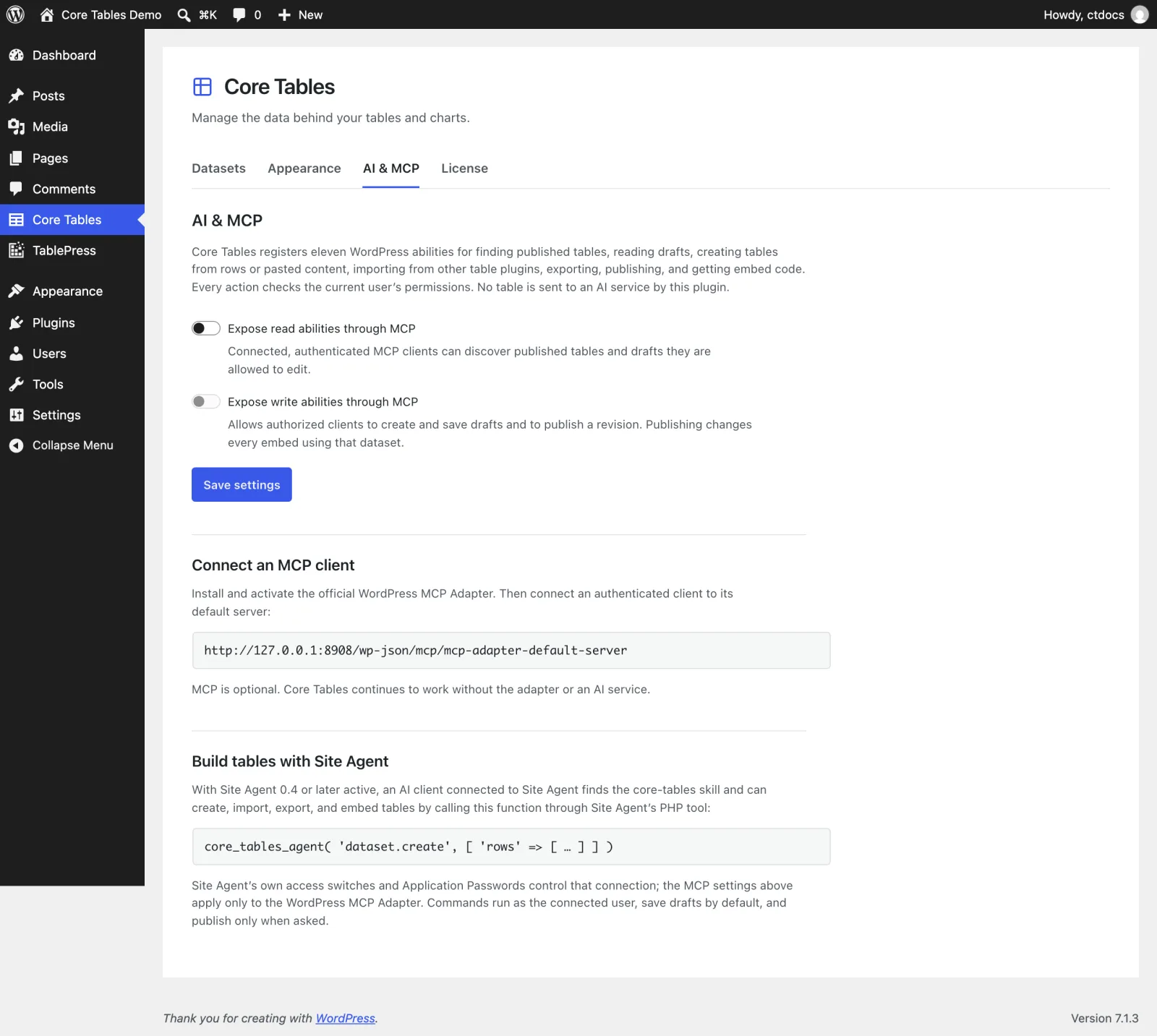
| Setting | Default | What it does |
|---|---|---|
| Expose read abilities through MCP | off | “Connected, authenticated MCP clients can discover published tables and drafts they are allowed to edit.” |
| Expose write abilities through MCP | off | “Allows authorized clients to create and save drafts and to publish a revision. Publishing changes every embed using that dataset.” |
Write needs read, so the write switch stays disabled until read is on. Select Save settings to apply them.
What the Switches Control
The switches decide which abilities the WordPress MCP Adapter shows to MCP clients. They don’t unregister the abilities. All 11 stay available through the WordPress Abilities REST API to logged-in users with the right capability, whatever the switches say.
Connect an MCP Client
- Install and activate the official WordPress MCP Adapter plugin.
- On the AI & MCP tab, turn on Expose read abilities through MCP, and write as well if you want the client to save drafts.
- Point your MCP client at the endpoint shown under Connect an MCP client. It looks like
https://example.com/wp-json/mcp/mcp-adapter-default-server. - Sign the client in as a WordPress user with the access it needs, usually with an Application Password.
The client acts as that user. An editor’s connection can only read drafts and publish datasets that editor owns.
Site Agent Is Separate
The Build tables with Site Agent section on the same tab explains the other route. Site Agent’s own switches and Application Passwords control that connection. The MCP switches here apply only to the WordPress MCP Adapter.
Core Tables doesn’t send anything to an AI service by itself. The commands Site Agent uses are listed in Build Tables with Site Agent, and the REST routes behind both are in the REST API Reference.
For a step-by-step walkthrough, see How to Let AI Build Your Tables with Site Agent.