
 by
by
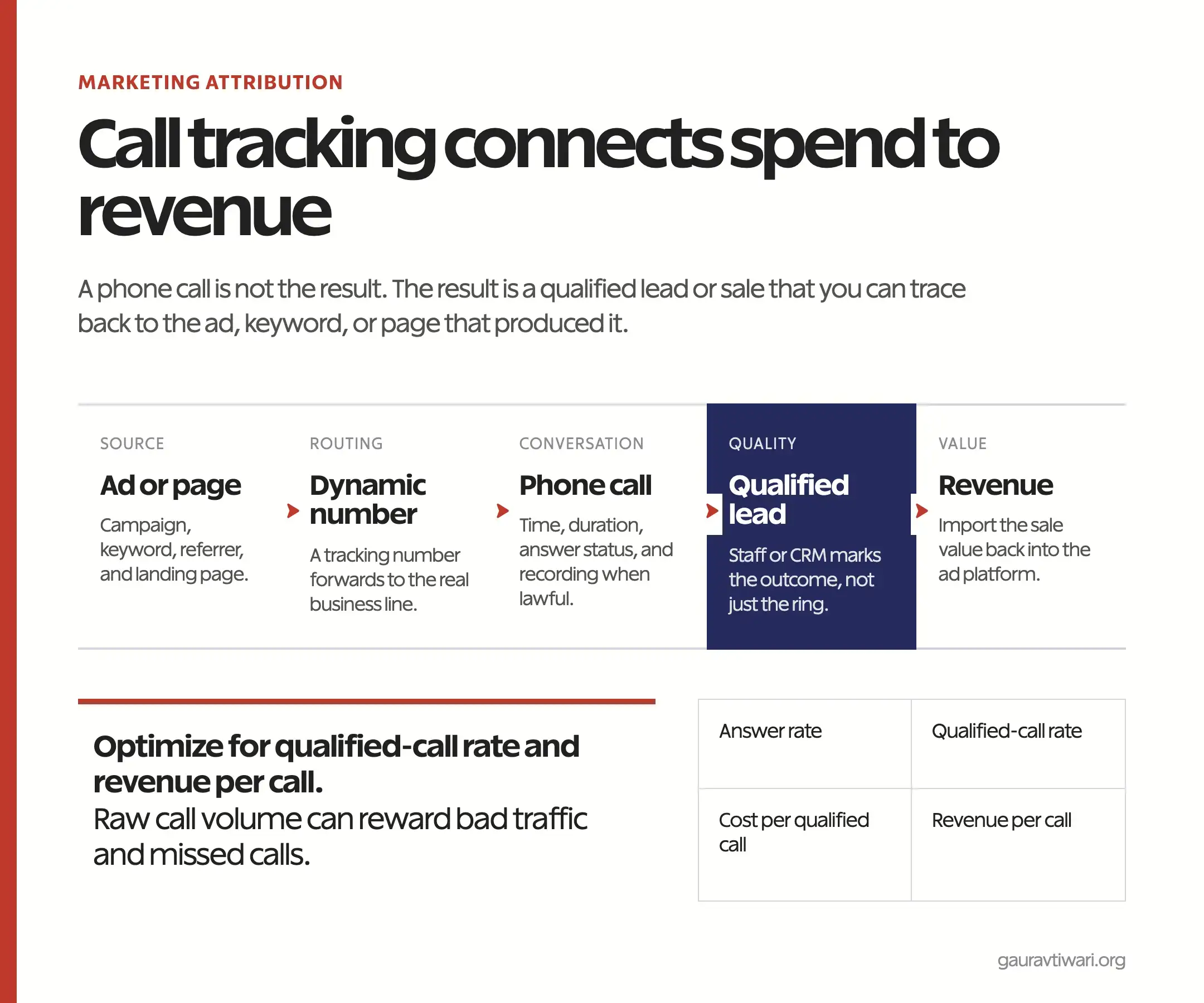
Call tracking for business only becomes useful when it connects a phone conversation to a marketing source and a business outcome. Counting rings is easy. Knowing which keyword produced a qualified lead, which team answered it, and whether the lead became revenue is the part that changes budget decisions.
For local services, healthcare, legal, education, and high-consideration sales, calls can carry more intent than a form submission. But the setup needs clear attribution, a CRM outcome, and privacy rules that match where you operate.

What is call tracking for business?
Call tracking assigns a measurable phone number to an ad, campaign, keyword, page, or visitor session, then forwards the call to your normal business line. The caller reaches the same team, while the tracking system records the source and basic call data.
The number is only the routing layer. The useful record joins source data with answer status, call duration, lead quality, CRM stage, and revenue. This is why call tracking belongs beside marketing analytics tools, not in a separate phone-reporting silo.
How does call tracking work?
A tracking provider owns or provisions phone numbers and forwards them to your main line. When someone calls, the provider stores the mapping between that number and its source. Dynamic number insertion, often shortened to DNI, can swap the number shown on a web page based on the visitor’s campaign or session.
Static campaign numbers
A static number is tied to one source: a billboard, print ad, directory listing, Google Business Profile, or a specific campaign. It is simple and durable, but it cannot explain which keyword or landing-page session produced the call.
Dynamic number insertion
DNI uses a pool of numbers and displays one based on the visitor’s source or session. The system can then connect the call to UTM parameters, Google Ads click data, the landing page, and the pages viewed before the call. The number pool must be large enough for your simultaneous traffic, or one visitor can inherit another visitor’s attribution.
Offline conversion import
The strongest setup sends a qualified lead or sale back to Google Ads or another platform. Google’s official phone call conversion import connects calls to later outcomes stored in a CRM. This lets bidding learn from valuable calls instead of every call over an arbitrary duration.
Which call tracking setup should you use?
Choose the lightest setup that answers the budget question in front of you. A small business testing two offline campaigns may need two numbers. A multi-location advertiser running paid search needs DNI, keyword data, CRM outcomes, and a quality-control process.
| Setup | What it attributes | Best fit | Main limitation |
|---|---|---|---|
| One static number per campaign | Campaign or channel | Print, radio, directory, simple tests | No visitor or keyword detail |
| DNI by source | Channel, campaign, referrer | Small and mid-size lead generation | Needs correct UTM and number-pool rules |
| DNI by session | Visitor path, keyword, landing page | Paid search and multi-page journeys | More cost and implementation work |
| CRM plus conversion import | Source through sale and revenue | Teams optimizing for profit | Fails if staff don’t record outcomes |
Set up call tracking without breaking attribution
Start with a measurement plan, not a software trial. Decide which sources need distinct numbers, what counts as a qualified call, who records the outcome, and where revenue will live. Then set up routing, analytics, and CRM fields around those decisions.
- Define the conversion. A connected call is not automatically a lead. Write the qualifying rule before launch.
- Keep the real business number. Tracking numbers should forward to it, and your permanent number should remain consistent in core business listings unless the platform supports tracking safely.
- Preserve campaign data. Capture UTMs, landing page, click ID, and session identifiers before they disappear.
- Test every route. Call from mobile and desktop, after consent choices, and outside office hours.
- Send outcomes to the CRM. Use a controlled status list such as qualified, booked, sold, support, spam, and missed.
- Reconcile revenue. Compare the call platform, CRM, and ad platform rather than assuming all three will match.
Google Ads can track calls from ads, calls to a number on a website, mobile click-to-call actions, and imported calls. Its phone call conversion documentation also makes an important distinction: some actions measure a click or estimated meaningful call, while imported conversions can represent the sale or lead outcome you define.
GA4’s Measurement Protocol can send a server-side call outcome to Analytics and attach it to prior session attribution when the required identifiers are present. Google’s Measurement Protocol guide notes that `session_id` is needed to connect those events with previous session data. Without that connection, offline events can appear as unattributed traffic.
The call tracking metrics that matter
The best call tracking metrics measure access, quality, cost, and value. Raw volume is useful for staffing, but it is a weak marketing goal because spam, support calls, and wrong numbers can all make the chart rise.
| Metric | Formula | Decision it supports |
|---|---|---|
| Answer rate | Answered calls ÷ inbound calls | Staffing, routing, office hours |
| Qualified-call rate | Qualified calls ÷ answered calls | Traffic and sales quality |
| Cost per qualified call | Campaign spend ÷ qualified calls | Campaign budget |
| Booking or close rate | Booked or won calls ÷ qualified calls | Sales process |
| Revenue per call | Attributed revenue ÷ inbound calls | Channel value |
| Missed-call recovery rate | Recovered missed calls ÷ missed calls | Follow-up operations |
Call duration is a diagnostic metric, not a universal quality score. A 90-second emergency plumbing call may be valuable, while a 12-minute support call may create no new revenue. Use historical outcomes to set thresholds, then let the CRM outcome overrule the timer.
A practical attribution example
Suppose a campaign spends ₹60,000 and produces 120 calls. The headline cost per call is ₹500. But 30 calls go unanswered, 20 are spam or support, and 35 are unqualified. That leaves 35 qualified calls, so the cost per qualified call is about ₹1,714.
If 10 of those calls become customers worth ₹18,000 in gross revenue each, the campaign produced ₹180,000 in attributed revenue. The operational lesson is bigger than the ROI number: recovering ten missed calls or improving qualification may be cheaper than buying more traffic. A small-business CRM is what makes that outcome analysis repeatable.
Privacy, consent, and call recording
Call tracking and call recording are different. You can attribute a call without recording the conversation. Recording adds voice data, notice and consent questions, retention rules, access controls, and sometimes sensitive personal information.
Laws and platform policies vary by country, state, industry, and the locations of both participants. Tell callers what is collected, get consent where required, restrict access, set a retention period, and involve legal counsel for regulated or multi-jurisdiction use. Google also requires clear information about data collection and consent where law or its policies require it.
Don’t enable recording because a vendor turned it on by default. Decide whether recordings are necessary for the stated purpose, then document access and deletion. Attribution rarely requires keeping every conversation forever.
When call tracking is worth it
Call tracking is worth the work when calls are a material lead channel and campaign choices change based on call quality. It is especially useful for local services, legal and professional services, admissions, property, automotive, healthcare, and other businesses where one qualified call can justify meaningful ad spend.
- Use it when multiple campaigns send calls to one team.
- Use it when the CRM can record qualified, booked, and sold outcomes.
- Use it when missed calls are expensive enough to manage.
- Skip complex DNI when calls are rare or one source already explains nearly all of them.
- Skip recording when attribution alone answers the business question.
If you need the full measurement stack built and reconciled, the analytics and tracking service covers GA4, conversion tracking, dashboards, and attribution rather than leaving another unowned report in the tool stack.
Frequently asked questions
What is call tracking for business?
Call tracking connects phone calls to marketing sources such as ads, campaigns, keywords, landing pages, or visitor sessions. Strong setups also attach lead quality, CRM stage, and revenue.
Does call tracking change my business phone number?
Customers may see a tracking number, but it forwards to your normal line. Keep your permanent number consistent in core business listings unless a platform supports tracking numbers safely.
What call tracking metrics should a small business track?
Start with answer rate, qualified-call rate, cost per qualified call, booking or close rate, revenue per call, and missed-call recovery rate.
Can GA4 track phone calls?
GA4 can record click-to-call events on a website. Actual call outcomes usually come from a call platform or CRM and can be sent to GA4 through an integration or Measurement Protocol.
Is call recording required for call tracking?
No. Source attribution, duration, answer status, and CRM outcomes can be measured without recording the conversation. Recording creates additional privacy and compliance duties.
How many tracking numbers do I need?
Static campaigns need at least one number per source you want to separate. Session-level DNI needs a pool sized for concurrent tracked visitors, plus a safety margin defined by the provider.
Measure the outcome, not the ring
A call report earns its place when it changes a budget, staffing decision, or sales process. Track the source, connect the call to a qualified outcome, attach revenue, and review missed calls. Everything else is a phone log with better branding.
Tell Google you want more of this.
Add Gaurav Tiwari as a preferred sourceOne tap, and this site shows up more often in your own Top Stories, AI Overviews and AI Mode. Remove it any time.