
 by
by
Why should you use a VPN? Use one when you need an encrypted tunnel across a network you do not trust, want to replace your ISP-assigned public IP at the destination, or must reach a private work resource. Do not use one as a substitute for HTTPS, MFA, malware protection, careful browsing, or anonymity.
A VPN solves a specific routing and trust problem. Your ISP or Wi-Fi operator stops being the party that can directly observe your destination traffic in a normal full-tunnel setup, but the VPN provider becomes a powerful intermediary. The decision is not privacy versus no privacy. It is which party you trust, what the tunnel covers, and what performance cost you accept.
The short version: A reputable VPN is useful on untrusted Wi-Fi, for remote access, and when hiding your original public IP or changing egress location has a clear purpose. It will not stop a logged-in service from recognizing you, erase cookies, hide GPS, block every scam, or guarantee access to a streaming library. The measured test below shows both the privacy-state change and the speed tradeoff.
The practical standard is testable: confirm tunnel state, egress, DNS path, routing exceptions, failure behavior, and rollback. Then measure speed against a direct baseline on the same device and endpoint. Marketing copy cannot do that work for you.
Why Should You Use a VPN?
A VPN is worth using when it changes a risk you actually have. There are four strong consumer and small-business cases:
- Untrusted network: encrypt device traffic to the VPN server so a local observer cannot read or route it in the same way.
- IP separation: websites see the VPN egress address instead of the public address assigned by your ISP.
- Private access: connect an employee to an internal service without exposing that service directly to the internet.
- Egress location: use a server in another region when the purpose is lawful and compatible with the service’s terms.
The first case applies away from your home or office. The second can matter even on a trusted home network. The third is an enterprise access problem. The fourth is brittle because websites can detect or block VPN ranges.
Your internet service provider, whether that is Airtel or another carrier, still sees that your device connects to a VPN server, plus timing and traffic volume. In a normal full-tunnel setup it no longer sees the final destinations directly, but that visibility moves to the VPN operator. This is a trust transfer, not invisibility.
The FTC guidance on VPN apps makes the trust tradeoff explicit. It cites technical research on nearly 300 VPN apps: some did not encrypt traffic, some requested unexpected permissions, and some shared data with third parties. A VPN app can see a great deal. Choose it with the same care you would choose a network provider.
How a VPN Works
A VPN creates a tunnel between your device and a VPN server. The operating system routes selected traffic into that tunnel. The server sends the traffic onward, so the destination sees the server’s public address.
- Before the tunnel: the local router and ISP carry your traffic.
- Inside the tunnel: traffic is encrypted between your device and VPN endpoint.
- After the endpoint: the VPN server connects to the destination; HTTPS still protects the application session when the site uses it.
- At the destination: accounts, cookies, fingerprints, form entries, and app identifiers can still identify you.
For the test in this guide, Cloudflare’s client architecture documents that WARP can use WireGuard or MASQUE for its encrypted proxy tunnel and DNS-over-HTTPS for DNS queries. The installed client used MASQUE. That describes this environment, not every VPN.
Full Tunnel, Split Tunnel, and the Leak Boundary
The phrase ‘all traffic goes through the VPN’ is only safe after you inspect the route. A full tunnel aims to carry ordinary IP traffic through the VPN. A split tunnel intentionally excludes apps, hosts, or networks. Operating systems also permit exceptions for services that must keep working.
Apple’s VPN routing documentation explains that VPN configurations can include or exclude traffic and that local networking, cellular services, and Apple Push Notification traffic may be treated differently. A connected badge is not proof that every packet follows the same path.
| Check | What success looks like | Common failure |
|---|---|---|
| Tunnel state | Client and independent endpoint report connected | UI says connected but traffic bypasses the tunnel |
| Public egress | Destination sees a different public IP | IPv4 changes but IPv6 remains direct |
| DNS path | Resolver path matches the intended design | Queries still use an ISP or local resolver |
| Split routes | Only documented apps, hosts, and networks bypass | A broad exclusion leaks more traffic than expected |
| Failure behavior | Strict kill switch blocks traffic when required | Tunnel drops and direct traffic resumes |
| Rollback | Documented reconnect or uninstall restores service | Stale routes or DNS settings break connectivity |
Reproducible VPN Test: Direct Connection vs WARP
I tested the tunnel mechanics on one Mac instead of borrowing a provider’s speed chart. Public IP addresses were not stored. The script retained 12-character SHA-256 fingerprints only long enough to verify that egress changed.
| Test input | Value |
|---|---|
| Device | Apple silicon Mac, arm64 |
| Operating system | macOS 27.0 |
| VPN client | Cloudflare WARP CLI 2026.6.880.0 |
| Tunnel protocol | MASQUE |
| Connection | Wi-Fi interface en0 |
| HTTP client | curl 8.7.1 |
| Endpoint | Same Cloudflare trace and 10 MB download URL |
| Sample | 3 latency and 3 download runs per state |
| Run order | Tunnel, direct baseline, reconnect and verify |
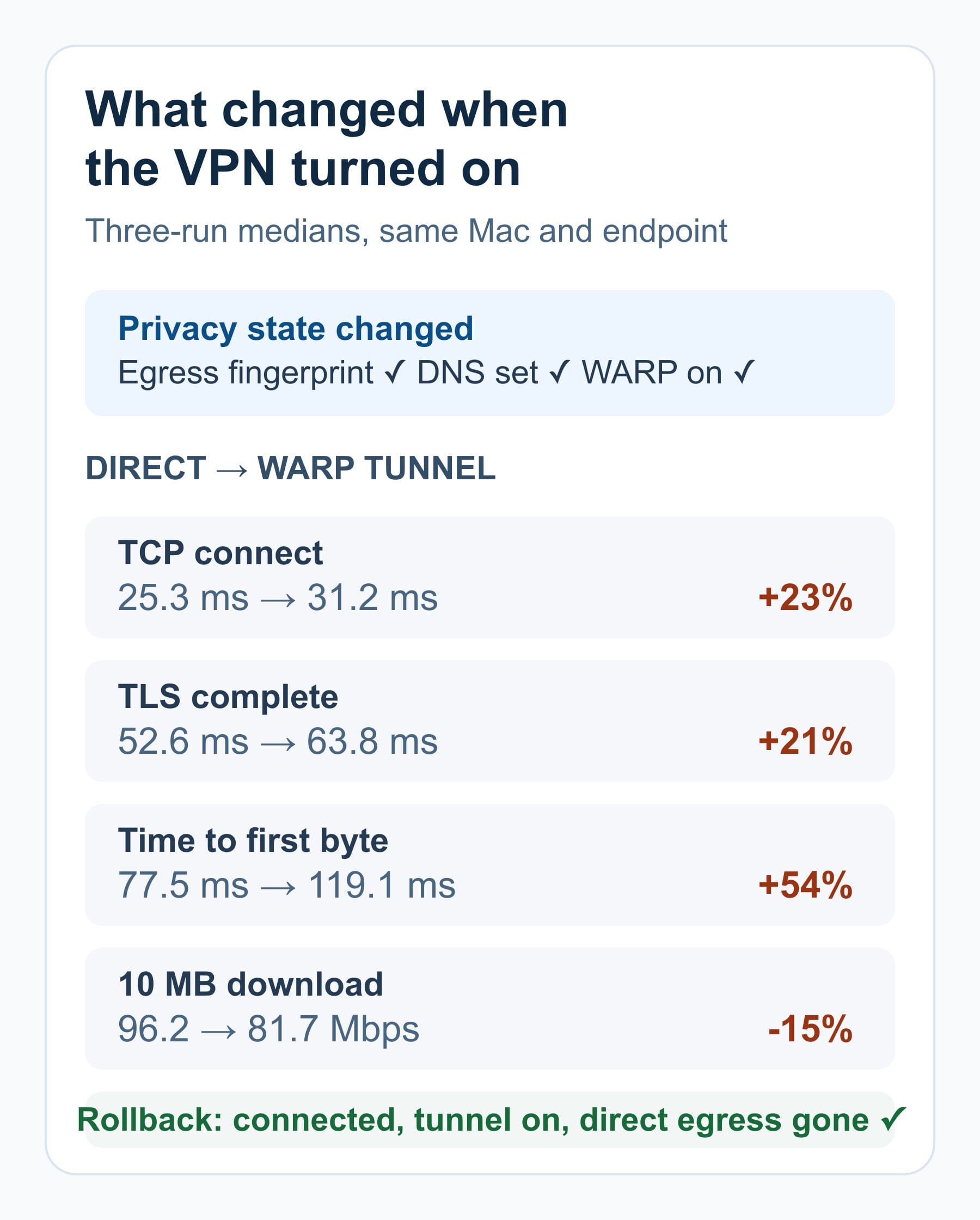
| Metric | Direct baseline | WARP tunnel | Difference |
|---|---|---|---|
| TCP connect | 25.3 ms | 31.2 ms | +23.3% |
| TLS complete | 52.6 ms | 63.8 ms | +21.3% |
| Time to first byte | 77.5 ms | 119.1 ms | +53.7% |
| 10 MB download | 96.2 Mbps | 81.7 Mbps | -15.1% |
What the test proves and what it cannot
- Measured: the tunnel state changed from off to on, the hashed egress changed, and the hashed resolver set changed.
- Measured: this route added latency and reduced throughput in this short sample.
- Failure mode: a manual disconnect returned the Mac to direct internet access. A strict kill switch was not enabled or tested.
- Rollback: the script reconnected WARP in a finally block; CLI status returned Connected, independent trace reported WARP on, and egress no longer matched the direct baseline.
- Not measured: WebRTC leakage, every split route, mobile traffic, a forced daemon crash, streaming access, or provider-side logging.
- Limit: one device, one Wi-Fi connection, one provider, one edge location, fixed run order, and three runs per state cannot rank vendors or predict another network.
The right interpretation is not ‘VPNs cost 15.1% speed.’ It is ‘this tunnel carried the traffic I expected, changed the privacy state, restored cleanly, and had a measurable local cost.’ Repeat the matrix with your provider, nearest server, and normal workload.
When You Actually Need a VPN
A VPN earns its place when it changes the party that can observe or reach something important. It does not earn its place merely because an ad says everyone is being watched.
| Situation | Does it help? | Boundary |
|---|---|---|
| Public Wi-Fi | Usually | Encrypts to the VPN endpoint; still verify the network and use HTTPS |
| Hide original IP from a website | Yes | The site sees VPN egress but can identify your account |
| Keep destinations from the ISP | Usually | ISP still sees the VPN connection, timing, and volume; routing exceptions matter |
| Reach a private work service | Yes | Requires identity, MFA, device posture, and access controls around the tunnel |
| Change apparent region | Sometimes | Services can block VPN addresses; law and terms vary |
| Become anonymous | No | Accounts, cookies, fingerprints, GPS, and payment remain |
| Stop phishing or malware | No, not by itself | Encryption does not prove a site or file is safe |
Location, Streaming, and Content Access
A VPN can make traffic appear to come from another server location. That can help with a lawful access need, but it is not a permanent streaming entitlement. Catalogs, detection, IP ranges, laws, and service terms change.
The existing guides for Crunchyroll, Couchtuner, Stream2Watch, and 9Anime Alternatives address separate service choices. Check the current official availability and terms before acting.
A service such as Hotstar.com may block a VPN range or require the account’s actual service region. A VPN failure here is not proof the tunnel is broken. It may mean the destination rejects that egress address.
What a VPN Does Not Protect You From
This is the section commercial VPN marketing tends to blur. A VPN changes network visibility. It does not remove identity or make unsafe behavior safe.
- Logged-in accounts: Google, Meta, a bank, or a store still knows which account acted.
- Private mode: “private browsing” mainly changes local browser history and storage behavior; it is not a network tunnel.
- Cookies and fingerprints: enabled cookies, device characteristics, and behavior can link sessions.
- Device location: GPS, nearby networks, Bluetooth, and app permissions can reveal location outside the VPN’s IP layer.
- Phishing and malware: a tunnel can deliver a malicious page or file securely.
- Provider trust: the VPN provider can technically observe or log important metadata unless its design, policy, audits, and legal behavior reduce that risk.
For practical security, you should combine a VPN’s protection with other security measures. Use MFA, updates, unique passwords, backups, and powerful antivirus software where it fits the device and threat model.
How to Choose a VPN Provider
A provider comparison should begin with trust and failure behavior, not server count. Ask for evidence you can inspect.
- Ownership and jurisdiction: who operates the service and which law applies?
- Logging: what is collected, for how long, and can an audit or legal case test the claim?
- Audit scope: was it a point-in-time app review, server assessment, policy assurance, or full infrastructure test?
- Client transparency: are apps open source or independently reviewed?
- Routing: does the client support IPv6, DNS protection, split-tunnel visibility, and a strict kill switch?
- Operations: are updates signed, incidents disclosed, and reports published?
- Commercial fit: renewal price, device limit, refund rule, region choice, and support.
Do not treat all zero-cost services as identical. The FTC warning is about incentives and evidence, not a proof that every free service sells data. My Free VPNs guide separates limited reputable tiers from anonymous apps that demand broad trust without proof.
Best VPN Apps I Actually Recommend
These are routing recommendations, not lifetime guarantees. Recheck ownership, audit scope, client version, price, and policy before paying.
- NordVPN: the broad default when you want polished clients and a large commercial network. Its sixth no-logs assurance engagement was a point-in-time Deloitte Lithuania review conducted from 10 November to 12 December 2025. The full report requires an account, which is a transparency limitation.
- Proton VPN: my privacy-first route when published reports and open-source clients matter. Proton’s fifth annual no-logs audit was published in 2026, and the provider makes the underlying report public. Its free plan is the important counterexample to the claim that every free VPN must monetize traffic.
- Surfshark: the household-value route because one subscription supports unlimited simultaneous devices. Its 2025 ISAE 3000 report covers the described no-logs system as of 10 June 2025. Point-in-time assurance still needs current operational trust.
For a broader shortlist, compare my best free VPN services guide with the full best VPN services roundup. Use the test matrix above after installation; a recommendation cannot verify your local route.
VPNs for Remote Work and Business Access
A consumer VPN sends traffic to a provider’s egress server. An enterprise remote-access system connects an authorized person or device to private business resources. Treating them as the same product creates bad security decisions.
CISA’s network-access guidance warns about vulnerabilities and misconfiguration in traditional remote-access and VPN deployments and points organizations toward zero-trust, SSE, and SASE approaches. A tunnel should not grant broad access merely because a password worked.
- Identity: phishing-resistant MFA and short session lifetimes.
- Device: patch level, disk encryption, endpoint health, and revocation.
- Authorization: least-privilege access to the specific service, not a flat internal network.
- Visibility: logs, anomaly detection, and an incident-response path.
- Resilience: tested fallback and rollback so a gateway outage does not become an improvised bypass.
Pair that access model with the wider steps to secure your business and the defense from cyber threats checklist. A VPN is one control in that system.
Frequently Asked Questions
Why should I use a VPN if most websites use HTTPS?
HTTPS encrypts the content exchanged with a website. A full-tunnel VPN also changes what the local network or ISP can observe and replaces your public egress address with the VPN server’s address. The tradeoff is that you shift trust to the VPN provider, and routing exceptions can still exist.
Does a VPN make me anonymous?
No. A VPN can mask your ISP-assigned IP from destinations and hide destinations from the local network in a normal full-tunnel setup. Accounts, cookies, browser fingerprints, GPS, payment records, and behavior can still identify you.
Will a VPN stop malware and phishing?
Not by itself. A basic VPN encrypts and routes traffic; it does not prove a site is genuine or stop you from entering a password into a phishing page. Some providers sell separate filtering features, but endpoint updates, MFA, a password manager, and security software still have separate jobs.
How much speed will I lose when using a VPN?
There is no defensible universal percentage. Distance, protocol, server load, device, ISP routing, Wi-Fi, and time of day all matter. In the three-run Mac test in this guide, 10 MB throughput fell 15.1%, but that result is local and should not be generalized.
What should I test after installing a VPN?
Confirm the tunnel state, public egress change, DNS resolver path, IPv6 behavior, split-tunnel exceptions, reconnect behavior, and whether a strict kill switch blocks traffic during an unexpected drop. Then measure latency and throughput against the same endpoint and document how to roll back.
Best Devices for Secure Browsing on the Go
The device that carries the VPN is usually your phone, laptop, tablet, or router. A smartwatch is not a substitute for a full-tunnel client on the device handling sensitive traffic. If you buy a connected wearable, review its account security, app permissions, update policy, and which phone or Wi-Fi path it uses.
The two device cards below are convenience choices, not security controls. Retail prices and availability can change. For the network layer, use the best free VPN services guide and repeat the route test on the phone or laptop that actually sends your traffic.
![Apple Watch Series 10 [GPS 46mm case] Smartwatch with Jet Black Aluminium Case with Black Sport Band - S/M. Fitness...](https://r2.gauravtiwari.org/wp-content/uploads/acf-blocks-plugin/images/36a41d3599c2186d91d1c704aa5a66ce.jpg)
- WHY APPLE WATCH SERIES 10. Bigger display with up to 30 percent more screen area.* A thinner, lighter, and more comfortable design.* Advanced health and fitness features provide invaluable insights.* Safety features connect you to help when you need it.* Faster charging gives you 80 percent battery in about 30 minutes.*
- ADVANCED HEALTH INSIGHTS. Take an ECG anytime.* Get notifications if you have high or low heart rate or an irregular heart rhythm.* Understand your menstrual cycle and get retrospective ovulation estimates.* See overnight health metrics like heart rate, respiratory rate, and more with the Vitals app.* Track sleep and get notifications if Apple Watch detects signs of sleep apnea.*
- A POWERFUL FITNESS PARTNER. Measure all the ways you move with Activity Rings, which are customizable to match your lifestyle. Get advanced metrics for a range of workouts with the Workout app. Track the intensity of your workouts with training load. Use depth and water temperature sensors for your aquatic adventures. And Apple Watch comes with three months of Apple Fitness+ free.*
- STAY CONNECTED. Send a text, take a call, listen to music and podcasts, use Siri, and get notifications on the go. Apple Watch Series 10 (GPS) works with your iPhone or Wi-Fi to keep you connected.
- INNOVATIVE SAFETY FEATURES. Fall Detection and Crash Detection can connect you with emergency services in the event of a hard fall or a severe car crash. Emergency SOS lets you call for help with the press of a button.* Check In automatically notifies a loved one when you've arrived at your destination.*
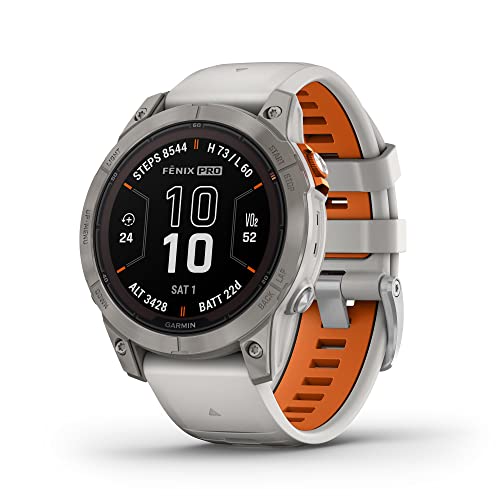
- Multisport GPS watch with a 1.3" display in a resilient 47 mm fiber-reinforced polymer case with a titanium bezel and rear cover
- Scratch-resistant Power Sapphire solar charging lens uses the sun's energy for weeks of battery life in smartwatch mode
- Built-in LED flashlight with variable intensities and strobe modes gives you greater awareness while you train at night and provides convenient illumination when you need it
- New hill score feature measures your running strength/endurance during ascents and gauges your progress over time
- New endurance score feature combines training data from all your athletic pursuits to help you better understand how training impacts your overall endurance
Use a VPN for a Defined Job
Why should you use a VPN? Use it when the tunnel changes a meaningful observer, address, or access path. Keep it only if the provider clears your trust standard, the routes match your intent, the failure behavior is acceptable, and the measured performance cost does not break your work.
Start with one reproducible baseline. Record versions, endpoint, runs, egress state, resolver path, latency, throughput, failure mode, and rollback. That gives you a defensible decision. A green Connected badge gives you only a status light.
Tell Google you want more of this.
Add Gaurav Tiwari as a preferred sourceOne tap, and this site shows up more often in your own Top Stories, AI Overviews and AI Mode. Remove it any time.
Disclaimer: This site is reader-supported. If you buy through some links, I may earn a small commission at no extra cost to you. I only recommend tools I trust and would use myself. Your support helps keep gauravtiwari.org free and focused on real-world advice. Thanks. - Gaurav Tiwari