
You have 3 queries from the scoring sheet and an empty editor. For each of those queries Google has already built a page, and that page tells you the format, the depth and the competition before you write a word. This lesson is how to read it, and what to do with an AI answer when one is sitting at the top.
Start with why the page is worth 10 minutes of your time. A thorough tutorial written for a query whose first page is all short comparison lists stays on page 2, and quality has nothing to do with it: the page and the query disagree about what the person wanted, and Google settled that disagreement in the lists’ favor before you started typing. The results page is Google’s public answer key for what a query means. Reading it is the most practical skill in the whole subject, and the one most bloggers skip because the editor is already open.
Move: Choose. The results page tells you the format, the depth and the competition before you write a word, and an AI Overview on it is a signal you can use rather than a wall.
Your three actions for this lesson:
- Run the five-step read on your top three keywords
- Map each one to a format the page already rewards
- List the sub-questions the AI answer fans out into
Why the Page Is the Answer Key
Google’s description of how it ranks says it uses aggregated and anonymized interaction data to check whether results are relevant to a query, on top of the words, the quality signals and the context. So the 10 results on the first page are the pages Google has judged, and watched people confirm, satisfy that question. They aren’t there by accident.
The point is to understand why they rank, and never to copy them: what the person wanted, which format serves it, how deep the good ones go and what you can add that isn’t on the page yet. Google’s guide to its generative AI features, from May 2026, is blunt about the last part. Don’t just recycle what others on the internet have already said, or what a generative AI model could easily produce. Reading the page is how you find out what has been said, so that you can stop repeating it.
Think of it the way a student reads the marking scheme before an exam. The scheme tells you what the examiner rewards and in what shape; it tells you nothing about whether you know the subject. The results page is the same. It shows you the format and the questions, and whether you have anything to say is a separate matter, which First-Hand Proof as the Moat takes up. One place the analogy breaks: a marking scheme stays fixed for the year, and a results page changes whenever Google changes its mind, so a read is dated the day you do it.
How to Read the Page
Search the query in a private window, so your own history doesn’t color it, and read the page in five steps, in this order. It takes 5 to 10 minutes per query and it should sit in front of every post.
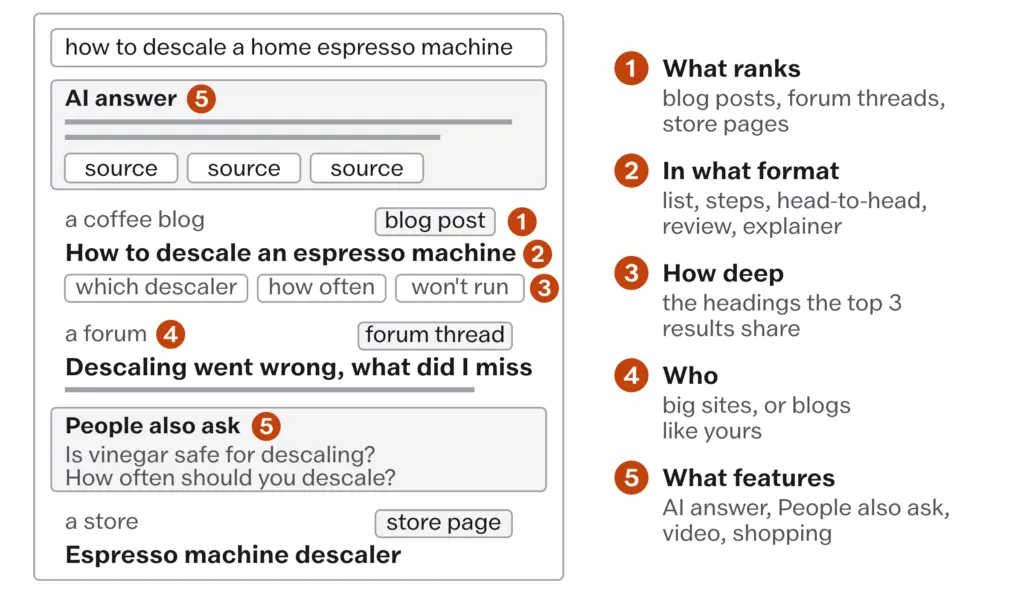
- What ranks. Note the kinds of page in the top 10: blog posts, product or category pages from stores, videos, forum threads, news, a Wikipedia entry, a tool. If the top results are product pages, the person is shopping and a blog post won’t crack that page however good it is. If they’re forum threads, the person wants another person’s experience, and a page with real experience on it has an opening. If they’re all blog posts, you’re on the right track.
- In what format. Among the blog posts, which shape dominates: a list (“10 best…”), a step-by-step guide, a head-to-head comparison, a single review, an explainer, an opinion piece. If Google shows 10 lists for “best project management tools”, it’s because that’s what people searching it wanted, and a 3,000-word essay on the philosophy of project management won’t rank there whatever its quality.
- How deep. Open the top 3 to 5 results and scan their headings. The subtopics they all cover are the minimum scope the page rewards. Depth here means the questions answered and nothing else; Google’s Starter Guide says the length of content alone doesn’t matter for ranking, and there’s no word count to hit, minimum or maximum. Anatomy of a Page That Ranks and Gets Cited takes depth over length from here.
- Who. Note the sites. If the top 10 are all major publications and brands, the query is a long shot for a blog. If sites like yours are there, it’s winnable. If big sites and small ones share the page, Google is reading the query more than one way, which is a reason to pick the format the small sites use.
- What features. Note everything on the page that isn’t a plain result: an AI Overview or an AI Mode answer, a featured snippet, People Also Ask, a video carousel, an image block, shopping results, a local pack, top stories. Each one is a reading of what the person wanted, and the AI answer is the one that gets its own section below.
Write the 5 answers next to the query on the sheet, in a line each. The last thing to note from the page is the language of the titles. If every top result carries the current year, people searching this query want to know the answer is current, and the page has to show a visible updated date and an answer that is in fact current; it does not license changing the publish date, and Updating, Merging, and Pruning has the one date rule. If every title carries a number, “7 best”, “12 tips”, the numbered list is the shape that wins.
Matching the Format
After you’ve read a few dozen pages the pairings repeat, and the table below is the set to start from. Every row is a starting point to verify against the page, never a rule to apply without looking.
| The query looks like | The page usually rewards | What the reader is after |
|---|---|---|
| best X | A list comparing options, with who each one suits and your pick | Options, then a recommendation |
| how to X | Numbered steps with screenshots or photographs and the step that goes wrong | Getting the thing done |
| X vs Y | A head-to-head on the points that matter, ending in a recommendation | A decision between two |
| what is X | A plain explainer with examples | Understanding; this is the most AI-answered shape of all |
| X review | One product, used, with specifics, who should skip it and what else to consider | An honest account from someone who used it |
| X for Y | Recommendations for that use rather than a generic list | Options that fit their situation |
The mismatches are the same few every time, and each one produces a page that never ranks despite being well written:
- A tutorial when the page wants a list. “Best WordPress plugins” is a list query, and “How to Choose the Best WordPress Plugins: A Complete Guide” will sit below every list on that page.
- A long guide when the page wants a short answer. Some queries need a few hundred words. If the top results are short, write short.
- A blog post for a query whose page is product pages. The person is buying, and the store’s page is the answer.
- An opinion when the page wants facts. “How much protein do you need per day” is answered with numbers from sources, and a personal take isn’t what the person asked for.
- Several formats in one post. A page that is a tutorial, a review, a comparison and an opinion at once does none of them well. One post does one job, and when the page is mixed you pick the format that dominates and commit to it.
Google’s rater guidelines have a section for queries with more than one likely reading, and the results page shows you which one Google favors. It is wise to serve that reading fully and to give the other one its own page later if it turns out to be worth winning.
Structuring a section “for the featured snippet”. Google’s documentation says you can’t mark a page as a featured snippet; its systems decide whether a page makes a good one and elevate it. Put the plain answer at the top of the section because the reader wants it there, and let the page decide what to pull.
The AI Answer as a Signal
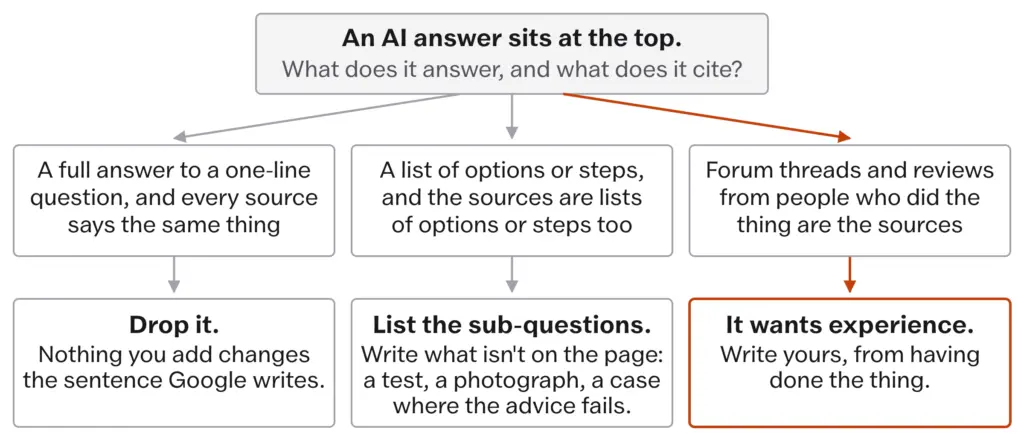
An AI Overview or an AI Mode answer at the top of the page is the feature bloggers read as a wall. It is more useful read as a signal, and it says three things at once.
The first is that Google judged the query answerable in summary form, which the scoring sheet in Keyword Research That Still Pays already scored. The second is that the sources under the answer are the pages Google trusted for it, and these are often not the same pages ranking below the answer; the figures on that are in What a Blogger Can Still Win From Search. The third is that the answer’s own sections show you how Google broke the query into pieces, which is the next section.
How a page gets into the answer is simpler than the industry has made it: a page needs to be indexed and eligible to show with a snippet, and nothing more, as How Google Decides Now set out from Google’s own documentation. Anything a tool sells you for “AI optimization” beyond a page that ranks and can be snippeted is selling you the page you were already going to build.
Being one of the sources still pays, even with the answer in the way. Seer Interactive’s April 2026 study, which What a Blogger Can Still Win From Search carries, found pages cited inside an AI Overview earned about 120% more clicks per impression than uncited pages on the same results page, and still about 38% fewer than pages on results with no AI Overview at all. On a query with an answer, being a source is the difference between a share of the clicks and almost none.
So the read of an AI answer is a second sorting, after the sheet:
- A full answer to a one-line question, with sources that all say the same thing, is an answered query. Nothing you add changes the sentence Google writes, and the sheet has already dropped it.
- An answer that lists options or steps, with sources that are themselves lists of options or steps, is a table of contents. Every item in it is a place where a page with something behind it, a test, a photograph, a case where the common advice fails, becomes the source the answer cites and the page the reader clicks.
- An answer whose sources are forum threads and reviews from people who did the thing is Google saying the query wants experience. That is the best page a blogger can find, provided the experience is real.
The Sub-Questions
When Google’s AI features answer a query, they don’t search it once. They run the query fan-out that How Google Decides Now described, several related searches across subtopics that the system generates to build one response, so the answer on the page is stitched from the answers to several smaller questions, and those smaller questions are the map of what the page rewards.
You can read them off the page:
- the sections and bullets of the AI Overview itself, each of which is one sub-question answered
- the People Also Ask box, which is the same fan-out shown as questions
- the headings of the pages cited under the answer
- the follow-up questions AI Mode suggests after its answer
- the related searches at the bottom
List them on the sheet under the query. A query like “how to descale a home espresso machine” fans out into which descaler to use, how often, whether vinegar is safe, what to do when the machine won’t run the cycle and how to rinse afterwards, which is 5 sub-questions and 5 places where a page can be the source.
Then comes the part that separates a page Google cites from a longer copy of the page it already has. For each sub-question, decide which of two things it is:
- Already answered the same way everywhere. Answer it in a line so the page is complete, and move on. Do not write 300 words on whether vinegar is safe if every source agrees and you have nothing to add.
- Open to what isn’t there. A measurement you took, a photograph of the step, the case where the common advice failed, a decision for one kind of reader. This is where the words go.
The case for your page is what isn’t on the page yet. A sub-question that deserves more than a section becomes its own page, a spoke in the cluster, and Topical Authority and Site Architecture is where that decision lives.
Read the page for the questions, never for the answers. The questions tell you what to cover; the answers are what every other page already has.
Covering A to D because the top results do, then adding E and F. That is a longer version of the page Google already has. Google’s May 2026 guide says content that recycles what others have said adds little; the case for your page is the part that isn’t out there.
Video on the Page
A video carousel or a block of video results tells you the query is served by watching, and the response most bloggers reach for, a post with a video embedded in it, doesn’t get the page into that block.
Google Search Central, Video SEO best practices, December 2025. Google’s video documentation says video features, which include the video results on the main page, need a dedicated watch page where watching the video is the main reason for the visit, and it names the pages that don’t qualify: a blog post that discusses a video, a product page with a clip, a category page that lists several. Those pages can still appear as text results and can carry a video badge in image results, and that is all. For a blogger with a post and an embed, the post competes for the text results only.
So the choice on a video-heavy page is a real one: make a watch page, or a video on a platform that is its own watch page, with a text post beside it, or accept that the text post competes for the text results only. Images, Video, and Discover has the setup.
What Doesn’t Work
The read is a snapshot. Google shows an AI Overview for a query one week and not the next, shows it more in some countries and languages than in others, personalizes by location and history and rearranges the features between core updates. Date every read on the sheet, and read the page again before you update a post rather than trusting notes from a year ago.
It tells you the format the page rewards and nothing about whether your page will rank. A perfect format match on a query owned by 10 major publications is still a long shot, and the who step exists to say so before the writing starts.
It cannot show you the fan-out queries directly. The sub-questions you list are read off what the page shows, the answer’s sections, the question box and the cited pages’ headings; they are your reconstruction of what Google asked rather than Google’s own list. Treat the list as a good guess and keep adding to it as the page changes.
And it can’t turn an embedded video into a video result, however good the video. The watch page rule is Google’s, and a text post with an embed is a text result.
Then there are the habits that quietly undo the read.
Writing first and searching afterwards. The editor is open, the outline feels obvious and the page is read only when the post doesn’t rank. By then the format is set and the fix is a rewrite.
Reading only the titles. The titles tell you the format; the headings of the top 3 tell you the depth, and the sources under the AI answer tell you what Google trusted. Ten seconds on the titles reads as research and misses two of the three.
Taking the top page’s outline as your outline. It produces a page that matches the winner point for point and gives Google no reason to choose it. The read is for the questions, and the outline should have something under each of them that the winner hasn’t.
Treating every AI answer as a closed door. The answered ones are closed. The ones that list options or cite forum threads are open, and a blogger who skips every query with an answer skips most of the comparisons that still pay.
Obeying every feature on the page. A People Also Ask box is a list of sub-questions and not an instruction to answer all of them in one post; a shopping block on a comparison query doesn’t mean the comparison can’t rank. Features are readings of the query, and the read decides what to do with them.
Mixing formats to hedge. The post that is a review, a list and a tutorial at once serves the mixed query worst of all, because every format on the page beats it at its own job.
- Five steps, in order: what ranks, in what format, how deep, who, what features; 5 to 10 minutes per query, in a private window, dated
- Product pages on top: a blog post won’t crack it. Forum threads on top: the query wants someone’s experience
- Depth is the questions the top 3 answer; Google sets no word count, minimum or maximum
- To be a source in an AI answer a page needs only to be indexed and snippet-eligible (Google, December 2025); no AI files, no chunking, no special writing (Google, May 2026)
- Cited pages get 120% more clicks per impression than uncited ones on the same page, and 38% fewer than pages with no AI Overview (Seer Interactive, April 2026)
- List the sub-questions from the answer’s sections, People Also Ask and the cited pages’ headings; write for the ones where you can add what isn’t there
- Video results need a watch page; an embed in a post is a text result (Google, December 2025)
Take the 3 queries you committed to in Keyword Research That Still Pays and give this 20 minutes. Search each one in a private window and write the five answers next to it: what ranks, in what format, how deep the top 3 go, who ranks and which features sit on the page, with the AI answer’s sections and the People Also Ask questions listed as sub-questions. Then write a one-sentence plan for each query naming the format, the sub-questions you’ll cover and the one thing you’ll add that isn’t on the page. Finally, open Search Console, pick 3 existing posts that sit below position 20 for the query they were written for, search those queries and compare the page with what you wrote. Any post whose format doesn’t match the page goes on the update list with the format it should have had.