
Your post covers the topic properly, and it sits on page 2 while a thinner page ranks above it and the AI summary at the top quotes somebody else. The part of that you control is the page itself, and this lesson is about the shape of that page: what Google reads from each part, what it shows on the results page and what it quotes.
Before the parts, I want to ensure the basic idea is clear. Google reads the whole page, but it does 3 different things with what it reads. It displays some of it, as the title link and the snippet on the results page. It ranks some of it, page by page and, since 2021, passage by passage. And its AI features quote some of it, with a link back to you. One page serves all 3 jobs when it is built the way this lesson describes, and nothing on it needs a separate version for AI.
Move: Build. One page shape serves both the ten blue links and the AI answer above them: a direct answer under every heading, headings that outline the post and nothing on the page that only existed for a rich result that’s gone.
Your three actions for this lesson:
- Rewrite the first paragraph under each H2 of one post so it answers before it explains
- Put any FAQ block’s real questions under visible headings
- Check the title link Google actually shows for the page
The Parts Google Reads
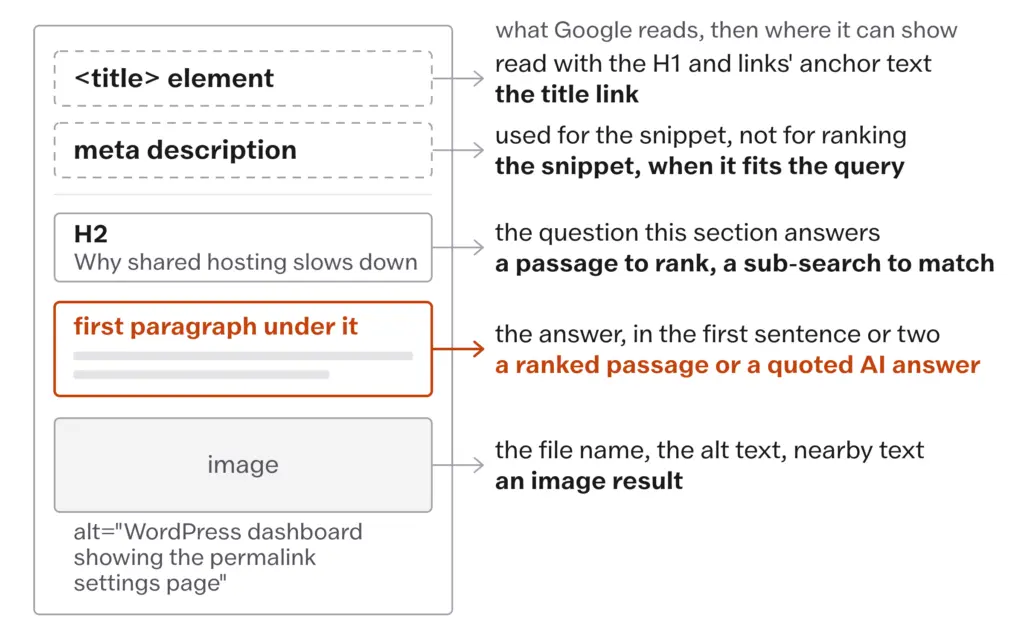
A blog post has a fixed set of parts that Google reads, and each part has a job:
- the title element, which Google reads for the title link along with your headings and the anchor text of links pointing at the page
- the meta description, which Google may use for the snippet and does not use for ranking
- the headings, which are the outline of the post and the list of questions it answers
- the first paragraph under each heading, which is the passage most likely to be ranked or quoted on its own
- the body under that, which carries the depth
- the images, their file names and their alt text
- the URL, which Google reads for words and hardly weighs
Everything else on the page, meaning the menu, the sidebar, the related-posts box and the footer, repeats on every page of the site, and Google learned long ago to tell that boilerplate from the content. The list above is where the work is.
The Title Link
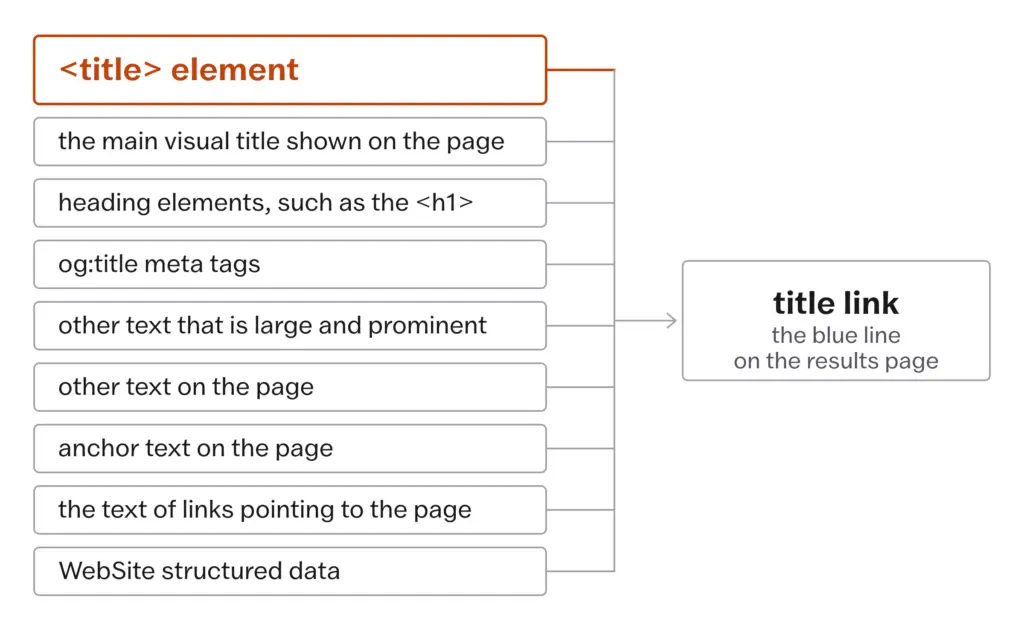
The title link is the blue line on the results page. Google builds it, and the important thing to understand is that Google builds it from more than your title element. Google’s title link documentation, updated December 2025, lists the sources:
- the content of the
<title>element - the main visual title shown on the page
- heading elements, such as the
<h1> - the content of
og:titlemeta tags - other text that is large and prominent through styling
- other text on the page
- anchor text on the page
- the text of links pointing to the page
WebSitestructured data
So when Google shows a title you didn’t write, it has not malfunctioned. It decided that your title element described the page less well than something else on that list, usually the H1 or the words other sites use when they link to you. The cure is a title element that says plainly what the page is, in words that agree with the H1 and with how people describe the page.
The advice worth keeping is about the words. Put the subject of the page near the front, because a searcher reads the first few words of each result and decides from those. Be specific, because “How to Start a Blog” is accurate and identical to 40 other results, while “How to Start a Blog on WordPress Without Paying for a Theme” says what is different about this one. A modifier in brackets such as “(With Examples)” is fine when it is true, because it tells the searcher what they get. Clickbait is not fine, because a title that promises a shock tells the searcher nothing about whether the page answers the question, and Google’s own guidance for title elements is short and dull on purpose:
- every page has a title in its
<title>element - the text is descriptive and concise, so not “Home” for the home page
- no repeated terms, which Google says “can make your results look spammy to Google and to users”
- distinct text per page, with no boilerplate shared across pages
- the same language and script as the page itself
On length, there is no character limit. Google’s documentation says the title link “is truncated in Google Search results as needed, typically to fit the device width.” A title that loses its tail on a phone has run out of screen and nothing has been penalized. The part that survives is the front, which is one more reason to put the subject there.
Cutting every title to 60 characters and every description to 155. Google sets no character limit for either. Both are truncated to fit the device width, so the same title survives whole on a laptop and loses its tail on a phone. Write the title to say what the page is, put the subject at the front and then check what Google actually shows.
I’d keep the year out of a title unless the page is genuinely reworked every year, because a title that says 2026 in March 2027 is a promise the page is breaking on the results page, and Updating, Merging, and Pruning has more on what a date on a page commits you to.
Checking is simple enough that it belongs in the publishing routine: search Google for the post’s exact title in quotes and look at the title link on your result. If it matches your title element, Google agreed with you. If it doesn’t, look at the H1 and at the anchor text other pages use for you, because that is where the substitute came from.
The Snippet
The snippet is the 2 or 3 lines under the title link. Google’s snippet documentation, updated April 2026, says how it is made:
- Google creates snippets mainly from the content of the page
- it “sometimes uses the meta description HTML element if it might give users a more accurate description”
- the same page can get different snippets for different searches
- the snippet is truncated to fit the device width, and there is no character limit
nosnippet,max-snippet:[number]anddata-nosnippetcontrol what Google may show
On ranking, Google said in September 2009 that it sometimes uses the description meta tag for snippets and does not use it in ranking, and nothing it has published since changes that. So keywords in the description do nothing for the ranking. What the description is for is the click: 1 or 2 sentences of ad copy for the searcher who is comparing 10 results, and Google will use it when it fits the query and write its own when it doesn’t. It is still worth writing, as a sentence a person would want to read, carrying the thing that makes this page different, with the understanding that on many searches the snippet will come from the body instead.
Since April 2026 a snippet can also carry a “read more” link that takes the searcher to a specific section of the page instead of the top. Google’s one instruction on this is to make sure the content is immediately visible to a human on the page, so a section hidden inside an accordion or a tab that has to be clicked open is a section Google is less likely to send someone to. That is one more argument for plain headings and visible text, and against the collapsed FAQ blocks so many themes ship with.
Headings as the Outline
One test is the only heading test you need. If someone read only your H1, H2s and H3s, would they know what the post covers and in what order? If yes, the headings are structural. If no, they are decoration, and the fix is to rewrite them as the questions the post answers, in the words the reader would use.
- one H1, the post title, which WordPress sets for you
- an H2 for each question or step the post covers
- H3s only where an H2 has real sub-parts
- H4 rarely, and if you need it the post may be 2 posts
Now the part most guides get wrong. Skipping a level or having 2 H1s is not a ranking problem. Google’s SEO Starter Guide says it plainly: having your headings in semantic order is fantastic for screen readers, but from Google Search’s perspective it doesn’t matter if you use them out of order. So the one-H1, no-skipped-levels rule is an accessibility rule, and it is a good one, because a screen reader user moves through a page by its headings the way a sighted reader scans them. The rule is worth keeping for that reason, and it is not worth a minute of worry for the other.
What matters for Search is what the headings say. Each H2 that names a real sub-question gives Google a passage to rank and gives its AI features a sub-search to match, because those features fan a query out into related searches across subtopics, per Google’s AI features documentation from December 2025. A heading that says “Overview” gives them nothing to match. A heading that says “Why Shared Hosting Slows Down Under Load” gives them the question, and the paragraph under it gives them the answer.
The First Paragraph Under Each Heading
This is the paragraph that does the most work on the page, and most guides file it under “featured snippet optimization”. The better reason for it is passage ranking. Since 2021 Google has ranked individual passages from a page and not only the page as a whole, so a sentence buried deep in a long post can be found for a specific search. That is why a 2,500-word post can rank for a question it answers in paragraph 14, and it is why the first paragraph under a heading, the passage Google reads right after the question the heading poses, is the one to get right.
Google, October 2020. Announcing passage ranking, Google said its systems could now rank “individual passages from the pages” and not only whole pages, so that “the single sentence that answers your question” buried deep in a page could be found, and that the change would “improve 7 percent of search queries across all languages” as it rolled out. It reached US English searches in February 2021. For a blogger, the paragraph directly under each heading is the passage most likely to be ranked or quoted on its own.
The shape is the same every time: state the answer in the first sentence or two, then explain it.
What most people write under a heading:
Hosting is one of the most important decisions you’ll make for your blog, and there are many factors to consider. In this section we’ll look at the options and help you decide.
What works better:
Shared hosting is the right choice for a new blog, because the site sits on one server with other sites and the cost stays low; the trade is that a traffic spike on a neighbor’s site can slow yours. Managed WordPress hosting costs more and removes that neighbor.
Same heading, and the second version answers the question in its first sentence, gives the reason in its second and leaves the rest of the section for detail, so a reader gets the answer before they scroll, passage ranking has something to rank and an AI feature has something to quote with a link back. The first version could sit under any heading on any site, and Google’s systems have no reason to pick it.
A reader who reads only your headings and the first paragraph under each one should still get the answer. Google reads the page the same way.
Depth Over Length
Length is how many words you wrote, and depth is how thoroughly you answered the question. Google says in 2 places that it does not measure the first: the SEO Starter Guide says the length of the content alone doesn’t matter for ranking and that there is “no magical word count target, minimum or maximum”, and the helpful content self-assessment asks whether you are writing to a particular word count because you heard Google has a preferred one, and answers itself, “No, we don’t.”
Depth is the set of things a reader would otherwise have to open a second tab to find. The way to check it is to read the top results for the query and sort what you see into 2 lists: what all of them cover and what none of them cover. The first list is the floor, and your page covers it too, in fewer words if you can. The second list is the reason your page exists, and where it comes from your own work, meaning something you measured, photographed or ran, it is the one thing a summary cannot restate without pointing at you. That is the whole of First-Hand Proof as the Moat, so I will leave it there.
A longer version of the same page is not depth. If a paragraph adds no information the reader didn’t have 2 paragraphs ago, it goes. If you are saying the same thing in different words, pick the best version and delete the rest. A post that gets shorter in that edit has lost nothing Google was counting.
Depth is how much of the question you answered. Length is how many words it took. Google measures the first and says it doesn’t measure the second.
The Intro and the Close
I write the intro last, and I would ask you to do the same. The intro you write before the body is almost always wrong, because you have not yet found out what your own argument is, and it ends up as a paragraph about the importance of the topic followed by a roadmap of the sections. Neither of those is what the first 100 words are for. The first 2 sentences say what the page is about and what the reader gets from it, in the words they searched for, and then the content starts. The history of the topic, the credentials and the “in this article we will” all go.
The conclusion has the same discipline in reverse. It does one thing, which is to tell the reader what to do next; a recap is wasted because they just read the page, and a summary is wasted because the headings already are one. A page that ends on an action is a page a reader can act on.
Images and Alt Text
Images get their full treatment in Images, Video, and Discover, with the alt text ladder from Google’s own examples. What belongs to the anatomy of the page is short. Google’s image documentation, updated March 2026, reads the file name and the alt text along with the text around the image, so every image that teaches something gets a descriptive file name, sits near the text it belongs to and carries an alt text that says what it shows in the context of the page. A purely decorative image gets an empty alt so a screen reader skips it.
URLs and Redirects
A URL is read by Google for its words and given hardly any weight for them. The SEO Starter Guide says keywords in the domain or the URL path alone have hardly any effect beyond appearing in breadcrumbs, so the URL rules are about people, not rankings:
- readable words rather than ID numbers, so
/keyword-research/and not/?p=1247 - hyphens between words, because Google recommends hyphens over underscores to separate words in URLs; the old line that underscores are just as good is retired
- short, with the unnecessary words trimmed
- the WordPress permalink setting on “Post name”, set once when the site launches and then left alone
The rule that matters more than any of those is the one older guides got right: a published URL is never changed without a 301 redirect from the old address to the new. Every link from another site points at the old address, and each one becomes a 404 the moment the slug changes. A redirect carries them across. A site that changes its permalink structure without redirects has thrown away every link it ever earned in one settings screen, and no amount of on-page work gets those back.
What AI Features Need From the Page
This is the section people expect to be long, and Google has made it short. Its AI features documentation, updated December 2025, says that to appear in AI Overviews or AI Mode “a page must be indexed and eligible to be shown in Google Search with a snippet”, and then that “there are no additional requirements to appear in AI Overviews or AI Mode.” The same controls that govern snippets, meaning nosnippet, data-nosnippet, max-snippet and noindex, govern the AI features. Clicks from them are counted under the Web search type in Search Console, which Measuring What Matters covers.
Google’s guide to optimizing for its generative AI features, published in May 2026 and updated in July, goes further and names the things you do not need to do:
- “You don’t need to write in a specific way just for generative AI search.”
- “There’s no requirement to break your content into tiny pieces for AI to better understand it.”
- “You don’t need to create new machine readable files, AI text files, markup or Markdown to appear in Google Search.” An
llms.txtfile is treated like any other text file. - “Structured data isn’t required for generative AI search, and there’s no special schema.org markup you need to add.”
- “SEO best practices continue to be relevant,” because the AI features run on the same ranking systems.
What the same guide asks for is the thing this lesson has been building toward: unique content with an expert or experienced take that goes beyond common knowledge, which it calls non-commodity content, as against commodity content that could have come from anyone. A page with a heading per question, the answer under each heading and something in it that only you could have written is already the shape. The rest is First-Hand Proof as the Moat.
One figure belongs beside this. Ahrefs’ March 2026 study of AI Overview citations, which How Google Decides Now carries in full, found that only 38% of cited pages ranked in the top 10 for the same query and about a third ranked outside the top 100. For a page, that is what fan-out looks like from the outside: a section that answers one sub-question well can be picked for that sub-question while the page ranks nowhere for the main query.
I have read people say a finished page should be rewritten into short chunked question-and-answer blocks so that an AI can read it. Google’s guide says the opposite, in 5 separate sentences. A page written for a person, with a heading per question and the answer under it, is the page its systems were built to read. The people selling the chunking services must be having a slow year.
What the Plugin Still Offers
Two rich results most guides still recommend are gone, HowTo since September 2023 and FAQ since May 2026, and Structured Data Without the Folklore has the dates and what to do with the markup. What belongs here is the visible page. Every FAQ block written to earn a rich result is a collapsed section a “read more” link cannot point into, so the questions that are real go under proper headings with the answer visible, and the block goes. The same applies to the advice to format a section “for the featured snippet”. Google’s featured snippet documentation answers the question of how to optimize for one with 2 words, “You can’t”, and explains that its systems decide whether a page would make a good featured snippet and put it there themselves. On a growing share of queries an AI Overview now sits where that snippet used to be. Write the answer under the heading, plainly and let the systems choose.
Keeping a collapsed FAQ block, or a section “formatted for the featured snippet”, because a plugin still offers them. Both rich results are gone, and Google’s own featured snippet page answers “how do I optimize for one” with “You can’t.” Put the real questions under visible headings, write the answer under each and let Google’s systems choose.
Which leaves the plugin score. An SEO plugin grades a page against its own checklist, and green means you satisfied the plugin. That is all it means. A post can go green and rank nowhere, and a post can sit at orange for a missing synonym and rank fine, because the plugin is checking presence and Google is judging whether the page answers the question. The reminders are useful. The score is not a ranking, and a plugin cannot tell you whether the page is any good. Speed is a real page matter and it has its own rules, so the old “under 3 seconds” line goes to Technical SEO Essentials, where the Core Web Vitals thresholds live.
What Doesn’t Work
The page anatomy cannot fix a page aimed at the wrong query. If the results page for the phrase you chose is 10 comparison lists and you wrote a tutorial, no heading rewrite closes that gap, because Google is matching the format people want, and you still have to go back to Reading the Results Page and change the page or the query.
It cannot make Google show your title. Google chooses from 9 sources, and the one you don’t control is the text other sites use when they link to you, so the most you can do is make the title element, the H1 and the rest of the page agree with each other and then check the result.
It cannot get a page cited for saying what 10 other pages say. An AI summary can restate common knowledge without pointing at anyone, and a well-built page with nothing of its own in it is still a page the summary can do without. The proof that gets a page pointed at is the next lesson’s job.
It does not make a slow or broken page fast. A page that fails Core Web Vitals or blocks Googlebot has a technical problem that headings cannot reach, and you still have to run the checks in Technical SEO Essentials.
Then there are the habits that quietly make the page worse.
Writing the intro first. It feels like the natural order, and it produces a paragraph about the importance of the topic and a roadmap, because the argument does not exist yet, so the first 100 words say nothing a searcher or Google can use.
Using headings as styling. A big bold line every 200 words breaks up the text, and none of the lines names a question, so the outline test fails and the passage under each heading has nothing to answer.
Using one title pattern for every post. “The Ultimate Guide to X” 40 times feels consistent, and it means no title says what is different about its page, which is exactly when Google starts substituting.
Adding the year to look current. It buys a click for a few months and then the title is a promise the page is breaking, and Google’s self-assessment asks in plain words whether you are changing dates on pages that have not substantially changed, so refreshing the year without refreshing the page is a named risk with a short shelf life.
Rewriting a finished page into question-and-answer chunks for AI. It costs a day and makes the page worse for the reader it was written for, and Google’s guide says its systems already understand a page with more than one topic on it.
- Google builds the title link from 9 sources and truncates it to the device width, with no character limit; make the title element and the H1 agree, and put the subject at the front
- The meta description is not used for ranking; write it as ad copy for the click and expect Google to replace it on some queries
- Heading order is an accessibility rule; heading words are the outline Google reads and the sub-questions its AI features match
- The first paragraph under every heading answers the heading’s question; passage ranking ranks that paragraph on its own
- There is no word count target, minimum or maximum; cut every paragraph that repeats
- AI features need an indexed, snippet-eligible page and nothing else; no chunking, no
llms.txt, no special schema - FAQ and HowTo rich results are gone and featured snippets cannot be optimized for; write the answer under a visible heading and let Google choose
Take the post you would most like to rank better and read only its headings. If they do not tell you what the post covers and in what order, rewrite them as the questions the post answers. Then rewrite the first paragraph under each H2 so its first sentence answers the heading’s question and its second gives the reason, and move whatever was there before below it. If the post carries a collapsed FAQ block, put its real questions under visible headings and drop the block. Finally, search Google for the post’s exact title in quotes and compare the title link Google shows with your title element; if they differ, make the H1 and the title element agree and note the anchor text other pages use for you.