
You have a few years of posts behind you, some of them are slipping, and you’re not sure whether to update them, merge them, delete them or leave them alone. This lesson is about making that call on evidence, one post at a time, and about the one date rule that keeps the whole exercise honest.
Move: Keep. Old posts are where the cheapest growth is, as long as you update for the reader and never for the date.
Your three actions for this lesson:
- Run the Keep, Update, Merge, Delete pass on your 10 oldest posts
- Update one post and annotate the date in Search Console
- Merge two posts that answer the same question
Why Old Posts Are the Cheapest Growth
Every post you publish starts collecting things the moment it goes live. Google indexes it, people find it, a few of them link to it and the URL builds a history. A brand new post has none of that. It starts from zero and has to earn everything from scratch, which is why a new post on a small site can sit unnoticed for months while an older one on the same site keeps drawing clicks from a query you’d forgotten it ranked for.
When you update an existing post, you keep everything it has already earned:
- the backlinks, because they point at the URL and the URL does not change
- the indexing history, because Google already knows the page and recrawls it on its own schedule
- the rankings it holds today, which are the starting point for the update rather than a target
You are giving Google an improved page on a URL it already knows. That is a smaller job than teaching it about a new one.
I want to be careful with one line that gets repeated about this, because it isn’t true and it never was quite true: “Google loves fresh content.” Google’s ranking systems guide, updated December 2025, describes freshness systems that show newer content “for queries where it would be expected,” and that is the whole of it. A query about last week’s plugin release expects recency. A query about how DNS works does not, and an updated date on a DNS explainer buys nothing on its own. Updating pays because the page gets better, and a better page ranks better on any query, fresh or old.
So the reason to update is the reader, and the date is a side effect. The next section is about the date, because that is where most bloggers get this backwards.
One Date Rule
Before the matrix, I want to settle the date question, because it decides how honest the rest of the exercise is. There are two rules floating around and they contradict each other: change the publish date only after a rewrite of 70% or more, and republish with today’s date whenever a post passes 12 months old. I read people recommending both. Neither is the rule now.
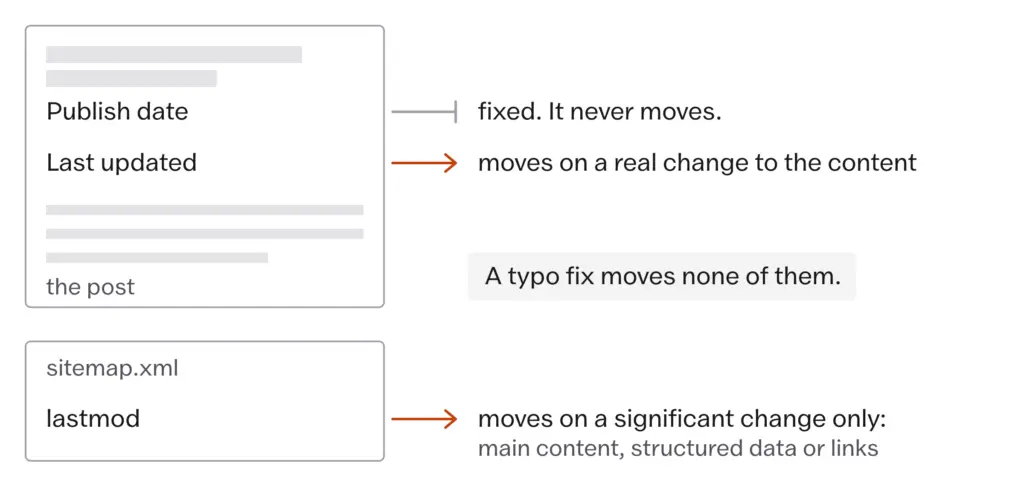
Keep the original publish date, show a visible updated date when the content really changed and change the sitemap’s lastmod only for a significant change.
Here is what sits behind each part of that:
- Google’s byline dates guidance, updated December 2025, says you can show a publication date and a last updated date, and gives “Last updated: Feb 14, 2018” as an acceptable format. Both dates on the page is the documented, normal case.
- Google’s helpful content self-assessment, updated December 2025, asks: “Are you changing the date of pages to make them seem fresh when the content has not substantially changed?” That is the pattern to avoid, in Google’s own words.
- Google’s sitemap documentation, updated July 2026, says the lastmod value “should reflect the date and time of the last significant update to the page.” A change to the main content, structured data or links counts as significant and a change to the copyright date does not, and Google uses lastmod only if it is “consistently and verifiably” accurate.
The publish date is a fact about when the post was born and it stays. The updated date is a promise to the reader that something on the page changed, and it moves when that promise is true. The lastmod value is a message to Googlebot that a recrawl is worth its time, and Google says it stops trusting the message once it notices the message is sent for nothing.
Most WordPress themes will show the modified date if you turn it on, and the SEO plugins write lastmod from the modified date without asking. That means a typo fix moves lastmod too. It is wise to fix typos in batches on a day you are making a real change to the post, or to accept that the odd small edit will move the date and not worry about it. What you should never do is the deliberate version: open a post, change nothing that matters and save it so the date looks new. Google wrote a question about that exact habit.
Republishing an updated post with today’s date, or republishing any post because it has passed 12 months. Google’s self-assessment names changing dates without substantial change as a sign of content made for search engines first. Keep the publish date, show the updated date and let the content do the work.
The Keep, Update, Merge, Delete Matrix
Not every post deserves an update: some should be left alone, some folded into other posts and some deleted. You need a way of deciding which is which that doesn’t depend on how you feel about the post, and four buckets do the job.
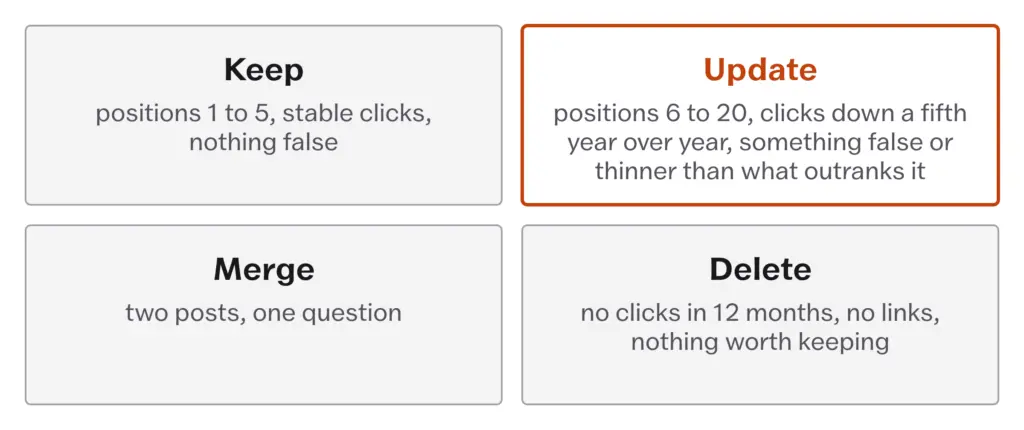
Keep. A post stays untouched when all of these hold:
- it ranks in positions 1 to 5 for the query it was written for
- its clicks are stable or growing over the last 6 months
- nothing on it is wrong today, including prices, screenshots, tool names and links
These stay as they are, and you don’t break what is working. Look at them again in 6 months and only touch one when one of the three conditions fails.
Update. A post goes into the update bucket when any of these is true:
- it ranks in positions 6 to 20 for its main query, on page 1 without the clicks or on page 2 with a real chance
- its clicks have fallen by a fifth or more from the same months a year ago
- it says something that is no longer true
- the pages that outrank it cover something it doesn’t
This is the money bucket, and it is where most of your update time goes, because these posts have already proved they can rank. Notice that age is missing from that list. A post from 2019 that still ranks in position 2 and says nothing false belongs in Keep.
Merge. Two posts go into the merge bucket when they answer the same question. If you have “best caching plugins for WordPress” and “top WordPress caching plugins for speed” as separate posts, Google sees two pages from one site competing for one query, and neither gets the full benefit of what the site knows about caching. Pick the stronger of the two, fold the useful parts of the weaker one into it and redirect the weaker URL. How to pick the stronger one gets a short section of its own below.
Delete. A post goes only when all of these are true at once:
- it has had no clicks in 12 months
- no other site links to it
- it is thin, wrong or about something you no longer cover, and there is nothing worth folding into another post
If any one of those fails, the post is an Update or a Merge, and if it has links it is never a delete. Holiday posts from years ago, news reactions that dated in a week and the 300-word placeholders from your first month are the usual residents of this bucket. It is a small bucket on most blogs and it should stay small.
Write the reason next to each post as you sort. If you can’t write one, the post goes back to Keep until you can.
Finding the Candidates in Search Console
This is the practical part, and it takes about 10 minutes a month once you know where to click. Search Console keeps 16 months of performance data, which is enough for a year-over-year view with room to spare.
The comparison that finds declining posts:
- Open Performance, then Search results.
- Set the date range to Compare, with the last 6 months against the previous 6 months.
- Switch to the Pages tab.
- Sort by the clicks difference, largest decrease first.
The pages at the top of that list are losing clicks, and they are your first update candidates. Before you act on any of them, check whether the decline started on a date that has a story: a core update, a change you made or the September 2025 change to how Google reports impressions that Measuring What Matters explains. A decline with a story is still a decline, but the story changes what the update should fix.
The filter that finds the almost-there posts:
- Stay on the Pages tab with a single 3-month range.
- Filter for an average position between 6 and 20.
- Sort by impressions, highest first.
A page with high impressions and an average position of 9 is being shown to plenty of people and chosen by few of them. It’s close, and a real improvement to the page, or sometimes only to the title link and the snippet, can move it up. That is a better use of an afternoon than a new post nobody is searching for yet.
Do the two lists together and the same URL will often appear on both, and that page goes first.
The Update Itself
Once a post is on the list, the work is the same every time, and I’d write it down so it stays the same.
- Record the starting point. Note the post’s clicks, impressions and average position for the last 3 months, together with the queries it ranks for. Without a starting point you will never know whether the update worked.
- Read what outranks it. Search the main query and read the top 5 results the way Reading the Results Page describes. Look for the sub-questions they answer and yours doesn’t, and for anything they got wrong that you can get right. Do not look at their word counts.
- Change the content. Correct every price, tool name, screenshot and claim that has moved. Add the sections the reader now needs. Remove the sections that recommend something that no longer exists. Add your own proof where you have it, because that is the part nobody above you can copy, as First-Hand Proof as the Moat argues. Add links to posts you have published since, following Internal Linking.
- Rewrite the title link and snippet if the page’s click-through rate is low next to your own pages at a similar position. Leave them alone if it isn’t.
- Keep the URL. Never create a new post with a new URL for an update. Every link, every bit of history and every ranking the post holds belongs to the URL.
- Save with the updated date visible and let lastmod move, because this was a significant change.
- Request indexing in URL Inspection, once and then let Googlebot do its work.
- Annotate the date. Search Console’s custom annotations, added in November 2025, let you put a short note on the performance chart for a date. Write “Updated caching plugins post” on the day you saved it. In 3 months, when the chart moves, you will know why.
- Tell the people who already follow you. Your newsletter and social accounts can carry an update as news when there is real news in it. Your audience won’t mind seeing a post again if there’s genuinely something new.
- Check back at 4 weeks and 12 weeks against the starting point, and write the result on the annotation.
One detail worth knowing about the annotations: they show on the chart in the normal view and not in compare mode. Read the compare view for the numbers and the normal view for the notes.
The list is long because the job is. An update that only changes the date and two prices is a small edit, and a small edit does not need the ceremony. The ceremony is for the update that gives the page something it did not have before.
Merging Two Posts
When two posts answer one question, the merge is the highest-value edit on the list and the one with the most ways to go wrong, and the order of the steps matters.
First, decide which URL survives. The stronger post is the one with more of these:
- links from other sites, checked in Search Console’s Links report under top linked pages
- the higher current position for the shared query
- the cleaner URL, meaning the one you would choose if you were writing the post today
- the older publish date, other things being equal, because it carries the longer history
Links outrank everything else on that list. A weaker post with 12 referring domains beats a stronger post with none, and the right move is to build the merged content on the linked URL even if it means moving the better text across.
Then do the merge:
- Fold the sections from the weaker post that add something into the surviving post. Leave out the parts that repeat.
- Update the surviving post’s internal links so nothing on your site points at the URL you are about to redirect.
- Set a permanent redirect from the weaker URL to the surviving one. In WordPress the SEO plugins and the redirection plugins both do this without touching server files.
- Annotate the date in Search Console.
Google’s redirects documentation, updated April 2026, describes a permanent redirect as a signal that the target should be treated as the canonical page, which is exactly what you want. The redirect has to land on a page that answers the same question. Redirecting a dead caching post to your homepage or to an unrelated post throws away the reason the redirect exists, and Google may treat it as a soft 404.
Check the backlinks before the redirect, always. It costs 2 minutes in the Links report and it is the difference between keeping a link and losing it.
Pruning for Quality, Never for Age
There is a belief that goes around every year or two that deleting old posts makes a site “fresher” in Google’s eyes and improves how the rest of it ranks. In August 2023 a large technology publisher deleted thousands of articles on that reasoning and the story went public. Google’s Search Liaison, Danny Sullivan, answered the same day.
Google Search Liaison, August 2023, reported by Search Engine Land. Asked about sites deleting old content to please Google, Danny Sullivan wrote that deleting content because you believe Google doesn’t like “old” content is “not a thing” and that Google’s guidance does not encourage it. The quote is secondhand, reported from his public posts of 8 August 2023. What it means for you: a post’s age is never, on its own, a reason to remove it.
The second belief that pushes bloggers to prune is crawl budget, the idea that Google has a fixed amount of attention for your site and thin posts use it up. Google does publish a guide to crawl budget, and its first section says who it is for.
Google Search Central, crawl budget guide, July 2026. Google’s guide to managing crawl budget is written for large sites with 1 million or more unique pages whose content changes about weekly, and for medium sites with 10,000 or more unique pages whose content changes daily. For everyone else it says plainly that if your pages are crawled the same day they are published, you don’t need to read the guide. What it means for you: a blog with 300 posts does not have a crawl budget problem, and deleting 40 of them will not make the other 260 rank better.
A post is pruned for what it is. Its age has nothing to do with it.
So what does get pruned? The Delete bucket above, and only that: no clicks in a year, no links from anywhere and nothing on the page worth keeping. Even then, two choices sit ahead of deletion. A post with a link from another site gets redirected to the nearest relevant post instead. A post you want off Google but still reachable, such as an old announcement someone might have bookmarked, gets a noindex tag and stays where it is. Deletion, with the URL returning a 404 or a 410, is for pages nobody links to, nobody visits and nobody would miss.
I’d add one more test before the bin. Read the post and ask whether it could become an Update with an hour’s work. A 400-word post on a question people still search for is a thin post today and a good post tomorrow. The delete bucket is for posts on questions nobody asks.
The Archive and the Spam Line
There is a newer temptation, and it comes from the same place as the old ones. With an AI writing tool it takes an afternoon to rewrite 200 old posts, save them all with fresh dates and call the archive updated. I read people describing exactly this as a “content refresh at scale.” They must be having a lot of faith in the date field.
Google has a spam policy for it. Scaled content abuse is many pages made mainly to rank and not to help, however they were produced, and Using AI Without Tripping the Spam Policies carries the policy’s own words and where the tool does help. The helpful content self-assessment asks the matching question for an archive: are you “adding a lot of new content or removing a lot of older content primarily because you believe it will help your search rankings overall by somehow making your site seem fresh”? A mass rewrite is that question answered yes.
Google’s question, then, is about value. Does each rewritten post carry something the reader could not get from it before: a corrected fact, a section the results page now expects, a test you ran, a photograph you took? One post at a time, each with a reason, is an update. Two hundred at once with the same reason is a pattern Google has a policy for.
Rewriting the whole archive with an AI tool and saving every post with a new date. Google’s scaled content abuse policy applies however the content is produced, and its self-assessment names bulk changes made to seem fresh. Update the posts the data flags, one at a time, and give each one something new.
What Doesn’t Work
An update cannot rescue a post that answers a question nobody asks. The Search Console lists find pages that people are already searching for, and a page with no impressions in 16 months is not on those lists, so the matrix has nothing to say about it except Delete or Merge. Decide whether the topic belongs in your content map from Topical Authority and Site Architecture before you spend an hour on the page.
Refreshing prices will not move a post from position 40 to position 5. A page that far down usually has a bigger problem, and it is more often the wrong format for the query or the wrong page on your site for it than stale content. Read the results page first.
The result does not show within a week. Measuring What Matters carries Google’s own timeline, hours for some changes and months for others, and the 4-week and 12-week checks in the workflow are the earliest honest readings.
Now the quiet habits that make this go worse.
Updating the top 30 posts by traffic every January. It feels like maintenance and it is mostly busywork on posts in the Keep bucket, while the positions-6-to-20 posts that would move sit untouched. The data picks the list and the calendar picks the day.
Changing the title, the intro, the headings and the date in one pass on a post that was ranking in position 4. Google now has to re-evaluate a page it liked, and if it settles lower you have no way of knowing which change did it. Change what the evidence says is wrong and leave the rest.
Merging two posts and redirecting the loser to the homepage. The link that pointed at a caching post now points at a page about nothing in particular, and Google may treat that as a soft 404. Redirect to the page that answers the same question or don’t redirect at all.
- Publish date stays. Updated date moves when the content really changed. Lastmod moves only for a significant change.
- Keep: positions 1 to 5, stable clicks, nothing false. Update: positions 6 to 20, clicks down a fifth year over year, something false or thinner than what outranks it. Merge: two posts, one question. Delete: no clicks in 12 months, no links, nothing worth keeping.
- Search Console, Compare, last 6 months against the previous 6, Pages tab, sort by clicks difference. Then Pages, position 6 to 20, sort by impressions.
- Before any redirect or deletion: the Links report, top linked pages. A post with links is redirected, never deleted.
- Same URL, always. Request indexing once. Annotate the date in Search Console and check at 4 and 12 weeks.
- Google’s crawl budget guide is for sites with 1,000,000+ pages. Pruning for crawl budget on a blog does nothing.
- Rewriting an archive in bulk with an AI tool is the scaled content abuse pattern, whatever the tool.
Open Search Console, set Compare to the last 6 months against the previous 6, go to Pages and sort by clicks difference. Take the top page that is losing clicks, check that the decline has no date story behind it and put it through the update workflow this week: record its starting numbers, read the 5 pages that outrank it, fix what has moved, add one thing the page did not have, keep the URL, save with the updated date and write an annotation for today. Put a reminder in your calendar for 4 weeks from now to compare.