
You published a post, checked it every day for a week and saw nothing, and you can’t tell whether Google never found it, or found it and left it out, or has it and ranks it low. This lesson gives you the three stages every page goes through, and the newer layer where AI answers pick their sources, so that a post that isn’t ranking becomes a diagnosis and stops being a mystery.
Most bloggers treat Google as a box: content goes in, traffic comes out or doesn’t and nobody knows why. Knowing the stages turns that from superstition into engineering, and you don’t need a computer science degree for it. You need 15 minutes and a willingness to think of Google as a system with rules that are mostly written down. The three stages come before the AI part, because most of the confusion I read about starts there.
Orientation. Crawl, index, rank, then the AI layer: once you can see which stage a page is stuck at, every SEO problem becomes a diagnosis instead of a mystery.
Your three actions for this lesson:
- Run the three-stage check on one page that isn’t ranking
- Read one AI Overview and list the pages it drew from
- Set the snippet controls on a page you don’t want summarized
The Three Stages
Google does three things with a page, in this order, and a failure at any one of these stops the next.
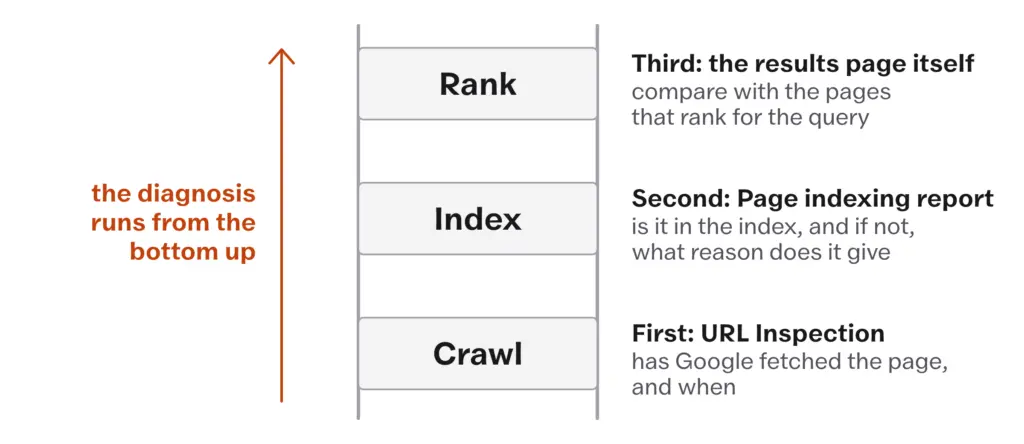
Crawling is discovery. Googlebot follows links from pages it already knows, reads sitemaps and fetches the pages it finds. Think of a librarian walking the shelves and pulling every book whose title is written on a card somewhere, with the limit that a book nobody has written a card for stays unread.
- Googlebot finds a new post through links from pages it already knows and through the XML sitemap.
- A post with no link pointing to it from anywhere on the site, and no entry in the sitemap, may never be found.
- Every post should be reachable from the homepage in a few clicks; Internal Linking covers how.
- The check is the URL Inspection tool in Search Console, which shows whether and when Google last crawled a URL.
Indexing is storage and understanding. Once Googlebot has the page, Google processes it, works out what it is about, and stores it in the index, which is its database of the web. A page that isn’t in the index cannot appear in results, whatever else is true of it.
- Not everything crawled gets indexed. Google may fetch a page and decide it adds nothing, duplicates another page or is blocked by a noindex tag.
- Google says there is no minimum or maximum word count, in its SEO Starter Guide as updated in December 2025. “Thin” is about what a page adds and not about its length; a 400-word page that answers something specific is not thin, and a 3,000-word page that restates 10 others is.
- The check is the Page indexing report in Search Console, which lists the indexed pages and gives a reason for each page that isn’t, and URL Inspection for one page at a time.
Counting site:yourdomain.com results to see what is indexed. Google’s own documentation for the operator, updated December 2025, says it doesn’t necessarily return every URL indexed under that prefix, so the count tells you nothing reliable. The Page indexing report gives you the number and the reasons; URL Inspection settles one page.
Ranking is the last step and the one everybody starts with. For each query, Google’s systems order the indexed pages that could answer it. There are hundreds of signals, Google publishes a guide to the systems it uses without publishing their weights and no one outside Google knows the full formula. What is known is enough to work with, and the next section is about that.
If a post was never crawled, indexing doesn’t matter. If it was never indexed, ranking doesn’t matter. That order is the whole method: when a page isn’t performing, you check the stages from the bottom, and you don’t touch the title or the headings until you know the page is in the index.
A page that Google never crawled cannot be indexed, and a page that isn’t indexed cannot rank. Check the stages in that order before you change anything on the page.
Say a post you published 3 weeks ago is bringing nothing. Open URL Inspection and paste the URL. If Google has never crawled it, the problem is discovery: there is no link to it, or the sitemap doesn’t list it, or the whole section is blocked, and no amount of editing the post will help. If it was crawled but is not indexed, the report gives a reason, and that reason is the work. If it is indexed, the page is in the library and the question becomes a ranking one, which means comparing it against the pages that do rank for the query, and that comparison is in Reading the Results Page. Three checks in that order tell you which lesson of this course you need.
What Google Weighs
Google’s stated aim for ranking is simple: show the most helpful result for the query. Everything else in the system is Google trying to work out what helpful means for that query, and the signals it has described in public fall into three groups.
Relevance. Does the page actually answer the question? Google’s own How Search Works page calls the presence of the query’s words in a page’s headings and body its most basic relevance signal, and then says its systems look beyond that for related content. So a page for “how to repot a succulent” needs to be about repotting, specifically and fully, and a page about succulents that mentions repotting in passing is not the same page. This is why the work in Keyword Research That Still Pays comes before the writing: you need to know exactly which question you are answering.
Quality. How well does the page answer the question, compared with every other indexed page on the topic? Google’s systems make exactly that comparison, so if the top result is a full guide with steps and its own photographs and yours is a summary, yours will not outrank it, and the length has nothing to do with it. Depth and length are different things. A focused, well organized page from someone who knows the subject beats a long one full of padding, and Google’s “no magical word count” line is the backing for that.
Trust and authority. Does Google trust the site and the page? Links from other sites, the site’s history and consistent work in a subject all feed this, and a post on a site with years of good pages and many links will generally outrank the same post on a new blog. That is how it works, and new blogs still rank for the queries the big sites have not bothered with, which is the case for choosing well.
There are two corrections to what used to be said about the third group. Google has never published a ranked list of factors, so “links are a top 3 factor” is folklore; link analysis is one of the systems in Google’s ranking systems guide, and Links and Mentions treats it at the size it deserves. And Google now says plainly, on the same How Search Works page, that it turns aggregated and anonymized interaction data into signals that help its systems estimate relevance. The older line that clicks and bounces are not direct ranking factors is no longer how Google describes it. You can’t click your way up on that, but a title that promises what the page delivers, and a page people don’t bounce off, are ranking work as well as good writing.
Trust Inside E-E-A-T
Google publishes guidelines for the human raters who assess search results, and the frame these raters use is experience, expertise, authoritativeness and trustworthiness. It is a description of what the systems are trying to reward, and nobody adds it up as a score inside the ranking systems.
The part most write-ups get wrong is the weighting. Google’s own helpful content page, updated December 2025, says trust is the most important member of the family and the other three contribute to it. A page does not need to show all four equally; some pages are valued mainly for the experience they show, others for the expertise. So the useful question is why a careful reader would trust this page, and for a blogger the strongest answer is usually experience: the product you used, the place you went, the thing that went wrong. First-Hand Proof as the Moat is that lesson, and Entity Signals and the Author Page covers the identity side.
The AI Layer
Since May 2024 in the US and across most of the world by October 2025, a query can get three kinds of answer on one Google page:
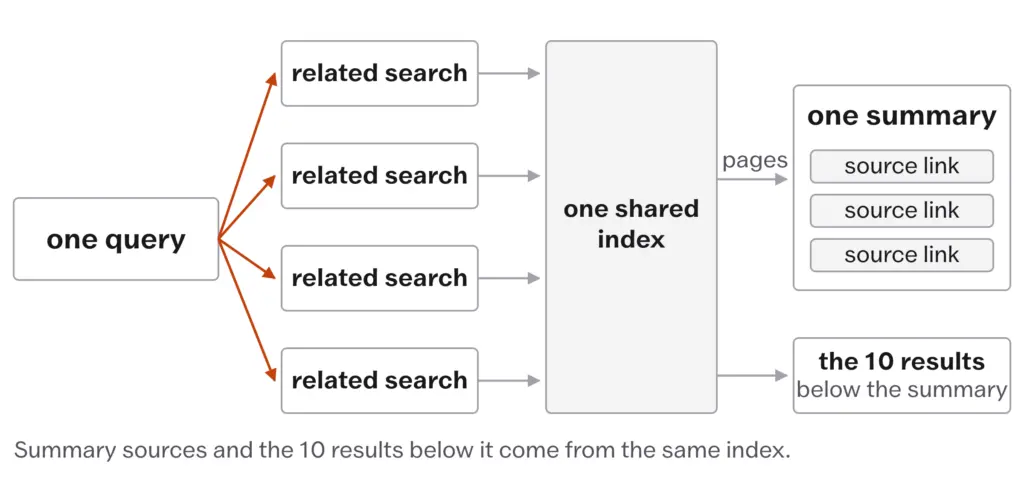
- an AI Overview, a summary with source links above the results
- the results themselves
- AI Mode, a conversational tab that answers and takes follow-up questions
The dates and the reach are in The State of Search, September 2026. What matters here is how the summaries choose their sources, because Google has written it down, and it is shorter than the folklore.
Google Search Central, AI features and your website, December 2025. Google’s documentation for site owners says the AI features are built on the core ranking systems and draw on the same index as the results below them, so there is no second index, and that a page needs to be indexed and eligible to be shown with a snippet. It then says there are no additional requirements to appear in AI Overviews or AI Mode. The number for a blogger is 0: there is no separate submission, no separate optimization and nothing extra to buy.
Three more things come from the same documentation and from Google’s guide to its generative AI features:
- To answer one query, the AI features run what Google calls a query fan-out: several related searches across subtopics and data sources, with the answer assembled from what these return. This is why the links under a summary are often wider and more varied than the 10 results below it.
- Search Console counts traffic from AI Overviews and AI Mode in its Performance report under the Web search type, mixed in with ordinary search traffic.
- Google’s guide to optimizing for generative AI features, published May 2026 and updated July 2026, says you don’t need new machine-readable files such as llms.txt or Markdown copies, you don’t need to break content into small chunks, you shouldn’t rewrite content for AI systems, and no special schema markup is required. It asks for unique, valuable content with an original perspective, gives first-hand reviews as the example, and says seeking “inauthentic mentions” across the web is not as helpful as it might seem.
Read those together and the AI layer stops being a separate discipline. The page that ranks well and carries something original is the page that gets cited, with one difference: the summary is answering a cluster of related questions, so a page that answers one of these well can be pulled in even when it does not rank for the headline query. The figures behind that are in What a Blogger Can Still Win From Search, where Ahrefs found 76% of AI Overview citations coming from the top 10 in July 2025 and 38% in March 2026, with detection that differed between the runs. For a blogger the useful reading is that the sub-questions around a topic are now worth answering in their own right.
AI Overviews and AI Mode draw from the same index as the results below them. A page needs to be indexed and eligible for a snippet, and nothing more; the page that ranks well and carries something original is the page that gets cited.
The old advice that AI Overviews mostly touch informational queries and leave “best X for Y” alone has not aged well. Google describes AI Mode as built for longer and more complex questions, comparisons included, so no commercial query is safe by category. The test is whether the person can act on the summary without your page, and Reading the Results Page makes that a step you run before writing.
Building a special version of the site for AI: an llms.txt file, paragraphs chopped into “chunks”, extra schema, a rewrite in flatter language “so the model can read it”. Google’s May 2026 guide says none of it is needed, and the rewrite makes the page worse for the people who click.
Snippet Controls and Preferred Sources
Two controls sit on your side of this. The first is old and works on the AI features because these use the same snippet rules as the results below them.
<meta name="robots" content="nosnippet">stops Google showing any snippet for the page, which also keeps its text out of AI features; the page can still rank as a bare link.max-snippet:[number]caps the snippet at that many characters, and the AI features respect the same cap.data-nosnippeton an HTML element keeps that part of the page out of snippets while the rest stays eligible.noindexremoves the page from Search altogether, AI features included.- Google’s snippet documentation, updated April 2026, carries the syntax, and URL Inspection shows whether Google has picked the change up after the next crawl.
Snippet controls are not free. A page with nosnippet shows as a title and a URL with nothing under it, and a page kept out of the summary is also kept out of the clicks the summary sends to the pages it cites. The right use is narrow: a page whose whole value is the text itself and which you do not want restated, or a section of a page you want people to read in place. A site-wide setting also exists, in Search Console, that removes the whole site from AI Overviews and AI Mode; that is a bigger decision, and The State of Search, September 2026 covers it.
The second control belongs to your readers. A reader can pick a site as a preferred source in their Google settings, and since June 2026 that choice shows inside AI Overviews and AI Mode as well as Top Stories: your page, when it is cited, carries a preferred badge for that reader. Google’s documentation, updated September 2026, gives site owners a button to put on the site so readers can choose it in a click, and only a domain or a subdomain qualifies, not a folder. The Owned Audience treats it as what it is, an email list’s cousin that lives inside Google.
The Three Questions Before You Publish
Knowing the stages changes how you approach every post, because each question below is a stage.
- Will Google find this post? Is it linked from a page Google already crawls, and is it in the sitemap?
- Will Google index this post? Does it add something the index doesn’t already have, and is nothing blocking it?
- Can this post rank, and be cited? Is it the best answer for its question from a trustworthy source, and does it hold something a searcher still wants after the summary?
If the answer to any of these is “probably not”, you know what to fix before you publish, and which lesson of this course fixes it.
Google’s systems keep changing under all of this. Most changes are small and unannounced; the confirmed ones, core updates, spam updates and the occasional Discover update, appear on the Search Status Dashboard with their start and end dates, and The State of Search, September 2026 carries the table for 2024 to 2026 with what each one changes for you, together with the 3 spam policies that launched alongside the March 2024 core update and the retirement of the helpful content system into core ranking in the same month.
What Doesn’t Work
The ladder tells you which stage a page is stuck at, and for the first two stages it tells you why, because Search Console reports the reason. For the third stage it cannot, because Google publishes the names of its systems and not their weights, so a page that is indexed and ranking on page 3 needs the comparison work in the Choose and Build lessons, and no report will hand you the reason.
The AI layer is not inspectable beyond what you can see on the page. You can read which pages a summary cites and infer the related searches it ran, but Google shows no report of the fan-out, and the generative AI report in Search Console shows impressions only, so you cannot count the clicks a citation sent. Measuring What Matters works inside that limit.
Snippet controls remove you from summaries and snippets alike. There is no setting that keeps a page in the summary but out of the quotation, so a page you want cited must be quotable.
And nothing here speeds Google up. URL Inspection lets you request indexing for one URL, and that works for one URL. It is not a strategy, and a site whose new posts routinely need it has a linking problem to fix first.
Then there are the habits that quietly cost.
Checking rankings every day for a week after publishing. Nothing in the three stages happens on your schedule, and a week of watching a number that has not moved yet usually ends with a rewrite the page didn’t need.
Working out “the algorithm” from one update’s list of winners and losers. Every update has such lists, they contradict each other from one update to the next, and a rule reverse-engineered from one of these is a rule about that week.
Writing to a word count because the top result is long. Google says there is no number. The top result is long because the question needed it, or in spite of it, and copying its length copies neither.
Treating E-E-A-T as page furniture: an author box, a “reviewed by” line, HTTPS, a privacy page. These are fine, and trust is something else: what the page shows the reader that they can check.
Setting nosnippet in a mood, after seeing your paragraph restated in a summary. The restated page was also the cited page, and the cited page is the one getting the click.
- Three stages, in order: crawl, index, rank. A failure at one stops the next, so check from the bottom.
- The checks: URL Inspection for crawling and one page’s status; the Page indexing report for the count and the reasons. Never
site:. - No minimum or maximum word count (Google, December 2025). Thin means the page adds nothing; length is not the test.
- Google uses aggregated, anonymized interaction data as a signal, and keyword presence is still its most basic relevance signal.
- Trust is the part of E-E-A-T Google calls most important; the other three feed it.
- AI Overviews and AI Mode need a page to be indexed and snippet-eligible, and nothing else. No llms.txt, no chunking, no special schema, no rewrite.
- Being cited is not the same as ranking: 38% of citations came from the top 10 in March 2026, 76% in July 2025 (Ahrefs; methods differ).
nosnippetandmax-snippetwork on AI features too, and they cost you the citation’s clicks.
Pick one post on your site that gets no search traffic and run it up the ladder. Paste its URL into URL Inspection and write down whether Google has crawled it and whether it is indexed. If it isn’t crawled, find or add a link to it from a page that is, and check that it is in the sitemap. If it is crawled and not indexed, write down the reason the report gives; that reason is your next job. If it is indexed, search for the question the post answers, read the AI Overview if one shows and list the pages it cites, then compare your post against the 3 results below it and write down 3 things those pages do that yours doesn’t. You now know which stage, and which lesson, this post needs.