
You have a list of topics, a keyword tool that shows a volume and a difficulty score for each of them and a growing doubt that those two numbers still tell you which posts will bring readers. This lesson is the method for choosing the queries that still pay: the ones where somebody will click through to you, and where that click is worth something to your blog.
The sheet and the filters come later. A keyword is just a question someone types into Google, for example:
- “how to start a blog”
- “best email marketing tool for beginners”
- “WordPress vs Squarespace”
Those are all keywords, and keyword research is the work of finding out what your readers are typing so that you can write the answer. That part hasn’t changed. What has changed is what happens after Google finds your answer.
Move: Choose. Volume alone now picks losers; you’ll score every keyword by what the person wants, by whether Google will answer it for them and by what a visit is worth to you.
Your three actions for this lesson:
- Build a 20-keyword list from Search Console positions 6 to 20
- Score each one for AI-answer risk and revenue per visit
- Commit to the top three and write their briefs
The Checks a Query Must Pass
A keyword used to pass two checks before it earned a slot on the calendar: enough people search for it, and a blog like yours can rank for it, which is to say volume and difficulty. Both still matter and both still go on the sheet, but on their own these now pick losers, because for a growing share of questions Google writes a summary on the results page and the click that used to follow a good ranking doesn’t come.
So a query now has to pass three checks, and each one is a column you fill in yourself:
- What does the person want when they type it? This decides the format of the page, and it decides whether a blog post can serve the query at all.
- Will Google answer it for them on the results page? An AI Overview, an AI Mode answer or a featured snippet on the page changes how many searches turn into visits, and whether first-hand experience is the answer changes how much of that loss applies to you.
- What is a visit worth to this blog? An affiliate comparison, an ad-supported explainer and a page that sells your own product earn very different amounts from the same reader.
The old two checks tell you whether you can rank. The new three tell you whether ranking is worth the week it costs to write the page. It is wise to run both sets, and to let the second set decide.
I have read plenty of advice saying Google no longer counts keywords. The words still matter. Google’s own description of ranking says the most basic signal that a page is relevant is that it contains the same keywords as the search, and its Starter Guide adds that its language systems understand how a page relates to many queries even when the exact terms aren’t there. So the query goes into the page in the words the reader used, once where it matters, and synonyms carry the rest. A page that never says what the reader typed is asking Google to guess.
Start With Search Console
Search Console comes before any keyword tool, every time, if the blog is live. The reason is that its query list is the only keyword data anywhere that already includes Google’s opinion of your pages. A tool can tell you that people search for a phrase. Search Console tells you that Google already shows your page for it, on which position and how often anyone clicks. Those queries are the ones a focused update can move, because the hard part, being judged relevant at all, has already happened.
The window to work in is positions 6 to 20: the bottom of the first page and all of the second. Above 6 you’re already getting most of what that query can give you. Below 20 the page is visible to almost nobody and a rewrite is usually a new page’s worth of work. Between 6 and 20 the page is close, and close is where an afternoon of work pays.
The steps, in the Performance report:
- Open Search results and set the date range to the last 3 months, so a single good week doesn’t decide the list.
- Add a Query filter and choose Non-branded queries. Google added this filter in November 2025; it removes searches for your own name and its misspellings, which otherwise sit at the top of every list and tell you nothing about what to write.
- Turn on the Average position column and sort by impressions.
- Keep the queries whose average position sits between 6 and 20, and write down the top 20 by impressions.
That is the list, 20 queries Google already half-trusts you for, ordered by how often it shows you.
There are two things to know about these numbers before you score them. Impressions in this report now include appearances inside AI Overviews and AI Mode, because Google counts AI features under the Web search type, so a query with many impressions and few clicks may be one where your page appears as a source inside the answer rather than as a link on the page. The page is doing fine; what you’re seeing is the second check arriving before you’ve scored it, and the sheet handles it in a moment. And branded searches are worth tracking on their own, as a sign that people are looking for you by name, which Measuring What Matters covers.
Search Console first, tools second. Your own query list is the only keyword data that already carries Google’s opinion of your pages.
Then the Tools
The tools come in when the Search Console list runs dry, when the blog is new and has no queries yet, or when you want a whole cluster of questions around one topic rather than the ones you already appear for. The tools appear by name only here; the plans, the free tiers and the one-paid-tool rule live in Tools and Setup, and prices change faster than any course can.
The cheapest source is Google’s own results page, and every suggestion in it is a query people actually typed:
- Autocomplete. Start typing a broad topic and the suggestions that appear are searches Google has seen enough of to predict. “Budgeting” brings up “budgeting apps”, “budgeting for beginners”, “budgeting spreadsheet template”. Each of those is a candidate.
- People Also Ask, the question box on the results page. Open a few and more appear, each one a question someone asked in those words.
- Related searches at the bottom of the page, for the variations you hadn’t thought of.
Then one tool for volume and difficulty, Semrush or Ahrefs, whichever you already pay for or can use on a free tier, and AnswerThePublic or a similar question tool for the brainstorming stage when you want hundreds of “why” and “how” questions around one word. Two tools is plenty. The work is turning a broad topic into the specific question. “Budgeting” is a topic. “How to create a monthly budget in Google Sheets” is a query someone types with a job in mind, and it’s the second kind that goes on the sheet.
Difficulty Without a Magic Number
Every guide gives a number for this, and the numbers disagree, because a difficulty score means nothing until you say on which tool’s scale. The tools don’t agree with each other, and they don’t measure the same thing.
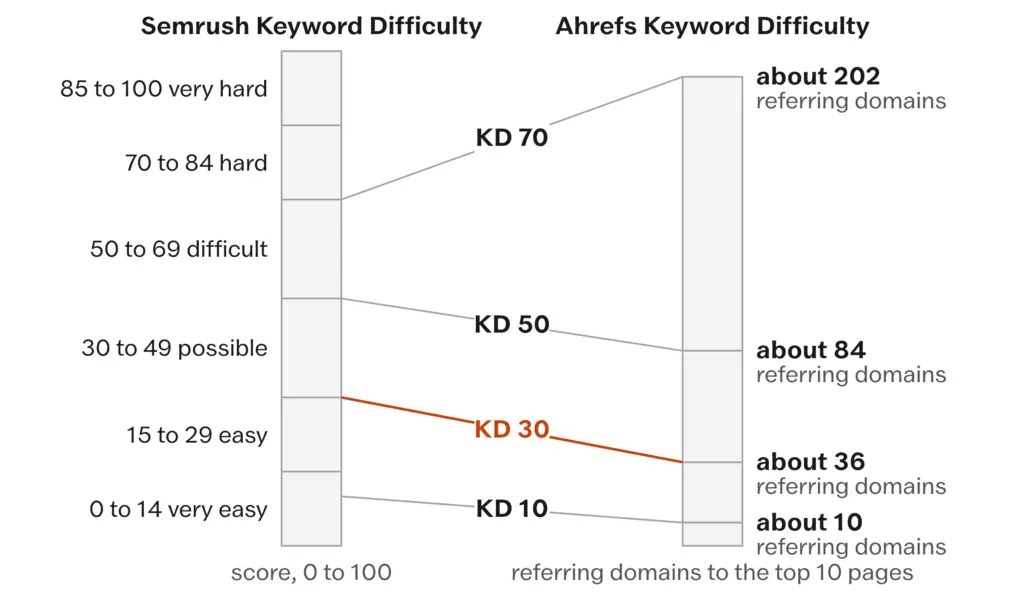
- Semrush’s Keyword Difficulty estimates the effort it would take to rank in the top 10, from the referring domains of the ranking pages, their authority score and the features on the results page. Its own bands are 0 to 14 very easy, 15 to 29 easy, 30 to 49 possible, 50 to 69 difficult, 70 to 84 hard and 85 to 100 very hard.
- Ahrefs’ Keyword Difficulty is built from how many websites link to the top 10 pages, and the scale isn’t linear: a KD of 10 corresponds to about 10 referring domains, 30 to about 36, 50 to about 84 and 70 to about 202. Ahrefs says outright that the score is absolute rather than relative; it estimates how hard the query is for an average site, and it doesn’t account for yours.
So “under 30” is the easy band on Semrush and about 36 linking sites on Ahrefs, and neither number knows how many sites link to you. Read the band the tool publishes, then do the check the tools can’t: look at who ranks. If the first page is all major publications, move on. If you see blogs like yours in the top 10, the query is winnable whatever the score says. That is the one difficulty test that has stayed true since the tools existed.
A blog with few linking sites should generally work in the tool’s lowest band and win on the specificity of the question; an established blog can push into the next band. There is no number that means easy on every tool, and I would not write one here even if the tools agreed, because the score is an estimate of backlinks, and How Google Decides Now has already explained that backlinks are one system among many.
Carrying one difficulty number from tool to tool. “Under 30” is the easy band on Semrush’s scale and means about 36 referring domains on Ahrefs’. Read the band the tool itself publishes, then look at who actually ranks.
The Scoring Sheet
The sheet is a spreadsheet with one row per query and three columns you fill in by hand after searching the query yourself. Volume, position and difficulty sit beside them as reference. The workbook lesson carries the same sheet; the columns are these:
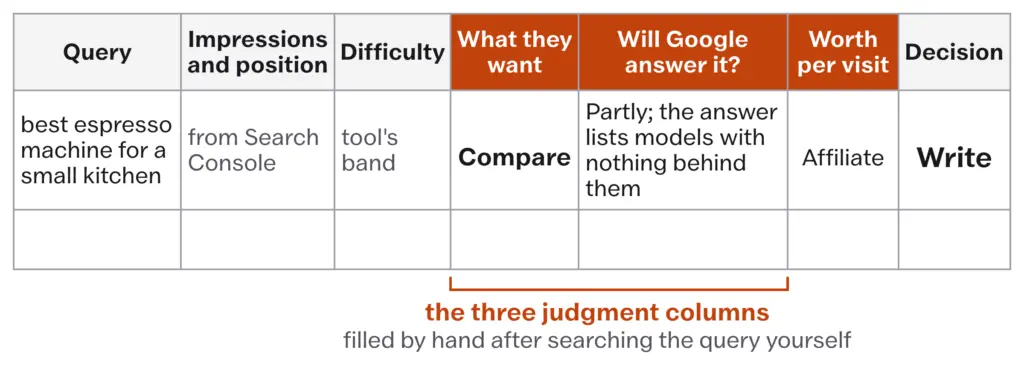
| Column | What goes in it |
|---|---|
| Query | The words as typed |
| Impressions, position | From Search Console, or blank for a new blog |
| Difficulty | The tool’s band, with the tool named |
| What they want | Learn, compare or buy; anything else is crossed off |
| Will Google answer it? | Answered, partly or open |
| Worth per visit | Affiliate, ad, product, list or none |
| Decision | Write, update or drop |
The three middle columns are the lesson. Each has its own test.
What They Want
Google’s own raters sort queries with 5 labels, set out in the Search Quality Rater Guidelines of September 2025, and these are more useful than the industry’s usual 4 because they separate the question that has one short answer from the one that doesn’t:
- Know: the person wants to find information or explore a topic.
- Know Simple: a special kind of Know query that seeks one specific answer, a fact or a figure, correct and complete in a line or two.
- Do: they want to accomplish something, which may be to download, to buy or to get something done online.
- Website: they want a specific site or page they already have in mind.
- Visit-in-Person: they want a place nearby.
The guidelines also give a section to queries that can be read more than one way, and the results page shows you which reading Google has chosen. That reading is the subject of Reading the Results Page; here you only need the label.
For the sheet the 5 collapse to 3 words. Learn covers Know and the how-to end of Do. Compare covers “X vs Y” and “best X for Y”. Buy covers pricing, discount and “where to get” queries. Website queries are somebody else’s traffic and get crossed off, and Visit-in-Person queries belong to Local SEO, If You Serve People in Person.
Keep the spectrum in mind while you label, because it is the bridge to the third column:
- “What is X” brings traffic and little revenue.
- “X vs Y” brings people who are evaluating.
- “Best X for Y” brings people close to a decision.
- “X pricing” and “X discount code” bring people ready to buy.
A healthy blog writes across all four, and a blog that wants revenue sooner leans its early calendar toward the comparison and best-of end, because those readers are further along and they’re the ones who click an affiliate link or buy a product.
Will Google Answer It?
Search the query yourself and look at the top of the page. An AI Overview, an AI Mode answer or a featured snippet sitting there is Google telling you it judged the question answerable in summary form. That matters for the click, and the measurement of how much it matters comes from a panel of real people rather than from a tool’s estimate: Pew Research Center’s July 2025 study, which What a Blogger Can Still Win From Search carries, found people clicked a result on 8% of visits with an AI summary and on 15% without. For the sheet, a query with an AI answer on the page sends roughly half the visits of one without, before your ranking is even considered.
The loss falls hardest on the page at the top, which is where you were hoping to be.
Ahrefs, April 2025. Across 300,000 keywords, using Search Console click data from March 2024 and March 2025, Ahrefs measured the click-through rate of the first result when an AI Overview was present at about 34.5% below what it would have been without one. The number one page for such a query keeps its ranking and loses a third of its clicks.
Neither figure says the query is dead. Half the clicks of a query worth pursuing is still a query worth pursuing, and the full set of click studies, with their disagreements, is in The State of Search, September 2026. What the figures do say is that the presence of an answer has to be scored, and that the score has a second half.
The second half is the question that decides most rows: is first-hand experience the answer? An AI summary can restate any fact that has been published enough times. It cannot restate what nobody has published yet, and Google’s own guide to its generative AI features, published in May 2026, says as much: don’t just recycle what others on the internet have already said or what a generative AI model could easily produce, because content that provides a unique expert or experienced take goes beyond common knowledge. So the column takes one of 3 values:
- Answered. An AI answer covers the query fully, every source under it says the same thing and there is nothing a reader would need from you after reading it. “How much caffeine is in a shot of espresso” is answered.
- Partly. An AI answer is there, but a reader who wants to act still needs specifics: which of the 5 listed machines fits a small kitchen, what the descaling step looks like on the model they own, what went wrong when someone actually did it.
- Open. No AI answer, or an answer that is a list of options with nothing behind them, or a question where the only honest answer comes from doing the thing.
Partly and open are where a blog can still be the page the reader needs. Answered rows go to the bottom of the sheet, however large the volume beside them. That is the whole reason volume alone now picks losers: the tools count searches, and for an answered query most of those searches end on Google’s page.
What a Visit Is Worth
The third column is the one most bloggers ignore, and the click loss has made it the deciding one. Every query on the sheet gets the way the page would earn:
- Affiliate: the page compares or recommends products with links you’re paid on.
- Ad: the page earns from ad impressions alone, so its value rises and falls with page views.
- Product: the page sells or leads to something you make, a course, a template, a service.
- List: the page’s job is an email signup, which pays later.
- None: the page earns nothing directly. It may still belong on the site as a spoke in a cluster, which Topical Authority and Site Architecture explains, but it earns its slot on that basis and on no other.
The exact arithmetic, revenue per visit with the units right, is the job of Measuring What Matters, and the sheet doesn’t need it yet. What the sheet needs is the rank. A product page usually earns most per visit, an affiliate comparison next and an ad-only explainer least, and the ad-only explainer is also the row most often marked answered, because a plain explanation is the easiest thing for a summary to restate. Two of the three columns pull the same way on it.
A query earns a slot when someone will still click and the click is worth something to you. Volume on its own decides nothing.
A Worked List
Say your blog is about making coffee at home. Below are four rows from a sheet, scored the way the columns ask, with the numbers left blank because they’d be yours:
| Query | What they want | Will Google answer it? | Worth per visit | Decision |
|---|---|---|---|---|
| how much caffeine in a shot of espresso | Learn (Know Simple) | Answered | Ad | Drop |
| best espresso machine for a small kitchen | Compare | Partly; the answer lists models with nothing behind them | Affiliate | Write |
| how to descale a home espresso machine | Learn (Do) | Partly; the steps are there, the photographs and the part that goes wrong are not | Affiliate, for the descaler | Write |
| espresso machine reviews | Compare, mixed | Open; the page shows reviews and forum threads | Affiliate | Update the existing page |
The first row would top a volume-sorted list and earn nothing, because the answer fits in a sentence and Google writes the sentence. The second and third rows are the shape of a query that still pays: a comparison or a procedure where the summary gives the outline and a person who has done the thing gives the rest. The fourth row is what a Search Console list usually turns up, an existing page close to the first page for a query nobody has answered in summary form, which is the cheapest win on the sheet.
The commitment at the end is 3, because that is 2 or 3 months of posts for a solo blog and because a longer list is a way of not starting. From a sheet of 20, pick the 3 rows where all three columns agree, and write a one-paragraph brief for each: the query, the format the results page rewards, what you’ll add that isn’t on the page and how it earns.
What Doesn’t Work
The sheet can’t tell you whether you’ll rank. Difficulty is an estimate of the backlinks the top pages have, and the sheet’s other columns are your own judgment of what the person wants and what Google has done about it; a row that scores well is a good bet, and a bet is all it is. You still have to write the page and wait.
The AI-answer column is a snapshot. Google shows an AI Overview for a query on one day and not the next, and more often in some countries and languages than in others; AI Mode answers differ from one session to the next. Date the score, and rescore a query before you update its page rather than trusting a column from last spring.
Search Console only shows queries you already appear for, so a new blog has an empty first list and has to start from the tools, where every volume is an estimate and the estimates disagree between tools by wide margins. That is normal, and precision matters less than direction at the start.
Then there are the habits that quietly waste the method.
Sorting by volume and working from the top. The biggest numbers on any list are the broadest questions, which are the most answered and the hardest to rank for, so the top of a volume-sorted list is the bottom of a scored one.
Targeting a topic instead of a query. “Fitness” is a niche, and “15-minute bodyweight workout for beginners at home” is a keyword a blog can win.
Building the spreadsheet and never writing. The research should take 30 to 45 minutes per batch, then you write. A perfect spreadsheet that never turns into articles is worthless, and an imperfect list that leads to consistent publishing will outperform it every time.
Writing only what’s easy to rank for. A calendar of answered Know Simple queries ranks and earns nothing, and it’s the calendar a volume tool builds for you.
Trusting one tool’s number as a law. The score is an estimate of an average site’s chances, on that tool’s scale, on that day. Who ranks is a fact.
Never redoing the list. Queries gain AI answers and lose them, and demand rises and falls, so a list scored once is out of date within a quarter.
- Search Console first: last 3 months, Non-branded queries, positions 6 to 20, top 20 by impressions
- Three scores per query: what they want; will Google answer it (AI Overview, AI Mode, featured snippet) and is first-hand experience the answer; what a visit is worth
- Difficulty read per tool: Semrush 0 to 14 very easy, 15 to 29 easy, 30 to 49 possible; Ahrefs KD 30 is about 36 referring domains; then look at who ranks
- With an AI summary on the page, people clicked a result on 8% of visits; without one, 15% (Pew Research Center, July 2025)
- Position 1 loses about 34.5% of its clicks when an AI Overview is present (Ahrefs, April 2025)
- Commit to the 3 rows where all three columns agree and write their briefs
- Rescore the sheet every quarter, and any query before you update its page
Set a timer for 45 minutes. Open Search Console’s Performance report, set the last 3 months, filter to Non-branded queries, sort by impressions and copy the 20 queries with an average position between 6 and 20 into the scoring sheet from the workbook lesson. If the blog is new and the list is empty, take one broad topic you cover, type it into Google and collect 20 queries from Autocomplete, People Also Ask and the related searches instead. Search each query, fill in the three columns by hand and mark each row write, update or drop. Pick the 3 rows where all three columns agree and write a one-paragraph brief for each before the timer ends. Those 3 are your next 3 posts.