
Internal Linking
You publish a post, share it once and it sits on the site while the older posts on the same topic carry on not mentioning it. Nothing on your site tells Google or a reader that these pages belong together. This lesson is about the links between your own pages, which is the one part of linking you control completely and the part most blogs leave to a plugin.
Before the model and the habits, I want to ensure the basic idea is clear. Google finds pages by following links, and it reads the text of each link to understand what the page at the other end is about. On another site those links are somebody else’s decision. On your own site every one of them is yours: which page links to which, and in what words. Backlinks are hard to get and impossible to control. Internal links are free, they are yours and you can build them this afternoon.
Move: Connect. Three habits, kept every week, give every page on your site a link, a place in a topic and an anchor in the words you choose, which is the one part of linking a blogger controls completely.
Your three actions for this lesson:
- Find every post with no inbound internal link and give it one
- Link 3 old posts to your newest one, with descriptive anchors
- Open the Links report and read your top linked pages
Why Internal Links Matter
Google’s link best practices, updated December 2025, are short enough to hold in your head, and they are the only rules in this lesson that come from Google rather than from judgment.
Google Search Central, link best practices, December 2025. Google’s link documentation says it “can only crawl your link if it’s an <a> HTML element with an href attribute”, that “every page you care about should have a link from at least one other page on your site”, that good anchor text “is descriptive, reasonably concise, and relevant to the page that it’s on and to the page it links to” and that “there’s no magical ideal number of links a given page should contain.” For a blogger, those 4 lines are the entire rulebook; everything else in this lesson is method.
A page that nothing on your site links to can still be found through the sitemap and indexed, so it is not invisible. But Google then has nothing on your site telling it where that page sits, what it is about in your words, or that it matters more than the privacy policy, and it has no path to the page except the sitemap. Older guides say such pages will never rank because Google has no context, and that overstates it; Google’s own rule is the modest one above, at least 1 link from another page, and a blog that keeps to that one rule is already ahead of most.
A link also carries some of the linking page’s standing to the page it points at, which is what PageRank has measured since Google began, so a link from a page that other sites link to is worth more to its target than a link from a page nobody visits. That is the whole reason a hub matters, and it is why the habit of linking old posts to new ones does more than the habit of linking new posts to old.
Every page you care about gets a link from at least one other page on your site, with an anchor that says what the page is about.
Hub and Spoke
If you take one model from this lesson, it should be this one. One hub page covers a topic broadly. Several spoke pages each cover one part of that topic in depth. The hub links to every spoke, every spoke links back to the hub and spokes link sideways to each other where their subjects overlap.
Say you run a cooking blog and the topic is meal prep. The hub is a complete guide to meal prep, covering the basics, the benefits, the tools and the common mistakes at a level a beginner can follow. The spokes are the pages that go deep on one part each:
- meal prep for weight loss
- meal prep containers, and what to buy
- 30 meal prep recipes for beginners
- how to meal prep chicken 5 ways
- meal prep for families on a budget
The hub links to all 5. Each of the 5 links back to the hub. The weight loss page links to the recipes page, because someone reading one wants the other, and the containers page links to the family budget page for the same reason. Nothing links sideways where the reader would not want to go.
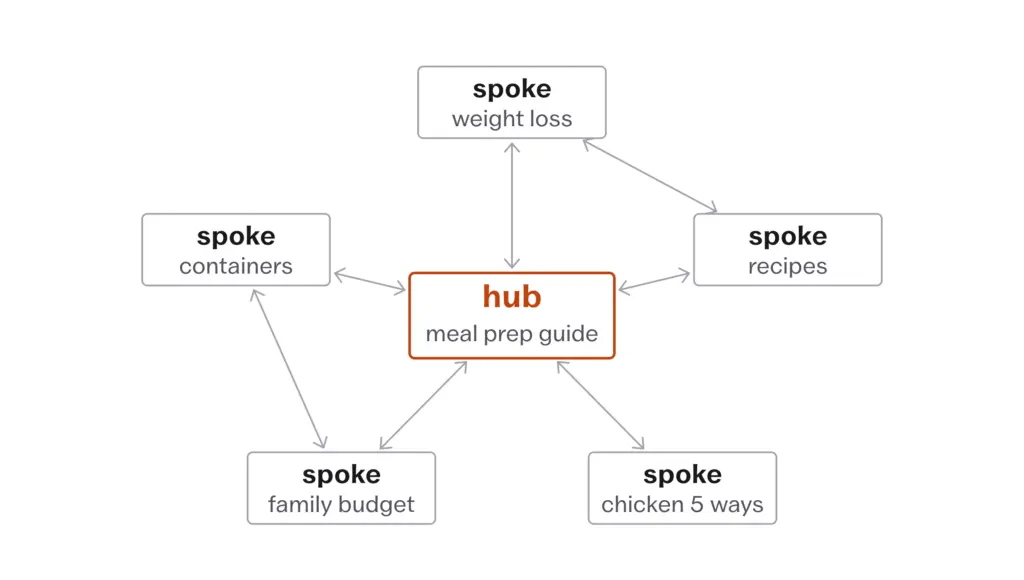
Why it works is not mysterious. Google ranks at page level and reads site-wide signals alongside, and a cluster of linked pages on one subject draws the shape of that subject in a way Google can read: this site has a page for the question and a page for each part of it. It matters more now than it did, because Google’s AI features fan a query out into related searches across subtopics, per its AI features documentation from December 2025, and a cluster where each page answers one sub-question is the shape a fan-out finds. When one spoke earns a link from another site, some of that standing reaches the hub and the other spokes through your own links, which is the only sense in which internal links compound.
Which topics get a hub, how many clusters a site can support and what to do with the posts that fit none of them belongs to Topical Authority and Site Architecture. This lesson is about the links inside a cluster once the map exists.
Anchor Text
Anchor text is the clickable words of a link, and Google’s rule for it is one sentence: “Good anchor text is descriptive, reasonably concise, and relevant to the page that it’s on and to the page it links to.” The bad examples in the same document are “click here” and “website”, and the worst is a sentence in which every word is a separate link. On stuffing, Google is direct: “Write as naturally as possible, and resist the urge to cram every keyword that’s related to the page that you’re linking to (remember, keyword stuffing is a violation of our spam policies).”
So the old advice to use keyword-rich anchors on internal links, because you control both ends, is retired. Descriptive and concise means the anchor is the name of the page at the other end, as you would say it in a sentence to a friend.
What most people write:
To learn more about hosting, click here.
What works better:
The trade-offs are in our shared versus managed WordPress hosting comparison.
Same link, and the second anchor tells a reader what they get by clicking and tells Google what the page at the other end is about, in 6 words. The first tells both of them nothing, and the word “here” is now the most common anchor pointing at that page.
Two habits keep anchors honest. The anchor should make sense in the sentence even if it were not a link, so if you have to force a phrase into a sentence to link it, the sentence should be rewritten instead. And a phrase gets linked once in a paragraph, usually at its first mention, because 3 links to the same page in 3 lines is the chained-link pattern Google’s documentation shows as the example to avoid. Across the site the anchors to one page should vary the way they would in speech, so “the hosting comparison”, “which hosting plan to pick” and “shared versus managed hosting” all point at the same page and each one reads naturally where it sits.
Using keyword-rich anchors on every internal link because you control both pages. Google’s link guidance asks for anchors that are descriptive, reasonably concise and relevant, and says outright that cramming related keywords into anchor text is keyword stuffing, which its spam policies cover. Write the anchor as the name of the page as you would say it in a sentence, and vary it the way you would vary it in speech.
How Many Links a Post Needs
Google says there is no magical ideal number, and then gives the only test that survives contact with a real post: if you think it is too much, it probably is. If you want a number to start from, I’d put about 5 contextual links in the body of a typical post, each one where the reader would want the next page and none where they would not. That is a judgment and not a rule. A long guide can carry more, a short answer may carry 2, and the count matters less than where the links sit.
Links belong in the body, where the concept comes up, spread through the post rather than bunched in one paragraph. A related-posts list at the end is a supplement to those and never a replacement, because a list of titles under a heading carries no context and a link inside a sentence carries the sentence. I’d keep the closing paragraph for the action, not for links, because a reader who got to the end is ready to do something, and I’d leave the homepage out of body links altogether, because the menu already links to it from every page and one more adds nothing.
Links Google Can Follow
This is the part most linking advice leaves out, and it changes what a related-posts plugin is worth. Google says it can only reliably crawl a link that is an <a> element with an href, and that it “can’t reliably extract URLs from <a> elements that don’t have an href attribute or other tags that perform as links because of script events.” A button with a click handler, a card that opens a page on click or a list that a script draws after the page has loaded may look like links to a visitor and be nothing to Googlebot.
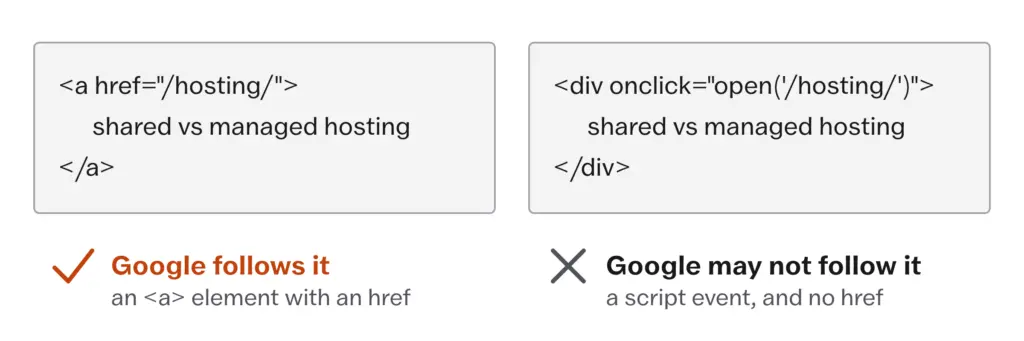
<a> element with an href, and that it cannot reliably extract a URL from an element that acts as a link through a script event, which is what some related-posts widgets output. Google Search Central, December 2025.WordPress core blocks and most themes output real anchors, so the links in the body of a post are safe. Related-posts widgets are the ones to check, because some draw their list with JavaScript after the page renders, some render the items as elements with click handlers rather than anchors and some rotate the list on every visit so Google sees a different set each time it crawls. The check takes a minute:
- open the post in a browser and view the page source, meaning “View Page Source” and not “Inspect”, because Inspect shows the page after scripts have run
- search the source for the title of one of the widget’s related posts
- look for
<a href="...">around it
If the widget’s links are not in the source as anchors with an href, they are not links Google can rely on, and the post’s internal links are only the ones in its body. That is the reason the habits below put the links in the body by hand.
Counting on a related-posts widget for your internal links. Google says it can only reliably crawl a link that is an <a> element with an href, and a widget that draws its list with a script after the page loads, or rotates it on every visit, may not give Google any link at all. View the page source and look for <a href around the widget’s links. The links in the body of the post are the ones you can be sure of.
The Three Habits
These 3 habits are the 80/20 of internal linking. The cluster map and the audit are refinement; the habits are the structure, and they are weekly, not quarterly.
Every new post should link to existing posts on the site, about 5 of them, each where the reader would want the next page, with an anchor that names the page.
Every time a post is published, 2 or 3 older posts on the same topic should get a link to the new one, with a descriptive anchor, placed where the new post answers a question the old post raised. This is the habit people skip, and it is the one that matters most, because a new post with no inbound link has only the sitemap, and the older posts are the ones with links from outside pointing at them.
Every core topic should have one hub page, and every post in the topic should link to the hub and be linked from it.
That is the whole system. A blog that does those 3 things every week has a link structure most sites never reach, and it has it without a tool.
The Spreadsheet Audit
Once a quarter the structure gets checked, and for a blog under a few hundred posts a spreadsheet is enough. One row per post:
| Column | What goes in it |
|---|---|
| Title | the post title |
| URL | the address |
| Hub | which topic cluster the post belongs to, or “none” |
| Links in | how many other pages on the site link to it |
| Links out | how many pages on the site it links to |
| Anchors | the anchor text used for the links pointing at it |
| Notes | what to fix |
The first pass looks for rows with 0 in “Links in”, because each of those is a page Google reaches only through the sitemap, and each gets a link from the most relevant post before anything else is touched. The second pass looks at the pages that earn, from the revenue sheet in Keyword Research That Still Pays, and asks whether their “Links in” count matches their importance. The third pass reads the anchors column for a page and checks that the anchors describe it and vary. A row with “none” in the hub column is either a post for a topic the site has not built yet or a post that does not belong, and that decision goes back to Topical Authority and Site Architecture.
The counts can come from the Links report below, from a site crawler or by hand on a small site. The tools are in Tools and Setup, because they change more often than the method does.
The Links Report
Search Console carries a Links report, and it is the one free view of your link structure that comes from Google’s own crawl. It has 2 halves. The external half shows top linked pages, top linking sites and top linking text, meaning the anchors other sites use for you. The internal half shows top linked pages from within your own site, and for any page, which of your pages link to it.
The help page carries caveats that matter more than the numbers:
- “This report isn’t a comprehensive list of every link on your site. It shows a sample of internal and external links”
- links are grouped by canonical URL, so fragments and some parameters are dropped before counting
- the report includes links Google found over time that may since have been removed
- tables are limited to 1,000 rows, so on a larger site they are cut off
So the report is read for shape, not for totals. The question to ask of the internal top linked pages is whether your hubs and your earning pages sit near the top. If the privacy policy, the contact page and the about page outrank them, that is the menu and the footer doing your linking and the bodies of your posts doing none, which is the most common shape a small blog has and the cheapest one to fix. The external half is read for its anchors: the words other sites use for you are the words Google associates with your pages, and they are also the words worth matching in your own internal anchors, because the two then agree.
What Doesn’t Work
Internal links cannot make a page rank for a question it does not answer. The anchor tells Google what the page is about, and Google then reads the page to check, so a strong anchor on a weak page buys a visit and a bounce.
They do not replace links from other sites. Standing arrives from outside, and internal links only route what the site already has, so a site with no external links and a perfect internal structure has routed nothing. Links and Mentions is the other half.
They cannot reach a page that is set to noindex or blocked in robots.txt, because Google either will not keep it or will not fetch it, and no number of links changes that. The checks are in Technical SEO Essentials.
A hub cannot hold a topic the site has not covered. A hub with 2 spokes is a long page with 2 links on it, and the cluster only exists once the spokes do, which is the content map’s job in Topical Authority and Site Architecture.
And the Links report cannot give you the count. It is a sample, capped at 1,000 rows, so a full audit on a site of any size still needs a crawl or a spreadsheet kept by hand.
Then the habits that quietly weaken it.
Using the same anchor for every link to a page. It feels consistent, and it is the one pattern that reads as manufactured, to Google and to a reader who sees the same 4 words linked in every post.
Linking every mention of a phrase. Each link seems helpful, and a paragraph with 3 links to the same page is the chained-link example Google’s documentation shows as the thing not to do.
Dumping links into a box at the end. The box ticks the internal-links item on a checklist, and it carries no context, so the links tell Google a list of titles and tell the reader nothing about why they would click.
Linking from the new post only. The new post points at 5 old ones and nothing points back, so the new post has only the sitemap while the pages with real standing on the site carry on not mentioning it.
Accepting a plugin’s suggested links wholesale. Each suggestion looks reasonable in isolation, and the result is 8 links in a post that needed 3, with anchors the plugin chose from a keyword match rather than from the sentence.
Leaving old posts untouched for years. Old posts are the ones with links from outside pointing at them, and every year they go unedited is a year that standing reaches none of the newer pages.
- Google follows only
<a href>links; a script-driven related-posts widget may count for nothing, so check the page source - Every page you care about gets a link from at least 1 other page on your site
- Anchors are descriptive, reasonably concise and relevant; “keyword-rich” is retired and stuffing is a spam policy matter
- About 5 contextual links in the body of a typical post, placed where the reader wants the next page; Google says there is no ideal number
- Hub and spoke: the hub links to every spoke, every spoke links back, spokes link sideways only where the subjects overlap
- Three weekly habits: the new post links out, 2 or 3 old posts link in, every post in a topic links to its hub
- The Links report shows a sample, capped at 1,000 rows; read it for whether hubs and earning pages sit near the top
Open Search Console, go to Links and read the internal top linked pages list. Note whether your hubs and your best-earning posts are near the top or whether the legal and contact pages are. Then pick the post that earns the most, open it and add links in the body wherever it mentions a topic you have covered elsewhere, each with an anchor that names the page. Then find 3 older posts on the same topic and add a link from each to that post, in a sentence where it belongs. If any of the 3 older posts has never been edited since it went live, it is the one that needed this most.