
How to Make Your Website SEO-Friendly (2026)
Your site can look great and still be invisible if Google can't crawl it fast. Here's how I make any website SEO-friendly in 2026: site structure, mobile-first, clean URLs, Core Web Vitals (LCP 2.0s, INP, CLS), schema, and HTTPS, plus where to DIY versus hire a developer.
 by
by
An SEO-friendly website isn’t the one with the prettiest theme. It’s the one Google can crawl, render, and trust in under a second. In 18 years of building sites, I’ve watched gorgeous redesigns lose half their traffic overnight because nobody checked whether the structure underneath could still be indexed. Looks don’t rank. Structure does.
Here’s the short answer for 2026. A site is SEO-friendly when it loads fast (good Core Web Vitals), works mobile-first, runs on HTTPS, uses clean readable URLs, has a logical heading and internal-link structure, ships schema markup, and serves genuinely useful content search engines can extract. That’s the whole game. Everything below is how you actually build those things into the website itself, not generic “do SEO” advice.
This guide is about the website, not the marketing. Keyword campaigns and backlinks matter, but they’re wasted on a site search engines struggle to read. Get the foundation right first. If you’re still fuzzy on the fundamentals, start with my primer on the basics of SEO, then come back here for the structural and technical work, plus the WordPress-specific moves that make it faster. On WordPress specifically, pair this with my guide to building an SEO-friendly WordPress site.
The verdict, up front: An SEO-friendly website in 2026 is built on six structural pillars: fast Core Web Vitals (LCP, INP, CLS), a mobile-first responsive layout, HTTPS, clean keyword-bearing URLs, a clear heading and internal-link hierarchy, and schema markup. On WordPress, Rank Math plus a caching plugin handles 80% of it. Nail these before you spend a rupee on keywords or links.
What changed in 2026: Google tightened the “Good” LCP threshold from 2.5 seconds to 2.0 seconds, so a site that used to scrape a pass now lands in “Needs Improvement.” INP also moved from a supplementary metric to a primary ranking signal alongside LCP and CLS, confirmed in Google’s March 2026 Search Central update. Mobile-first indexing is now the default, with mobile scores used to rank desktop results too. Translation: speed and the phone experience matter more this year, not less.
Table of Contents
Map Your Site Around Real Keywords
An SEO-friendly site structure starts with knowing what people actually search for, then turning those queries into your page hierarchy. Keywords aren’t decoration you sprinkle on later. They decide which pages you build, what you call them, and how they connect. Before I design a single template, I list the queries each section has to win.
Picture the person typing into Google. They don’t search “premium artisanal solutions.” They search “best running shoes for flat feet” or “fix slow WordPress site.” Match that language. Then group related queries into clusters so one strong pillar page links out to supporting articles. That structure is what search engines read as topical authority, and it’s the difference between ranking and being invisible.
Do the research properly. I lean on Google Search Console for queries I already get impressions on, then expand with a dedicated tool. If you’ve never done this, start with my walkthrough on keyword research for beginners. It’s the one step too many people skip, then wonder why a beautiful site gets no traffic.
Build Mobile-First, Then Scale Up

Google indexes the mobile version of your site first, so design for the phone and let the desktop layout follow. This is mobile-first indexing, and it’s not optional. If your mobile page hides content, breaks layout, or buries the main text under interstitials, that’s the version Google judges you on. Build the small screen first and the big screen takes care of itself.
Get the fundamentals right. Use a responsive layout that reflows to any width, keep tap targets at least 48 pixels with breathing room so people don’t fat-finger the wrong link, and make sure the same content and structured data appear on mobile and desktop. Don’t serve a stripped-down mobile page. That used to be common advice and now it actively hurts you.
Test on real devices, not just a browser resize. I check pages in Chrome DevTools device mode, then on an actual mid-range Android, because that’s what most of my readers use. Layout shift on load (the CLS in Core Web Vitals) shows up on slow phones long before it shows on your fast laptop. Catch it there.
Place Keywords Where the Structure Lives
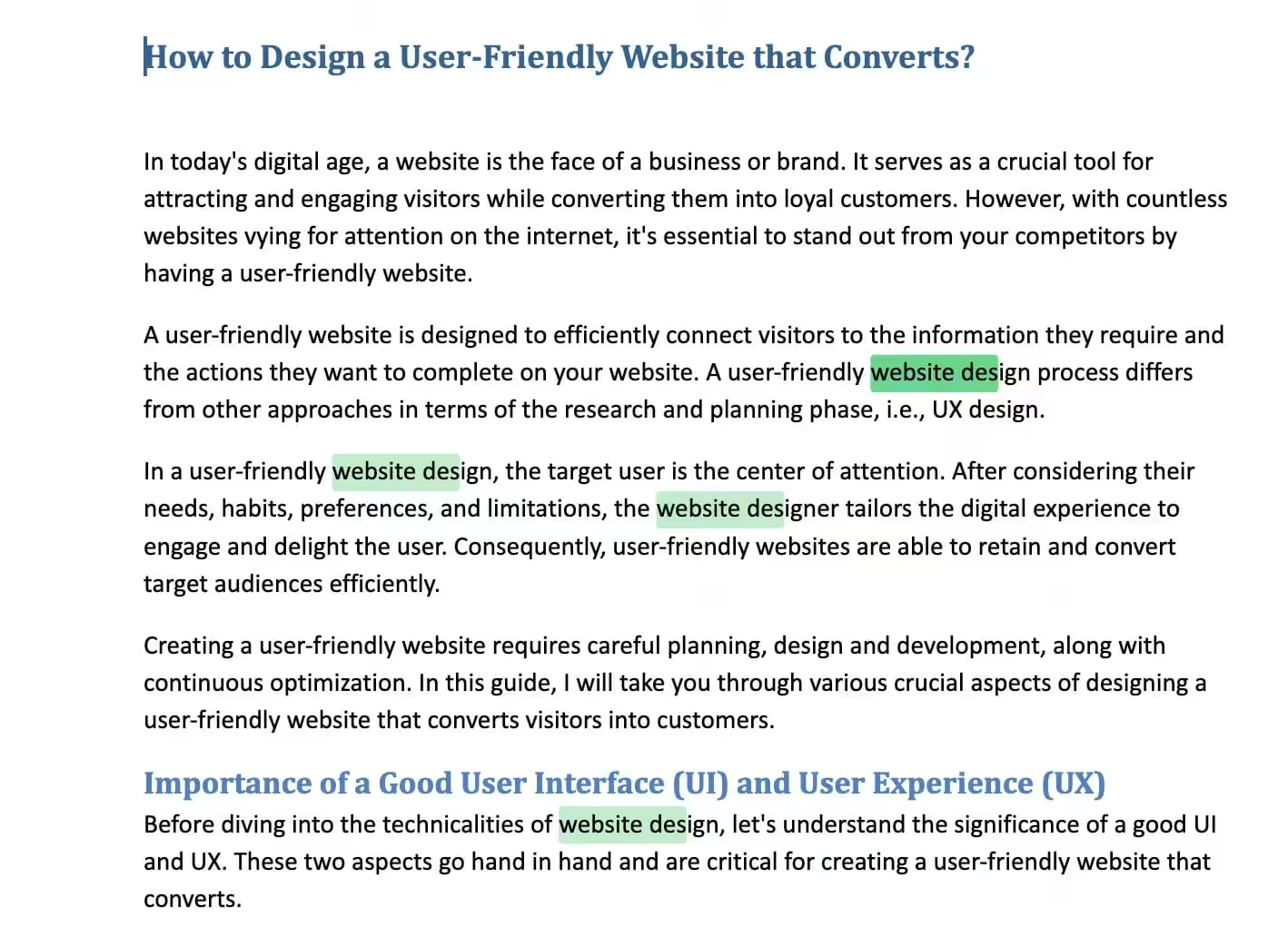
Keywords earn their weight in the structural slots, not from raw repetition. The H1, the first 100 words, your H2 subheads, the URL, the title tag, and image alt text carry far more signal than the twentieth mention buried in a paragraph. Put your primary phrase in those positions once, naturally, and you’ve done more than any density formula.
Forget the old 2-3% density rule. Google’s models read meaning now, not ratios. Stuffing the same phrase over and over reads as spam and gets you flagged. What works instead is covering the topic completely with the related terms a real expert would use.
- Write for the reader first, then check that the structural slots carry your phrase.
- Use the keyword where it genuinely fits the sentence, never forced.
- Bring in semantic and related terms so the page reads as comprehensive, not repetitive.
Tools like Rank Math’s content analysis flag whether your focus keyword sits in the right places without you having to count anything. Let the structure do the heavy lifting and the prose stay human.
Write Title Tags That Earn the Click
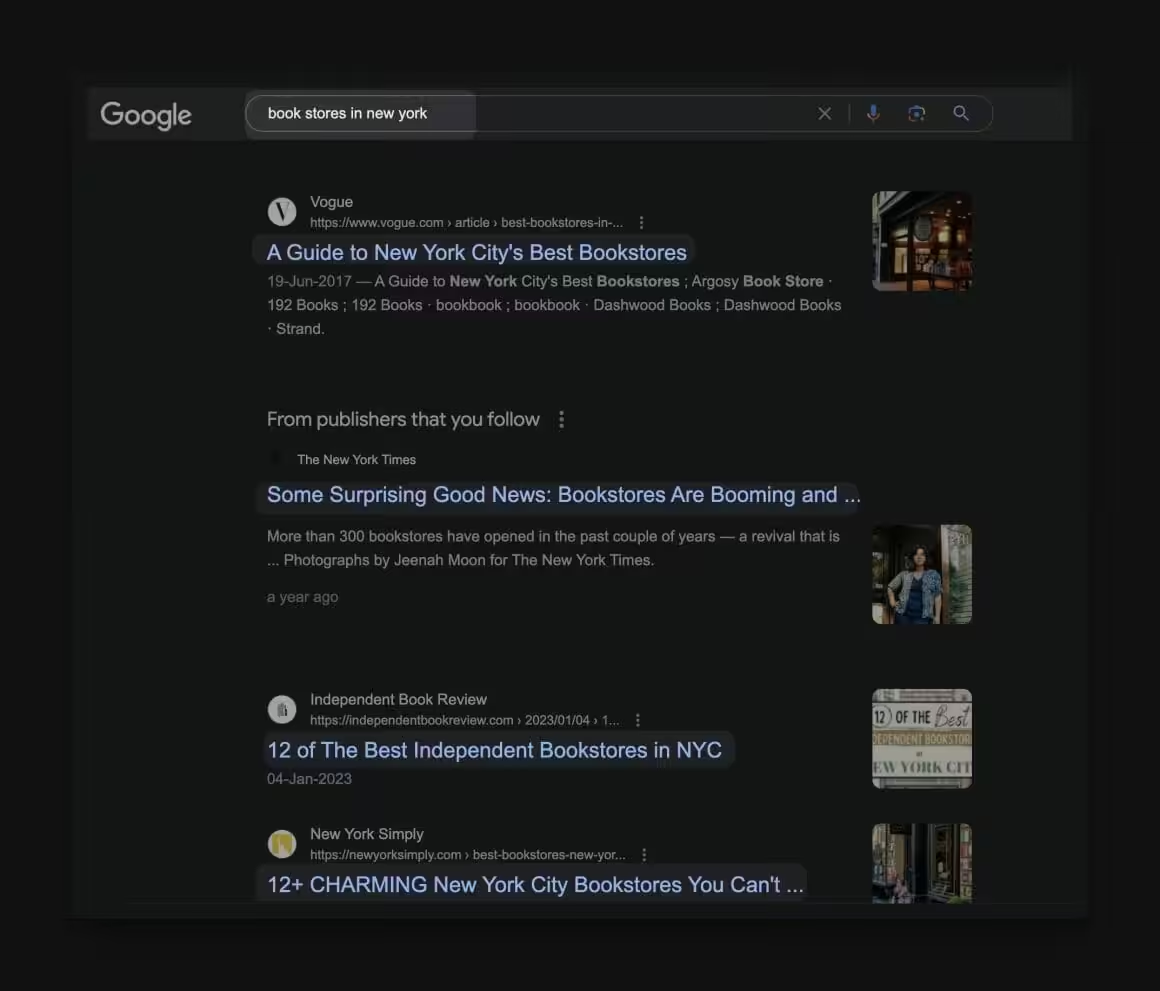
Your title tag is the single most clickable line you’ll write, so lead with the keyword and make a human want to click. It’s the bold blue link in search results and the label on the browser tab. It tells Google what the page is about and tells the searcher whether you’re worth their tap. Both matter equally.
Here’s how I write title tags that actually pull clicks:
- Front-load the keyword: Put the primary phrase near the start. “WordPress Speed: 9 Fixes That Cut My Load Time” beats “9 Tips To Make Your WordPress Site Faster.”
- Stay under 60 characters: Google truncates longer titles. Keep the important words inside the visible window.
- Match the page: The title has to deliver what the page delivers, or your bounce rate punishes the ranking.
- Don’t repeat keywords: One instance is plenty. Repetition reads as manipulation.
- Add a hook: A number, a year, a benefit, or a question. “(2026)” and “Complete Guide” earn clicks because they signal freshness and depth.
- Set titles in Rank Math: On WordPress, write the SEO title in the Rank Math box, not just the post heading. The two can differ, and the SEO title is what Google shows.
- Keep every title unique: Duplicate titles confuse search engines and split your own pages against each other.
- Track and revise: Use Google Search Console to watch impressions versus clicks, then rewrite the titles with high impressions and low click-through.
A sharp title is the cheapest ranking upgrade you have. I’ve doubled click-through on old posts just by rewriting the title and meta description, no new content at all.
Optimize Images for Speed and Alt Text

Images do two jobs on an SEO-friendly site: they can’t slow the page down, and they have to be readable to search engines and screen readers. The biggest speed killer I see on otherwise clean sites is a hero image weighing two megabytes. Compress it, serve it in WebP or AVIF, set width and height to stop layout shift, and lazy-load anything below the fold. My full process is in the guide on how to compress images for the web.
Alt text is the second half. It describes the image to people using screen readers and gives search engines context they can’t get from pixels. Here’s how to write it well.
General Best Practices for Image Alt Text Optimization:
- Describe what’s actually there: “Golden retriever chasing a ball on a beach” beats “dog.”
- Keep it to one phrase: Descriptive but brief. A sentence or less.
- Add the keyword only when it fits: Relevant, natural, never crammed in.
- Skip “picture of” and “image of”: Screen readers already announce it’s an image.
- Describe the action for functional images: A submit-button image gets the alt text “submit,” not a description of the icon.
- Leave decorative images empty: Use
alt=""so screen readers skip pure decoration.
Optimizing Image Alt Text in WordPress:
- Name the file before upload: “golden-retriever-playing.jpg,” never “IMG12345.jpg.” The filename is its own ranking signal.
- Set alt text in the Media Library: Open the image, fill the “Alt Text” field with a descriptive phrase. It carries everywhere the image is reused.
- Use the Block Editor field: Select an image block in Gutenberg, then add alt text in the block settings panel on the right.
- Handle theme and widget images: Logos and banners set by the theme may need an image-optimization plugin or a quick template edit to get proper alt text.
- Let your SEO plugin nudge you: SEO plugins like Rank Math and Yoast can flag images missing alt text so nothing ships bare.
Alt text exists first for the person who can’t see the image. Write it for them and the SEO benefit follows on its own.
Keep URLs and Permalinks Clean
A clean URL tells both the reader and Google what the page is about before anyone clicks. “gauravtiwari.org/seo-friendly-website” says everything. “gauravtiwari.org/?p=1006488” says nothing. On WordPress, the single biggest URL win is setting your permalink structure to “Post name” under Settings, then leaving it alone, because changing it later breaks every existing link.
Here’s what a search-friendly URL looks like:
- Make it readable: “example.com/tips-for-baking-bread” beats “example.com/post12345” every time.
- Include the keyword: “example.com/sourdough-bread-baking-tips” puts the topic right in the address bar.
- Drop the parameters: Use clean static slugs instead of query strings wherever you can.
- Keep it short: Trim filler words. The slug doesn’t need every word from the title.
- Separate words with hyphens: Never underscores or spaces. Hyphens are how search engines read word breaks.
- Don’t stuff keywords: “example.com/bread-baking-bread-home-bread-tips” looks like spam.
- Reflect your hierarchy: If a page lives under a category, let the structure show. It helps both navigation and crawling.
- Stick to lowercase: Mixed case can trigger duplicate-content issues on some servers.
Set the permalink structure once at launch and you avoid the single most painful SEO mistake on WordPress: renaming URLs after the fact and watching rankings evaporate. If you must change one, set up a 301 redirect in Rank Math so the link equity carries over.
Ship Original Content and Add Schema
Original, genuinely useful content is the one ranking factor with no shortcut, and schema markup is how you hand it to search engines on a plate. Copied or thin content earns penalties, not rankings. Write from your own experience, cover the topic deeper than the pages already ranking, and give the reader something they can’t get elsewhere. That’s what “content is king” actually means in 2026.
Then make it machine-readable. Schema markup (Article, FAQ, HowTo, Product) is structured data that tells Google exactly what each part of your page is. It’s what wins rich results: star ratings, FAQ drop-downs, recipe cards. On WordPress, Rank Math adds the right schema type per post with no code. Pair clean content with the matching schema and you become eligible for placements plain pages never get.
Watch for accidental duplication too. Tag archives, printer-friendly versions, and parameter URLs can quietly create copies of your own content that compete with each other. My checklist on how to prevent duplicate content covers the canonical tags and redirects that fix it.
See: SEO Tips: Characteristics of High Quality Content that Ranks
Keep It Fresh and Internally Linked
Search engines reward sites that stay current and connect their pages with internal links. A site you publish once and abandon goes stale, and stale pages slide down the rankings while competitors update theirs. Set a cadence, even a light one, and revisit your top pages every few months to refresh stats, dates, and dead links.
Internal linking is the half most people forget. Every new article should link to two or three related older ones with descriptive anchor text, and your strongest pages should link out to the pages you want to rank. This is how crawlers discover content, how authority flows through your site, and how readers stay longer. The cluster structure you planned in step one is what makes this natural instead of forced.
Wire In HTTPS and Social Signals
HTTPS is a hard requirement now, and social sharing amplifies the content once the secure foundation is in place. Google has used HTTPS as a ranking signal since 2014, and Chrome flags plain HTTP pages as “Not Secure,” which kills trust on sight. Get a free SSL certificate (most hosts include one through Let’s Encrypt), force HTTPS site-wide, and you’ve cleared the bar.
Social signals don’t directly rank you, but they spread your work to the people who do link and cite. Add share buttons, set Open Graph tags so links preview cleanly (Rank Math handles this), and post your best pieces where your audience already hangs out. Use social to push content as a marketing channel, and the traffic and links that actually move rankings tend to follow.
Pass Core Web Vitals on Page Speed
Page speed is a confirmed ranking factor, measured through Core Web Vitals, and it’s where most SEO-friendly websites either win or lose. Google grades three things: LCP (Largest Contentful Paint, how fast the main content appears, target under 2.0 seconds as of the tightened 2026 threshold, down from 2.5), INP (Interaction to Next Paint, how fast the page responds to a tap, target under 200 milliseconds), and CLS (Cumulative Layout Shift, how much the layout jumps, target under 0.1). Google measures these on the 75th percentile of real visitors, so your slowest quarter of traffic is what counts. This is the technical SEO that actually moves rankings. Check yours in PageSpeed Insights and the Search Console “Core Web Vitals” report.
When a site fails these, the cause is almost always one of the following:
- Cheap or oversold hosting that’s slow at the server level, which kills LCP before anything renders
- Heavy, uncompressed images and no width/height attributes, which wreck both LCP and CLS
- Too many plugins and third-party scripts piling onto the main thread, which tanks INP
- No caching or CDN, so every visitor rebuilds the page from scratch
- An outdated CMS or bloated theme dragging everything down
On WordPress, a caching plugin plus a CDN and decent hosting fixes most of this in an afternoon. I run FlyingPress with Cloudflare on this site and hold all three vitals in the green. Speed isn’t a nice-to-have. It’s the floor an SEO-friendly website has to clear before anything else you do counts.
DIY or Hire a Developer?
Most of an SEO-friendly website is DIY-able if you run WordPress. Permalinks, titles, alt text, internal links, schema through Rank Math, and a caching plugin are settings and habits, not engineering. The line I draw with clients is this: do the configuration and content yourself, and bring in a developer the moment the fix lives in code or hosting. Here’s roughly how I split it.
| Task | DIY | Hire a developer |
|---|---|---|
| Permalinks, titles, alt text, internal links | Yes, settings only | No need |
| Schema markup | Yes, via Rank Math | Only for custom types |
| Image compression and caching | Yes, plugin-driven | No need |
| Failing Core Web Vitals after the basics | Diagnose in PageSpeed Insights | Yes, theme or render-blocking code |
| Slow server-level response (high TTFB) | Switch hosts | Yes, server or stack tuning |
| Custom theme, JS bloat, migrations | Risky solo | Yes, every time |
If you’re a solo blogger or small business on WordPress, you can ship 90% of this yourself in a weekend. The day you’re staring at a red INP score that won’t budge no matter how many plugins you toggle, that’s the signal to pay someone. Paying for the right hour beats burning a month guessing.
Conclusion
An SEO-friendly website is built, not decorated. Get the six pillars right at the foundation: Core Web Vitals, mobile-first, HTTPS, clean URLs, a clear heading and internal-link structure, and schema markup. On WordPress, Rank Math plus a caching plugin carries most of the load, which is why I recommend that stack to every client. Do this work before you chase keywords or backlinks, because a fast, crawlable, well-structured site multiplies everything you do on top of it. Rankings still take months to build. But on a foundation like this, the months actually pay off.
Tell Google you want more of this.
Add Gaurav Tiwari as a preferred sourceOne tap, and this site shows up more often in your own Top Stories, AI Overviews and AI Mode. Remove it any time.