
 by
by
Most hosting plans sold as unlimited in India aren’t infinite, and for most websites that doesn’t matter. A plan with 100 GB of monthly bandwidth or 20 GB of storage gives a blog or business site more room than it will realistically use, so the word unlimited matters less than it looks on a pricing page.
Where sites actually get stuck is processing and cost. CPU, memory and PHP workers decide how many visitors a WordPress site can serve at once, and a cheap monthly price often needs a four-year prepayment with a much higher renewal. So the best unlimited web hosting in India is a plan with generous bandwidth and storage, enough processing for your traffic and a total cost you’re comfortable paying.
For most Indian websites, I’d start with Hostinger, a shared host with INR billing and a Mumbai server option, whose Premium plan includes unlimited bandwidth. If unmetered storage is the reason you’re shopping, Namecheap Stellar Plus is the plan to look at, and it has a Singapore data center for Indian audiences. HostArmada is a smaller cloud shared host with a Mumbai location and 7 daily backups on its entry plan.
What Is Unlimited Hosting?
Unlimited hosting means a particular feature has no fixed allowance, as long as you use it for a normal website under the host’s fair-use policy. It doesn’t mean every resource is infinite.
The feature called unlimited is usually one of these:
- Bandwidth, the data transferred between your site and its visitors. Hosts also call this unmetered.
- Storage, the space for your website files, databases and sometimes email.
- Websites, the number of sites you can add to the account.
- Mailboxes, the number of email accounts, each with its own storage limit.
What stays limited matters more for a growing site. CPU, memory and PHP workers (the processes that build dynamic pages) cap how many visitors a WordPress site can serve at once, even when bandwidth is unmetered. An inode limit counts files and folders, so a site with lots of small files, image sizes or emails can hit it long before the disk is full.
Hostinger Premium is a good example. Its bandwidth is unlimited, but it has 20 GB of storage, 400,000 inodes, 1 CPU core, 2 GB of RAM and 40 PHP workers. Those numbers are published in Hostinger’s plan limits, and they’re what you should compare, not the word unlimited.
How Much Is 100 GB for a Website?
For most websites, a large fixed allowance works the same as unlimited. The numbers below use simple assumptions, so you can swap in your own page sizes.
Bandwidth first. A fairly heavy page of 2 MB, with images, fonts and scripts, means 100 GB covers about 50,000 page views a month. Returning visitors load less because their browser caches files, and a CDN serves images from its own servers, so the transfer your host actually sees is usually lower. A blog or business site needs a lot of traffic before 100 GB becomes a real limit.
Storage goes further than most people expect:
- WordPress with a theme and a handful of plugins takes a few hundred megabytes.
- Text is tiny. Thousands of posts add only tens of megabytes to the database.
- Images take most of the space. At 200 KB per optimized image, 20 GB holds about 100,000 of them.
WordPress saves several sizes of every image you upload, so the real count is lower than that, but it still runs into tens of thousands. A plan with 20 GB of storage is enough for a large blog.
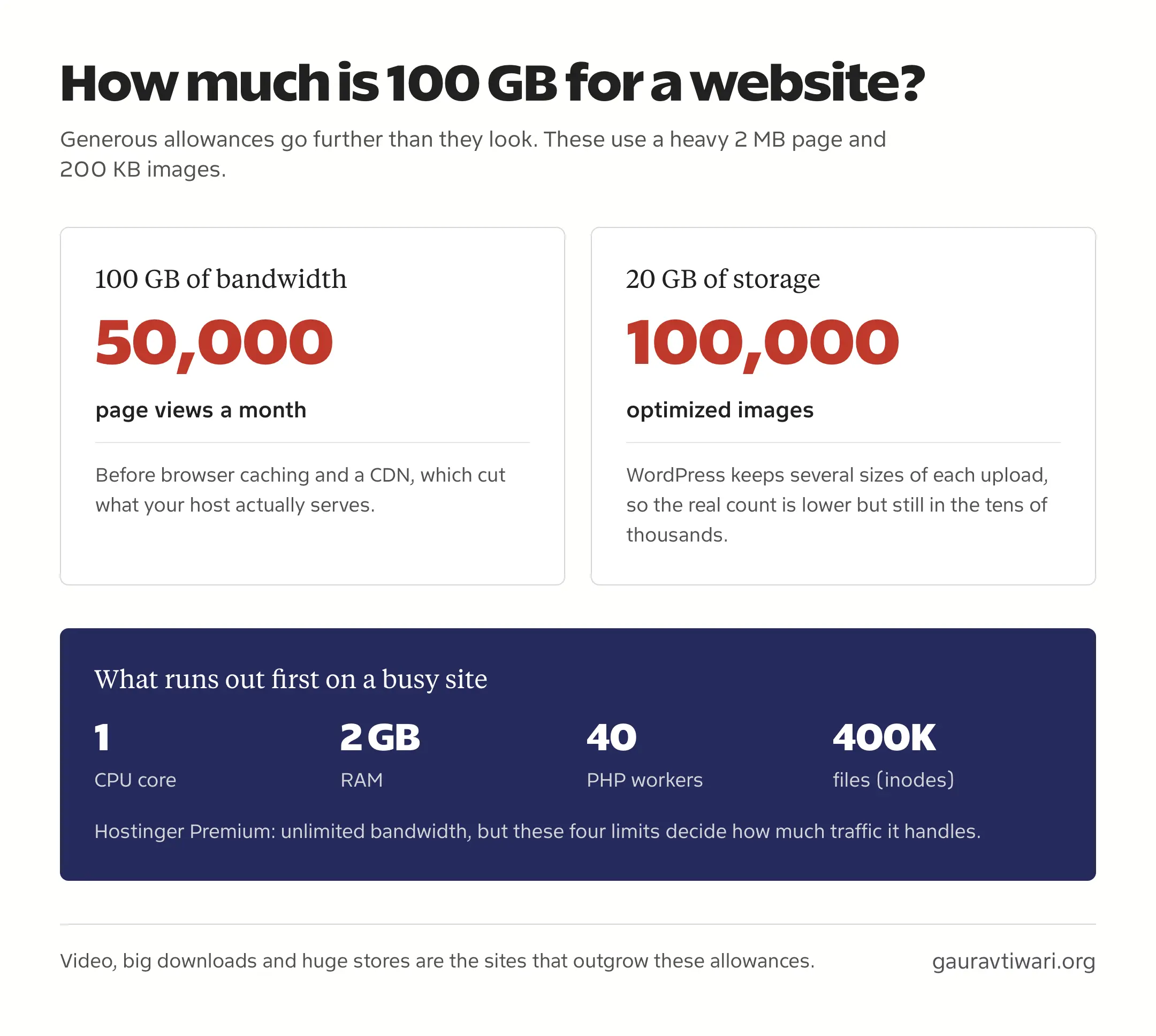
The sites that do outgrow these allowances are specific ones: video served from the hosting account, large downloadable files, stores with huge product catalogs and accounts that keep their backups on the same server. If yours isn’t one of them, the allowance isn’t what will slow you down.
The limit that does is processing. An unlimited plan and a 100 GB plan with the same CPU, RAM and PHP workers will slow down at the same traffic, because bandwidth and storage were never the constraint. That’s why the plans below are compared on their real numbers, whether a feature is called unlimited or not.
Compare Unlimited Hosting Plans
The table shows each plan’s actual allowances side by side. For a typical site, the bandwidth and storage columns are all comfortable, so the processing limits, renewal and region are what separate them.
| Plan | Bandwidth | Storage | Websites | Region | Price | Renewal |
|---|---|---|---|---|---|---|
| Hostinger Single | 100 GB a month | 10 GB SSD | 1 | Mumbai | ₹69/month, 48-month term | ₹289/month |
| Hostinger Premium | Unlimited | 20 GB SSD | 3 | Mumbai | ₹149/month, 48-month term | ₹449/month |
| Hostinger Unlimited | Unlimited | 50 GB NVMe | Unlimited | Mumbai | ₹249/month, 48-month term | ₹649/month |
| Namecheap Stellar Plus | Unmetered | Unmetered, 300,000 inodes | Unlimited | Singapore | 30-day free trial, then $2.98/month | $7.88/month |
| HostArmada Start Dock | Unmetered (fair use) | 15 GB NVMe | 1 | Mumbai | $1.99/month, 36-month offer | $9.95/month |
An unlimited-websites plan shares one set of resources across every site on it. Five small sites on one account still split the same storage, CPU and backups.
Best Unlimited Web Hosting in India
These three plans are the ones I’d compare first for an Indian website, each for a different reason.
Hostinger
Hostinger is the one I’d start with when you want INR billing, a Mumbai server option and a low entry price. Premium is the first plan with unlimited bandwidth, but the cheaper Single plan’s 100 GB of monthly bandwidth and 10 GB of storage are plenty for one small site. Single costs ₹69 a month on a 48-month term and renews at ₹289.
The India offer for Premium works out like this:
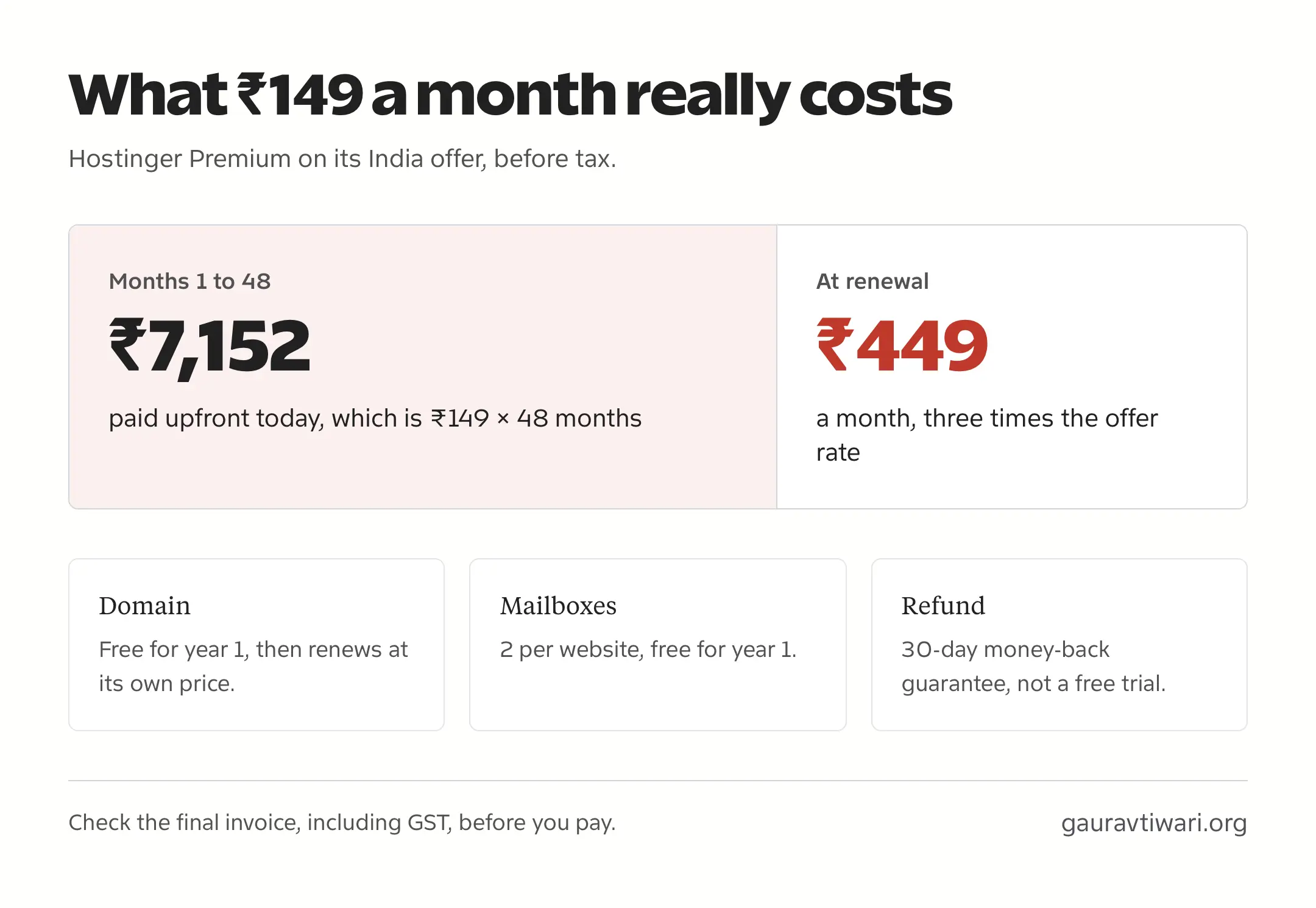
- ₹149 a month on a 48-month term, which is ₹7,152 paid upfront.
- Renewal at ₹449 a month.
- 3 websites, 20 GB of SSD storage and weekly backups.
- A free domain and 2 mailboxes per website for the first year.
The plan actually named Unlimited costs ₹249 a month on the same 48-month term and renews at ₹649. It adds unlimited websites, 50 GB of NVMe storage, daily backups, 2 CPU cores and 60 PHP workers, which makes it the better fit for several sites or a small store.
- Unlimited bandwidth from the Premium plan
- 20 GB SSD storage and 3 websites on Premium
- Daily backups and 50 GB NVMe on the Unlimited plan
- 30-day money-back guarantee
Hostinger’s renewal price is shown clearly beside the offer, so the real catch is the length of the commitment. I’d pick the tier by storage, site count and backup needs, and a single small blog doesn’t need the Unlimited plan just because of its name. If one of these limits rules Hostinger out, my Hostinger alternatives guide covers the closest options.
Namecheap
Namecheap Stellar Plus is the plan to look at when unmetered storage is what you need. It includes unmetered SSD storage, unmetered bandwidth and unlimited websites. The cheaper Stellar plan has 20 GB of storage, so the two names aren’t interchangeable.
Unmetered storage still has rules. Stellar Plus has a 300,000-file inode limit, and Namecheap’s acceptable-use policy restricts using hosting space for backups, archives or file storage. It is unlimited for website files, not a cheap place to park videos.
Namecheap currently offers a 30-day free trial on Stellar Plus, then $2.98 a month at the introductory rate, with the regular rate listed at $7.88 a month. You can choose a Singapore data center, which is the closest of its locations for Indian visitors, and backups run twice a week plus AutoBackup.
- Unmetered SSD storage and bandwidth
- 300,000-file inode limit
- Unlimited websites with AutoBackup
- 30-day free trial
Billing is in USD, so your card may add a foreign-currency charge on top. My Namecheap hosting review covers the wider service, and Hostinger vs Namecheap compares the two head to head.
HostArmada
HostArmada is a cloud shared host with a Mumbai data center, and its entry plan publishes its resources clearly. Start Dock includes:
- 15 GB of NVMe storage and 1 website.
- 2 CPU cores and 2 GB of RAM.
- 7 daily backups.
- A 45-day money-back guarantee.
Start Dock is advertised at $1.99 a month on a 36-month offer, against a regular rate of $9.95 a month. Its bandwidth is unmetered under an acceptable-use guideline, and HostArmada says that guideline isn’t an automatic cap or overage charge, so a sudden traffic spike shouldn’t cost you extra.
- Mumbai data center
- 15 GB NVMe, 2 CPU cores and 2 GB RAM
- 7 daily backups
- 45-day money-back guarantee
The higher tiers change more than storage. Start Dock and Web Warp run on NGINX, while Speed Reaper uses LiteSpeed, so I’d check the stack on the tier you’re buying rather than assume the top plan’s caching applies everywhere.
Other Hosting Options
These options come up in the same searches, but each needs a closer look before it belongs on an unlimited shortlist.
Cloudways
Cloudways is managed cloud hosting, not unlimited shared hosting. You get a fixed server, such as 1 GB of RAM on its Flexible plan from $11 a month, and you pay for more when you need it. That makes it the natural upgrade when a shared plan’s CPU or PHP limits start to hurt.
It runs on DigitalOcean, AWS, Google Cloud, Linode and Vultr, billed monthly with no long prepayment. Offsite backups are charged by the gigabyte and the Cloudflare add-on costs extra per domain, so the starting price isn’t the full bill. My managed cloud hosting guide covers when the switch makes sense.
- Choice of 5 cloud providers
- Monthly billing, no long prepayment
- Offsite backups billed per GB
- Upgrade path when shared hosting runs out
Hosting.com
Hosting.com, the company formerly known as A2 Hosting, now has an India site with INR prices and a Mumbai option. Its plans have fixed storage allocations, so compare the current India plan and renewal before treating any of them as unlimited. Its India terms offer a 30-day refund window for qualifying first purchases.
Bluehost
Bluehost India’s older accounts were migrated to BigRock in 2025, and bluehost.in now redirects to Bluehost’s India page. Check the current plan’s storage, billing currency and renewal on that page rather than relying on older India prices. Bluehost and Hostinger are both listed on WordPress.org’s hosting page.
HostGator India
HostGator India no longer sells new plans on its own. Its current notice sends new purchases to BigRock after the two brands were consolidated in July 2025, so a BigRock plan needs its own comparison before you buy.
Check Resource and Fair-Use Limits
Before buying any unlimited plan, you should find these limits on the provider’s plan page or support docs:
- Storage, and whether email counts towards it.
- The inode or file limit.
- CPU cores, RAM and PHP workers or entry processes.
- Database size and connection limits.
- Backup frequency, how many copies are kept and whether restores cost extra.
- Rules on storing videos, archives, downloads or backups.
- What happens if you exceed fair use, whether that means a warning, throttling, an upgrade request or suspension.
If a host doesn’t publish these numbers, ask support for them before you prepay for 3 or 4 years.
Compare the Total Cost
The monthly price on a hosting page is usually a monthly equivalent of a long prepaid term. Hostinger Premium’s ₹149 a month means paying ₹7,152 today for 48 months, and the plan renews at ₹449 a month after that.
Before paying, you should check:
- The billing term and the amount you pay today.
- The renewal price for the term you’ll keep.
- How long the free domain and mailboxes stay free.
- Backup, restore, CDN and security add-on costs.
- The final invoice, including GST and any card charges on USD billing.
- The refund window and what it excludes.
A money-back guarantee isn’t a free trial. You pay first and can ask for a refund within the window, while a free trial like Namecheap’s lets you start without paying. Compare plans over the same period too, because a 48-month prepaid offer and a monthly cloud plan aren’t the same kind of decision.
Choose a Server Region
A server in Mumbai or Singapore is usually closer to Indian visitors than one in the US or Europe, which can cut network delay. Caching, a CDN and how heavy your pages are matter just as much, so the region is one factor, not a guarantee of speed.
Time to First Byte (TTFB), how long the first byte of a page takes to arrive, is affected by server distance and can slow down Largest Contentful Paint. TTFB isn’t one of Google’s Core Web Vitals itself. Those are LCP, INP and CLS, and you should judge them on your real site rather than from a server’s location label.
Unlimited bandwidth doesn’t help rankings directly. Pick the region closest to most of your visitors, confirm the plan you’re buying is available there and measure your site once it’s live.
When to Upgrade Hosting
Visitor counts alone don’t tell you when to upgrade. A cached blog post and a logged-in WooCommerce checkout put very different loads on a server, even with the same monthly traffic.
Bandwidth is the easiest part to estimate. As a rough example, 20,000 page views at 2 MB each come to about 40 GB of transfer a month, and a CDN or browser caching brings the load on your server down further. That number says nothing about CPU or PHP workers, which is usually where shared plans run out first.
You should upgrade when the limits show up in practice: repeated resource-limit errors, slow uncached pages, storage running out or backups you need but don’t have. Moving to a higher shared tier or to managed cloud hosting should fix that specific limit. If broader provider choice is the question, my best web hosting services guide covers more options.
FAQs on Unlimited Hosting
Is 100 GB of bandwidth enough for a website?
Yes, for most sites. At 2 MB per page view, 100 GB covers about 50,000 page views a month, and browser caching and a CDN reduce what your host actually serves. Video, large downloads and busy online stores are the cases that need more.
Can I use unlimited hosting to store videos or backups?
Usually not. Unmetered storage is meant for website files, and most hosts’ acceptable-use policies restrict backups, archives and video libraries. Use separate storage or a video host for those.
Do emails and small files count towards the inode limit?
Yes, they usually do. An inode is one file or folder, and email messages stored on the account often count. A site with many small files can reach the inode limit before its disk space runs out.
Why does my unlimited-bandwidth site show resource limit errors?
Bandwidth is separate from CPU, RAM and PHP workers. A busy dynamic site can run out of processing capacity even when data transfer is unmetered, so check which limit the host’s dashboard shows before upgrading.
Is the free domain or mailbox free forever?
No. Hosting offers usually include the domain and mailboxes for the first year, then they renew at the normal price. Check those renewal prices separately from the hosting renewal.
Is INR hosting always cheaper than a USD plan?
No. Compare the same term and the final invoice, including GST and any foreign-currency charge from your card. INR billing makes budgeting easier but doesn’t guarantee the lowest total cost.
Is a money-back guarantee the same as a free trial?
No. With a money-back guarantee you pay first and can request a refund within the window, with some exclusions such as domains. A free trial, like Namecheap’s 30 days on Stellar Plus, lets you start without paying.
Do I need to upgrade at a certain number of visitors?
No. Upgrade when your site actually hits its limits, such as repeated resource errors, slow uncached pages or full storage. A cached blog and an online store with the same traffic need different amounts of server resources.
Can I still buy hosting from HostGator India?
No. HostGator India now sends new purchases to BigRock after the brands were consolidated in July 2025. Compare any BigRock plan on its own terms rather than assuming the old HostGator prices still apply.
Before You Buy
I’d choose the plan whose limits and full cost fit the site you’re building now, with some room to grow. For a small blog, a bandwidth-unlimited plan with enough storage is usually enough. A store, a membership site or several sites need the CPU, PHP worker and backup limits checked just as carefully.
Before paying, confirm three things on the plan page: what’s unlimited, what’s capped and what you’ll pay at renewal. If any of those isn’t clear, ask the host before you commit to a long term.
Tell Google you want more of this.
Add Gaurav Tiwari as a preferred sourceOne tap, and this site shows up more often in your own Top Stories, AI Overviews and AI Mode. Remove it any time.
Disclaimer: This site is reader-supported. If you buy through some links, I may earn a small commission at no extra cost to you. I only recommend tools I trust and would use myself. Your support helps keep gauravtiwari.org free and focused on real-world advice. Thanks. - Gaurav Tiwari