
 by
by
Defense from cyber threats works when each layer has a defined failure to catch. Authentication limits stolen credentials. Patching closes known entry points. Endpoint and network controls contain malicious behavior. Phishing checks stop fraudulent requests. A tested offline backup gives you a recovery path when prevention fails.
The mistake is buying five products and calling that a strategy. For each control, name an owner, the system it covers, the evidence that it works, the failure condition, and the recovery step. If you cannot produce that evidence, the control is an assumption.
The current threat data supports this layered approach. The 2026 Verizon Data Breach Investigations Report covers incidents from 1 November 2024 through 31 October 2025. Its top-level and SMB findings include:
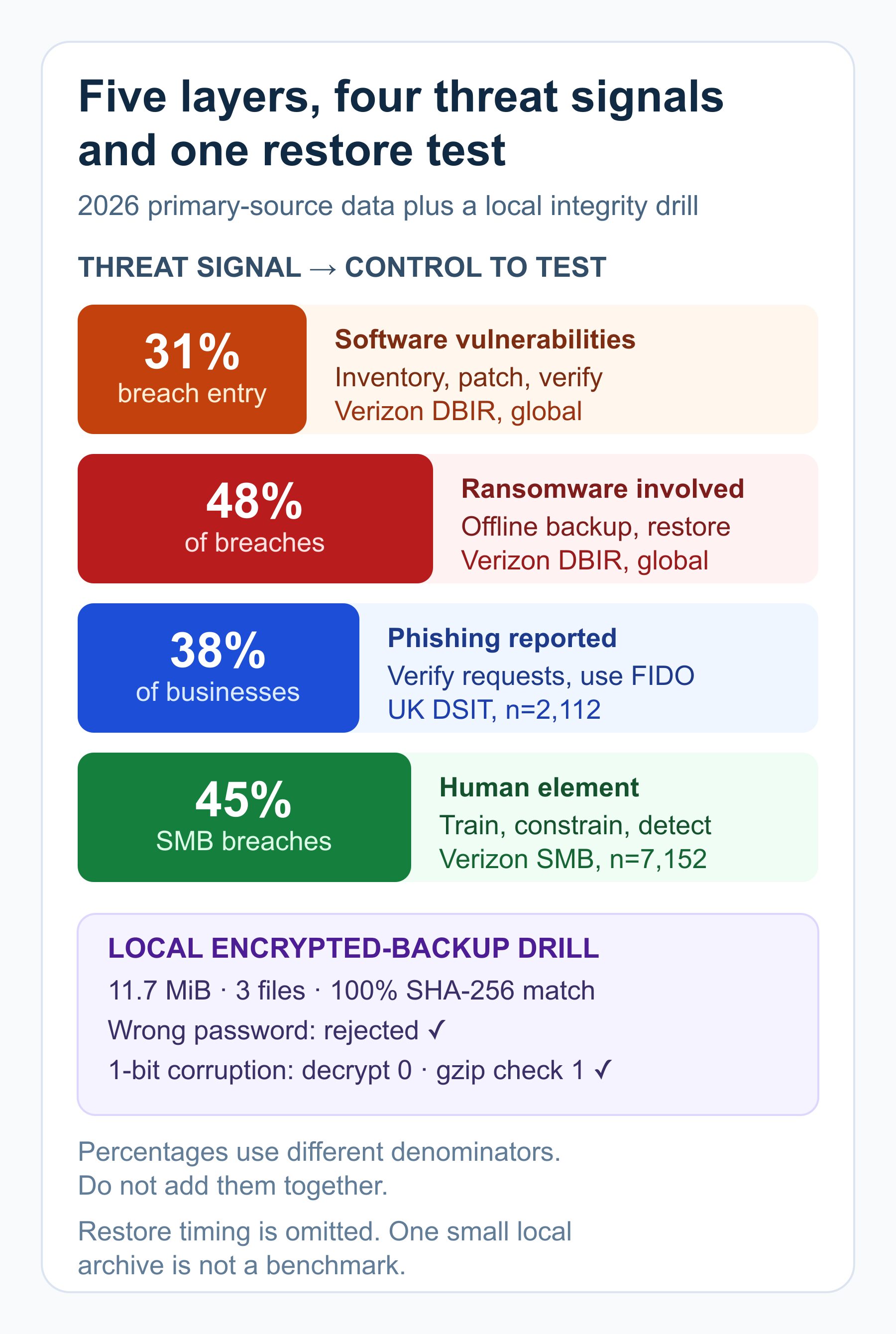
- 31%: the share of breaches that started with software-vulnerability exploitation.
- 48%: the share of breaches involving ransomware. This does not mean ransomware was always the initial access route.
- 45%: the share of SMB breaches containing a human element in an SMB dataset of 7,152 incidents.
- 15 techniques: the number of attack techniques Verizon says were being augmented by generative AI.
The UK Cyber Security Breaches Survey 2025/2026 adds a different lens. It surveyed 2,112 businesses from August through December 2025. These are self-reported, detected events in the UK, so do not combine its percentages with Verizon’s breach corpus.
- 43% of businesses identified a breach or attack in the previous 12 months.
- 38% of businesses reported phishing.
- 69% of organisations that had a breach or attack named phishing as the most disruptive type.
- 22% of businesses tested staff, including through mock phishing exercises.
- 32% used monitoring tools, 30% ran a cyber-risk assessment, 18% conducted a vulnerability audit, and 13% conducted penetration testing.
| Threat signal | Control to test | Evidence to keep |
|---|---|---|
| Vulnerability exploitation | Inventory, patching, segmentation | Asset list, patch age, exception and verification |
| Ransomware | Endpoint controls plus offline recovery | Alert test, backup integrity, successful restore |
| Stolen credentials | Phishing-resistant MFA and least privilege | Coverage report, account review, recovery test |
| Phishing and payment fraud | Second-channel verification and reporting | Simulation result, report path, payment approval log |
| Unknown or missed activity | Central logs and incident response | Alert evidence, owner, response time, lessons learned |
Skip to:
1. Back Up and Encrypt Your Business-Critical Data

A backup is a recovery control, not a copy you hope will work. CISA StopRansomware guidance says to maintain offline, encrypted backups and regularly test their availability and integrity in a disaster-recovery scenario. Offline or immutable matters because ransomware may search for accessible backups and damage those too.
- Scope: list the data, configuration, keys, licences, and application components needed to operate.
- Copies: keep multiple copies on separate failure domains, with at least one offline or immutable.
- Encryption: protect backup confidentiality and separately retain the credentials needed to decrypt.
- Integrity: run the backup tool’s verification and compare file or object hashes where appropriate.
- Restore: rebuild into an isolated location and test application consistency, permissions, and access.
- Objectives: record the maximum acceptable data loss and downtime, then measure the drill against them.
For database-heavy WordPress systems, the commands in my guide on how to back up MySQL databases with the right tools cover the data export step. Solid Backups can schedule and move WordPress copies off site. Neither route removes the need for an independent restore test.
Encryption protects a different failure. A service such as ProtonMail can protect email content in supported flows, but email encryption is not a backup, and a backup archive is not an incident-response plan. Define the job of each control.
The encrypted-backup restore test
I ran a narrow, reproducible test with synthetic data so the article contains checked recovery evidence rather than a vendor claim. No user files or persistent passphrase were used.
| Input | Recorded value |
|---|---|
| System | macOS 27.0 on arm64 |
| Tools | OpenSSL 3.6.2 and bsdtar 3.5.3 |
| Data | 3 synthetic files, 11.7 MiB total |
| Archive | gzip-compressed tar, then AES-256-CBC encryption |
| Key derivation | PBKDF2, 200,000 iterations, random salt |
| Checks | wrong password, one-bit corruption, clean restore, SHA-256 |
- Baseline passed: the archive and encrypted copy were created; the clean gzip integrity check returned exit code 0.
- Wrong password failed safely: OpenSSL returned exit code 1.
- Corruption exposed a boundary: after one ciphertext bit was changed, CBC decryption still returned exit code 0, but gzip integrity testing returned exit code 1.
- Rollback passed: the untouched encrypted archive was decrypted and restored after the failure tests; all three SHA-256 file hashes matched the source.
The lesson is not that gzip is a complete backup system. The lesson is that encryption success is not integrity proof. AES-256-CBC is not authenticated encryption, and this small test showed why a second verification stage matters.
Limits: one Mac, one synthetic data set, one run, and a file-level restore. This does not measure a commercial backup service, a database-consistent snapshot, permissions, credential recovery, retention, or a production recovery-time objective.
2. Strong Authentication: the Defense Most People Skip
Passwords remain necessary in many systems, but a password alone is not a sufficient control for email, billing, remote access, or administration. CISA’s MFA guidance for small and medium businesses recommends requiring MFA wherever possible and starting with remote access, privileged accounts, and people who handle sensitive data.
- Best available route: use FIDO/WebAuthn passkeys or security keys for phishing resistance.
- Interim route: use number matching rather than blind push approval when FIDO is not yet available.
- Recovery: store recovery codes securely and test the lost-device process without weakening identity checks.
- Coverage: include email, password manager, domain registrar, hosting, cloud storage, finance, and admin.
- Least privilege: remove unused accounts, separate administrator access, and review permissions.
A password manager such as NordPass can generate and share unique credentials without putting them in chat or email. Its limitation is operational: it only helps accounts your team actually puts into the system, and its own recovery and admin access must be protected.
Test authentication with a coverage report, not a policy document. Count privileged accounts, count how many enforce phishing-resistant MFA, review recovery methods, remove stale identities, and attempt a controlled recovery. Record exceptions and owners.
3. Install Strong Firewalls and Intrusion Prevention
A firewall enforces network rules. Intrusion prevention or endpoint detection can identify and block suspicious behavior. Neither control knows what to protect until you have an asset inventory, a patch process, and reviewed logs.
Vulnerability exploitation started 31% of breaches in Verizon’s 2026 corpus. Use the CISA Known Exploited Vulnerabilities catalog to prioritise vulnerabilities known to be exploited in the wild, especially on internet-facing systems. Patch them or document a time-limited compensating control, then verify the result.
- Inventory: owner, purpose, internet exposure, software version, and data handled.
- Reduce exposure: close unused services, remove default accounts, and segment sensitive systems.
- Patch: prioritise exploited and public-facing vulnerabilities instead of sorting only by headline severity.
- Enforce: define inbound and outbound rules; deny what the system does not need.
- Observe: log configuration changes, denied traffic, administrative actions, and suspicious egress.
- Verify: scan from the expected network boundary and confirm the rule or patch changed the exposure.
CISA’s logging guidance recommends enabling logs on servers, firewalls, endpoints, and cloud services, centralising them, and alerting on events such as repeated failed logins or privilege escalation. A firewall with nobody reviewing alerts is an enforcement layer without a dependable detection loop.
Review the Wi-Fi security measures every user should know at the network edge. For public networks, NordVPN is a consumer tunnel option; the exact trust and routing limits are in my guide on why you should use a VPN. A VPN does not patch the endpoint or replace access control.
4. Run Antivirus to Block Malicious Software
Endpoint protection should prevent, detect, contain, and explain malicious activity on every supported device. A licence count is not evidence that protection is healthy.
- Coverage: every supported laptop, desktop, and server reports into one inventory.
- Health: real-time protection, engine, definitions, tamper protection, and operating system updates are current.
- Containment: an authorised operator can isolate a device quickly without improvising.
- Alerts: high-severity detections reach a named person and enter an incident process.
- Test: use a safe vendor or industry test file in an approved environment, then verify alert, quarantine, investigation, and cleanup.
- Fallback: document how work continues if an agent update causes instability or a device is isolated.
Surfshark Antivirus is an integrated consumer option for someone who wants antivirus and VPN tools in one subscription. That convenience is the benefit. The limitation is that a bundled consumer product is not a replacement for fleet inventory, central alert ownership, enterprise containment, or an incident-response process.
5. Defend Against Spam and Phishing Mail

Phishing defense should focus on actions and verification, not grammar. A polished message can still be fraudulent, and a real account can be compromised.
- Verify identity: inspect the full sender and domain, but do not assume they are sufficient proof.
- Verify the request: confirm payments, bank changes, password resets, and sensitive files through a known second channel.
- Use phishing-resistant MFA: a stolen password should not be enough to approve a new session.
- Report quickly: give staff a clear reporting route that does not punish a mistaken click.
- Contain: revoke sessions, reset affected credentials, preserve evidence, and inspect related accounts.
- Measure: track report rate, time to report, repeat exposure, and whether the response path actually ran.
The UK survey found phishing at 38% of businesses, yet only 22% of businesses tested staff. Those are not a causal pair, but the gap is operationally useful: many teams face the event without checking whether reporting and verification behavior works.
This human layer belongs inside the broader best practices to secure your business. Training cannot compensate for excessive permissions, weak recovery, missing logs, or an approval process that lets one inbox move money.
Putting the Five Layers Together
The NIST Cybersecurity Framework 2.0 small-business guide organises cybersecurity outcomes into Govern, Identify, Protect, Detect, Respond, and Recover. It is voluntary and not one-size-fits-all. The five tips above sit mostly in Protect and Recover; a working program also needs ownership, inventory, detection, response, and lessons learned.
| Week | Test | Pass evidence | Failure or rollback |
|---|---|---|---|
| 1 | Accounts and MFA | Privileged-account list and enforced FIDO coverage | Remove stale access; document temporary exception |
| 1 | Internet-facing assets | Owner, version, KEV match, patch verification | Segment or disable exposure if patch fails |
| 2 | Endpoint and firewall | Healthy agents, alert route, reviewed egress rule | Isolate test device; revert the rule safely |
| 3 | Phishing workflow | Report received and sensitive request verified | Revoke session and use the incident contact tree |
| 4 | Backup recovery | Integrity check, application restore, measured time | Use clean offline copy; record missing dependencies |
Keep one scorecard with the owner, scope, last test, evidence link, exception, next test, and recovery step for each control. Review failed checks before adding another product. Defense from cyber threats improves when assumptions become tests and test failures become specific work.
Frequently Asked Questions
What is the best first defense from cyber threats?
Start with email and admin accounts: require phishing-resistant MFA where available, remove unused accounts, and give each person only the access needed. Then test an offline backup restore. Those steps reduce account-takeover risk and give you a recovery path.
Is antivirus enough for a small business?
No. Antivirus can detect and contain some malicious software, but it cannot replace patching, MFA, least privilege, network controls, logging, phishing checks, tested backups, or an incident plan.
How often should a business test backups?
Set the interval from the amount of data and downtime the business can afford to lose. A critical daily system may need frequent automated checks and scheduled recovery drills. Every drill should verify integrity, permissions, credentials, application state, and restore time against a written recovery objective.
Does a firewall stop phishing and ransomware?
A firewall can enforce network rules and may block known malicious traffic, but phishing can still steal a valid session or persuade a user to approve a payment. Ransomware can also arrive through credentials, software vulnerabilities, suppliers, or endpoints. Use the firewall as one logged and reviewed layer.
How can I tell whether the five defenses work?
Collect evidence: MFA coverage, unused-account removal, patch age for internet-facing assets, endpoint health, central log alerts, phishing-report tests, backup integrity, and a successful restore. A purchased licence or green dashboard is not the same as a tested control.
Start With the Failure You Cannot Afford
Strong defense from cyber threats is not a claim that nothing can go wrong. It is a measured system that limits entry, detects abnormal behavior, contains damage, and restores the service.
This week, choose one critical system. Enforce the strongest MFA it supports, check its software and exposure, confirm endpoint and log ownership, verify a suspicious request through a second channel, and restore its backup into an isolated location. Keep the evidence. That is a security baseline you can defend.
Tell Google you want more of this.
Add Gaurav Tiwari as a preferred sourceOne tap, and this site shows up more often in your own Top Stories, AI Overviews and AI Mode. Remove it any time.
Disclaimer: This site is reader-supported. If you buy through some links, I may earn a small commission at no extra cost to you. I only recommend tools I trust and would use myself. Your support helps keep gauravtiwari.org free and focused on real-world advice. Thanks. - Gaurav Tiwari