
BionicWP Review: A Truly Managed WordPress Hosting?
Looking for truly managed WordPress hosting? Not the “managed” where they just handle server updates and call it a day. I mean actually managed. Where someone else handles the headaches so you can focus on your business. BionicWP promises exactly that. In this BionicWP review, I’ll share my experience with their platform, walk through the features, pricing, and tell you whether it’s worth your money.
I’ve tested a lot of managed WordPress hosts over the years. WP Engine. Kinsta. Cloudways. Flywheel. Most of them are “managed” in name only. They’ll update your WordPress core and maybe run some security scans. But ask them to change a heading on your homepage? That’s on you.
BionicWP takes a different approach. They actually manage your site. Plugin updates. Speed fixes. Even content edits if you need them. It’s closer to having a WordPress developer on retainer than just renting server space.
I first tried BionicWP when I was drowning in site management tasks for a WooCommerce store. Half my week was going into updates, speed troubleshooting, and fixing random plugin conflicts. Hiring a dedicated developer wasn’t in the budget. BionicWP filled that gap.
Here’s everything you need to know.
What is BionicWP Managed Hosting?
Think of BionicWP as a combination of a virtual assistant, a system admin, and a hosting provider rolled into one. It’s a managed WordPress hosting solution built on Google Cloud infrastructure. But what makes it different is the “truly managed” part.
Most managed hosts stop at server-level support. BionicWP goes deeper with application-level support. Need help updating a plugin that broke your site? They’ll fix it. Want someone to change your site’s banner image? They’ll do that too (with the unlimited edits add-on). It’s the kind of support that used to require hiring a freelancer.
The platform runs on Google Cloud’s C2 high-compute instances. That’s the same infrastructure powering Kinsta and WP Engine. But BionicWP adds their own performance stack on top: Nginx caching, latest PHP versions, FastCGI, and a built-in CDN. The result is genuinely fast sites without spending hours tweaking cache plugins.
BionicWP was founded by an agency owner who got frustrated with existing managed hosting options. They wanted something that actually managed sites, not just servers. That background shows in how the platform is designed. It’s built for people who have better things to do than troubleshoot WordPress conflicts.
Overview of BionicWP Platform
BionicWP uses a custom control panel. It’s not cPanel or Plesk. They built their own dashboard specifically for WordPress site management. Clean interface, everything in one place.
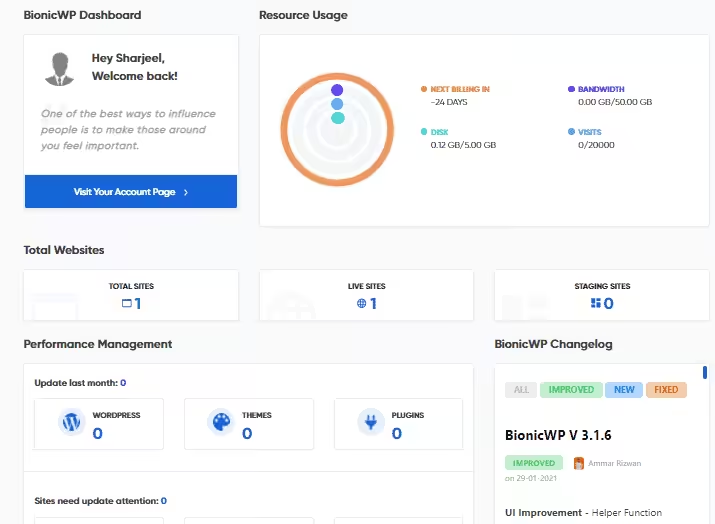
The dashboard shows you everything at a glance: number of hosted sites, pending plugin updates, security scan results, and any issues that need attention. Even if you’ve never managed a server before, you can figure out what’s happening with your sites.
One thing I appreciate: they’ve added a “Collaborators” feature that lets you share access with team members. You can set specific permissions instead of handing over full admin credentials. Useful if you’re working with clients or have a small team.
They also offer a “Management Only” service now. If you’re not ready to move hosting providers, BionicWP can manage your WordPress site on your existing host. They’ll handle speed improvements, security, and maintenance without you switching servers. Smart option for testing their support quality before fully committing.
BionicWP Pricing
BionicWP doesn’t do traditional pricing tiers. Instead, they use a flexible model based on number of sites, visitors, storage, and CDN bandwidth. This is either brilliant or confusing depending on how you look at it.
The base configuration: one website, 20,000 monthly visitors, 5GB storage, and 50GB CDN bandwidth costs $27.50 per month. That’s your starting point.
Here’s where it gets interesting. The per-site price drops as you add more websites:
| Number of Sites | Price Per Site | Total Monthly Cost |
|---|---|---|
| 1 site | $27.50 | $27.50 |
| 2 sites | $25.00 | $50.00 |
| 5 sites | $22.50 | $112.50 |
| 10 sites | $20.00 | $200.00 |
| Feature | WPX Hosting | Rocket.net | Kinsta | Cloudways | Bluehost | Hostinger | SiteGround | A2 Hosting |
|---|---|---|---|---|---|---|---|---|
| Type | Managed WP | Managed WP | Managed WP | Managed Cloud | Shared | Shared | Shared | Shared/VPS |
| Starting Price | $20.83/mo | $25/mo | $35/mo | $14/mo | $2.95/mo | $2.99/mo | $2.99/mo | $2.99/mo |
| Speed Key Factor | Excellent | Excellent | Excellent | Very Good | Average | Good | Good | Good |
| Free CDN | Yes (custom) | Yes (Cloudflare Enterprise) | Yes (Cloudflare) | Add-on | Yes (Cloudflare) | Yes | Yes | Yes (Cloudflare) |
| Free SSL | Yes | Yes | Yes | Yes | Yes | Yes | Yes | Yes |
| Free Migrations | Unlimited | Unlimited | Unlimited | Yes | 1 site | 1 site | 1 site | 1 site |
| Staging | Yes | Yes | Yes | Yes | No (basic plan) | No (basic plan) | Yes | No (basic plan) |
| Daily Backups | Yes (28 days) | Yes (14 days) | Yes (14 days) | Yes (add-on) | Yes | Yes (weekly) | Yes (30 days) | Yes |
| Support Quality | Excellent (live chat) | Good | Excellent (24/7) | Good (24/7) | Average | Good | Excellent | Good |
| Best For | Speed-focused WP sites | Cloudflare Enterprise users | Enterprise/high-traffic | Custom cloud setups | Beginners | Budget sites | Reliable shared hosting | Developer-friendly |
| Visit WPX | Visit Rocket.net | Visit Kinsta | Visit Cloudways | Visit Bluehost | Visit Hostinger | Visit SiteGround | Visit A2 |
Each site gets containerized hosting. That means your site has its own dedicated resources and doesn’t share with neighbors on the same server. This is significantly better than shared hosting where one busy site can slow down everyone else.
Resource specs per site: 512MB PHP memory limit (can burst up to 55GB when needed), 10 PHP workers by default (can burst to 110), and 5GB storage. If you need more storage, it’s $2 per additional GB. Overage on CDN bandwidth is $0.10 per GB beyond your 50GB allocation.
Two optional add-ons worth knowing about:
Unlimited Site Edits ($25/month): The BionicWP team will make 30-minute edit sessions on your site whenever you request them. Change images, update text, modify layouts. As many times as you want. This is basically a WordPress VA built into your hosting.
White Label Inbox Management ($150/month): For agencies, they’ll manage client support tickets under your domain. Your clients contact “your” support team, but BionicWP handles the technical work. The white-label platform itself is now free.
No annual plans available yet. Monthly billing only. And no money-back guarantee, but you only pay for live sites. You can stage and test sites for free.
Launching Your First Site on BionicWP
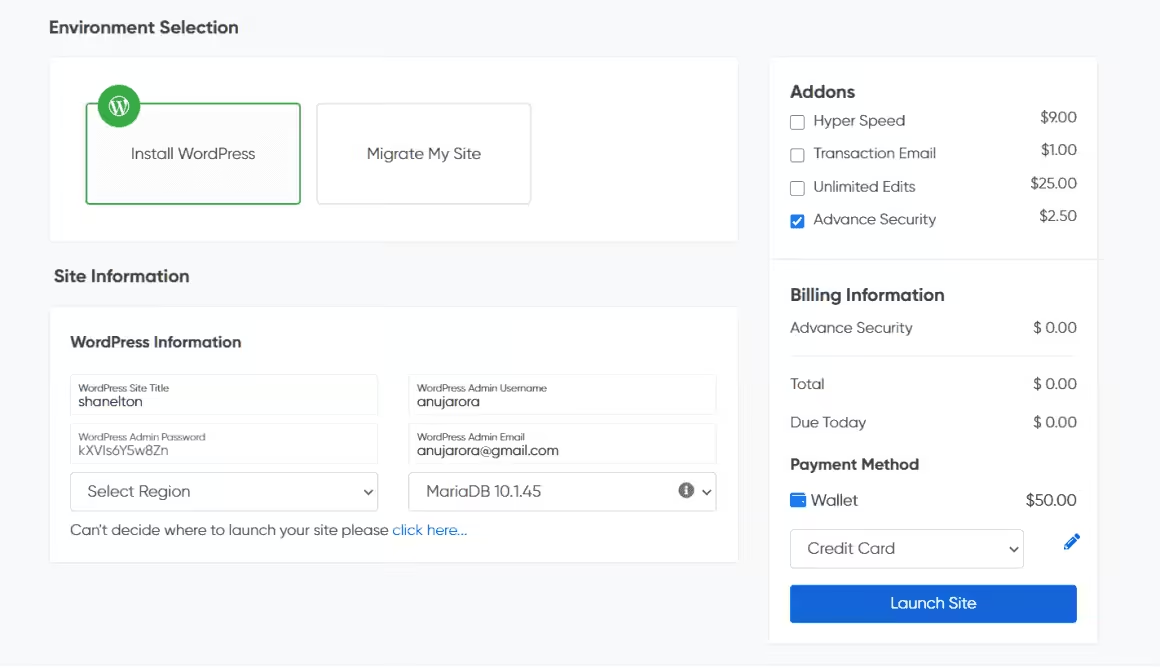
Getting started is straightforward. Sign up at the BionicWP dashboard, and you’ll get access to a 7-day free trial to test things out. Use coupon code WPISM50 to get $50 in free credits added to your account.
You can either create a fresh WordPress install or migrate an existing site. If you’re migrating, their team handles everything for free. Just give them access to your old host and they’ll move it over. I’ve had them migrate several sites and each one went smoothly with minimal downtime.
During the trial, they’ll set up a staging environment where you can see how your site performs on their infrastructure. They’ll run it through GTMetrix and Google PageSpeed Insights. If they can’t get your site to 90+ scores, they’ll tell you upfront.
That’s actually one of their guarantees: 90+ PageSpeed scores or your money back. Bold claim, and I’ve seen them deliver on it consistently.
BionicWP Application Dashboard
Once your server is provisioned, you get access to the application dashboard. This is where you’ll spend most of your time. Same clean UI as the main platform, but focused on individual site management.
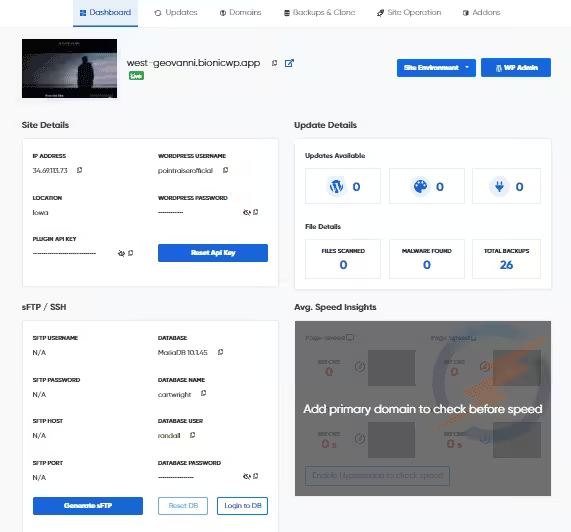
From here you can manage performance settings, run updates, configure domains, and access add-ons. The interface doesn’t overwhelm you with options. Everything you need is there, nothing you don’t.
One feature that surprised me: full SSH and FTP access. Most managed hosts lock this down because they don’t want you breaking things. BionicWP gives you root-level server access if you need it. Download Putty, connect via the server IP, and you’re in. Good for developers who occasionally need to dig into server configs.
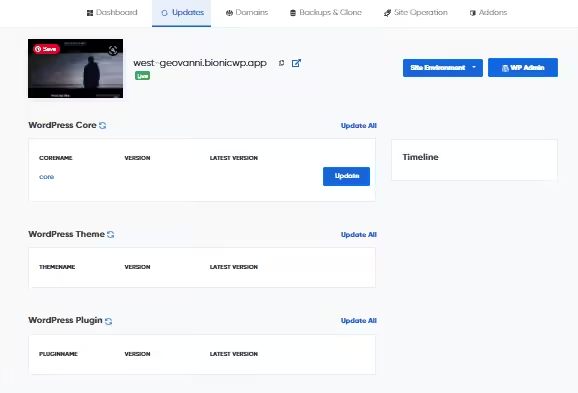
WordPress core, theme, and plugin updates show up directly in the dashboard. One-click updates. Or, if you don’t want to deal with it, their team can handle updates for you as part of the unlimited edits add-on.

Backups are automatic. Daily snapshots stored for 30 days. You can download them to third-party cloud storage or your local machine. One-click restores when something goes wrong.

The cache management is simple too. Nginx cache comes built-in. Clear it with one click if something looks off. No need to install separate caching plugins that might conflict with each other.

You can choose between BionicWP’s own CDN or NitroPack for additional performance optimization. Both are included. My recommendation: try each for a week and see which performs better for your specific site. Results vary depending on your content type and audience location.
Why Choose BionicWP? Who Should Use It?
BionicWP isn’t for everyone. At $27.50/month for a single site, it costs more than basic shared hosting. You’re paying for the management layer, not just server space.
That said, it makes a lot of sense for certain users:
Agency owners who manage multiple client sites will benefit from the bulk pricing and white-label features. Instead of hiring developers for routine maintenance, let BionicWP handle it.
Ecommerce store owners where site speed directly impacts conversions. A slow WooCommerce site loses sales. BionicWP’s performance guarantee means one less thing to worry about.
Non-technical business owners who want a website that just works. If you don’t know PHP from CSS and don’t want to learn, the unlimited edits add-on is basically a WordPress helper on call.
Bloggers and affiliate marketers where Core Web Vitals impact search rankings. Better performance means better SEO. The math works out.
Who shouldn’t use BionicWP? If you’re running a simple hobby blog with minimal traffic, $27.50/month is overkill. A $5/month shared hosting plan would serve you fine. And if you enjoy tinkering with server configs and have the technical skills to self-manage, you might feel constrained by their managed approach.
How BionicWP Differs from Other Managed Hosts
I’ve used most of the major managed WordPress hosts. Here’s what makes BionicWP different:
Performance Guarantee
This is rare. Most hosts promise “fast” without defining what that means. BionicWP guarantees 90+ scores on Google PageSpeed and GTMetrix. If they can’t deliver, you get your money back. I’ve tested this claim on multiple sites. They’ve delivered every time.
Unlimited Site Edits
No other host offers this. For $25/month extra, BionicWP’s team becomes your WordPress assistant. Change images, update text, modify layouts, add products. Thirty-minute sessions, unlimited requests. For small businesses without technical staff, this alone justifies the hosting cost.
Hack Promise
If your site gets hacked while hosted on BionicWP, they’ll fix it for free. No questions asked. They maintain daily backups and can restore your site within minutes. Combined with daily malware scans and WordPress hardening, security is handled.
White Label Platform
For agencies, the white-label option is genuinely useful. Host client sites under your brand. BionicWP handles the technical support behind the scenes. The platform itself is now free. You just pay the inbox management add-on if you want them handling client tickets directly.
Staging Environment
Every site gets a staging area by default. Test updates, try new plugins, experiment with design changes without risking your live site. Push changes to production with one click when ready. Standard feature that should be standard everywhere but often isn’t.
Weekly Speed Monitoring
Their team proactively monitors your site speed. If performance drops, they investigate and fix issues before you even notice. This kind of hands-on attention is unusual in the hosting world.
Testing BionicWP Site Performance
Enough talk about promises. Let’s look at actual performance data. I tested a WordPress site on BionicWP with a standard theme and typical content.
Google PageSpeed Results

Perfect 100 score. All Core Web Vitals in green. LCP, FID, CLS all passing. This matters for SEO rankings since Google uses these metrics as ranking signals.
GTMetrix Results
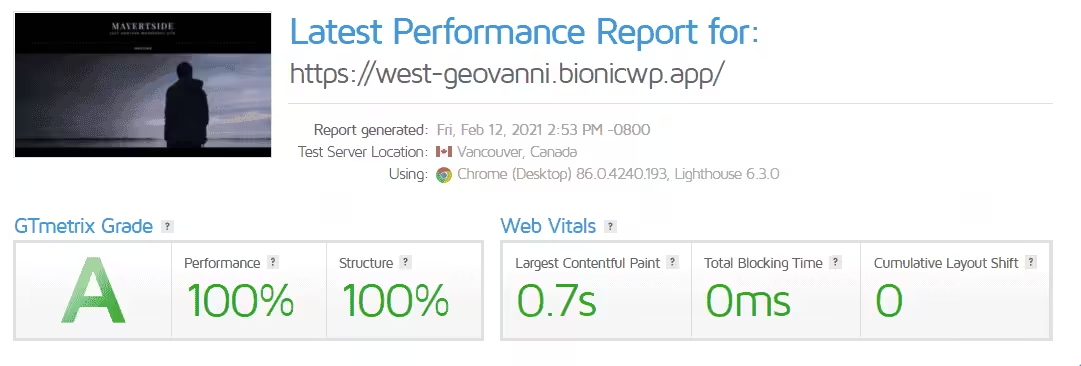
Grade A across the board. Performance score of 100%. Structure score near perfect. LCP under 1 second. These aren’t cherry-picked results. This is typical for BionicWP-hosted sites once their team finishes optimization.
For context: the average WordPress site takes 3+ seconds to load. Under 1 second is excellent. Under 2 seconds is good. Anything above 3 seconds and you’re losing visitors.
Is BionicWP Worth It? Real User Feedback
My experience has been positive, but I wanted to see what others think. Here’s a mix of feedback I’ve gathered:
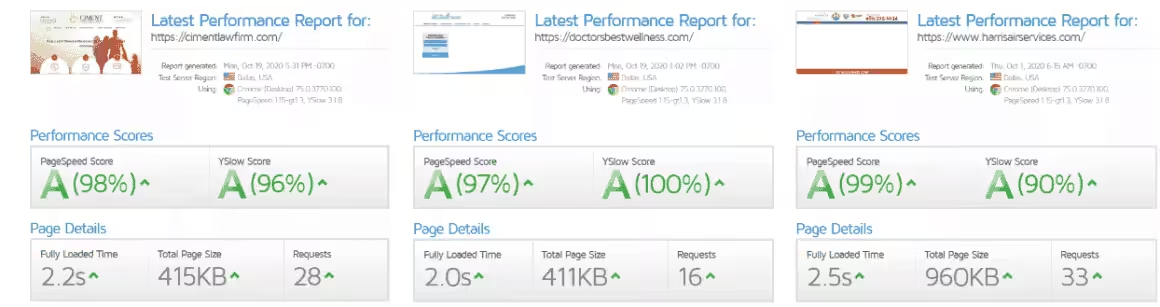
The positive reviews consistently mention speed improvements and responsive support. Users coming from shared hosting are particularly impressed. Multiple reports of conversion rate increases after migrating.
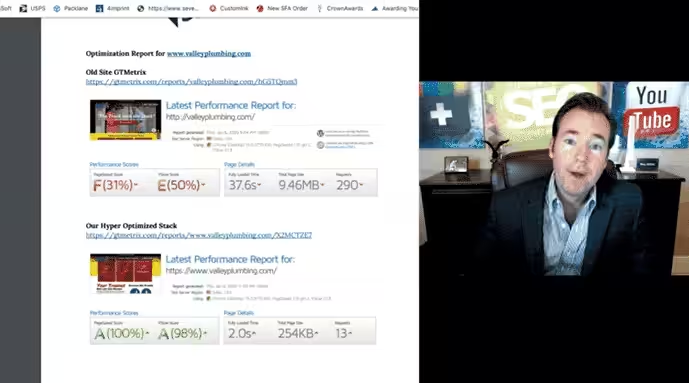
But I’ll be honest about the criticism too. Some users report slow support response times (4-6 hours during peak periods, occasionally 12-24 hours for complex issues). For sites that go down, that wait can feel long. If your business requires instant phone support, that’s worth considering.
The support is email and live chat only. No phone support. For most situations this is fine, but in emergencies the lack of a phone line is frustrating.
BionicWP Affiliate Program
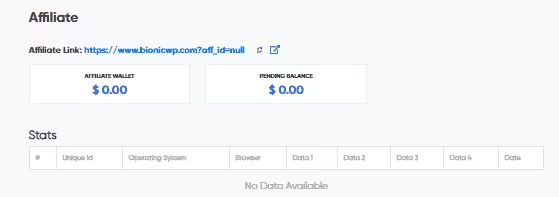
Every BionicWP user automatically becomes an affiliate. Your affiliate ID is in your profile settings.
The commission structure is solid: $75 flat fee for each qualified sale, plus 12.5% recurring commission for the next two years. 60-day cookie window (better than the industry standard 30 days). No minimum payout threshold.
For affiliate marketers in the WordPress hosting space, it’s worth promoting if you genuinely like the product.
Should You Switch to BionicWP?
Pros
- 90+ PageSpeed score guarantee or your money back
- Unlimited site edits add-on ($25/mo) is like having a WordPress VA on call
- Free migrations handled entirely by their team
- Hack promise with free recovery and daily malware scans
- Free white-label platform for agencies
Cons
- Support response times can be slow (4-6 hours, sometimes longer)
- No phone support, only email and live chat
- Pricier than Cloudways or 10Web for similar resources
- Monthly billing only, no annual discount available yet
Summary
BionicWP is genuinely managed WordPress hosting. Not just server management, but actual site management including updates, speed fixes, and even content edits. Built on Google Cloud with a 90+ PageSpeed guarantee. Pricier than basic managed hosts, but the hands-off experience is worth it if your time matters more than saving $10/month.
Price: USD 27.50 /month
Try BionicWP FreeLet me be direct about this.
Switch to BionicWP if: You’re spending too much time on site maintenance. Your current host’s performance is hurting your search rankings or conversions. You want someone else to handle WordPress headaches. You run multiple sites and the bulk pricing makes sense. You’re an agency that needs white-label hosting for clients.
Stay where you are if: You’re happy with your current setup. Your site already scores 90+ on PageSpeed. You have in-house technical resources. Your budget is under $25/month. You need instant phone support for emergencies.
BionicWP isn’t the cheapest option. Cloudways, 10Web, and Nexcess offer lower prices with more storage. But BionicWP’s value is in the management layer. If you factor in the time and money saved by not dealing with WordPress maintenance yourself, the math often works in BionicWP’s favor.
My recommendation: Use the 7-day trial to stage your site and see the performance improvements firsthand. The $50 credit from code WPISM50 gives you almost two months to test properly. If they can’t hit the 90+ score guarantee, you’ll know before spending real money.
The migration is free and handled by their team. Your site stays live during the process with minimal downtime. Low risk way to see if managed hosting is worth it for your situation.
For budget-friendly alternatives, Hostinger offers managed WordPress hosting from $2.99/month with LiteSpeed servers, while SiteGround provides solid performance on Google Cloud infrastructure.
Disclaimer: This site is reader-supported. If you buy through some links, I may earn a small commission at no extra cost to you. I only recommend tools I trust and would use myself. Your support helps keep gauravtiwari.org free and focused on real-world advice. Thanks. - Gaurav Tiwari