
Modern 2FA as a Key Business Tool for Scalable and Secure Customer Protection
Choose modern 2FA by threat using NIST and FIDO guidance, a reproducible 18-vector TOTP test, measured failure and rollback results, passkey limits, and a practical 30-day rollout.
 by
by
Modern 2FA should be chosen by threat, not by the number of login steps. SMS, authenticator-app codes, push approval, security keys, and passkeys all reduce some password risk, but they do not stop the same attacks. A manual code can be relayed through a phishing page. A WebAuthn credential is bound to the intended domain.
My recommendation is direct: require phishing-resistant authentication for administrators and other high-impact roles, offer passkeys to customers, keep TOTP as the broad compatibility fallback, and use SMS only where reach or recovery requirements leave no stronger practical option. Then test enrollment, second login, recovery, factor replacement, and rollback before you force the change.
The 2026 evidence is more useful than the old “2FA blocks 99.9%” slogan. NIST says manually entered OTP outputs are not phishing-resistant, while WebAuthn provides verifier-name binding. FIDO reports 5 billion active passkeys, but its survey samples and definitions matter. The latest Verizon report also shows why MFA cannot replace patching, backups, and incident response.
I reproduced the TOTP layer against all 18 public RFC 6238 Appendix B vectors and then tested clock drift, a wrong secret, a replayed counter, a failed secret rotation, and rollback. Every expected result held. That is a useful implementation baseline, not proof that a full authentication system is secure.
What Two-Factor Authentication Actually Does
Two-factor authentication requires evidence from two different factor categories. A password plus a PIN is still knowledge plus knowledge. A password plus a device-held cryptographic key combines knowledge and possession. A biometric usually unlocks a local authenticator; the server should not need your fingerprint image.
- Knowledge: something the user knows, such as a password or activation PIN.
- Possession: something the user controls, such as a phone, authenticator app, or hardware key.
- Inherence: something the user is, such as a biometric used locally to unlock a device credential.
- Independence: compromising one factor should not automatically compromise the other.
The control narrows one route into an account. It does not clean malware from a trusted device, fix an exposed API, revoke a stolen session cookie, or stop an administrator from approving a bad action. That is why 2FA belongs inside a wider plan to secure your business.
The 2026 Verizon DBIR says 31% of breaches in its 2026 dataset began with vulnerability exploitation and 48% involved ransomware. The incidents were collected from November 1, 2024 through October 31, 2025. MFA matters, but those denominators make the boundary clear: authentication is one control, not a breach-proof seal.
The Four Types of Modern 2FA (and When to Use Each)
The useful dividing line is phishing resistance. NIST says a manually entered out-of-band or OTP value is not phishing-resistant because an impostor can relay it. WebAuthn binds a credential to the relying-party domain, so a lookalike site cannot ask the authenticator to sign for the real domain.
| Method | Main strength | Important failure mode | Best role |
|---|---|---|---|
| SMS or voice code | Reach; no app required | Number porting, interception, code relay | Fallback or recovery where stronger methods exclude users |
| Authenticator-app TOTP | Offline code; no carrier dependency | Shared-secret theft and real-time phishing | Compatibility fallback for ordinary accounts |
| Push with number matching | Reduces blind approval | Social engineering, device compromise, weak recovery | Transition control where WebAuthn is unavailable |
| WebAuthn passkey or security key | Verifier-bound public-key authentication | Poor enrollment, device loss, or unsafe recovery | Admins, finance, exports, and customer sign-in |
SMS and Voice Codes
NIST SP 800-63B-4 finalized in 2025 treats PSTN-based out-of-band authentication as a restricted authenticator. It tells verifiers to offer alternatives and consider signals such as a device swap, SIM change, or number port before sending a secret.
For a 2026 stack, SMS is a fallback, not the security target. It can still reduce password-only exposure, but do not describe it as phishing-resistant. Rate-limit requests and verification, mask destination data, watch carrier and delivery failures, and make changing the registered number a fresh authenticator-binding event.
TOTP (Time-Based One-Time Passwords)
Apps like Google Authenticator, Authy, and a password manager like NordPass can generate TOTP codes. The code works offline, but the verifier and authenticator share a secret. Protect that secret at rest and during enrollment.
TOTP removes carrier delivery and SIM-swap exposure. It does not bind the code to a domain. An attacker who controls a convincing login page can ask the victim for a current password and code, then relay both before the time window closes. Use TOTP when compatibility matters, while keeping privileged accounts on WebAuthn.
Hardware Security Keys
A physical YubiKey or another compliant roaming authenticator can use FIDO2/WebAuthn over USB, NFC, or another supported transport. The private key stays with the authenticator, and the public-key credential is scoped to the relying party.
That domain binding is why security keys belong on administrator, billing, support-impersonation, backup, domain, and customer-data export accounts. Buy and enroll a spare where the risk justifies it, store it separately, and test the loss procedure. A strong key with an email-only bypass is a weak system. Treat it as one layer in your defense against cyber threats.
Passkeys: The Future of Authentication
W3C WebAuthn Level 3 describes public-key credentials scoped to a relying party. A passkey may be stored on one authenticator or synced across a user’s devices, depending on the implementation. A local biometric or device PIN can perform user verification without sending the biometric to the website.
FIDO Alliance’s 2026 survey reported 5 billion active passkeys in May 2026. In its April 2026 online consumer survey, 75% of 11,000 adults across ten countries said they had enabled a passkey on at least some accounts; the stated margin of error was plus or minus 0.9 percentage points. In a separate survey of 1,400 decision-makers at organizations with at least 500 employees, 68% said they were deploying, piloting, or rolling out passkeys; the stated margin of error was plus or minus 2.6 points.
Those are adoption signals, not a census of all people, businesses, or logins. The workforce wording also combines pilots with deployments. Use the numbers to justify compatibility testing, not to declare passwords finished.
Set a risk floor, not one method for everyone. CISA’s MFA guidance recommends moving toward FIDO/WebAuthn. Require it for privileged roles, offer it broadly, keep TOTP for compatibility, and document exactly when SMS or assisted recovery is allowed.
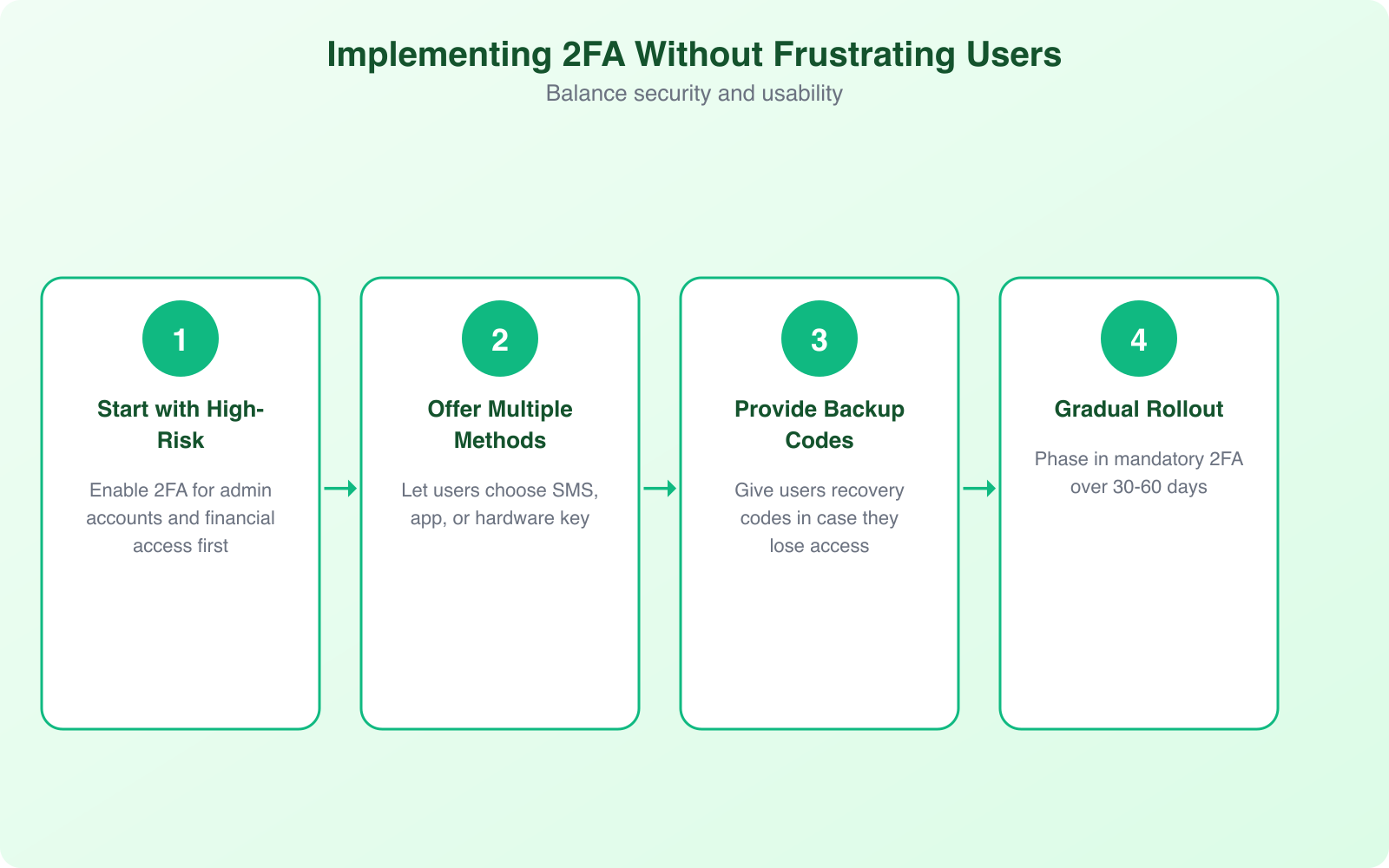
This four-step rollout visual is a planning template, not a universal 30-to-60-day rule. Use your account risk, support capacity, accessibility needs, and measured failure rate to set the deadline.

A Reproducible TOTP Test Matrix
I tested the TOTP verifier against RFC 6238, not against made-up login samples. The environment was macOS 27.0 on arm64 with Node.js 26.0.0. The baseline used the public Appendix B secrets, a 30-second step, eight digits, and an exact-window verification policy.
| Check | Baseline or change | Measured result |
|---|---|---|
| RFC interoperability | 6 timestamps x SHA-1, SHA-256, and SHA-512 | 18 of 18 vectors matched |
| Exact-step login | Correct token; exact 30-second counter | Accepted |
| Clock drift | Same token; server clock plus 31 seconds; exact window | Rejected |
| Tolerated drift | Same token; server clock plus 31 seconds; one-step window | Accepted at the previous counter |
| Wrong secret | Correct token verified with a different secret | Rejected |
| Replay | Reuse the already accepted counter | Rejected |
| Bad rotation | Activate a new secret before client re-enrollment | Rejected the old token |
| Rollback | Restore the previous secret | Old token accepted again |
Five runs of 100,000 exact-window HMAC-SHA-1 verifications took a median 139.23 milliseconds in the local process. That number proves only that the HMAC calculation is cheap in this narrow environment. It is not a production capacity claim.
- Not tested: enrollment UI, QR-code handling, secret encryption, databases, sessions, queues, network latency, or support recovery.
- Not compared: no vendor, plugin, passkey, SMS delivery, or browser ceremony was benchmarked.
- Security limit: matching test vectors does not review key management, authorization, logging, or the surrounding application.
- Rollback lesson: keep the prior configuration available until second-login and recovery checks pass, then retire it under a documented policy.
How to Implement 2FA Without Frustrating Your Users
A usable rollout proves the next login and the recovery path rather than stopping at enrollment. The account owner should know which authenticators are enrolled, how to add a second one, what will happen after device loss, and how to report an unauthorized change.
- Inventory first: list privileged, customer, service, emergency, and recovery accounts. Machine identities need a separate credential plan.
- Enroll two authenticators: where practical, allow a primary and a separately stored backup.
- Prove the second login: measure whether an enrolled user can return and authenticate without help.
- Bind recovery carefully: factor reset should not be easier than ordinary sign-in. Notify the owner and log the event.
- Use step-up authentication: require a fresh strong factor for exports, payout changes, new recovery methods, and role elevation.
- Keep accessibility routes: support people who cannot use the default biometric, device, or transport.
Do not copy a universal remember-device period. NIST’s assurance levels have different reauthentication guidance, and your risk may be stricter. Make the period explicit, revoke it after factor changes or suspicious activity, and test the token on shared and managed devices.
The Business Case: 2FA Beyond Security
The business case is expected loss avoided, not a recycled breach-cost average. Let annual control cost be C, the financial impact of the specific account-takeover scenario be L, and the annual probability reduction produced by the control be p. Break-even occurs when p x L is at least C.
| Illustrative case | Annual control cost (C) | Scenario impact (L) | Break-even probability reduction (C / L) |
|---|---|---|---|
| Small admin rollout | $4,000 | $25,000 | 16% |
| Customer platform | $12,000 | $100,000 | 12% |
| High-impact environment | $30,000 | $500,000 | 6% |
The formula forces honest inputs. Include implementation, support, accessibility, hardware replacement, SMS delivery, and recovery labor in C. Define L for one named scenario instead of mixing fraud, ransomware, regulatory exposure, and reputation into a single dramatic number. Estimate p as a range, not a promise.
Compliance also needs exact scope. PCI SSC’s Requirement 8.4.2 clarification says MFA is required for access into the cardholder data environment under Requirement 8.4.2, while some in-scope components outside the CDE can still have different treatment. A passkey or MFA deployment does not automatically satisfy PCI DSS, HIPAA, GDPR, SOX, or an insurer’s questionnaire. Map the implementation to the exact rule and have the responsible specialist verify it.
MFA also does not replace endpoint and network controls. Lock down your Wi-Fi security, use a VPN on untrusted networks when it fits the threat model, patch exposed services, protect backups, and revoke stolen sessions.
Scaling 2FA from Startup to Enterprise
Scale authentication by impact and system boundary, not by a user-count slogan. A 12-person company can have high-risk finance and domain accounts. A million-user product can have low-risk browsing accounts alongside a small number of critical support impersonation and export roles.
| Boundary | Minimum decision | Evidence to retain |
|---|---|---|
| Privileged workforce | Phishing-resistant factor; spare or second credential | Coverage by role, exception owner, recovery test |
| Customer login | Passkey offer plus measured fallback | Enrollment, second-login success, factor mix |
| High-impact action | Fresh step-up; session and authorization checks | Challenge result, actor, device, action, time |
| Recovery and factor reset | Independent verification and notification | Reset reason, reviewer, delay, alerts, outcome |
| Service or machine identity | Workload credential, not a human OTP workaround | Owner, scope, rotation, last use, revocation |
If you evaluate vendor-supported or proven open-source implementations, keep the same acceptance test: standards vectors, enrollment, second login, replay, rate limiting, recovery, audit logging, failure behavior, and rollback. Do not build cryptographic primitives yourself.
Common 2FA Implementation Mistakes
The worst MFA failures sit around the factor. A correct TOTP algorithm cannot save an unencrypted shared secret, an email-only bypass, an unrevoked session, or an administrator who can disable MFA without step-up authentication.
- Optional privileged coverage: one password-only administrator can defeat an otherwise strong rollout.
- Weak binding: do not activate a new phone, number, key, or passkey without a protected binding ceremony.
- No replay record: reject reuse of an accepted OTP counter where the implementation can track it.
- Unbounded guessing: apply attempt limits, backoff, monitoring, and abuse controls based on your system.
- Plaintext TOTP secrets: encrypt secrets with keys separated from the application database and plan rotation.
- Recovery as a bypass: review and instrument the recovery route as carefully as ordinary authentication.
- Enrollment-only reporting: also measure second login, failure, abandonment, reset, recovery, and support time.
- Instant cutover: pilot, prove, monitor, and retain a bounded rollback path before enforcement.
For WordPress, start with a maintained authentication plugin or identity provider rather than writing TOTP yourself. Check current compatibility, update cadence, recovery behavior, role enforcement, multisite support, logging, and your staging rollback. A familiar brand name does not remove the need to test.
The Passwordless Future: Where 2FA Is Heading
Passwordless does not mean recovery-less or risk-less. Passkeys remove a reusable password from the ordinary ceremony and can provide phishing resistance, but the business still owns credential binding, device change, account recovery, session security, authorization, and support impersonation.
The 2026 FIDO survey shows serious consumer awareness and workforce experimentation. It does not prove that every user can recover a passkey across every platform, that every synced passkey meets every assurance level, or that every compliance assessor will treat two implementations the same way.
Run a mixed-mode period. Offer passkeys, measure successful creation and return login by platform, let users enroll another authenticator, and keep a deliberately weaker fallback only where the inclusion or recovery need justifies it. The destination is not invisible authentication at any cost. It is strong authentication with a recovery path that does not undo it.
Getting Started: A 30-Day 2FA Rollout Plan
Use 30 days as a pilot frame, not an automatic enforcement deadline. A small team can move faster; a regulated or consumer platform may need accessibility, support, legal, and migration work that takes longer.
- Days 1-7, map and test: inventory accounts and recovery paths; select the factor floor; run standards vectors, replay, drift, reset, and rollback checks.
- Days 8-14, protect privileged roles: enroll admins and other high-impact users; require a second credential; test device loss and emergency access.
- Days 15-21, pilot real return logins: measure enrollment, second-login success, failures, abandonment, recovery starts, and support minutes by factor.
- Days 22-30, decide from evidence: fix the largest failure mode, document exceptions, verify rollback, then set enforcement dates by role and risk.
The go/no-go question is not “Did we send the enrollment email?” It is “Can the intended user sign in again, recover without a weak bypass, and complete a high-impact action while an attacker with only the password is stopped?”
Frequently Asked Questions
Is SMS-based 2FA still safe to use in 2026?
SMS is usually better than password-only access, but it is not phishing-resistant and NIST treats PSTN-based out-of-band authentication as restricted. Keep it as an accessibility or recovery option when necessary. Prefer WebAuthn for privileged accounts and TOTP when WebAuthn is unavailable.
Is an authenticator app phishing-resistant?
No. TOTP avoids SIM-swap and message-delivery risks, but a user can still type the current code into an attacker-controlled page. NIST says manually entered OTP outputs are not phishing-resistant because they are not bound to the intended session or domain.
What should happen when a user loses a 2FA device?
Use single-use recovery codes, another previously enrolled authenticator, or a reviewed support process. Do not let an email reset silently remove every strong factor. Record recovery events, notify the account owner, and apply a delay to high-impact changes when the risk justifies it.
Should every employee use the same MFA method?
No. Set a minimum by risk. Administrators, finance staff, and people who can export customer data should use phishing-resistant WebAuthn. Other staff can use WebAuthn where supported, with TOTP as a compatibility fallback. SMS should not be the default for privileged access.
Do passkeys count as two-factor authentication?
It depends on how the credential and user verification are implemented and on the rule you must satisfy. A passkey protected by a device PIN or biometric can be a multi-factor cryptographic authenticator, but compliance frameworks may apply their own conditions. Map the exact implementation to the exact requirement.
How should a small business measure a 2FA rollout?
Track eligible accounts, enrollment, second-login success, challenge failures, recovery starts, recovery completion, support time, factor resets, denied suspicious attempts, and privileged accounts without a phishing-resistant factor. Segment the numbers by factor and user role instead of reporting one adoption rate.
Start with privileged accounts this week. Choose WebAuthn where you can, keep TOTP as the measured fallback, and make recovery part of the security design. In 2026, the winning authentication system is not the one with the loudest adoption statistic. It is the one that survives phishing, device loss, bad configuration, and rollback without locking out the right person.
Tell Google you want more of this.
Add Gaurav Tiwari as a preferred sourceOne tap, and this site shows up more often in your own Top Stories, AI Overviews and AI Mode. Remove it any time.