
 by
by
To secure your business in 2026, start with the accounts, systems, data, vendors, and payment workflows that could stop operations or move money. Then assign an owner, require strong authentication, patch exposed software quickly, keep restorable backups, and rehearse the response. A long shopping list is not a security program.
The priority has changed. Verizon’s 2026 breach dataset says vulnerability exploitation now leads initial access, while the FBI recorded more than $3 billion in reported business email compromise losses during 2025. Security therefore has to protect both software and human approval paths. Neither employee training nor a firewall can carry the whole job.
The practical verdict: use a minimum baseline for every important system, but size additional spending against the impact you can actually suffer. In the worked model below, a 25-person firm spends $14,600 a year and needs either a large potential loss or a meaningful reduction in incident probability to break even.
The 2026 Business Security Baseline
A useful business security baseline covers governance, assets, identity, endpoints, backups, payment controls, detection, response, and recovery. NIST’s small-business CSF 2.0 guide organizes the work as Govern, Identify, Protect, Detect, Respond, and Recover. That sequence matters because controls without ownership and recovery create false confidence.
- Exploit exposed software first: Verizon’s 2026 DBIR reports that vulnerability exploitation caused 31% of initial access, up 55% from the previous edition. Its observation window ran from November 1, 2024, through October 31, 2025.
- Plan for ransomware: the same DBIR says ransomware appeared in 48% of breaches. That is a breach share, not the probability that your business will be attacked.
- Test suppliers: third-party involvement reached 48% of breaches, a 60% year-over-year increase in Verizon’s dataset. Ask which vendors can access production data, reset identities, change DNS, or approve payments.
- Move beyond email-only training: Verizon reports 40% higher median click rates for simulated mobile voice and text entry points than for email entry points.
| Area | Minimum control | Evidence to retain |
|---|---|---|
| Ownership | Named system, data, vendor, and response owners | Asset register and quarterly review |
| Identity | Unique accounts, least privilege, MFA, fast offboarding | Admin list, sign-in logs, removal records |
| Software | Inventory, supported versions, risk-based patch deadlines | Patch and exception reports |
| Data | Encryption, retention limits, tested isolated backups | Restore-test results and deletion logs |
| Money | Independent verification for payment and bank-detail changes | Approval and callback records |
| Response | Contacts, containment steps, legal and customer decisions | Exercise notes and corrected gaps |
A NordPass subscription or an endpoint tool such as Bitdefender can fill part of this baseline. Neither product establishes ownership, restores a backup, verifies a bank change, or makes a risk decision for you.
The One Thing Most Small Businesses Skip
The skipped step is not buying another tool. It is writing down what matters, who owns it, and what happens when it fails. Start with a one-page register rather than a 100-page policy.
- Critical service: what customer or operational job stops?
- System and data: which accounts, devices, databases, and vendors support it?
- Maximum tolerable outage: how long can the business operate without it?
- Owner and deputy: who makes access, recovery, and communication decisions?
- Recovery evidence: when was the last successful restore or failover?
Map those answers to the NIST Cybersecurity Framework. The framework is a management model, not a certification badge. A business with modest resources can use it to expose gaps, prioritize them, and communicate why a control exists.
Educate Your Employees
Training should teach a few verifiable actions, then test whether people use them under pressure. Generic annual videos do little for an accounts employee facing an urgent bank-detail change or a developer receiving a fake identity-provider alert.
- Reported BEC harm: the FBI’s 2025 IC3 report recorded 24,768 business email compromise complaints and $3,046,598,558 in reported losses. IC3 data is complaint-based and cannot represent every loss.
- AI is present, but do not invent a percentage: IC3 recorded 22,364 AI-related complaints across crime types and $893,346,472 in losses. It separately says businesses reported more than $30 million in BEC losses involving AI.
- Ransomware loss is undercounted: IC3 recorded more than 3,600 complaints and over $32 million in reported ransomware loss, while warning that the figure usually excludes lost business, time, wages, files, equipment, and third-party remediation.
- Make verification operational: staff should confirm payment, password-reset, payroll, and bank-detail changes through a trusted channel already on record, not a number or link supplied in the request.
A phishing email still a top initial-access vector, but your exercises also need text messages, calls, QR codes, vendor portals, and fake meeting invitations. Track reporting speed, verification behavior, and repeat failures rather than celebrating a low click rate by itself.
Control Access and Permissions
Give each person the access required for the current job, separate daily and administrative accounts, and remove access immediately when the relationship changes. Shared administrator logins destroy accountability and make offboarding harder.
- Inventory privileged access: export administrator, billing, DNS, cloud, source-control, payroll, and payment roles every quarter. Formal user-access reports can help larger estates, but a reviewed export is better than an unused platform.
- Automate lifecycle events carefully: SCIM can provision and deprovision accounts from an identity system. Test mapping, failed removals, dormant accounts, and emergency access.
- Separate approval: the person creating a payee or changing bank details should not be the only person approving the transfer.
- Review service accounts: every machine identity needs an owner, purpose, least privilege, rotation plan, and expiry or review date.
Use Strong Passwords and 2FA
Current NIST advice does not require arbitrary character-class formulas. NIST SP 800-63B-4 says a password used as the only factor should be at least 15 characters, providers should check proposed passwords against a blocklist, and other composition rules should not be imposed.
- Use unique passwords: generate and store them in a password manager. NordPass is one option, not a reason to skip account recovery and offboarding tests.
- Require MFA: start with email, identity, admin, cloud, DNS, finance, payroll, source control, remote access, and password-vault accounts.
- Prefer phishing-resistant authentication: NIST says manually entered OTP codes are not phishing-resistant. Use passkeys or hardware security keys where the service and recovery design support them.
- Secure recovery: backup codes, help-desk resets, lost-device procedures, and break-glass accounts can bypass otherwise strong authentication.
Keep and Maintain Backups
A backup becomes evidence only after a successful restore. Keep protected copies outside the production trust boundary, encrypt them, limit deletion rights, define retention, and test both a small restore and a full service recovery.
- Database: use this guide to backing up a MySQL database, then prove the dump can be restored into a clean environment.
- Coverage: include application data, configuration, identity dependencies, encryption keys, DNS, code, media, and vendor exports.
- Isolation: the FBI recommends encrypted, immutable, off-site or offline backups in its 2025 ransomware guidance.
- Recovery objective: measure the real restore time and data loss, then compare both with the maximum tolerable outage in the asset register.
Keep Software Up to Date
Patch by exposure and active exploitation, not by a vague monthly promise. Internet-facing identity, remote-access, firewall, file-transfer, CMS, and management products deserve the shortest deadlines.
- Know what exists: maintain owners, versions, exposure, support dates, and update channels for software and firmware.
- Prioritize exploited flaws: use CISA’s Known Exploited Vulnerabilities Catalog as one high-priority input, then account for your own exposure and compensating controls.
- Test and verify: log attempted updates, failures, exceptions, rollback decisions, and the version actually installed.
- WordPress: a defined WordPress maintenance plan should cover core, plugins, themes, PHP, hosting, backups, staged tests, and rollback. My list of the best WordPress security plugins is a control layer, not a substitute for maintenance.
Utilize Firewalls and Secure Networks
A firewall enforces a network policy. It does not protect a stolen cloud session, stop an approved fraudulent payment, or repair an unpatched application. Use networks to reduce unnecessary exposure and limit movement after one account or device is compromised.
- Default deny inbound access: expose only required services, restrict management interfaces, and remove abandoned rules.
- Separate risky zones: keep guest, payment, production, backup, management, and untrusted device traffic apart where the impact justifies it.
- Secure remote access: require MFA, managed devices, current software, logged access, and fast revocation. A VPN alone is not proof of trust.
- Watch the edge: retain useful DNS, identity, endpoint, cloud, and firewall logs long enough to investigate. Alert on high-value changes rather than collecting noise.
For a public site, an SEO-friendly WordPress setup still needs secure administration, supported components, correct TLS, backups, monitoring, and a recovery plan. Search visibility cannot compensate for a compromised origin.
Protect the Money and the Paperwork
Protect payment instructions, payroll, tax accounts, contracts, customer data, intellectual property, insurance conditions, and incident records with the same discipline as servers. The fastest serious loss may be an authorized transfer to the wrong account, not stolen source code.
- Verify changes independently: call a known contact using a trusted number before changing supplier, customer-refund, employee, or lender bank details.
- Use dual approval: require a second person for new payees, changed details, unusual amounts, payroll exports, and recovery of finance accounts.
- Set bank controls: use transaction limits, alerts, positive pay or local equivalents, beneficiary controls, and the narrowest required permissions.
- Prepare the response: keep bank, insurer, counsel, forensic, platform, regulator, customer, and law-enforcement decision paths current. Legal and notification duties vary by jurisdiction and facts, so get qualified advice before an incident.
The budget question can be modeled without pretending that a universal breach probability exists. This example uses a 25-person firm, a $60 loaded hourly cost, and explicit annual inputs. The assumed five-percentage-point reduction in material-incident probability is a scenario, not a benchmark.
| Annual model input | Calculation | Cost |
|---|---|---|
| Identity and password management | 25 x $4 x 12 | $1,200 |
| Endpoint protection | 25 x $8 x 12 | $2,400 |
| Backup and retention | $250 x 12 | $3,000 |
| Training and exercises | Modeled allowance | $2,000 |
| Patch and access administration | 60 hours x $60 | $3,600 |
| Restore and incident exercises | 40 hours x $60 | $2,400 |
| Total | $14,600 |
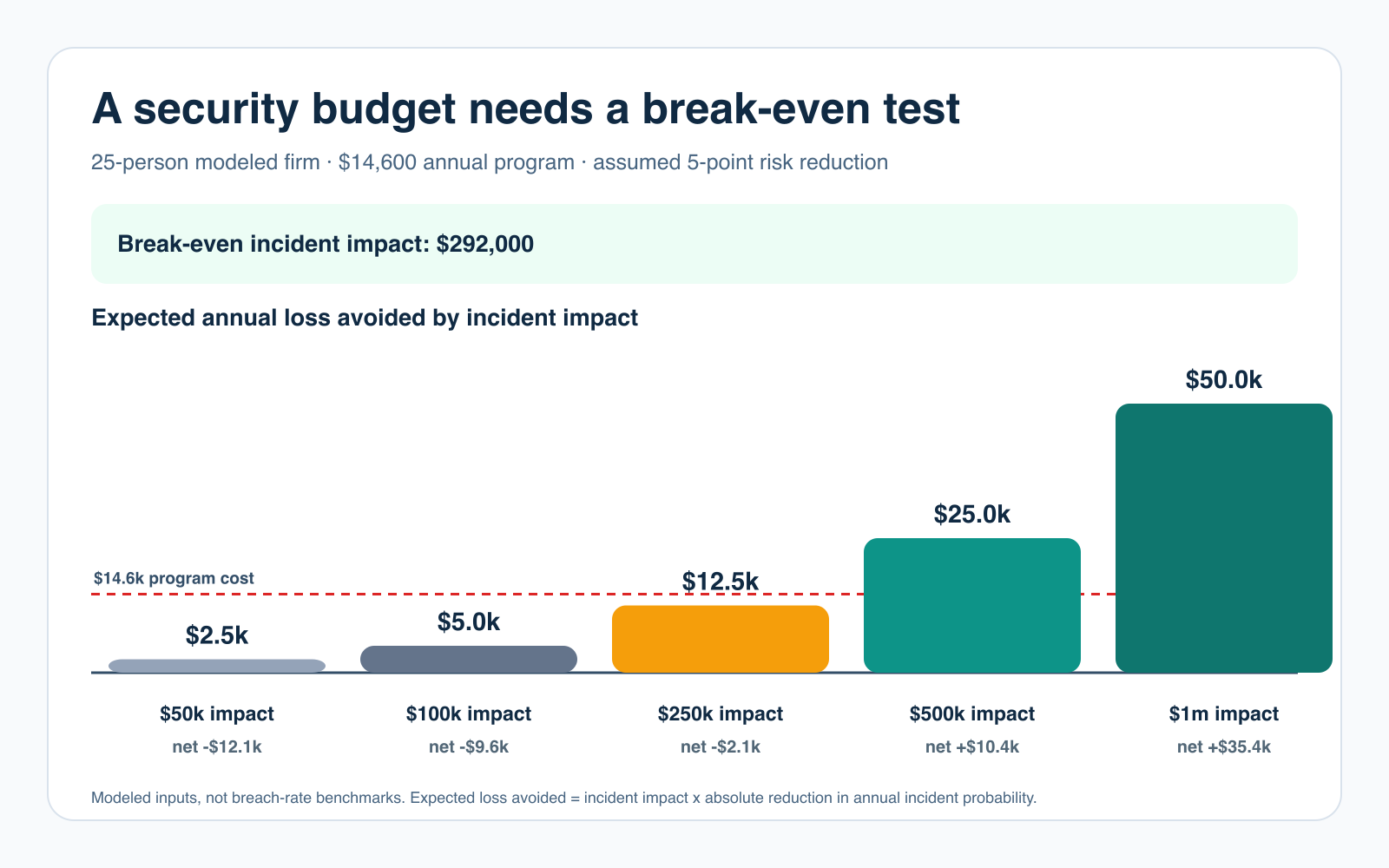
- Formula: expected loss avoided = incident impact x absolute reduction in annual incident probability.
- $250,000 impact at two points: $5,000 expected loss avoided and -$9,600 after the program cost.
- $250,000 impact at five points: $12,500 expected loss avoided and -$2,100 after cost.
- $250,000 impact at 10 points: $25,000 expected loss avoided and +$10,400 after cost.
- Break-even: at a five-point reduction, incident impact must reach $292,000. At a $250,000 impact, the program needs a 5.84-point reduction.
Decision rule: implement controls required by law, contracts, customer promises, and basic operational duty. For discretionary spending, state the input, expected risk reduction, potential impact, owner, evidence, and review date. If you cannot explain how a tool changes exposure, detection, containment, or recovery, it is not yet a justified security investment.
Tell Google you want more of this.
Add Gaurav Tiwari as a preferred sourceOne tap, and this site shows up more often in your own Top Stories, AI Overviews and AI Mode. Remove it any time.