
WordPress login security comes down to one number: how many password guesses you allow before slamming the door. Out of the box, WordPress allows infinite guesses. The Login Security module adds login attempt limiting, lockouts, XML-RPC authentication blocking, and login page customization, and it replaces the dedicated limit-login plugin you’re probably running now.
The defaults are deliberately strict because brute-force traffic isn’t hypothetical. Any site that’s been online for a week is already in the bot lists; the only question is whether guesses cost the attacker anything.
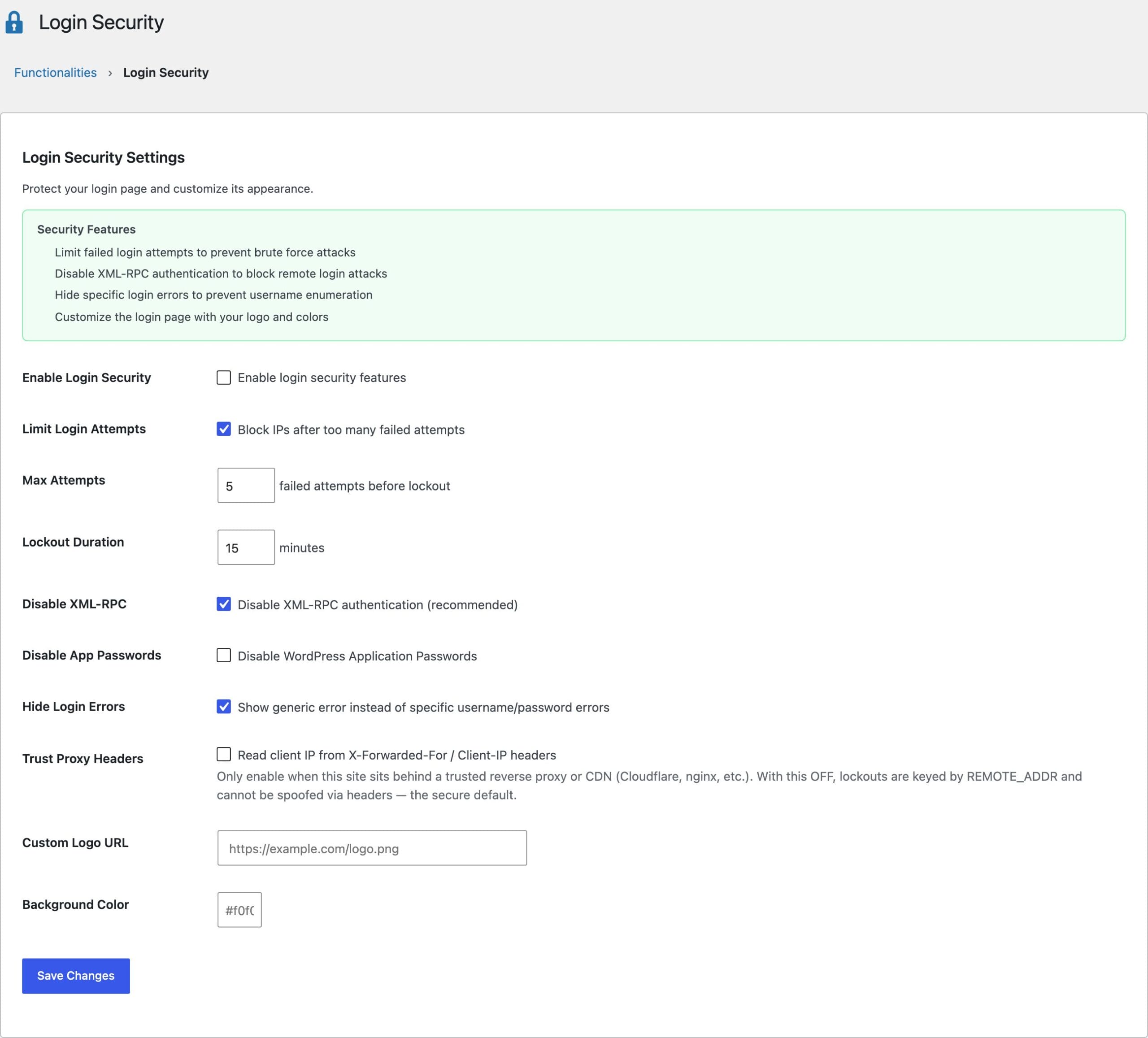
Login Attempt Limiting
5 failed attempts triggers a 15-minute lockout for that IP. Both numbers are configurable, and lockout state lives in transients, so it expires on its own without cron jobs or cleanup queries. Lockout events are logged with the blocked IP and the username it targeted, which tells you whether you’re seeing random scanning or someone specifically guessing admin.
The module throttles by username as well, and that setting is on by default. An IP-only lockout does nothing against a botnet that rotates addresses and keeps guessing the same account, which is the shape most credential-stuffing traffic takes now. Locking the username too means the attempts add up no matter where they arrive from.
Three things make the lockout log usable rather than just informative:
- An IP allowlist, so your own office or VPN address never gets locked out no matter how badly you fumble a password
- An unlock button on each entry, for the times you lock out a client 10 minutes before a call
- A warning when every recent lockout shares 1 address, which is almost never an attack. It is the signature of a site behind a CDN or reverse proxy handing WordPress the proxy’s IP instead of the visitor’s, and it means your lockouts are hitting everybody at once
That last one leads straight into the proxy setting below, and it is worth reading before you touch it.
Closing the Side Doors
The login form isn’t the only place WordPress accepts passwords, so the module covers the other entrances:
- XML-RPC authentication blocking (on by default): XML-RPC accepts hundreds of credential pairs in a single request via
system.multicall, which makes it the brute-force amplifier of choice - Application Passwords disable (optional): blocks REST API key generation if no integration on your site needs it
- Generic error messages (on by default): replaces “incorrect password for user gaurav” with a neutral error, so the form stops confirming which usernames exist
Proxy Headers: Read This Before Enabling
The “Trust Proxy Headers” setting ships off, and that’s a security decision, not an oversight. Headers like X-Forwarded-For are attacker-controlled on direct connections: a bot can rotate a fake IP per request and dodge every lockout, or worse, spoof your IP and lock you out of your own site. Enable this setting only when your server sits behind a trusted reverse proxy or CDN like Cloudflare that overwrites the header, and the module then validates every forwarded IP before using it.
Login Page Customization
A custom logo URL and background colors let the login screen match the site instead of advertising WordPress. Cosmetic, but clients notice.
What This Module Doesn’t Do
There’s no web application firewall, malware scanning, or file integrity monitoring here, and that’s intentional; those belong to a different tool with server-level access. My roundup of the best WordPress security plugins covers that layer, and the Performance & Cleanup lesson shows how to disable the XML-RPC endpoint entirely rather than just its authentication.
How many login attempts should I allow in WordPress?
Five failed attempts with a 15-minute lockout is the right default for most sites. Legitimate users rarely fail more than twice, and a 15-minute pause makes automated guessing economically pointless without ever locking a real person out for long.
Should I disable XML-RPC authentication?
Yes, unless you use a legacy tool that publishes via XML-RPC. The modern WordPress mobile apps and almost all integrations use the REST API. Blocking XML-RPC authentication kills the highest-volume brute-force vector at no functional cost.
Why does my security plugin show lockouts from impossible IP addresses?
Your plugin probably trusts proxy headers on a server that isn’t behind a proxy. Attackers can write anything into X-Forwarded-For. Login Security ignores those headers unless you explicitly enable proxy trust, so lockouts are keyed to the real connection address.