
WordPress performance cleanup is mostly subtraction. Core ships scripts, styles, and endpoints that a typical content site never uses: emoji detection, oEmbed discovery, XML-RPC, jQuery Migrate, Heartbeat polling. The Performance & Cleanup module gives you a toggle for each one, so you remove exactly the bloat your site doesn’t need.
These toggles replace what I used to do with 15 separate snippets in a functions.php file. One screen, 20 switches, and each one documents what it removes.
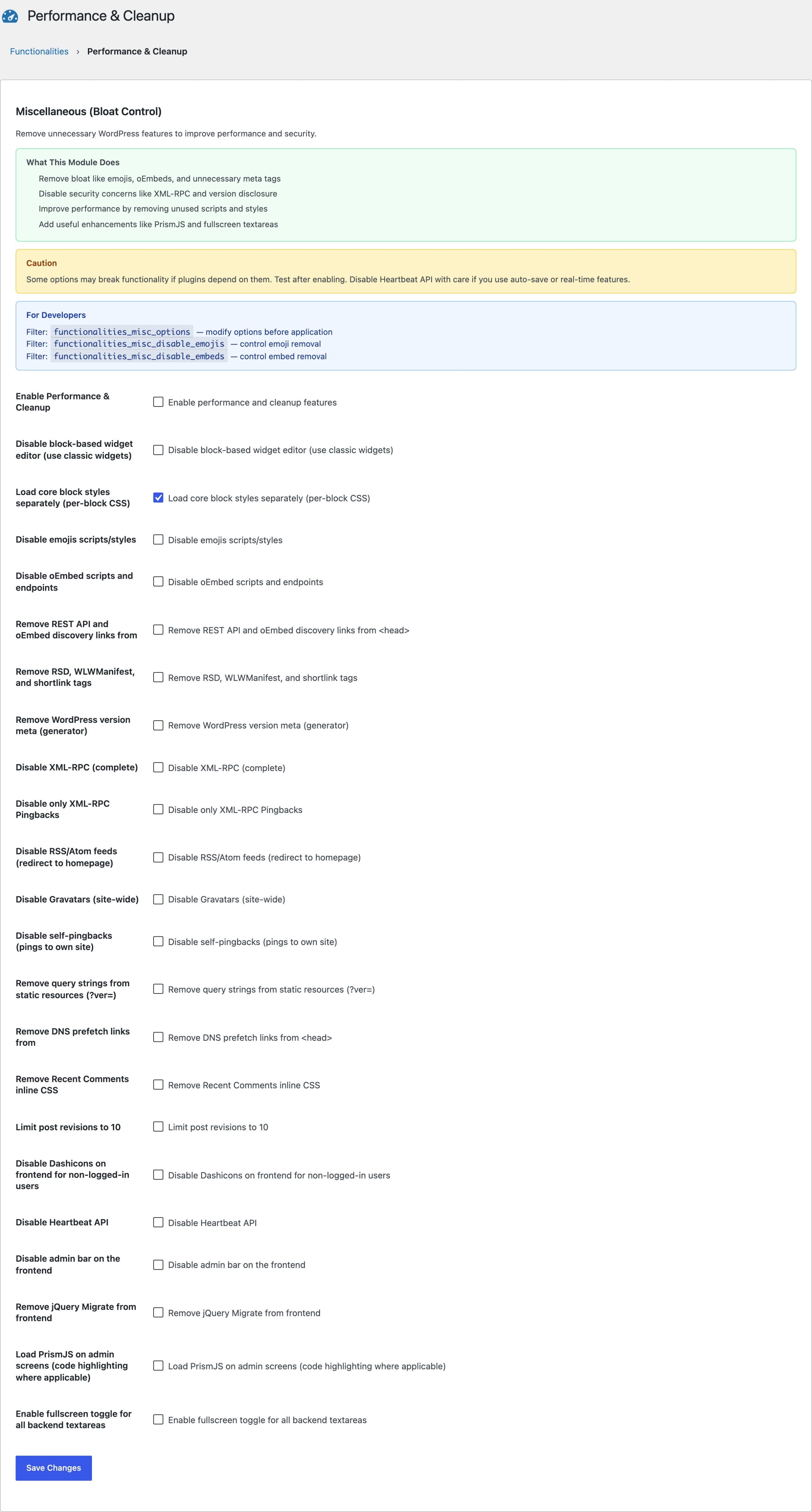
What You Can Disable
The most impactful toggles, grouped by what they remove:
- Scripts and styles: emoji detection script, jQuery Migrate, Dashicons for logged-out visitors, the recent comments widget CSS
- Requests: Heartbeat API polling, DNS prefetch hints, Gravatar loading
- Head cleanup: generator meta tag, RSD and WLW manifest links, shortlinks, REST API discovery links,
?ver=query strings on static assets - Endpoints and behaviors: XML-RPC, XML-RPC pingbacks, oEmbed discovery and endpoints, RSS feeds (redirected home with a 301), self-pingbacks
- Editor and admin: block-based widget editor (restores classic widgets), front-end admin bar
- Database growth: a revision limit, 10 by default, so a long-running post stops accumulating rows forever
Which Toggles Actually Move the Needle
Start with emojis, jQuery Migrate, and Heartbeat. The emoji script is render-blocking inline JavaScript on every page, jQuery Migrate exists only for pre-2016 plugin compatibility, and Heartbeat fires an admin-ajax request every 15 to 60 seconds while an admin tab is open. Those 3 toggles cut requests that show up directly in a waterfall chart.
Heartbeat has a second switch worth understanding before you flip the first one. Disabling it applies to the front end only unless you also enable the admin option, and that split is deliberate: Heartbeat is what drives autosave and post locking, so killing it everywhere means a writer loses a draft to a browser crash and 2 editors overwrite each other with no warning. Switch it off on the front end, where nothing needs it, and leave the admin side alone unless you know the cost.
Disabling XML-RPC matters more for security than speed; it closes the endpoint used for credential-stuffing amplification. If you want the full security stack around it, the Login Security lesson picks up there.
What Not to Disable
Don’t disable RSS feeds if anyone subscribes to your content, and leave oEmbed alone if your posts embed tweets or YouTube videos. Every toggle here is off by default for a reason: subtraction is only free when the feature is genuinely unused. Flip one switch at a time and check the front end.
How This Fits a Full Speed Stack
Cleanup toggles remove waste, but they don’t replace caching, image optimization, or good hosting. This module handles the layer most caching plugins skip. For the rest of the stack, my WordPress speed course covers CSS and JavaScript optimization and Core Web Vitals in depth.
Is it safe to disable XML-RPC in WordPress?
Yes for almost every site. XML-RPC exists for legacy remote publishing and the Jetpack-era mobile apps. The modern WordPress apps and integrations use the REST API instead. Disable it unless you know a specific tool on your site still needs it.
Does disabling emojis break emoji in my posts?
No. Emojis you type still render through the visitor’s operating system fonts. The toggle only removes the detection script WordPress ships for ancient browsers that couldn’t render emoji natively.
Why are all Performance & Cleanup toggles off by default?
Because every site is different. A site with RSS subscribers needs feeds, a site embedding YouTube needs oEmbed. Off-by-default means installing the plugin can never break an existing behavior.