
A WordPress redirect manager shouldn’t need its own database tables, an options page with nine tabs, and a few hundred milliseconds of your time to first byte. The Redirect Manager module in Dynamic Functionalities stores every redirect in a single JSON file, resolves exact matches in constant time, and counts hits without slowing the redirect down.
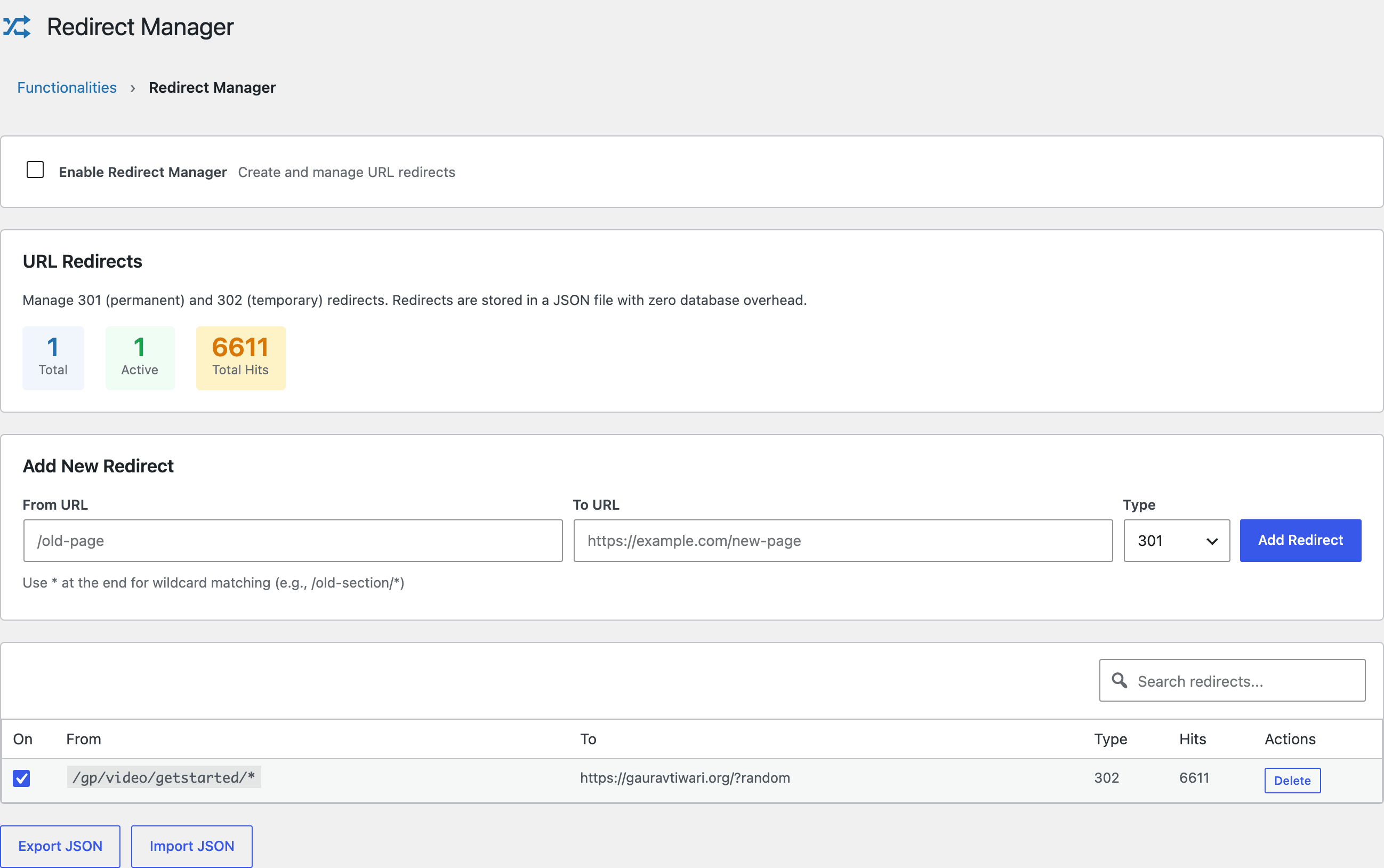
It currently handles the redirects on my own site. The screenshot below shows a single wildcard rule that has fired 6,611 times, and the hit counter costs visitors nothing because it’s written after the redirect response is already on its way.
Setting Up Your First Redirect
Enable the module, type a source path in From URL, a destination in To URL, pick a type, and click Add Redirect. The From field takes a relative path like /old-page; the To field accepts a relative path or a full URL. Each redirect gets an on/off checkbox, so you can pause a rule without deleting it or losing its hit count.
Redirect Types: 301, 302, 307, 308
Use a 301 when content has moved permanently, because that’s the signal that passes SEO value to the new URL. The module supports all four standard types:
| Code | Meaning | When to use it |
|---|---|---|
| 301 | Permanent | Content moved for good; search engines transfer ranking signals |
| 302 | Temporary | Short-term moves, A/B tests, campaign URLs |
| 307 | Temporary (method-safe) | Like 302, but POST requests stay POST |
| 308 | Permanent (method-safe) | Like 301, but preserves the request method |
Wildcard Redirects
Add an asterisk at the end of a From URL and the rule matches every path under that prefix. Two examples:
/old-blog/*catches/old-blog/post-1,/old-blog/category/tech, and everything else under it/docs/v1/*catches/docs/v1/apiand/docs/v1/guide/intro
This is how you retire an entire section of a site with one rule instead of fifty. My guide on content pruning covers how to decide which URLs deserve a redirect and which should return a 410.
Query Strings and Redirect Loops
The matcher strips query strings before comparing, so /old-page?utm_source=newsletter still matches a rule for /old-page, and the original query string is passed through to the destination URL. Your campaign tracking survives the redirect.
The module also detects redirect loops twice: once when you try to save a rule that points at itself or chains back to an existing source, and again at runtime as a safety net.
Performance Under the Hood
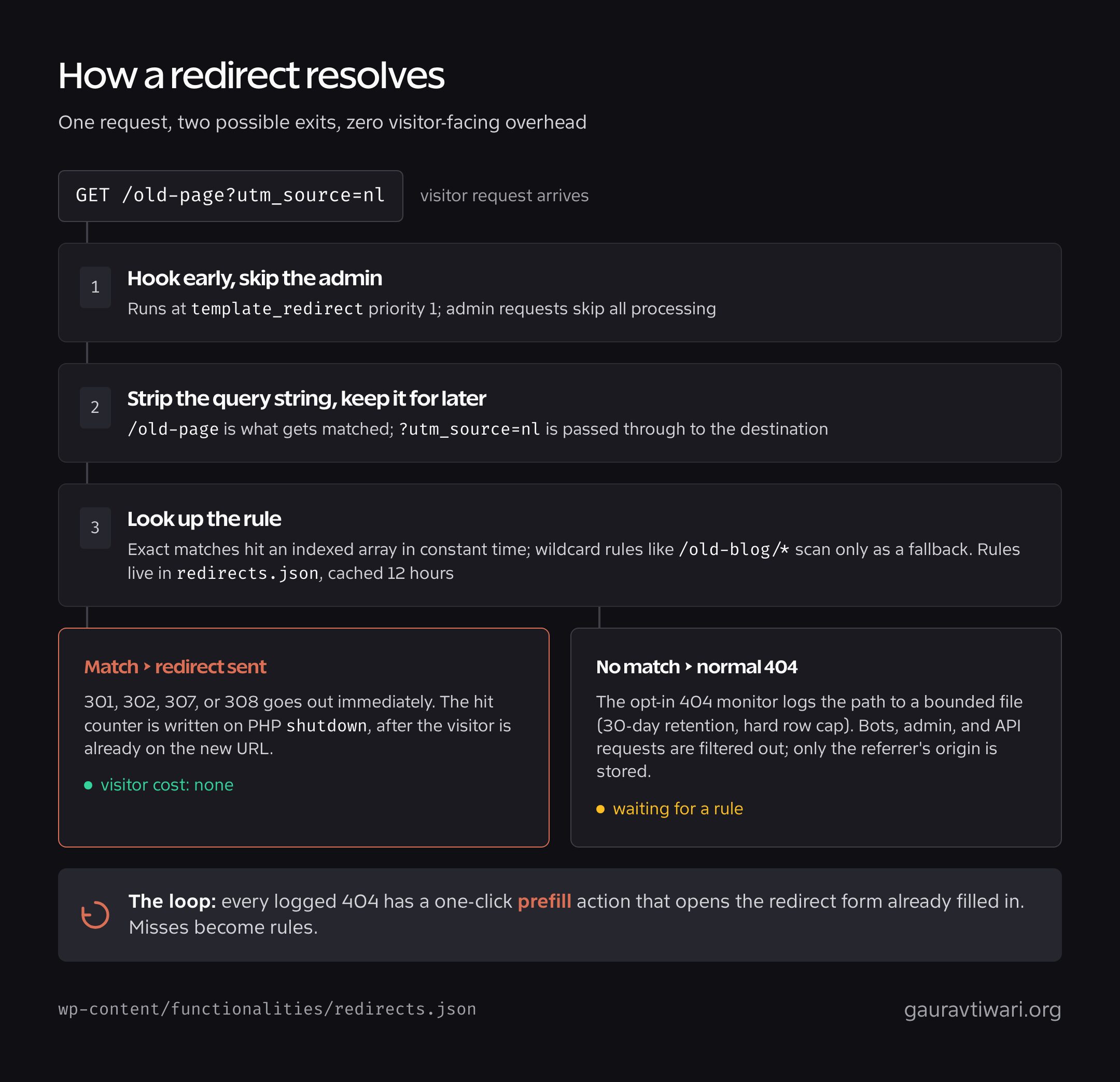
This is the part that made me write the module in the first place. Everything is tuned so a redirect costs as close to nothing as WordPress allows:
- File-based storage: all rules live in a single
redirects.json, cached with a 12-hour transient so most requests never touch the disk - O(1) exact lookup: exact matches hit an indexed array, with wildcard scanning only as a fallback
- Early exit: runs at
parse_request, before WordPress queries the database for a page it is about to throw away, and never touches the admin or WordPress’s own entry points - Deferred, batched hit counting: counters go into a buffer and reach disk in batches rather than rewriting the whole file under an exclusive lock on every request, so a crawler sweeping dead URLs does not serialise behind a lock. The batch size is filterable through
functionalities_redirect_buffer_threshold, which defaults to 25 - Atomic writes: rule updates take a file lock, write to a same-directory temporary file, and swap it in atomically, so concurrent saves can’t corrupt the JSON
Import and Export
The Export JSON button downloads every rule with its hit counts, and Import JSON restores them. Moving redirects from a staging site to production is one download and one upload.
The JSON itself lives in a per-site folder named with 20 random characters under wp-content/functionalities/, not at a path anyone can guess. A redirect map tells a stranger every URL you have retired and where each one now points, which is a site history you probably did not intend to publish. Both folders carry an index.php, Apache deny rules and an IIS web.config, and a Site Health check verifies over HTTP that the folder is genuinely unreachable instead of trusting that the rules took effect.
CSV works in both directions too, which is the format that matters for migration. The importer recognizes the column names other redirect plugins use for source and target, so a CSV exported from Redirection or a similar plugin usually imports without editing the header row. Every import runs as an all-or-nothing dry run first: duplicates, wildcard problems, redirect loops, and chains are flagged before a single rule is written. If the file has a problem, nothing changes.
On WordPress 7 the rules and the 404 activity each get a DataViews workspace, so you can search, sort and filter them in a proper table instead of scrolling a long list, with a DataForm for adding a rule. The classic screens stay as the fallback everywhere else.
404 Monitoring
The module also ships an opt-in 404 monitor, because the URLs people actually hit and miss are the redirects you haven’t written yet. Turn it on and the module logs 404s to a bounded file with a retention window (30 days by default) and a hard row cap, so the log can’t grow without limit.
It’s built to stay privacy-conscious and quiet: bot, admin, and API requests are filtered out, you can exclude paths you don’t care about, and only the referrer’s origin is stored, never the full referring URL. Each logged path gets three actions: purge it, ignore it permanently, or prefill a new redirect from it, which is the whole point. Spot a 404 with real traffic, click once, and the redirect form is already filled in.
Should I use a 301 or a 302 redirect?
Use a 301 when the move is permanent, because search engines consolidate ranking signals to the new URL. Use a 302 only when the original URL will come back, like a temporary campaign page or a test.
Do redirects slow down a WordPress site?
Plugin-based redirects add one lookup before WordPress renders the page. Redirect Manager keeps that lookup near zero with an indexed exact-match check, a 12-hour transient cache, and no database queries. Server-level redirects are still marginally faster, but you lose hit tracking and the convenience of managing rules in wp-admin.
How do I redirect an entire folder to a new location?
Create a rule with a trailing asterisk, like /old-section/* pointing at the new parent URL. Every path under /old-section/ then redirects with a single rule.
That covers the day-one modules. The next module group starts with Content Integrity, which watches your posts for accidental damage every time you hit Update.