
Every Gutenberg block stamps its own CSS class into your HTML: wp-block-heading, wp-block-list, wp-block-image, on every element, on every page. If your theme styles elements directly and never references those classes, that’s dead weight in your DOM. The Block Cleanup module removes wp-block classes from frontend output, selectively, block type by block type.
To be clear about scope: this is a markup hygiene module. It won’t transform your Core Web Vitals, but on a content-heavy page it strips hundreds of unused attributes, and cleaner HTML is easier to style, diff, and debug.
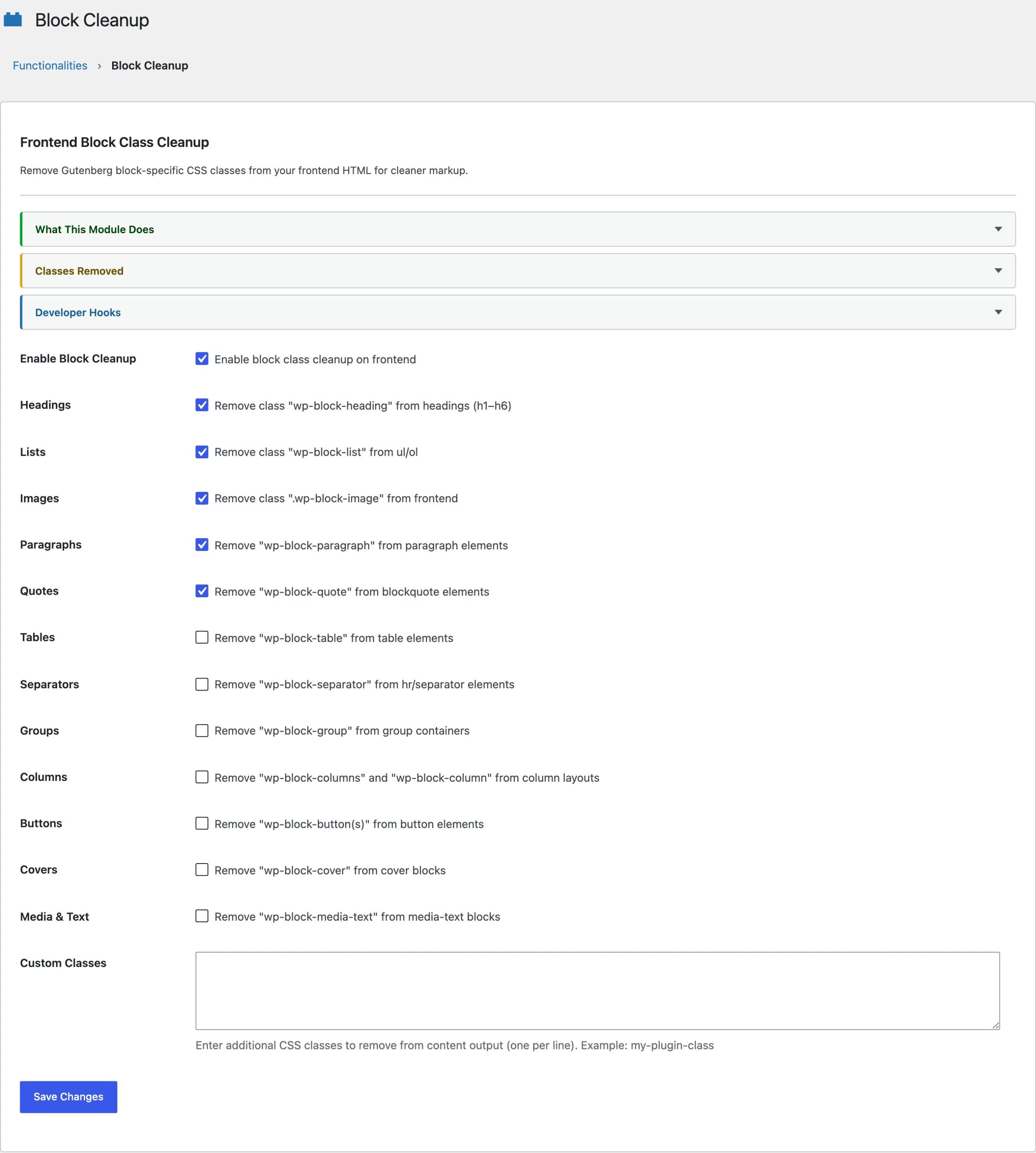
What You Can Strip
14 block classes have individual toggles, so you remove only what your stylesheet genuinely never targets:
- Text:
wp-block-heading,wp-block-paragraph,wp-block-list,wp-block-quote - Media:
wp-block-image,wp-block-cover,wp-block-media-text - Layout:
wp-block-group,wp-block-columns,wp-block-column,wp-block-separator,wp-block-table - Interactive:
wp-block-buttons,wp-block-button
Only the class token is removed. The element, its other classes, its inline styles and its attributes all stay exactly as the block editor wrote them, so this never changes what is on the page, only what the page calls it.
Before You Enable Anything
Search your theme’s CSS for wp-block- first. If the stylesheet references a class, stripping it breaks that styling, and so do plugins that target block classes for styling or JavaScript hooks. The per-block toggles exist precisely so you can strip the classes nothing uses and keep the ones something does. Enable one, check the front end, repeat.
The 2 that catch people out are wp-block-image and wp-block-columns, because block themes and most page builders lean on them for layout rather than decoration. If your columns collapse into a single stack after you flip a toggle, that is the one to put back.
Developer Filters
The class list and the processing are both filterable. Add a custom class to the cleanup list, or veto cleanup on specific content:
// Strip an extra class everywhere.
add_filter( 'functionalities_block_cleanup_classes', function( $classes ) {
    $classes[] = 'my-theme-helper-class';
    return $classes;
});

// Skip cleanup on a specific post type.
add_filter( 'functionalities_block_cleanup_enabled', function( $enabled ) {
    return is_singular( 'docs' ) ? false : $enabled;
});
A third filter, functionalities_block_cleanup_content, hands you the content after cleanup runs, which is the place for any pass of your own that should see the cleaned markup rather than the original.
How the Markup Survives
Cleanup runs through the WordPress HTML API, which walks the document and removes the class token in place. Nothing is reserialized, so the rest of your markup comes out exactly as it went in, byte for byte, including the parts a general-purpose HTML parser tends to rewrite.
That is what makes the module safe on a page built with Vue, Alpine, or mustache templates. Directives such as v-if and @click, curly-brace bindings and any other attribute the parser does not recognize are left alone rather than mangled or quietly skipped, so the cleanup applies to that content like it does to everything else.
If markup cleanliness is your thing, this pairs naturally with Performance & Cleanup for the head section and Schema Settings for giving the cleaned markup semantic meaning. All three run from the same Dynamic Functionalities install.