
 by
by
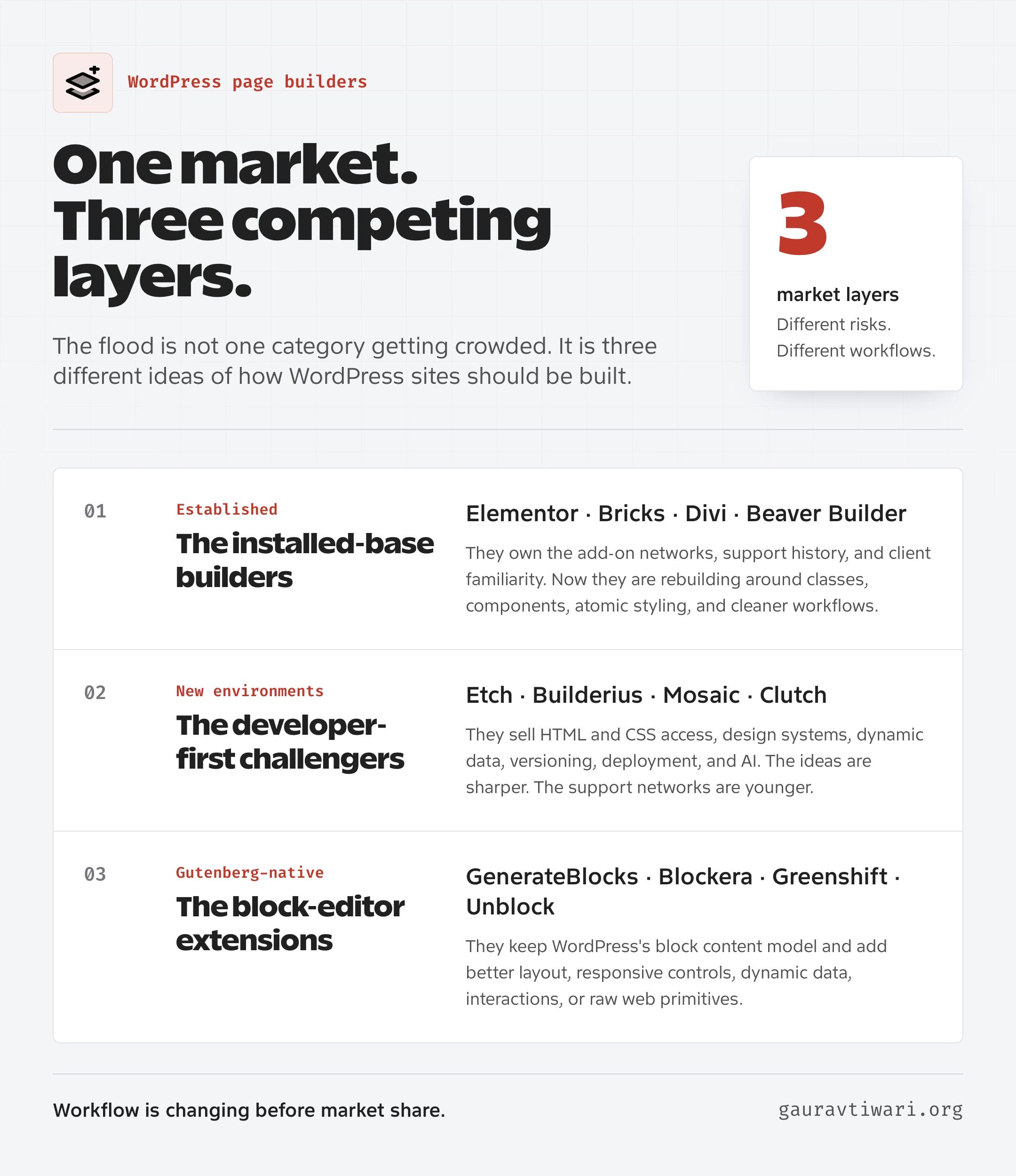
The WordPress page builder flood is accelerating faster than most of us can test it. Etch, Builderius, Mosaic, Clutch, Unblock, and a growing pile of block editor extensions all want a piece of the same market. WordPress did not need another hundred widgets, but that is not what this wave is selling.
The pitch has changed. These tools are selling cleaner HTML, class systems, design tokens, dynamic data, reusable components, code access, safer deployment, and AI that can work with the page instead of merely writing filler copy for it. The target is no longer just the business owner who cannot code. It is the developer, freelancer, and agency builder who knows enough CSS to be annoyed by the old tools.
That makes the WordPress page builder flood worth watching. But it doesn’t make every new builder ready for client work.
The 2026 WordPress Page Builder Dataset
I checked 15 builders and block systems against official changelogs, WordPress.org records, and public release pages on July 28, 2026. Eight had changed since the earlier article snapshot. That release velocity is useful evidence, but it is not the same thing as production readiness.
| Builder | Observed version | Channel | Active installs | Change vs article |
|---|---|---|---|---|
| Etch | 1.6.3 | stable | Not on WordPress.org | changed since article |
| Builderius | 1.3.5-beta | stable | 100 | matches or expands article |
| Mosaic | 1.0.5 | stable | Not on WordPress.org | matches or expands article |
| Clutch | 1.446.1 | beta | Not on WordPress.org | matches or expands article |
| GenerateBlocks | 2.3.0 | stable | 200,000 | matches or expands article |
| Blockera | 1.12.2 | stable | 100 | matches or expands article |
| Greenshift | 13.1.4 | stable | 70,000 | changed since article |
| Kadence Blocks | 3.7.8.1 | stable | 600,000 | changed since article |
| Spectra family | Legacy 2.20.0; Blocks 1.0.2 | stable | 1,000,000 | changed since article |
| Stackable | 3.19.10 | stable | 100,000 | matches or expands article |
| Unblock | 1.0.0-beta.7 | beta | Not on WordPress.org | changed since article |
| Elementor | 4.2.0 | stable | 10,000,000 | changed since article |
| Bricks | 2.3.9 stable; 2.4-beta2 | stable_and_beta | Not on WordPress.org | changed since article |
| Divi | 5.9 | stable | Not on WordPress.org | matches or expands article |
| Beaver Builder | 2.11.0.1 | stable | 100,000 | changed since article |
W3Techs separately estimated Elementor on 31.5% of WordPress sites, Beaver Builder on 1.0%, Bricks on 0.3%, and Divi Builder on 0.1%. Those crawl-based shares and WordPress.org active-install counts use different populations, so I do not combine them.
This WordPress Page Builder Flood Is Different
The new wave is different because it starts with the professional workflow, not the beginner’s widget panel. Etch, Builderius, and Mosaic build inside WordPress, while Clutch takes an adjacent Next.js route. They still return to the same ideas: real web primitives, global systems, reusable components, dynamic content, and fewer trips between disconnected screens.
Class-first styling is the turning point. A builder becomes maintainable when it stops treating every element as a unique snowflake and starts treating a website as a system.
That sounds like a small distinction until you inherit a 200-page site. Per-element sliders feel fast on page one. By page 50, they become a search operation: which button has the correct padding, where did that color come from, and why does the tablet breakpoint behave differently on this one template?
Classes, variables, components, and design tokens reverse that relationship. The first page takes more thought. The fiftieth page becomes easier because the decisions already exist. Bricks proved there was a serious WordPress audience for that approach. The newer builders are taking the same demand and pushing it toward code access, data modeling, deployment, and AI.
15 WordPress Builder Releases and Status Changes
The WordPress builder market is moving on three fronts: new products are filling out core workflows, Gutenberg plugins are splitting into old and new product lines, and established builders are shipping new design-system and AI features.
| Product family | Current public release | Key release detail |
|---|---|---|
| Etch | 1.6.2, stable | July 8: taxonomy editing, loop editing, and asset-manager changes |
| Builderius | 1.3.5, beta | Static export and Remote Sync shipped; History and Undo plus visual CSS Grid remain in progress |
| Mosaic | 1.0.5, stable | July 7: ACF support, interactions, style variables, conditions, and editor controls |
| Clutch | 1.446.1, beta | January 14 beta for a visual Next.js platform, not a WordPress page builder |
| GenerateBlocks | 2.3.0, stable | Security hardening, direct CSS support for Pro tools, and media-toolbar changes |
| Blockera | 1.12.2, stable | 200+ installs; last public release July 2025; Pro still described as in development |
| Greenshift | 13.1.2, stable | Current AI work includes dynamic template generation and updated model support |
| Kadence Blocks | 3.7.8, stable | June 29 security and capability hardening; 600,000 active installations |
| Spectra family | Legacy 2.20.0; Blocks 1.0.0 | Legacy is maintenance-only; new development moved to the separate Blocks plugin |
| Stackable | 3.19.10, stable | Endpoint hardening, API-key masking, integration fixes, and saving improvements |
| Unblock | 1.0.0-beta.6, beta | One block maps to one HTML element, with visual conditions and expression operators |
| Elementor | 4.1.5, stable | Design System panel, transferable classes and variables, and Angie Atomic editing |
| Bricks | 2.3.9, stable; 2.4, beta | Stable maintenance plus beta AI Abilities, MCP, Builder Browser, and design-system transfer |
| Divi | 5.9, stable | 65 fixes and improvements plus variable fonts and the CSS Grid Editor |
| Beaver Builder | 2.11, stable | Popups, global-color work, Font Library support, accessibility, attributes, and performance changes |
Three New WordPress Builders and One Adjacent Platform
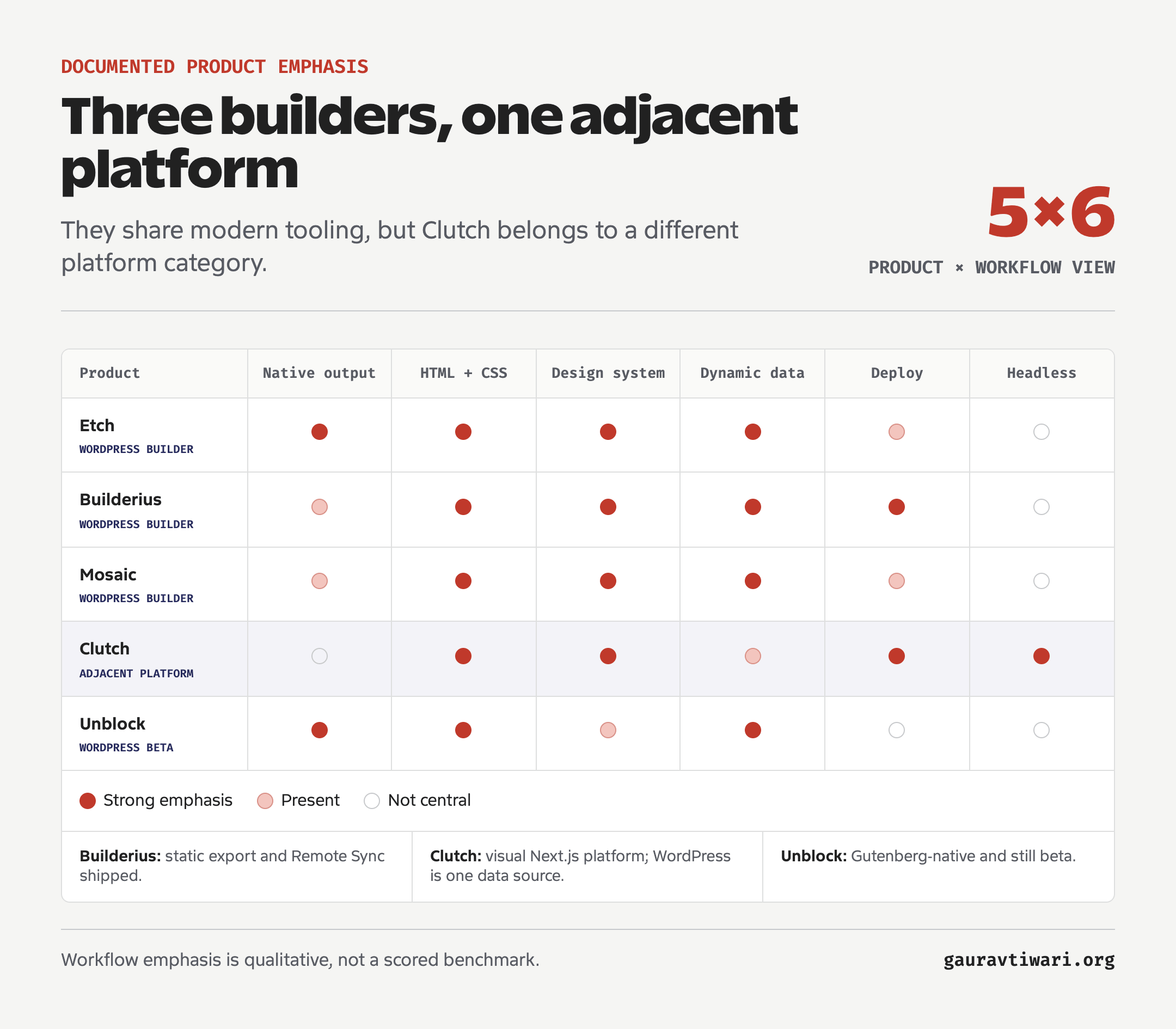
Etch, Builderius, and Mosaic are the three new WordPress builders I would watch most closely. Clutch belongs nearby because it can use WordPress as a content source, but it is primarily a visual Next.js development platform. Treating all four as direct page-builder alternatives hides the most important architectural difference.
| Product | Core idea | Where it lives | Current caution |
|---|---|---|---|
| Etch | Professional visual development that authors Gutenberg blocks | Inside WordPress, with its own development environment | My hands-on testing stopped at 1.5.0 |
| Builderius | HTML, CSS, dynamic data, versioning, deployment, and AI | Inside WordPress as a builder and templating layer | Still beta, with major workflow features unfinished |
| Mosaic | Theme builder, visual editor, and class-based design system | Inside WordPress as a unified site-building system | Accessibility and key integrations remain roadmap work |
| Clutch | Visual Next.js development with components, agents, and data sources | Outside the traditional WordPress theme layer | Adjacent platform, not primarily a WordPress page builder |
Etch Wants WordPress Development to Feel Like One System
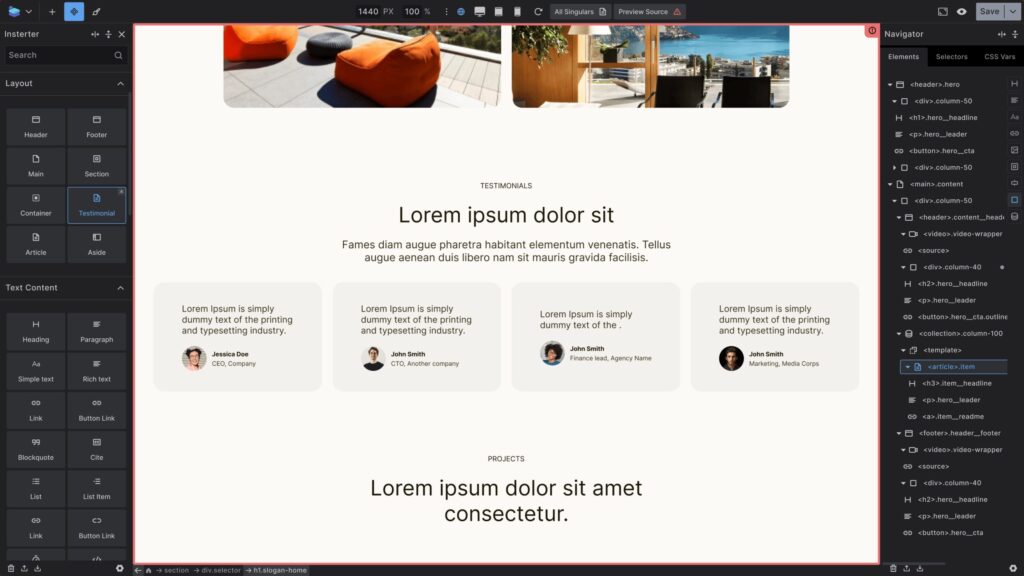
Etch launched its production line in January 2026. Its pitch is not “Elementor with fewer wrappers.” Etch wants the development environment, WordPress content architecture, and client editing experience to speak the same language.
- It exposes HTML and CSS instead of hiding them behind proprietary controls.
- It lets builders work with selectors, classes, components, custom post types, custom fields, loops, and templates in one environment.
- It authors the result to Gutenberg blocks so clients can edit content in the native block editor.
- Its experimental Etch Intelligence layer works with the site’s structure and code.
That architecture is interesting because it separates building from editing without creating two unrelated versions of the page. The professional gets the deeper environment. The client gets blocks and guardrails.
Etch’s July 8 release added taxonomy editing, better loop editing through Etch Intelligence, and asset-manager changes. My hands-on experience ends at version 1.5.0. Etch requires an Index Template, which acts as the fallback when no more specific template matches.
Builderius Treats Versioning as Part of the Builder
Builderius is the most development-tool-shaped product in this group. It combines semantic HTML, visual CSS controls, a code editor, variables, components, dynamic data, GraphQL, conditions, and an unusual feature for a WordPress builder: development and production branches.
You can save named releases, switch between development and live states, compare alternative versions, roll back, and move Builderius work between sites. That matters because page building is not only a design task. It is also change management, and WordPress builders have traditionally pushed that responsibility onto staging plugins, hosts, and a developer’s memory.
Builderius remains in beta. Its July releases added static exports to ZIP files, GitHub Pages, and Cloudflare Pages, followed by Remote Sync and taxonomy export. History and Undo plus visual CSS Grid controls remain in progress. Gutenberg integration, collaboration, and the marketplace remain planned.
I wouldn’t standardize a client workflow around Builderius while it remains in beta.
Mosaic Combines the Theme, Builder, and Design System
Mosaic’s argument is simple: WordPress themes, page builders, and supporting plugins each solve part of the workflow, but the pieces do not fit cleanly. Its answer is one class-based system containing the theme builder, visual editor, dynamic data, conditional logic, interactions, and design tokens.
Mosaic 1.0.5 added broader style variables, ACF support, interactions, Gutenberg Styles, improved conditions, semantic lists and accordions, and editor visibility controls. Accessibility work is in progress. WooCommerce is next, while the Gutenberg Block Builder remains in the backlog without a confirmed date.
Clutch Is an Adjacent Next.js Platform
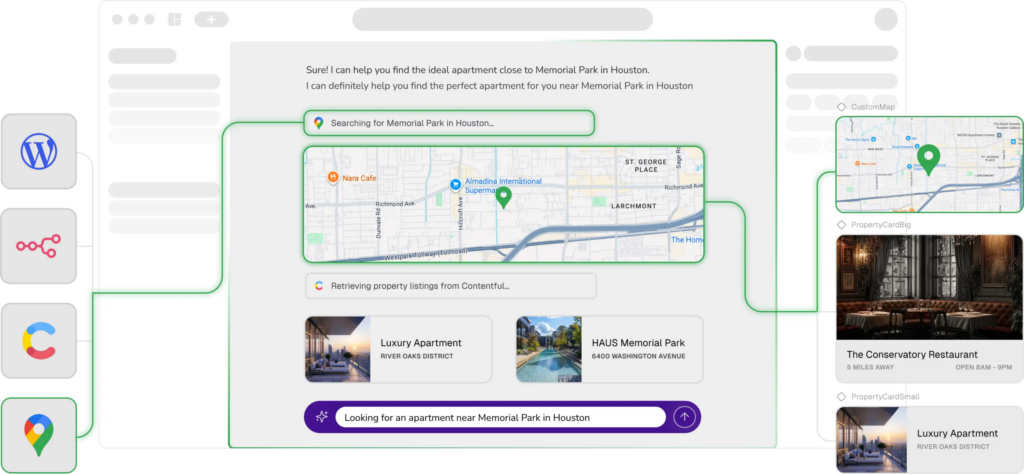
Clutch is not primarily a WordPress page builder. It is a visual Next.js development platform built around components, agents, MCP, and external data sources. WordPress can supply content, but it is only one possible backend.
Clutch remains in beta.
When you use WordPress behind a separate Next.js front end, you may remove some theme and plugin limitations, but headless is not a free performance button. You now own a deployment pipeline, preview behavior, caching, forms, search, redirects, SEO rendering, and every integration that assumed PHP would render the page. A traditional builder problem can quietly become an infrastructure problem.
Treat Clutch as an application architecture choice, not a Beaver Builder alternative.
Gutenberg Has Its Own Page-Builder Flood
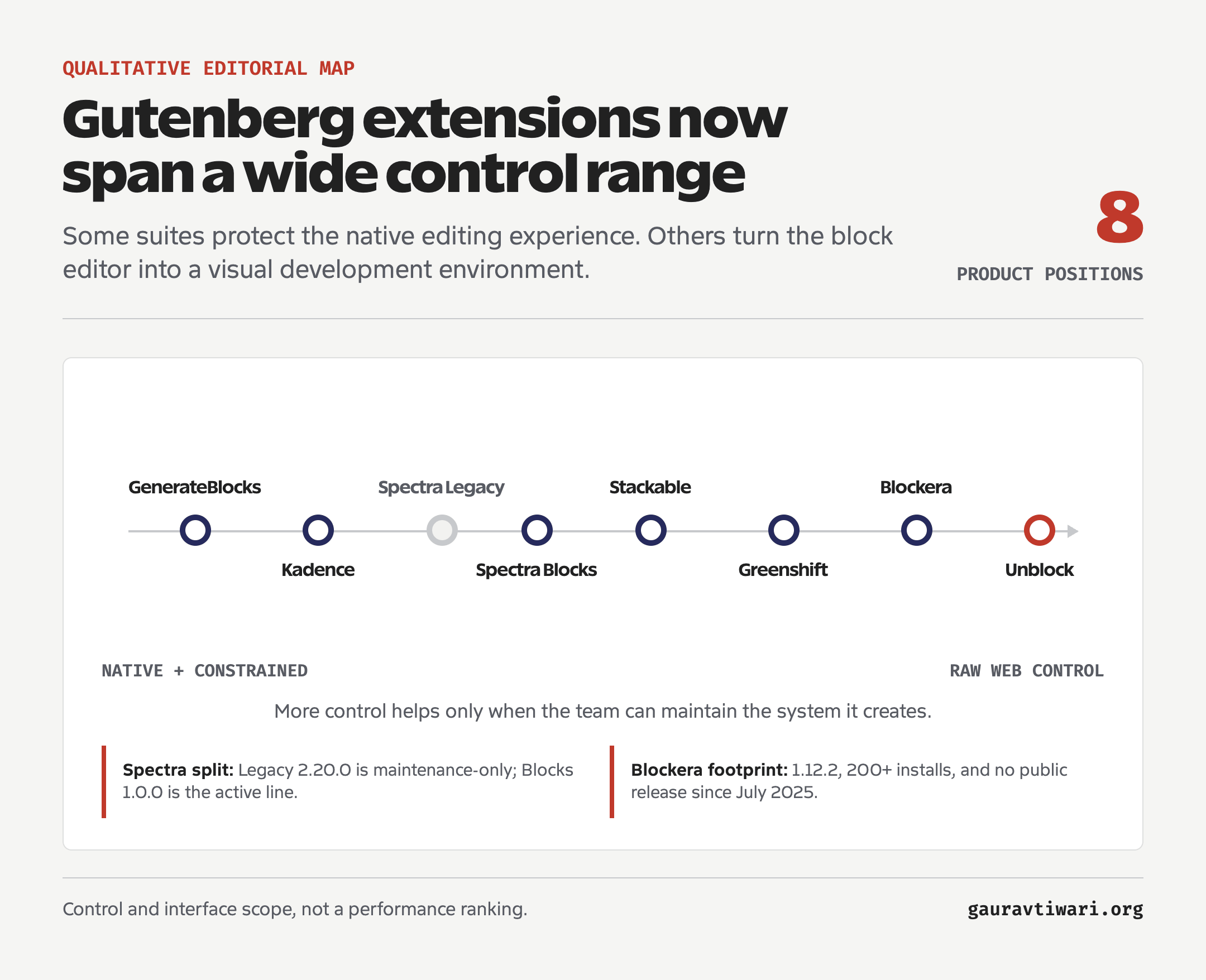
The second flood is happening inside Gutenberg. GenerateBlocks, Blockera, Greenshift, Kadence Blocks, Spectra, Stackable, and Unblock all extend the native editor, but they make different bets about how much interface and abstraction WordPress needs.
This route has one structural advantage: the content stays in WordPress’s block model. You are extending the editor rather than replacing it with a parallel application. That does not eliminate plugin dependency, but it usually gives content a better chance of surviving a theme change or a tooling rethink.
GenerateBlocks is still my default for this approach. It gives me a small set of layout primitives, global styles, patterns, queries, and increasingly capable site-building blocks without turning the editor into a widget warehouse. I have used it since its 2020 launch and built hundreds of pages with it.
Blockera works as an advanced mode for the block editor. It adds responsive controls, block states, advanced styling, and inner-block customization to core blocks. Its public plugin footprint is still small: 200+ active installations, an older July 2025 public release, compatibility declared only through WordPress 6.8.5, and a Pro product still described as in development.
Greenshift pushes further into animations, interactions, dynamic content, full-site building, and AI-assisted dynamic templates while conditionally loading assets.
Kadence Blocks and Stackable represent the mature earlier wave. They proved that many users wanted page-builder controls without leaving Gutenberg. My Gutenberg blocks plugin guide covers that field in more detail. The short version is that more blocks do not automatically create more freedom. A focused system beats a 90-block menu you will never fully learn.
Spectra Legacy and Spectra Blocks Are Separate Product Lines
Spectra now consists of two product lines. Spectra Legacy maintains the original plugin for existing websites. Spectra Blocks is the actively developed rebuild launched in July 2026. Existing sites do not automatically carry every global color, typography setting, block default, or custom CSS assumption into sections rebuilt with the new plugin.
Count Systems, Not Blocks
A block collection gives you more things to insert. A page-building system gives you repeatable classes, components, responsive rules, patterns, and guardrails. Count systems, not blocks.
Unblock Gives You HTML-Level Control in Gutenberg
Unblock is technically ambitious and still beta. I have it installed on anantamias.com, but I wouldn’t use it for client production yet.
Unblock’s documentation describes it as beta and relatively raw, while its About page calls the core stable and production-ready. Its core idea is direct: one block maps to one HTML element. A Section can render a <section>. A Group can be a <div>. Blocks can receive any valid tag, class, data attribute, ARIA attribute, custom CSS, JavaScript interaction, condition, or dynamic expression.
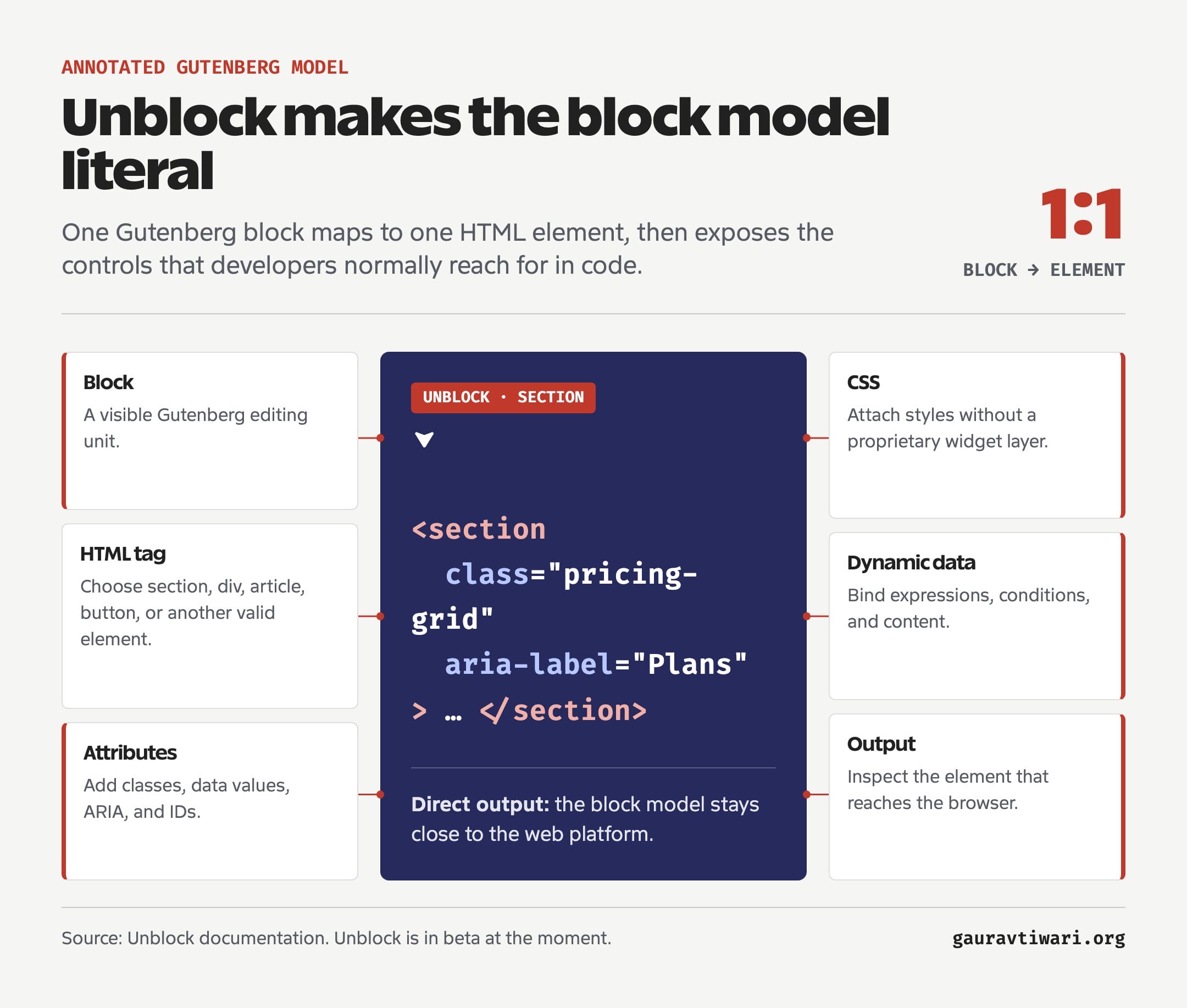
In other words, Unblock does not try to protect you from the web platform. It puts HTML, CSS, and data binding inside Gutenberg. If you know what you are doing, that is liberating. If you do not, you now have enough freedom to create an inaccessible, inconsistent mess without ever opening a code editor.
The AI assistant is what makes the experiment timely. You can describe a result and let the assistant write CSS, attributes, and expressions. That lowers the syntax barrier, but it does not remove the need for judgment. AI can generate an ARIA attribute. It cannot guarantee that your interaction makes sense to a keyboard user or that the resulting component belongs in your design system.
I would use Unblock locally to learn where Gutenberg can go. I wouldn’t hand it to a client team because the current interface still expects a technically confident operator.
Elementor, Bricks, Divi, and Beaver Builder Are Not Standing Still
The old guard still owns the installed base, and it is rebuilding around the same ideas the newcomers promote. Elementor, Bricks, Divi, and Beaver Builder are all shipping current releases. They move at different speeds, but none can fairly be described as dormant.
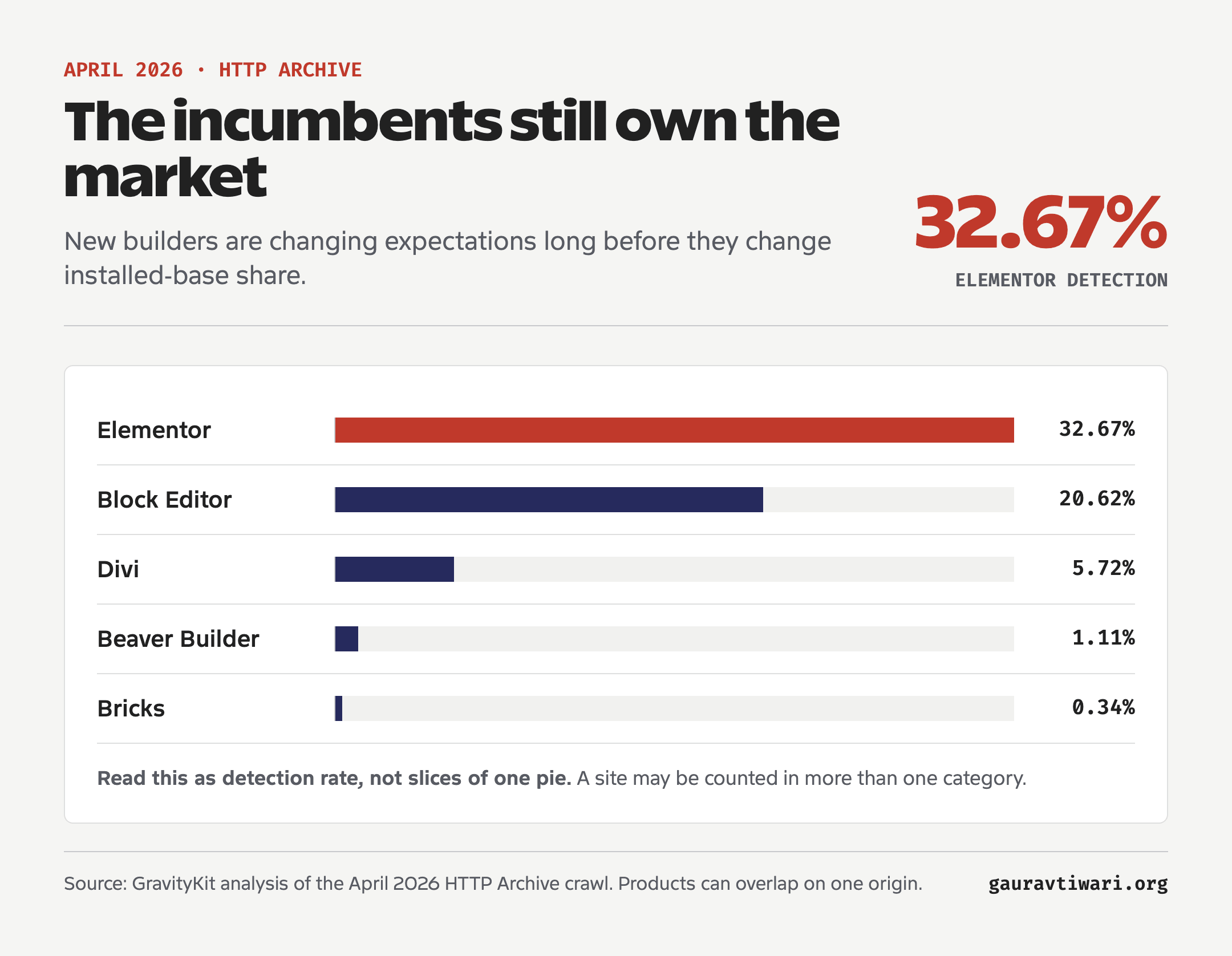
A GravityKit analysis of the April 2026 HTTP Archive crawl found Elementor on 32.67% of WordPress origins in its sample. The native Block Editor appeared on 20.62%, Divi on 5.72%, Beaver Builder on 1.11%, and Bricks on 0.34%. Those detections overlap, so they are not slices of one neat market-share pie.
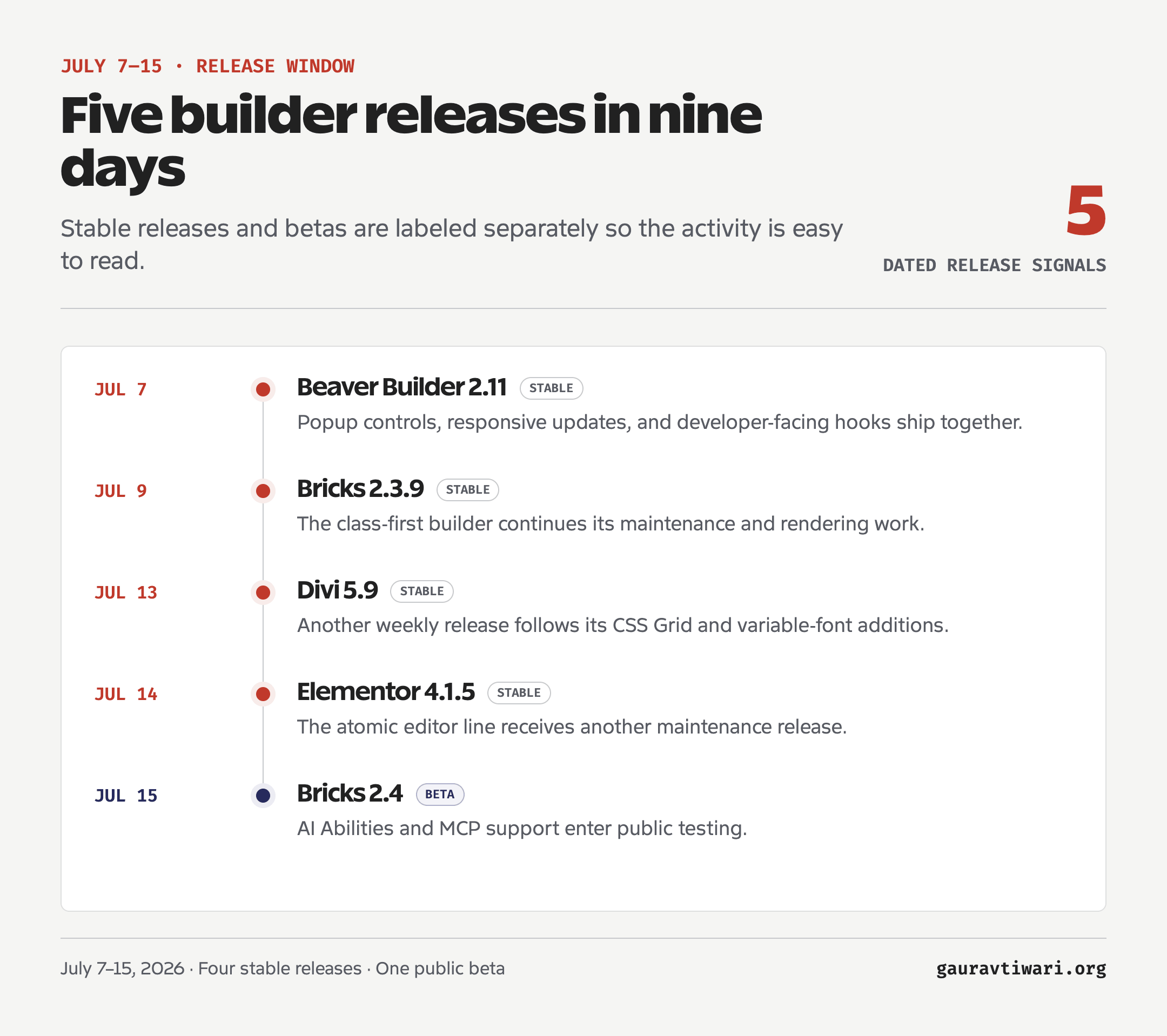
- Elementor now centers its Atomic line on a Design System panel, transferable classes and variables, and Angie editing for layouts, components, forms, classes, and variables.
- Bricks keeps improving components, Gutenberg integration, WooCommerce, forms, rendering, and design-system transfer. Its current beta also introduces AI Abilities through the WordPress Abilities API and MCP.
- Divi 5 is now on a weekly release cadence after leaving beta, with recent work covering variable fonts, a visual CSS Grid editor, and dozens of fixes. Divi AI Agent remains in development.
- Beaver Builder remains the conservative option, but its current release adds popups, global-color improvements, WordPress Font Library support, accessibility work, custom attributes, performance changes, and AI design-system hooks.
Bricks is the most useful signal in the numbers. It recorded 71.2% year-over-year growth in detected origins. Its measured share increased by 0.15 percentage points, from 0.19% to 0.34%. The detections can overlap, so they are not mutually exclusive shares that must total 100%. The absolute Bricks share is still small, but the growth shows that developers will accept a steeper learning curve for cleaner output, classes, components, and control.
Elementor’s response matters even more because of its scale. Variables, classes, components, and an atomic editor are not niche developer vocabulary anymore. They are becoming the baseline language of mainstream WordPress building. Divi 5 tells a similar story from another direction: legacy products need architectural rewrites to compete with tools that start fresh.
What the New Builders Are Actually Changing
The new builders are changing workflow expectations, not WordPress market share. Their shared enemy is the fragmented process of building a site across a theme panel, builder, custom-fields plugin, code-snippet plugin, staging system, media library, and half a dozen admin screens.
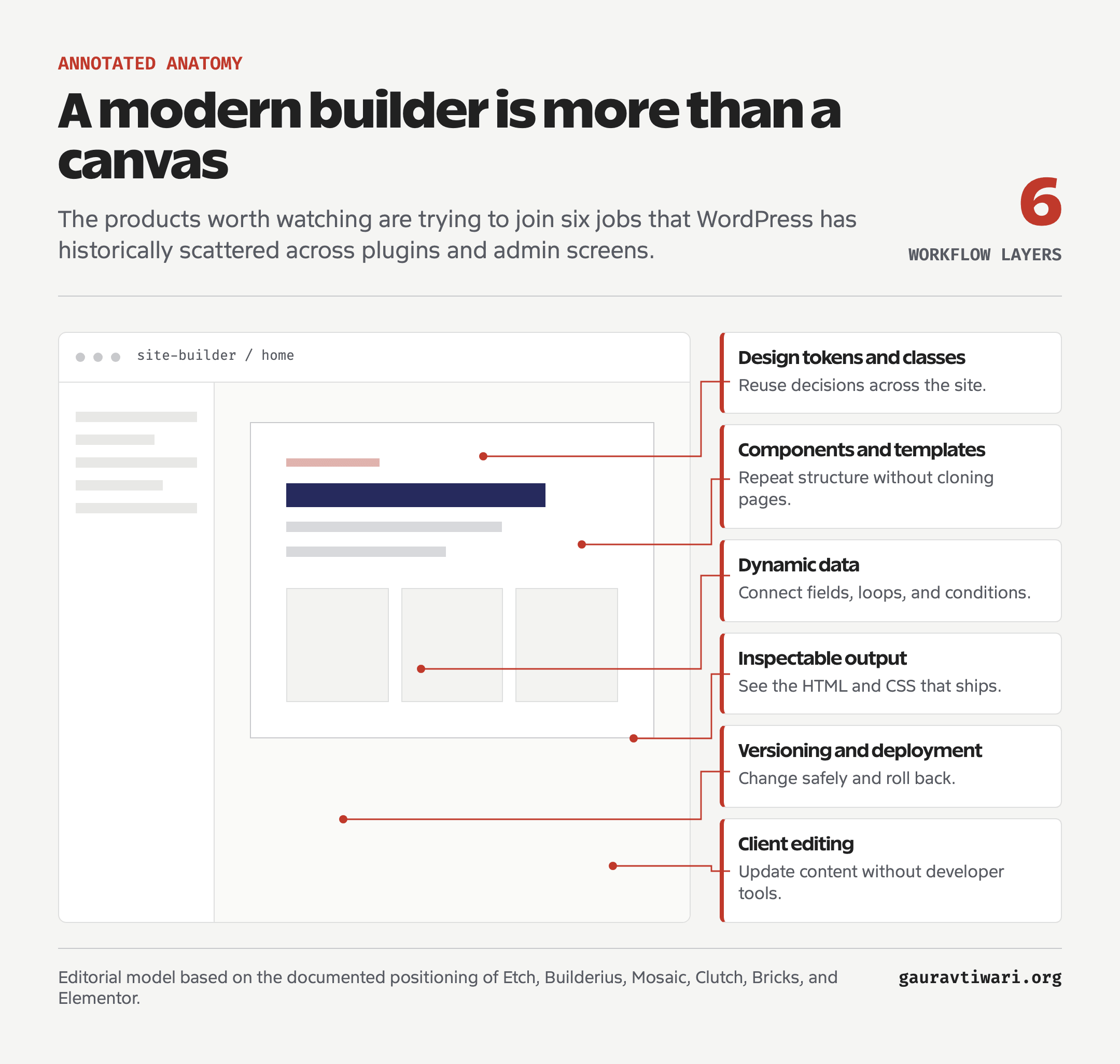
They Are Attacking Proprietary Abstraction
Older builders often created a private language for the web. You learned the builder’s section model, its responsive controls, its widget hierarchy, and the places where custom CSS was allowed to leak through. The new tools keep pointing back to HTML elements, CSS properties, selectors, variables, and components.
That does not eliminate lock-in. A Builderius release, Mosaic component, Etch recipe, and Clutch project are still product-specific objects. But skills transfer better when the interface maps to web standards. Learning flexbox in a builder should make you better at flexbox everywhere else.
They Are Turning Styling Into a System
Design tokens, classes, variables, and components appear in nearly every serious product now. This is not feature-list coincidence. Per-element styling fails at scale, and every builder eventually discovers the same math.
Suppose a site has 40 button instances and each one stores five local design decisions. That is up to 200 small values to keep consistent. A shared component turns those 200 decisions into a handful of controlled properties. The point is not that components are fashionable. The point is that they reduce variance.
They Are Making Dynamic Data Normal
Custom post types, fields, loops, conditions, and queries used to separate a basic page builder from a developer tool. Etch, Builderius, Mosaic, Bricks, and Unblock now treat dynamic data as part of the normal visual workflow.
A freelancer can build a five-page brochure site with almost anything. The harder work is a property directory, course catalog, documentation library, membership site, or WooCommerce store where one template needs to render hundreds of structured entries safely.
AI Is Becoming a Builder Interface
AI features are moving beyond one-click layout generation. Elementor lets Angie edit Atomic layouts and design-system values. Etch Intelligence can update existing loops. Greenshift can generate dynamic templates. Bricks is testing AI Abilities through the WordPress Abilities API and MCP. These features still operate inside vendor-specific systems, so they do not solve builder lock-in.
The useful version of this is translation. You describe the layout or behavior, the tool produces standards-based HTML and CSS, and you can inspect the result. The dangerous version hides a growing pile of generated decisions behind a friendly prompt box. AI is a speed tool. It still is not a taste tool, an accessibility expert, or an exit plan.
WordPress core is moving in the same general direction. The official 2026 roadmap includes responsive styling controls, expanded block tools, Phase 3 collaboration workflows, and AI with project-wide guardrails. That gives Gutenberg extensions a stronger base, but it also raises the bar for builders that replace the native experience.
More Choice Creates a New Kind of Lock-In
Cleaner HTML does not automatically mean a low-risk platform. The new lock-in is less likely to look like a page full of dead shortcodes. It can look like a team that only knows one workflow, a component library that cannot travel, a hosting setup tied to one vendor, or a client who cannot edit anything without calling the original developer.
Export Is Not Interoperability
No builder here offers a documented, supported, lossless migration path that preserves layouts, responsive rules, dynamic data, interactions, and design tokens across products. The popular tools do have import and export features, but those features keep you inside the same ecosystem:
- Elementor exports website kits for another Elementor site.
- Bricks exports templates as JSON or ZIP files that Bricks can import.
- Divi’s Portability system moves Divi Theme Builder templates as JSON files.
- Beaver Builder exports saved content for a WordPress site running Beaver Builder.
That is portability within a product, not interoperability between products. None of these tools translates an Elementor page into Bricks, a Divi layout into Gutenberg, or a Beaver Builder template into Etch. Components, classes, responsive rules, conditions, queries, forms, and dynamic templates remain builder-specific.
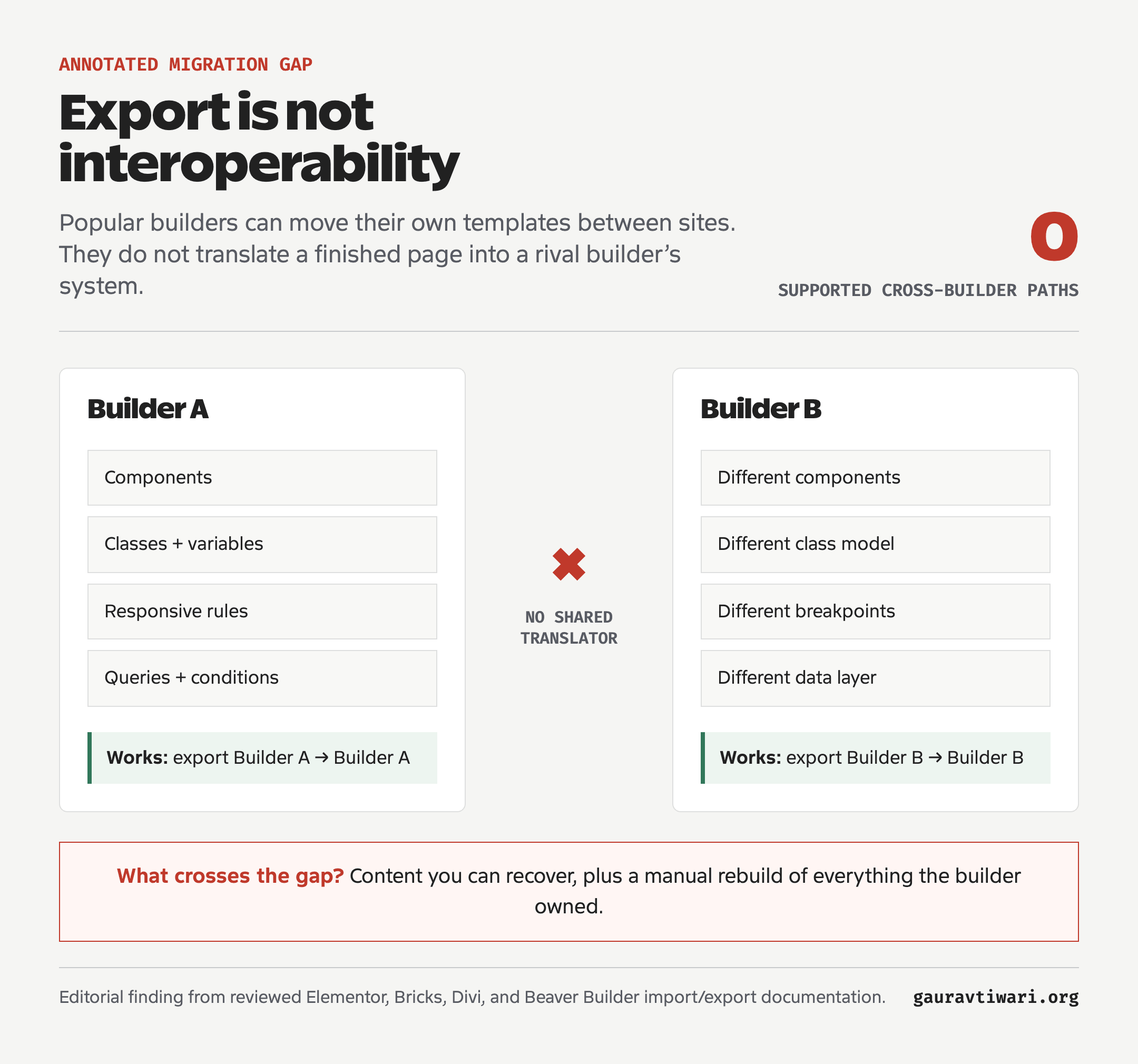
The new page builders are no different. Etch writing to Gutenberg may preserve more editable content. Cleaner HTML may reduce the pain of rebuilding. Builderius can move Builderius work between sites. Those are useful improvements, but they do not create a cross-builder migration path.
So choose a builder as if you will use it for the working life of the site. If you leave, expect to pay for a manual migration: rebuilding templates, translating the design system, recreating dynamic behavior, retraining editors, and testing every important page again. The WordPress page builder flood makes trying another tool feel cheap. It does not make leaving one cheap.
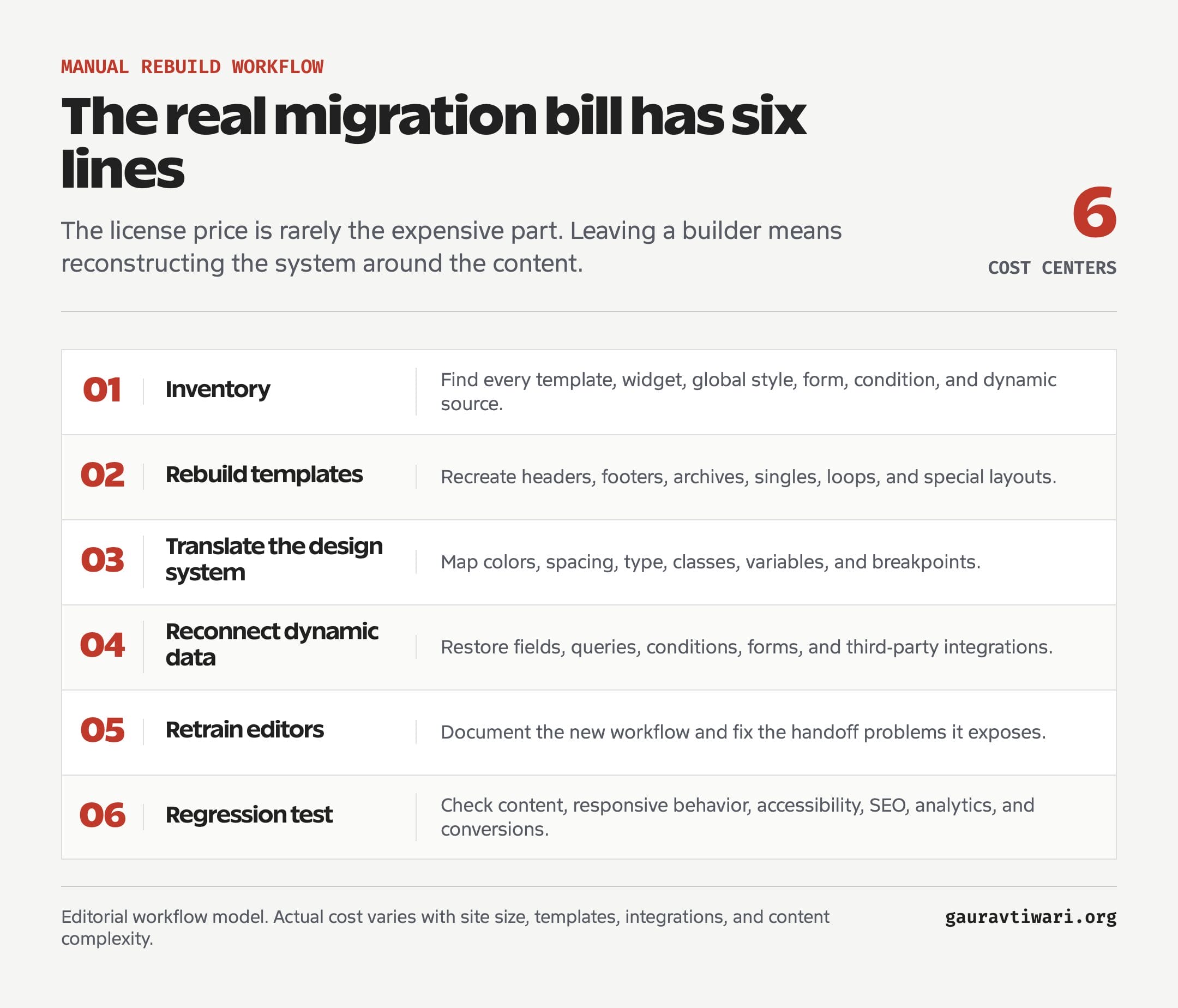
I would check eight things before using any new WordPress page builder on production:
- Content storage: What remains if the builder is deactivated?
- HTML output: Are the elements semantic, accessible, and reasonably shallow?
- Style ownership: Can you use classes, variables, and a global design system?
- Dynamic data: Can templates, loops, conditions, ACF fields, and custom post types work without fragile glue?
- Rollback: Can you safely reverse a bad deployment or builder update?
- Client editing: Can a non-developer change content without entering the development environment?
- Support and hiring: Are documentation, integrations, support, and skilled implementers available?
- Migration and exit path: What exactly must be rebuilt if you switch builders or the company disappears?
Products fail. Teams change direction. Founders sell companies. WordPress core changes. A good tool can still be the wrong foundation if leaving it means rebuilding the business under pressure.
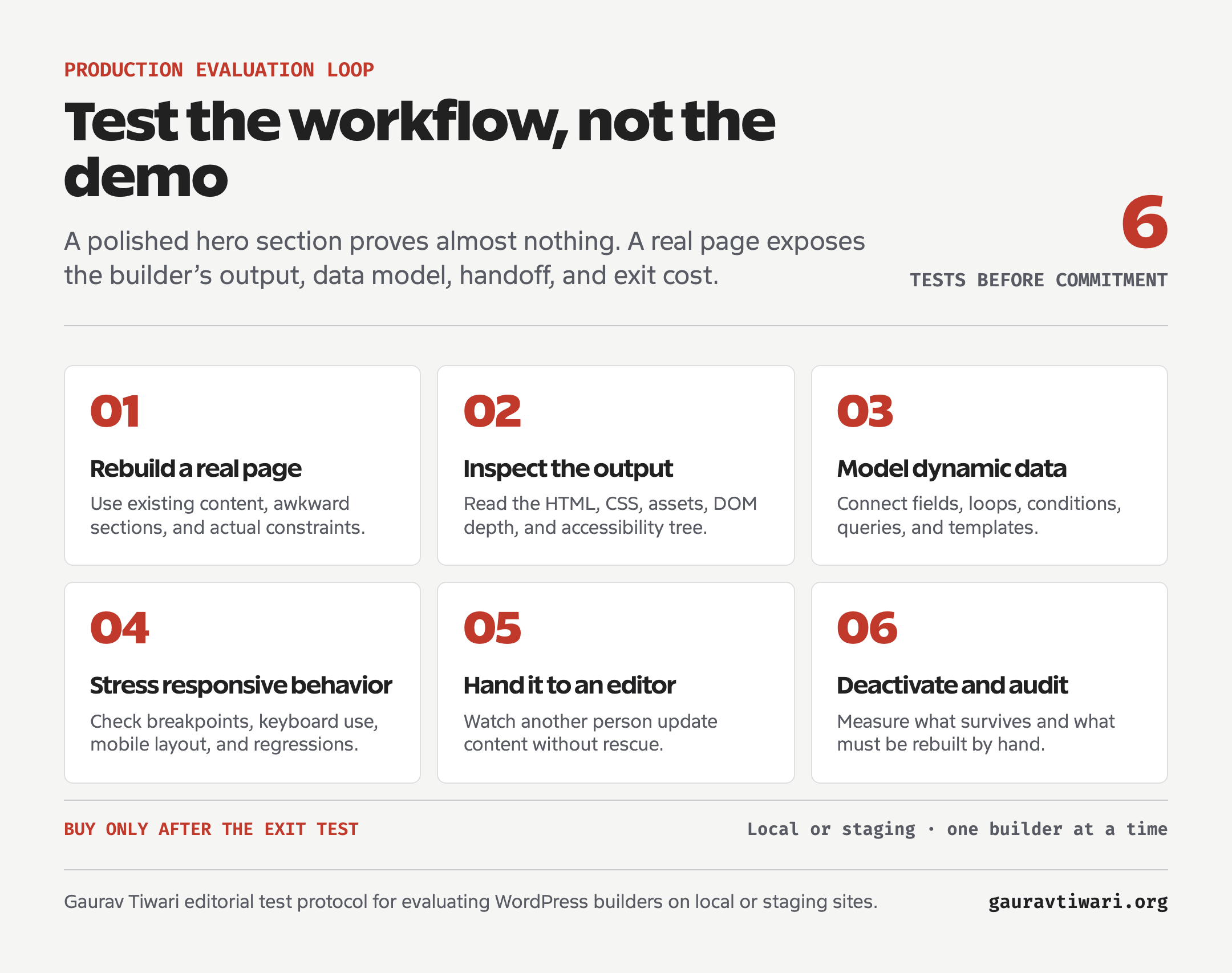
Do Not Test a Builder With a Hero Section
Rebuild one production-style page with a query loop, custom fields, responsive states, forms, accessibility requirements, and a client-editing handoff. Pretty cards reveal almost nothing about long-term maintenance.
What I Would Use on a Production Site Today
For a content-heavy site I own, I would still start with the native block editor, GenerateBlocks, and a controlled set of custom or ACF blocks. That stack is not the most exciting option in 2026. It is the one I know I can maintain, measure, and hand over without turning the content into a hostage.
For advanced client sites, I would choose an established builder based on the team’s skills and the site’s maintenance model. Bricks makes sense for a developer-led, class-first workflow. Elementor makes sense when add-ons, templates, and hiring flexibility matter more. Beaver Builder makes sense when stability and client predictability win. Divi 5 deserves fresh evaluation because it is no longer the same technical product Divi 4 was.
I would test Etch, Builderius, Mosaic, and Unblock on local or staging sites, one at a time. I would evaluate Clutch separately as a Next.js platform that can consume WordPress data. In either case, rebuild a page that already exists, inspect the output, model dynamic content, test responsive behavior, hand it to another editor, and then remove the tool to see what survives.
Frequently Asked Questions
What are the newest WordPress page builders in 2026?
Etch, Builderius, and Mosaic are three notable new WordPress builders in 2026. Clutch is an adjacent visual Next.js platform that can use WordPress as one data source, so it should not be treated as a direct fourth page-builder alternative.
Is Etch ready for production websites?
Etch calls its current line production-ready, but my hands-on experience ends at 1.5.0. Test your custom fields, loops, breakpoints, plugin stack, and client-editing workflow before using it on an important site.
Is Builderius still in beta?
Builderius is still beta. Static export and Remote Sync have shipped, while History and Undo plus visual CSS Grid remain in progress. I wouldn’t standardize it for client work until the beta ends and the unfinished workflow features ship.
Does Mosaic work inside Gutenberg?
Mosaic is a WordPress theme builder and visual development system. Its Gutenberg Block Builder remains in the backlog without a confirmed date, so treat Mosaic as its own integrated environment today, not as a finished Gutenberg extension in the same category as GenerateBlocks or Greenshift.
Is Unblock ready for client sites?
I wouldn’t standardize Unblock for client production yet. Its documentation describes a beta and relatively raw HTML, CSS, JavaScript, and data-binding engine, while its About page calls the core stable and production-ready. Use it locally or on staging until the release status and client-facing workflow are clearer.
Will Gutenberg replace Elementor and other page builders?
Gutenberg will replace some page-builder use cases, especially content-heavy sites and controlled design systems. Elementor, Bricks, Divi, and Beaver Builder will remain relevant where teams need faster visual production, mature add-on networks, complex templating, or familiar client workflows. The likely future is hybrid, not winner-takes-all.
The builder that wins will not be the one with the loudest launch, the largest widget count, or the cleverest AI demo. It will be the one that becomes boring infrastructure: clean enough for developers, constrained enough for clients, and stable enough that nobody has to think about it after the site ships.
Until then, keep your production stack boring and your staging site curious.
Tell Google you want more of this.
Add Gaurav Tiwari as a preferred sourceOne tap, and this site shows up more often in your own Top Stories, AI Overviews and AI Mode. Remove it any time.
Disclaimer: This site is reader-supported. If you buy through some links, I may earn a small commission at no extra cost to you. I only recommend tools I trust and would use myself. Your support helps keep gauravtiwari.org free and focused on real-world advice. Thanks. - Gaurav Tiwari