
 by
by
WordPress speed optimization has turned into an affiliate-driven mess. Half the “best hosting for speed” lists ranking on Google are written by people who’ve never measured a TTFB in their life, ordered by whoever pays the fattest commission. Then they tell you to fix a slow server by installing a caching plugin, which is like fixing a leaking roof with air freshener.
So here’s my position. (This post still have affiliate links but they are only for products and services that I use and recommend. No random recommendations.)
Speed is a stack, you fix it in one specific order, and the host you start on decides most of the outcome before you touch a single plugin. This is the exact setup I run on gauravtiwari.org and the client sites I build, the picks I’d defend with spec sheets, and the hosts and plugins I wouldn’t put a site on if you paid me. Every claim here comes with a number.
WordPress speed optimization is a stack, fixed in one order. Get hosting right first, it’s most of the result, then a lean theme, one cache plugin like FlyingPress, compressed WebP or AVIF images, a Cloudflare CDN, and Perfmatters for the leftovers. Boring, repeatable, and it’s the exact stack I run.
What everyone gets wrong about WordPress speed optimization
The common advice is backwards. “Install a caching plugin” is step five dressed up as step one, and it’s why so many sites stay slow after their owner has bought three premium plugins. A cache plugin serves a stored copy of a page. It can’t make a slow origin generate that page any faster for the first visitor, the logged-in user, or the bot crawling you.
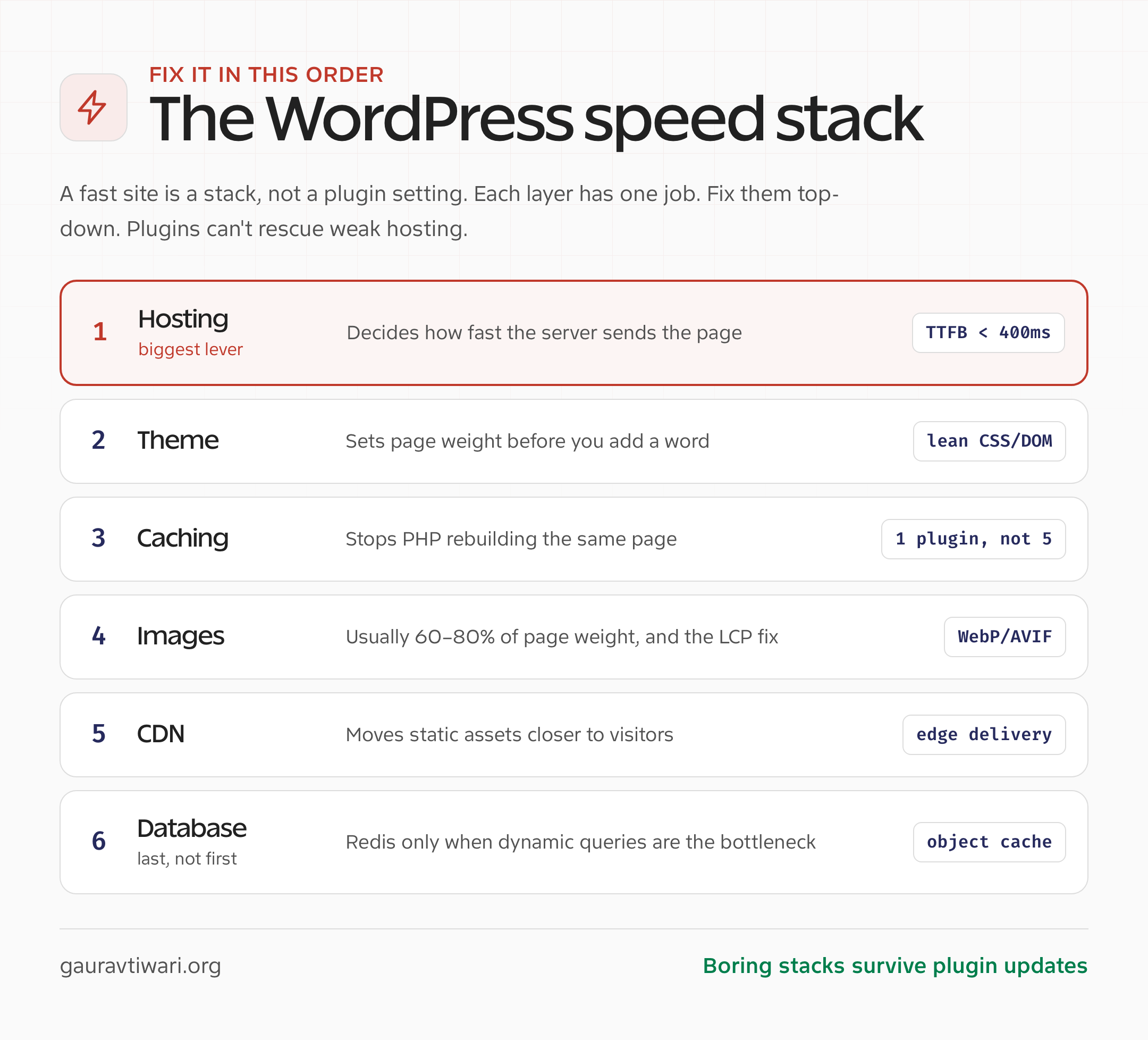
The real order is boring and it’s fixed:
- Hosting sets your server response time. Nothing downstream fixes a slow one.
- Theme sets your page weight before you write a word.
- Caching stops PHP rebuilding the same page, with one plugin, not five.
- Images are usually 60 to 80% of page weight and the LCP element.
- CDN cuts global latency by serving from the edge.
- Database matters last, and only when real queries repeat.
| Layer | What to optimize | Target |
|---|---|---|
| Hosting | PHP version, CPU consistency, object cache, edge cache | TTFB under 400ms on cached pages |
| Theme | DOM size, CSS weight, layout stability | Small critical CSS, no layout shift |
| Caching | Page cache, preload, mobile cache, exclusions | Static pages served without PHP |
| Images | AVIF/WebP, responsive sizes, lazy-load rules | Hero image ready for LCP |
| CDN | Static assets, edge HTML cache, image delivery | Lower global latency |
| Database | Autoloaded options, slow queries, object cache | Fewer repeated queries |
Fix them top down. Most “slow WordPress” tickets I take are someone who spent money on layers three through six while ignoring layer one. If that sounds boring, good. Boring stacks survive plugin updates. The flashy ones break on checkout pages, LMS dashboards, and ad-heavy blogs.
Hosting is 90% of it, and most lists sell you the wrong host
Hosting is the biggest WordPress speed optimization decision you’ll make, full stop. TTFB is roughly 30 to 40% of total load time on a content page, and your host owns TTFB. If the origin takes 600ms to build the HTML, no plugin rescues that first delay.
I tested TTFB across the big names on identical WordPress installs: same theme, same 400 posts, same plugins, pinged from US East. One caveat the affiliate lists never give you. These are best-case cached medians on a homepage, the least meaningful speed number there is. Independent 2026 benchmarks measure higher under load, and logged-in requests are slower everywhere. What holds up is the ordering and the size of the gap.
| Host | Plan | TTFB (best-case cached, US East) | Renewal |
|---|---|---|---|
| Rocket.net | Starter ($30/mo) | 82ms | Same |
| Cloudways Vultr HF | $14/mo | 145ms | Same |
| Hostinger Cloud Startup | $9.99/mo | 180ms | $24.99/mo |
| SiteGround GrowBig | $7.99/mo intro | 340ms | $44.99/mo |
| Bluehost Choice Plus | $5.45/mo intro | 590ms | $19.99/mo |
| GoDaddy Deluxe | $9.99/mo intro | 680ms | $19.99/mo |
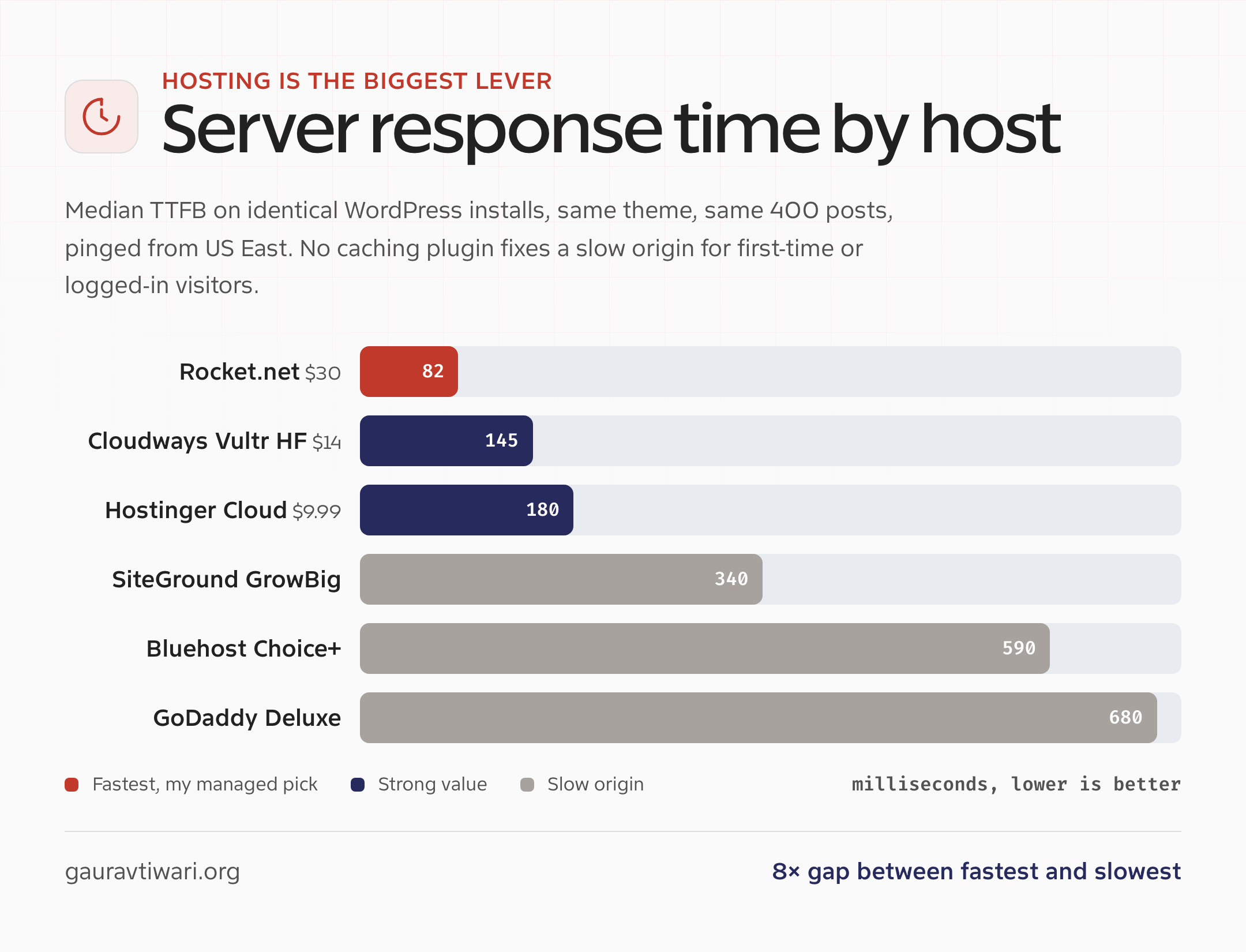
Rocket.net wins its cached numbers because it runs on Cloudflare Enterprise with Tier-1 routing. You’re paying for infrastructure, not a prettier cPanel skin. Here’s how I’d actually choose:
- Managed, money’s there: Rocket.net or Cloudways on Vultr High Frequency. Both ship object caching by default, which matters the moment you have WooCommerce, membership, or logged-in traffic.
- Budget that doesn’t embarrass itself: Hostinger Cloud Startup. LiteSpeed, decent NVMe, TTFB holds with the bundled CDN on. Skip the cheapest Premium plan, too many neighbors on the box.
- On the server itself: WordPress 7.0, PHP 8.3 as the floor and 8.4 as the production sweet spot, OPcache, HTTP/3, real backups. WordPress.org now recommends PHP 8.3 or newer.
If you’re still guessing, my tested web hosting picks and the WordPress hosting comparison sort it before you spend a rupee on plugins.
The stack I actually run
For most content sites the stack is boring on purpose. Choose one owner per layer. I am currently running GT Performance on gauravtiwari.org, while FlyingPress remains my mature annual default for client sites where a longer public production record is the priority:
- Theme: Custom themes with GenerateBlocks. Read my GenerateBlocks review.
- Caching, mature annual pick: FlyingPress, $59/year. It has the longer production history and its remove-unused-CSS implementation beat WP Rocket in A/B tests I ran across 12 client sites. WP Rocket remains the easier established UI.
- Caching, portfolio pick: GT Performance, free for every site. I built it to combine page cache, Cloudflare Free orchestration, server-side unused CSS, Redis controls, and commerce-aware bypass rules under one owner. Start on staging and test private flows before production.
- Images: EWWW Image Optimizer, which I have an LTD for. OR, ShortPixel, $9.99/month unlimited. WebP plus optional AVIF, CDN delivery, glossy compression that looks identical at a third of the size. Imagify is the close third.
- CDN: Cloudflare Free plus APO ($5/month). APO caches HTML at the edge and is the cheapest performance win in WordPress. I’ve watched international TTFB drop from 800ms to 90ms with it on. See how I set Cloudflare up.
- Script control: Perfmatters, $29.95/year. Only for what a cache plugin doesn’t do: the script manager, local fonts, Heartbeat control, selective unloading.
- SEO: Rank Math. Unavoidable, and the one of lightest and feature-rich of the SEO plugins. The SEO Framework and SEOPress are the closest alternatives.
I built GT Performance, so the recommendation above is a founder’s recommendation. The plugin is active on this site and gatilab.com, but two live deployments do not prove compatibility with every host, checkout, membership, or LMS stack.
Total plugin count past these is usually 12 to 15. Typical article weight stays under 500KB and LCP lands at 0.8 to 1.1 seconds. That’s the target, and it’s repeatable. The deeper tests are in the WordPress caching plugin roundup, the FlyingPress vs WP Rocket numbers, and the GeneratePress free vs premium breakdown. Match the stack to the site, though:
| Site type | Stack I trust | What I avoid |
|---|---|---|
| New blog | Good shared or cloud hosting, lean theme, simple page cache | Five optimization plugins on day one |
| Growing affiliate site | Managed WordPress or VPS, FlyingPress, Perfmatters, image CDN | Heavy page builders and untested ad scripts |
| WooCommerce | Managed host with object cache, careful cache exclusions, CDN | Cheap shared hosting with no staging |
| Course or membership | Host with PHP workers, Redis, backups, staging | Caching logged-in dashboards blindly |
Core Web Vitals: what each one is actually telling you
Core Web Vitals aren’t a vanity score, they’re a diagnostic, and each one points at a different layer. Google grades you at the 75th percentile of real visitors, so chase field data in Search Console, not a single lab run.
| Metric | What it measures | Good (75th percentile) | Usual cause when it fails |
|---|---|---|---|
| LCP | Loading | under 2.5s | Hero image, server response, render-blocking CSS, fonts |
| INP | Responsiveness | under 200ms | Heavy JavaScript and main-thread work |
| CLS | Visual stability | under 0.1 | Missing image dimensions, injected ads, late banners |
The mistake is treating all three as one problem. They have different causes:
- Slow LCP points to the hero image, server response time (TTFB), render-blocking CSS, or fonts loading without font-display: swap.
- Bad INP points to JavaScript and main-thread work, not images.
- Bad CLS points to missing image dimensions, injected ads, and late banners.
The reader-friendly, step-by-step version is my guide to passing Core Web Vitals. This piece is the opinion and the map.
The 2026 levers most guides are too lazy to mention
Two recent additions move real numbers, and most guides still online predate them, so they’re easy wins:
- Speculative Loading. Since WordPress 6.8 (March 2025), core can prefetch or prerender the page a visitor is likely to click next, so navigation feels instant. Perfmatters exposes a control to switch prefetch versus prerender and tune eagerness. It’s Chromium-only, and Safari and Firefox ignore it harmlessly, so there’s no reason not to turn it on.
- fetchpriority plus AVIF for LCP. Core has auto-added
fetchpriority="high"to the likely LCP image since 6.3 and added AVIF support in 6.5. Pair them: one above-the-fold image gets high priority and eager loading, everything else stays default, and you serve AVIF (now near 95% browser support) with a WebP fallback. It’s the most direct LCP win there is.
What I’d never touch
This is the part the affiliate lists leave out. Here’s what I won’t put a site on, and what I’d use instead:
- Newfold/EIG hosts for performance work, Bluehost, HostGator. They work, they’re just slow, and the renewal pricing stings after the intro year. Use Hostinger or Cloudways instead for the same money.
- Cheap shared hosting for WooCommerce. No object cache, no PHP workers, no staging. The first traffic spike on a sale day takes the cart down. A managed host with Redis is the floor for a store.
- Page builders on a new site. Elementor outputs DIV-ception, wrappers inside wrappers, and I’ve watched it add 180KB of markup that GenerateBlocks rendered in 22KB. Divi ships about 470KB of CSS before you customize anything. If you’re already on one and it works, don’t migrate for its own sake. But don’t start there.
- Five plugins doing one job. One plugin minifies, another delays JS, another caches, another handles fonts, then something breaks and nobody knows which plugin touched the file. One cache plugin, plus Perfmatters for asset control. That’s it.
Most slow-site cleanups are subtraction, not addition. Remove what shouldn’t load, cache what doesn’t change, compress what must load, and upgrade the one layer that’s genuinely weak.
| Problem | Bad fix | Better fix |
|---|---|---|
| Slow homepage | Install another cache plugin | Measure TTFB and LCP, then fix the blocking layer |
| Heavy page builder | Minify everything harder | Reduce DOM weight or rebuild critical templates |
| Bad mobile LCP | Lazy-load all images | Exclude the LCP image and serve the right size |
| Slow logged-in pages | Purge cache repeatedly | Check PHP workers, queries, and object cache |
And the things I skip entirely:
- “All-in-one” performance plugins. They do every job poorly.
- Standalone minification plugins separate from the cache plugin.
- Database optimization plugins. The cache plugin handles it, run it quarterly at most.
- Anything claiming to “optimize WordPress core.” Don’t touch core.
- 50-plugin stacks. Every plugin is a queries-per-request tax.
The 20-minute audit I run before touching anything
Before I buy or install a thing, I run this, in order. The point is to stop optimizing noise:
- Check real-user Core Web Vitals in Search Console and PageSpeed Insights.
- Measure uncached and cached TTFB from the region where your readers live.
- Find the LCP element and confirm it isn’t lazy-loaded.
- Disable one unnecessary plugin at a time on staging, then retest.
- Check autoloaded options and slow queries if logged-in pages feel slow.
- Confirm static assets are served from the CDN edge, not your origin.
- Document the final stack so future you knows what changed and why.
If that’s more than you want to run yourself, that’s exactly what my WordPress speed audit service does.
Where I might be wrong
A few caveats, because a stance without them is just noise. If you’re already on enterprise-managed hosting, some of this is moot, the host is doing the heavy lifting. If you run one site for a purely local audience, a global CDN barely moves your numbers. And if you’re on Elementor with a fast host and good Core Web Vitals, you don’t need to rebuild anything, leave it alone.
One more thing. I earn affiliate income on some of these links. But I run this exact stack on my own sites, and the two picks that pay me the least, Cloudflare and LiteSpeed, are still in it. The recommendation never bends to the commission.
My verdict
Switch the host first. Then use one lean theme, one cache owner, compressed WebP or AVIF images, and a CDN. For one established site, FlyingPress is still the mature choice. For an agency or portfolio willing to stage and test the change, GT Performance is free for every site and puts origin cache, Cloudflare Free, unused CSS, Redis, and commerce safeguards in one plugin. Fix the layer in front of you, not the one a plugin sales page told you to fear.
Frequently asked questions
What is the best WordPress speed optimization plugin?
For a mature one-site setup, FlyingPress is my primary cache pick. GT Performance is my founder-built pick for agencies, commerce sites, and portfolios that want one free plugin across every site. WP Rocket is the easiest established option, and LiteSpeed Cache is best when the server runs LiteSpeed. Use only one main cache owner.
Does hosting affect WordPress speed more than plugins?
Yes. Hosting controls server response time, PHP resources, object cache support, and stability. A good cache plugin helps, but it can’t fully hide weak CPU, overloaded shared hosting, or an old PHP version. Fix hosting first.
What Core Web Vitals should WordPress sites target?
Aim for LCP under 2.5 seconds, INP under 200 ms, and CLS under 0.1, measured at the 75th percentile of real visitors. INP replaced FID in 2024 and is still the responsiveness metric in 2026.
Which PHP version is best for WordPress speed?
PHP 8.3 is the safe floor and 8.4 is the production sweet spot for speed and security. WordPress 7.0 fully supports PHP 8.5, but the plugin ecosystem is still catching up, so 8.4 is the balanced choice today.
Should every WordPress site use Redis?
No. Redis object cache helps dynamic, database-heavy sites most, like WooCommerce, membership, and LMS portals. If most visitors receive cached HTML, Redis barely moves public page speed. Test query count and TTFB before adding it.
Is a CDN required for WordPress speed optimization?
A CDN isn’t required for tiny local sites, but it helps most public sites by cutting static-asset latency and improving global delivery. Cloudflare Free covers it, and APO at $5/month adds edge HTML caching. Image-heavy sites benefit the most.
What is Speculative Loading in WordPress?
Speculative Loading uses the browser Speculation Rules API, built into WordPress since version 6.8, to prefetch or prerender the page a visitor is likely to click next so navigation feels instant. It works in Chromium browsers and is safely ignored elsewhere.
How do I update the PHP version in WordPress?
You don’t touch code, you change it in your host’s dashboard. In cPanel it’s “Select PHP Version” or MultiPHP Manager; on Cloudways, Kinsta, or Rocket.net it’s a dropdown in the site settings. Back up first, set PHP to 8.3 or 8.4, then load the site and check for plugin errors. Moving off PHP 7.x is one of the biggest free speed wins there is.
How do I fix render-blocking resources in WordPress?
Render-blocking resources are CSS and JavaScript that load before the page can paint. A caching plugin like WP Rocket, FlyingPress, or LiteSpeed Cache clears most of it: defer and delay JavaScript, inline critical CSS, and remove unused CSS so only what the page needs loads first. Fewer heavy plugins on the page helps as much as any setting.
How do I reduce server response time (TTFB) in WordPress?
Server response time is mostly your host. Run a fast stack (LiteSpeed or NGINX, PHP 8.3 or newer, object caching), turn on full-page and object caching, and put Cloudflare or a CDN in front so cached HTML serves from the edge. On a slow shared host no plugin fixes a 600ms origin, so upgrading the host is the real reduce-server-response-time fix.
Should I disable the WordPress Heartbeat API?
The Heartbeat API runs autosave and live dashboard updates, but it fires admin-ajax requests every 15 to 60 seconds and can spike CPU on busy sites. Don’t kill it outright, throttle it. Perfmatters or the Heartbeat Control plugin lets you slow it down or limit it to post-editing screens, so autosave keeps working without the constant load.
What does font-display: swap do, and should I use it?
font-display: swap tells the browser to show text right away in a fallback font, then swap in your web font once it loads, so text is never invisible during load. It clears the “ensure text remains visible during webfont load” warning. Self-host the fonts and add a dns-prefetch or preconnect hint for any third-party font host to cut the delay further.
How do I speed up a slow WooCommerce store?
WooCommerce speed lives on the dynamic, logged-in side that page caching skips, so object caching with Redis and a host that ships it matter most. Then disable cart fragments on pages that don’t need them, keep PHP at 8.3 or newer, clean the database, and load store scripts only on store pages. A lightweight theme like GeneratePress or Blocksy keeps the front end fast.
Tell Google you want more of this.
Add Gaurav Tiwari as a preferred sourceOne tap, and this site shows up more often in your own Top Stories, AI Overviews and AI Mode. Remove it any time.