
 by
by
An AI article writer for WordPress can produce a draft that looks ready while still carrying unsupported claims, broken links or generic advice. If you publish it unchecked, readers can act on wrong information and low-value pages can create SEO problems.
You should choose the reader’s question and gather reliable sources before generating text. Then check the draft’s facts, examples and links, save it as a WordPress draft and make the publishing decision yourself.
GT DeepSeek for AI is a free WordPress plugin that connects DeepSeek to WordPress AI features. It offers research, internal-link and metadata actions using your own DeepSeek API key, with API usage billed separately.
Can AI Content Rank in Google?
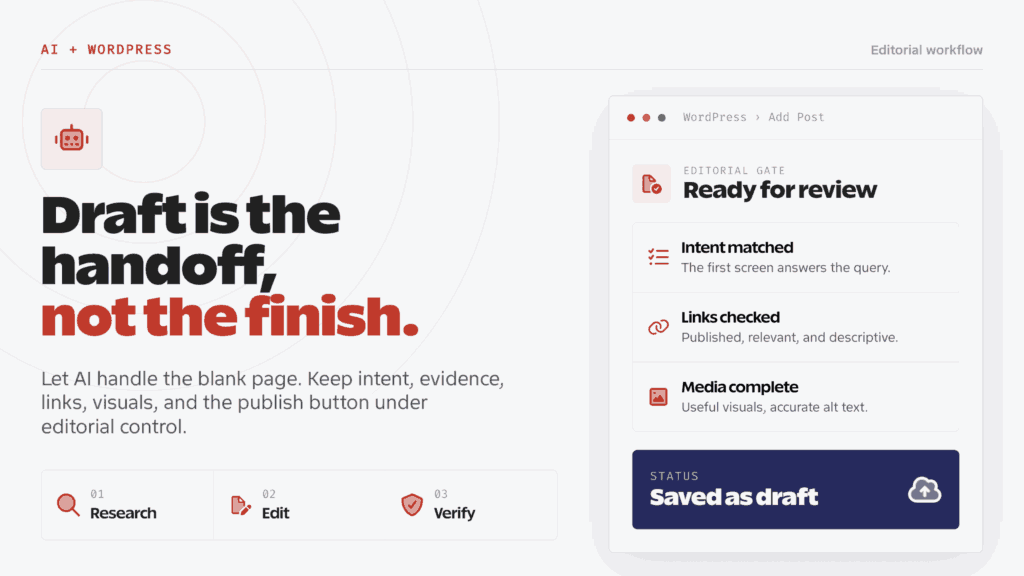
Yes, AI-generated content can rank in Google. Google evaluates whether a page is accurate, useful, original, and made for people. It doesn’t apply a blanket penalty merely because a generative AI tool helped create the text.
Google’s guidance on generative AI content allows for uses such as research and structure. Generating many pages without adding value can violate its scaled content abuse policy. I would judge the finished page by the help it gives the reader and the evidence behind its claims.
- AI assistance is fine when the finished page helps a reader do something.
- Automation becomes risky when volume is the goal and added value is missing.
- The method of production matters less than the accuracy, originality, and usefulness of the result.
- Titles, meta descriptions, structured data, and image alt text need the same care as the article body.
You should check whether the page contains useful judgment, evidence and a reason to trust it. The comparison of AI content and human content for SEO explains those quality differences.
Google’s helpful content guidance gives you a practical test: does the page add original information or analysis, demonstrate first-hand knowledge, and leave the reader able to achieve a goal? A smooth AI draft can fail all three tests while still sounding confident.
You should check a draft’s claims even when its wording looks polished. AI models can write a wrong claim with the same confidence and grammar they use for a correct one.
How an AI Writer Fits WordPress
You can use an AI article writer for repeatable drafting and formatting tasks, then review its output in WordPress. I would keep source verification, original examples and the final publishing decision with an editor who understands the subject.
Complete headings, images and SEO fields can make a page look finished. You still need to check its sources and advice; a plugin score or valid Gutenberg markup cannot do that for you.
| Job | AI can help with | A human must own |
|---|---|---|
| Topic research | Gather questions, entities, and competing angles | Choose a query that fits the site and reader |
| Outline | Group related questions into a logical structure | Decide the promise, stance, and what to cut |
| Drafting | Produce rough section drafts and variations | Add experience, evidence, and accurate examples |
| SEO | Suggest titles, headings, and related terms | Match search intent and avoid keyword stuffing |
| Internal links | Find possible anchors and destinations | Verify every destination is published and relevant |
| Images | Suggest visual concepts and draft alt text | Select useful visuals, inspect them, and set accurate alt text |
| WordPress | Format Gutenberg blocks and fill metadata | Review the saved draft and decide when it goes live |
You should configure the integration to save a WordPress draft, with automatic publication disabled until editorial review is complete.
AI Article Writer Workflow
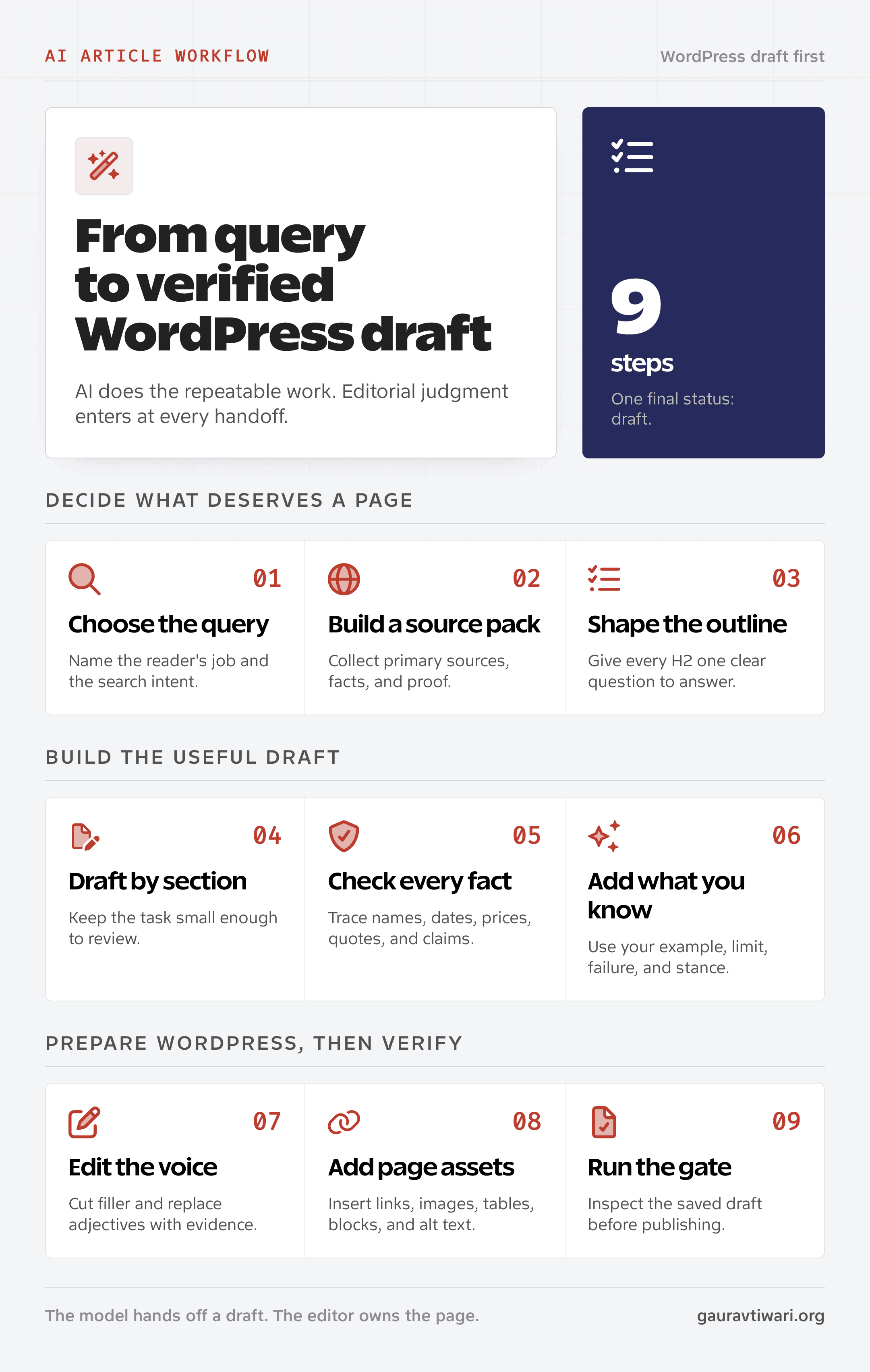
You should settle the query and sources before generating text. These 9 steps carry that brief through drafting, editing and a saved WordPress page you can review.
Step 1: Choose the Query
You should start with the job the reader is trying to finish. A keyword is only a label. Search intent tells you whether the person wants instructions, a comparison, a definition, or a buying decision.
For example, “AI article writer for WordPress” can hide 3 different needs:
- A blogger wants a tool that connects directly to WordPress.
- An editor wants a safer process for AI-assisted content.
- An SEO manager wants to know whether automated articles can rank.
You should choose one main promise and keep supporting sections relevant to it. The keyword research guide explains how to distinguish a search phrase from the task behind it.
Step 2: Gather the Sources
You should give the writer evidence before requesting prose. Useful inputs include official documentation, current product pages, relevant published material and first-party notes you have permission to share.
Your source pack should include:
- The primary query and the reader’s goal
- Reliable primary sources for the claims the article needs to make
- Product versions, prices, dates, and plan limits that can change
- The stance you expect the article to support or challenge
- Personal examples, screenshots, tests, or client lessons you can publish
A source pack gives you something to check the draft against. The model can still invent or misread a fact, so supplied references do not remove the need for verification.
Step 3: Write the Outline
Your outline should reflect the reader’s task and the evidence available. A prompt such as “write a complete SEO article about X” leaves those decisions unspecified and can produce a generic structure.
You should build each H2 around a question the reader needs answered. Put the answer before its explanation and evidence. I would remove a section that does not support the main promise before spending time drafting it.
Step 4: Draft by Section
Generating one section at a time can make the draft easier to review. You can keep the relevant sources beside each section and correct weak reasoning before it carries into later sections.
You should give the writer these details for each section:
- The question the section must answer
- The sources or facts it may use
- The opinion or practical lesson it should carry
- The transition to the next section
You should read each section before moving on. An unsupported assumption in an early section can carry into the rest of the article.
Step 5: Check the Facts
You should verify names, dates, prices, statistics, quotations, software behavior and policy claims against their original sources. Asking the same model to approve its own answer does not establish that the claim is true.
You can sort claims by the evidence you have:
- Confirmed: You tested it or found it in a primary source.
- Supported: Multiple reliable sources agree, but you didn’t test it yourself.
- Unverified: The draft states it, but you can’t trace it to evidence.
You should remove unsupported claims. If a detail matters but can’t be confirmed, state the limit plainly instead of smoothing over it.
Step 6: Add Original Evidence
AI can summarize common knowledge. It can’t supply your exact failure, setup, preference, customer question, or publishing constraint unless you give it those details.
You can add a relevant test result, customer question, setting or limitation when your notes support it. A researched article can also add value through careful comparison and explanation; it does not need an invented personal story.
I would revise a section that any competitor could publish unchanged. It needs a more useful explanation, a defensible judgment or evidence specific to the reader’s problem.
Step 7: Edit the Draft
You should edit for the reader’s question, available time and need for reliable information. An AI-detector score does not tell you whether those needs have been met.
Your first pass can remove throat-clearing and duplicated ideas. Then replace vague claims with specific examples and tradeoffs. I would keep simple instructions short and give a difficult explanation enough room to make sense.
If the draft still sounds interchangeable, you can use the techniques in the content writing tips. The fastest improvement is usually a sharper stance backed by one concrete example.
Step 8: Prepare the WordPress Page
You should add the page elements that help readers understand or use the article. WordPress blocks provide structure, but each table, link and image still needs a reason to be there.
- Use H2 headings for major questions and H3 headings for supporting steps.
- Add a table when repeated attributes make a comparison easier to understand.
- Link to relevant published pages within running sentences, using descriptive anchors. Omit redundant links.
- Upload images to the WordPress media library instead of hotlinking them.
- Write alt text that describes the image and its purpose.
- Use an FAQ block only for questions answered on the page.
You should verify every suggested internal link before inserting it. A generated slug may not exist, may point to a draft or may lead to an irrelevant page. The guide to internal linking for WordPress explains the manual and plugin-assisted options.
You can use GT DeepSeek for AI for internal-link suggestions, structured FAQs and metadata tasks. Its alt-text suggestions use stored WordPress text evidence, so you should inspect the image before accepting a description.
Step 9: Review the Saved Draft
You should review the saved WordPress draft before publishing. Check its metadata, blocks and page elements, then confirm that a reader can find the answer promised by the title.
You should check these items before publishing:
- Focus keyword appears naturally in the title, first 100 words, one H2, and the meta description.
- The title and description promise what the page actually delivers.
- Every factual claim has a source or clear first-party basis.
- Internal links point to published pages.
- External sources open and use the right link attributes.
- Images have descriptive filenames, dimensions, captions where useful, and alt text.
- The FAQ answers work as standalone answers.
- WordPress preserved the Gutenberg and ACF block markup after saving.
Only then should you consider publishing.
Editing an AI Draft
You can make a generic draft more useful by replacing vague certainty with specific judgment. I would remove repeated introductions and unsupported praise, then add the evidence and conditions needed to defend the recommendation.
Remove Filler
Openings such as “In this fast-paced digital world” and “let’s explore” postpone the answer. You should introduce the concrete problem and its consequence, then explain the solution promptly.
You should also look for repeated ideas. Keep the clearest explanation and remove repetitions that add no evidence, qualification or next action.
Replace Adjectives With Evidence
Claims such as “fast,” “easy” and “SEO-friendly” need support. You should explain the feature or result behind each claim and include the limits that affect the reader’s choice.
Bad:
The tool creates high-quality, optimized content quickly.
A hypothetical review could be more specific:
The outline followed the supplied brief. An editor corrected 2 unsupported product claims and rewrote the opening before saving the WordPress draft.
This example identifies what worked and what required correction. You would need actual test notes before making those claims about a named tool.
Explain the Limits
You should explain who should choose another method, what the tool cannot establish and which parts of the work need original reporting.
A hands-on review needs someone who has used the product and recorded the evidence. If you have only documentation and public sources, you should label the piece as researched analysis and keep its claims within those sources.
SEO Checks Before Publishing
You should review the article as a complete WordPress page. Its text, links, images, metadata and structured data should describe the same subject and support the same reader task.
Align the Title and Metadata
The SEO title, H1, slug, and meta description should describe the same page. If the title promises a step-by-step workflow, don’t open with a 700-word history of artificial intelligence.
You should keep the focus keyword visible without turning every heading into a variation of it. Related terms such as AI-generated content SEO, WordPress AI writing, content editing, and internal linking add context when they belong in the sentence.
Using Rank Math and Yoast
Rank Math and Yoast are WordPress SEO plugins with metadata, sitemap, schema and on-page checks. You can use their checks to find some missing fields or basic placement issues, while reviewing the evidence and advice yourself.
If you need to choose between them, the comparison of WordPress SEO plugins explains their features and tradeoffs.
Check the Whole Page
A WordPress draft should include more than a keyword and a green score:
- A concise opening that identifies the reader’s problem and gives the answer promptly
- Clear H2 and H3 hierarchy
- Published internal links spread across the page
- Primary-source external links for factual claims
- Compressed, relevant images in the media library
- Descriptive alt text and sensible captions
- A useful FAQ with schema when the questions belong
- A title and description that earn the click without exaggeration
You can use the content optimization guide to review search intent, structure, readability, links and freshness together.
Tasks That Need Human Review
You should keep decisions that require lived experience, accountability or sensitive judgment with someone qualified to make them. An AI tool can organize supplied material, but it cannot establish that an author personally observed an event or tested a product.
These tasks need human review:
- First-person experience: A model can’t use a product, make a mistake, or observe a client workflow.
- Quotations: Verify the wording and original source before publishing.
- Product verdicts: A review requires hands-on use or a clear researched-only label.
- Legal, medical, and financial advice: High-risk claims need qualified review and current sources.
- Breaking news: Early reports change, and generated summaries can merge conflicting accounts.
- The final publish action: A human should review the saved WordPress draft and make the call.
I would assess accuracy, source quality and reader value directly. AI-detector scores estimate writing patterns and can misclassify both human and generated text, so they cannot establish whether an article is reliable.
WordPress Publishing Checklist
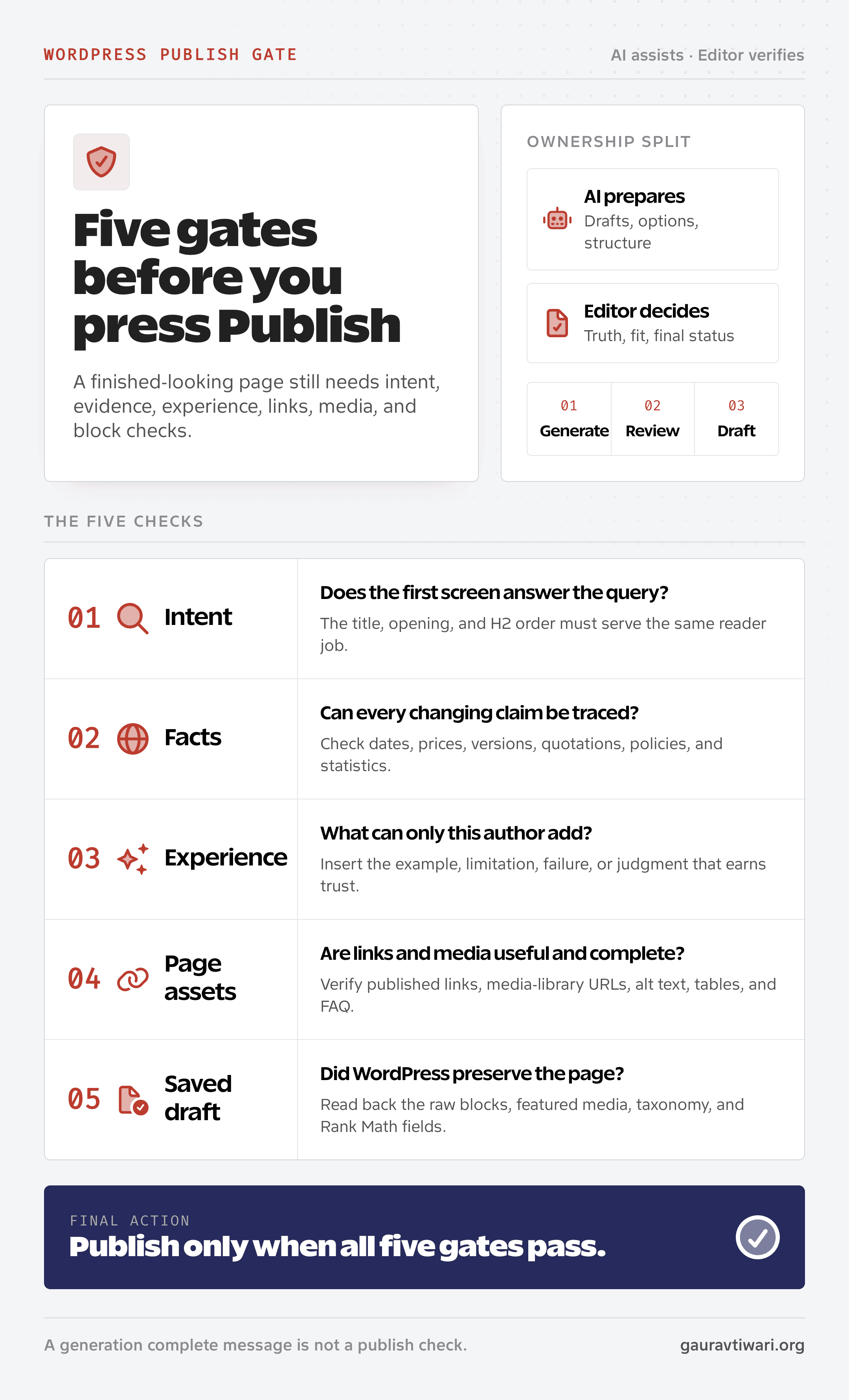
You can use this checklist after the article is saved as a draft. It catches the failures that a writing prompt can’t see, including missing media, bad links, stripped blocks, and incomplete metadata.
Content and Evidence
- The opening answers the main query within 100 words.
- Each H2 starts with a direct answer before the explanation.
- Claims about prices, versions, policies, and statistics trace to primary sources.
- The article adds useful evidence, comparison or judgment without inventing first-person experience.
- The article names an honest limitation and who should choose differently.
WordPress Structure
- The post is saved as a draft.
- The slug is short, readable, and has no date.
- Gutenberg blocks remain valid after saving.
- The table of contents detects the correct H2 and H3 headings.
- The FAQ accordion contains the same questions visible to readers.
Links and Media
- Every internal link points to a published page.
- Every external link opens and supports the nearby claim.
- Images are stored in the WordPress media library.
- Each image has a useful filename and accurate alt text.
- The featured image belongs to this article, not a random stock library.
SEO Metadata
- Rank Math has a focus keyword, SEO title, and meta description.
- The focus keyword appears naturally, not in every paragraph.
- The title fits the query and doesn’t exaggerate the outcome.
- The meta description tells the reader what they will get.
- Article and FAQ schema reflect content that is actually on the page.
The article is ready when the saved WordPress draft survives these checks. A generation tool saying “complete” doesn’t count.
When to Choose Another Approach
Direct observation, original reporting, personal stories and expert accountability need source material from the people involved. You should begin with their notes, interviews or test results. An AI tool can help organize supplied material, but it cannot supply the missing experience.
You should keep first-party evidence central to:
- Hands-on product reviews where testing is the evidence
- Case studies with private client context or sensitive data
- Interviews and reported stories that depend on exact quotations
- Personal essays where the voice and memory are the substance
- Medical, legal, tax, or investment guidance
- New technical findings that haven’t been documented elsewhere
AI can still help you sort notes, identify gaps, or tighten a paragraph. It shouldn’t invent the raw material that gives those pages their value.
FAQs on AI Article Writers
Can AI-written articles rank on Google?
Yes. Google says it evaluates helpfulness, accuracy, originality, and relevance rather than banning content based on whether AI helped create it. AI-written articles become risky when they add little value, repeat existing pages, or are generated at scale mainly to manipulate rankings.
Does Google penalize AI-generated content?
Google doesn’t apply a blanket penalty to AI-generated content. Its spam policy targets scaled, unoriginal pages created to manipulate search rankings, regardless of the production method. A useful, verified article can rank. A large batch of thin pages can violate policy.
Should an AI writer publish directly to WordPress?
You should save generated articles as WordPress drafts for editorial review. That gives you time to verify facts, check links, inspect images, fix Gutenberg blocks and review metadata before deciding to publish.
How do I fact-check an AI article?
You should trace names, dates, prices, statistics, quotations, product features and policy claims to primary sources. Official documentation, product pages, government records and documented tests can provide evidence. Remove or qualify anything you cannot confirm.
Do I still need Rank Math or Yoast with an AI writer?
Yes, if you already use Rank Math or Yoast for WordPress metadata, sitemaps, schema, and on-page checks. An AI writer can suggest fields, but the SEO plugin stores and validates them inside WordPress. Neither plugin replaces search intent, evidence, or editing judgment.
How many internal links should an AI article include?
There is no fixed number. You should link to published pages when the destination helps the reader understand a point or complete the task. Put descriptive anchors in running sentences and omit redundant links.
Are AI content detector scores useful for SEO?
No. AI detectors estimate writing patterns and can misclassify both human and generated text. Google doesn’t require a detector score. Check factual accuracy, originality, first-hand value, source quality, and reader usefulness instead. Those checks improve the page even when no detector agrees.
What is the safest way to use an AI article writer for WordPress?
You should supply a clear brief and reliable sources, review the generated text and save it as a WordPress draft. Check its claims, examples, links, images, metadata and block structure before deciding to publish.
Final Remarks
For your next article, you should settle the query and gather the evidence before choosing what to automate. Keep the result as a WordPress draft until its claims, links and page elements are ready for readers.
Tell Google you want more of this.
Add Gaurav Tiwari as a preferred sourceOne tap, and this site shows up more often in your own Top Stories, AI Overviews and AI Mode. Remove it any time.
