
 by
by
You can run Tally on Mac reliably, but you can’t install TallyPrime directly in macOS. The cleanest local route is Windows 11 inside Parallels Desktop. I installed TallyPrime 7.1 that way, created a GST-enabled company, posted a Rs 1,000 payment voucher, confirmed it in Day Book, and exported the report as a PDF.
My verdict is simple. If one person uses TallyPrime regularly and needs local files or offline access, run it in Parallels. If several people need Tally from different devices, pay for official TallyPrime Cloud Access. Don’t build your accounting workflow around Educational Mode, unofficial cloud hosts, or a remote desktop session nobody in the office knows how to maintain.
Does Tally work on Mac?
Tally works on a Mac only through Windows or a Windows session delivered from the cloud. There is no native TallyPrime macOS application, and the current Tally system requirements name 64-bit Microsoft Windows, including Windows 11.
Here is the evidence behind that answer:
- Confirmed by testing: TallyPrime 7.1 installed and opened in Windows 11 ARM under Parallels Desktop 26.4.0.
- Confirmed by testing: I created a company, enabled GST, created an expense ledger, saved a Payment voucher, opened Day Book, and exported a readable PDF.
- Confirmed on record: Tally Solutions lists Windows 11, a 64-bit x64 processor, at least 4 GB RAM, 150 MB application space, and a 1366 x 768 display in its recommended configuration.
- Inferred: Windows 11 ARM translated TallyPrime’s x64 code on the Apple M5 Pro. The successful accounting workflow proves this specific route, not every TDL, bank connector, DSC token, or printer driver.
- Not tested: A paid Silver or Gold activation, multi-user LAN access, and the hosted Cloud Access service.
That last distinction matters. “It launched” is weak evidence for accounting software. A saved voucher that appears in Day Book and survives a PDF export is a much better test.
Why doesn’t Tally have a native Mac version?
TallyPrime is a Windows desktop application, so macOS can’t execute it as a normal Mac app. Apple Silicon adds another layer because current Macs use ARM processors while Tally’s published requirement still specifies x64.
The stack that worked in my test was:
- Apple M5 Pro Mac with 24 GB unified memory
- macOS 27.0 beta build 26A5378j
- Parallels Desktop 26.4.0 build 57513
- Windows 11 Pro ARM64 build 26200.8653
- A virtual machine with 4 vCPU, 8 GB RAM, and a 256 GB virtual disk
- TallyPrime Release 7.1
Windows 11 ARM can translate many x64 Windows applications. That translation is why a Windows-only accounting app can work on an ARM Mac, but it isn’t a promise that every old driver or hardware accessory will behave.
This is also why Wine-style compatibility layers aren’t my recommendation for live books. Even when the main executable opens, a silent failure around printing, licensing, exports, or a third-party TDL can cost more than the virtual machine saved. Accounting data deserves the boring route.
How do you install TallyPrime on Mac with Parallels?
Install Windows 11 through Parallels, then install TallyPrime inside that Windows virtual machine exactly as you would on a PC. On an Apple Silicon Mac, Parallels automates most of the Windows 11 ARM setup.
The practical sequence is:
- Install Parallels Desktop on the Mac.
- Let Parallels download and install Windows 11 ARM.
- Give the virtual machine 4 vCPU and 8 GB RAM if the Mac has enough memory.
- Finish Windows Update before installing accounting software.
- Download TallyPrime only from the official Tally Solutions page.
- Verify that Windows shows Tally Solutions as the publisher in the security prompt.
- Install TallyPrime, then activate your legitimate Silver or Gold license.
- Keep the company-data folder inside Windows or a properly tested shared location.
- Take a VM snapshot before a TallyPrime, Windows, or major TDL update.
The Parallels Standard resource ceiling matches the exact VM I used: 4 vCPU and 8 GB vRAM. You don’t need the Pro edition for ordinary single-user TallyPrime work. Buy Pro only when another Windows workload actually needs more CPU, RAM, developer tools, or automation.
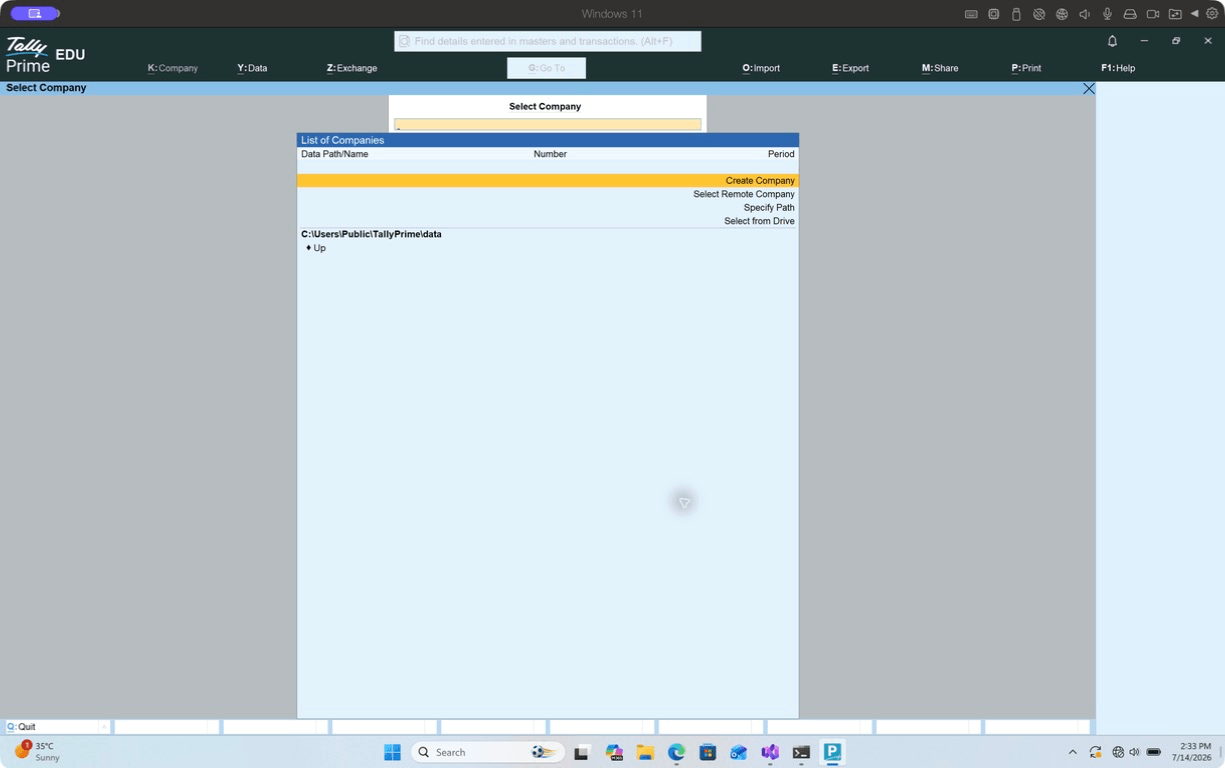
Educational Mode is useful for confirming that the interface, company creation, ledgers, vouchers, and reports work before you move a paid license. It isn’t a substitute for the license.
What worked in my TallyPrime 7.1 test?
The core single-user accounting loop worked: company setup, ledger creation, voucher entry, Day Book review, and PDF export. TallyPrime remained responsive in an 8 GB Windows 11 ARM virtual machine.
I used a deliberately small but meaningful workflow:
- Created “Codex Test Company”
- Enabled Goods and Services Tax in company settings
- Created “Office Expenses” under Indirect Expenses
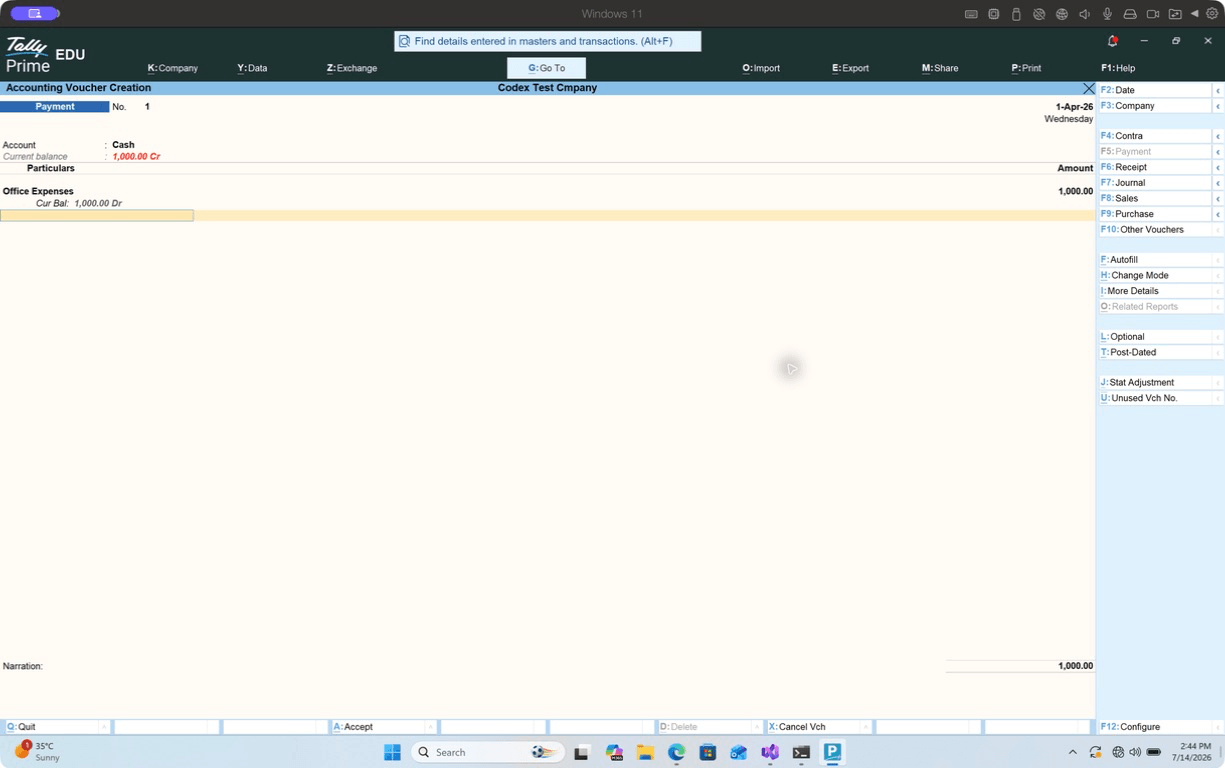
- Opened a Payment voucher
- Credited Cash and debited Office Expenses by Rs 1,000
- Saved voucher number 1 on April 1, 2026
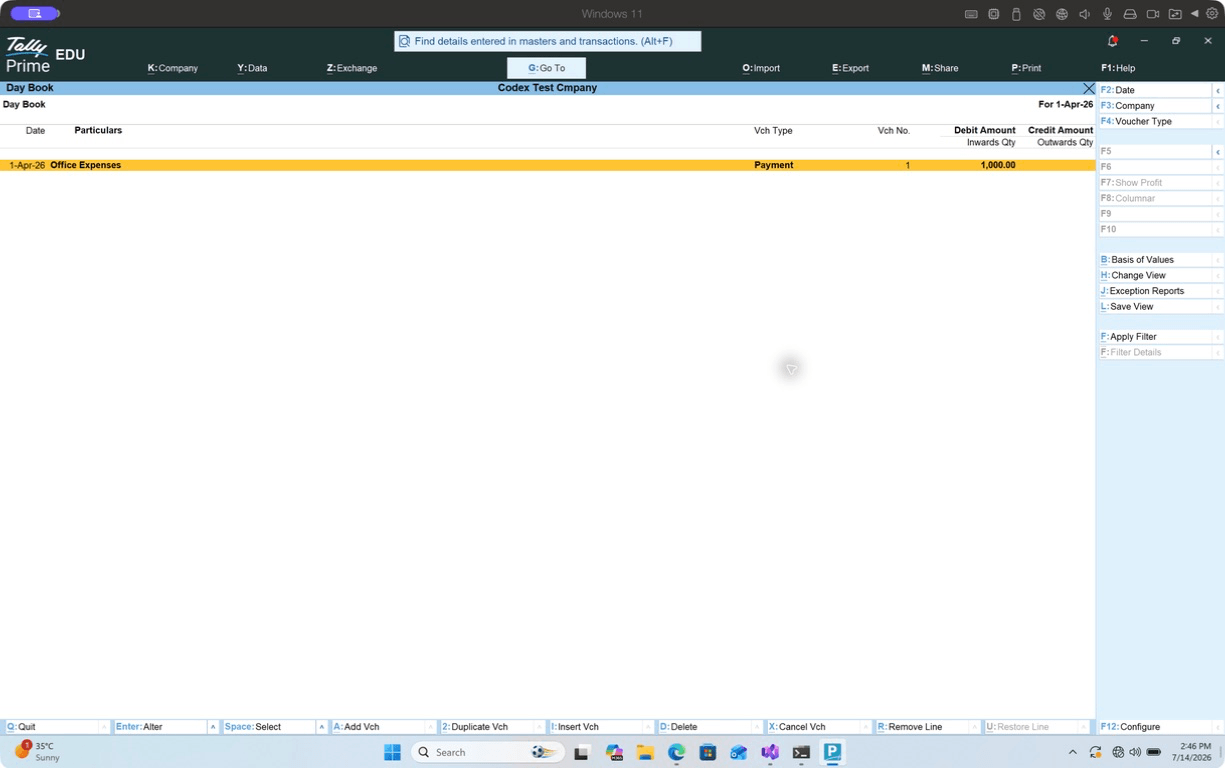
- Opened Day Book and confirmed the Rs 1,000 Payment entry
- Exported the Day Book to PDF
The TallyPrime process used about 440 MiB of working memory and 414 MiB of private memory at the time I measured it. Those numbers don’t include Windows itself, Parallels, or macOS, so they aren’t a total-RAM estimate. They do show that TallyPrime wasn’t the heavy part of this stack.
The more important observation was interaction quality. Keyboard-driven screens, voucher saving, report navigation, and export all responded normally. I didn’t see a crash or corrupted output during the test.
I wouldn’t generalize that into “everything works.” I didn’t test biometric devices, DSC tokens, dot-matrix printers, bank-specific upload tools, TallyPrime Server, or custom TDL code. If your business depends on one of those, test that exact dependency with copied data before moving the production books.
Can you use TallyPrime Educational Mode on a Mac for free?
You can use Educational Mode to learn TallyPrime and test the Parallels setup, but it is intentionally restricted and unsuitable for normal bookkeeping. In my test, the voucher date had to be April 1, which matched the documented date restriction.
Educational Mode is good for:
- Learning company creation and navigation
- Practicing ledgers, vouchers, inventory, and reports
- Checking whether TallyPrime launches on your Mac
- Testing keyboard shortcuts and display scaling
- Demonstrating a workflow without touching production books
It is not good for:
- Daily transaction entry
- Maintaining statutory books
- Evaluating month-long or year-long operations
- Replacing a Silver or Gold license
- Proving that a paid license, TSS, or network license will activate correctly
Tally’s license documentation also lists situations that can push a paid setup back into Educational Mode, including an expired rental or trial, invalid TSS coverage for the installed release, a moved license, missing license files, and extended offline use. A VM snapshot helps with recovery, but it doesn’t replace a valid license or a current backup.
Is TallyPrime Cloud Access better than Parallels for Mac?
TallyPrime Cloud Access is better when access from multiple devices and managed hosting matter more than local control. Parallels is better when one Mac user wants a fast, local, offline-capable copy of TallyPrime.
Official TallyPrime Cloud Access runs TallyPrime on cloud infrastructure and exposes it through a browser. The service page positions it for macOS and other devices, while Oracle Cloud Infrastructure sits underneath the managed service.
Choose Cloud Access when:
- Two or more people need the same company data from different locations
- You don’t want to maintain Windows on every endpoint
- Staff move between Macs, PCs, and tablets
- Centralized access is worth a recurring per-user bill
- A managed provider is preferable to office-hosted remote desktop
Choose Parallels when:
- One primary Mac user handles the books
- Local responsiveness matters
- Internet connectivity isn’t dependable
- You need direct control over company data and backups
- You already have enough Mac storage and memory for a Windows VM
Cloud Access doesn’t eliminate licensing. Tally says the TallyPrime license is purchased separately, then Cloud Access is added per user. That distinction gets buried in reseller pitches, and it changes the real cost.
How much does Tally on Mac cost?
The total cost is TallyPrime plus either Parallels and Windows or a recurring Cloud Access subscription. The least expensive route depends more on user count and maintenance than on the sticker price.
Current official Tally figures in India are:
| Cost item | Current figure | What it covers |
|---|---|---|
| TallyPrime Silver | Rs 22,500 plus GST | Single-user license |
| TallyPrime Gold | Rs 67,500 plus GST | Multi-user LAN license |
| TallyPrime Cloud Access | From Rs 600 per user per month plus 18% GST | Hosted access, TallyPrime license separate |
| Parallels Desktop | Check current official price | Windows virtualization on one Mac |
| Windows 11 | Depends on activation rights | The Windows operating system inside the VM |
Tally’s July 13, 2026 total-cost guide is the source I trust for the current Indian license figures because it is first-party, recently published, and separates license, TSS, implementation, and cloud costs. Some reseller pages show lower numbers, old annual rentals, or bundled support. Those offers may be real, but they aren’t a stable baseline.
For a single Mac user, the local route has a larger upfront setup cost but no cloud-access fee per month. For a five-person team, managed browser access can be easier to budget than five Windows environments, especially once backup and support time are counted.
If you’re comparing the wider market instead of preserving a Tally workflow, my accounting and bookkeeping software guide covers native cloud alternatives. The right comparison isn’t Tally versus every accounting app. It is the cost of keeping your existing data, integrations, accountant workflow, and staff habits intact.
How should you store and back up Tally data in Parallels?
Keep the active company data in one clearly owned Windows location, then back it up outside the VM. A VM snapshot is a rollback point, not an accounting backup.
My preferred layout is:
- Active company data on the Windows virtual disk
- Tally’s own backup copied to a Mac folder after each work session
- That Mac folder included in Time Machine or another versioned backup
- A periodic offline or cloud copy protected from ransomware
- A VM snapshot before Windows, Parallels, TallyPrime, or TDL upgrades
Avoid opening the same live company-data folder from two Tally instances unless the licensing and network architecture explicitly support it. Also avoid putting actively changing Tally data into a generic sync folder without testing file locking and conflict behavior. Dropbox, OneDrive, and iCloud Drive are excellent at syncing documents. A multi-file transactional data folder is a different problem.
Shared Mac folders are convenient for exports. They aren’t automatically the best place for the live books. I used the Parallels shared folder successfully to bring a PDF back to macOS, which is exactly the kind of low-risk exchange I recommend.
What about printing, GST tools, and Tally add-ons?
Standard PDF export worked in my test, but hardware-dependent workflows need their own proof. ARM Windows can run x64 applications while still failing on an old driver that has no ARM64 equivalent.
Test these before committing:
- The exact invoice printer and paper size
- Dot-matrix printing, if you still use it
- USB DSC token and its driver
- Bank upload or reconciliation utility
- Excel export and your installed Office bitness
- Third-party TDLs
- TallyPrime Server or Gold license discovery over the LAN
- Barcode scanners, weigh scales, and other serial or USB devices
For a normal laser printer, macOS printing through Parallels may work without drama. For a device that installs a proprietary Windows kernel driver, the answer can change. Don’t buy a Mac-only office fleet on a compatibility assumption.
Are there better alternatives to running TallyPrime on Mac?
A native cloud accounting system is better only if you are willing to change the accounting workflow. It isn’t a drop-in way to open a Tally company and continue exactly where you stopped.
The realistic alternatives are:
- Keep one Windows PC: Cheapest when the machine already exists, but awkward for a Mac-first user.
- Remote into an office PC: Fine for occasional access, but dependent on that PC, its internet connection, and remote-access security.
- Use official Cloud Access: Best hosted route for preserving TallyPrime itself.
- Move to cloud accounting: Best long-term option when collaboration matters more than Tally-specific behavior.
- Use a generic hosted Windows vendor: Technically workable, but support, data residency, backups, and Tally licensing need close scrutiny.
I wouldn’t recommend an unofficial cracked installer, a shared license sold through a marketplace, or a cloud provider that can’t explain where the data lives. That isn’t clever cost saving. It is turning statutory data into an unpriced risk.
If TallyPrime is only one of several Windows dependencies, start with my Windows apps on Mac guide and virtual desktop software comparison. If you are buying hardware for an accountant, the laptop guide for accountants and tax professionals may save more money than forcing the wrong Mac setup.
What Mac specifications do you need for TallyPrime?
A 16 GB Apple Silicon Mac with roughly 80 GB of genuinely free storage is a sensible starting point for TallyPrime, Windows, and Parallels. TallyPrime itself is light. Windows, updates, swap, snapshots, and the virtual disk create most of the footprint.
My test Mac had 24 GB of unified memory, and I assigned 8 GB to Windows. That left macOS enough room to keep the host responsive while TallyPrime ran. The Windows VM bundle eventually reached about 72 GB after installations and a snapshot, even though Tally’s own application requirement is only 150 MB plus company data.
Use these planning numbers:
- Mac memory: 16 GB minimum for comfortable daily use, 24 GB or more if you keep browsers, Excel, and other heavy Mac apps open
- Windows VM memory: 8 GB for ordinary TallyPrime work
- VM processors: 4 vCPU is enough for the tested single-user workflow
- Free Mac storage: Start with at least 80 GB, then watch snapshots and Windows updates
- Display: Tally recommends at least 1366 x 768, which modern Mac displays exceed
- Backup capacity: Separate space outside the VM for company backups and exported reports
An 8 GB Apple Silicon Mac may launch the stack, but I wouldn’t recommend buying one specifically for it. macOS and Windows would be competing for a small memory pool, and that is exactly where a setup that looks fine in a five-minute demo becomes irritating during month-end work.
Storage deserves the same honesty. Parallels virtual disks grow as Windows uses them, and snapshots preserve changed blocks. Deleting files inside Windows does not always return the same amount of space to macOS immediately. If your Mac has a 256 GB internal SSD and is already half full, Tally on Mac through a local VM may be the wrong route. Cloud Access or a remote Windows PC avoids that local storage burden.
How do you move an existing Tally company to the Mac setup?
Move a backup, not the only live copy. Restore it inside the same or a compatible TallyPrime release, then reconcile reports before anyone enters a new transaction.
My migration checklist is intentionally conservative:
- Note the TallyPrime release and TSS status on the old Windows computer.
- Run Tally’s backup from the old system.
- Copy that backup to two separate locations.
- Install the matching TallyPrime release in the Parallels VM.
- Restore the backup into a new Windows folder.
- Open the company and check the period, security settings, GST configuration, and license state.
- Compare Trial Balance, Profit and Loss, Balance Sheet, outstanding receivables, and inventory totals with reports from the old computer.
- Test one non-production voucher, report export, invoice print, and backup.
- Remove the test voucher or restore the clean backup before the real cutover.
- Pick a cutover time and stop entry on the old system.
Do not casually browse to the old company’s live folder through a shared network path and start working. Tally data is a group of files, not one self-contained document. A copy that finishes while Tally is writing can be incomplete even if Finder reports success.
Release compatibility also matters. Opening data in a newer TallyPrime release may upgrade it. That can be fine, but your rollback plan must preserve the pre-upgrade backup and the installer for the older release if your TSS entitlement requires it.
For a Gold or TallyPrime Server deployment, a one-Mac test doesn’t prove the network design. License discovery, client and server subnet rules, Windows Firewall, ports, shared data paths, and simultaneous users need a planned pilot. Tally’s own Educational Mode troubleshooting guide shows how sensitive license serving can be to gateway services, IP ranges, and firewall rules.
The cutover is complete only when opening balances and reports match, a new voucher saves, a backup restores, and the person doing month-end work can find the files without calling the installer. For routine tally on mac work, that is the standard I would use before replacing the old PC.
Frequently asked questions
Can Tally run on a MacBook Air?
Yes. TallyPrime can run inside Windows 11 through Parallels on an Apple Silicon MacBook Air. I would want at least 16 GB of Mac memory and enough free storage for Windows, Tally data, updates, and snapshots. An 8 GB Mac leaves too little headroom.
Can I download TallyPrime directly for macOS?
No. Tally Solutions distributes TallyPrime for 64-bit Windows, not as a native macOS application. A Mac needs a Windows virtual machine, remote Windows PC, or official cloud access.
Is TallyPrime Cloud Access the same as Tally on Cloud?
TallyPrime Cloud Access is Tally Solutions’ official managed service. “Tally on Cloud” is also used generically by third-party hosting providers, so verify who operates the service, where data is stored, and whether the Tally license is included.
Does Tally work offline on a Mac?
The Parallels route can work locally without a continuous connection, subject to Tally’s license rules and periodic validation. Cloud Access and remote desktop require a dependable internet connection.
Is Parallels Standard enough for TallyPrime?
Yes for the single-user workflow I tested. The VM used 4 vCPU and 8 GB RAM, which matches the Standard edition ceiling. Large multi-user data, other heavy Windows apps, or developer workloads may justify Pro.
Can I use my existing Tally company data on a Mac?
Yes, after installing TallyPrime in Windows, restore or open a copy of the company data. Test with a duplicate first, match the TallyPrime release, and keep the original backup untouched until reports reconcile.
Is Tally Educational Mode enough for a student?
It is enough to learn the interface and practice on permitted dates. It isn’t suitable for maintaining a real business’s daily books because transaction dates are restricted.
Will GST, e-invoicing, and e-way bills work through Parallels?
The core GST-enabled company setup worked in my test, but I didn’t submit a live return, e-invoice, or e-way bill. Those connected workflows should be tested with a licensed copy and non-production credentials before relying on them.
What I would choose
For one accountant using one Mac, I would run Tally on Mac through Parallels, keep the active data inside Windows, and push verified backups outside the VM. It is fast, understandable, and still usable when the office internet is having a bad day.
For a team, I would pay for official Cloud Access. A cheaper improvised remote desktop stops being cheap the first time nobody knows whether the latest books are on the office PC, a laptop, or someone’s sync folder.
Footnotes: Tally Solutions, Recommended System Configurations for TallyPrime. Tally Solutions, TallyPrime License in Educational Mode. Tally Solutions, TallyPrime Total Cost of Ownership in India. Tally Solutions, TallyPrime Cloud Access. Parallels, Desktop editions and resource limits.
Tell Google you want more of this.
Add Gaurav Tiwari as a preferred sourceOne tap, and this site shows up more often in your own Top Stories, AI Overviews and AI Mode. Remove it any time.
Disclaimer: This site is reader-supported. If you buy through some links, I may earn a small commission at no extra cost to you. I only recommend tools I trust and would use myself. Your support helps keep gauravtiwari.org free and focused on real-world advice. Thanks. - Gaurav Tiwari