
 by
by
There still isn’t a native Power BI for Mac desktop app. If you only view dashboards or make browser-supported edits, use the Power BI service in Safari, Chrome, or Edge. If your work depends on local .pbix files, Power Query, data modeling, or desktop-only connectors, run the Windows version through Parallels Desktop.
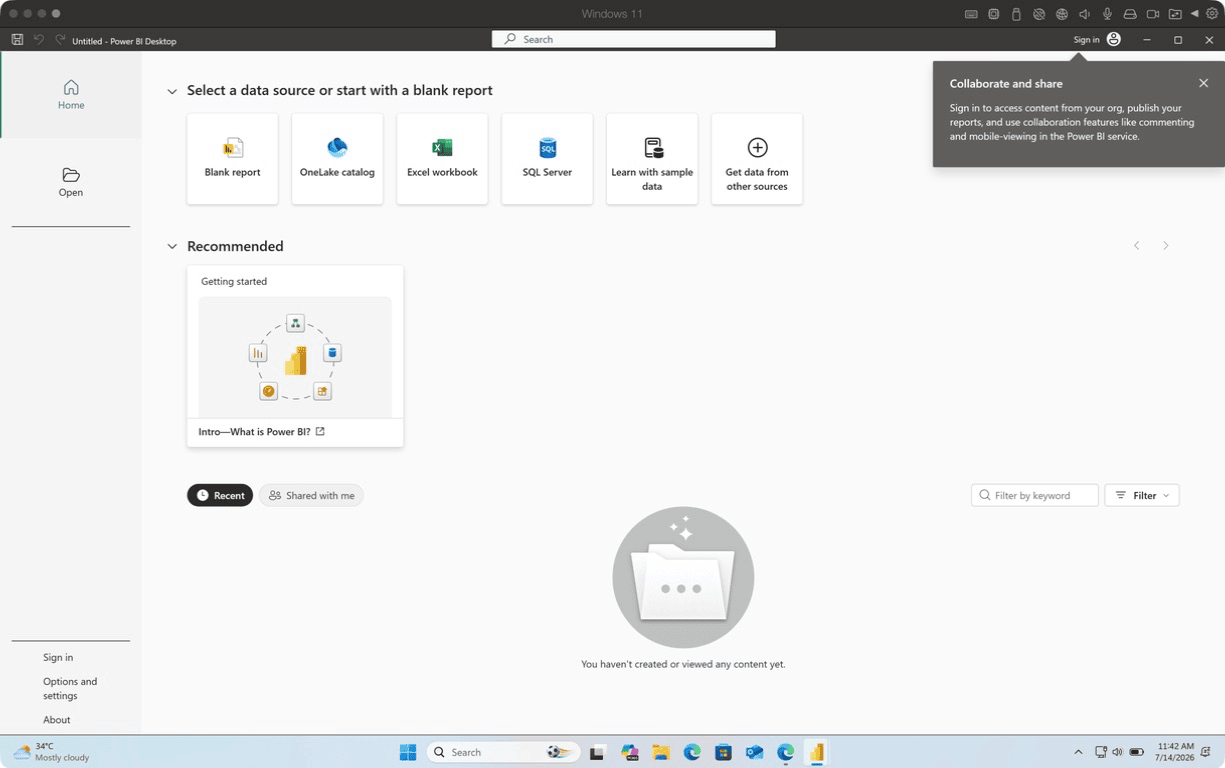
That’s the clean answer. I tested the messier part on an Apple M5 Pro Mac: a current Windows 11 ARM virtual machine, the June 2026 release of Power BI Desktop, and an official Microsoft sample report. Power BI worked, but the test also exposed two limits most workaround lists skip. A 6 GB Windows VM was too tight once the model engine loaded, and opening a report doesn’t prove that every R, ArcGIS, connector, or tenant-controlled publishing workflow will work.
My Power BI for Mac verdict and test setup
Use the browser until a desktop-only task stops you. Then use Parallels Desktop with an 8 GB Windows VM, not a cloud PC subscription, if you need Power BI Desktop every week on one Mac.
Confirmed in my July 14 test:
- Host: Apple M5 Pro with 24 GB unified memory
- Host OS: macOS 27.0 beta, build 26A5378j
- Virtualization: Parallels Desktop 26.4.0, build 57513
- Guest OS: Windows 11 Pro ARM64, build 26200.8653
- VM allocation during the measured Power BI run: 4 vCPU and 6 GB RAM
- Power BI Desktop: version 2.155.756.0, the June 2026 release
- Test file: Microsoft’s official Supply Chain Sample
.pbix, 1,177,398 bytes - First visible window: 42.7 seconds on the instrumented first launch
- Loaded memory footprint: 456 MB across Power BI processes plus 1,137 MB for the
msmdsrvmodel engine - Free guest memory after the sample loaded: 712 MB
Inferred from the measurement:
- A 6 GB VM can launch Power BI Desktop, but it leaves too little headroom for comfortable report authoring.
- An 8 GB VM is the practical starting point for modest reports. Larger semantic models need more.
- A Mac with 16 GB total memory can run this setup, but a 24 GB Mac gives macOS and Windows room to coexist without constant memory pressure.
Not tested or not confirmed:
- Publishing to a Power BI workspace, because I didn’t enter a Microsoft account
- A clean refresh of the Supply Chain Sample, because it requested local R and ArcGIS dependencies
- Every connector, custom visual, Python script, gateway, or company tenant policy
That distinction matters. Plenty of guides turn “the application opened” into “everything works.” Those aren’t the same claim.
Does Power BI work on Mac?
Power BI works on a Mac in the browser, but Power BI Desktop still requires Windows. Microsoft distributes the desktop authoring application through the Microsoft Store and a Windows .exe, while the Power BI service supports current versions of Safari, Chrome, and Edge.
The product naming causes most of the confusion, so separate these three things:
- Power BI Desktop is the free Windows report-authoring application. It opens
.pbixfiles, builds data models, runs Power Query, and connects to local or remote data sources. - Power BI in the browser is the service for viewing, sharing, collaboration, and browser-supported editing. What you can edit depends on your role, license, workspace, and report.
- The Microsoft Power BI mobile app on the App Store is for consuming and interacting with reports. It isn’t a Mac replacement for Power BI Desktop.
Microsoft now documents Windows on ARM as a supported Power BI Desktop platform, with one condition: Windows needs the September 2025 cumulative update KB5065789 or a later cumulative update. That detail changes the Apple Silicon answer. Older articles treated ARM compatibility as an emulation gamble. The current requirement is on record, and the June 2026 build installed on my Windows 11 ARM VM.
But macOS itself still isn’t a supported Power BI Desktop operating system. You can’t download a .dmg, drag an app to Applications, and open a .pbix. If a course tells you to “install Power BI on your Mac,” it has skipped the most important noun: Windows.
Which Power BI for Mac option should you use?
Use the Power BI service for viewing and light browser work. Use Parallels Desktop for repeated local authoring, a managed cloud PC for company-controlled Windows access, or remote access when an existing office PC already has Power BI Desktop.
| Route | Opens local .pbix files | Power Query and modeling | Offline | Typical cost | Best fit | Main catch |
|---|---|---|---|---|---|---|
| Power BI service in a browser | Not as a full Desktop workflow | Limited by web features, role, and report | No | Free account, Pro $14/user/month, or PPU $24/user/month | Viewing, sharing, and supported browser edits | It doesn’t replace every Desktop task |
| Parallels Desktop plus Windows 11 ARM | Yes | Yes, subject to connector and dependency support | Yes | Standard $99.99/year list price, Windows license may be separate | One person doing weekly Desktop work | Uses local RAM, storage, and battery |
| Managed cloud PC | Yes | Yes | No | Recurring per-user plan based on CPU, RAM, storage, and service | IT-managed teams and locked-down company data | Costs more over time and needs a stable connection |
| Remote office or home Windows PC | Yes, on the remote PC | Yes | No | Low if the PC already exists | Occasional use | Two machines must stay available |
For most people searching for Power BI for Mac, the decision comes down to frequency. The annual Parallels Desktop license looks expensive beside a free browser tab. Compare it with the right thing, though. If Power BI Desktop is a weekly requirement, compare the annual local VM cost with twelve months of a cloud PC, not with the free viewing experience.
My recommendation is deliberately narrow:
- Stay in the browser if you consume reports, comment, share, or make edits the service already supports.
- Buy Parallels Desktop if
.pbix, Power Query, desktop connectors, or offline work blocks you at least a few times per month. - Ask your employer for a managed Windows machine if company policy, gateways, credentials, or private networks control the workflow.
If you’re still comparing VM products, my virtual desktop software guide explains the broader choices. For this specific Apple Silicon job, I recommend Parallels Desktop because Windows 11 ARM installation, shared folders, and Mac integration are already handled.
What Power BI can you do in a Mac browser?
The Mac browser route covers report consumption, dashboard access, sharing, and some report editing, but your Power BI license and workspace role decide what appears. Safari, Chrome, Microsoft Edge, the Power BI service, and Microsoft Fabric are the named parts of this route, not a hidden Mac desktop app.
Use the browser when you need to:
- Open reports and dashboards shared with your account
- Filter, sort, drill, bookmark, comment, and export when the report owner permits it
- Create or edit supported reports inside a workspace where you have the required role
- Publish and share with a Power BI Pro license, or use capacity that covers the intended audience
- Work from a managed dataset without maintaining a local Windows VM
Expect to need Desktop when you must:
- Open and author local
.pbixfiles as your normal workflow - Build or reshape data with Power Query beyond what the web experience offers
- Create detailed model relationships, calculated tables, or Desktop-specific report behavior
- Use a connector, custom visual, R script, Python script, or local file workflow that depends on Windows
- Work offline
Power BI Desktop itself is free. The paid part starts when collaboration, publishing, sharing, or premium capacity enters the picture. Microsoft’s US pricing page currently lists:
- Power BI Free: $0
- Power BI Pro: $14 per user per month, paid yearly
- Power BI Premium Per User: $24 per user per month, paid yearly
Those prices don’t make the Mac app problem disappear. They answer a different question: who can publish, share, and consume content in the service. A Power BI Pro license doesn’t install Power BI Desktop on macOS, and a Parallels Desktop license doesn’t include Power BI Pro.
This is where students get caught. A university may give you Microsoft 365 access but not the Power BI workspace role your assignment expects. Confirm the tenant and license before you spend money on virtualization.
How to run Power BI Desktop on Mac with Parallels
Install Parallels Desktop, create a Windows 11 ARM VM, finish Windows Update, and then install the current 64-bit Power BI Desktop package. Give Windows 8 GB RAM if your Mac has enough memory, because the measured 6 GB setup had only 712 MB free after one modest sample loaded.
1. Check your Mac before you create the VM
Power BI is only one part of the load. macOS, Parallels Desktop, Windows 11, WebView2, Power BI Desktop, and the analysis engine all compete for memory and storage.
Use these starting points:
- 16 GB Mac: allocate 6 to 8 GB to Windows and keep other Mac apps under control
- 24 GB Mac: allocate 8 GB to Windows for modest Power BI work
- 32 GB or more: allocate 8 to 12 GB when reports or refreshes are larger
- Free storage: keep at least 80 GB available before installation, then more for
.pbixfiles, caches, and snapshots - VM CPU: start with 4 vCPU rather than assigning every core to Windows
These are practical allocations, not Microsoft’s minimum requirements. Microsoft says Power BI Desktop needs at least 2 GB of available RAM and recommends 4 GB or more. That number is for the application environment, not for macOS plus a Windows VM plus your report.
The Mac performance guide is worth checking if your machine already swaps heavily before you add Windows. Virtualization won’t fix an overloaded Mac. It will make the overload more obvious.
2. Install Windows 11 ARM and run Windows Update
Parallels Desktop can download and install Windows 11 ARM from its assistant. The installation download shown during my setup was 5.8 GB, and the default VM started with 4 vCPU and 6 GB RAM.
Before installing Power BI Desktop:
- Open Windows Settings
- Run Windows Update until no required cumulative update remains
- Restart Windows when asked
- Confirm the build is later than the September 2025 KB5065789 requirement
- Confirm Parallels Tools is installed for display, clipboard, and shared folders
My VM ran Windows 11 Pro ARM64 build 26200.8653 with Parallels Tools 26.4.0-57513. That’s far newer than the required cumulative update.
3. Install Power BI Desktop from Microsoft
Microsoft offers two routes: the Microsoft Store and the standalone executable. The Store route stalled at “Starting package install” in my VM. I canceled it, downloaded Microsoft’s official standalone package, and finished the installation from there.
The confirmed installer details were:
- Download size: 676,032,600 bytes, about 644.7 MB
- Download time in the VM: 28 seconds on my connection
- Installed version: 2.155.756.0
- Architecture environment: Windows 11 ARM64
- Result: successful installation and launch
If the Store sits at the same message for several minutes without disk or network activity, stop waiting and use Microsoft’s official executable. Don’t download Power BI installers from software mirrors. Monthly Power BI releases change fast, and Microsoft supports only the current Desktop version.
4. Configure display and shared folders
Power BI Desktop has a documented display requirement of at least 1440×900 or 1600×900. Microsoft also warns that Windows scaling above 100% can push some dialogs out of view.
On a Retina Mac, that creates an awkward tradeoff:
- Higher scaling makes Windows text comfortable but can hide Power BI controls.
- Lower scaling exposes the controls but makes text smaller.
- Coherence mode makes the Windows application feel Mac-like, but full-screen Windows is easier when troubleshooting dialogs.
My VM mounted Mac locations as Windows drives. The iCloud folder appeared as Y: and the Mac home integration appeared as Z:. I still recommend keeping active .pbix work on the Windows virtual disk, then copying finished files to a shared folder. Shared folders are convenient, but local disk removes one more variable during refreshes and saves.
5. Open a known sample before your company report
Start with a Microsoft sample rather than a 900 MB company report full of private connectors. I used the official Supply Chain Sample from Microsoft’s powerbi-desktop-samples GitHub repository.
That test exposed useful facts:
- The first launch reached a visible Power BI window in 42.7 seconds.
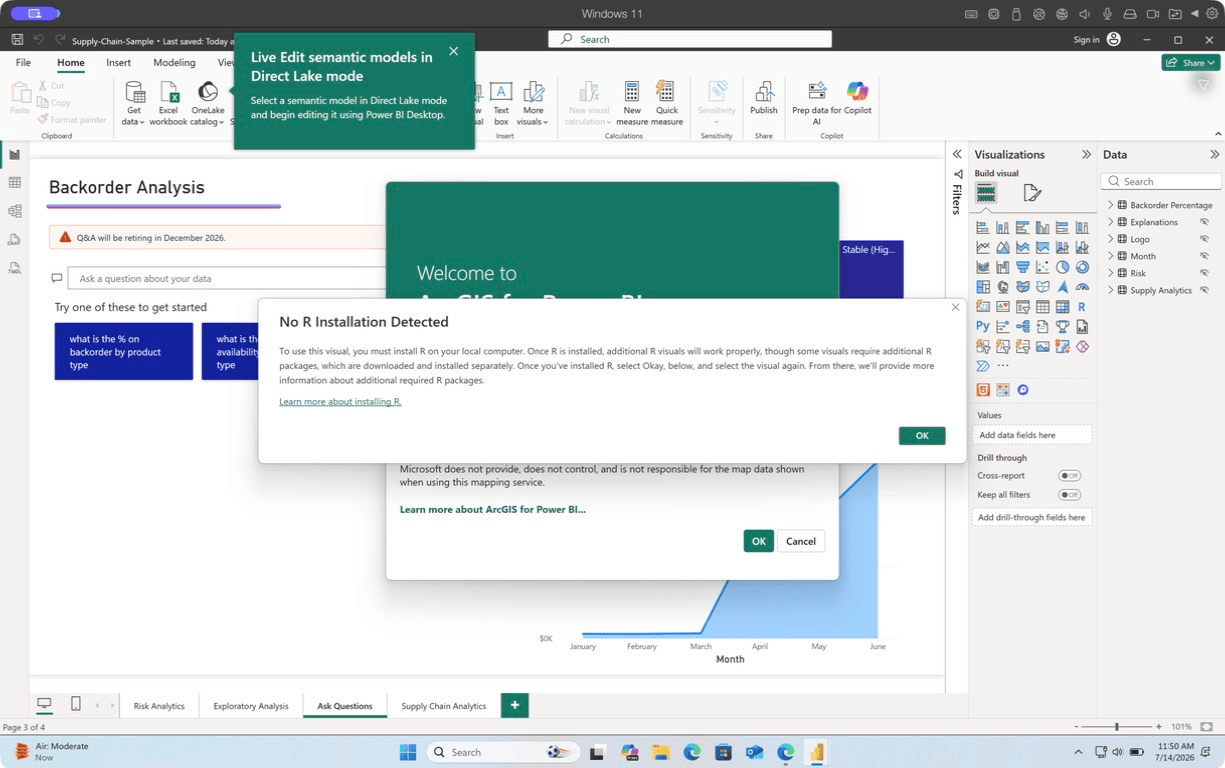
- The first attempt to open the sample returned “Unable to open document.”
- A second launch opened the same file with the report pages and visuals visible.
- The report then requested an R installation and showed ArcGIS for Power BI terms.
I couldn’t confirm why the first open failed, so I won’t hand you a made-up fix. The second launch worked. If your file fails repeatedly, test a second official sample before blaming ARM, Parallels Desktop, or the .pbix itself.
How Power BI Desktop performed on Apple Silicon
Power BI Desktop was usable on the Apple M5 Pro test Mac, but the 6 GB Windows allocation was the weak point. The application and model engine used about 1.59 GB with one official sample loaded, leaving Windows with 712 MB free.
| Test | Measured result | Evidence label | What it means |
|---|---|---|---|
| Official installer | 644.7 MB, downloaded in 28 seconds | Confirmed | The standalone route works on Windows 11 ARM |
| Installed version | 2.155.756.0 | Confirmed | The June 2026 Desktop build installed |
| First visible window | 42.7 seconds | Confirmed | Initial launch isn’t instant |
| Official sample | Opened on the second launch | Confirmed | Current `.pbix` compatibility worked in this case |
| Power BI processes | 456 MB | Confirmed | The visible app is only part of the memory use |
| Model engine | 1,137 MB | Confirmed | `msmdsrv` used more memory than the UI processes |
| Combined footprint | 1,592 MB | Confirmed | 6 GB VM allocation leaves little headroom |
| Refresh and publish | Not completed | Unconfirmed | Don’t treat this test as proof for every tenant or connector |
The model engine number is the one most articles miss. Watching only PBIDesktop.exe undercounts the working set because the Analysis Services process carries the loaded model. On this report, that background process used roughly 2.5 times the memory of the visible Power BI processes.
So I changed the VM to 8 GB after the measurement. That isn’t a magic number. It’s a sensible floor that gives Windows, WebView2, Power BI Desktop, and the model engine more breathing room.
Is this native performance? No. Power BI Desktop is still a Windows application inside a VM. But “not native” doesn’t mean “not usable.” The sample opened, rendered, and responded on an ARM64 guest. The limits showed up around memory and external dependencies, not an immediate architecture crash.
When a cloud PC or remote Windows machine is better
Choose a cloud or remote Windows machine when IT needs centralized control, your Mac can’t spare 8 GB RAM, or the data must remain inside a company network. Microsoft Dev Box, Windows 365, Windows App, Microsoft Intune, and an existing office PC solve management problems that a personal Parallels Desktop VM doesn’t.
A managed Windows machine is the better choice when:
- Your employer maintains approved Power BI connectors, gateways, certificates, and VPN access
- Data-loss prevention rules prohibit local copies of
.pbixor source files - Several people need the same image and support policy
- Your Mac has 8 GB or 16 GB RAM and already struggles under normal work
- You use Power BI Desktop occasionally enough that maintaining a local VM feels wasteful
A local Parallels VM is the better choice when:
- You work alone on one Mac
- You need Power BI Desktop every week
- Offline access matters
- You want local files and predictable performance
- You’d rather pay an annual virtualization license than a recurring cloud-PC fee
Remote access to an existing Windows PC is the cheapest route if the machine already exists. The catch is availability. A sleeping office PC, a broken VPN, or a Windows update at the wrong time can derail a class or client deadline.
This is why my broader Windows apps on Mac guide treats remote access as a valid method, not the default. It removes local resource pressure by moving the work somewhere else. It doesn’t remove the second computer.
How much RAM and storage does Power BI need on a Mac?
Use a Mac with at least 16 GB total memory and assign 8 GB to Windows for modest Power BI work. A 24 GB or 32 GB Mac is safer when reports are larger, several Mac apps stay open, or Power Query refreshes pull substantial data.
The measured memory split explains the recommendation:
- macOS must keep running
- Parallels Desktop has virtualization overhead
- Windows 11 needs memory before Power BI starts
- Power BI Desktop used 456 MB across its visible processes in my test
- The model engine used another 1,137 MB
- Windows had only 712 MB free with a 6 GB VM allocation
Microsoft’s 4 GB recommendation for Power BI Desktop isn’t a recommendation for your entire Mac. It assumes a Windows environment already exists. When Windows itself is a guest, count both operating systems.
Storage deserves the same treatment. The Windows 11 download was 5.8 GB, the Power BI installer was 644.7 MB, and the VM grows as Windows updates, report caches, temporary files, and snapshots accumulate. Keep at least 80 GB free before setup. If your .pbix files are large, keep 100 GB or more.
Parallels Desktop Standard currently limits a VM to 8 GB vRAM and 4 vCPU. Parallels Desktop Pro raises those ceilings to 128 GB vRAM and 32 vCPU per VM. Standard is enough for the 8 GB recommendation. Pro matters when your report and development workloads need more resources, not because the label sounds better.
Power BI for Mac problems that waste the most time
Most Power BI on Mac failures come from using the wrong product, skipping Windows updates, starving the VM, or assuming a license includes permissions it doesn’t. Check these before you reinstall anything.
The App Store result isn’t Power BI Desktop
- Symptom: You install the Microsoft Power BI app but can’t open or author a local
.pbixlike a Windows tutorial shows. - Cause: The App Store listing is the mobile consumption app, not Power BI Desktop for macOS.
- Fix: Use the Power BI service for browser work or install Windows 11 ARM through Parallels Desktop.
The Microsoft Store installation hangs
- Symptom: Installation sits at “Starting package install.”
- Cause: I couldn’t confirm the exact Store failure in my VM.
- Fix: Cancel the stalled route and download the current standalone installer from Microsoft.
Power BI opens but a report fails
- Symptom: A
.pbixreturns an error or opens with dependency prompts. - Cause: The file may depend on R, Python, ArcGIS, a gateway, a custom visual, credentials, or a connector that isn’t ready in the VM.
- Fix: Open a second official Microsoft sample, then install only the dependency your report names.
Power BI becomes sluggish after a report loads
- Symptom: Windows starts paging, menus lag, or other apps stop responding.
- Cause: The model engine can use more memory than the visible Power BI process. My sample used 1,137 MB in
msmdsrvalone. - Fix: Shut down Windows, raise the VM to 8 GB, and close heavy Mac apps. Don’t change VM memory while Windows is suspended.
The report opens but you can’t publish
- Symptom: Publish is unavailable, authentication fails, or the target workspace doesn’t appear.
- Cause: Power BI Pro, workspace roles, tenant settings, conditional access, and company policy are separate from Desktop installation.
- Fix: Ask the workspace owner which account, role, and tenant the report requires. Buying Parallels Desktop won’t grant Power BI permission.
Dialogs are cut off on a Retina display
- Symptom: Buttons or startup controls sit outside the visible window.
- Cause: Microsoft documents minimum resolution and warns about Windows scaling above 100%.
- Fix: Switch the VM to full screen, temporarily set Windows scaling to 100%, and use at least 1440×900 or 1600×900.
For the Mac side of the setup, my Mac apps and utilities list covers the tools I keep around without turning the machine into a menu-bar landfill.
Frequently asked questions
Does a MacBook allow Power BI?
Yes. A MacBook can use the Power BI service in a supported browser, and Apple Silicon Macs can run Power BI Desktop inside Windows 11 ARM with Parallels Desktop. There is no native Power BI Desktop application for macOS.
Why isn’t Power BI Desktop available for Mac?
Microsoft builds and distributes Power BI Desktop as a Windows application through the Microsoft Store and a Windows executable. Microsoft hasn’t announced a native macOS Desktop version. The browser service remains the official Mac-accessible route for supported web tasks.
Is there a Power BI app for Mac?
There is a Power BI mobile app in Apple’s App Store, but it isn’t Power BI Desktop for macOS. Use the browser for the Power BI service or run the Windows Desktop application in a VM.
Can I open a .pbix file on a Mac without Windows?
Not with the full Power BI Desktop authoring workflow. You may consume a report after it has been published to the Power BI service, but opening and authoring a local .pbix still requires Windows.
Is Power BI Desktop free in Parallels?
Power BI Desktop is a free Microsoft download. Parallels Desktop, Windows licensing, and Power BI service licenses are separate costs. Power BI Pro is currently $14 per user per month paid yearly, while Premium Per User is $24.
How much RAM should I assign to Power BI in Parallels?
Start with 8 GB for Windows on a Mac with at least 16 GB total memory. In my test, a 6 GB VM had only 712 MB free after Microsoft’s Supply Chain Sample loaded, so I raised it to 8 GB.
Does Power Query work in Power BI on Mac?
Power Query works inside Power BI Desktop running in Windows, including a Windows 11 ARM VM. But individual connectors, R or Python steps, gateways, and company authentication can add dependencies. Test your exact query before promising compatibility.
What is the Mac equivalent of Power BI?
There isn’t a one-for-one Mac equivalent if your team exchanges .pbix files. Tableau, Excel, Looker Studio, and browser-based BI tools cover parts of the job, but switching formats changes the workflow. If .pbix is non-negotiable, run Power BI Desktop in Windows.
What I’d do
Stay in the browser until it blocks a specific task. Don’t install an entire operating system because you need to read one dashboard.
But if a .pbix file, Power Query step, desktop connector, or offline deadline keeps sending you back to a Windows machine, use Parallels Desktop with an 8 GB VM. The June 2026 Power BI Desktop build and Microsoft’s sample report worked on the Apple M5 Pro test Mac. The limits were measurable and manageable: memory, dependencies, and account permissions. Those are much better problems than buying a second laptop just to open one file format.
Footnotes: Microsoft Learn, “Get Power BI Desktop” and “What’s new in Power BI.” Microsoft Power Platform, “Power BI pricing.” Microsoft GitHub, powerbi-desktop-samples. Parallels, “Buy Parallels Desktop” pricing page.
Tell Google you want more of this.
Add Gaurav Tiwari as a preferred sourceOne tap, and this site shows up more often in your own Top Stories, AI Overviews and AI Mode. Remove it any time.
Disclaimer: This site is reader-supported. If you buy through some links, I may earn a small commission at no extra cost to you. I only recommend tools I trust and would use myself. Your support helps keep gauravtiwari.org free and focused on real-world advice. Thanks. - Gaurav Tiwari