
MailerPress Review: Email Marketing Plugin that Made Me Move Away from SaaS
I’ve been sending email newsletters since 2012. Started with Mailchimp when it was still the default choice for everyone. Moved to MailerLite when Mailchimp got expensive. Tried Sendfox for a while because it was cheap – but that has deliverability issues. Jumped to Substack when the “newsletter as a product” trend picked up. Even dabbled with Beehiiv for a few weeks. Substack sticked for a while.
On the self-hosted side, I’ve used Noptin, Newsletter plugin, Mailster, Jetpack CRM, and FluentCRM at different points across different sites. I’ve paid licenses for Noptin and Mailster sitting in my account right now. Collecting dust, basically. You get the pattern.
So when I tell you I bought MailerPress during their Black Friday launch last November for $99 as a lifetime deal for unlimited websites, and I’m now actively migrating everything there… I want you to understand everything.
I bought the LTD because the price was right and the team behind it (more on that later) gave me confidence. But I was skeptical about whether it would actually fit my workflow. I sat on it for almost three months, watching updates roll in, waiting for a reason to commit. Well, that reason came in February 2026 when they shipped public newsletter archives. That single feature made me pull the trigger on the actual migration.
Now I’m consolidating everything into MailerPress, and I’m liking it so far.
Why I Was Looking to Move (Again)
My newsletter setup was, to put it politely, a mess. About 4,000 subscribers (3830) on Substack. Another 1,500+ scattered across other platforms and WordPress installs. Some on MailerLite, some collected through Noptin forms, some through random contact forms that dumped emails into a CSV file I “planned to do something with later.” You know how that goes.
Substack was supposed to simplify things. And it did, for a while. The writing experience is clean. The network effects are real. You get some organic discovery that you won’t get from a self-hosted WordPress newsletter. I appreciate what Substack built.
But the longer I stayed, the more the limitations started eating at me. And the biggest one, the one that really pushed me toward the exit… was the total lack of developer-friendly infrastructure.
The Substack API Problem
Substack doesn’t have a public API. Not a limited one. Not a beta one. Nothing.
Their official support page literally says: “At this time, we don’t have a public API and we don’t have a timeline for when/if this would become available.” That’s it. No roadmap. No “coming soon.” Just… silence. I hate the ambiguity more than I hate the lack of a roadmap.
No webhooks either. So you can’t trigger actions when someone subscribes, unsubscribes, or interacts with your content. Nothing. You can’t sync subscriber data with your CRM, your course platform, or your WordPress site without manual CSV exports.
I know what you’re thinking. “But Gaurav, some people have reverse-engineered Substack’s internal API.” Yes, they have. There are developers who’ve figured out endpoints like /api/v1/subscriber/add by inspecting browser network traffic. You can extract your connect.sid cookie and make unauthenticated-looking requests that technically work.
But here’s the thing… that’s not a solution. That’s a hack. And hacks break. Substack can and does change their internal endpoints, and this makes your entire workflow collapse overnight. I’ve seen it happen with other platforms. Building your business on undocumented internal APIs is like building a house on someone else’s land.
For a developer, this is a dealbreaker. I need to connect my newsletter system with my WordPress sites, my products, my analytics. I need data flowing between systems automatically. And Substack just… doesn’t let you do that.
I think Substack’s strategy is intentional. They want you locked in. They want your subscribers on their platform, reading through their app, engaging through their network. And for writers who don’t care about owning their infrastructure, that’s fine. But for me, and I believe for most WordPress developers, bloggers running businesses, and entrepreneurs who think long-term, that level of lock-in is unacceptable.
Enter MailerPress
I first heard about MailerPress sometime around mid-2025. It was new. Really new. The initial release (v0.2.0) dropped in July 2025. That’s barely seven months ago.
Normally, I’d never jump on a plugin that young. I’ve been burned too many times by WordPress plugins that launch with promises and then go silent after six months. But well, two things caught my attention.
First, the team behind it. MailerPress was co-founded by Benjamin Denis, who is also the CEO of SEOPress.
If you’ve been in the WordPress world for any length of time, you know SEOPress. It’s one of the most respected SEO plugins out there, competing directly with Yoast and Rank Math. The team is based in the South-West of France, and they’ve been building WordPress products for years. That matters. A lot, actually. It tells you these folks know how to build plugins that last, how to handle updates and compatibility, how to manage a growing user community. MailerPress isn’t a side project from some random developer with a GitHub repo and a dream. It’s a serious product from a team with a proven track record.
Second, the changelog. Look, I’m a changelog reader. Always have been. Before I buy any plugin, I check the changelog. Not the marketing page. Not the testimonials. The changelog. Because that tells you what’s actually happening with the product.
And MailerPress’s changelog is… honestly, kind of impressive for a plugin that’s been around for less than eight months.
The Development Progress
Between July 2025 and February 2026, MailerPress has shipped 18 releases. That’s roughly one every two weeks. And these aren’t minor bug fix releases. Real features have landed:
- The email editor uses the WordPress block editor (Gutenberg), which means you’re building emails the same way you build WordPress content. If you know Gutenberg, you know MailerPress. No separate editor to learn. And this is important. MailerPress speaks native WordPress. It supports Full Site Editing. Your emails inherit your theme’s color palette and typography from theme.json. If you’ve spent time building a design system for your site, your emails will automatically match. That’s not something you get from Mailchimp or ConvertKit.
- They’ve added integrations with major email service providers all that use SMTP or have proper support, like Emailit, SendGrid, Brevo, Mailjet, Mailgun, Postmark, Gmail/Google Workspace, and Amazon SES. So you’re not stuck sending through PHP mail. You connect your preferred ESP and send through proper infrastructure.
- The form integrations have expanded quickly too: Contact Form 7, Gravity Forms, Fluent Forms, Elementor, and Bricks Builder all have native integrations now. That’s not a small thing. If you’re running any kind of WordPress site with forms, you probably use one of these.
- Custom fields landed in v1.1.1. Segmentation is available in Pro. Automated campaigns came in v0.3.0 (August 2025). Merge tags for personalization. CSV import with auto-mapping. Email revisions. Bounce handling with proper ESP API integration.
- And then, in v1.4.0, the feature that genuinely pushed me over the edge: public newsletter archives.
Public Newsletter Archives Changed Everything
This is the feature that made me sit up and start seriously planning the migration. MailerPress now lets you create a public URL for every campaign you send. You can display your newsletter archive on your website using a shortcode or a Gutenberg block.
Why does this matter so much?
On Substack, your newsletter archive lives on Substack. Your readers go to yourname.substack.com to read past issues. That’s traffic Substack gets. Those are pages Substack indexes. That’s SEO value Substack keeps.
With MailerPress, your newsletter archive lives on your WordPress site. Your domain. Your SEO juice. Your content. Readers discover your newsletter through your blog, read past issues on your site, and subscribe through your forms. Everything stays in your ecosystem.
For someone like me who’s spent years building domain authority on gauravtiwari.org, sending that traffic to a subdomain on someone else’s platform never sat right. I know Substack lets you use a custom domain, but that’s cosmetic. The content, the subscriber data, the infrastructure, it’s all still Substack’s.
MailerPress flips that. Your WordPress site becomes the single source of truth for your content and your subscribers. And that’s exactly how it should be for someone who owns their platform.
Setting Up MailerPress
The onboarding experience deserves a mention because it sets the tone for how the whole plugin works: simple, clean, no bloat.
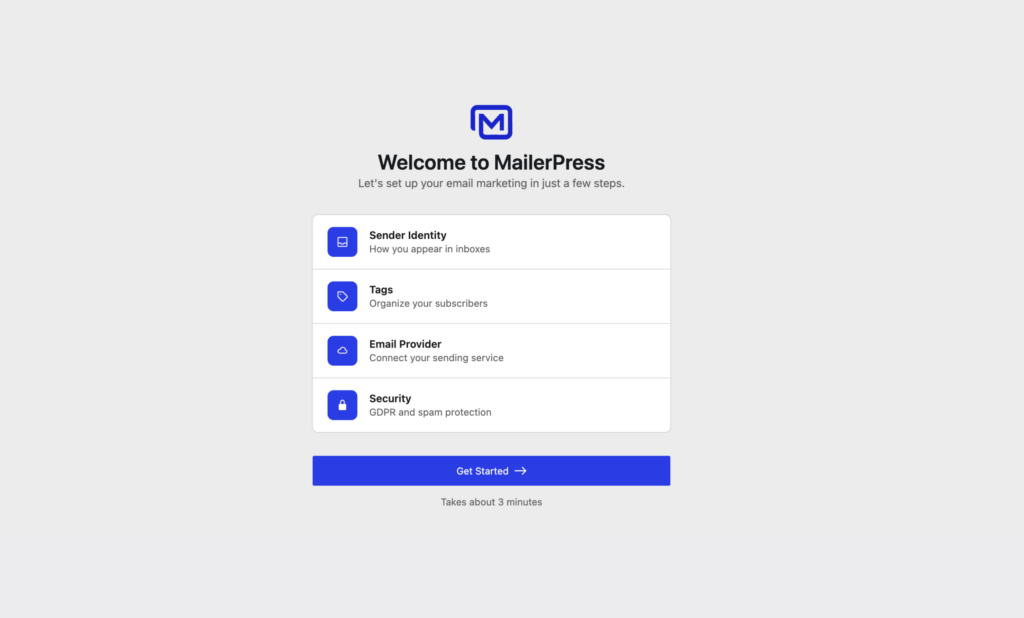
When you activate MailerPress, you’re greeted with a setup wizard that takes about 3 minutes. Four steps. That’s it.
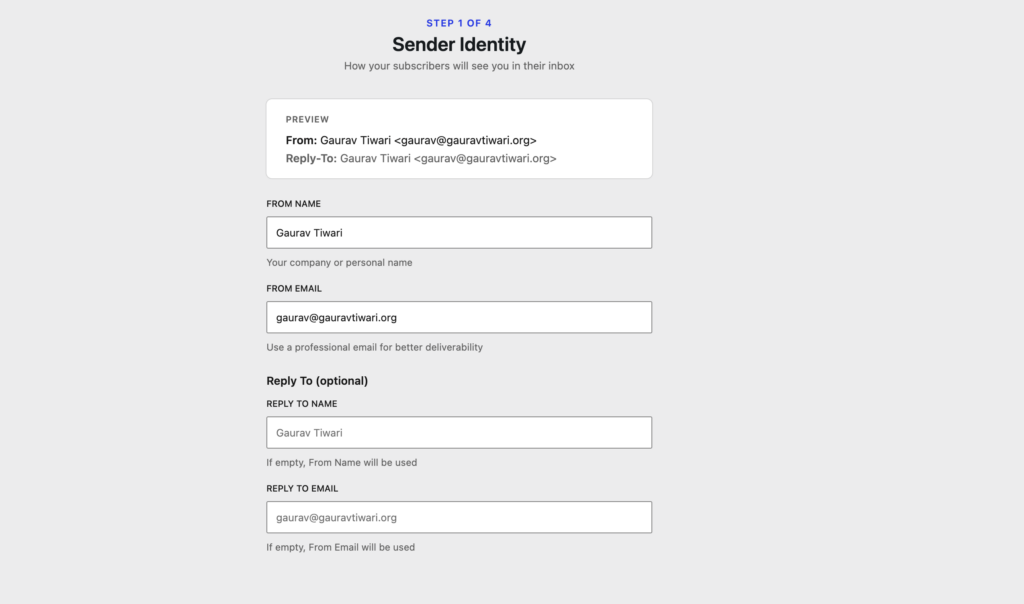
Step 1: Sender Identity
You configure your “From” name, email address, and reply-to details. The preview at the top shows exactly how your subscribers will see you in their inbox. I set mine to “Gaurav Tiwari” with gaurav@gauravtiwari.org. Clean interface, no unnecessary options cluttering the screen.
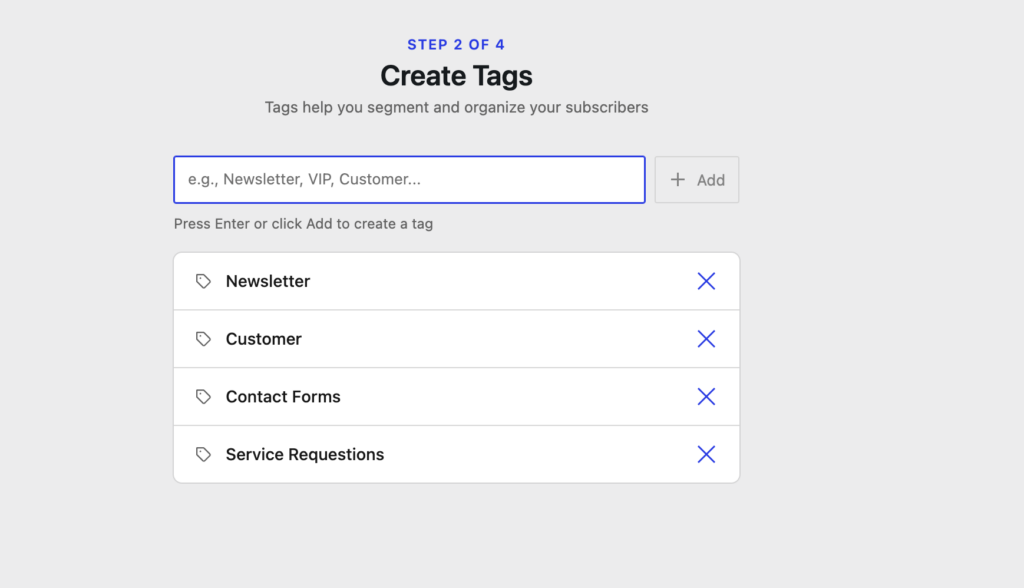
Step 2: Create Tags
This is where you organize your subscribers from the start. I created four tags: Newsletter, Customer, Contact Forms, and Service Requests. You can always add more later, but I like that the wizard pushes you to think about segmentation early instead of dumping everyone into one giant list.
Step 3: Email Provider
Here you connect your sending service. The wizard shows your Configured Providers and makes it easy to set one as primary. I started with Custom SMTP connected to Emailit (smtp.emailit.com on port 587 with TLS), and PHP Mail as a fallback. The SMTP configuration panel is straightforward. Host, port, encryption method, authentication credentials, default sender address. Nothing confusing. For supported ESPs, this is even easier.
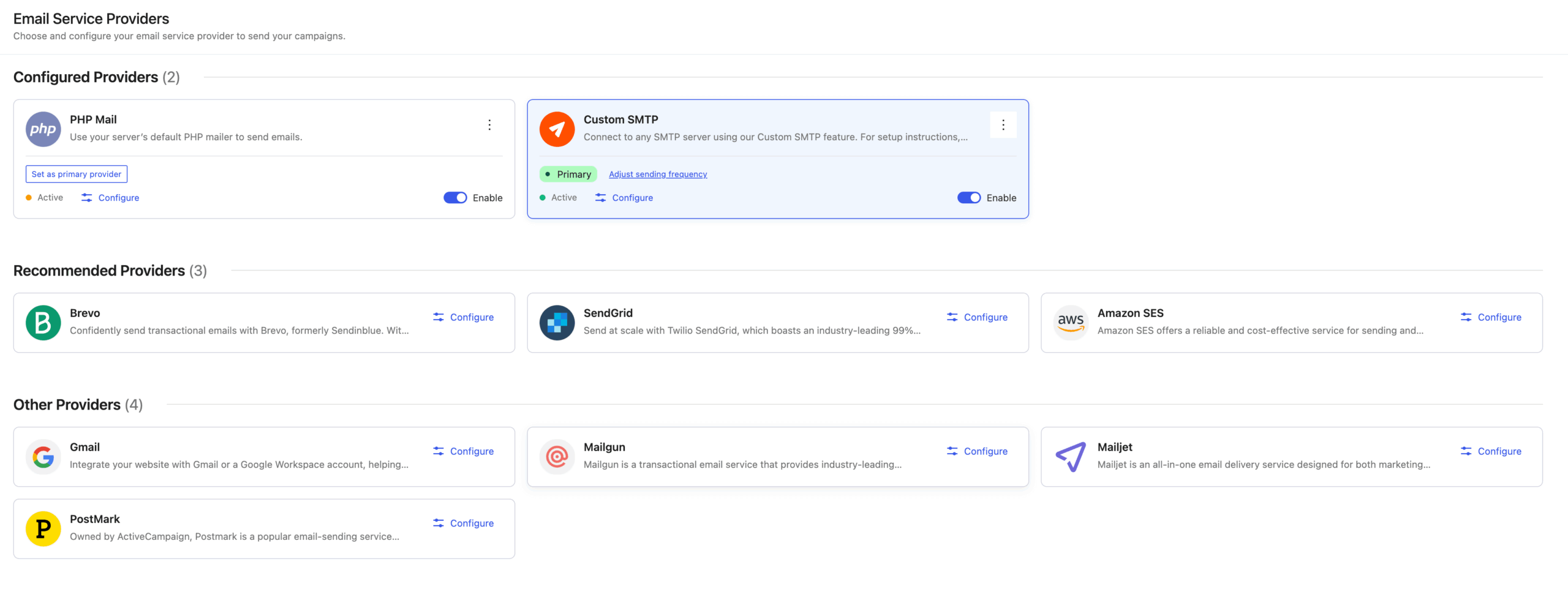
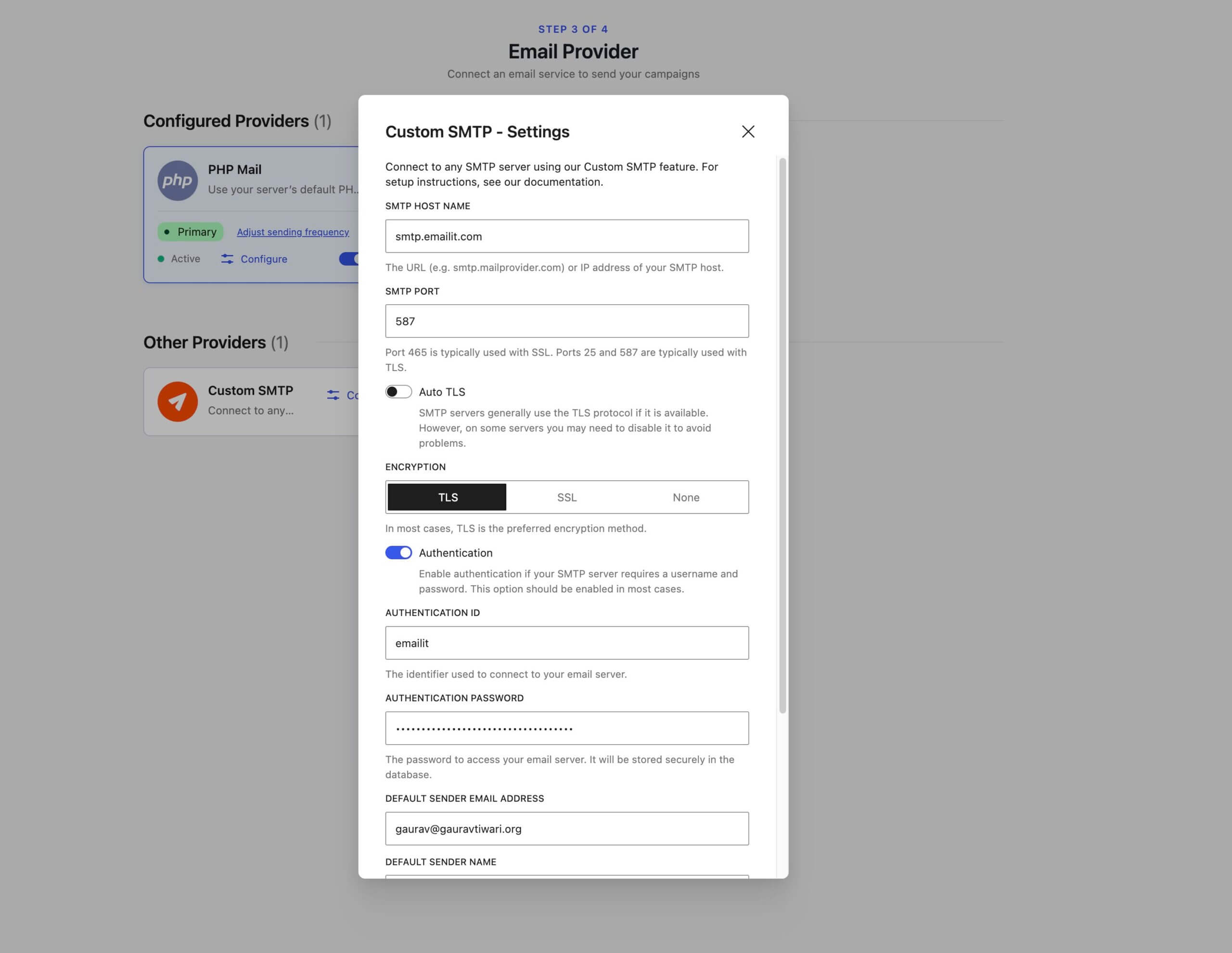
You can also adjust sending frequency right from the provider card, which is a smart touch. Send too fast and your ESP throttles you. MailerPress gives you control over that from day one.
Step 4: Security and Compliance
The final step covers GDPR essentials and spam protection. Manage Subscription Page, Unsubscribe Page (both with preview links), Honeypot Protection, and Rate Limiting (5 submissions per minute per IP by default). All toggles, all sensible defaults.
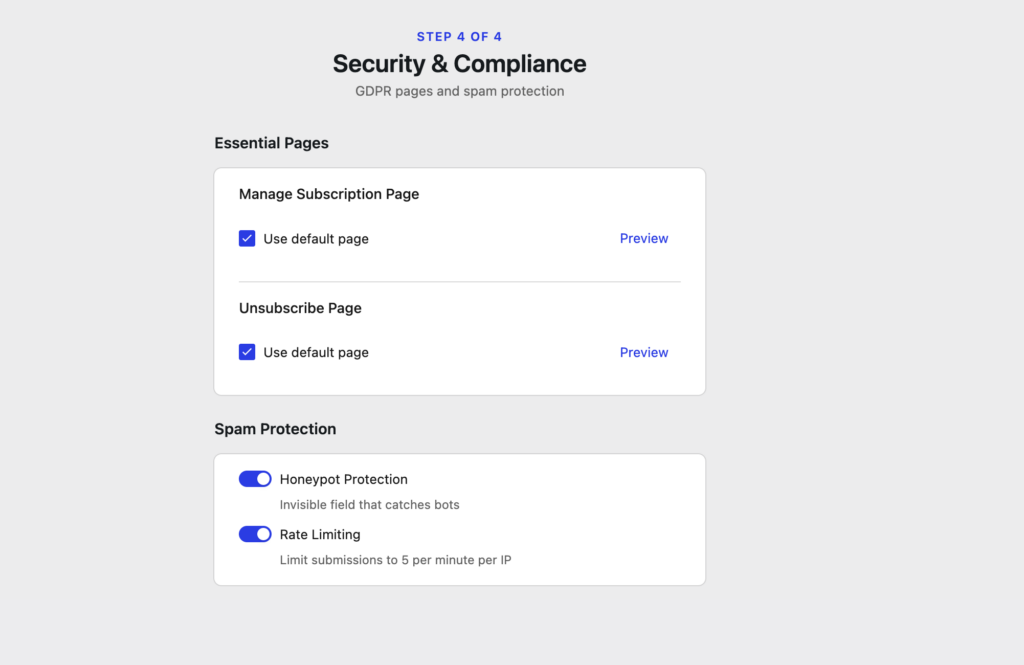
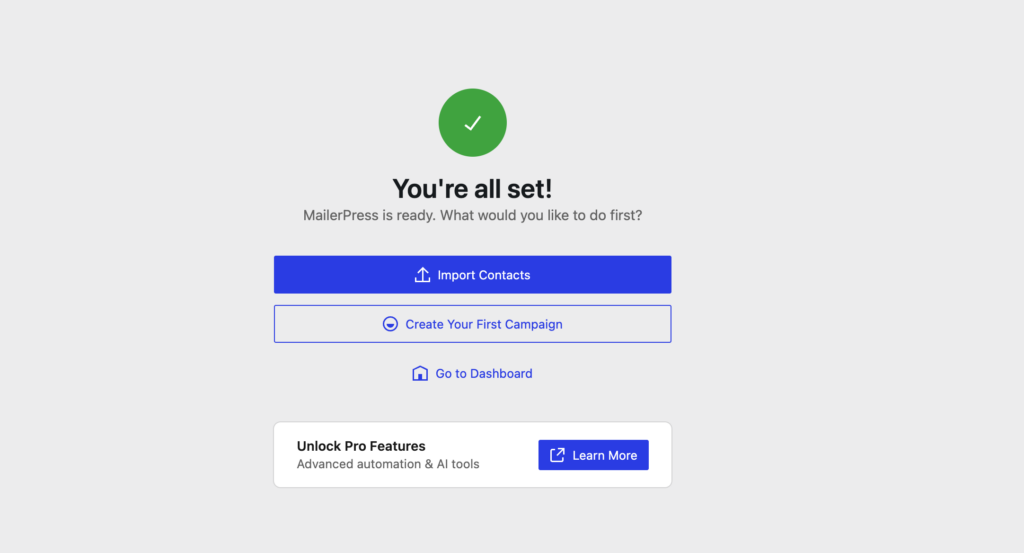
After that? “You’re all set.” Import contacts, create your first campaign, or head to the dashboard. The whole process took me under 3 minutes, and I was ready to send.
The Global Settings Panel
Once you’re past the wizard, the full settings panel gives you more control. Running MailerPress Pro 1.4.2, my settings screen shows sections for General, Spam Protection, Sign-up Confirmation, Sending Frequency, Embed Forms, AI Settings, White Label, and License management.
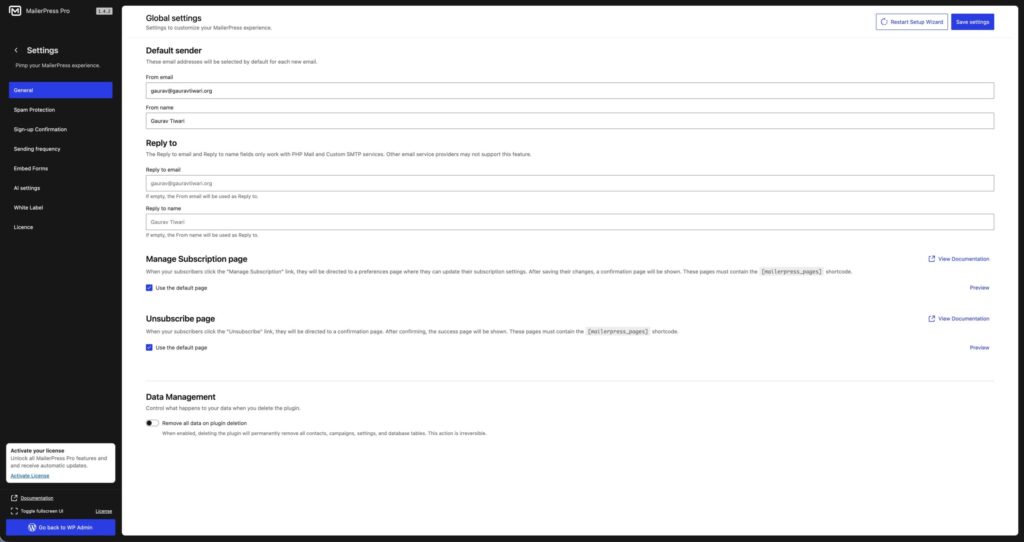
One thing I noticed and appreciated: there’s a “Data Management” section at the bottom where you can choose whether all MailerPress data gets removed when you uninstall the plugin. This is a small detail that matters a lot. Some plugins leave database tables behind even after deletion. MailerPress gives you the choice, and that’s the right approach.
The fact that you can restart the Setup Wizard at any time (there’s a button in the top-right corner of the settings page) is also nice. If you’re changing ESPs or reorganizing your setup, you don’t have to dig through individual settings pages.
The Email Editor Experience
I’ll be honest… I was skeptical about using the block editor for emails. I’ve built plenty of WordPress content with Gutenberg/Block Editor, but email HTML is a different beast. Email clients are notoriously bad at rendering modern HTML/CSS. What looks perfect in Chrome might fall apart in Outlook 2019 or the Gmail app on Android.
MailerPress handles this by using MJML under the hood for responsive email generation. You build in the block editor, but the output is properly formatted email HTML that renders consistently across clients. You can also import MJML templates directly if you have existing designs.
The block library is solid for email use. You get the standard text and image blocks, but also email-specific ones like a Countdown timer, Social icons, a Query block (more on that in a second), and List Items. There’s also a dedicated Video block that handles the thumbnail-with-play-button pattern that works in email.
One feature I appreciate: the editor shows the email size in kilobytes as you build. Now, this might sound minor, but Gmail clips emails over 102KB. If you’ve ever sent a beautiful newsletter only to have it truncated with a “View entire message” link at the bottom, you know how frustrating that’s. Being able to see the weight in real-time prevents that.
The editor also supports revisions. So you can go back to a previous version of your email design if you mess something up. And there’s an autosave delay you can adjust through a developer filter if the default feels too aggressive or too slow.
The Query Block is Quietly Powerful
The Query block deserves its own mention because, honestly, I think it’s one of the most underrated features in MailerPress. It lets you pull content directly from your WordPress database into your emails. Posts, pages, WooCommerce products, custom post types, ACF fields, anything.
So if you publish a weekly roundup of your latest blog posts, you don’t need to manually copy links and excerpts into your email. You set up a Query block, configure it to pull your last 5 posts, style it once, and you’re done. Every time you send, it grabs the latest content automatically.
This also powers the automated campaign feature. Set up a campaign with a Query block, define your schedule, and MailerPress sends your latest content to subscribers automatically. Like a WordPress-native version of Mailchimp’s RSS-to-email, except it works with any post type and gives you full design control.
For someone running a blog with regular content, this alone can save hours per month. I used to manually build my newsletter every Friday. Copy the title, write the excerpt, format the link, add the image… for five posts, that’s 30-40 minutes of tedious work. The Query block eliminates most of it.
AI Features
MailerPress Pro includes AI-powered email creation. You get to choose your AI provider (OpenAI, DeepSeek, or Mistral) and the specific model. I’ve got it set up with OpenAI using GPT-4o, which works well for text generation.
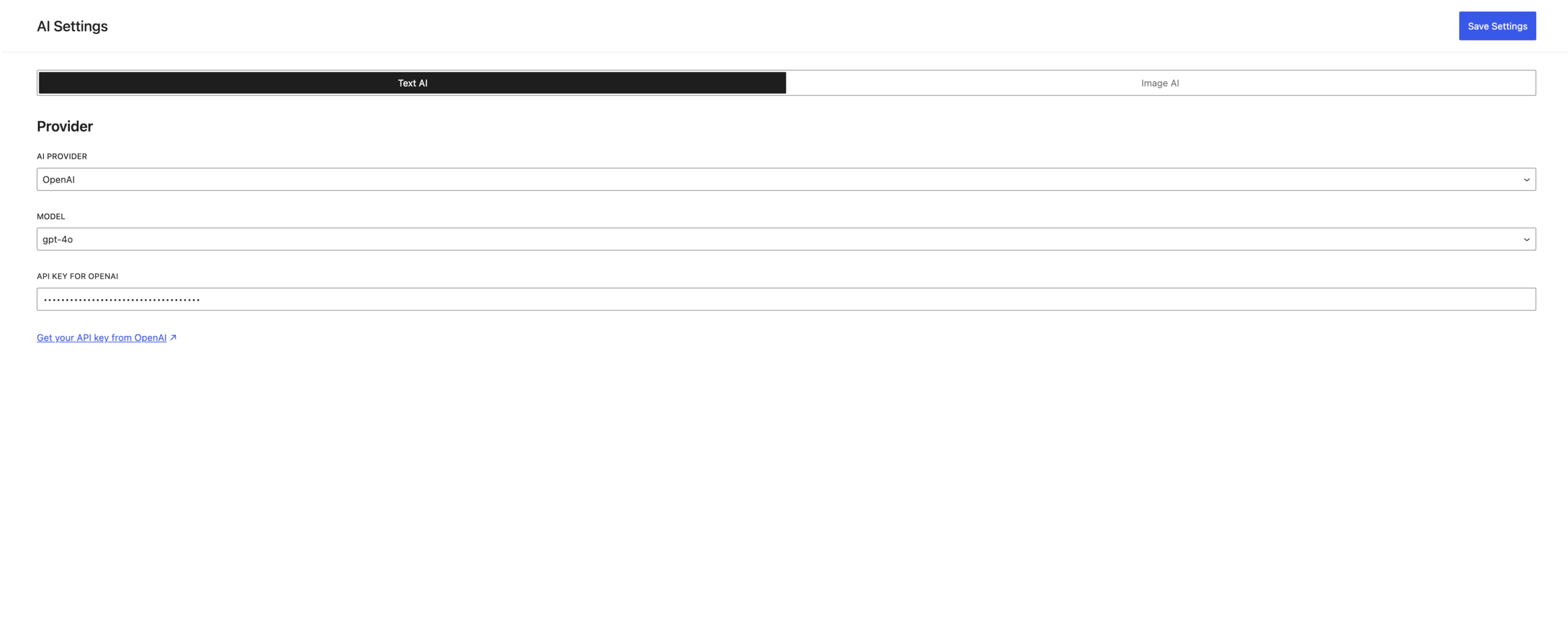
The AI settings panel is split into two tabs: Text AI and Image AI. Text AI lets you generate email copy, translate newsletters, and tweak content. Image AI (powered by Google AI Studio with Gemini/Nano Banana) lets you generate images from prompts directly inside the email editor.
I’ve played with it. It’s… fine. Useful for generating draft content or translating a newsletter for a different audience. But I wouldn’t rely on it for final copy. My newsletter readers expect my voice, not AI-generated filler. That said, the translation feature could be genuinely valuable if you serve a multilingual audience. And the image generation is a nice-to-have for creating quick visuals when you don’t have a designer on call.
What I like about the implementation: you bring your own API key. MailerPress doesn’t charge extra for AI usage or route requests through their servers. You connect directly to OpenAI (or DeepSeek, or Mistral), and you pay your own API costs. No hidden markup.
One Concern: GPT-4o Is Being Deprecated
Here’s something that bugs me, though. The model dropdown currently shows GPT-4o as an option. That’s fine today, but OpenAI has already announced that GPT-4o is heading toward deprecation. GPT-4.1, o3, and eventually GPT-5 are the future of that platform. If MailerPress doesn’t update their model list to include newer OpenAI models as they become available, you’ll be stuck with a deprecated model that gets slower, less reliable, and eventually gets shut off.
I don’t know what MailerPress’s update process looks like for AI model support. Do they hardcode the model list? Is it a dropdown they update with each plugin release? Can you manually enter a model string? These are questions I haven’t been able to answer yet, and the documentation doesn’t cover it.
This isn’t a dealbreaker for me because I don’t rely heavily on AI for my newsletters. But if you’re planning to make AI a core part of your email workflow, you should know that the current implementation is tied to specific models, and the AI space moves fast. The fact that MailerPress already supports three providers (OpenAI, DeepSeek, Mistral) suggests they’re thinking about flexibility, but I’d feel more confident if they let you enter any model string manually or updated the model list faster.
ESP Integrations and Deliverability
This is something I want to talk about separately because, well, it’s where most self-hosted email tools fail. You can build the prettiest newsletter in the world, but if it lands in spam, none of it matters.
MailerPress doesn’t try to reinvent email delivery. It connects to established providers and lets them handle the hard part. As of the latest version, you can send through SendGrid, Brevo (formerly Sendinblue), Mailjet, Mailgun, Postmark, Amazon SES, and Gmail/Google Workspace. That’s a solid list that covers most use cases and budgets.
I’m going with Emailit for my main site because I’ve used their infrastructure for a couple of years and trust their deliverability. But for client sites with smaller lists? Amazon SES at roughly $0.10 per 1,000 emails is hard to beat on cost.
The bounce handling system got a complete overhaul in v1.2.0. It now works directly with ESP APIs rather than relying solely on SMTP responses. That’s a big deal. Proper bounce management keeps your sender reputation clean. And with detailed email logs showing failed deliveries, you can actually troubleshoot when something goes wrong instead of guessing.
One more thing worth mentioning: the v1.3.0 release introduced sending frequency settings with profile-based sending. So you can throttle how fast emails go out based on your ESP’s rate limits. Send too fast through most ESPs and you’ll get throttled or flagged. MailerPress lets you control that properly now.
Form Integrations and Subscriber Management
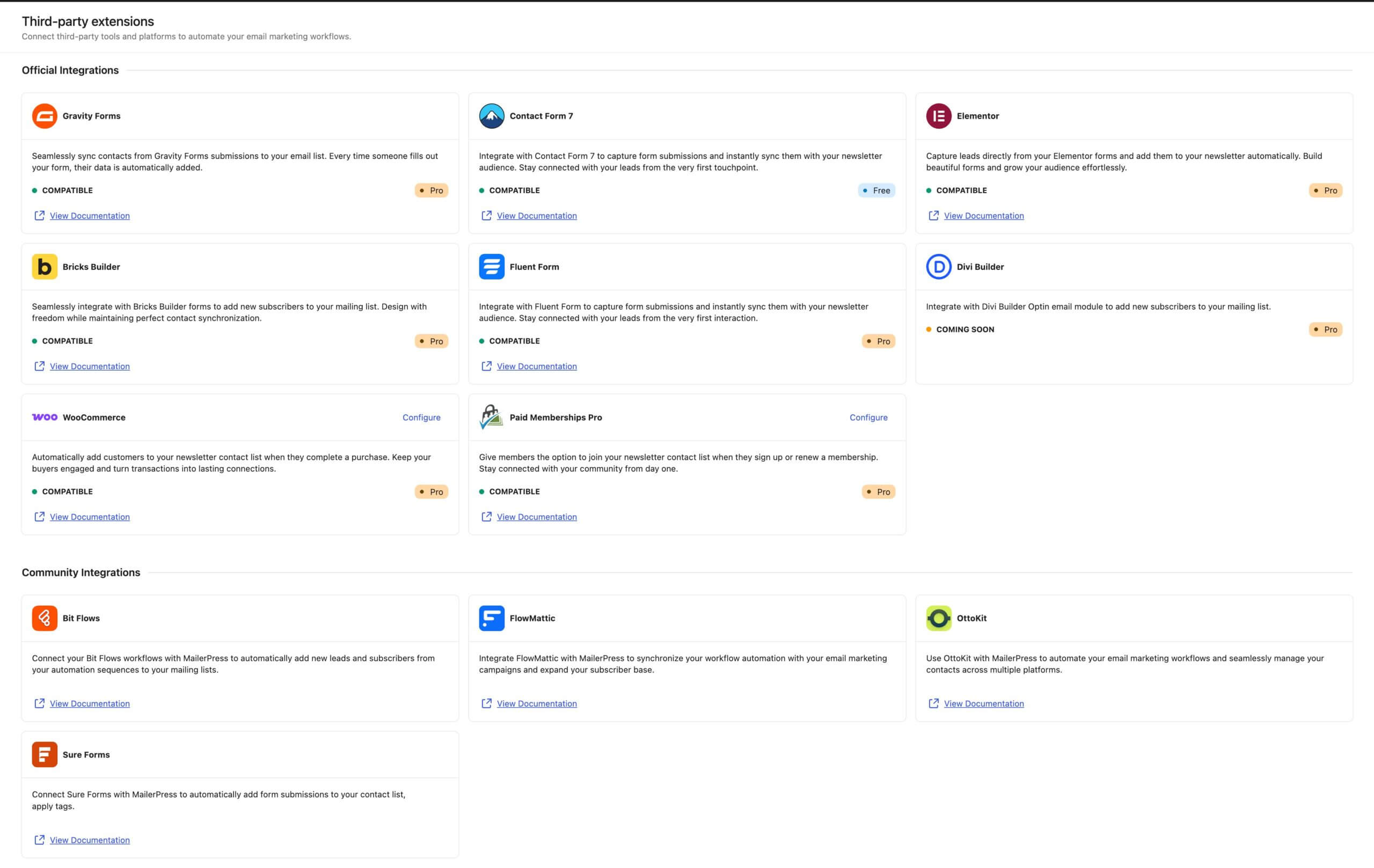
MailerPress has native integrations with the major WordPress form plugins: Contact Form 7, Gravity Forms, Fluent Forms, Elementor forms, Core Forms and Bricks Builder forms. There’s also a universal shortcode that works with any page builder, and since v1.3.0, you can create embeddable forms for use on external websites. That last one is interesting if you run multiple properties and want a single subscriber list.
What I appreciate about the subscriber management is the double opt-in system. It’s built in, it works with editable confirmation emails, and since v1.3.0 there are automatic reminder emails for people who don’t confirm. That last bit? Surprisingly rare in WordPress email plugins. And it genuinely improves confirmation rates.
The v1.2.0 release also added custom redirect URLs after subscription confirmation. Sounds small, but if you’ve ever wanted to send new subscribers to a specific thank-you page, a download, or an onboarding sequence page… this matters. Before that, I was using hacky JavaScript redirects through my form plugins. Now it’s a setting in MailerPress.
Contact management itself feels modern. Custom fields, lists, tags, segmentation (Pro), notes on contacts, and CSV import/export with auto-column mapping. I imported a test batch of 500 contacts from a CSV and the auto-mapper correctly identified email, first name, and last name columns without me touching anything. Small thing, but it shows attention to the user experience.
REST API and Developer Capabilities
OK, this is where I need to be upfront. I’ve been making heavy use of REST APIs lately, especially with Claude Code for building custom integrations and automations. So naturally, I wanted to know what MailerPress exposes through the WordPress REST API.
The honest answer? It’s early days. MailerPress’s features page lists “Developer friendly” and “Webhooks” as “Coming soon.” The developer documentation currently covers five topics: adjusting the autosave delay, custom capabilities/permissions, white label setup, revision limits, and cron job configuration. No REST API endpoint documentation yet.
That said, MailerPress is built on modern WordPress architecture. Its entire admin interface uses the block editor and React-based components, which means it almost certainly registers internal REST routes for its own operations (campaigns, contacts, lists, settings). These are the same patterns SEOPress follows, and SEOPress has good developer tooling. So I’m cautiously optimistic that public REST API endpoints will come as the plugin matures. Fingers crossed.
The custom capabilities system is already solid. MailerPress lets you define granular permissions for who can access, edit, or manage different areas of the plugin. That’s important for agencies and multi-author sites where you don’t want every editor poking around in email settings.
For now, if you need programmatic access to MailerPress data, you’d likely need to query the WordPress database directly or… wait for the official API. Given the development pace (18 releases in 7 months), I’d bet on REST API endpoints landing within a few months. But I’d be dishonest if I told you they’re here today.
What MailerPress Does Well
Development Speed
I keep coming back to this because it matters. Eighteen releases in seven months. Think about that. Features shipping consistently. Bugs getting fixed within days, not months. The v1.2.0 release alone added Elementor support, Bricks Builder integration, a completely refactored bounce system, ACF support in the Query block, detailed email logs, and custom redirect after subscription confirmation. That’s one release.
Compare this to some WordPress email plugins I’ve used that ship maybe three updates a year and fix bugs “in the next major release.” The MailerPress team is clearly invested in rapid iteration.
WordPress-Native Architecture
Everything lives inside your WordPress dashboard. Contact management, campaign creation, analytics, settings. No external accounts to manage. No separate login. No API keys to generate just to connect your own website to your own newsletter tool. Just… WordPress.
Your email templates inherit your theme’s colors and typography from theme.json. If you change your brand colors in your WordPress theme, your emails update automatically. That’s a small detail that shows the developers understand how WordPress users actually work.
Pricing That Makes Sense
MailerPress has a genuinely useful free version on WordPress.org, which is worth mentioning because, look, most “free” WordPress email plugins cripple the free tier so badly it’s unusable. That’s not the case here.
The free version includes the block-based email editor, content retrieval (posts, pages, products, custom post types), template manager, FSE compatibility with theme.json, Google Fonts, CSV import/export, unlimited contacts/lists/tags, campaign management, GDPR-friendly unsubscribe and subscription management, double opt-in with editable confirmation emails, MJML template import, WooCommerce integration, automated post sending, merge tags, and sending through PHP Mail or custom SMTP.
That’s a lot. Honestly, if you’re running a single blog with a small list and you’re comfortable setting up custom SMTP through your host or a service like Emailit, the free version might be all you need.
Pro unlocks the things that matter at scale: premium ESP integrations (SendGrid, Brevo, Mailjet, Mailgun, Postmark, Amazon SES, Gmail/Google Workspace), AI features (OpenAI, DeepSeek, Mistral), premium form plugin integrations (Gravity Forms, Contact Form 7, Fluent Forms, Elementor, Bricks), premium templates, mobile management, white label, contact segmentation, and priority support. Automations, webhooks, and custom fields are listed as “Coming soon” under Pro.
Here’s the pricing for Pro:
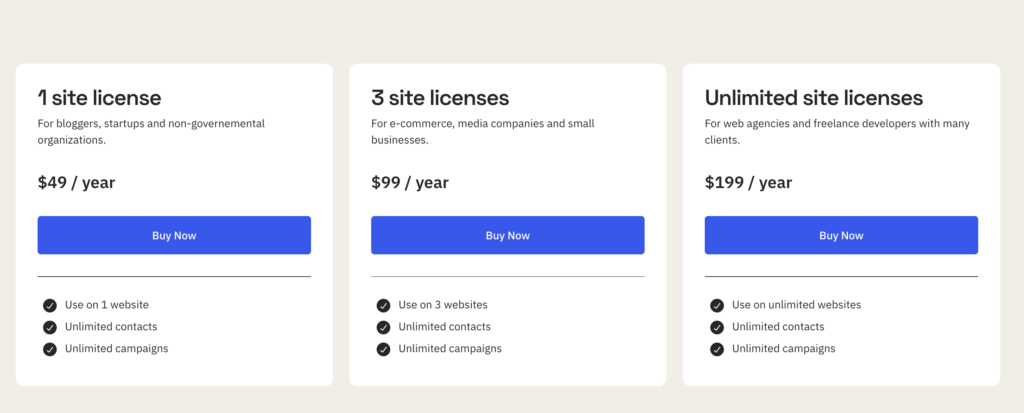
- 1 site license: $49/year. Best for individual bloggers, startups, and NGOs.
- 3 site license: $99/year. Fits e-commerce sites, media companies, and small businesses.
- Unlimited site license: $199/year. Built for agencies and freelancers managing client sites.
All plans include unlimited contacts and unlimited campaigns. No per-subscriber pricing. No sending limits from MailerPress’s side (those depend on your ESP). 14-day money-back guarantee, no questions asked.
I got my unlimited license at $99 as a lifetime deal during MailerPress’s Black Friday launch in November 2025. That LTD is no longer available. Current pricing is annual only.
But even at $199/year for unlimited sites, it’s remarkably cheap compared to what you’d pay for Mailchimp, ConvertKit, or any other SaaS email tool at scale. Mailchimp charges $20/month for just 500 contacts on their Standard plan. That’s $240/year for one list on one site. MailerPress gives you unlimited everything for less than that. And you own your data.
WordPress SMTP and Email Services Compared
| Feature | FluentSMTP | WP Mail SMTP | Amazon SES | Mailgun | SendGrid | Postmark |
|---|---|---|---|---|---|---|
| Type | WP Plugin (free) | WP Plugin ($49/yr+) | Email Service | Email Service | Email Service | Email Service |
| Free Tier | Fully free forever | Free (limited providers) | 62K emails/mo (12 months) | 1,000 emails/mo (3 months trial) | 100 emails/day free | 100 emails/mo free |
| Cost at 50K emails/mo Pricing | $0 (plugin) + provider cost | $49–$399/yr + provider cost | $5.00 | $15.00 | $14.95 | $25.00 |
| Deliverability | Depends on provider | Depends on provider | Excellent | Excellent | Good | Excellent (transactional focus) |
| Email Logging | Yes (built-in, detailed) | Yes (Pro only) | Via CloudWatch | Yes (dashboard) | Yes (dashboard) | Yes (dashboard) |
| Resend Failed Emails | Yes | Yes (Pro) | No (manual) | No | No | No |
| Multi-Provider Routing | Yes (route by from address) | Yes (Pro, backup connection) | N/A | N/A | N/A | N/A |
| Setup Difficulty | Easy (WP plugin) | Easy (WP plugin) | Moderate (AWS console) | Easy (API key) | Easy (API key) | Easy (API key) |
| Best For | Any WP site needing SMTP | Non-technical WP users | High-volume senders (cheapest) | Developer-friendly email API | Marketing + transactional combo | Transactional email reliability |
| Visit FluentSMTP | Visit WP Mail SMTP | Visit AWS SES | Visit Mailgun | Visit SendGrid | Visit Postmark |
Spam Protection
MailerPress supports honeypot and rate-limiting for form submissions (5 per minute per IP by default). Basic stuff, but important. Too many WordPress form plugins leave this as an afterthought. MailerPress built it in early.
White Label Support
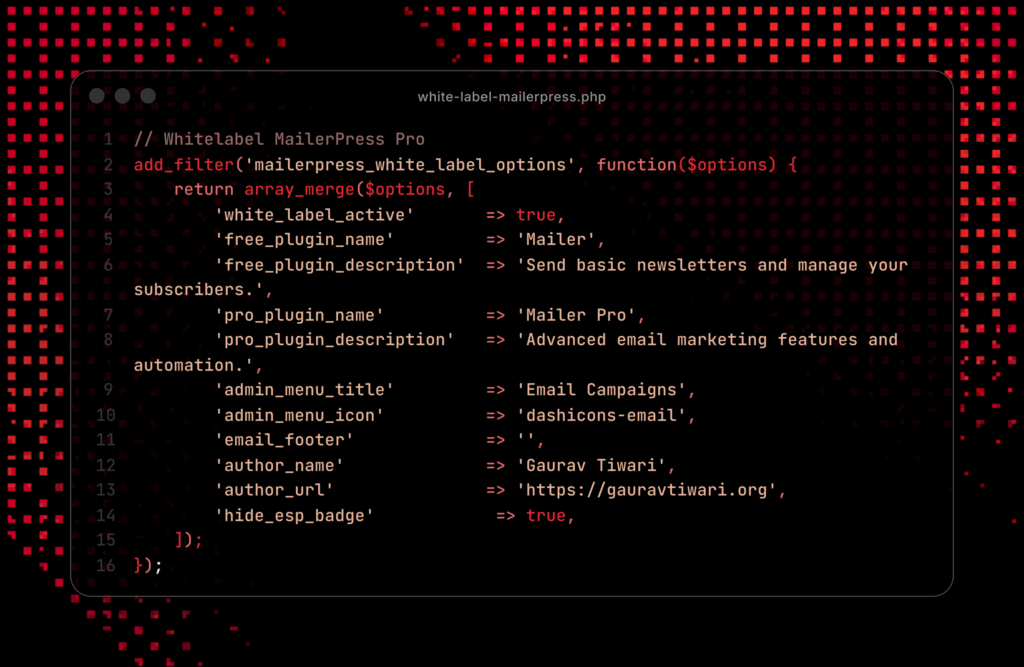
If you build sites for clients (and I do), white-label support matters. MailerPress lets you remove their branding and replace it with your own.
This is what I use to white-label in one snippet.
| Service | Free Tier | Cost at 10k emails/mo | MailerPress Support | Best For |
|---|---|---|---|---|
| Amazon SES | None (pay-per-use) | ~$1 | Yes | High volume, lowest cost |
| SendGrid | 100/day | $19.95/mo | Yes | Reliable API, good docs |
| Mailgun | 100/day (trial) | $15/mo | Yes | Developer-friendly |
| Brevo (Sendinblue) | 300/day | $25/mo | Yes | EU compliance, easy setup |
| Postmark | None | $15/mo | Yes | Transactional + newsletter |
What MailerPress Doesn’t Do Well (Yet)
No Full Automation Workflows
Automated campaigns exist, but full automation workflows (like “when someone buys X, add them to list Y and send sequence Z”) aren’t here yet. The features page lists “Automations” as “Coming soon.” For me, this is fine because I’m using it primarily for newsletter campaigns. But if you need complex marketing automation, you’ll want to wait or supplement with something like FluentCRM or AutomateWP.
Webhooks and REST API Still Coming
Webhooks are listed as “Coming soon” on the features page. And there’s no documented public REST API for developers yet. For a plugin that’s positioning itself as developer-friendly, these need to ship soon. The irony of me leaving Substack partly over missing webhooks and moving to a plugin that also doesn’t have them yet… yeah, that’s not lost on me. But MailerPress has at least committed to building them, and given their development velocity, I believe they’ll deliver. Plus, being on WordPress gives me database-level access to my data that Substack never would, webhooks or not.
Documentation Could Be Better
The documentation exists and covers the basics, but it’s not as deep as I’d like. The “Developers” section has only five entries. Five. I’m hoping this improves as the plugin matures and as the REST API and webhooks get built out.
Young Plugin, Small Community
MailerPress launched in October 2025 (stable v1.0). That means the community is still small. You won’t find dozens of YouTube tutorials or extensive forum threads like you would for Mailchimp or FluentCRM. If you hit an obscure issue, you’re relying on their support team rather than community knowledge. Support is available in English and French, which makes sense given the team is based in France.
MailerPress vs My Other Self-Hosted Options
I own lifetime licenses for both Noptin and Mailster. I also have access to FluentCRM through its integration with FluentCart. So… why am I choosing MailerPress over tools I’ve already paid for?
MailerPress vs Noptin
Noptin is a solid free newsletter plugin with a decent Pro version. I’ve used it on smaller sites and it works fine for basic email collection and sending. But Noptin’s email editor feels dated compared to MailerPress’s block-based approach. The feature gap between the two has been growing rapidly, especially on the integration side. Noptin doesn’t have the ESP integrations, the form plugin connections, or the pace of development that MailerPress does.
MailerPress vs Mailster
Mailster has been around for years and it’s a mature plugin. Good template system, reliable sending. But it feels like a product that hit its peak a few years ago. Updates come slower. The editor looks like it belongs in 2020, honestly. And it doesn’t have the modern WordPress integration (block editor, theme.json support) that MailerPress offers. If you’re already running Mailster and happy with it, there’s no urgent reason to switch. But for new projects, I think MailerPress is the better bet.
MailerPress vs FluentCRM
FluentCRM is more of a full CRM with email marketing bolted on. It’s powerful, especially if you’re in the Fluent ecosystem (FluentForms, FluentCart, FluentBoards). The automation workflows in FluentCRM are more mature than what MailerPress currently offers. But FluentCRM is also more complex. If all you need is a clean way to manage subscribers and send beautiful newsletters from WordPress, MailerPress is simpler to set up and use. I’ll probably keep FluentCRM for e-commerce sites where I need CRM functionality, but for content-focused blogs and newsletters, MailerPress wins.
| Feature | MailerPress | FluentCRM | Mailster | Noptin |
|---|---|---|---|---|
| Price | $99 lifetime | $129/yr | $99 lifetime | $49/yr |
| Block Editor | Yes (native Gutenberg) | No (custom builder) | No (drag-and-drop) | Basic |
| Public Archives | Yes | No | No | No |
| REST API | Full REST API | Limited hooks | No | Basic |
| ESP Integrations | Amazon SES, SendGrid, Mailgun, Brevo, Postmark | Amazon SES, SendGrid, Mailgun | Amazon SES, SendGrid, Mailgun, SparkPost | Amazon SES, SendGrid |
| Automation | Basic (coming soon) | Advanced sequences | Autoresponders | Basic |
| Development Pace | 18 releases in 8 months | Mature (slower updates) | Established | Active |
| WooCommerce | Planned | Deep integration | Yes | Basic |
Who Should Use MailerPress
Bloggers Moving Away From SaaS Platforms
If you’re on Substack, Beehiiv, ConvertKit, or any SaaS newsletter platform and you’re tired of monthly per-subscriber pricing, MailerPress is worth a serious look. You get to own your subscribers, host your archive, and pay a flat annual fee regardless of list size.
WordPress Developers Building Client Sites
The unlimited license, white-label support, and growing list of integrations make MailerPress a good choice for agencies and freelancers. Install it on every client site, connect their preferred ESP, and you’ve got email marketing built in without recommending (and supporting) a third-party SaaS tool.
If you’re building client sites and want to include email marketing as part of your deliverable, check out my email automation services and newsletter setup services. I’ve configured email workflows on 50+ client projects.
Content Creators Who Publish Regularly
If you publish blog posts on a regular schedule and want to automatically share them with your email list, the Query block and automated campaigns make this dead simple. Set it up once, forget about it.
Entrepreneurs Who Want Full Control
If you care about owning your subscriber data, hosting your content on your domain, and not being locked into any single platform, MailerPress fits that philosophy perfectly. Your data stays in your WordPress database. You can export it, query it, back it up, and move it whenever you want.
Before committing to any platform, use my email marketing cost calculator to compare what you’d spend on SaaS vs self-hosted options over 12 months. The numbers are eye-opening once your list crosses 5,000 subscribers.
Who Should NOT Use MailerPress
If you need complex marketing automation workflows right now (drip sequences, behavior-triggered emails, lead scoring), MailerPress isn’t ready for that yet. Look at FluentCRM, Groundhogg, or a SaaS tool like ActiveCampaign.
If you don’t have a WordPress site and don’t plan to get one, obviously MailerPress isn’t for you. It’s a WordPress plugin, not a standalone platform.
If you need battle-tested enterprise reliability with 24/7 phone support and SLAs, you’re probably better off with an enterprise SaaS solution. MailerPress is great for individuals, small teams, and agencies, but it’s not positioning itself as an enterprise tool.
My Migration Plan
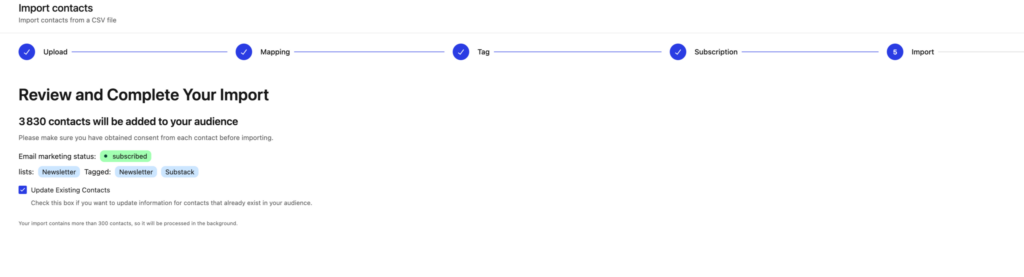
I’m consolidating about 5,500 subscribers (3800+ from Substack plus 1,500+ from other sources) into MailerPress Pro. The plan is straightforward:
Export subscribers from Substack as CSV (which, thankfully, Substack does allow). Clean and deduplicate the list. Import into MailerPress using the CSV importer with auto-mapping. Set up double opt-in to reconfirm engaged subscribers. Connect SendGrid as the ESP for reliable delivery. Build my newsletter template once using the block editor. Set up public newsletter archives on my site.
The biggest unknown is how the Substack subscribers will respond to the reconfirmation email. Some percentage will inevitably drop off. That’s expected and, honestly, healthy. I’d rather have 3,500 engaged subscribers than 5,500 where half don’t open my emails.
The Uncomfortable Truth About Platform Dependency
Read: Content Distribution, You Have Been Doing It All Wrong!
I wrote about this same principle in my guide to making money blogging. Platform dependency is the biggest risk to your income, and email is one of the few channels you can truly own. Pair your email strategy with a solid blogging checklist and the compounding effect is real.
Every creator who builds on a platform they don’t control is taking a risk. Substack could change their terms tomorrow. They could start charging creators a cut of free newsletter revenue. They could kill the product entirely. You’d get a CSV export of email addresses and that’s it.
I’ve seen this happen before. Medium changed their algorithm and writers lost their audiences. Twitter changed their API and third-party apps died overnight. Google killed Reader and an entire ecosystem of RSS-based tools collapsed.
Your email list is the most valuable digital asset you own. Storing it on someone else’s platform, behind an interface you can’t customize, without API access or webhooks, without the ability to build your archive on your domain… nah. That’s a risk I’m no longer willing to take.
MailerPress isn’t perfect. It’s young. It’s missing features I want. Somethings don’t work well yet. But it gives me what matters most: control over my data, my content, and my relationship with my readers. And right now, that’s enough. And the development velocity tells me the missing features are coming.
MailerPress Review

Pros
- Native WordPress block editor for emails with FSE and theme.json support.
- 18 releases in 7 months. Fastest development pace I've seen in a WordPress email plugin.
- Built by the SEOPress team. Proven track record with WordPress products.
- Public newsletter archives live on your domain. Your SEO, your traffic.
- Unlimited contacts and campaigns. No per-subscriber pricing. $49/year for 1 site.
- AI email creation with your own API key. No markup on OpenAI, DeepSeek, or Mistral usage.
Cons
- No full automation workflows yet. Drip sequences and behavior triggers listed as coming soon.
- No documented REST API or webhooks. Developer tools still marked as coming soon.
- AI settings show GPT-4o which is heading toward deprecation. Unclear how fast model list updates.
- Young plugin with thin documentation and small community. Limited third-party tutorials.
Summary
MailerPress is the WordPress email marketing plugin I’ve been waiting for. Built by the SEOPress team, it uses the native block editor for email creation, supports Full Site Editing with theme.json, and connects to every major ESP (SendGrid, Brevo, Amazon SES, Mailgun, Postmark, Mailjet). Public newsletter archives on your own domain sealed the deal for me. It’s young (launched October 2025) and missing automation workflows and REST API, but 18 releases in 7 months tells me the team ships fast. Best fit for bloggers, developers, and agencies who want email marketing inside WordPress without per-subscriber SaaS pricing.
Price: USD 49 /year
Try MailerPress FreeI bought MailerPress during their Black Friday launch in November 2025 because the $99 lifetime deal for unlimited sites was too good to pass up. But I’ll be honest, I sat on it for almost three months. I wasn’t sure it was ready. The plugin was barely five months old at that point. I kept watching the changelog, waiting.
Then public newsletter archives shipped in February 2026. That was the feature I needed to actually commit to the migration. I switched, and well… I’m liking it so far. The setup took under 3 minutes, my SMTP was configured in the wizard, and I sent a test campaign within the hour.
Is it the most feature-rich email marketing solution available for WordPress? No, not even close. FluentCRM has more automation features. Mailster has a more mature template library. But MailerPress has the best foundation I’ve seen for what a modern WordPress email plugin should be: block editor native, FSE compatible, ESP-agnostic, and built by a team (the SEOPress folks) that knows how to ship quality WordPress products consistently.
If you’re a blogger, developer, or entrepreneur who wants email marketing inside WordPress without the bloat, the monthly SaaS fees, or the platform lock-in, give MailerPress a serious look. The free version on WordPress.org is enough to test whether it fits your workflow. And if it does, the Pro upgrade is one of the better values in the WordPress plugin market right now.
I’ll update this review as I complete my migration and spend more time with the platform. Check back in a few months for the long-term report.
Get MailerPress if you want:
- Email marketing that lives entirely inside WordPress with native block editor and FSE support
- Flat annual pricing with no per-subscriber costs
- Public newsletter archives on your own domain (not someone else’s)
- AI-powered email creation with your own API key (no markup)
- A plugin backed by the same team that built SEOPress
Skip MailerPress if you want:
- Complex marketing automation workflows today
- Enterprise-grade support with phone access and SLAs
- A documented REST API for programmatic access right now
- Non-WordPress newsletter publishing
Starting at $49/year for a single site (or free on WordPress.org to test the waters), MailerPress is THE email marketing plugin I’d recommend for WordPress users in 2026. The Black Friday LTD is gone, but even at regular annual pricing, the value holds up. It’s not the most established option. But it’s the one I’m betting on. And I don’t make that bet lightly, trust me.
Disclaimer: This site is reader-supported. If you buy through some links, I may earn a small commission at no extra cost to you. I only recommend tools I trust and would use myself. Your support helps keep gauravtiwari.org free and focused on real-world advice. Thanks. - Gaurav Tiwari
Hi there!
A big thank you on behalf of the entire MailerPress team. We greatly appreciate this type of detailed feedback, which helps us understand our users’ expectations. We have already noted the areas for improvement in the product for future versions. 🙏
This is a clear, transparent, and well-balanced recommendation that highlights both the strengths and limitations of MailerPress. The focus on native WordPress integration, fair pricing, and user ownership of newsletters makes it especially appealing for creators who value control and simplicity. The honest disclaimer and realistic expectations further build trust, showing a thoughtful and credible endorsement rather than a one-sided promotion.