
 by
by
You can transfer a domain name without moving the website, email, or DNS. The safe sequence is to verify eligibility, capture a DNS baseline, unlock the domain, obtain the current authorization code, start the move at the gaining registrar, and verify the same public records after completion.
The dangerous shortcut is treating a registrar transfer and a nameserver cutover as the same operation. They are not. Move one control plane at a time, keep a rollback record, and do not change registration contact data immediately before the transfer unless you understand the resulting lock.
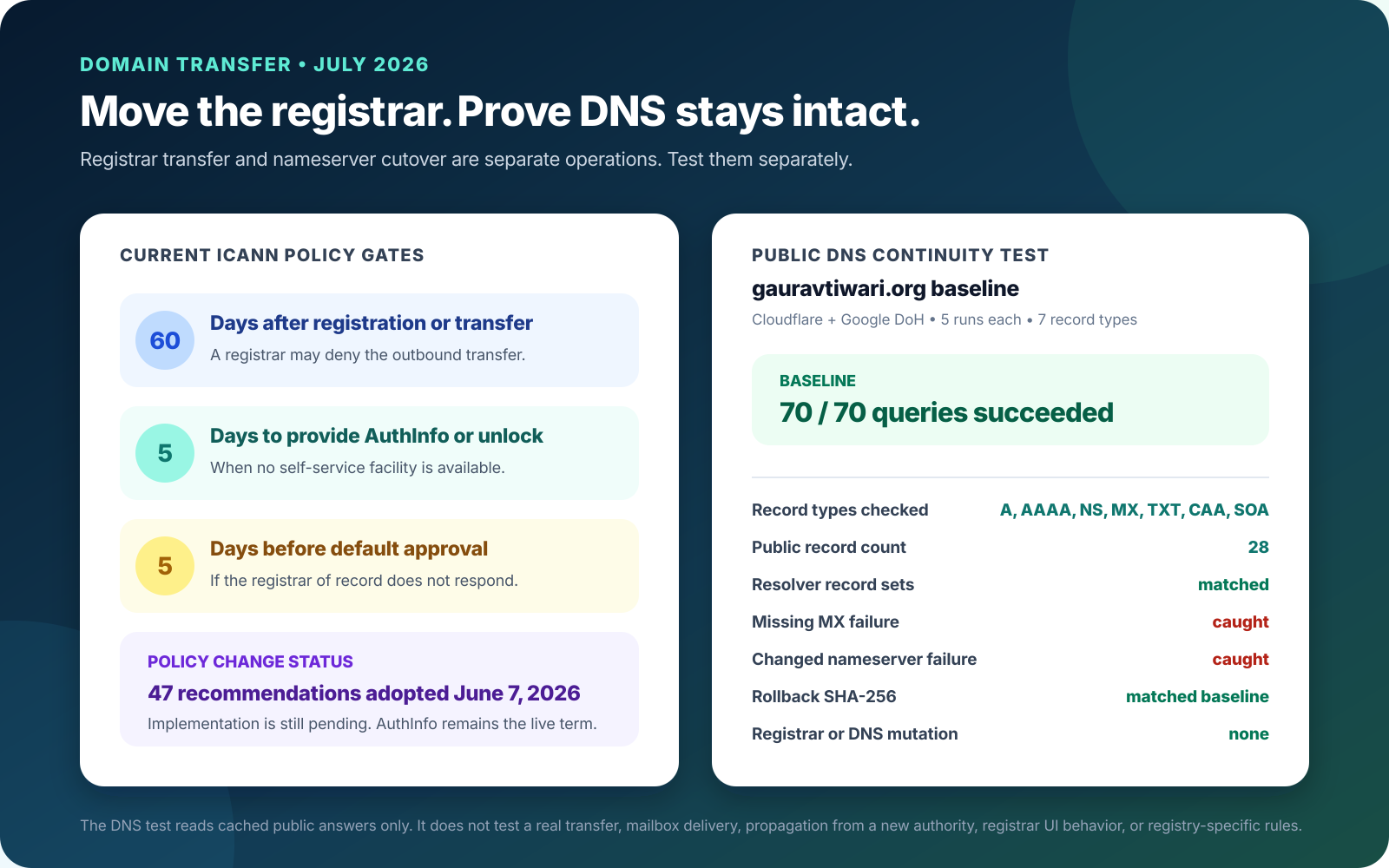
Policy correction for 2026: the effective ICANN policy still calls the credential AuthInfo or an Auth-Code. ICANN’s June 7, 2026 Board resolution adopted 47 recommendations, including the TAC term, but implementation is still pending as of July 29, 2026. A registrar dashboard may already use TAC, EPP code, authorization code, or transfer code for the same operational credential.
Why transfer your domain in the first place?
Transfer when the ongoing registrar relationship is the problem. Renewal price, account security, recovery, DNS constraints, support, and portfolio administration matter more than a one-year coupon.
- Renewal cost: compare the normal renewal, ICANN fee, taxes, premium-name pricing, and required multi-year term. Do not compare a promotional transfer with a standard renewal as if they were the same product.
- Security: require account 2FA, registrar lock, DNSSEC support, useful account alerts, and a recovery path you can test before an emergency.
- DNS freedom: Cloudflare Registrar requires Cloudflare authoritative nameservers. That is a feature when you want the combined stack and a constraint when you need Route 53, another DNS provider, or custom operational control.
- Portfolio control: consolidating can reduce missed renewals, but putting every domain in one account also increases the impact of an account takeover. Use roles, hardware-backed MFA where available, and a domain inventory.
A cheap registration can become an expensive dependency. The real costs of free web hosting follow the same pattern: the first-year sticker price says little about renewal, control, migration, or failure recovery.
When you should NOT transfer (and who should wait)
Run the eligibility gate before paying. The current ICANN Transfer Policy allows or requires denial in specific cases, and TLD registries can add their own procedures.
- Initial or recent-transfer lock: a registrar may deny a gTLD transfer within 60 days of initial registration or within 60 days of the last inter-registrar transfer.
- Change-of-registrant lock: a material change to the registrant name, organization, or email can trigger a 60-day lock. A registrar may offer an opt-out, but it must be chosen before the change. This is not an after-the-fact override.
- Dispute or order: a pending UDRP, URS, transfer dispute, or applicable court order can require denial.
- Expiration risk: there is no universal ICANN rule that blocks every transfer inside 30 days of expiry. Still, the authorization can expire if the domain expires before the registry transfer is submitted, and renewal timing can affect whether a transfer adds a year.
- No DNS inventory: wait if you cannot identify the current nameservers, website addresses, mail exchangers, verification TXT records, and DNSSEC state.
- Unsupported TLD or workflow: country-code domains can differ. For example, .uk-family transfers use an IPS tag rather than the standard Auth-Code flow.
Use ICANN Lookup to inspect the registrar, dates, and statuses. clientTransferProhibited usually means the domain is locked. A self-service unlock may be immediate; if the registrar does not provide self-service, the current policy gives it five calendar days to remove the status after the holder’s request.
Best domain registrar to transfer to in 2026
My default is Cloudflare Registrar when Cloudflare DNS is acceptable; otherwise I would choose Porkbun before paying a high renewal premium. Namecheap remains useful when a familiar support route matters more than the lowest renewal.
| Registrar | Published .com transfer or package | Published renewal | Decision constraint |
|---|---|---|---|
| Cloudflare | At cost; about $10.46 from $10.26 wholesale + $0.20 ICANN | At cost; wholesale rises to $10.97 on Nov. 1, 2026 | Must use Cloudflare authoritative DNS |
| Porkbun | $11.08, fees included | $11.08 | Low, transparent public price; verify premium names |
| Namecheap | $11.48 sale; $0.20 ICANN fee can apply | $18.48 | Renewal is $7 or 61.0% above the listed transfer sale |
| GoDaddy | $0.01 only with a required three-year purchase | $22.99 for each additional initial-term year | Three-year checkout is $45.99, or $15.33/year, before tax |
The .com wholesale fee is $10.26 today. Verisign’s April 2026 announcement says it rises to $10.97 on November 1, 2026, a 6.9% increase before any ICANN fee or registrar markup. Cloudflare’s at-cost model follows that underlying price; it is not a permanently fixed dollar amount.
For a direct choice, use Cloudflare Registrar when its DNS requirement fits, inspect the Porkbun live price table, and use Namecheap when support and dashboard familiarity justify the renewal gap. The Namecheap live transfer table and GoDaddy transfer offer show why the live renewal and required term belong in the comparison. My broader guide to the best domain registrars covers the wider shortlist.
The exact step-by-step transfer process
Keep registration, DNS, and hosting as three separate checklists. For a typical supported gTLD, this is the order I would use.
- Inventory ownership and dependencies. Record the registrar, registrant contact, expiry date, DNS provider, nameservers, DNSSEC state, web host, mail provider, and any registrar-tied DNS or forwarding service.
- Check eligibility in RDAP. Confirm the creation date, last transfer, registrar, and EPP statuses. Review the gaining registrar’s TLD-specific page too.
- Capture a DNS baseline. Export the zone when possible. At minimum, record A, AAAA, CNAME, NS, MX, TXT, CAA, SRV, and SOA data plus TTLs. Hash the export and store it outside both registrar accounts.
- Separate any nameserver migration. If the new registrar requires different nameservers, pre-stage the full zone, verify it, handle DNSSEC deliberately, then change delegation. Let that stabilize before starting the registrar transfer.
- Unlock only when ready. Remove
clientTransferProhibitedas late as practical. Keep account 2FA on and restrict administrator access. - Request a fresh authorization code. ICANN Auth-Code guidance says a registrar must provide it within five calendar days if the control panel cannot generate it. Treat the code like a password and do not send it through chat or a ticket unless the registrar’s verified workflow requires that.
- Start the transfer at the gaining registrar. Enter the exact domain and current code, verify the registrant details, read the renewal term, and save the receipt.
- Approve and monitor. The current policy gives the registrar of record five calendar days to respond after the registry notice; no response means default approval. Explicit release can be faster.
- Verify before cleanup. Compare registrar, expiry, nameservers, DNSSEC, web response, and mail routing to the baseline. Re-lock only after the transfer is complete.
If you are moving into Cloudflare, follow the Cloudflare transfer guide: the zone must be active on Cloudflare nameservers before the authorization-code step. Cloudflare estimates about 30 minutes of active work and up to 10 days total. That is a combined DNS and registrar workflow, not proof that every registrar transfer requires a nameserver change.
My public DNS continuity preflight
I tested a non-mutating DNS manifest before recommending the checklist. On July 29, 2026, a Python 3.14.5 script queried the public records for gauravtiwari.org through Cloudflare and Google DNS-over-HTTPS. It made five runs per resolver across seven record types: A, AAAA, NS, MX, TXT, CAA, and SOA.
| Check | Measured result | Decision |
|---|---|---|
| Query completion | 70 of 70 succeeded | Both resolver runs completed |
| Published record sets | 28 records across 7 types | Cloudflare and Google sets matched |
| Median cached query time | Cloudflare 30.05 ms; Google 54.48 ms | Diagnostic only, not provider benchmarking |
| Missing mail route | Removed all MX records | Validator caught missing type and set mismatch |
| Changed delegation | Replaced one nameserver | Validator caught NS set mismatch |
| Rollback | Restored baseline manifest | Validation passed and SHA-256 matched |
The baseline and rollback SHA-256 were 67a00fdb0d48be852be100b584127f3a4ffe4c09e5886ab0d135d937bd478bb8. Publishing a hash does not expose the underlying TXT values, but it lets me prove that the serialized manifest after rollback is byte-for-byte identical to the baseline.
- What this proves: the same public record sets were reproducible through two resolvers during the test; the validator caught two deliberate continuity failures; rollback restored the exact manifest.
- What it does not prove: no registrar transfer was initiated. The test did not send email, move authoritative DNS, measure global propagation, test a registrar UI, or cover registry-specific rules.
- Timing limit: public resolvers cache answers. The measured milliseconds describe these requests, not the relative performance of Cloudflare DNS and Google Public DNS.
Seven gotchas that cause failed transfers
Most transfer failures are eligibility or state failures, not difficult technical work. Check these seven before you expose the authorization code.
- 1. A live 60-day restriction. Check creation, last transfer, and any material registrant change. Do not rely on memory or a dashboard summary.
- 2. Assuming a contact-change lock has no escape. A registrar may offer an opt-out, but only before the material change. If you already accepted the lock, wait.
- 3. A stale or malformed Auth-Code. Request a fresh value, preserve case, and remove accidental spaces or line breaks.
- 4. Using a gTLD checklist for a ccTLD. A .uk transfer uses an IPS tag; other registries can have different fees, timing, renewal, and approval rules.
- 5. Missing Cloudflare’s DNS prerequisite. Cloudflare will not accept the code until the zone is active on its nameservers. Treat this as a planned DNS cutover.
- 6. Breaking DNSSEC during a nameserver change. A stale DS record can make a correctly copied zone fail validation. Follow the DNS provider’s disable, TTL, cutover, and re-enable sequence.
- 7. Expecting an extra year after a recent post-expiry renewal. Some transfers inside the registry’s 45-day auto-renew grace period do not add the expected year. Check the losing and gaining registrar’s exact rule before paying.
The Cloudflare transfer troubleshooting also calls out locked statuses, DNSSEC, invalid codes, payment failures, contact verification, unsupported TLDs, and the Cloudflare nameserver prerequisite. It says a normal Cloudflare transfer often takes three to five business days, while some TLDs can take up to 10 days.
DNS and email continuity during transfer
A registrar transfer should not change application traffic when the same authoritative nameservers remain delegated. The continuity risk rises when DNS service belongs to the losing registrar or when you change nameservers, DNSSEC, hosting, or email in the same window.
- Web: verify apex and www over HTTP and HTTPS, including redirects, certificate names, and the expected origin or proxy.
- Email: compare every MX record, SPF TXT value, DKIM selector, and DMARC policy. Send outbound and inbound test messages only after the public record comparison passes.
- Other services: retain verification TXT records, CAA policy, SRV records, subdomain delegations, and vendor-specific CNAMEs.
- DNSSEC: compare the registrar-side DS state with the authoritative provider. A stale chain of trust is more damaging than an unsigned but intentionally staged transition.
Put an economic ceiling on the maintenance window. For a 20-person team with two hours of lost email access valued at $35 per person-hour, the internal time exposure is 20 x 2 x $35 = $1,400 before missed orders or support requests. That illustrative cost justifies a DNS export, two-person review, and a rollback point even when the domain itself costs $11.
If the website is already unstable, fix that separately. My guide to why a WordPress site is slow and how to fix it helps isolate hosting, caching, and application performance from registrar and DNS changes.
Post-transfer cleanup
Do not call the transfer complete when the domain appears in the new dashboard. Complete the control and continuity checks first.
- Confirm registration: verify the new registrar, expiry date, registrant contact, and expected status in RDAP.
- Confirm delegation: compare nameservers and DNSSEC state to the approved plan, not merely to what the new dashboard imported.
- Repeat the DNS manifest: compare record counts and normalized values through at least two public resolvers.
- Test services: check HTTPS, canonical redirects, inbound and outbound email, critical subdomains, and APIs.
- Restore security: re-enable registrar lock, confirm 2FA and recovery codes, remove temporary administrators, and keep the Auth-Code out of notes and tickets.
- Set renewal controls: enable auto-renew only with a working payment method and independent expiry alerts. Keep an off-platform domain inventory.
Once the control plane is stable, follow the SEO-friendly WordPress setup guide for the site layer. If the domain fronts a store, evaluate the application separately with the best WooCommerce hosting comparison rather than mixing a host migration into the registrar move.
Frequently asked questions
Does transferring a domain affect the website or email?
An inter-registrar transfer changes the registrar of record. It does not inherently move hosting, mailboxes, DNS records, or nameservers. Downtime usually comes from combining the registrar transfer with a nameserver or DNS-record change, or from losing DNS service that was tied to the old registrar. Export and verify the zone before starting.
How long does a domain transfer take?
Under the current ICANN gTLD policy, the registrar of record has five calendar days to respond to a registry transfer notice; no response results in default approval. A registrar can release the domain sooner, while some TLDs use different registry processes. Cloudflare estimates up to 10 days end to end and Namecheap says 30 minutes to six days for its supported transfers.
Can I transfer a domain within 60 days of buying it?
A registrar may deny a gTLD transfer requested within 60 days of initial registration or within 60 days of the last inter-registrar transfer. Country-code domains can follow different registry rules. Check the TLD policy and the current RDAP status before paying the gaining registrar.
Is TAC the new name for an EPP or AuthInfo code?
TAC means Transfer Authorization Code and is the terminology in the 47 transfer-policy recommendations ICANN’s Board adopted on June 7, 2026. As of July 29, 2026, implementation is still pending and the effective ICANN policy still uses AuthInfo. Registrar interfaces may say Auth-Code, EPP code, transfer code, or TAC for the credential used to authorize the move.
Do I need to disable WHOIS privacy before transferring?
Not as a universal rule. Cloudflare says most domains can transfer with privacy enabled, although a registrar or TLD can impose a different requirement. Do not expose registration data by default. Follow the losing and gaining registrar’s current instructions if the transfer stalls.
Which registrar is best for a domain transfer?
Cloudflare Registrar is my price-first choice when using Cloudflare authoritative DNS is acceptable. Porkbun is the cleaner choice when you want low published pricing without that nameserver constraint. Namecheap costs more at renewal but has a familiar support path. Compare the renewal price, DNS constraint, support, 2FA, DNSSEC, and recovery process, not only the transfer promotion.
Start by exporting the public DNS state and checking RDAP. If the domain is eligible and the resolver baseline agrees, unlock it, request a fresh code, and move only the registrar relationship. That one-at-a-time sequence is slower than clicking everything in one evening and much faster than recovering a broken website and mail system.
Tell Google you want more of this.
Add Gaurav Tiwari as a preferred sourceOne tap, and this site shows up more often in your own Top Stories, AI Overviews and AI Mode. Remove it any time.
