
What is Content Marketing Audit and what are the best ways to do it?
Most sites don’t have a content strategy problem. They have a content memory problem. You publish for years, traffic gets messy, old posts start slipping, and nobody knows which pages still pull their weight. A content marketing audit fixes that. It shows you what to keep, what to refresh, what to merge, and what to kill before stale content drags the rest of your site down.
I’ve done this on small blogs, affiliate sites, service businesses, and content-heavy WordPress installs with hundreds of posts. The pattern barely changes. A small batch of pages drives most of the traffic and conversions. Another batch sits on page 2 and needs a push. Then there’s the dead zone, outdated pages, cannibalized topics, broken links, weak internal linking, and articles that should’ve been redirected two years ago.
What’s Inside This Audit Guide
- What is a content marketing audit? — definition, purpose, and how it differs from a content inventory
- Why audits matter for SEO, AEO, and GEO — how audits improve rankings across traditional and AI search
- What data to collect first — the exact metrics and sources you need before scoring pages
- Build your inventory — how to organize URLs into a workable spreadsheet
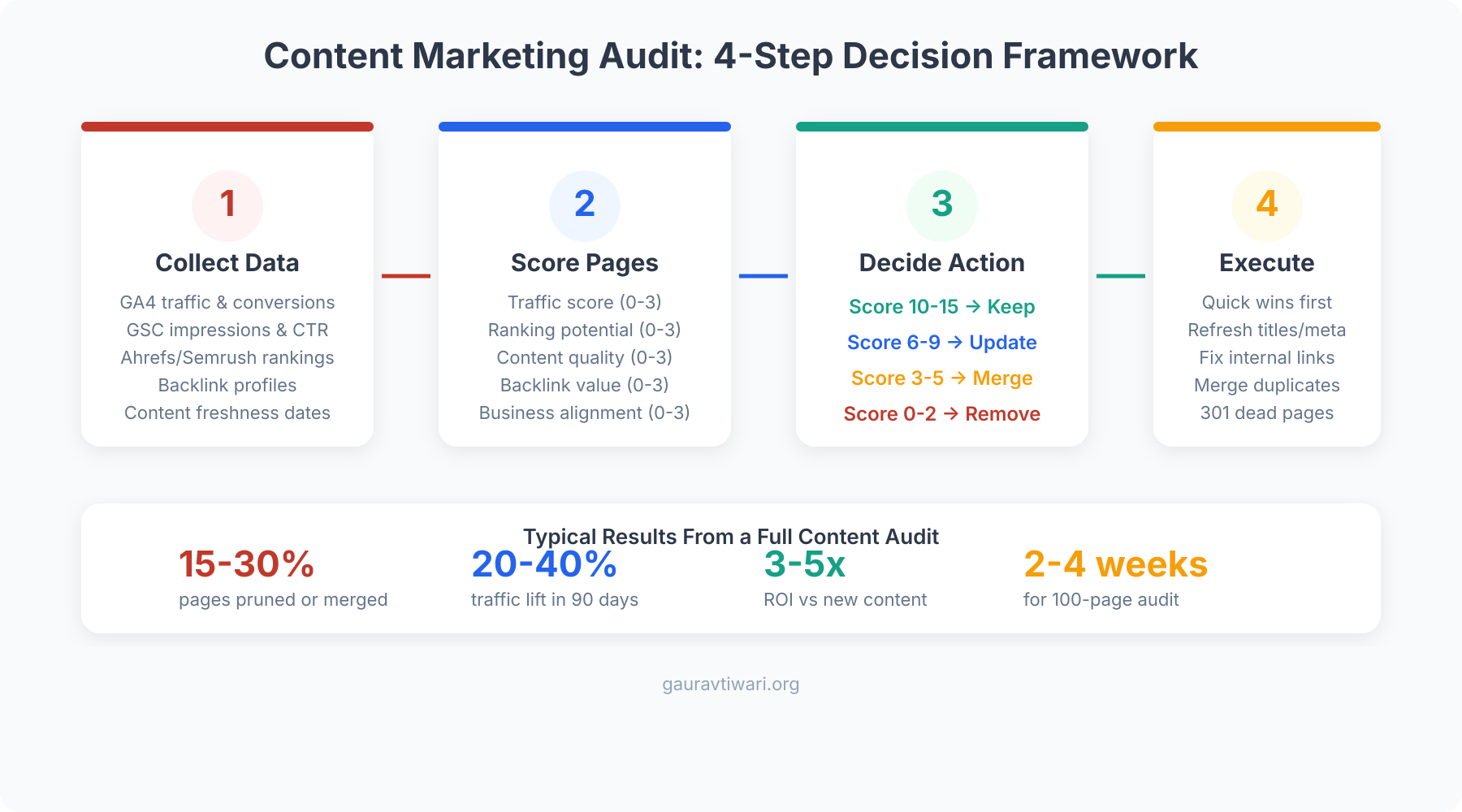
- Four-way decision framework — keep, update, merge, or kill every page
- Scoring model for faster decisions — numeric system to prioritize pages objectively
- The exact workflow I use — step-by-step process from real client projects
- Quick wins that move traffic first — low-effort fixes with the biggest impact
- Best content audit tools — Ahrefs, Semrush, Screaming Frog, and more
- Common mistakes to avoid — the errors that waste the most time
What is a content marketing audit?
A content marketing audit is a structured review of every important URL on your site. You pull performance data, check freshness, inspect intent match, review internal links, and assign each page a clear action. Keep. Update. Merge. Redirect or delete. That’s the whole game.
It is not the same thing as a content inventory. An inventory is just a list of URLs. An audit is a decision system. The inventory tells you what exists. The audit tells you what deserves resources.
When the audit is done properly, you stop publishing in panic mode. You stop guessing which topics matter. You stop rewriting random posts just because they “feel old.” And you start improving the pages that are closest to growth.
- It shows which pages still earn organic traffic, leads, and revenue.
- It reveals outdated content that’s quietly hurting trust.
- It exposes keyword overlap and topic cannibalization.
- It surfaces internal linking gaps inside your topic clusters.
- It gives you an execution plan instead of a vague “we should update content” feeling.
If your site has more than 100 indexable URLs and you haven’t audited them in the last 6 to 12 months, you are almost certainly carrying content debt.
Why content audits matter for SEO, AEO, GEO, and traffic
A content audit improves search performance because it helps you remove waste and strengthen the pages already closest to winning. That helps classic SEO, answer engine optimization, generative engine optimization, and plain old traffic growth at the same time.
For traditional SEO, the benefits are obvious. You tighten keyword targeting, fix stale titles, improve internal linking, merge duplicate coverage, refresh weak sections, and redirect dead pages that still have equity. Pages stuck at positions 8 to 20 are usually your best short-term opportunities because they need improvement, not reinvention.
For AEO and GEO, the audit matters because AI systems prefer content that is current, well-structured, explicit, and easy to extract. Google AI Overviews, Perplexity, and ChatGPT-style search systems don’t reward vague content. They pull from pages with clean headings, direct answers, named tools, clear steps, and strong factual packaging. Thin content gets ignored. So does bloated content that never gets to the point.
Traffic improves because the audit forces better resource allocation. Instead of spreading effort across 200 average posts, you push the pages with real upside: high impressions and weak CTR, page-2 rankings, high-conversion pages with low traffic, posts with backlinks but stale content, and cluster pages that deserve more internal authority.
If you’re already working on content marketing strategy, your audit is the quality-control layer that keeps the strategy honest.
What data to collect before you touch a single URL
Before you score anything, collect the right data. If you skip this step, you’ll make emotional decisions. And emotional decisions are how weak pages survive while strong pages get ignored.
Search performance data
Start with Google Search Console. Pull impressions, clicks, CTR, and average position by page for the last 6 to 12 months. Pages with high impressions and low CTR usually need title and meta rewrites. Pages ranking in positions 8 to 20 usually need content upgrades, better links, and stronger intent match. If you need help setting this up, start with this Google Search Console setup guide.
Engagement and conversion data
Then check GA4 or Independent Analytics. Look at sessions, engagement time, bounce behavior, scroll depth if you track it, assisted conversions, email signups, affiliate clicks, and demo or contact submissions. A page with modest traffic and strong conversion value deserves more respect than a vanity-traffic page that does nothing.
Link equity, freshness, and intent match
Finally, pull backlink data, internal links, publish date, last updated date, content type, and target topic. You also need a quick judgment on search intent. If the query wants a comparison and your page reads like a generic essay, that’s a mismatch. If the query wants a tutorial and you wrote an opinion piece, same problem. This is also where content decay becomes obvious.
Don’t judge a page using one metric. Low traffic plus high affiliate revenue is still a winner. Low traffic plus 18 referring domains is a redirect candidate, not a delete candidate. High impressions plus low CTR is a rewrite candidate, not a dead page.
Build your inventory before you score pages
Your inventory is the spreadsheet or database that holds the whole audit together. I usually build mine with Screaming Frog, Search Console exports, analytics data, backlink exports, and a manual notes column for business value and intent fit.
You don’t need a fancy dashboard. Google Sheets is fine. Airtable is fine. A CSV is fine. What matters is that every URL has enough context for a decision.
| Column | Why it matters | Red flag to watch |
|---|---|---|
| URL | Base record for all analysis | Duplicate or inconsistent slugs |
| Content type | Helps compare like with like | Blog post trying to rank like a landing page |
| Primary query or topic | Shows intent and overlap | Multiple URLs targeting the same phrase |
| Organic clicks and impressions | Measures search demand and visibility | High impressions, weak CTR |
| Average position | Finds page-2 opportunities | Pages stuck between positions 8 and 20 |
| Conversions or revenue | Keeps you from deleting valuable pages | Low traffic, high conversion value |
| Referring domains | Protects link equity | Pages with backlinks and no redirect plan |
| Internal links in | Shows topical support | Important page with almost no internal links |
| Last updated date | Measures freshness | Evergreen topic untouched for 18+ months |
| Recommended action | Turns data into execution | No clear next step |
While you’re here, check your cluster logic. If you’re weak on internal support between related pages, fix that next. This guide on internal linking for WordPress is a good companion when you’re tightening cluster structure.
Use a four-way decision framework
Every page should end the audit in one of four buckets. If you add more than that, people start inventing comfort labels and the action plan gets fuzzy.
| Action | When to use it | What you do next |
|---|---|---|
| Keep | Traffic is solid, conversions are healthy, content is current | Do light maintenance, improve links, revisit later |
| Update | Page has traffic, impressions, links, or conversion potential but feels stale or incomplete | Refresh title, intro, sections, examples, entities, schema, and links |
| Merge | Two or more pages overlap and split intent or rankings | Combine into one stronger URL, then redirect weaker pages |
| Redirect or delete | Page has no strategic value and no recovery case | Redirect if it has links or a close replacement, delete only when appropriate |
This framework forces clarity. It also stops the common habit of saying “we’ll revisit this later” about pages nobody will ever revisit.
Never delete a page with quality backlinks without a redirect plan. That is one of the fastest ways to waste authority you already earned.
My scoring model for faster decisions
I like simple scoring because it keeps teams consistent. My current model uses four dimensions scored from 1 to 5. That gives each page a total out of 20.
- Search traction: impressions, clicks, rankings, and query fit
- Business value: leads, sales, affiliate clicks, or support value
- Freshness and quality: accuracy, examples, readability, completeness
- AEO and GEO readiness: direct answers, named tools, clean headings, extractable structure, FAQ potential
| Total score | Default action | What it usually means |
|---|---|---|
| 16-20 | Keep or light update | The page already works. Tighten links, examples, and freshness. |
| 11-15 | Update | The page has upside and should be refreshed soon. |
| 6-10 | Merge or major rewrite | The topic still matters, but the current URL is weak. |
| 1-5 | Redirect or delete | The page is not helping, and the opportunity cost is real. |
Numbers don’t remove judgment. They just keep judgment from drifting. That’s useful when you are evaluating 150 pages in a row and your brain starts romanticizing old work.
The exact workflow I use on real sites
This is the workflow I keep coming back to because it works. Not because it’s pretty, but because it gets done.
- Crawl the site and export every indexable URL.
- Pull Search Console, analytics, and backlink data for the same date range.
- Tag each page by type, topic, and business goal.
- Score each page using the same model across the whole site.
- Assign a clear action: keep, update, merge, redirect or delete.
- Prioritize by upside first, not by publish date or emotion.
- Execute quick wins before heavy rewrites.
- Track results for at least 8 to 12 weeks after the changes.
One audit I ran on a 450-post site ended with 120 redirects, 85 rewrites, and a much tighter internal link map. Organic traffic grew by 34% in about 3 months. No publishing sprint. No magical new tool. Just cleaner decisions and better execution.
Quick wins that usually move traffic first
You do not need to wait for a full-site rewrite before seeing results. Some fixes move faster than others.
- Rewrite title tags and meta descriptions on pages with high impressions and weak CTR.
- Add internal links from strong pages to underlinked money pages and priority guides.
- Refresh intros on page-2 posts so the answer appears faster and more clearly.
- Add FAQ blocks where the topic naturally invites follow-up questions.
- Merge overlapping posts before you write more content on the same topic.
- Update stats, screenshots, pricing, and examples on evergreen pages.
If you need a starting point, begin with pages already ranking for useful terms discovered during keyword research. They are almost always easier to move than a page with zero traction.
Best content audit tools in 2026
You don’t need every tool. You need the right stack for your site size and budget. For most people, four tools cover almost everything.
Screaming Frog for crawling and structure
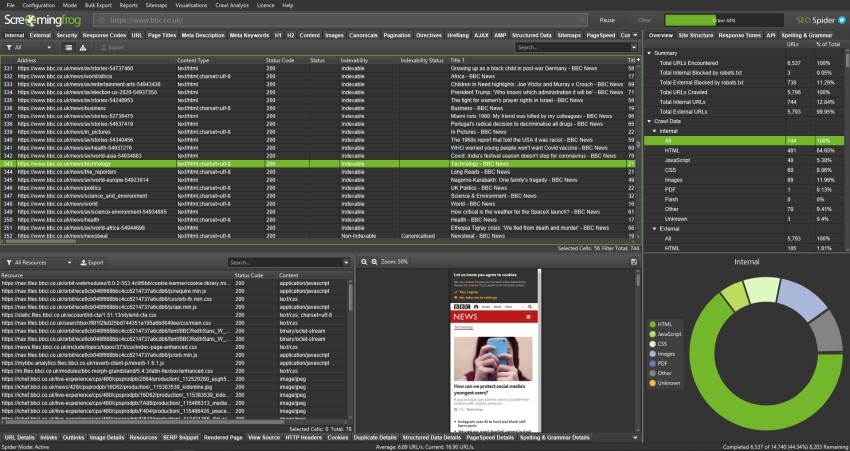
Screaming Frog SEO Spider is still my first stop for crawling. It gives you URLs, titles, headings, indexability, response codes, canonicals, duplicate pages, orphan signals, and internal link context. The free version covers up to 500 URLs. The paid version is cheap compared to the time it saves.
Search Console and analytics for truth
Search Console tells you how search sees the page. Analytics tells you what visitors do after they land. You need both. Search Console without conversions is incomplete. Analytics without query data is blind.
Semrush or Ahrefs for backlinks and opportunity discovery
Semrush is great when you want one tool for rankings, backlinks, content opportunities, and site health. Ahrefs is still strong for backlink analysis and competitive content gap work. If you already pay for one, use that. Don’t buy both unless you’re running a bigger content operation.

MarketMuse or a topical scoring tool for depth
MarketMuse and similar topical scoring tools help when your article looks decent but still underperforms because it lacks depth, missing entities, or weak subtopic coverage. They’re useful, but secondary. I’d rather have clean Search Console data and a strong spreadsheet than an expensive content score with no plan behind it.

If you want a broader software stack, this guide to the best SEO tools can help you narrow it down.
Common content audit mistakes that waste time
The biggest audit mistake is treating the spreadsheet like the finish line. It isn’t. The finish line is updated pages, cleaner architecture, stronger internal linking, and measurable traffic movement.
Mistake 1: judging pages by traffic alone. Some low-traffic pages convert well, support commercial pages, or attract quality links. Don’t kill them just because they aren’t flashy.
Mistake 2: deleting content without checking backlinks and internal dependencies. Redirect first. Always.
Mistake 3: updating random posts instead of pages with proven upside. Start where you already have impressions, links, rankings, or revenue.
Mistake 4: ignoring structure. Weak headings, no FAQ, no comparison packaging, and vague openings hurt both human scanning and AI extraction.
Mistake 5: running the audit once and forgetting it. Audits should become a maintenance rhythm, not a panic project.
What to do in the next 30 days
If this feels like a lot, good. It is. But the work gets easier once you break it into a sequence.
- Week 1: export every URL, build the inventory, and pull performance data.
- Week 2: score pages and tag them as keep, update, merge, or redirect.
- Week 3: fix quick wins, internal links, weak CTR pages, and redirects.
- Week 4: rewrite the top update candidates and submit refreshed URLs for reindexing.
Don’t try to “clean the whole site” in one burst. Finish one batch. Measure it. Then move to the next. That’s how content audits stop being theory and start producing traffic.
Frequently Asked Questions
How often should I run a content marketing audit?
Run a full audit every 6 to 12 months. If you publish heavily, or if your traffic depends on content, run lighter monthly reviews on your top pages and quarterly mini-audits on important clusters.
What pages should never be deleted right away?
Do not delete pages with quality backlinks, useful conversions, or strategic internal-link roles until you have a redirect or merge plan. Some low-traffic pages still carry real SEO value.
What is the difference between a content inventory and a content audit?
A content inventory is a list of what exists. A content audit adds performance data, quality judgment, and a decision for each page. The inventory is the input. The audit is the decision layer.
Can a content audit help with AI search and AI Overviews?
Yes. Audits help you identify pages that need clearer answers, stronger headings, fresher facts, missing entities, better FAQ coverage, and cleaner structure. Those improvements make pages easier for AI systems to quote and summarize.
How many metrics should I track in the audit?
Start with a small set: impressions, clicks, average position, conversions, backlinks, internal links, freshness, and business relevance. That’s enough to make strong decisions without drowning in spreadsheet noise.
What is the fastest win after finishing a content audit?
Usually it is rewriting title tags and intros on high-impression pages, fixing internal linking to priority URLs, and refreshing page-2 posts with clearer answers and stronger content packaging.