
 by
by
The best WordPress hosting in 2026 depends on what you are building, but my default recommendation is simple: Hostinger for beginners and India, Hostinger KVM 4 plus xCloud for advanced users, ScalaHosting Managed Cloud for commercial sites, and WPX when client support matters.
My own stack changed my opinion. I currently run my primary sites on Hostinger KVM 4 with xCloud, keep staging on a RackNerd VPS, have run secondary sites on Hetzner, and still have many client sites on ScalaHosting and WPX. I have also used Bluehost, HostGator, SiteGround, Rocket.net, Namecheap, Cloudways, BigRock, GoDaddy, AccuWeb, GreenGeeks, and A2 Hosting, now Hosting.com.
A quick disclosure before the list: some links are affiliate links. That does not change the order here. I am deliberately skipping hosts that would pay commissions but do not deserve a fresh recommendation in this guide.
If you want one lazy answer, pick Hostinger. If the site makes money and someone else depends on it, pick ScalaHosting. If you are the person who will own the server decisions, Hostinger KVM 4 plus xCloud is the stack I would copy first.
| Use case | My pick | Why | Starting price I verified |
|---|---|---|---|
| Best for beginners | Hostinger | Easy dashboard, low entry cost, good WordPress features, and clear India pricing. | $3.99/mo or ₹249/mo promo for Business + AI. |
| Best for India | Hostinger India | Rupee pricing, stronger value than older shared hosts, and a better product than it was a year ago. | ₹249/mo promo, renews at ₹649/mo for Business + AI. |
| Best for advanced users | Hostinger KVM 4 plus xCloud | Dedicated VPS resources with the management layer I use for primary sites. | $12.99/mo or ₹1,099/mo promo for KVM 4. xCloud depends on your plan. |
| Best for commercial sites | ScalaHosting Managed Cloud | Managed VPS resources, support, migrations, email, backups, and SPanel in one place. | $29.95/mo intro for Build #1, renews at $54.95/mo. |
| Best support-led managed WordPress | WPX | Fast support, malware cleanup, daily backups, CDN, and easier client handoff. | $17.99/mo for Starter, $29.99/mo for Business. |
| Best hosted WordPress platform | WordPress.com Business or Commerce | Good if you want hosted WordPress and can accept WordPress.com platform rules. | Business $25/mo annually or ₹640/mo first-year India annual pricing. |
| Best cheap secondary VPS | RackNerd specials | Cheap annual KVM VPS for secondary workloads, tools, experiments, and non-critical sites. | $35.99/year for a 2 GB KVM VPS special. |
How I Picked These WordPress Hosts
I did not rank these hosts by who has the prettiest pricing table. I looked at my own usage, public pricing, renewal costs, resource clarity, support, India pricing, and whether the host makes sense for the person actually buying it.
- Real usage: hosts I use now, have used in the past, or still manage for client sites.
- Pricing honesty: promo price, renewal price, billing length, and whether INR pricing exists.
- Resource clarity: CPU, RAM, NVMe or SSD storage, bandwidth, PHP workers, backups, staging, and email limits.
- Operational fit: whether the buyer is a beginner, developer, agency, business owner, or support-heavy client.
- Exit cost: how painful the host becomes when the site grows or needs to move.
If you are still comparing managed hosting with raw servers, read my guide to managed WordPress hosting benefits before you buy anything expensive.
Hostinger: Best WordPress Hosting For Beginners And India
Hostinger is the easiest WordPress hosting recommendation for beginners because it gives you enough speed, enough features, and enough hand-holding without making the first bill painful. It is not perfect. Renewals jump, support can slow down at peak times, and the cheapest plans are still cheap hosting. But the product is much better now than it was a year ago.
That last part matters. I used to be more cautious with Hostinger. Now, for beginners and Indian users, I would rather recommend Hostinger than send someone into a bloated old shared host with a worse dashboard and a higher renewal bill.
| Hostinger plan | Best for | Promo price | Renewal price | Key specs |
|---|---|---|---|---|
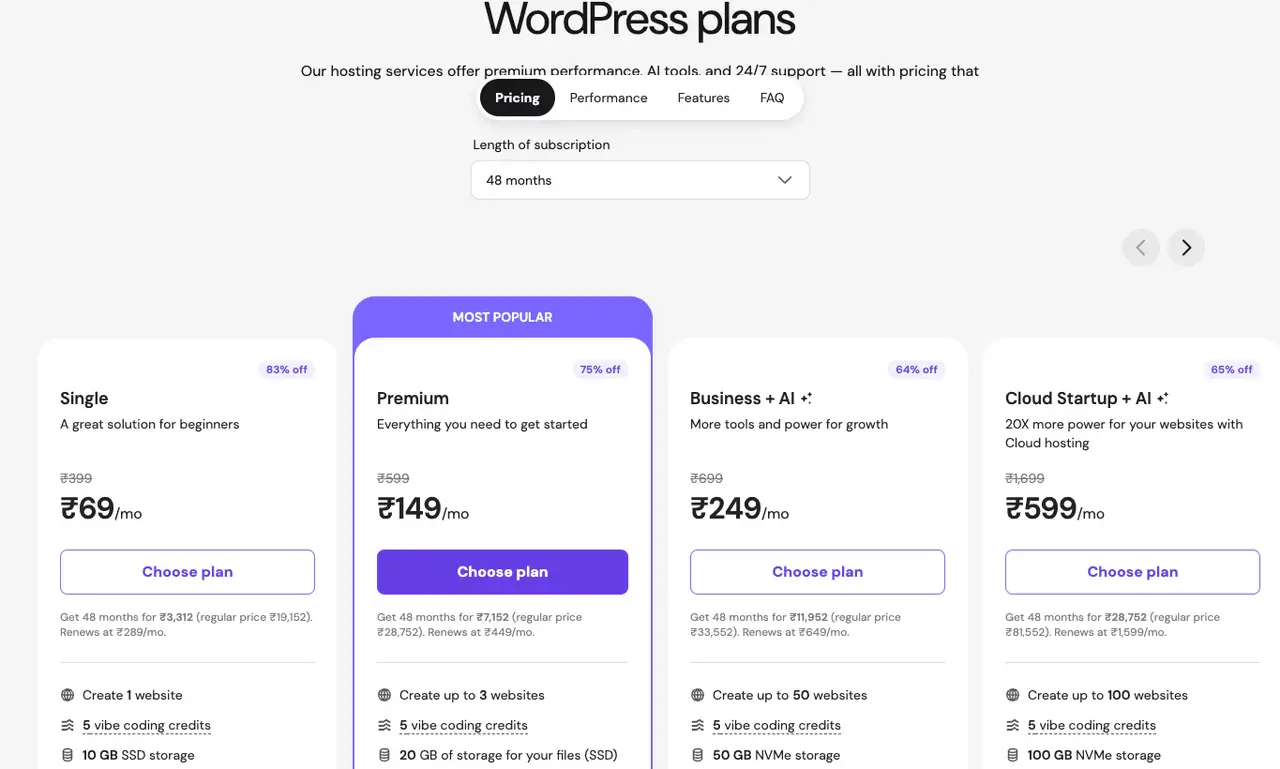
| Business + AI | Most beginner WordPress sites | $3.99/mo or ₹249/mo | $16.99/mo or ₹649/mo | Up to 50 websites, 50 GB NVMe, daily and on-demand backups, staging, free CDN. |
| Cloud Startup + AI | Growing blogs and heavier sites | $7.99/mo or ₹599/mo | $25.99/mo or ₹1,599/mo | Up to 100 websites, 100 GB NVMe, priority support, dedicated IP, 100 PHP workers, 4 GB RAM. |
| Premium | Very small sites only | $2.99/mo or ₹149/mo | $10.99/mo or ₹449/mo | Up to 3 websites, 20 GB SSD, weekly backups. |
My practical advice: choose Business if you are starting one serious blog or business site. Choose Cloud Startup if you already know the site will grow. If you are in India, Hostinger is the easiest pick because the INR pricing is clear and competitive.
The catch is renewal pricing. Hostinger’s promo prices are strong, but they usually require long billing terms. If you buy the 48-month deal, you get the lowest monthly rate. If you hate long upfront billing, compare the renewal price before you commit.
Hostinger KVM 4 Plus xCloud: My Advanced WordPress Stack
For advanced users, my current pick is Hostinger KVM 4 with xCloud. This is the stack I use for primary sites now, and it gives me the part of VPS hosting I like without forcing me to babysit every small server task manually.
Hostinger publicly sells this as KVM VPS hosting. My shorthand is Hostinger Cloud KVM4 because that is how I think of the stack in day-to-day use, but the public plan name is KVM 4.
| Hostinger VPS plan | Promo price | Renewal price | CPU | RAM | Storage | Bandwidth |
|---|---|---|---|---|---|---|
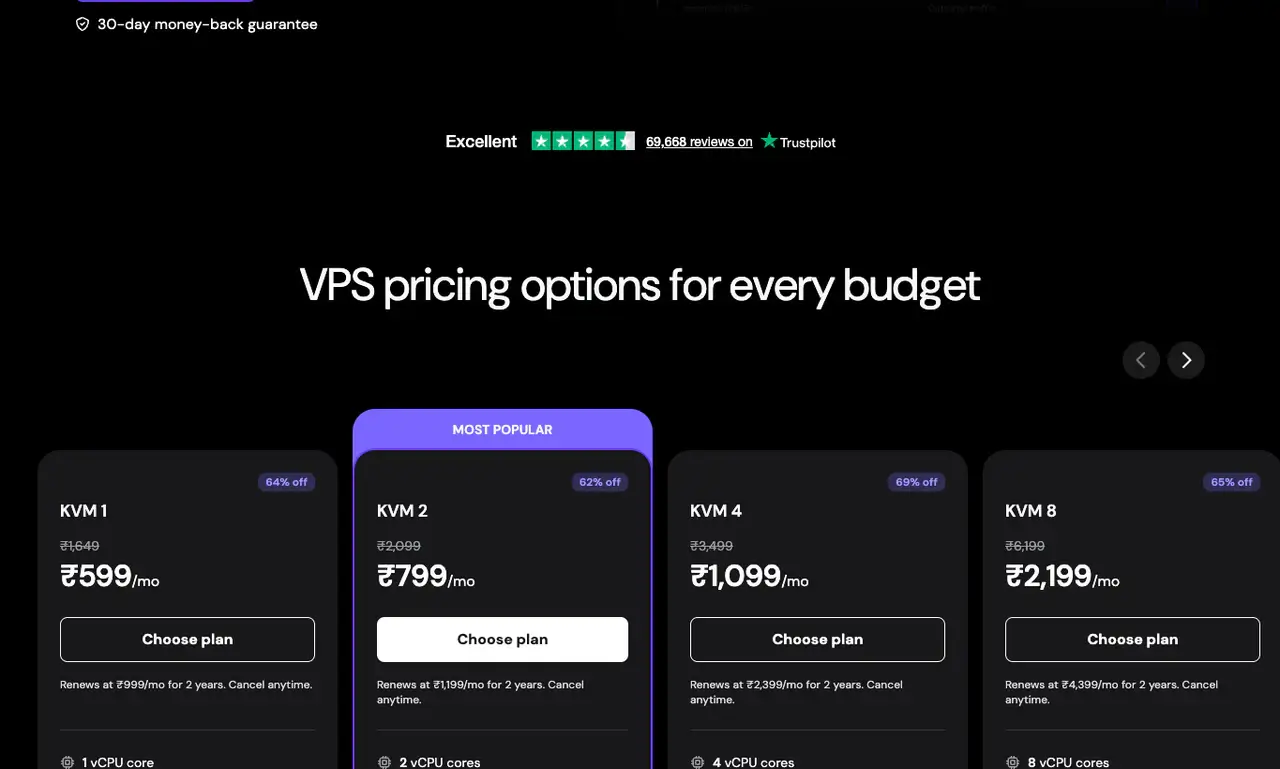
| KVM 2 | $8.99/mo or ₹799/mo | $14.99/mo or ₹1,199/mo | 2 vCPU | 8 GB | 100 GB NVMe | 8 TB |
| KVM 4 | $12.99/mo or ₹1,099/mo | $28.99/mo or ₹2,399/mo | 4 vCPU | 16 GB | 200 GB NVMe | 16 TB |
| KVM 8 | $25.99/mo or ₹2,199/mo | $49.99/mo or ₹4,399/mo | 8 vCPU | 32 GB | 400 GB NVMe | 32 TB |
xCloud is the management layer in my setup. I own an LTD, so my economics are different from a new buyer’s. That is why I would not publish a fake total monthly stack cost for everyone. If you already own xCloud or are comfortable paying for a server panel, Hostinger KVM 4 plus xCloud is one of the best value stacks for advanced WordPress users.
- Choose this if you understand DNS, backups, caching, PHP versions, and server-level risk.
- Choose this if you want VPS resources without paying premium managed WordPress prices.
- Avoid this if you do not know what root access means or want one company to own every support problem.
If server control is the reason you are reading this, my shared vs VPS vs dedicated hosting guide gives you a deeper view of that side of the stack.
ScalaHosting Managed Cloud: Best For Commercial Sites
ScalaHosting Managed Cloud is the commercial recommendation here. If a client site, business website, or revenue-generating project needs more than cheap shared hosting but the owner does not want to become a server admin, ScalaHosting is a safer recommendation than a raw VPS.
I have many client sites on ScalaHosting, and this is where its value shows. The pitch is not just faster server. The pitch is managed VPS resources, SPanel, SShield, support, migrations, email, databases, backups, and WordPress tooling in one place.
| ScalaHosting plan | Intro price | Renewal price | Monthly price | CPU | RAM | Storage | Bandwidth |
|---|---|---|---|---|---|---|---|
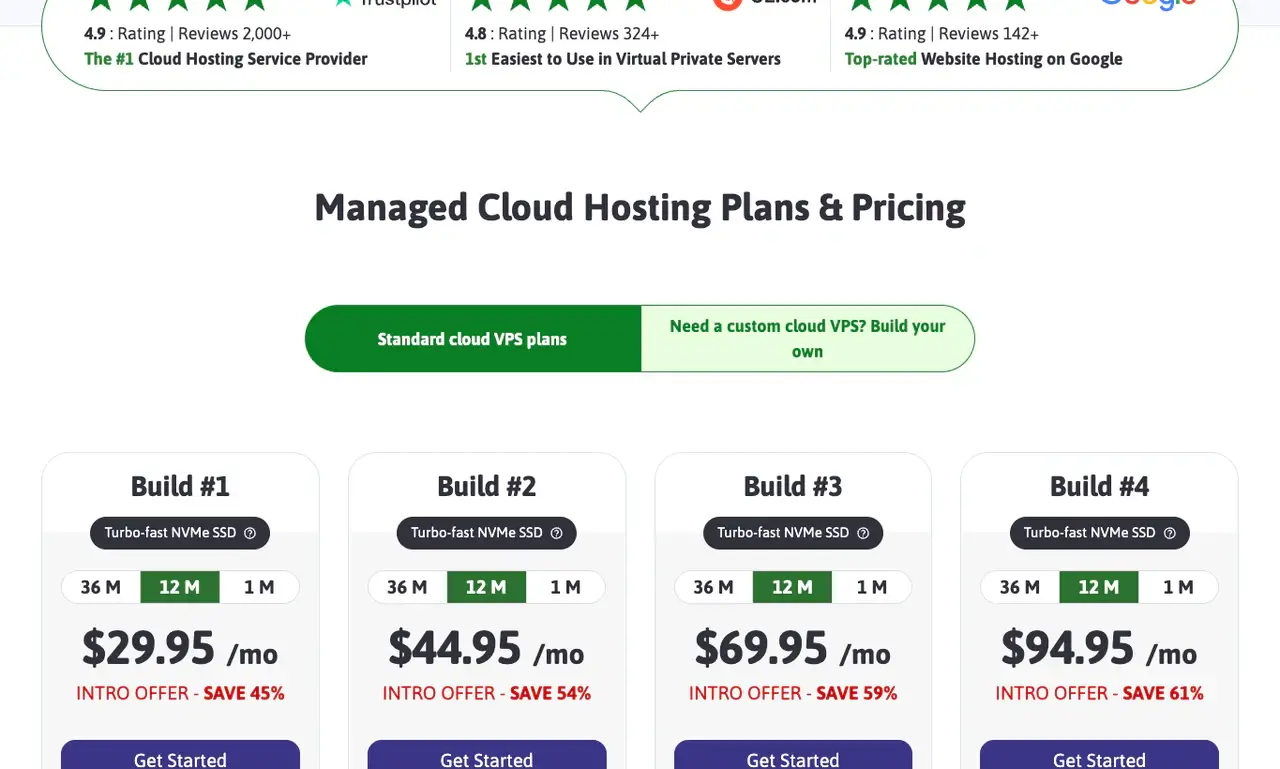
| Build #1 | $29.95/mo | $54.95/mo | $54.95/mo | 2 cores | 4 GB | 50 GB NVMe | Unmetered |
| Build #2 | $44.95/mo | $96.95/mo | $96.95/mo | 4 cores | 8 GB | 100 GB NVMe | Unmetered |
ScalaHosting makes sense when the site makes money, the owner needs help, email matters, and the setup should not depend on one developer remembering how every server was configured. Raw specs do not solve those business problems by themselves.
WPX: Best When Support Matters
WPX is still one of the easiest managed WordPress hosts to recommend when support and handoff matter. I used WPX for years, and I still have client sites there. It is not the cheapest path, but it is cleaner than handing a non-technical client a VPS panel and pretending that is empowerment.
| WPX plan | Monthly price | Sites | Storage | Bandwidth | RAM | CPU | PHP workers |
|---|---|---|---|---|---|---|---|
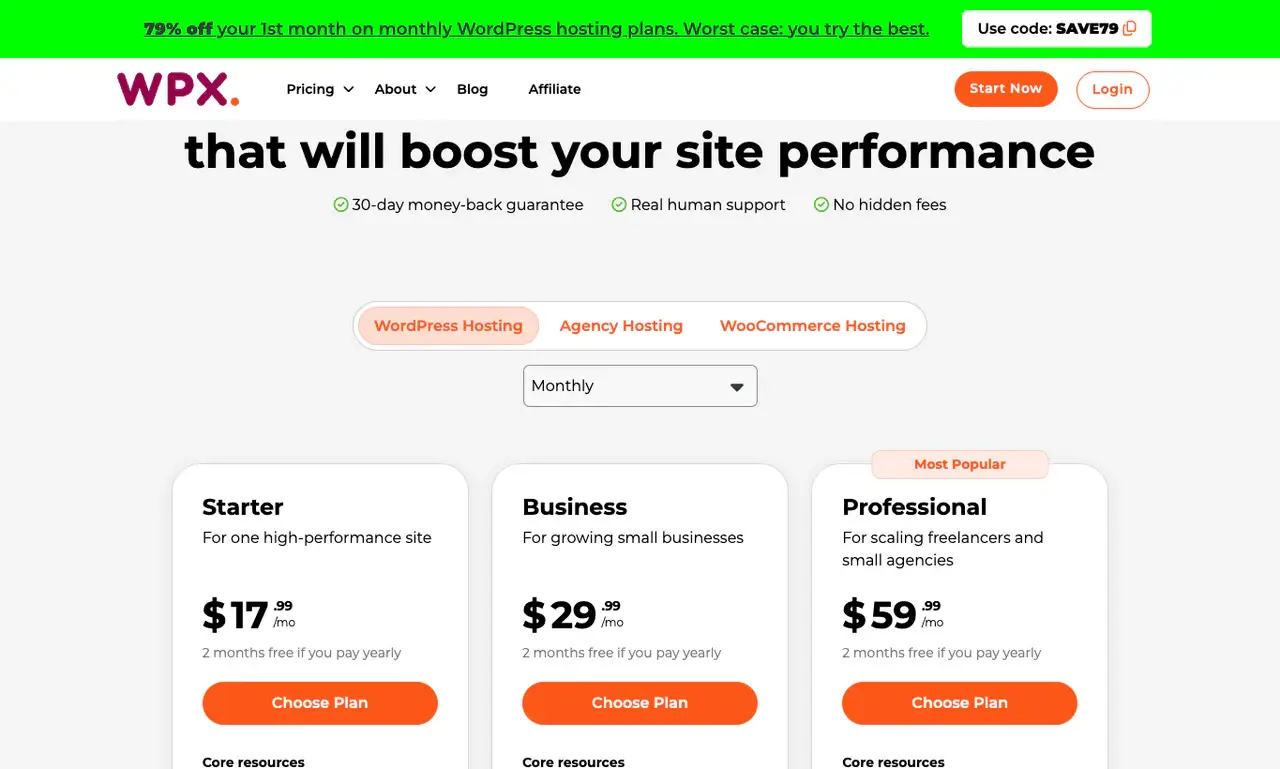
| Starter | $17.99/mo | 1 | 10 GB | 100 GB | 3 GB | 0.5 core | 9 |
| Business | $29.99/mo | Up to 5 | 20 GB | 200 GB | 5 GB | 1 core | 15 |
| Professional | $59.99/mo | Up to 15 | 40 GB | 400 GB | 15 GB | 2 cores | 45 |
| Elite | $119.99/mo | Up to 35 | 80 GB | Unlimited | 35 GB | 3 cores | 105 |
WPX makes sense when you manage client sites, want malware cleanup included, want email included, and need a support team that can help when something breaks. WPX is not my first pick for every personal site anymore because Hostinger and VPS stacks can be better value. For support-heavy client work, it still earns a place.
I wrote more about the support angle in my WPX hosting review, but the short version is this: WPX is less about cheap hosting and more about reducing client panic.
WordPress.com Business And Commerce: Hosted WordPress With One Catch
WordPress.com is the cleanest answer for people who want WordPress without owning hosting infrastructure. I would only cover Business and Commerce here because those are the plans that make sense for serious sites.
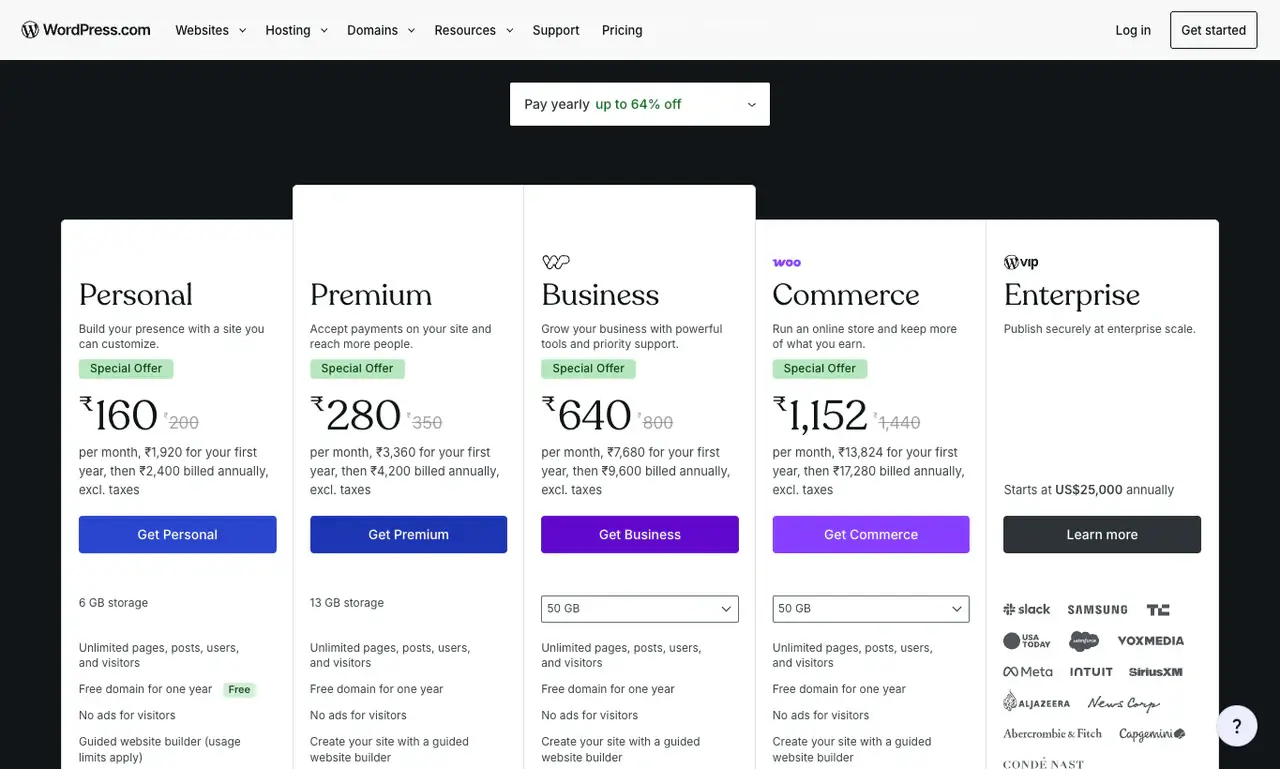
The good part: WordPress.com handles hosting, security, backups, performance, plugin access, and developer tools in a polished way. The annoying part: Jetpack is not optional in the way it is on self-hosted WordPress. WordPress.com-hosted sites cannot fully deactivate Jetpack or Akismet because doing so would break access and remove essential platform features, according to WordPress.com support.
| WordPress.com plan | USD monthly billing | USD annual billing | India annual pricing visible in checkout page | Storage | Best for |
|---|---|---|---|---|---|
| Business | $40/mo | $25/mo | ₹640/mo first year, then ₹9,600/year, excluding taxes | 50 GB | Business, content, and plugin-powered sites. |
| Commerce | $70/mo | $45/mo | ₹1,152/mo first year, then ₹17,280/year, excluding taxes | 50 GB | WooCommerce stores that want a hosted platform. |
Commerce adds the store-specific WooCommerce layer: unlimited products, abandoned cart emails, dynamic upsells, bulk discounts, inventory management, selling in 60+ countries, and 0% transaction fees for standard WooCommerce payment features.
I would recommend WordPress.com Business or Commerce when the buyer wants a managed platform more than freedom. It is good hosting. It is not the same thing as self-hosted WordPress. If that distinction is still fuzzy, start with my WordPress.com vs WordPress.org comparison.
RackNerd And Hetzner: Cheap Secondary VPS, Not Beginner Hosting
RackNerd and Hetzner are not where I would send a beginner who wants WordPress hosting. They are where I put cheap secondary workloads, experiments, small tools, and non-critical sites when price or infrastructure value matters more than polish.
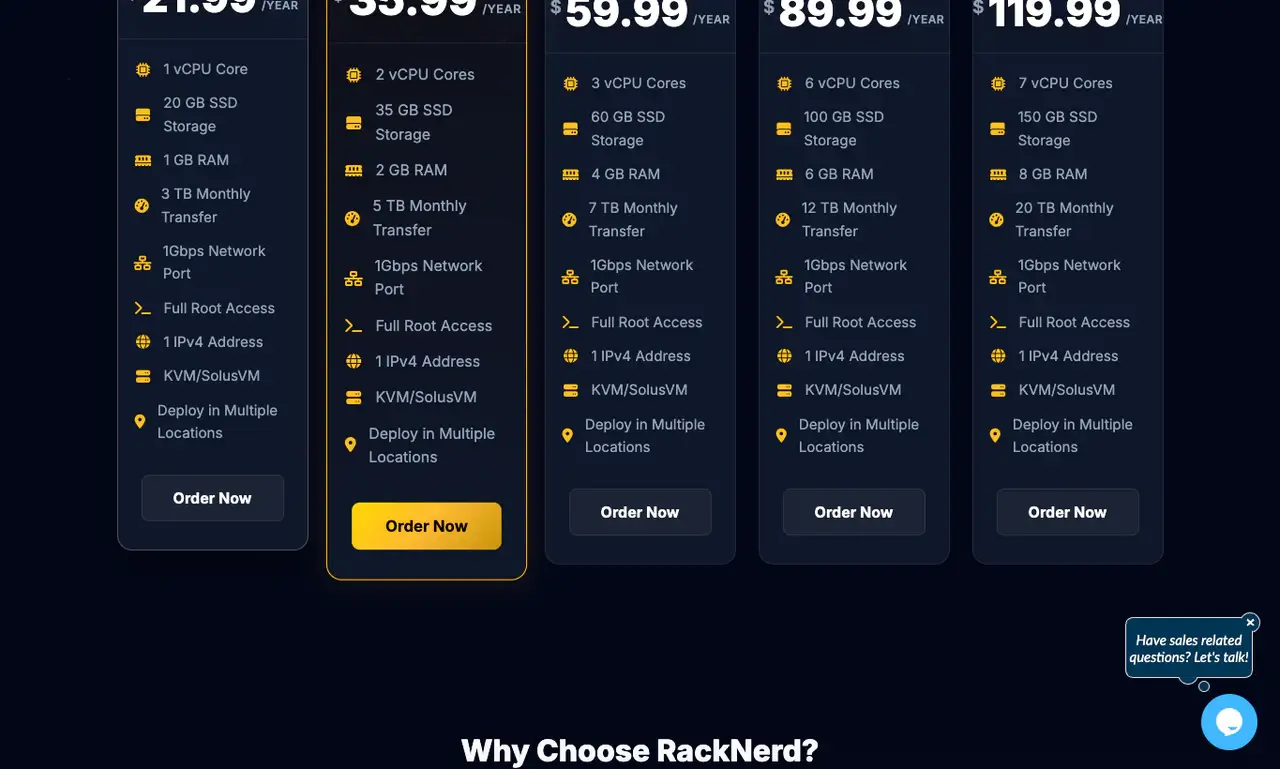
| RackNerd special | Price | CPU | RAM | Storage | Transfer | Port |
|---|---|---|---|---|---|---|
| 2 GB KVM VPS | $35.99/year | 2 vCPU | 2 GB | 35 GB SSD | 5 TB/mo | 1 Gbps |
| 4 GB KVM VPS | $59.99/year | 3 vCPU | 4 GB | 60 GB SSD | 7 TB/mo | 1 Gbps |
I’ve used RackNerd and Hetzner for secondary sites and staging, not because they are the best managed WordPress hosts. They are not. I use them because cheap VPS servers have a place if you know what you are doing and the workload is not mission-critical.
Premium Managed Hosts I Would Still Consider
Not every good host needs to be a top recommendation. Rocket.net, Kinsta, WP Engine, Cloudways, Bluehost, and A2 Hosting, now Hosting.com can all fit specific cases. They are just not where my 2026 recommendation starts.
Rocket.net
Rocket.net is strong for premium managed WordPress performance, especially because the edge stack is the point of the product. I would consider it when performance matters more than saving money. I would not make it the default beginner recommendation.
Kinsta
Kinsta is polished, developer-friendly, and strong for premium managed WordPress. I would choose it for businesses that want premium WordPress hosting and do not want to think about servers. I would not choose it for low-budget users or Indian beginners.
Cloudways
Cloudways still works for users who want managed cloud hosting without building their own panel stack. It is less compelling for me now because I prefer owning the server workflow with xCloud.
Bluehost
Bluehost is beginner-friendly and still has the WordPress.org recommendation behind it. I have used it. I just do not think it beats Hostinger for the beginner and India use cases anymore.
A2 Hosting, Now Hosting.com
A2 Hosting, now under the Hosting.com brand, has always had a speed-focused pitch. It can be fine. In this guide, it belongs as a secondary mention, not a top category winner.
Hosts I Would Skip
This is where hosting recommendations need to be honest. I would skip HostGator and Namecheap in this guide. They may still work for small sites, but it works is not enough to earn a recommendation when better beginner, managed, VPS, and commercial options exist.
I would also not make GoDaddy or SiteGround primary recommendations here.
HostGator
HostGator had its time. I have used it. In 2026, I do not see a reason to send a new WordPress user there when Hostinger is easier to recommend for beginners and WPX, ScalaHosting, or WordPress.com are better for serious use cases.
Namecheap
Namecheap is still good for domains. Hosting is a different conversation. I would not make Namecheap a WordPress hosting recommendation when the goal is performance, support, and a clean growth path.
GoDaddy
GoDaddy has India pricing and broad brand recognition. That is not enough. The dashboard, upsells, and general product experience are not where I want a beginner to start if the goal is a clean WordPress site.
SiteGround
SiteGround has fans, and it has improved many things over the years. I am still not comfortable making it a primary recommendation because the renewal pricing and resource limits make the value harder to defend.
Best WordPress Hosting By Scenario
Here is the decision tree I would actually give a friend.
If you are starting your first WordPress site
Choose Hostinger Business. It is affordable, beginner-friendly, and has enough WordPress features for a real site.
If you are in India
Choose Hostinger. The INR pricing, low entry cost, and improved product make it the easiest recommendation.
If you are building a serious blog or affiliate site
Start with Hostinger Cloud Startup if you want managed simplicity. Use Hostinger KVM 4 plus xCloud if you are comfortable managing a server stack.
If you are building a business website
Choose ScalaHosting Managed Cloud if the business needs reliability and support. Choose WordPress.com Business if the owner wants a hosted platform and can accept Jetpack.
If you are building a WooCommerce store
Choose WordPress.com Commerce if you want hosted WooCommerce with platform management. Choose ScalaHosting Managed Cloud if you want more control. Consider Rocket.net or Kinsta if the performance budget is higher.
If you manage client sites
Choose WPX when support and handoff matter. Choose ScalaHosting when you need managed VPS resources. Choose Hostinger KVM 4 plus xCloud only if you are the person who will own the server operations.
If you are experimenting
Use RackNerd or Hetzner. Just do not confuse cheap VPS experiments with managed WordPress hosting.
My Final Recommendation
The best WordPress hosting in 2026 is not one company. It is the right company for the risk you are willing to own.
- Hostinger for beginners, low-budget users, and India.
- Hostinger KVM 4 plus xCloud for advanced users who want VPS value and control.
- ScalaHosting Managed Cloud for commercial users and business sites.
- WPX for client-friendly managed WordPress support.
- WordPress.com Business or Commerce for hosted WordPress users who can accept Jetpack.
- RackNerd and Hetzner for secondary VPS use, experiments, and users who know what they are doing.
If I had to give one simple answer to a beginner, I would say Hostinger. If I had to give one answer to a business owner, I would say ScalaHosting. If I had to give one answer to a developer like me, I would say Hostinger KVM 4 plus xCloud.
Frequently Asked Questions
What is the best WordPress hosting for beginners?
Hostinger is my pick for beginners because it is affordable, easy to use, and good enough for most new WordPress sites. The Business + AI plan is the safer starter pick because it includes daily backups, staging, CDN, and 50 GB NVMe storage.
What is the best WordPress hosting in India?
Hostinger is my pick for India. The India pricing is clear, the entry cost is low, and the product is better now than it was a year ago. Business + AI starts at ₹249/mo on the long-term promo and renews at ₹649/mo.
Is Hostinger KVM 4 good for WordPress?
Yes, Hostinger KVM 4 is a strong WordPress VPS option for advanced users. It gives you 4 vCPU cores, 16 GB RAM, 200 GB NVMe storage, and 16 TB bandwidth. Pairing it with a server management panel like xCloud makes it more practical for serious WordPress sites.
Is WordPress.com good hosting?
WordPress.com Business and Commerce are good hosted WordPress options if you want WordPress without managing a server. The main catch is Jetpack. WordPress.com installs and manages Jetpack automatically, and hosted sites cannot fully deactivate it.
Which is better, WordPress.com Business or Commerce?
Choose WordPress.com Business for a normal business, content, or plugin-powered site. Choose Commerce if you are building an online store and want WooCommerce-focused features like unlimited products, abandoned cart emails, dynamic upsells, bulk discounts, and inventory management.
Is ScalaHosting better than WPX?
ScalaHosting is better if you want managed VPS resources, SPanel, server control, email, databases, and commercial-site flexibility. WPX is better if you want simpler managed WordPress hosting with strong support, daily backups, malware cleanup, and easier client handoff.
Should I use cheap VPS hosting for WordPress?
Use cheap VPS hosting only if you know how to manage it or you have a server panel you trust. RackNerd and Hetzner can be excellent for secondary sites and experiments, but they are not beginner WordPress hosting in the same way Hostinger, WPX, ScalaHosting, or WordPress.com are.
Which WordPress hosts should I avoid?
I would not make HostGator, Namecheap, GoDaddy, or SiteGround primary recommendations in this guide. Some of them can still work for small sites, but better choices exist for beginners, India, commercial sites, and advanced VPS users.
Tell Google you want more of this.
Add Gaurav Tiwari as a preferred sourceOne tap, and this site shows up more often in your own Top Stories, AI Overviews and AI Mode. Remove it any time.
Disclaimer: This site is reader-supported. If you buy through some links, I may earn a small commission at no extra cost to you. I only recommend tools I trust and would use myself. Your support helps keep gauravtiwari.org free and focused on real-world advice. Thanks. - Gaurav Tiwari