
Web Design Tips That Actually Work: What I Learned From 15+ Years of Building Sites
Most web design advice is useless. “Stay updated on trends.” “Master responsive design.” “Improve your skills.” Thanks, very helpful.
I’ve been building websites since 2009. Hundreds of projects. Everything from small business sites to enterprise platforms for companies like IBM and Adobe. After 15+ years and 800+ projects, I’ve figured out what actually moves the needle. Not the motivational fluff you’ll read in design blogs. The specific, sometimes uncomfortable skills that separate designers who build careers from those who spin their wheels.
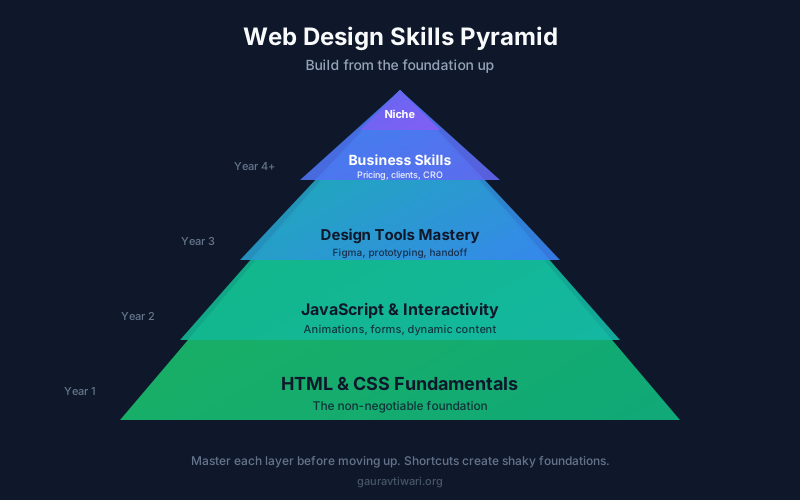
If you’re starting out in web design or looking to level up in 2026, here’s what actually matters. Not the pretty stuff. The practical stuff that determines whether you build a career or waste years going in circles.
Learn to Code (Yes, Really)

I know this isn’t what you want to hear. Figma is amazing. Page builders exist. AI can generate code, create sites, and apps in minutes. Why bother learning to code in 2026?
Because every designer I know who earns good money understands code. Not necessarily writes it daily, but understands it deeply enough to communicate with developers, troubleshoot problems, and know what’s actually possible.
You don’t need to become a full-stack developer. But you need HTML and CSS fluency. Not “I took a course once” fluency. Real fluency where you can look at a layout and mentally translate it to code.
Where to Actually Start
Forget the 40-hour bootcamp courses. They’re overwhelming and you’ll quit halfway through. Instead, start with one small project. Build a single webpage from scratch. No templates. No page builders. Just HTML and CSS.
Pick something simple: your portfolio homepage, a landing page for a fake product, or a recreation of a website you admire. You’ll get stuck constantly. That’s the point. Every time you Google “how to center a div” or “CSS flexbox guide,” you’re learning something that sticks.
Once you’re comfortable with HTML and CSS, add basic JavaScript. Start with interactions: a mobile menu toggle, a simple form validation, a scroll animation. Don’t try to learn React before you understand vanilla JavaScript. I’ve watched designers waste months on frameworks they didn’t need because some tutorial told them it was essential.
The goal isn’t to become a programmer. It’s to understand the medium you’re designing for. A chef who understands ingredients cooks better than one who just follows recipes. Same principle.
Stop Chasing Trends (Most of Them Don’t Matter)
Every year, design blogs publish lists of “trends you must know.” Glassmorphism. Neubrutalism. Whatever “morphism” is hot this month. Most of it is irrelevant to actual client work.
Here’s what I’ve learned: clients don’t care about design trends. They care about results. Does the website load fast? Do visitors become customers? Can they update content without calling you?
I’m not saying ignore aesthetics. Beautiful design matters. But a beautiful design that follows timeless principles beats a trendy design that ages poorly. White space, typography hierarchy, color contrast, and intuitive navigation have mattered since the early web and will matter for years to come.
What Actually Matters in 2026
Focus on fundamentals that won’t change regardless of what’s trendy. Learn typography deeply. Understand how to establish visual hierarchy. Master the use of white space. These skills transfer across every project and every trend cycle.
Performance is the trend that never goes out of style. A site that loads in under two seconds will always beat a gorgeous site that takes six seconds. If you learn to optimize websites for faster load times, you’ll be more valuable than designers who only care about how things look.
Accessibility matters increasingly every year. Sites that work for everyone aren’t just ethical choices. They’re legal requirements in many contexts. Learn WCAG basics. Understand color contrast ratios. Know how screen readers interpret your designs. This knowledge sets you apart from designers who’ve never considered users with disabilities.
Master Responsive Design (Actually Master It)
Everyone claims responsive design skills on their resume. Few actually have them. Most designers create a desktop layout, then awkwardly squeeze it onto mobile. That’s not responsive design. That’s damage control.
True responsive design starts with mobile and expands outward. It considers how layouts transform at different breakpoints. It accounts for touch targets on mobile versus hover states on desktop. It anticipates how content reflows and what gets prioritized on smaller screens.
Practical Responsive Skills
Learn CSS Grid and Flexbox thoroughly. These aren’t optional anymore. They’re the foundation of modern responsive layouts. Spend a weekend building layouts with them until they feel natural.
Test on real devices, not just browser dev tools. Simulators lie. There’s no substitute for actually tapping through your design on an iPhone and Android device. Borrow phones if you don’t have them. Test on tablets. Test in landscape orientation.
Understand when mobile layouts need completely different structures, not just squeezed-down versions of desktop layouts. Navigation patterns, content hierarchy, and user intent often differ significantly between devices. A mobile user might want quick contact information while a desktop user is ready to browse extensively.
Performance optimization matters more on mobile. Mobile users often have slower connections and less patience. Images need aggressive compression. Third-party scripts need auditing. Every kilobyte matters when someone is loading your site on cellular data.
Use AI as a Tool, Not a Crutch
AI has changed web design. Let’s be honest about what it does well and where it falls short.
For building portfolio sites and landing pages without WordPress, Webflow gives you visual control with clean code output. Pixpa is a portfolio builder built specifically for photographers and creatives who want a polished gallery site without coding. And Placeit handles quick mockups and branding assets when you need visuals fast.
iCreate is an AI-powered website and graphic design tool that generates logos, social media graphics, and marketing materials from text prompts. It is useful for quick mockups and brand assets when you need something faster than opening Photoshop but more polished than Canva templates.
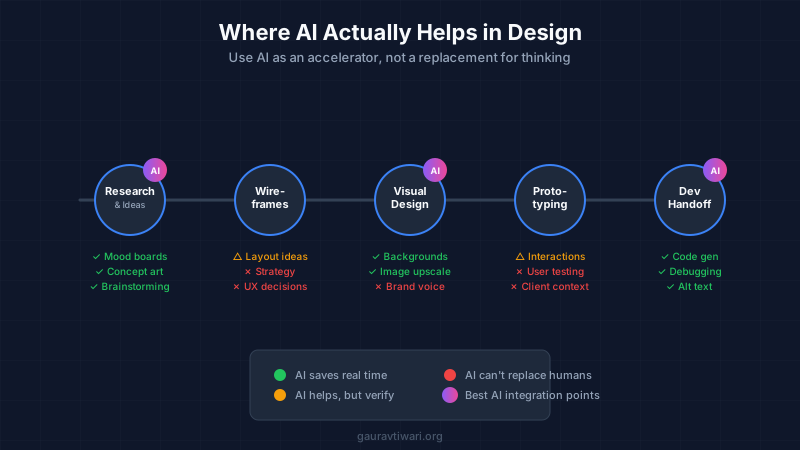
I use AI tools daily. They’re genuinely useful for generating initial CSS, debugging code, writing placeholder content, and brainstorming layout variations. What used to take an hour sometimes takes ten minutes. That’s real productivity.
But here’s where designers get into trouble: they treat AI output as finished work. It isn’t. AI-generated designs look generic because they’re trained on everything, optimized for nothing specific. AI-written code often works but isn’t clean or maintainable. AI suggestions lack context about your specific client, audience, or business goals.
Where AI Actually Helps
Use AI for first drafts and iteration speed. Ask ChatGPT or Claude to generate a CSS grid layout matching your specs. Use Midjourney or DALL-E for mood boards and concept exploration. Let GitHub Copilot autocomplete repetitive code patterns.
AI excels at tasks that are tedious but not creative. Resizing images. Generating color palette variations. Writing alt text for dozens of images. Creating responsive breakpoint variations of a component you’ve already designed. These are legitimate time-savers.
For debugging, AI is surprisingly good. Paste your broken CSS or JavaScript, describe what should happen versus what actually happens, and you’ll often get a working solution faster than Stack Overflow diving.
Where AI Falls Short
AI can’t replace taste. It doesn’t know that your client’s audience skews older and needs larger text. It doesn’t understand that the brand voice is playful, not corporate. It can’t see that the homepage hero image competes with the headline for attention.
Design decisions require context AI doesn’t have. Why did you choose that specific shade of blue? Because it tested better with your client’s customers last quarter. AI doesn’t know that.
The designers getting replaced by AI are the ones who were already producing generic, template-level work. If your value is “I can make a website,” you’re competing with tools that cost $20/month. If your value is “I understand your business and create solutions that achieve specific outcomes,” AI is your assistant, not your replacement.
AI Tools Worth Learning
Figma’s AI features are improving rapidly. Learn them as they roll out. Same with Adobe Firefly if you’re in the Adobe ecosystem.
For code assistance, Claude Code, ChatGPT Codex, GitHub Copilot, and Cursor are worth the subscription if you write code regularly. They’re not magic, but they eliminate a lot of boilerplate typing.
Learn prompt engineering basics. The difference between a useful AI response and garbage is often how you ask. Be specific. Provide context. Give examples of what you want. This skill transfers across every AI tool.
Build Projects That Actually Matter
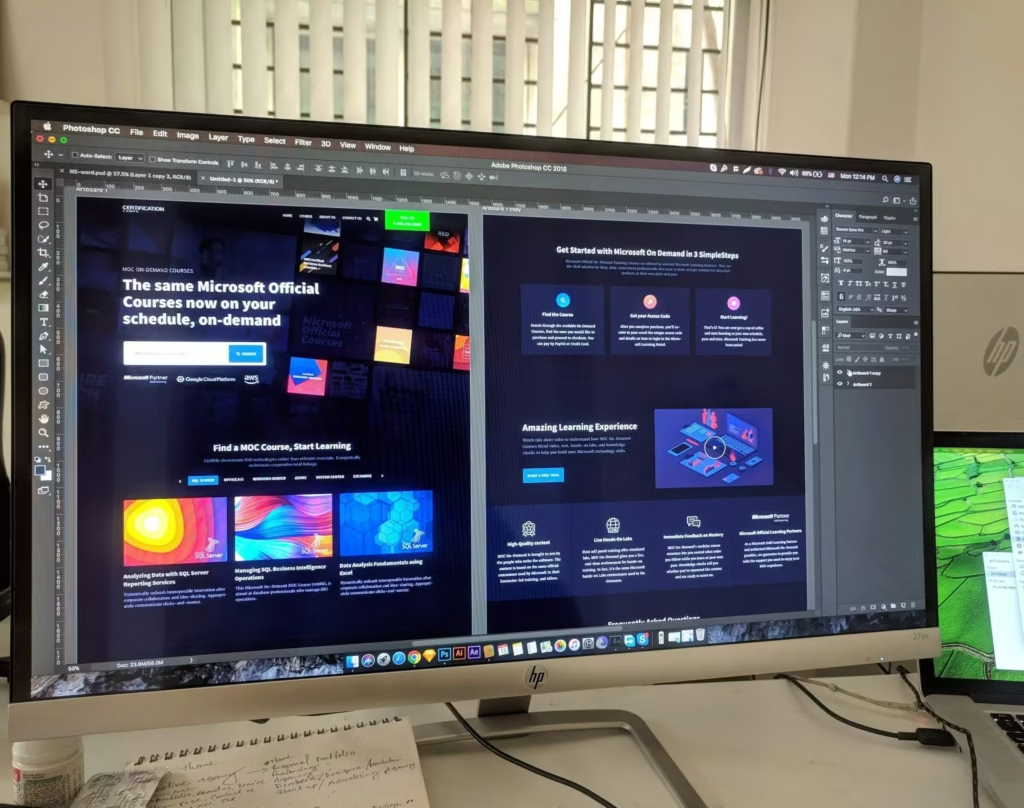
Your portfolio should include real projects that solved real problems. Not 47 variations of the same dribbble-style mockup. Not fictional app concepts that were never built.
I’ve reviewed hundreds of design portfolios. The ones that impress me show process, constraints, and outcomes. “The client needed X, we tried Y and Z, settled on this approach because of these reasons, and it resulted in these metrics.” That’s infinitely more valuable than “here’s a pretty screenshot.”
How to Get Real Experience
If you don’t have client work, create your own constraints. Redesign a local business website (with their permission if you want to use it publicly). Build a real project for a nonprofit. Create something for a friend’s side business.
The key is working within constraints. Real projects have budgets, timelines, stakeholder opinions, and technical limitations. Practice working with these before you encounter them with paying clients.
Document your process obsessively. Screenshots of early concepts. Notes about why you made decisions. Before and after comparisons. This documentation becomes portfolio content that demonstrates how you think, not just what you produce.
Consider contributing to open source projects. Many need design help. It’s real experience with real users and real feedback. Plus, it builds credibility and connections.
Understand Business Basics
Most design education ignores business entirely. Then designers wonder why clients push back on their brilliant ideas or why they struggle to charge decent rates.
Your designs exist to achieve business goals. Increased conversions. More leads. Better brand perception. Faster customer support resolution. If you can’t articulate how your design serves business objectives, you’ll struggle to sell your work or command higher rates. Understanding how to design user-friendly websites that convert gives you an edge over designers who focus only on aesthetics.
Learn to design for conversion rate optimization. Understand why certain layouts convert better than others. Know the psychology behind effective CTAs. This knowledge transforms you from someone who makes things pretty to someone who makes things profitable.
Pricing and Client Management
Designers chronically undercharge. I did it for years. The fix isn’t just raising rates. It’s understanding the value you provide and communicating it clearly.
A website that generates $10,000 per month in new business is worth far more than a few hundred dollars. Learn to price based on value delivered, not hours spent. This requires understanding your client’s business well enough to articulate expected returns.
Client management skills matter as much as design skills. Learn to write clear proposals. Set boundaries early. Communicate proactively about timeline changes. Most client horror stories stem from poor communication, not poor design work.
Read this: Website Pricing: $5k or Not – How Much to Charge for a Website?
Master Your Tools Deeply
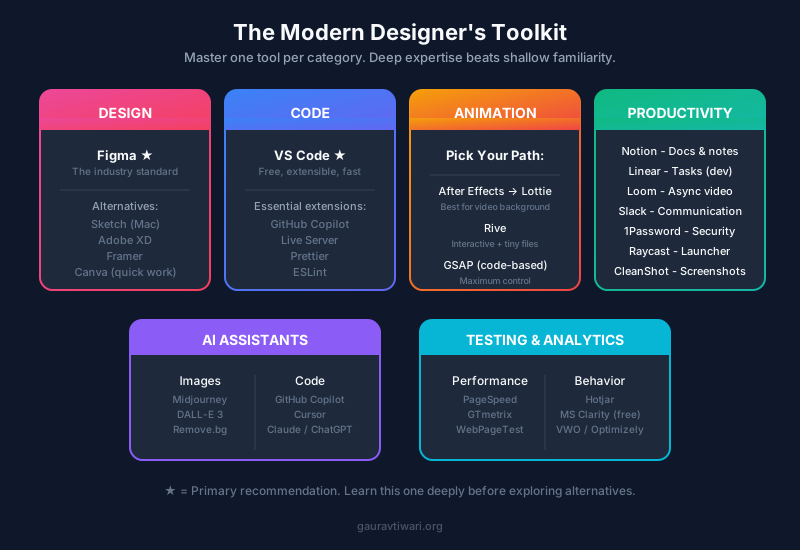
Designers obsess over tool choices. Figma versus Sketch versus Adobe XD. Which prototyping tool. Which handoff solution.
Honestly, the tool matters less than fluency with whatever you choose. Master one tool deeply rather than knowing five superficially. For most designers in 2026, Figma has won the design tool war. Learn it well. Same goes for WordPress themes. Pick one and learn it deeply.
Advanced Figma Skills That Pay Off
Most designers use maybe 20% of Figma’s capabilities. The other 80% separates fast designers from slow ones.
Learn auto-layout properly. Not just “I can make things stack.” Real auto-layout mastery where you build components that resize intelligently, handle variable content, and maintain spacing automatically. This alone can double your design speed.
Component variants and properties save massive time on design systems. Instead of 47 separate button files, you have one button with variants for size, state, and style. Learn this thoroughly.
Figma’s Dev Mode matters if you work with developers. Understanding how developers will interpret your designs helps you structure files in ways that make handoff smoother. Less back-and-forth means faster projects.
Plugins extend Figma significantly. Content Reel for placeholder content. Stark for accessibility checking. Unsplash for stock photos. Build a plugin toolkit that matches your workflow.
Beyond Design Software
Browser developer tools are your friend. Learn to inspect elements, modify CSS in real-time, and test responsive breakpoints. These skills help you troubleshoot implementation issues and communicate more effectively with developers.
Version control matters even for designers. Learn basic Git. At a minimum, know how to work with developers who use it. Designers who can work directly in code repositories save development teams significant time.
If you work with WordPress (and many designers do), understand how it works. Know the difference between themes and plugins. Understand custom post types and page builders. This context makes your designs more implementable and your conversations with developers more productive.
Collaborate and Get Feedback
Working in isolation produces blind spots. Your designs might be technically competent but miss obvious user experience issues. Or they might work beautifully on your high-end monitor but fall apart on typical screens.
Find designers whose work you respect and ask for honest feedback. Not validation. Feedback. “This looks great!” helps nobody. “This hierarchy is confusing because X” helps you grow.
Building Your Network
Join design communities where people actually critique work. Not the ones where every post gets generic praise. Look for spaces with constructive, specific feedback cultures.
Attend local meetups or virtual events. The connections matter more than the content. Knowing other designers creates referral opportunities, collaboration possibilities, and friends who understand your professional challenges.
Consider finding a mentor. Someone a few years ahead of you who’s willing to occasionally review your work and answer questions. You don’t need formal arrangements. Many experienced designers enjoy helping newcomers. Just be respectful of their time.
Automate the Boring Stuff
Time spent on repetitive tasks is time stolen from creative work. Learn to automate what you can.
Set up keyboard shortcuts for your most common actions. Figma lets you customize these. So does Photoshop. Every second saved adds up across thousands of actions.
Create templates for common project types. A starter file for landing pages. A component library for common UI patterns. Documentation templates for client deliverables. Front-loading this work means faster starts on every new project.
Automation Tools Worth Exploring
Zapier or Make (formerly Integromat) can automate workflows between tools. Automatically save Figma exports to specific folders. Send Slack notifications when projects reach certain stages. Create client invoices when projects complete.
If you do any coding, learn basic scripting. A simple Python or Node script that batch-processes images or generates responsive sizes saves hours over doing it manually. You don’t need deep programming knowledge. Just enough to automate specific pain points.
Browser extensions like Muzli, Panda, or Savee can automate inspiration gathering. Instead of actively hunting for design references, let curated content come to you during natural browsing.
Specialize Eventually (But Not Too Soon)
Early in your career, generalist experience is valuable. Try different project types. Explore various industries. Build different kinds of sites.
But eventually, specialists earn more than generalists. Someone who’s “the WordPress designer for law firms” commands higher rates than someone who “does websites.” Clients pay premium prices for expertise in their specific context.
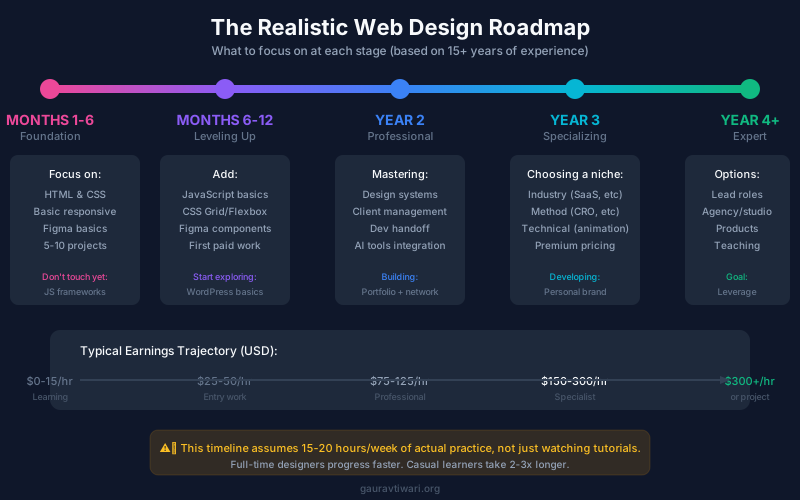
The timing matters. Specialize too early and you miss valuable learning. Too late and you’ve spread yourself thin without depth. A reasonable path: spend your first two to three years exploring broadly, then start focusing where you find the intersection of genuine interest, market demand, and natural ability.
Finding Your Specialty
Your specialty can be technical: animations, ecommerce, web applications. It can be industry-based: healthcare, real estate, SaaS. It can be methodology-based: design systems, rapid prototyping, conversion-focused landing pages.
Pay attention to which projects energize you versus drain you. Notice where clients seem particularly happy with your work. These patterns point toward natural specialization areas.
Consider the market. A specialty nobody’s hiring for won’t help your career. Research what businesses actually need and are willing to pay for. Sometimes the unsexy niches are the most profitable.
Never Stop Learning (But Be Strategic)
The design landscape changes constantly. New tools emerge. Techniques evolve. What worked five years ago might be obsolete or greatly improved now.
But “continuous learning” shouldn’t mean constantly chasing shiny objects. Be strategic about what you learn. Ask: will this skill matter in three years? Does it address a gap in my current abilities? Will it help me serve my target clients better?
Learning coding basics is strategic. Mastering yet another design tool that does roughly the same thing as three tools you already know is probably not.
Learning Resources Worth Your Time
Build a system for staying current without drowning in content. Follow a few high-quality sources rather than dozens of mediocre ones. Designate specific time for learning rather than letting it interrupt focused work.
Hands-on projects beat passive consumption. You’ll learn more redesigning one real website than watching twenty tutorial videos. Use tutorials as reference when stuck, not as primary learning.
Teach others as you learn. Writing about concepts, creating tutorials, or explaining techniques to junior designers cements your own understanding and builds your reputation simultaneously.
Design-to-Code Tools Are Finally Good
For years, “design to code” meant broken HTML that no developer would touch. That’s changed. Tools like Anima, Locofy, and Builder.io now generate code that’s actually usable. Not perfect, but usable.
I was skeptical until I tested Locofy on a client project last year. Took a complex Figma design, exported it to React components, and my developer said “this needs cleanup, but it saved me two days.” Two days. On one project.
The workflow that works: design in Figma with proper auto-layout and component structure, export with a design-to-code tool, then have a developer refine the output. You’re not replacing developers. You’re giving them a massive head start.
Which Tool to Learn
If you work with React, Locofy or Anima are worth learning. For WordPress, Elementor’s Figma kit and Builder.io both handle the translation reasonably well. Framer deserves special mention because it’s both a design tool and a publishing platform. Design, prototype, and ship without ever touching code.
The catch: these tools work best when your designs are structured properly. Sloppy Figma files produce sloppy code. Learning to design with export in mind makes you more valuable even if you never personally run the export.
Advanced Animation Tools
CSS animations and JavaScript libraries handle basic motion. But clients increasingly want sophisticated interactions: micro-animations, scroll-triggered sequences, animated illustrations that respond to user input.
Three tools dominate this space now. Learn at least one.
Rive
Rive creates interactive animations that export to tiny file sizes. I’m talking complex character animations under 50KB. The learning curve is steep, maybe two weeks to get comfortable, but the results are impossible to achieve any other way without killing page performance.
Use cases: animated logos, interactive illustrations, game-like interfaces, loading states that actually delight users. Rive animations can respond to user input, hover states, and data changes. Not just decorative motion, but functional animation.
Lottie and After Effects
If you already know After Effects, Lottie is the bridge to web. Design animations in After Effects, export via Bodymovin plugin, and play them on any website with minimal performance cost. The ecosystem is mature with plenty of tutorials and pre-made animations.
LottieFiles has a massive library of free and premium animations. Sometimes faster to customize an existing Lottie than create from scratch. Worth bookmarking.
Framer Motion and GSAP
For code-based animation, Framer Motion (React) and GSAP (vanilla JS or any framework) are the standards. GSAP has been around forever and handles complex timelines, scroll animations, and SVG manipulation better than anything else.
You don’t need to master these personally, but understanding what they can do helps you design better. Knowing that a certain interaction is trivial in GSAP versus impossible in CSS changes how you approach motion design.
AI Image Tools for Designers
Midjourney, DALL-E, and Stable Diffusion have obvious uses for concept art and mood boards. But the practical applications go deeper.
Background and Asset Generation
Need a hero image for a client mockup before the photoshoot happens? AI generates something plausible in minutes. Need texture backgrounds, abstract patterns, or placeholder product shots? Faster than stock photography and more specific to your needs.
I use Midjourney regularly for generating website backgrounds during the design phase. Clients see something custom rather than obvious stock photos. Even if we replace it with real photography later, it sells the concept better during approval. For simpler needs, Canva handles AI image generation too.
Image Enhancement
Tools like Topaz Gigapixel and Upscayl use AI to upscale low-resolution images without the blur you’d get from traditional methods. Incredibly useful when clients provide tiny logos or images scraped from their old website.
Remove.bg and similar tools handle background removal better than Photoshop’s built-in features for most cases. PhotoRoom takes it further with AI-generated backgrounds for product shots.
When AI Images Fail
AI struggles with text in images, specific brand elements, hands (still), and anything requiring precise accuracy. Use AI for conceptual work and atmospherics. Use real photography or custom illustration for anything client-specific or detail-critical.
Also watch the licensing. Commercial usage rights vary between tools and subscription levels. Midjourney’s terms are more permissive than you might expect, but read them before using AI images in client deliverables.
AI Writing Assistants for Design Projects
Copywriting bottlenecks design projects constantly. Clients promise content that never arrives. Placeholders become permanent. AI writing tools won’t replace professional copywriters, but they unstick projects.
Where AI Copy Actually Helps
First drafts. When you need placeholder text that’s more useful than lorem ipsum, Claude or ChatGPT generates realistic copy that helps clients visualize the final product. Headlines, product descriptions, feature lists. Rough enough to be obviously placeholder but specific enough to be useful.
Microcopy. Button text, error messages, form labels, empty states. The small text that nobody thinks about until implementation. AI handles these efficiently with the right prompts.
Content outlines. When clients don’t know what content they need, AI can generate content structures based on competitor analysis or industry standards. “Here’s what a typical services page includes” is easier to show than explain.
What AI Copy Can’t Do
Brand voice. AI writes generic competent copy. It doesn’t capture the specific voice that makes a brand recognizable. Use AI for structure and starting points, then add personality manually or hire a real copywriter.
Strategy. AI doesn’t know that your client’s audience skews older and prefers formal language. It doesn’t understand why certain keywords matter for SEO or why this particular headline angle will resonate. Strategy requires human context.
Prototyping Tools Beyond Figma
Figma’s prototyping is fine for basic click-throughs. But advanced interactions, logic, and data visualization need specialized tools.
ProtoPie
When clients need to feel an interaction, not just see it, ProtoPie delivers. It handles complex multi-screen flows, conditional logic, sensor inputs (accelerometer, sound), and variables that persist across screens.
I use ProtoPie for app concepts and advanced web applications where the interaction pattern is the selling point. The learning curve is moderate. Maybe a week to get productive, a month to feel fluent.
Principle and Origami Studio
Principle is Mac-only but creates buttery smooth animation prototypes fast. Drag, record, done. Less powerful than ProtoPie but faster for simple motion concepts.
Origami Studio (free from Meta) handles the most complex prototypes possible, including real device sensors and Facebook/Instagram integrations. Overkill for most projects but powerful when you need it.
When High-Fidelity Prototypes Matter
Enterprise clients and funded startups often need prototypes detailed enough for user testing before development begins. Agencies building pitch decks for competitive bids benefit from prototypes that feel real.
For smaller projects, Figma prototypes are usually sufficient. Don’t over-engineer the demo. Match prototype complexity to project complexity and client expectations.
Analytics and Testing Tools
Design decisions should be informed by data, not just intuition. These tools help.
Heatmaps and Session Recording
Hotjar and Microsoft Clarity show where users actually click, scroll, and get stuck. Clarity is free and surprisingly capable. Hotjar adds surveys and feedback widgets.
Review session recordings before redesigning existing sites. Watch real users struggle with navigation or miss important CTAs. This evidence convinces clients to accept design changes better than any design theory.
A/B Testing
For clients with sufficient traffic, tools like VWO, Optimizely, or A/B testing tools let you test design variations against real users. Which headline performs better? Does the green or blue CTA get more clicks?
You don’t need to run these tools yourself, but understanding A/B testing methodology makes you a better designer. Knowing that opinions should bow to data changes client conversations.
Performance Testing
PageSpeed Insights, GTmetrix, and WebPageTest measure what matters for user experience and SEO. Learn to read these reports. Understand which metrics matter (LCP, CLS, INP) and which design decisions affect them.
When you deliver designs with performance in mind, you become more valuable than designers who create beautiful but slow websites.
Collaboration and Handoff Tools
Design doesn’t happen in isolation. How you collaborate affects project success as much as your design skills.
Developer Handoff
Figma’s Dev Mode handles most handoff needs now. But Zeplin and Avocode still exist for teams with specific workflows or non-Figma design tools.
More important than the tool: structure your files for developers. Clear naming conventions. Organized layers. Properly built components. A beautifully designed file that developers can’t parse wastes everyone’s time.
Talk to developers early. Ask how they prefer to receive designs. What information do they need? What format works best? This conversation prevents more problems than any handoff tool.
Client Feedback
InVision and Marvel have faded. Figma commenting handles most feedback now. For clients who struggle with Figma’s interface, Loom videos explaining designs work better than any annotation tool.
Record yourself walking through the design. Explain your decisions. Anticipate questions. Clients feel more heard and provide better feedback than they would clicking through a prototype alone.
Project Management
Linear for development-heavy teams. Notion for documentation and knowledge management. Asana or monday.com for traditional project management. These aren’t design tools, but designers who understand project workflows integrate better into teams.
Pick whatever your team uses and learn it properly. The designer who tracks their own tasks and updates statuses without reminders is more valuable than equally talented designers who need babysitting.
Future-Proofing Your Skills
The tools I’ve mentioned will evolve. Some will disappear. New ones will emerge. How do you stay current without drowning in constant learning?
Principles Over Tools
The specific tool matters less than the underlying skill. Learning Figma auto-layout teaches you about responsive component thinking. That knowledge transfers to any future design tool.
When new tools emerge, ask: what underlying skill does this require? If you have the foundation, learning new implementations becomes faster.
Watch What Developers Use
Developer tooling often predicts designer tooling. Version control came to design after developers used it for decades. Component-based design followed component-based development. AI-assisted coding preceded AI-assisted design.
Follow developer communities casually. You don’t need to understand everything. Just notice patterns in what’s emerging.
Invest in One Tool Deeply
Rather than surface-level knowledge of ten tools, develop deep expertise in one tool per category. One design tool (Figma). One animation tool (your choice). One prototyping tool (if needed). One AI assistant.
Deep expertise in a few tools beats shallow familiarity with many. You can always learn adjacent tools when projects require them.
Frequently Asked Questions
Do I need a degree in web design to get hired?
No. Most hiring managers care about your portfolio, not your credentials. I’ve hired designers without degrees who outperformed those with four-year design programs. Build a strong portfolio with real projects, demonstrate problem-solving ability, and you’ll compete with anyone regardless of formal education.
How long does it take to become job-ready as a web designer?
Focused learning with consistent practice can get you entry-level ready in 6-12 months. This assumes 15-20 hours weekly of actual practice, not just consuming tutorials. Building real projects accelerates this dramatically compared to only taking courses. Becoming truly proficient takes 2-3 years of professional experience.
Should I learn to code or use no-code tools?
Both, but prioritize code fundamentals first. No-code tools are powerful for certain projects, but understanding code makes you better at using them. You’ll hit walls with no-code solutions that code knowledge helps you work around. Plus, code skills are transferable across tools while specific no-code platforms may become obsolete.
Will AI replace web designers?
AI is replacing designers who produce generic, template-level work. If your only value is making layouts, yes, you’re at risk. But designers who understand business context, user psychology, and strategic thinking remain valuable. AI becomes your assistant, not your replacement. The key is developing skills AI can’t replicate: taste, judgment, client relationships, and understanding specific business needs.
What’s the best way to build a portfolio with no client work?
Redesign existing websites with documented reasoning. Create fictional but realistic projects with genuine constraints. Volunteer for nonprofits or small businesses who need web help. Contribute to open source projects. The key is treating these like real client work with deadlines, limitations, and business objectives rather than unconstrained creative exercises.
How do I price my web design services?
Research market rates for your experience level and location. For beginners, start at rates that feel slightly uncomfortable but not insulting to the profession. Raise prices with each project as your skills improve. Aim to price based on value delivered to the client, not just hours spent. A site generating thousands monthly is worth more than a few hundred dollars.
Is web design still a good career choice in 2026?
Yes, but the role is evolving. Pure visual design is being commoditized by templates and AI tools. Designers who understand user experience, conversion optimization, and technical implementation remain highly valuable. The designers struggling are those who only make things look pretty without solving business problems. Focus on becoming a problem-solver, not just a pixel-pusher.
Should I freelance or seek full-time employment?
For most beginners, full-time positions offer faster learning. You’ll have mentors, structured feedback, and exposure to projects larger than you could land independently. Freelancing works better after 2-3 years when you have established skills, a portfolio, and professional network. Starting freelance is possible but requires stronger self-direction and business skills from day one.
The Path Forward with these Web Design Tips
These aren’t theoretical suggestions. They’re what’s worked for me across 800+ projects and 15+ years of building websites for clients ranging from small businesses to Fortune 500 companies.
Web design in 2026 rewards designers who combine aesthetics with performance, understand business objectives, and can communicate with both clients and developers. AI tools are making basic design work easier, which means the bar for excellence is what separates successful careers from commoditized gig work.
Start with the fundamentals. Learn to code at least HTML and CSS. Build real projects with real constraints. Get honest feedback from people who won’t just validate your choices. Understand that your designs exist to serve business goals, not just look impressive. Use AI as an accelerator, not a replacement for thinking.
Most importantly, actually build things. Reading about design, watching tutorials, and collecting inspiration boards are not the same as designing. The fastest way to improve is shipping work, seeing how users respond, and iterating.
Your first fifty projects won’t be great. That’s normal. The goal isn’t perfection. It’s learning. Every mediocre project teaches you something that makes the next one better.
Pick one thing from this guide and start today. Not tomorrow. Not “when I have more time.” Today. The designers who succeed are the ones who stop consuming advice and start creating work.
Go build something.
Disclaimer: This site is reader-supported. If you buy through some links, I may earn a small commission at no extra cost to you. I only recommend tools I trust and would use myself. Your support helps keep gauravtiwari.org free and focused on real-world advice. Thanks. - Gaurav Tiwari