
Teachable Review: Is It Still Worth It for Course Creators?

Teachable
- Zero-code course builder with drag-and-drop lessons
- Built-in payment processing and tax handling
- Free plan available to test the market
- Affiliate program on paid plans
- Mobile-responsive student experience out of the box
Create and sell online courses, coaching, and digital downloads without any technical setup. All-in-one platform for non-technical course creators.
Teachable is an online course platform that’s been around since 2013. It lets you create, host, and sell courses without touching code. Over 100,000 instructors have used it, generating over a billion dollars collectively. Those are impressive numbers.
But here’s my honest take after evaluating it alongside dozens of alternatives: Teachable is a solid starting point for first-time course creators who want simplicity over power. It’s not the best platform for everyone, and it’s definitely not the best for WordPress users who want control over their infrastructure.
I’m rating it 3.8 out of 5. Good enough to recommend with caveats, not good enough to call it the best.
What Teachable Actually Does
Teachable handles the entire course delivery stack. You create content (video lessons, text, quizzes, downloads), upload it to their platform, set a price, and sell. They manage hosting, payment processing, student enrollment, and delivery. You focus on the content.
The value proposition is clear: if you don’t want to deal with WordPress hosting, plugin compatibility, payment gateway setup, or any of the technical overhead that comes with self-hosting, Teachable removes all of that. Sign up, build your course, publish.
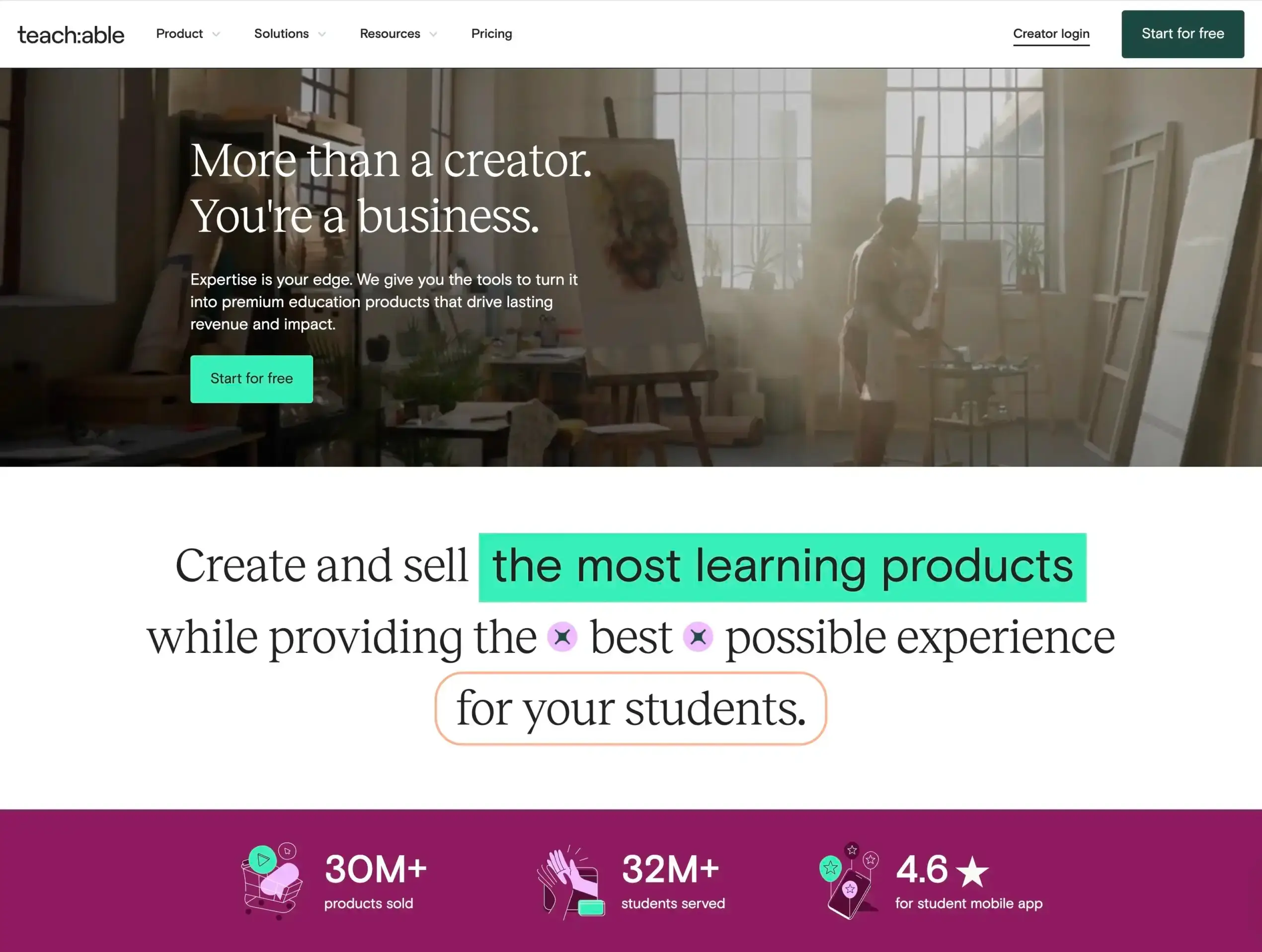
At its core, it’s a hosted marketplace with a course builder bolted on. You don’t own the infrastructure. You don’t control the student data the way you would with a self-hosted WordPress LMS. But you also don’t have to worry about server maintenance, security patches, or plugin conflicts. That tradeoff is the key decision you need to make before committing.
Who Is Teachable Really For?
Teachable works best for a specific type of creator. And I think most reviews get this wrong by saying “anyone can use it.” That’s technically true but practically misleading.
The platform shines for solo creators who have expertise in a non-technical subject and want to monetize it without building infrastructure. Think: a yoga instructor selling a 6-week flexibility program. A business coach packaging their methodology into video lessons. A photographer teaching editing workflows. A language tutor creating structured lessons.
These folks don’t want to install WordPress, configure LearnDash, set up Stripe, and troubleshoot why their video lessons aren’t loading on Safari. They want to focus on content. Teachable lets them do that.
Where it falls short is for WordPress developers, bloggers who already have an audience on their own domain, and anyone who cares about owning their platform. If you already run a WordPress site with traffic, adding a WordPress LMS plugin gives you more control, better SEO integration, and no monthly SaaS fees scaling with your student count.
Key Features That Matter
I’m not going to list every feature from Teachable’s marketing page. Here’s what genuinely affects whether you should use it.
Course Builder
The drag-and-drop builder is genuinely easy. You create sections, add lessons (video, text, PDFs, quizzes), and arrange them. No code. No design skills needed. The templates are clean if a bit generic.
The editing experience is comparable to building a basic WordPress page. Not as flexible as Gutenberg, but simpler. If you’ve never built a website before, you’ll find this approachable. If you’ve built WordPress sites, you’ll find it limiting.
Payment Processing
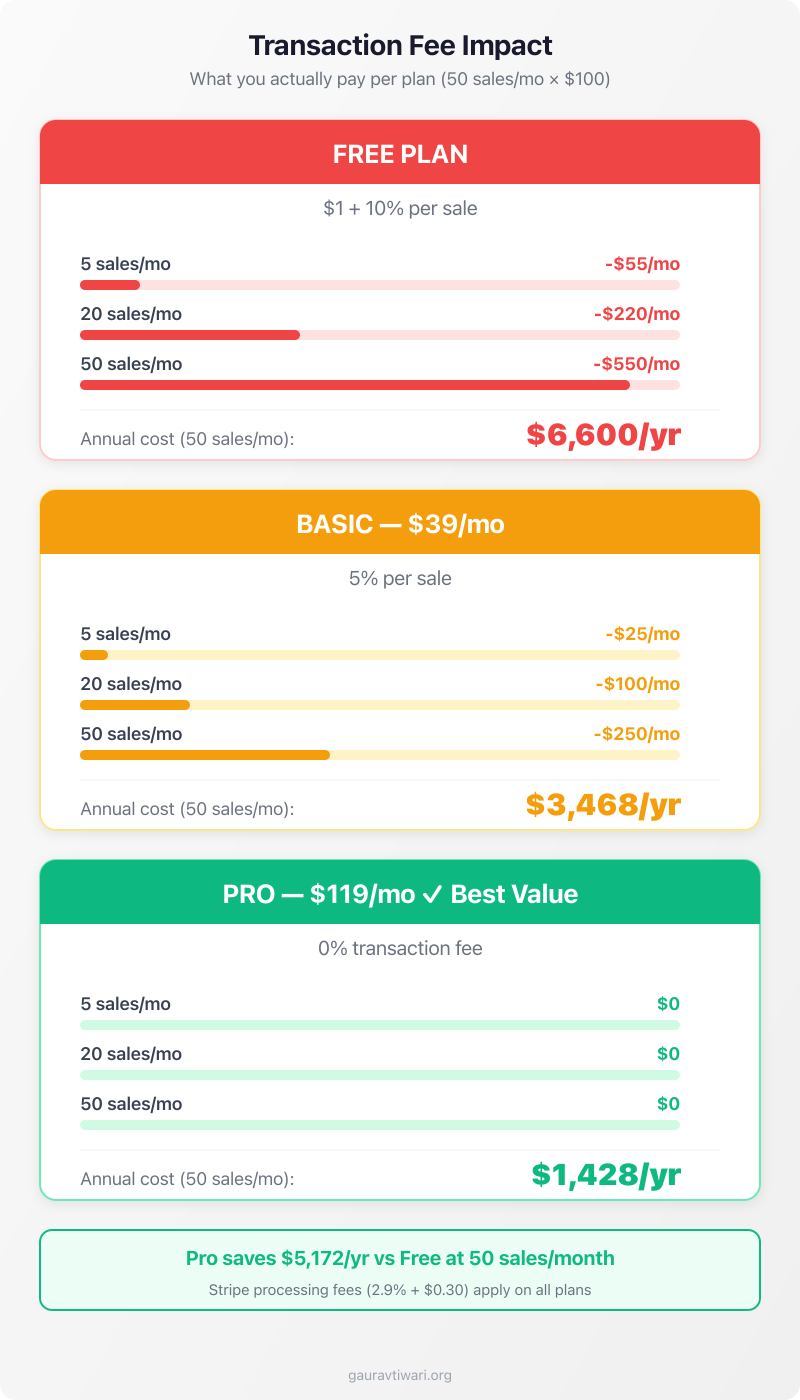
Teachable handles payments through Teachable Payments (powered by Stripe) or PayPal. They collect the money and pay you. On the Free plan, they take a $1 + 10% transaction fee. On the Basic plan ($39/month), that drops to 5%. On the Pro plan ($119/month), transaction fees disappear.
If you’re selling a $100 course and moving 50 units a month on the Free plan, you’re paying $550 in transaction fees. That’s $6,600/year. The Pro plan at $1,428/year saves you over $5,000. But if you’re only selling 5 courses a month, the Free plan costs you $55 in fees, and the Pro plan is overkill.
Affiliate Program
Teachable has a built-in affiliate system. You can recruit affiliates to promote your courses and pay them commissions. This is available on paid plans. For comparison, if you’re on WordPress, you’d need a separate affiliate plugin like AffiliateWP or Solid Affiliates. Having it built-in saves setup time and cost.
Student Management
You get a student dashboard, progress tracking, course completion certificates, and basic email features. The email tools are functional but basic. You can send announcements and automated drip content, but don’t expect the power of a dedicated email marketing platform. If you need proper email automation, you’ll want one of the best email marketing tools alongside Teachable.
Quizzes and Certificates
You can create quizzes within lessons and issue completion certificates. The quiz builder is basic: multiple choice, true/false. If you need advanced assessments (essay grading, timed exams, question pools), you’ll need something more robust like LearnDash on WordPress.
What Teachable Does Well
Zero Technical Barrier
This is Teachable’s strongest selling point, and it’s genuine. You don’t need to know HTML, CSS, hosting, domains, SSL, or any technical concept. Sign up, build, sell. I’ve worked with 800+ clients over 16 years, and I can tell you that the technical barrier is what stops most people from launching their first course. Teachable removes it completely.
All-in-One Simplicity
Hosting, payments, delivery, student management, landing pages. One platform, one login, one bill. For someone who doesn’t want to manage a WordPress site with 6 plugins just to sell a course, this simplicity is worth paying for.
Mobile-Responsive Out of the Box
Your course pages and student experience work on mobile without any configuration. This matters more than most people realize. Over 60% of web traffic is mobile. If your course doesn’t work on phones, you’re losing students.
What Teachable Doesn’t Do Well
Limited Customization
You’re stuck with Teachable’s templates and limited design options. You can’t build custom pages the way you would with WordPress and GenerateBlocks. You can’t add custom functionality. Your school looks like… a Teachable school. For many first-time creators, this is fine. For anyone who cares about branding, it’s frustrating.
Transaction Fees on Lower Plans
The Free plan’s $1 + 10% fee is steep. Even the Basic plan at 5% eats into your margins. You only eliminate transaction fees on Pro ($119/month) or Business ($299/month). Compare this to a self-hosted WordPress setup where Stripe charges 2.9% + $0.30 and that’s it. No platform fee on top.
SEO Limitations
Your courses live on teachable.com subdomains (or a custom domain you point there). But you don’t get the SEO control you’d have on WordPress. No Rank Math, no schema customization, no granular meta control. Your course landing pages compete on Teachable’s infrastructure, not yours.
For bloggers and content creators who already have domain authority on their own site, hosting courses on a separate Teachable domain means you’re starting from zero in terms of SEO. You can’t leverage the authority you’ve already built.
No Live Classes or Webinars
Teachable doesn’t support live teaching. It’s strictly pre-recorded content delivery. If you want live workshops, you’ll need a separate webinar tool (Zoom, Google Meet) and then link to it from within Teachable. This feels like a missing piece in 2026.
Vendor Lock-in
Your courses, student data, and revenue history live on Teachable’s servers. If you want to leave, you can export student email addresses, but your course structure, lesson content, and student progress don’t transfer easily. You’d have to rebuild on the new platform.
I’ve written about the uncomfortable truth of platform dependency before. Building your business on someone else’s platform is always a risk. Teachable could change pricing, terms, or features at any time.
What I Like
- Zero technical barrier for first-time creators
- All-in-one: hosting, payments, delivery, student management
- Built-in affiliate program on paid plans
- Mobile-responsive course pages out of the box
- Free plan to test the market
- Payment processing and tax compliance handled
What Could Be Better
- Aggressive transaction fees: $1 + 10% on Free, 5% on Basic
- Limited customization and branding options
- No SEO control vs self-hosted WordPress
- Vendor lock-in with difficult data portability
- No live classes or webinar support
- WordPress users get better value from LearnDash
Pricing
Here’s the full pricing breakdown. The annual pricing is where the value is. Monthly billing is significantly more expensive.
| Plan | Monthly | Annual (per month) | Transaction Fee |
|---|---|---|---|
| Free | $0 | $0 | $1 + 10% |
| Basic | $59 | $39/mo | 5% |
| Pro | $159 | $119/mo | 0% |
| Pro+ | $249 | $199/mo | 0% |
| Business | $665 | $499/mo | 0% |
The math that matters: If you’re earning less than $500/month from courses, the Free or Basic plan works. Once you’re consistently above $2,000/month, Pro pays for itself through eliminated transaction fees. Below that, do the math carefully.
Check Current Teachable Pricing
See all plans and current offers. Free plan available.
Pricing vs Competitors
| Platform | Starter | Mid-Tier | Top Tier |
|---|---|---|---|
| Teachable | Free ($1+10%) | $119/mo (Pro) | $499/mo |
| Thinkific | Free | $99/mo | $199/mo |
| Podia | $39/mo | $89/mo | $199/mo |
| Kajabi | $55/mo | $119/mo | $319/mo |
| LearnDash (WP) | $199/yr | $399/yr | $799/yr |
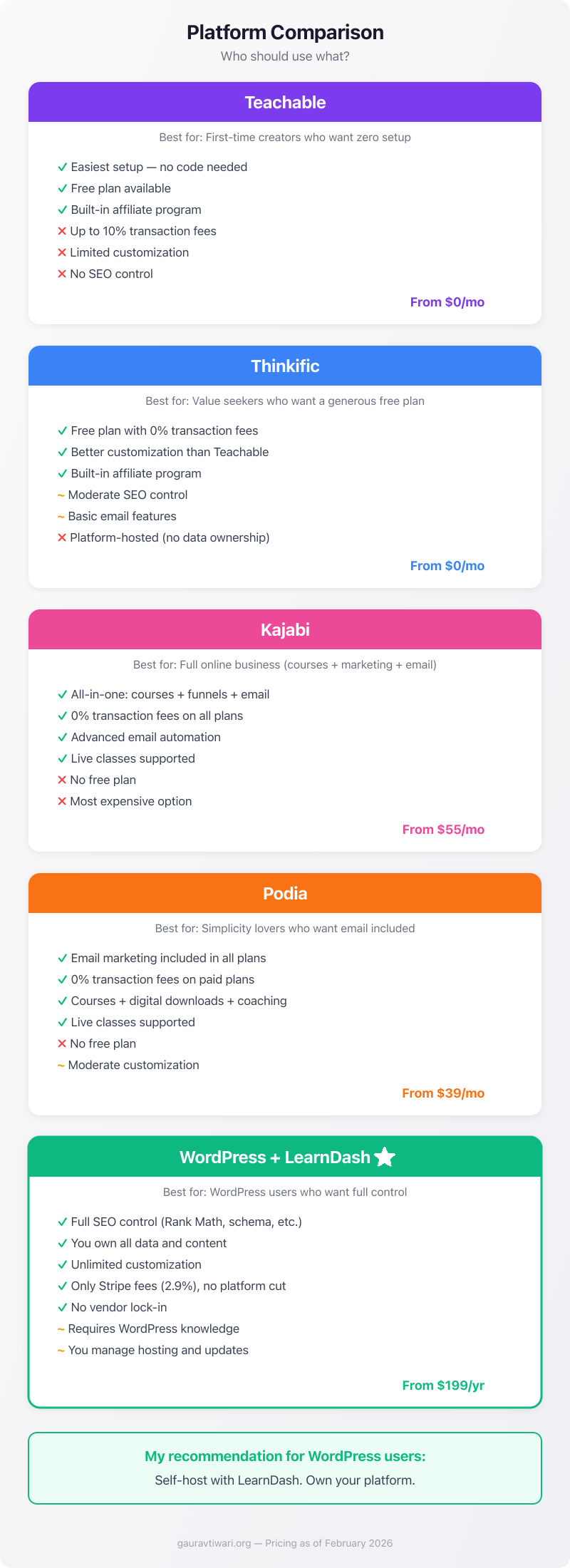
For self-hosted builders with WordPress experience, LearnDash is dramatically cheaper long-term. For non-technical creators, Teachable and Thinkific offer the most accessible entry points. See my full breakdown of best online teaching platforms for a deeper comparison.
Teachable vs Alternatives
Teachable vs Thinkific
Thinkific is the closest competitor. Both offer similar course building experiences. Thinkific’s free plan has no transaction fees, which makes it better for testing. Thinkific also offers more customization options and a better student experience out of the box. I’ve also covered the best Thinkific alternatives if you want more options.
My take: if you’re choosing between the two, start with Thinkific’s free plan. It’s more generous.
Teachable vs Kajabi
Kajabi is the premium option. It includes marketing funnels, email automation, a website builder, and course hosting in one package. It’s significantly more expensive ($55-319/month), but if you’re building a full online business, not just selling one course, Kajabi eliminates the need for 3-4 separate tools.
My take: Kajabi if you’re running a full coaching business. Teachable if you just want to sell courses.
Teachable vs WordPress + LearnDash
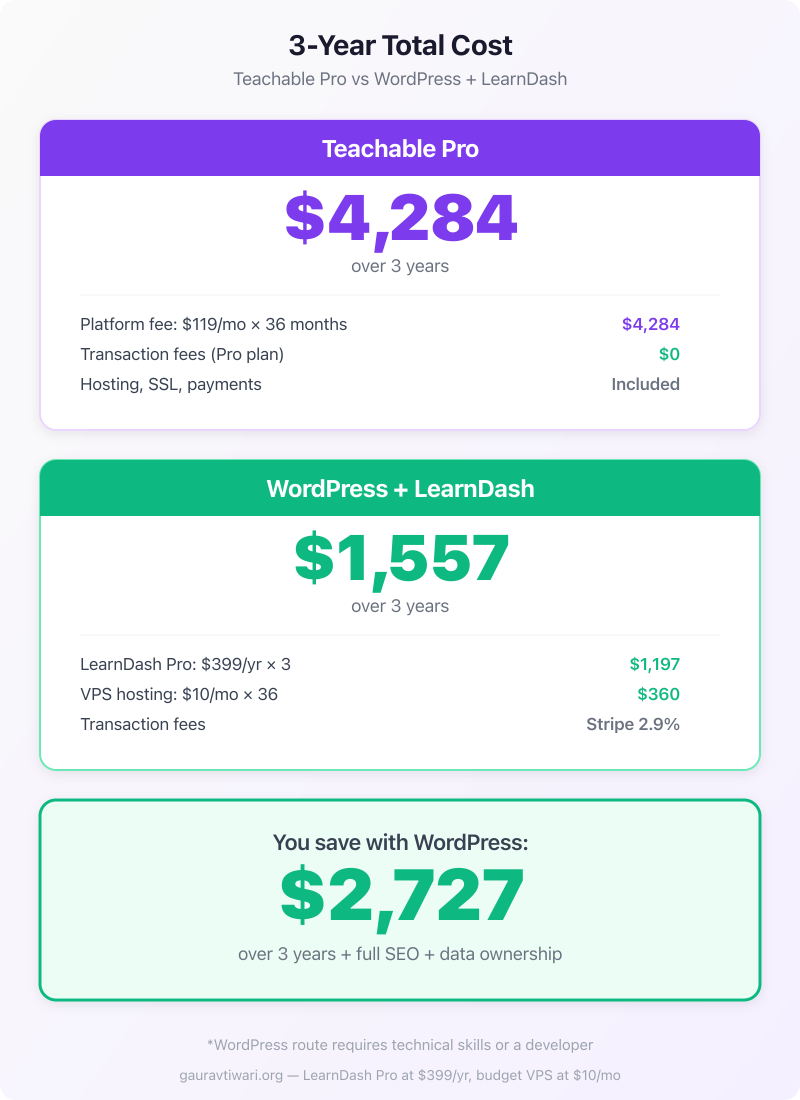
This is the comparison that matters for my readers. A WordPress site with LearnDash gives you full control over design, SEO, student data, and pricing. You pay a flat annual fee ($199-799/year) with no transaction fees beyond Stripe’s standard 2.9%.
The tradeoff: you need to manage hosting, updates, and compatibility. If you already have a WordPress site, this is almost always the better choice. If you don’t want to touch WordPress, Teachable wins on simplicity.
Also see: How to Create an Online Teaching Website with WordPress
Teachable vs Podia
Podia is simpler than Teachable and includes email marketing in all plans. No transaction fees on any paid plan. If you want courses + digital downloads + email marketing in one tool, Podia offers better value at the lower end.
For a deeper look at your options, check out 8 of the best Teachable alternatives and my comparison of Kajabi alternatives. If you’re looking at marketplaces instead, see best Udemy alternatives.
Who Should Use Teachable
First-Time Course Creators
If you’ve never sold an online course and you want to test the market without technical overhead, Teachable’s free plan lets you start with zero upfront investment. Build one course, validate demand, then decide if you want to upgrade or switch.
Non-Technical Subject Experts
Coaches, consultants, therapists, fitness instructors, artists. People who have expertise worth packaging but don’t want to learn WordPress. Teachable’s no-code builder is built for exactly this user.
Solo Creators Without an Existing Website
If you don’t already have a website with traffic, Teachable gives you a complete brand presence: landing pages, checkout, student area. Building all of this from scratch on WordPress takes time and money. Though if you’re thinking about it, my guide on starting a blog is a good starting point.
Who Should NOT Use Teachable
WordPress Developers and Bloggers
If you already run a WordPress site with traffic and domain authority, don’t put your courses on a separate platform. Use LearnDash, LifterLMS, or TutorLMS. Keep everything on your domain. Keep the SEO value. Keep control of your data.
High-Volume Course Sellers
Once you’re selling thousands of enrollments monthly, transaction fees (even at 0% on Pro) aren’t the issue. The limitations are: customization, branding, automation, and data ownership. At scale, a self-hosted solution or Kajabi makes more sense.
Anyone Who Wants Full Control
If data ownership, custom branding, SEO integration, and platform independence matter to you, Teachable is the wrong choice. It’s a walled garden. A nice one, but a walled garden nonetheless.
How Did Teachable Fare with Me?
I’ve evaluated Teachable across multiple projects and recommended it to clients who needed the lowest barrier to entry. It does what it promises: simple course creation and delivery without technical overhead.
But I can’t ignore the limitations. The transaction fees on lower plans are aggressive. The customization is restrictive. The SEO capabilities are basic. And the vendor lock-in concerns are real, especially for anyone building a long-term business.
For my WordPress-savvy audience, I’d almost always recommend a self-hosted LMS instead. The upfront effort is higher, but you own everything. For non-technical first-timers testing the waters? Teachable is a reasonable starting point. If you’re interested in teaching online more broadly, my guide on how to teach online covers all the options.
Bottom line: Teachable is a 3.8/5. Good for getting started, not good enough for scaling. Start here if you must, but plan your exit to a platform you control.
Teachable
Pros
- Zero technical barrier to entry for first-time course creators
- All-in-one platform: hosting, payments, delivery, student management
- Built-in affiliate program on paid plans
- Mobile-responsive course pages out of the box
- Free plan available to test the market
- Handles payment processing and tax compliance
Cons
- Aggressive transaction fees: $1 + 10% on Free, 5% on Basic
- Limited customization and branding options
- No SEO control compared to self-hosted WordPress
- Vendor lock-in with difficult data portability
- No live classes or webinar support built in
- WordPress users get better value from LearnDash or LifterLMS
Summary
Teachable is a solid entry-level course creation platform for non-technical creators. Zero setup complexity, decent course builder, built-in payments. But transaction fees on lower plans are steep, customization is limited, and you don’t own your infrastructure. For WordPress users, a self-hosted LMS like LearnDash offers more control at lower long-term cost. Best for first-time course creators testing the market.
Frequently Asked Questions
Is Teachable worth it in 2026?
For non-technical first-time course creators, yes. The free plan lets you test with zero upfront cost. But if you already run a WordPress site, a self-hosted LMS like LearnDash gives you more control at lower long-term cost. Teachable is a 3.8/5 in my evaluation.
How much does Teachable actually cost?
Free plan costs $0/month but charges $1 + 10% per transaction. Basic is $39/month (annual) with 5% fees. Pro is $119/month (annual) with 0% fees. The hidden cost is transaction fees on lower plans. Do the math based on your expected sales volume.
Is Teachable or Thinkific better?
Thinkific’s free plan is more generous with no transaction fees. Thinkific also offers more customization. I’d start with Thinkific if you’re choosing between the two. Teachable wins on brand recognition and marketplace visibility.
Can I use Teachable with WordPress?
You can link to Teachable from your WordPress site, but they don’t integrate natively. Your courses live on Teachable’s servers, not your WordPress installation. If you want courses on your WordPress site, use LearnDash, LifterLMS, or TutorLMS instead.
Does Teachable handle taxes?
Teachable Payments handles US sales tax collection and EU VAT for BackOffice users. This is a genuine convenience if you’re selling internationally. On self-hosted platforms, you’d need a tax plugin or service like TaxJar.
Can I migrate from Teachable to WordPress later?
You can export student email addresses. But your course structure, lesson content, quizzes, and student progress don’t export cleanly. You’d essentially rebuild your courses on the new platform and re-upload all content. Plan for this if you start on Teachable.
Is Teachable good for selling digital products (not courses)?
Teachable supports digital downloads, but it’s primarily a course platform. For pure digital product sales (ebooks, templates, printables), Podia or Gumroad are better fits with simpler delivery and lower fees.
What’s Teachable’s refund policy?
Teachable offers a 30-day money-back guarantee on paid plans. For your students, you set your own refund policy per course. There’s no platform-enforced student refund policy like Udemy has.
Disclaimer: This site is reader-supported. If you buy through some links, I may earn a small commission at no extra cost to you. I only recommend tools I trust and would use myself. Your support helps keep gauravtiwari.org free and focused on real-world advice. Thanks. - Gaurav Tiwari