
4 Tips for Starting a Successful Gaming Blog
A gaming blog can be a fun hobby and an effective way to share your interests with likeminded folk, but running a successful gaming blog can also be a viable side hustle. By attracting users and increasing your subscribers, you might be surprised at how much income your gaming blog can generate. To optimize your success, take a look at these four tips for starting a successful gaming blog now:
Choose Your Niche
There are nearly 3 billion active gamers in the world, so there’s no doubt a gaming blog can acquire a large audience. However, trying to appeal to such a large audience can be tricky, particularly as there are so many different aspects of gaming. By focusing on a particular niche, a game category, you can publish content that’s most relevant to your audience and provide blog visitors with a meaningful experience.
Whether you focus on specific consoles or platforms, such as the Xbox, PS or PC, or select a genre, like RPG or FPS, narrowing your audience also gives you the opportunity to create content about the aspects of gaming you enjoy the most.
See my full guide on How to Select a Profitable Niche? for more detail on how to choose a perfect niche for your blog.
Feature Affiliate Links
There are numerous innovations that have been brought to life by the internet and online shopping is just one of them. With billions being spent via the internet, featuring affiliate links on your blog can be a savvy way to show users great products and monetize your blog. Generally, when a user clicks an affiliate link and makes a purchase, you’ll receive a commission or a pre-agreed fee. In some cases, you can even generate revenue when a user simply clicks a link on your blog. This is called affiliate marketing in experts’ language.
If you want to run your blog as a side hustle and supplement your income with your hobby, featuring affiliate links on your blog can be a great way to do it. See Amazon Affiliate Plugins that can help you do so on WordPress.
Publish High Quality Content
Whatever niche you’re focusing on, it’s vital to deliver engaging and informative content to your audience. After all, there are millions of blogs out there, so you’ll need to offer something innovative if you want to capture and retain your audience.
Creating a content calendar can be a good way to strategize and come up with fresh, new ideas. As well as helping to structure content releases, a calendar will make it easy to see whether you’re covering some topics too frequently.
Optimize Your Blog
When you’re running a blog, you might choose to use a free hosting service, or you might prefer to launch your own website. Whichever hosting package you decide to use, make sure your blog is optimized to deliver an outstanding user experience (UX). From reducing page loading times to implementing a mobile-first approach to structure and design, there are many ways to enhance your blog and attract more viewers.
Launching Your Gaming Blog
In many ways, blogging can be most difficult when you’re first starting out. As time goes on, however, you’ll gain more experience and become more adept at engaging your audience. Additionally, you’ll be able to use the data your blog generates to learn more about user behavior and can optimize your blog, structure and content based on the insights you’ve gained.
Hardware You Need to Run a Gaming Blog
A gaming blog needs screenshots, video captures, and sometimes live streams. That means your laptop matters. I run my content creation on a MacBook Pro, but for gaming blogs specifically, you need a machine that can run games AND screen capture simultaneously.
The ASUS TUF at $899 is the sweet spot for a gaming blogger. It handles modern games, screen capture, and video editing without breaking a sweat. Pair it with a decent webcam if you plan to do face-cam content. I wrote more about the full setup in my home office setup guide.
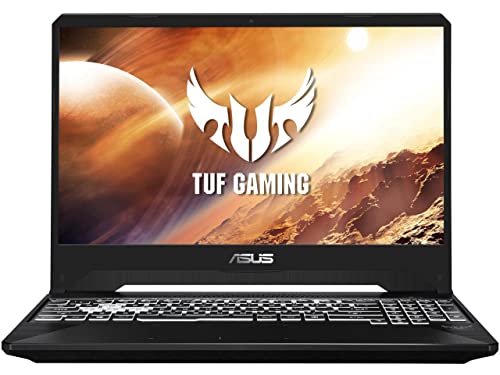
- NVIDIA GeForce GTX 1650 4GB GDDR5 (Base: 1395MHz, Boost: 1560MHz, TDP: 50W)
- Intel Core i7-9750H Processor (8M Cache, up to 4.5GHz)
- 15.6” 144Hz FHD (1920×1080) IPS-Type display
- 512GB PCIe NVMe M.2 SSD
- 8GB DDR4 2666MHz RAM
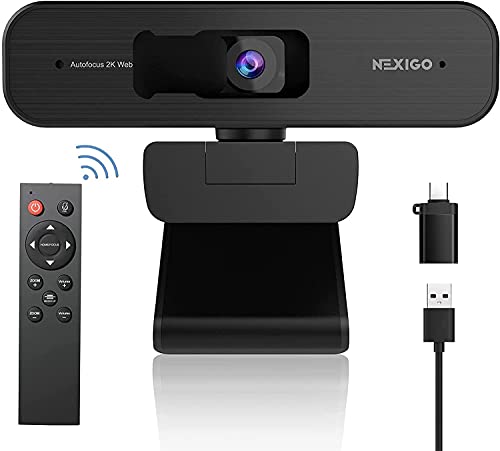
- 【2K QHD 5 Megapixels Sony Starvis Sensor】Powered by a 2K (2560×1440, 30fps) QHD 5-megapixel Sony Starvis CMOS Sensor, the N940P captures bright and crisp video even in low light. It's perfect for work, conferencing, and streaming!
- 【Remote with 3x Digital Zoom】 Control your video calls with a remote so even away from the desk you are still in charge. Turn off the webcam, adjust the volume, zoom in and out, mirror/flip your image, and more. With support for 3x digital magnification at 1080P@30fps, the NexiGo 2K webcam makes it possible to zoom in gradually with the single press of a button.
- 【USB Type A or C & Privacy Cover Included】 The NexiGo webcam is compatible with USB-A as well as USB-C input ports when using the included USB-C adapter. A webcam privacy cover is also included to provide security and peace of mind.
- 【AutoFocus & Built-in Noise Reduction Mic】The NexiGo N940P webcam uses high sensitivity autofocus technology to quickly capture and focus on any subject. The built-in noise-canceling mic reduces ambient noise to enhance the sound quality of your video.
- 【Plug and Play Setup & Widely Compatible】Works with USB 2.0 or 3.0, no additional drivers required. You can directly enjoy the webcam in applications such as Skype and Zoom. Compatible with Windows 7/8/10/11, Mac OS 10.6, Linux 2.6.24, Chrome OS 29.0.1547 or above, Ubuntu Version 10.04 or above.
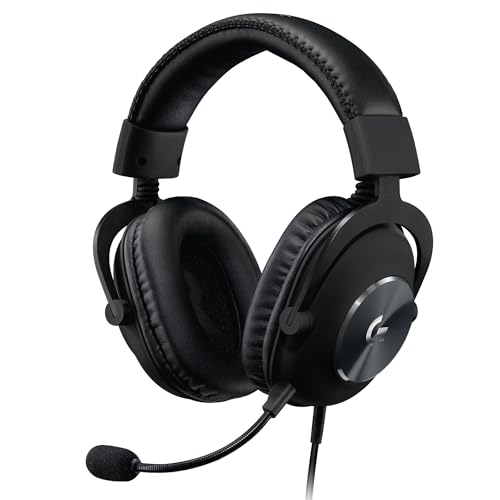
- PC gaming headset with detachable 6mm microphone featuring real time Blue Voice technology, including noise reducer, compressor, and more for cleaner, pro-grade sounding voice comms*
- USB gaming headset with 7.1 and object-based surround sound for greater in-game positional, distance, and object awareness during gameplay*
- Built to last with a durable aluminum fork and steel headband and soft memory foam ear-pads with leatherette for all-day comfort
- PRO-G 50 mm drivers deliver clear and precise sound imaging with improved bass response; Hear footsteps and environmental cues with clarity to give you the competitive advantage in games
- USB external sound card with EQ profile storage delivers tournament-level game sound and voice comms; Save EQ settings to onboard memory with Logitech G HUB*