
Best Amazon Affiliate Plugins for WordPress in 2026
Amazon now requires 10 qualifying sales in 30 days for its Creators API, which replaced PA-API 5.0 in May 2026. Compare the WordPress plugins that still show product data, the free options and the plugins to remove.
 by
by
Amazon now asks for sales before it shares product data. Your Associates account needs 10 qualifying sales in the past 30 days before the Creators API returns prices or images, and the old PA-API 5.0 keys no longer work. So a new site can’t show the one thing a product box is for, the current price, until those sales arrive.
The best Amazon affiliate plugins for WordPress handle that gap in different ways. For most Amazon-focused sites I’d pick AAWP, because its paid AAWP API shows live product data before you qualify. AzonPress is the cheaper route if you can enter products by hand for a while, and the free AffiliateX covers a zero-budget start.
Find your situation in the table, then jump to that plugin.
Best Amazon Affiliate Plugins at a Glance
The column that matters most for a new site is the third one: what each plugin can show before Amazon gives you API access.
| Plugin | Best for | Before you qualify for the API | Price |
|---|---|---|---|
| AAWP | Amazon-focused sites | Live data through the paid AAWP API | €79/year, plus the AAWP API from €7/month |
| AzonPress | Tight budgets | Zero API boxes you fill in yourself | $39/year |
| AffiliateX | Free block-editor boxes | Boxes you fill in yourself | Free; Pro from $69/year |
| Content Egg | Price-comparison sites | Nothing safe (its NoAPI module is a scraper) | Amazon needs Pro, from $59/year |
| WZone | WooCommerce storefronts | Chrome extension import, being retired | $49 one time |
| Lasso | Multi-network sites | Your other networks keep working | Free for 1 site; paid from $19/month |
| ThirstyAffiliates | Link management | Text links need no API | Free; Pro from $99.60 first year |
| GT Link Manager | Free branded and country links | Text links need no API | Free |
| Auto Affiliate Links | Keyword autolinking | Plain Amazon links need no API | Free; Pro $199/year |
Amazon Affiliate Program Changes in 2026
Amazon’s rules decide what a plugin is allowed to show, so I’d read them before picking one. These are the changes that matter for a WordPress site:
- API access needs recent sales. Since late 2025, the Creators API needs at least 10 qualifying sales in the trailing 30 days, and only the primary account owner can create credentials. Access stops again when your sales drop below that.
- PA-API 5.0 is gone. Amazon retired it on May 15, 2026, and old keys now get an access error.
- Prices must come from the API. Amazon allows prices and availability only through its API, cached for 24 hours at most. If you refresh less often than hourly, you also need a timestamp and Amazon’s price disclaimer.
- No compliant star ratings right now. Amazon allows ratings and reviews only through its API, and the Creators API doesn’t return them, so I’d leave stars off Amazon product boxes.
- Images stay on Amazon. You can’t store Amazon product images on your server, so plugins load them from Amazon.
- Links have to look like Amazon links. Amazon bans cloaking, and any shortener or button that makes it unclear you’re linking to Amazon.
- SiteStripe makes text links only. Its image links were switched off in December 2023.
- Disclosure is required. Your site must state “As an Amazon Associate I earn from qualifying purchases,” and Amazon wants a clear disclosure near your links too.
Commissions are thin as well. Most US categories pay 1% to 4.5%, and luxury beauty tops the public rate table at 10%. At 4.5%, a $50 kitchen sale earns you $2.25, so a paid plugin needs real sales volume before it pays for itself.
The question for any plugin, then, is what it shows before you qualify and whether that stays inside these rules. My guide to the Amazon affiliate program covers the rate tables, the 3-sale approval window and the rest of the account rules.
Best Amazon Affiliate Plugins for WordPress
I’ve ordered the list by job. The first five put Amazon products on your pages, and the last four manage the links that send readers to Amazon and other stores.
AAWP
AAWP is my top pick for a site where Amazon is a real share of the income. Its paid AAWP API can show live prices and images before your account qualifies for the Creators API, which is the problem most new sites hit first.
AAWP stands for Amazon Affiliates WordPress Plugin. It builds product boxes, bestseller lists, comparison tables and text links from Amazon data, and it keeps prices updated without you touching the post again.
The AAWP API
The AAWP API is a separate paid data service from the AAWP team. Until you have 10 qualifying sales in 30 days, it fetches the product data for you, so your boxes show prices from the first post.
- It costs from €7 a month for 150 products to €48 a month for 1,000 products, or €69 to €469 billed yearly.
- You pay for it on top of the plugin license, and the pricing page lists API access on the yearly licenses only.
- Once you qualify, you can connect your own Creators API credentials, which AAWP has supported since version 5.0, and cancel the API plan.
So a new site on the Starter license and the smallest yearly API plan pays €148 in its first year. I think that is fair when Amazon is a real part of your income and too much while you are still testing whether Amazon fits your niche.
There is one gray area here. Amazon’s rules say prices must come from the Creators API, and AAWP doesn’t say where the AAWP API gets its data. I’d treat it as a short bridge until your own credentials work.
Features
- Product boxes, bestseller and new-release lists, comparison tables, text links and buttons, through shortcodes or a block.
- Geotargeting across 21 Amazon marketplaces, including the US, UK, Germany, Canada, Japan and India.
- Automatic price updates, so the prices on your pages don’t go stale.
The bestseller lists are the feature I’d use most. Point AAWP at a category and the list keeps itself current, which suits “best of” roundup posts that would otherwise go stale every month.
Limitations
- The AAWP API is an ongoing cost until you qualify for Amazon’s own API.
- Starter covers 1 site and can’t be used on multisite.
- Prices are in euros and exclude tax, and there is no free trial.
Price: Starter costs €79 a year for 1 site, Advanced User €129 for 3, Experienced User €199 for 5 and Professional User €299 for 10. Lifetime licenses run €299 to €899, and every plan has a 30-day money-back guarantee. It isn’t cheap, but it pays for itself if you’re serious about Amazon affiliate income.
AzonPress
AzonPress is my budget pick. It costs $39 a year for 1 site, about half of AAWP’s Starter license, and it comes from WPManageNinja, the team behind Fluent Forms.
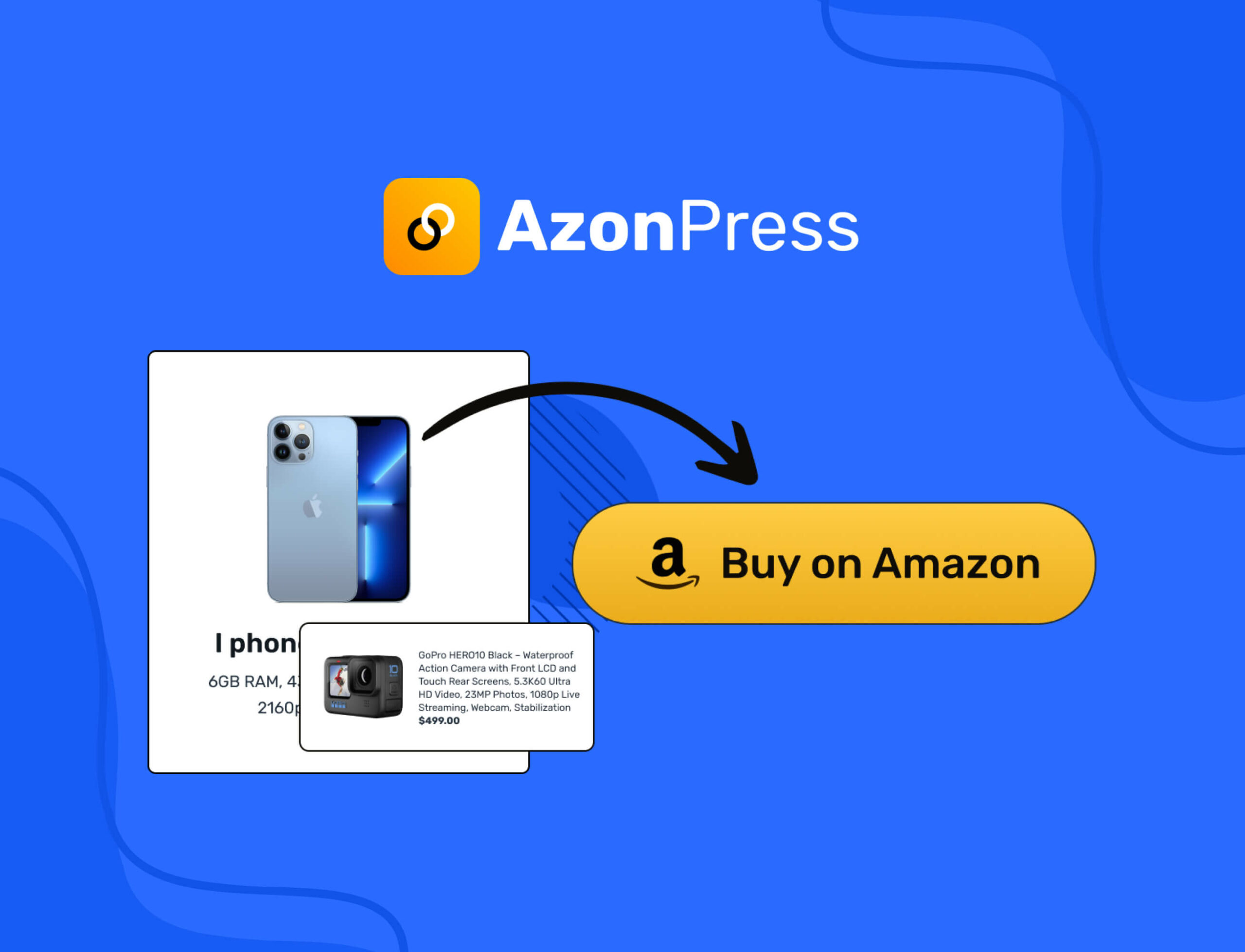
Since version 2.3, AzonPress takes product data only from the Creators API, and its old PA-API settings are gone. Until you qualify, you’ll be working in its Zero API mode.
It covers the usual jobs:
- Geotargeting sends visitors to their local Amazon store, and the country reports show where your clicks come from.
- Product boxes, tables and buttons work the same way for API products and Zero API products.
Zero API Mode
Zero API mode creates a custom product from an Amazon, eBay or Etsy affiliate link, or from details you type in. The star rating is a manual field, and nothing updates on its own.
I’d leave the price and the star rating out of those boxes. Amazon allows prices and ratings only from its API, so a typed-in price breaks the rule the day it goes stale.
Limitations
- The settings take longer to learn than AAWP’s, and the documentation is lighter.
- It isn’t on WordPress.org, so you buy it and get updates from the vendor.
- Zero API boxes stay static until you connect Creators API credentials.
Price: $39 a year for 1 site, $79 for 20 sites and $159 for unlimited sites, or $199, $319 and $479 for lifetime licenses. There is a 14-day refund.
AffiliateX
AffiliateX is the best free option here, as long as you’re happy to enter product details yourself. It’s a block plugin with 9,000+ active installs and a 4.5/5 rating on WordPress.org.

The free version has 10 blocks, including product boxes, comparison tables, pros and cons, verdict boxes and buttons. It also counts clicks and checks for broken links at no cost.
Typing in 5 to 10 products per article is fine. It gets tiring across 50 articles, and that’s where the paid plan earns its price.
- AffiliateX Pro adds 10 more blocks, Creators API import and a Zero API mode with 3,000 product requests a month.
- Pro costs $69 a year for 1 site, $169 for 3 and $429 for 10, with a 14-day refund.
At $69, Pro sits close to AAWP’s Starter license. If Amazon is your main program, I’d put that money into AAWP instead. And the same rule applies to the free blocks: leave typed-in prices and star ratings out.
Content Egg
Content Egg is the pick for price-comparison sites that list Amazon next to other stores. It has 10,000+ active installs, but its 3.9/5 rating on WordPress.org trails AffiliateX’s 4.5.
Amazon support is in Content Egg Pro only. Pro connects to the Creators API and to other networks such as AWIN, AliExpress and Best Buy. That lets one product box show the same item’s price at several stores.
Skip its Amazon NoAPI module. Content Egg’s own documentation describes it as a web scraper that runs through paid scraping services, and Amazon allows prices and ratings only through its API.
Price: The free version covers the non-Amazon modules. Pro costs $59 a year for 1 site, $99 for 5 and $179 for 25, or $149 to $449 for a lifetime license.
WZone
WZone, sold on CodeCanyon as WooCommerce Amazon Affiliates, is the only plugin here that turns Amazon products into a WooCommerce store. I’d use it only after checking its security record, which is the weakest on this list.
Visitors browse your store and add items to a cart, then check out on Amazon, where you earn the commission. It syncs prices and stock, handles variations like size and color and can import products in bulk.
Its NO PA API KEYS module added Creators API support in version 15.1. The Chrome extension that imports products without API keys is being retired, and the vendor hasn’t given a date.
Security
- CVE-2026-27040 is an arbitrary file deletion bug rated 8.8. Patchstack records it as fixed in version 15.2.0.
- CVE-2026-27039, a blind SQL injection rated 8.5, and CVE-2026-25473, a broken access control bug, have no fixed version recorded. WPScan lists all three as having no known fix.
- All three need only a subscriber-level account, the kind a store customer gets when they register.
So on a store with open registration, anyone who signs up can reach these bugs. Ask the vendor which build fixes the SQL injection before you install it, and keep auto-updates on if you already run it.
It also needs WooCommerce, which is a lot of plugin for a blog that only recommends products. WZone makes more sense for a dedicated Amazon niche store.
Price: $49 one time on CodeCanyon, with 6 months of support. Extending support to 12 months costs $16.50, and there is no yearly fee.
Lasso
Lasso is for established sites that earn from Amazon and other networks and want one dashboard for all of it. It builds product displays from any affiliate program and supports Creators API credentials for Amazon.
It tracks clicks across your programs and alerts you when a link breaks or a product goes out of stock. On a site with hundreds of articles, those alerts replace hours of manual checking.
Lasso also finds unmonetized links, which are product mentions on your site that don’t point to any affiliate program. On a large archive, that report shows money you’re leaving on the table.
Some large affiliate sites pair AAWP for Amazon with Lasso for everything else. I think that is overkill for a beginner and sensible once affiliate income is a real line in your accounts.
Price: Free for 1 property, without broken-link alerts. Creator costs $19 a month for 1 property, Pro $29 a month for 3 and Studio $59 a month for 5, with cheaper yearly billing. That is fair for a multi-network site and too expensive if Amazon is your only program.
ThirstyAffiliates
ThirstyAffiliates is the link manager I’d pair with a product box plugin when you also promote programs beyond Amazon. Caseproof owns it, and it has 30,000+ active installs on WordPress.org.
It turns long affiliate URLs into clean links like yoursite.com/recommends/product-name. You can sort links into categories, add notes and see click counts in your dashboard.
Important: Amazon doesn’t allow links that hide where they go. ThirstyAffiliates can uncloak links one by one or by category, so your Amazon links point straight at Amazon while other programs stay cloaked. That feature is in the free plugin.
Pro adds automatic keyword linking, geolocation redirects, click reports with CSV export and Amazon product import through the Creators API.
Price: The core plugin is free. Pro Basic costs $99.60 for the first year on 1 site and renews at $249, so budget for the renewal price. Plus covers 5 sites and Advanced covers 10.
Pair it with AAWP and you have a complete setup: AAWP for the product boxes and ThirstyAffiliates for every other link.
GT Link Manager
GT Link Manager is the free link manager I built, and it runs every /go/ link on this site. It’s the pick if you want branded links, per-country routing and click counts without paying for a Pro plan.
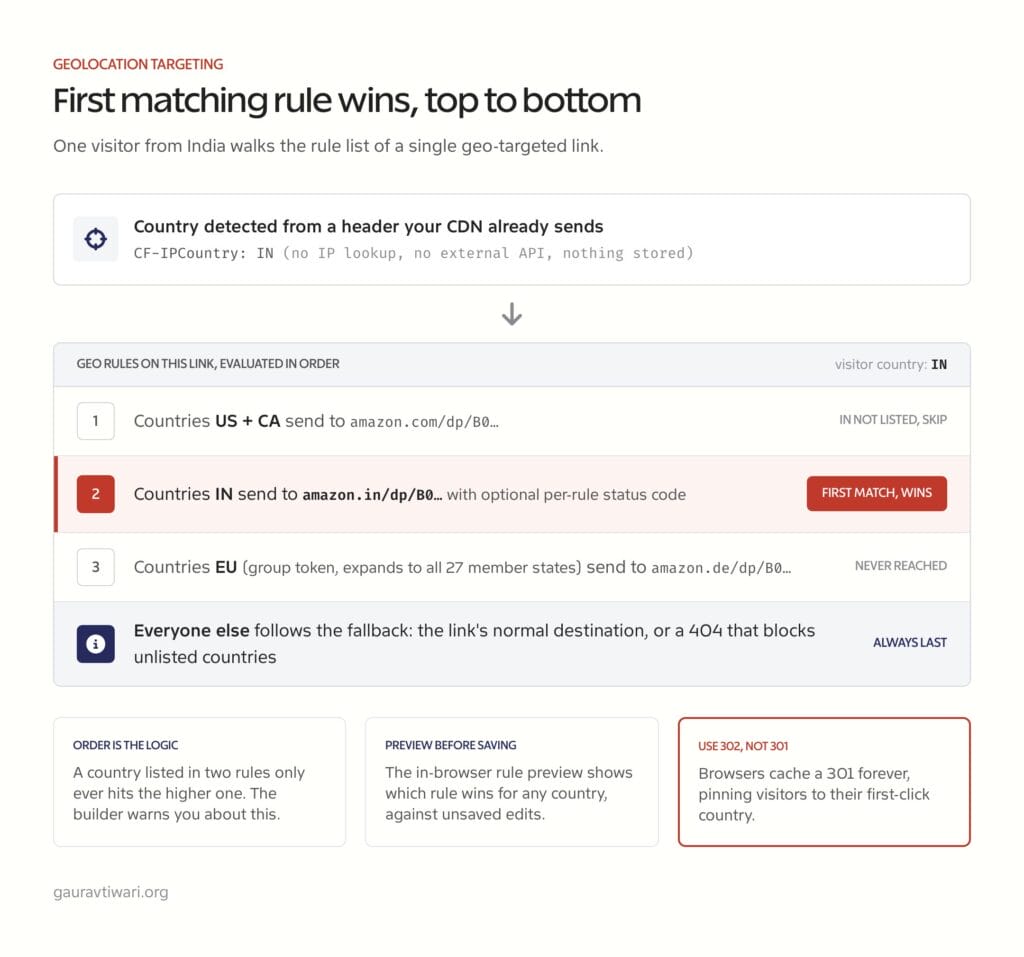
It turns long affiliate URLs into branded links such as yoursite.com/go/product, with 301, 302 or 307 redirects and nofollow or sponsored set per link. Links resolve from custom database tables before the theme loads, so a large link library doesn’t slow the redirect down.
- Per-country routing sends visitors in India to amazon.in and US visitors to amazon.com from one link, using the country header your CDN or server already sends.
- Optional click analytics cover referring pages, countries and devices without tracking scripts or cookies.
- CSV import has presets for Pretty Links and LinkCentral, plus manual mapping for ThirstyAffiliates and Lasso exports.
- A REST API lets scripts and AI tools create and update links, and my GT Link Manager REST API guide shows how.
Amazon links: GT Link Manager handles the links, so pair it with AAWP or AffiliateX for product boxes. Amazon doesn’t allow links that make it unclear you’re sending readers to Amazon. You should label branded Amazon links plainly, for example “Check the price on Amazon,” and use 302 redirects for country-based links.
Price: Free, with no Pro tier.
Auto Affiliate Links
Auto Affiliate Links turns keywords across your site into affiliate links. Set “running shoes” to your Amazon link, and every mention becomes a link, up to the limit you choose.

It works with Amazon, ClickBank, eBay, Walmart, Awin, Impact and more, so it suits sites that aren’t Amazon-only. Recent versions moved Amazon to the Creators API, added plain Amazon links that need no API credentials and added AI keyword suggestions.
You can cap it at 1 to 5 links per article, set a custom limit per post and choose which post types get linked. It has 2,000+ active installs, and Pro costs $199 a year.
Watch out: it changes content as the page renders, which can clash with recipe plugins, lightboxes and some page builders. Test it on a few posts before you turn it on site-wide.
I’d use it on a large archive where manual linking will never happen, and skip it on a small site where you can place each link yourself.
Plugins to Avoid in 2026
Some plugins that used to be popular are now closed, abandoned or unsafe. If you still run one of these, plan the replacement this week:
- Auto Amazon Links (formerly Amazon Auto Links): closed on WordPress.org on November 7, 2025 over a security issue. CVE-2025-11451 lets anyone read files on your server through a REST endpoint in every version up to 5.4.3, and no fixed version is listed. Delete it and use AffiliateX with a free link manager instead.
- Amazon Associates Link Builder (AALB): Amazon’s own plugin. It was closed on WordPress.org in February 2020 and stopped working when Amazon shut down PA-API 4 in March 2020.
- EasyAzon: closed on WordPress.org in June 2024 over a security issue. CVE-2023-6956, a cross-site scripting bug that needs no login, was never patched.
- AmaLinks Pro: its website has been offline since at least July 2026, with no official shutdown notice. Don’t buy it, and plan a replacement if you still run it.
- AzonTables: no longer sold, and its domain has lapsed.
- Prosociate: its free edition was pulled from WordPress.org in 2020, and the vendor has never announced Creators API support.
- WpZon, Simple Amazon Affiliate, Easy Amazon Product Information and AzonBox: all closed on WordPress.org over security issues in 2024 and 2025.
- Amazon Native Shopping Ads: Amazon retired them in August 2023, so any plugin built on them shows nothing.
- Any plugin that still asks for PA-API 5.0 keys: those calls now fail. Update to a version with Creators API support or switch plugins. Amazon Product in a Post, last updated in 2021, is one of them.
Which Plugin Should You Choose?
Here’s how I’d choose, based on where your site is today:
- New affiliates without API access: AAWP with the AAWP API. Starter plus the smallest yearly API plan costs €148 in the first year, and your boxes show live prices while you work toward 10 sales.
- Tight budget: AzonPress at $39 a year. You’ll build Zero API boxes until you qualify, so leave prices and stars out of them.
- Zero budget: AffiliateX plus a free link manager such as GT Link Manager or ThirstyAffiliates. If you’d rather skip a plugin, my guide to adding product boxes to WordPress posts shows how to build one with blocks.
- Established Amazon sites: AAWP with your own Creators API credentials. The bestseller lists, geotargeting and comparison tables do the most work here.
- Price-comparison sites: Content Egg Pro with its Creators API module, never the NoAPI scraper.
- Multi-network sites: AAWP for Amazon products and Lasso for everything else.
- WooCommerce storefronts: WZone, but only after the vendor confirms which build fixes the SQL injection. Otherwise, use AAWP boxes on a normal content site.
The Bottom Line
AAWP is still the plugin I’d start with on an Amazon-focused site. Its API covers the gap the Creators API created for new sites, and you can cancel it once your own credentials work.
If Amazon is one program among several, a link manager will do more for you than a product box plugin. My list of affiliate marketing tools I use covers the rest of that stack.
Either way, keep a fallback, because Amazon cuts API access as soon as your 30-day sales fall below 10.
FAQs on Amazon Affiliate Plugins
What is the best Amazon affiliate plugin for WordPress?
AAWP is the best Amazon affiliate plugin for most Amazon-focused WordPress sites. Its paid AAWP API shows live product data before you qualify for Amazon’s Creators API. AzonPress is the budget pick at $39 a year, and AffiliateX is the best free option if you’re happy to enter products by hand.
What is the AAWP API and how does it help new affiliates?
The AAWP API is a paid data service from the AAWP team that fills in prices, images and descriptions until your own Amazon account qualifies for the Creators API. It costs from €7 a month for 150 products to €48 a month for 1,000, on top of the plugin license. Once you have 10 qualifying sales in 30 days, you can connect your own credentials and cancel it.
Do I need Amazon API access to use an Amazon affiliate plugin?
Not to get started. AAWP offers its paid AAWP API, AzonPress and AffiliateX Pro have Zero API modes, and the free AffiliateX blocks take details you type in. Without API data, leave prices and star ratings out of your boxes, because Amazon allows them only through its API.
What are the Amazon Creators API requirements in 2026?
You need at least 10 qualifying sales in the trailing 30 days, and only the primary account owner can sign up. Access stops if your sales fall below that. Approval is a separate step that needs 3 qualifying sales within your first 180 days.
Which is the best free Amazon affiliate plugin for WordPress?
AffiliateX is the best free option. Its free version has 10 product blocks, click counts and a broken-link checker, and it pairs well with a free link manager such as GT Link Manager or ThirstyAffiliates. Skip the old favorite, Auto Amazon Links, because WordPress.org closed it over a security issue.
Can I use multiple Amazon affiliate plugins together?
Yes, and many affiliates do. A common setup is AAWP for product boxes plus ThirstyAffiliates or GT Link Manager for links, and large sites often add Lasso for other networks. Avoid running two product box plugins at once, because they duplicate work and can conflict.
Can I show Amazon prices and star ratings without the API?
No. Amazon allows prices, availability, star ratings and reviews only through its API, and the Creators API doesn’t return ratings at all. A plugin that shows Amazon star ratings is either scraping them or showing stale numbers, so I’d leave stars off and show prices only from live API data.
Can I cloak Amazon affiliate links in WordPress?
Not in a way that hides Amazon. Amazon bans cloaking and any shortener or button that makes it unclear you’re linking to Amazon. ThirstyAffiliates can uncloak Amazon links, and if you use branded redirects, label the link clearly, for example “Check the price on Amazon.”
What happened to Amazon SiteStripe image links?
Amazon turned off SiteStripe image links in December 2023, and existing image links stopped working at the end of that month. SiteStripe still builds text links. For product images on your site, you now need a plugin that pulls them through the Creators API or a service like the AAWP API.
Is WZone (WooZone) safe to use in 2026?
Treat it with caution. Three 2026 vulnerabilities, including a blind SQL injection rated 8.5, have no fixed version recorded in WPScan, and Patchstack lists only the file deletion bug as fixed, in version 15.2.0. If you use it, ask the vendor which build fixes the rest and keep auto-updates on.
How do I choose between AAWP and AzonPress?
AAWP costs €79 a year against $39 for AzonPress, and its AAWP API can show live data before you qualify. AzonPress can only show static Zero API boxes until you have Creators API access. Choose AAWP if you want live prices from day one, and AzonPress if you can wait for your own API access.
Do Amazon affiliate plugins slow down my website?
They can. Product boxes and comparison tables add HTML, scripts and images, and Amazon’s rules mean the images load from Amazon’s servers instead of yours. Use a caching plugin, limit product displays per page and check PageSpeed Insights after adding any affiliate plugin.
Tell Google you want more of this.
Add Gaurav Tiwari as a preferred sourceOne tap, and this site shows up more often in your own Top Stories, AI Overviews and AI Mode. Remove it any time.
Disclaimer: This site is reader-supported. If you buy through some links, I may earn a small commission at no extra cost to you. I only recommend tools I trust and would use myself. Your support helps keep gauravtiwari.org free and focused on real-world advice. Thanks. - Gaurav Tiwari
