
10 Best Online Logo Makers to Create a Professional Logo
You need a logo. Maybe you’re launching a business, rebranding a side project, or your current logo looks like it was made in PowerPoint in 2011. You’ve checked agency pricing and seen quotes starting at $2,000. You’ve browsed Dribbble and felt intimidated by designers whose work you can’t afford. So you’re stuck: go without a professional logo, or spend money you don’t have.
That frustration is real, and I’ve watched it paralyze hundreds of clients over 16 years. Businesses launch with no logo at all. Others spend weeks going back and forth with cheap designers who can’t get the brief right. Some give up and slap their business name in Arial on a white background. The longer you delay, the harder it gets. Every day without a proper logo is a day your brand looks less credible than your competitors.
Here’s the good news: the gap between a $5,000 agency logo and a $50 online logo maker has almost disappeared. I’ve designed logos for over 200 client projects since 2009. AI-powered generators now produce professional-quality logos in under 60 seconds. Template editors give you full creative control without touching Illustrator. And marketplace platforms connect you with real designers for less than a dinner out. If you’re curious about how logo design has evolved over the years, this AI shift is the biggest change since desktop publishing. I’ve tested every tool on this list by creating actual logos for real projects, and these are the 10 best online logo makers that actually deliver.
What Makes a Great Online Logo Maker?
A great online logo maker needs five things: professional design quality, deep customization, vector file exports (SVG, EPS, PDF), transparent pricing, and brand kit integration. I’ve evaluated each tool on these criteria after creating real logos with all 10 platforms.
- Design quality comes first. Your logo represents your entire business. If it looks like clip art from 2005, it doesn’t matter how cheap or fast the tool is. Every logo maker on this list produces output I’d feel comfortable putting on a professional website.
- Customization depth matters more than template count. Some tools advertise 10,000 templates but only let you change colors. Others offer 500 templates with full control over every element. I’ll take the second option every time.
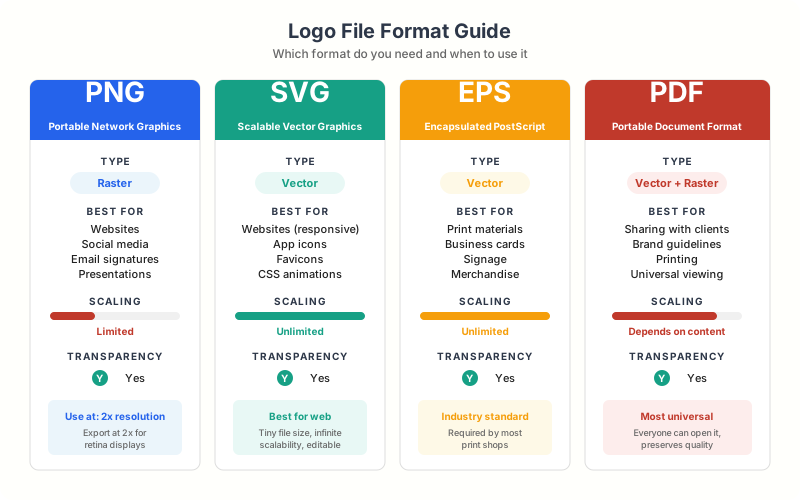
- File formats can make or break your logo’s usefulness. You need SVG for web, PNG for social media, and high-resolution files for print. Any logo maker that only exports low-res PNGs isn’t worth your time.
- Pricing transparency is non-negotiable. Some tools let you design for free, then charge $65 to download. Others are upfront about costs. I’ve flagged the pricing model for each tool so you know exactly what you’re paying before you start designing.
- Brand kit integration separates casual tools from serious ones. Your logo doesn’t exist in isolation. It needs to work with your brand colors, fonts, and other assets. The best logo makers help you build a complete brand identity, not just a standalone icon.
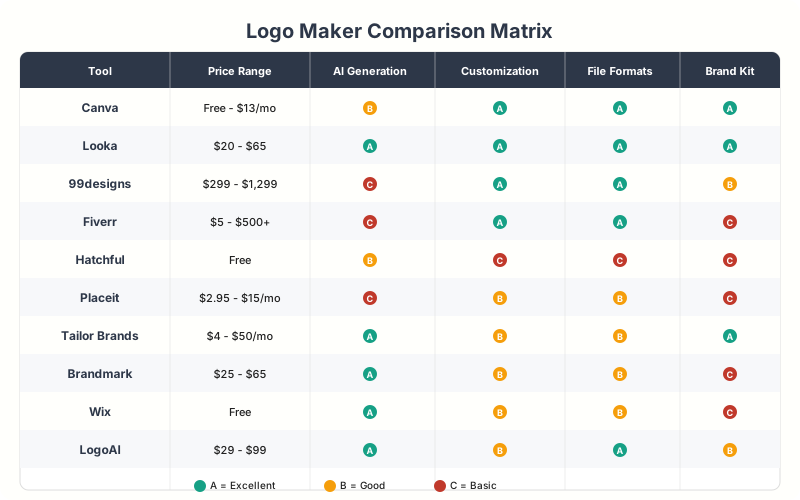
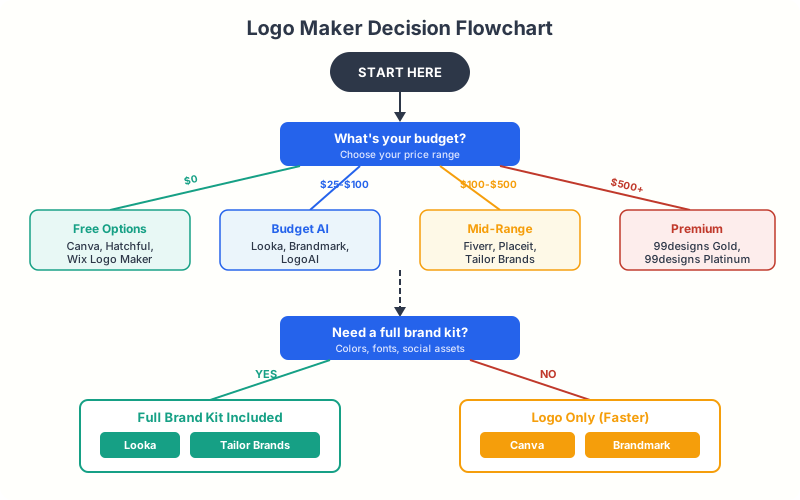
Need a logo in 5 minutes? Go with Canva or Looka. Want a custom design from a real person? Use 99designs or Fiverr. Building a full brand identity? Looka or Tailor Brands gives you the complete package.
1. Canva Logo Maker – Best Free Logo Maker Overall
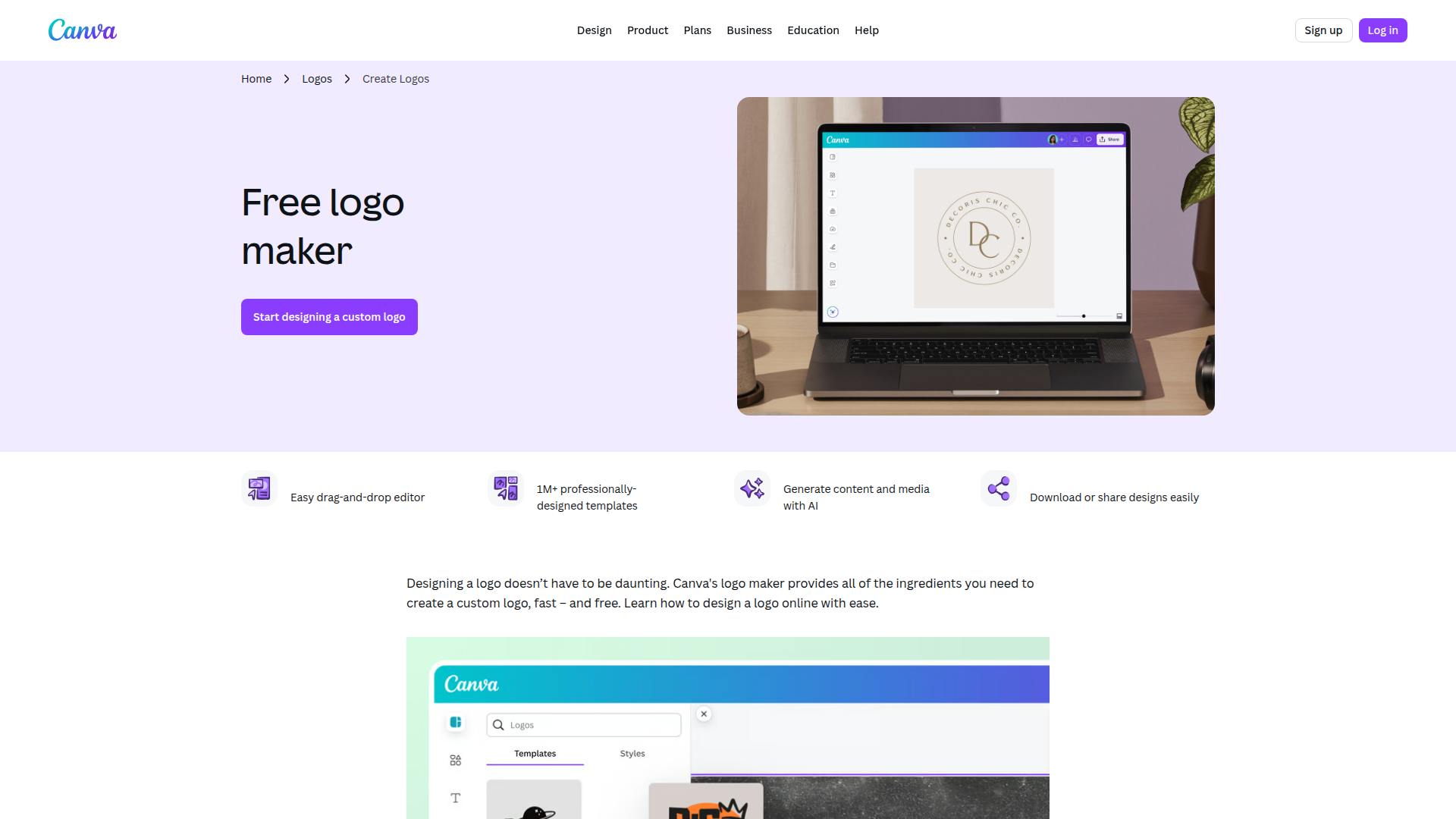
Canva’s logo maker is the best free logo maker available in 2026, offering 20,000+ templates with full customization and PNG export at zero cost. It’s the tool I recommend to anyone who asks “where should I make a logo?” I’ve used it for quick client mockups when I need to present logo concepts before investing in a full design.
The template library is massive. Over 20,000 logo templates organized by industry, style, and color palette. But what makes Canva stand out is the customization. You can modify every single element: swap icons, adjust spacing, change typography pairings, tweak colors with hex codes, and resize for different platforms.
Canva Pro users (starting at $12.99/month) get access to the Brand Kit feature. This stores your logo alongside brand colors, fonts, and templates so everything stays consistent across marketing materials. It’s the closest thing to having a brand guidelines document built into a design tool.
The free version exports PNG files at reasonable quality. Pro unlocks SVG downloads, transparent backgrounds, and the ability to resize for any platform with one click. For most small businesses and solopreneurs, the free version is more than enough to get started.
Pricing: Free (basic), $12.99/month (Pro with SVG export and Brand Kit). Best for: Budget-conscious founders, solopreneurs, and side projects that need a professional logo fast. Export formats: PNG (free), SVG, PDF (Pro).
2. Looka – Best AI-Powered Logo Generator
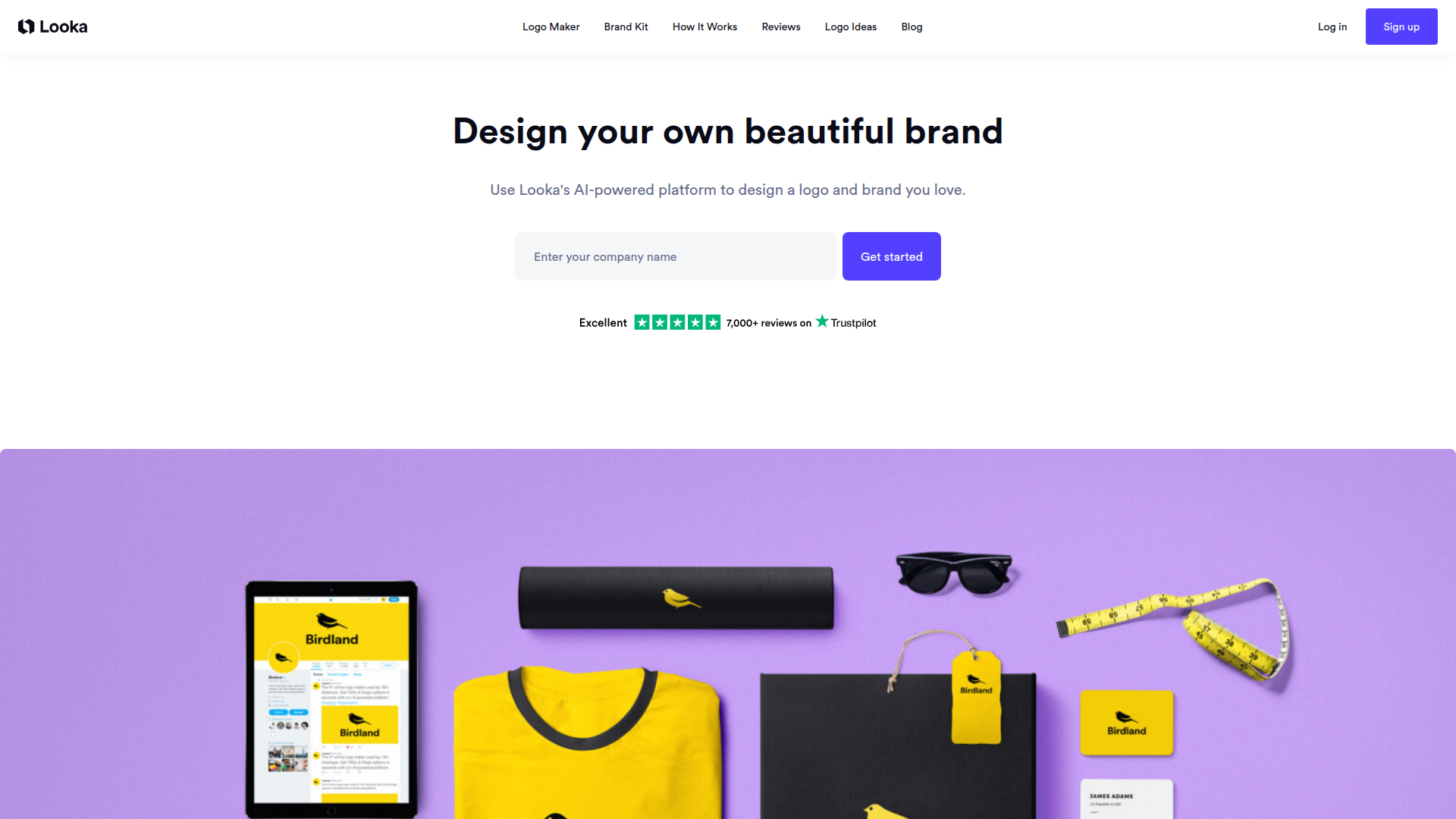
Looka is the best AI-powered logo generator for 2026, producing 50+ unique logo concepts in 30 seconds based on your style preferences, industry, and color choices. I point people toward Looka when they want something more polished than a template but don’t want to hire a designer.
The onboarding process is clever. Looka asks you about your industry, preferred styles (modern, vintage, playful, elegant), color preferences, and icon types. Then it generates 50+ logo options in about 30 seconds. You can favorite designs, tweak them in the editor, and iterate until you land on something you love.
What sets Looka apart is the Brand Kit add-on. Once you finalize your logo, Looka generates a complete brand identity: business card designs, social media templates, email signatures, letterheads, and brand guidelines. I’ve seen startups use Looka’s Brand Kit as their entire visual identity for the first year of business.
The editor gives you control over layout, colors, fonts, spacing, and icon placement. It’s not as flexible as Canva for general design, but for logos specifically, the AI-guided approach often produces better results than starting from a blank template.
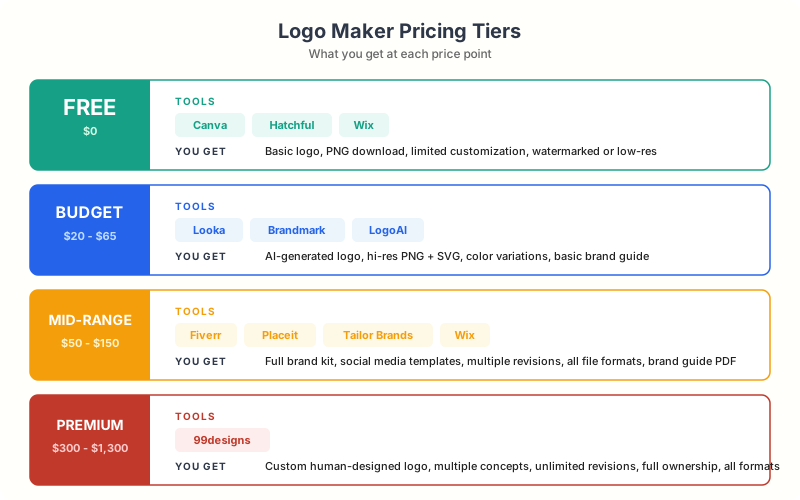
Pricing: Free to design, $20 (Basic Logo Package), $65 (Premium with SVG + Brand Kit), $80 (Brand Kit subscription). Best for: Startups and new businesses that want a complete brand identity in one sitting. Export formats: PNG, SVG, EPS, PDF.
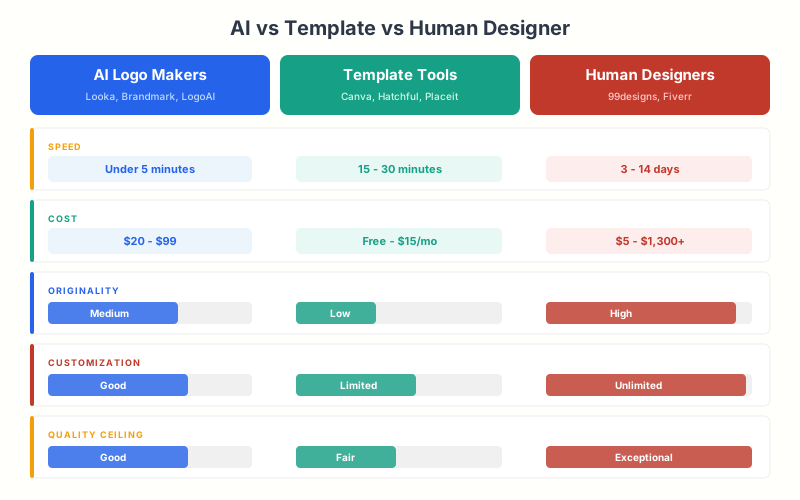
AI generators like Looka create unique designs from scratch based on your inputs. Template tools like Canva start with pre-made designs you customize. Neither approach is objectively better. AI works great when you don’t have a clear vision. Templates work better when you know exactly what you want.
3. 99designs – Best for Custom Designer-Made Logos
99designs (now part of Vistaprint) is the best option for getting a truly original, human-designed logo starting at $299 with a 100% money-back guarantee. It’s a design contest platform where multiple professional designers compete to create your logo. You describe what you want, set a budget, and receive dozens of unique concepts from real humans.
I’ve used 99designs for three client projects where the logo needed to be truly original. The experience is different from any automated tool. You launch a contest, provide a creative brief, and within 24-48 hours, designers start submitting concepts. By the end of a 7-day contest, you’ll have 30-100+ unique logo designs to choose from.
The quality ceiling is significantly higher than any AI tool. You’re working with professional graphic designers who understand typography, color theory, and brand psychology. The back-and-forth revision process means you can refine concepts until they’re exactly right.
The downside? It’s the most expensive option on this list and takes the longest. But if your brand identity matters enough to invest in it properly, 99designs delivers results that automated tools simply can’t match.
Pricing: Starting at $299 (Bronze), $499 (Silver), $899 (Gold), $1,299 (Platinum). 100% money-back guarantee. Best for: Established businesses, funded startups, and brands that need truly unique, designer-crafted logos. Export formats: AI, EPS, SVG, PNG, PDF (all source files included).
4. Fiverr Logo Design – Best Budget Option with Real Designers
Fiverr offers human-designed logos starting at $5, with the quality sweet spot at $75-$100 for professional results with full source files and revisions. It bridges the gap between automated logo makers and premium design agencies. You get a logo designed by a real human, often for less than the cost of downloading from an AI tool. I’ve commissioned over 15 logos through Fiverr for various projects, and the results range from “surprisingly good” to “exactly what an agency would deliver.”
The key to Fiverr is choosing the right designer. Look for sellers with 500+ reviews, a 4.9+ rating, and a portfolio that matches your aesthetic. The top-tier logo designers on Fiverr charge $50-$150, which is still a fraction of what a local agency would quote. I’ve found that the $75-$100 range hits the sweet spot for quality and value.
What you get depends on the package. Basic packages typically include 1-2 concepts with limited revisions. Standard packages offer 3-4 concepts with multiple rounds of revisions. Premium packages include full brand identity assets, source files, and social media kits.
Turnaround is fast, too. Most designers deliver initial concepts within 2-3 days, with final files within a week. For rush orders, many offer 24-hour delivery at a small premium.
Pricing: Starting at $5 (basic), $50-$150 (recommended range for quality work). Best for: Small businesses and freelancers who want human-designed logos at budget prices. Export formats: Varies by seller (most provide AI, EPS, SVG, PNG, PDF).
5. Hatchful by Shopify – Best Free Logo Maker for E-commerce
Hatchful is Shopify’s 100% free logo maker with no watermarks or hidden fees, built specifically for e-commerce entrepreneurs launching online stores. The tool walks you through a guided process: pick your business type, select a visual style, choose your industry, and Hatchful generates logo options tailored to e-commerce.
The templates are designed with online selling in mind. They work well as favicons, social media avatars, and watermarks. The designs skew modern and clean, which is exactly what most e-commerce brands need. You won’t find ornate, illustration-heavy options here, but that’s by design.
Customization is more limited than Canva or Looka. You can change colors, fonts, layout, and icons, but the editing interface is simpler. That’s actually a feature for non-designers. Fewer options means fewer ways to make your logo look bad.
The biggest advantage? It’s completely free. No watermarks, no hidden fees, no “pay to download” surprises. You get high-resolution PNG files for web and social media at zero cost. If you’re launching a Shopify store on a tight budget, Hatchful is the obvious starting point.
Pricing: 100% free. Best for: E-commerce entrepreneurs and Shopify store owners on a budget. Export formats: PNG (high-resolution for web, social, and print).
6. Placeit by Envato – Best for Logo Mockups and Branding
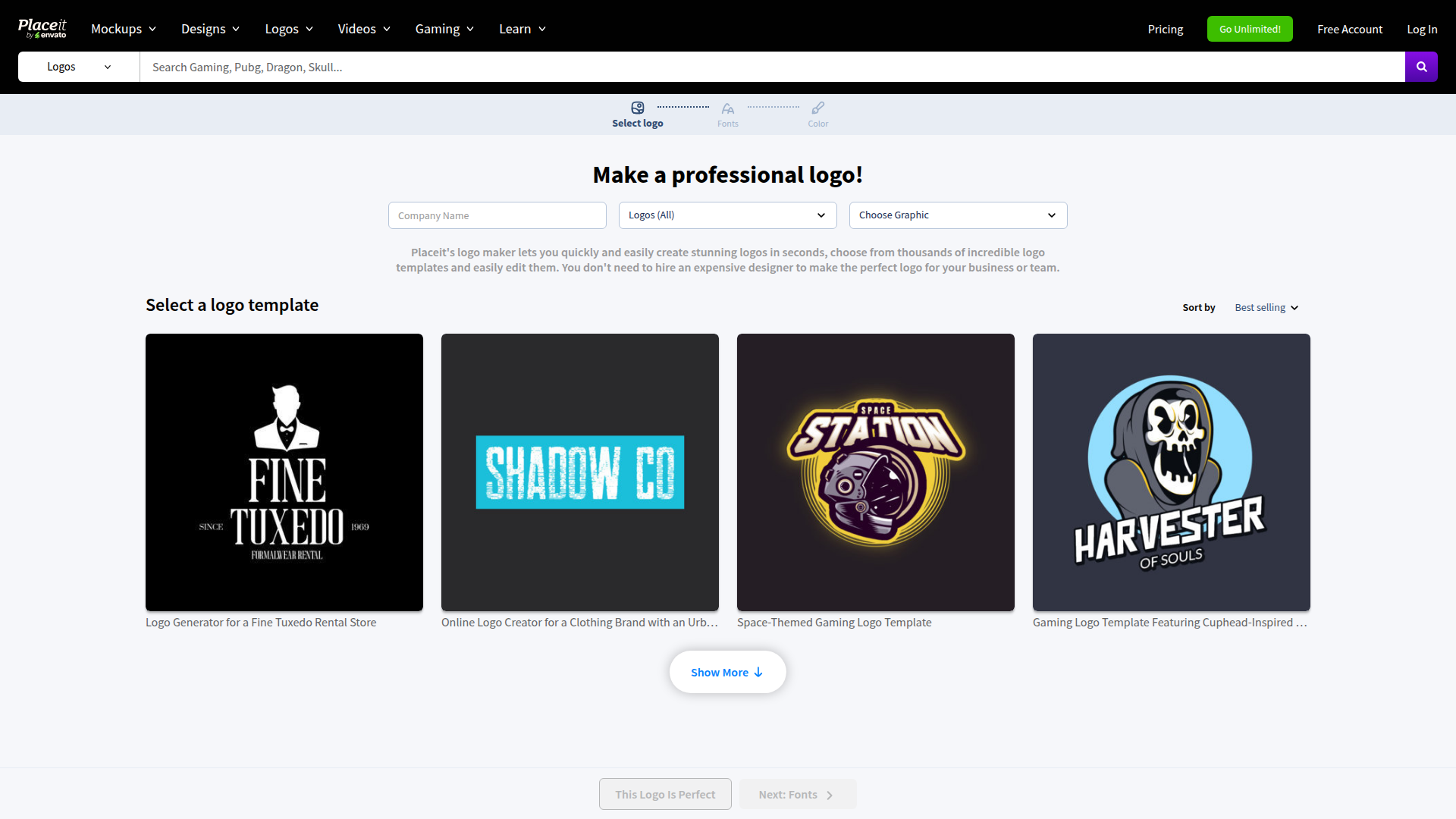
Placeit by Envato combines logo design with 50,000+ mockup templates starting at $7.47/month, and does something no other logo maker on this list does: it shows you how your logo will look in the real world before you finalize it. Design your logo, then instantly preview it on business cards, storefronts, merchandise, phone screens, and billboards using Placeit’s mockup library.
The logo maker itself is solid. Thousands of templates, organized by style and industry, with a clean editing interface. You can customize fonts, colors, icons, and layout. The designs lean toward modern and minimalist, which works for most brands.
But the real value is the ecosystem. A Placeit subscription gives you unlimited access to logo templates, mockup generators, video templates, and design assets. If you’re building a brand from scratch and need logos, social media graphics, and product mockups, Placeit is the most cost-effective all-in-one solution.
I’ve used Placeit primarily for client presentations. Being able to show a client their new logo on a t-shirt, a website header, and a business card in 30 seconds flat closes deals faster than any PDF mockup.
Pricing: $7.47/month (annual) or $14.95/month (monthly) for unlimited downloads. Single logo: $39.95. Best for: Brands that need logos plus mockups, merch designs, and marketing assets. Export formats: PNG (transparent background available).
Start with a free tool like Canva or Hatchful to validate your concept. Once you know what direction works, invest in a premium tool or designer for the final version. This approach saves you from paying $300+ for a concept you end up hating.
7. Tailor Brands – Best for Complete Brand Identity
Tailor Brands is the most comprehensive brand-building platform on this list, bundling AI logo design with a website builder, social media tools, and even LLC formation starting at $3.99/month. It positions itself as a full branding platform, not just a logo maker. The AI-powered logo generator is the entry point, but the real product is the complete brand-building toolkit that comes with your subscription.
The logo creation process is among the smartest I’ve tested. It asks you to choose between icon-based, name-based, and initial-based logos. Then it presents font pairings and icon options. The AI generates logos that feel cohesive and intentional, not random.
Where Tailor Brands really shines is post-logo. Your subscription includes a website builder, social media post generator, digital business cards, branded merchandise creator, and even LLC formation services. It’s trying to be the one-stop shop for launching a business, and honestly, it does a decent job. If you’re evaluating more SaaS tools for brand marketing, Tailor Brands fits squarely in that ecosystem.
The logo quality is a step above most free tools but below what you’d get from a human designer. For solopreneurs, consultants, and small service businesses, that’s often the perfect trade-off. You get professional-enough branding at a fraction of the cost.
Pricing: Free to design, $3.99/month (Basic), $5.99/month (Standard), $12.99/month (Premium). Best for: Solopreneurs and small businesses that want logo + website + brand assets in one platform. Export formats: PNG, SVG, EPS (varies by plan).
8. Brandmark – Best AI Logo Quality
Brandmark produces the highest-quality AI-generated logos I’ve tested, with designs starting at $25 that include light/dark versions, icon-only variants, and matching color palettes. The designs are clean, modern, and genuinely look like they came from a professional studio. If I showed you 10 logos and mixed in 2 from Brandmark, you’d struggle to identify the AI-made ones.
The process is straightforward. Enter your brand name, tagline, and select keywords that describe your style. Brandmark generates a page of logo concepts with matching color palettes and font pairings. Every concept includes light and dark versions, icon-only versions, and social media profile variants.
The editor is powerful for an AI tool. You can fine-tune every aspect: adjust icon positioning, swap fonts from a curated library, modify color palettes, and preview how the logo looks on various backgrounds. The color palette generator alone is worth bookmarking.
The catch is pricing. Brandmark’s packages start higher than most competitors. But you get what you pay for: commercial-use rights, vector source files, and a complete brand guide. For the quality level, it’s actually fair pricing.
Pricing: $25 (Basic), $65 (Designer with source files), $175 (Enterprise with full brand guide). Best for: Design-conscious founders who want AI quality that rivals human designers. Export formats: PNG, SVG, PDF, EPS (varies by plan).
9. Wix Logo Maker – Best for Wix Website Users
Wix Logo Maker generates AI logos starting at $49 that automatically sync across your Wix website, email, and marketing materials. It uses AI to generate logos that integrate seamlessly with Wix websites. If you’re already on Wix or planning to build there, this is the most convenient option. Your logo automatically syncs across your site, email, and marketing materials.
The AI-driven questionnaire is solid. It asks about your industry, style preferences, and presents pairs of logos for you to choose between (similar to how Spotify Discover works). This preference-learning approach means the AI gets smarter with every choice you make, producing better results by the end.
Customization is generous. You can swap icons from a library of thousands, adjust fonts, modify layouts, and fine-tune colors. The editor feels polished and responsive, which isn’t always the case with browser-based design tools.
The free version lets you design and preview your logo, but downloading requires a purchase. The basic logo file costs $49, while the advanced package at $99 includes social media files, a brand guide, and resizable logo files for any platform.
Pricing: Free to design, $49 (Basic logo file), $99 (Advanced with social media kit and brand guide). Best for: Wix website users who want integrated logo and brand assets. Export formats: PNG, SVG (Advanced plan only).
10. LogoAI – Best for AI-Generated Brand Packages
LogoAI generates complete brand packages starting at $29, including logo variations, color palettes, typography systems, and social media templates in under 60 seconds. It takes the AI approach further than most competitors. It doesn’t just generate a logo. It creates an entire brand package: logo variations, color palettes, typography systems, brand guidelines, social media templates, and even mockup presentations.
The generation process is fast. Enter your brand name, select your industry, pick style preferences, and LogoAI produces results in under a minute. The quality is comparable to Looka and Brandmark, with a slight edge in icon design. The AI seems to understand spatial relationships better than most tools, producing logos where text and icons feel balanced.
One feature I particularly like is the “brand center.” After purchasing your logo, you get a dashboard where all your brand assets live. Need a version for dark backgrounds? It’s there. Need a favicon? Already generated. Social media avatars in every platform size? Done. It eliminates the tedious process of exporting and resizing.
LogoAI also offers a unique subscription model where you can regenerate logos and brand assets as your brand evolves. Most logo makers treat the purchase as a one-time transaction. LogoAI treats it as an ongoing relationship. This approach aligns well with how AI logo tools are being used in e-commerce brand building.
Pricing: $29 (Basic), $59 (Professional with brand kit), $99 (Brand Package with all assets). Best for: Tech startups and digital businesses that want comprehensive AI-generated brand packages. Export formats: PNG, SVG, PDF, EPS.
Some logo makers let you design for free but charge $50-$100 to download. Others offer cheap basic packages but lock SVG/vector files behind premium tiers. Always check what file formats are included before you start designing. You need SVG for websites and high-res files for print.
How to Choose the Right Logo Maker for Your Business
Choose Canva or Hatchful for $0, Looka or Brandmark for $25-$100, Fiverr for $75-$150 with human designers, or 99designs for $300-$1,300 contest-quality logos. The best logo maker depends on your budget, design skills, and how much originality you need. Here’s my honest breakdown after testing all 10.
If you have zero budget: Start with Canva or Hatchful. Both are genuinely free with no hidden costs. Canva gives you more customization. Hatchful is simpler and faster. Either will produce a logo good enough for a new business.
If you have $25-$100: Go with Looka or Brandmark. The AI generation is significantly better than free tools, and you get vector files you can use anywhere. Looka’s Brand Kit is especially valuable if you need more than just a logo.
If you have $100-$500: Consider Fiverr designers in the $75-$150 range or a 99designs Bronze contest. You’ll get a human-designed logo with original concepts and full revision support. The quality difference between a $100 Fiverr designer and a $25 AI tool is substantial.
If you have $500+: 99designs Gold or Platinum contest. You’ll get 50-100+ concepts from professional designers competing for your project. This is as close to agency-quality as you can get without agency pricing.
One piece of advice from building hundreds of brand identities: don’t overthink your first logo. Your logo will evolve as your business grows. Nike’s original swoosh cost $35. Google’s first logo was made in GIMP. What matters is starting with something clean and professional, then refining it as your brand matures. If you want to try designing one yourself first, here’s my guide on how to design a logo on your own.
Logo Design Tips from 16 Years of Client Projects
I’ve reviewed thousands of logos across 800+ client projects. These are the mistakes I see most often and the principles that consistently produce better results.
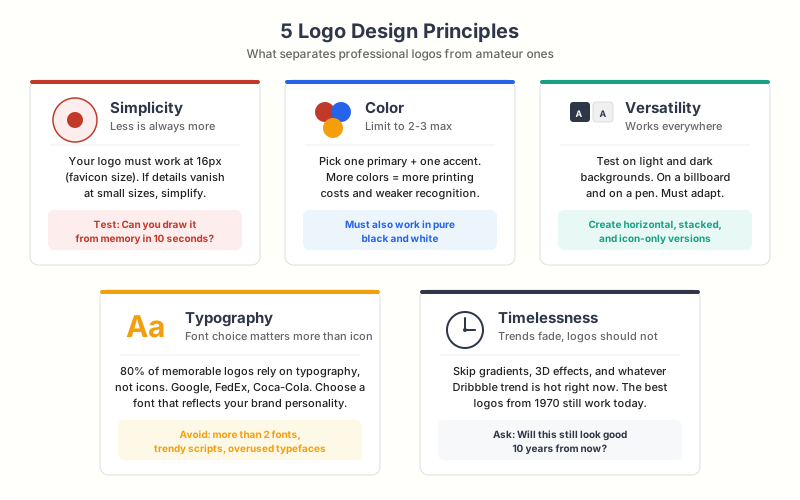
Keep it simple. The most recognizable logos in the world are also the simplest. Apple, Nike, Target, FedEx. Your logo needs to work at 16×16 pixels (favicon) and on a billboard. Complex designs with fine details fall apart at small sizes. If your logo doesn’t look good as a social media avatar, simplify it.
Limit your colors to 2-3. More colors mean more printing costs, harder brand consistency, and visual clutter. Pick one primary brand color and one accent. That’s usually enough. Look at how many iconic brands use just one or two colors: Coca-Cola (red), Facebook (blue), Spotify (green + black).
Test on multiple backgrounds. Your logo needs to work on white backgrounds, dark backgrounds, colored backgrounds, and photographs. Always create a light version and a dark version. Every logo maker on this list can generate both variants.
Typography matters more than the icon. A well-chosen font with proper spacing can carry a logo without any icon at all. Google, FedEx, Coca-Cola, and Disney are all typography-first logos. If you’re not sure about an icon, try a text-only approach first. For a deeper dive into this process, check out my guide on undertaking the logo design process for your business.
Always get vector files. PNG files work for web, but they can’t be scaled without losing quality. SVG and EPS files scale to any size without pixelation. You’ll need these for print materials, vehicle wraps, signage, and merchandise. Never accept only raster files from a logo maker.
If you’re building a serious brand, consider trademarking your logo. AI-generated logos can potentially produce designs similar to existing trademarks. Before investing heavily in brand materials, run a trademark search at USPTO.gov (US) or your country’s trademark office. A $250 trademark search now can prevent a $25,000 legal headache later.
Free vs Paid Logo Makers: What You Actually Get
Free logo makers like Canva and Hatchful export PNG only, while paid tiers ($20-$175) unlock SVG vector files, transparent backgrounds, and commercial-use brand kits. Designer marketplaces like Fiverr ($50-$150) and 99designs ($299-$1,299) add original human creativity. Here’s the honest breakdown.
Free logo makers (Canva free, Hatchful) give you usable logos with some limitations. You’ll typically get PNG exports only, no vector files, limited template access, and possibly a smaller icon library. For a side project, personal blog, or early-stage startup testing an idea, free is perfectly fine.
Paid logo makers ($20-$100 range) like Looka, Brandmark, and Tailor Brands unlock vector file exports, transparent backgrounds, complete brand kits, and commercial-use licenses. If your logo will appear on printed materials, merchandise, or official business documents, you need paid-tier exports.
Designer marketplaces ($50-$1,000+) like Fiverr and 99designs give you something no automated tool can: original human creativity. A skilled designer considers your competitors, your target audience, and design trends in ways that AI doesn’t. For brands competing in crowded markets, this originality matters.
My recommendation? Start free to explore directions. Invest $25-$65 in an AI tool if you find a concept you love. And if your brand will be the face of a funded business, spend $100-$500 on a human designer. The logo is the single most visible piece of your brand, and it’s worth proportional investment.
Compare Design Tools
| Feature | Canva | Adobe Creative Cloud | Figma | CorelDRAW | Envato Elements |
|---|---|---|---|---|---|
| Free Plan | Yes (generous) | No (7-day trial) | Yes (3 projects) | No (15-day trial) | No (7-day trial) |
| Price | $12.99/mo | $59.99/mo (all apps) | $12/editor/mo | $24.50/mo | $16.50/mo |
| Ease of Use Key Factor | Very Easy | Advanced (steep learning) | Moderate | Moderate | Very Easy (templates) |
| Templates | 250,000+ | Adobe Stock (paid) | Community files | Limited | 12M+ creative assets |
| Photo Editing | Basic | Excellent (Photoshop) | No | Yes (Photo-Paint) | No (assets only) |
| Vector Graphics | Basic | Excellent (Illustrator) | Yes | Excellent | No |
| Video Editing | Yes (basic) | Premiere Pro + After Effects | No | No | Video templates |
| Collaboration | Yes (real-time) | Yes (Creative Cloud) | Yes (excellent) | Basic | No |
| Brand Kit | Yes (pro) | Yes (Libraries) | Yes (libraries) | No | No |
| Best For | Non-designers, social media | Professional creatives | UI/UX design teams | Print + vector design | Ready-made creative assets |
| Visit Canva | Visit Adobe CC | Visit Figma | Visit CorelDRAW | Visit Envato |
Frequently Asked Questions
What is the best free online logo maker?
Canva Logo Maker is the best free option overall. It offers 20,000+ templates, full customization, and PNG exports at no cost. Hatchful by Shopify is another excellent free option specifically designed for e-commerce businesses. Both produce professional-quality logos without watermarks or hidden fees.
How much should I pay for a logo?
For a side project or early-stage startup, $0-$25 using free tools or basic AI generators is reasonable. For a serious small business, $50-$150 on an AI tool like Looka or a Fiverr designer delivers professional results. For funded startups and established businesses, $300-$1,300 on a 99designs contest or professional designer is worth the investment. The logo is your most visible brand asset, so invest proportionally to your business stage.
Can I trademark an AI-generated logo?
Yes, you can trademark an AI-generated logo in most jurisdictions, including the US. The trademark protects the logo as a brand identifier regardless of how it was created. However, you should run a trademark search first to ensure the AI hasn’t generated something too similar to an existing mark. Tools like Looka, Brandmark, and LogoAI all grant commercial-use rights with their paid packages.
What file formats do I need for my logo?
At minimum, you need PNG (for web and social media) and SVG (for websites and scaling). For print materials, you’ll want EPS or PDF files. For professional use, get all four formats. Free logo makers typically only export PNG, so if you need vector files, plan to use a paid tier or designer service.
Is it worth hiring a designer instead of using a logo maker?
It depends on your budget and brand needs. AI logo makers have gotten remarkably good, and tools like Brandmark and Looka produce results that rival mid-tier designers. However, a skilled human designer brings strategic thinking, competitor analysis, and true originality that AI can’t replicate. If your brand competes in a crowded market where visual differentiation matters, a human designer is worth the extra investment. Platforms like Fiverr make this accessible starting at $75-$100.
How long does it take to create a logo with an online logo maker?
AI-powered logo makers like Looka and Brandmark generate initial concepts in 30-60 seconds. With customization and refinement, expect to spend 15-30 minutes on a finished logo. Template-based tools like Canva take 10-20 minutes if you have a clear vision. Designer services like Fiverr take 2-5 days, while 99designs contests run 5-7 days. The fastest path from zero to usable logo is Canva or Hatchful, both of which can produce a finished logo in under 10 minutes.
Can I use my logo commercially with free logo makers?
Most free logo makers grant commercial-use rights, but always check the terms. Canva’s free plan allows commercial use of logos you create. Hatchful by Shopify is fully commercial-use. However, some free tools use shared template elements that other businesses might also use, so your logo won’t be truly unique. For guaranteed exclusivity, use an AI generator’s paid tier or a human designer.
Your logo doesn’t need to be perfect on day one. It needs to be professional, clean, and representative of what your business stands for. Every tool on this list can deliver that. Start with the option that matches your budget, and remember that even the biggest brands in the world started with simple logos they later refined.
If I had to pick just one tool for someone starting out today, it’d be Canva for free users and Looka for anyone willing to spend $65. Both consistently produce logos that look like they cost 10x what you actually paid.
Disclaimer: This site is reader-supported. If you buy through some links, I may earn a small commission at no extra cost to you. I only recommend tools I trust and would use myself. Your support helps keep gauravtiwari.org free and focused on real-world advice. Thanks. - Gaurav Tiwari