
Content Decay: How to Find and Fix Pages Losing Traffic
Your best-performing articles are quietly dying. That blog post driving 5,000 monthly visitors last year? It’s probably down to 3,000 now. That comprehensive guide ranking #2 for your target keyword? Someone published something better six months ago, and you’re now on page two.
This is content decay, and it happens to every website. I’ve watched sites lose 40-50% of their organic traffic over 18 months simply because they kept publishing new content while ignoring older posts that were slowly bleeding out. The tragedy is that fixing decaying content often takes less effort than creating new content from scratch, yet most site owners don’t even realize which pages are declining until the damage is severe.
In this guide, I will show you exactly how to identify content decay, understand why it happens, and implement fixes that restore (and often exceed) your previous traffic levels.
What Is Content Decay and Why Should You Care?
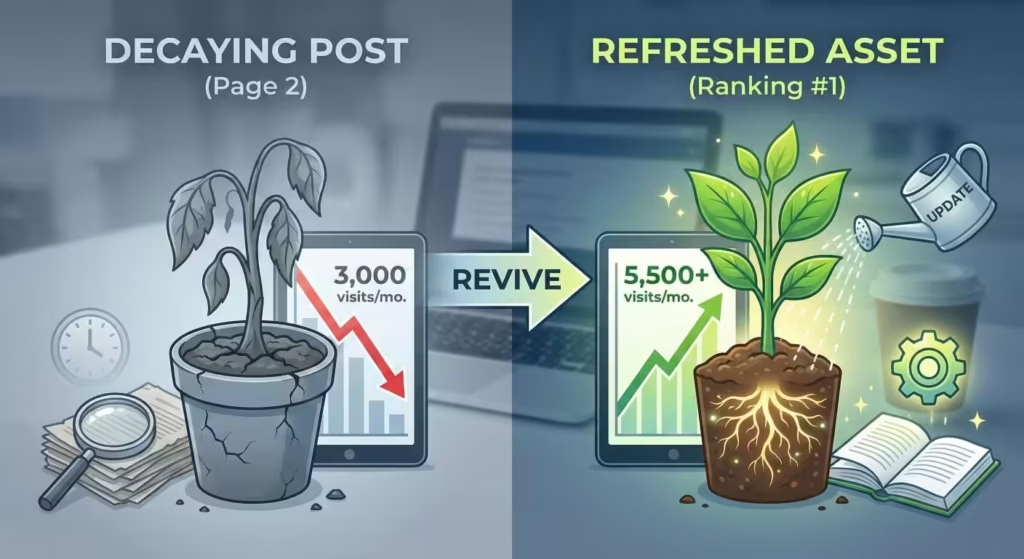
Content decay is the gradual decline in organic search traffic and rankings that happens to virtually all content over time. A page that ranked #3 and drove consistent traffic for two years slowly drops to #7, then to page two, then effectively disappears from search results.
This isn’t failure. It’s the natural lifecycle of content in a competitive search environment. Google’s algorithm evolves. Competitors publish better content. User intent shifts. Information becomes outdated. Fresh content gets a temporary ranking boost that fades.
The problem isn’t that content decays. The problem is that most site owners don’t monitor for it, don’t catch it early, and don’t have a system for reversing it.
The Real Cost of Ignoring Decay
Let me put this in concrete terms. Say you have 200 blog posts, each averaging 500 monthly visitors when performing well. If 30% of those posts are experiencing decay (a conservative estimate for sites older than 2-3 years), you’re losing traffic from 60 posts. If decay has reduced each by just 200 visitors per month, that’s 12,000 monthly visitors gone.
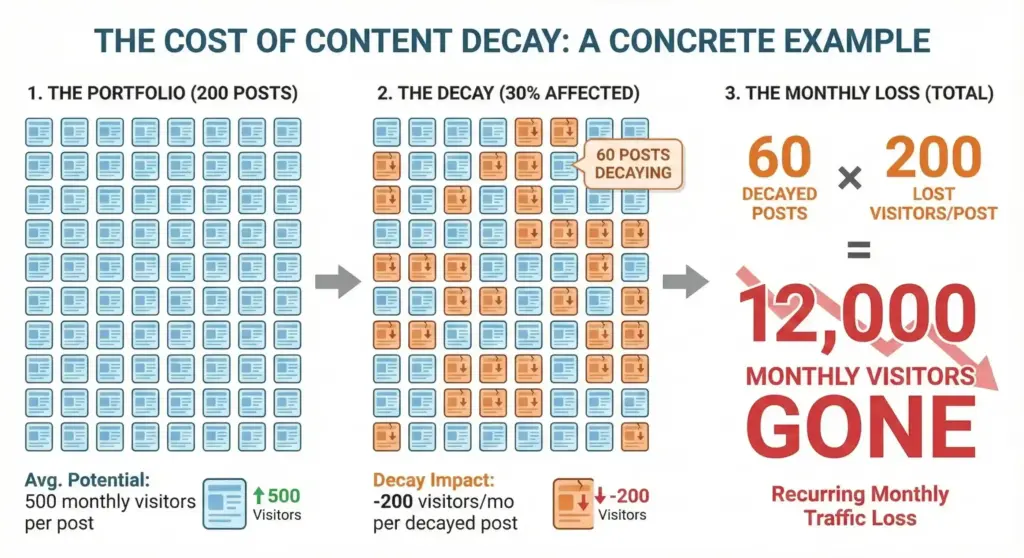
Twelve thousand visitors you already earned. Traffic you didn’t need to build from scratch. Leads and sales that evaporated while you focused on the next new article.
Content decay compounds. An article loses 10% of traffic. You don’t notice. It loses another 15%. Still under your radar. By the time you realize something’s wrong, it’s lost 60% of its peak traffic and dropped from page one entirely. Recovery becomes much harder once you’ve lost significant positions.
Why Content Decays
Understanding the causes helps you prevent and fix decay more effectively.
- Information becomes outdated. An article about “Best WordPress Plugins for 2022″ is useless in 2026. But even evergreen content ages. Statistics get stale. Referenced tools shut down. Best practices evolve. Screenshots show old interfaces. Links break.
- Competitors publish better content. Someone saw your #1 ranking article, studied what made it work, and published something more comprehensive, more current, and better designed. Google noticed. Rankings shifted.
- Search intent shifts. The query “remote work tools” meant something different in 2020 than in 2026. User needs change, and content written for the old intent no longer satisfies searchers. Google’s algorithm is constantly reevaluating what content best matches how people are searching today.
- Algorithm updates. Google rolls out thousands of updates yearly. Major core updates can significantly reshuffle rankings. Content that Google previously rewarded might no longer match their evolved understanding of quality.
- Technical degradation. Site speed slows as you add more plugins. New theme updates break formatting. Images get deleted accidentally. Mobile experience degrades. These technical issues hurt rankings even when content remains strong.
- Freshness signals fade. Google gives newer content a temporary ranking boost for many queries. As your content ages, this freshness boost disappears while competitors’ newly published content enjoys it.
- Link equity diminishes. That article earned great backlinks when published. But websites shut down, pages get deleted, links get removed. Over time, your backlink profile weakens.
How to Identify Decaying Content
You can’t fix what you can’t find. Here are the methods I use to systematically identify content decay, ranked from free to paid.
Method 1: Google Search Console (Free)
Google Search Console is your first stop because it’s free, reliable, and shows exactly how Google sees your site.
Finding declining pages:
- Open Search Console and go to Performance
- Set your date range to “Compare” mode
- Compare the last 3 months to the previous 3 months (or last 6 months to previous 6 months for clearer trends)
- Click the “Pages” tab
- Sort by “Clicks Difference” to see which pages lost the most traffic
Pages with significant negative differences are your decay candidates. A page that went from 500 clicks to 300 clicks over that period is clearly declining.
Identifying ranking drops:
In the same Performance view:
- Click on a specific declining page
- Click the “Queries” tab
- Look at how rankings (position) changed for key queries
If you were averaging position 4.2 and now you’re at position 9.8, that explains the traffic drop. You’ve likely fallen from page one to page two.
Spotting impression declines:
Sometimes traffic drops before rankings do. If impressions are declining while position remains stable, it might mean:
- Search volume for your keywords is dropping seasonally
- Google is showing your content for fewer query variations
- Featured snippets or other SERP features are stealing clicks
Search Console data goes back 16 months, which is enough to spot most decay patterns.
Method 2: Google Analytics (Free)
Google Analytics complements Search Console by showing actual user behavior on your site.
Setting up a decay detection view:
- Go to Reports > Engagement > Pages and screens (GA4)
- Set your date comparison (same periods as Search Console)
- Look for pages with significant traffic declines
In Universal Analytics (if you still have historical data), the Landing Pages report under Acquisition > All Traffic > Organic shows this more clearly.
Checking engagement metrics:
Decay isn’t just about traffic. Sometimes pages maintain traffic but engagement drops because the content no longer satisfies users:
- Bounce rate increasing significantly
- Time on page declining
- Scroll depth decreasing (if tracked)
- Conversions from that page dropping
A page maintaining traffic but seeing 40% higher bounce rates might be on the verge of ranking drops. Users are telling Google the content isn’t meeting their needs.
If you are not comfortable with Google Analytics due to privacy and page-speed reasons, you can use an alternative like Independent Analytics. The process decay detection will be quite similar in any analytic tool.
Method 3: Semrush Position Tracking
Semrush automates much of this analysis and catches decay earlier than manual methods.
Setting up position tracking:
- Create a project for your domain
- Add the keywords you want to track (focus on keywords where you already rank)
- Set tracking frequency (daily catches changes faster)
Finding declining keywords:
In Position Tracking, use the “Positions” report and filter for:
- Keywords that dropped positions
- Keywords that left the top 10
- Keywords that left the top 20
Each represents content decay requiring attention.
Organic Research for competitor movement:
Semrush‘s Organic Research tool shows which competitors are gaining on your keywords. If a specific competitor appears consistently, study what they’re doing differently.
Method 4: Ahrefs Site Explorer
Ahrefs provides similar functionality with its own data sources, which sometimes catches movements Semrush misses (and vice versa).
Using the Organic Keywords report:
- Enter your domain in Site Explorer
- Go to Organic Keywords
- Use the date comparison feature to see movement
- Filter for keywords that dropped
Content Explorer for competitive analysis:
Ahrefs Content Explorer shows the top-performing content for any topic. If your decaying content ranks for “email marketing strategies,” search that term in Content Explorer to see what’s currently winning and why.
Method 5: Dedicated Content Decay Tools
Some tools specifically focus on content decay detection.
- Rank Math Pro & SEOPress include an Analytics module that tracks rankings over time directly in WordPress. You can see which posts are declining without leaving your dashboard.
- AIOSEO offers similar functionality with their Search Statistics feature, pulling data from Google Search Console into an easier-to-read interface.
- Semrush’s Content Audit tool specifically identifies “Rewrite or remove” content and “Need to update” content based on traffic and engagement metrics.
Creating a Content Decay Dashboard
For systematic monitoring, create a simple spreadsheet tracking:
| URL | Peak Traffic Month | Peak Monthly Traffic | Current Traffic | % Decline | Primary Keyword | Current Position | Priority |
|---|---|---|---|---|---|---|---|
| /email-marketing-guide | Mar 2023 | 4,500 | 2,100 | -53% | email marketing guide | 8 | High |
Update monthly. Sort by percentage decline to prioritize fixes. Pages with 30%+ decline deserve immediate attention.
Prioritizing Which Content to Fix
Not all decaying content deserves rescue. Some pages should be consolidated or removed. Here’s how to prioritize.
🔴 High Priority: Fix Immediately
- High-value commercial pages: Pages that drive conversions, email signups, or affiliate revenue deserve immediate attention regardless of traffic volume. A product comparison page dropping from #3 to #7 is an emergency.
- High-traffic pages with recent decline: If a page went from 3,000 to 2,500 monthly visitors in the last quarter, catch it now before it drops further. Early intervention is easier than recovery from page two.
- Pages ranking just below page one: A page ranking #11-15 that was previously on page one is recoverable with focused effort. Push it back up before it slides further.
- Content in your core expertise: Pages covering topics central to your business deserve protection. If you’re a WordPress development company, your WordPress guides should never decay unchallenged.
🟡 Medium Priority: Schedule for Update
- Moderate traffic with slow decline: Pages losing 10-15% quarterly aren’t emergencies, but schedule updates before they become emergencies.
- Older evergreen content: Guides and tutorials from 2-3 years ago likely need refreshes even if traffic is stable. Proactive updates prevent future decay.
- Pages with engagement problems: If traffic is stable but bounce rate jumped 20%, update the content before rankings follow.
🟢 Low Priority: Consider Removing or Consolidating
- Zero or near-zero traffic for 12+ months: If a page hasn’t attracted meaningful traffic in a year despite indexing, it’s probably not worth fixing. Consider whether it could merge into another page.
- Outdated beyond repair: An article about a discontinued product, a company that no longer exists, or a strategy that’s completely obsolete might not be salvageable. Redirect to relevant current content.
- Thin content with no unique value: If you have 300-word posts from years ago that cover topics you’ve since written about comprehensively, consolidate them into your stronger content and redirect.
- Duplicate or near-duplicate content: If you’ve written about the same topic three times, pick the best version, consolidate the unique points from others, and redirect the weaker pages.
How to Fix Decaying Content
Now the actionable part. Here’s my systematic process for reviving decaying content.
Step 1: Analyze Why the Decay Happened
Before touching anything, understand the cause. Different causes require different fixes.
Search your target keyword and study the top 5 results. Ask:
- What do they cover that you don’t?
- How long are competing articles?
- What formats do they use (videos, tables, infographics)?
- How recent are their updates?
- What’s their page experience like?
If competitors are shipping 4,000-word guides with original research and your post is 1,500 words of basic tips, you’ve found your problem.
Next, you need to evaluate freshness.
- When was the content last updated?
- Are statistics and data current?
- Do screenshots show current interfaces?
- Are recommended tools still available and relevant?
- Are linked resources still live?
Also check technical issues like:
- Page speed (test in Google PageSpeed Insights)
- Mobile usability (test in Google’s Mobile-Friendly Test)
- Core Web Vitals (check in Search Console)
- Broken internal and external links
- Missing images or formatting problems
Search your target keyword and look at what ranks. If the top results are all comparison tables and your content is a narrative guide, your format might not match current intent.
Step 2: Content Refresh (When Structure Is Sound)
If the fundamental content is solid but needs updating, a refresh is faster than a rewrite.
- Update outdated information:
- Replace old statistics with current data
- Update screenshots to show current interfaces
- Add new developments in your topic area
- Remove references to defunct tools or companies
- Fix broken links or replace with working alternatives
- Expand thin sections: If competitors cover topics you only mention briefly, expand those sections. Look for opportunities to add:
- Specific examples
- Step-by-step instructions
- Data to support claims
- Expert quotes or original insights
- Improve formatting and readability:
- Add a table of contents for long content
- Break up text walls with subheadings
- Add bulleted lists where appropriate
- Include relevant images or diagrams
- Add callout boxes for key points
- Update on-page SEO:
- Ensure target keyword appears in title, H1, meta description, and naturally throughout
- Add related keywords and semantic variations discovered from competitor analysis
- Write a new, compelling meta description
- Update internal links to point to newer relevant content
- Change the published date: This is debated, but I do it when updates are substantial. Changing the displayed date signals freshness to users and can trigger a recrawl. Don’t abuse this for minor edits, but significant updates warrant it.
Step 3: Content Rewrite (When Fundamentals Are Weak)
Sometimes a refresh isn’t enough. If the content’s structure, angle, or comprehensiveness is fundamentally lacking compared to competition, rewrite it.
Start with new research:
Before rewriting, understand what ranks now:
- Analyze top 5-10 results for your keyword
- Note their structure, subheadings, and covered topics
- Identify gaps none of them cover well
- Find unique angles or data you can offer
Create a new comprehensive outline:
Build an outline that covers everything competitors cover, plus unique elements they miss. This isn’t about copying; it’s about being comprehensively useful.
Rewrite with fresh perspective:
Don’t just edit the old content. Write fresh sections from scratch. Your voice might have evolved. Your expertise has deepened. Old content often carries old bad habits.
Maintain the URL:
Keep the same URL to preserve any existing link equity and rankings. A rewrite on the same URL is an update, not new content. You keep whatever authority the page already earned.
Step 4: Content Consolidation (When You Have Overlap)
If you have multiple declining pages covering similar topics, consolidate them.
- Choose the strongest base: Pick the page with the best existing traffic, backlinks, and rankings. This becomes your target page.
- Merge unique content: Review weaker pages for any unique points, examples, or sections the target page lacks. Add these to the target.
- Set up redirects: 301 redirect the consolidated pages to the target page. This passes link equity and ensures anyone reaching old URLs finds updated content.
In WordPress, you can set up redirects with:
- Rank Math (built-in redirect manager)
- SEOPress (built-in redirect manager)
- AIOSEO (redirect module)
- Redirection plugin (free standalone option)
Find pages linking to the consolidated URLs and update them to point to the target page directly.
Step 5: Add New Content Elements
Sometimes decay happens because competitors added content types you don’t have.
Consider adding:
- Video (even a simple screen recording or talking head)
- Infographics summarizing key points
- Downloadable templates, checklists, or cheat sheets
- Interactive calculators or tools
- Original data from surveys or research
- Expert interviews or quotes
These additions provide unique value competitors lack and give users reasons to engage longer with your content.
Step 6: Build Internal Links to Decaying Content
Decaying content often suffers from isolation. Boost it with internal links from your stronger pages.
- Find high-authority internal pages: In Search Console or your SEO tool, identify which pages have the most backlinks or highest traffic. These are your power pages.
- Add contextual links: From these strong pages, add natural links pointing to your decaying content. An article about email marketing strategy linking to your decaying email subject lines guide passes authority and signals topic relevance.
- Link Whisper can help identify internal linking opportunities you’ve missed.
Step 7: Request Reindexing
After significant updates, request reindexing to speed up Google’s discovery.
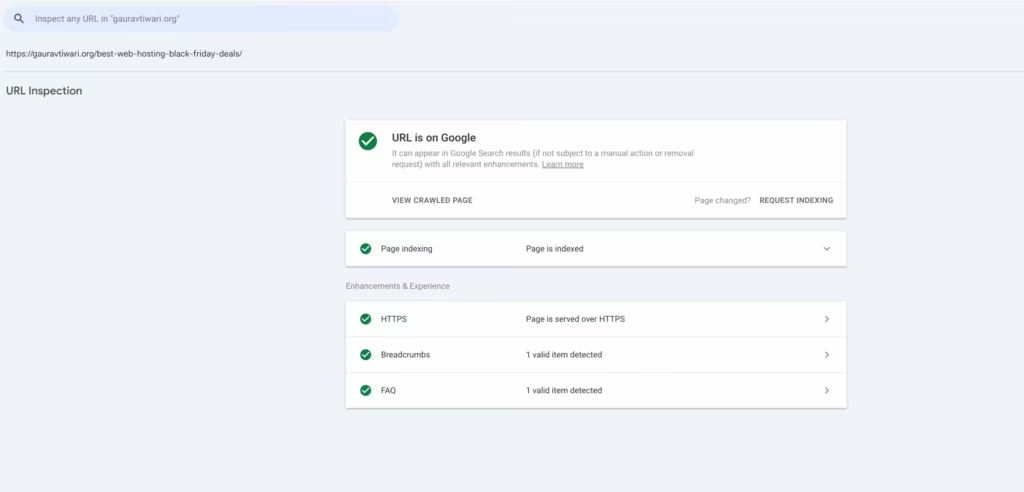
- Open Google Search Console
- Enter the updated URL in the URL Inspection tool
- Click “Request Indexing”
This doesn’t guarantee immediate reindexing, but it puts your page in the priority queue.
Preventing Future Content Decay
Fixing decay is necessary, but prevention is more efficient. Build systems that catch decay early.
Establish a Content Audit Schedule
- Monthly quick review: Check Search Console for pages with significant traffic declines from the previous month. Add concerning pages to your update list.
- Quarterly deep audit: Review all content published more than 12 months ago. Check for:
- Outdated information
- Broken links
- Declining rankings
- Engagement metric changes
- Annual content inventory: Once yearly, assess your entire content library. Decide what needs updates, what can be consolidated, and what should be removed.
Create Evergreen Content Systems
When you reference data, time-sensitive information, or current best practices, add HTML comments noting what needs regular updates if you using a custom CMS or just use Notes in WordPress editor.
The HTML comments can be inside the code:
<!-- UPDATE ANNUALLY: Review email marketing statistics -->
<!-- UPDATE WHEN CHANGED: Check WooCommerce interface screenshots -->
WordPress notes are comparatively easier to write and maintain.
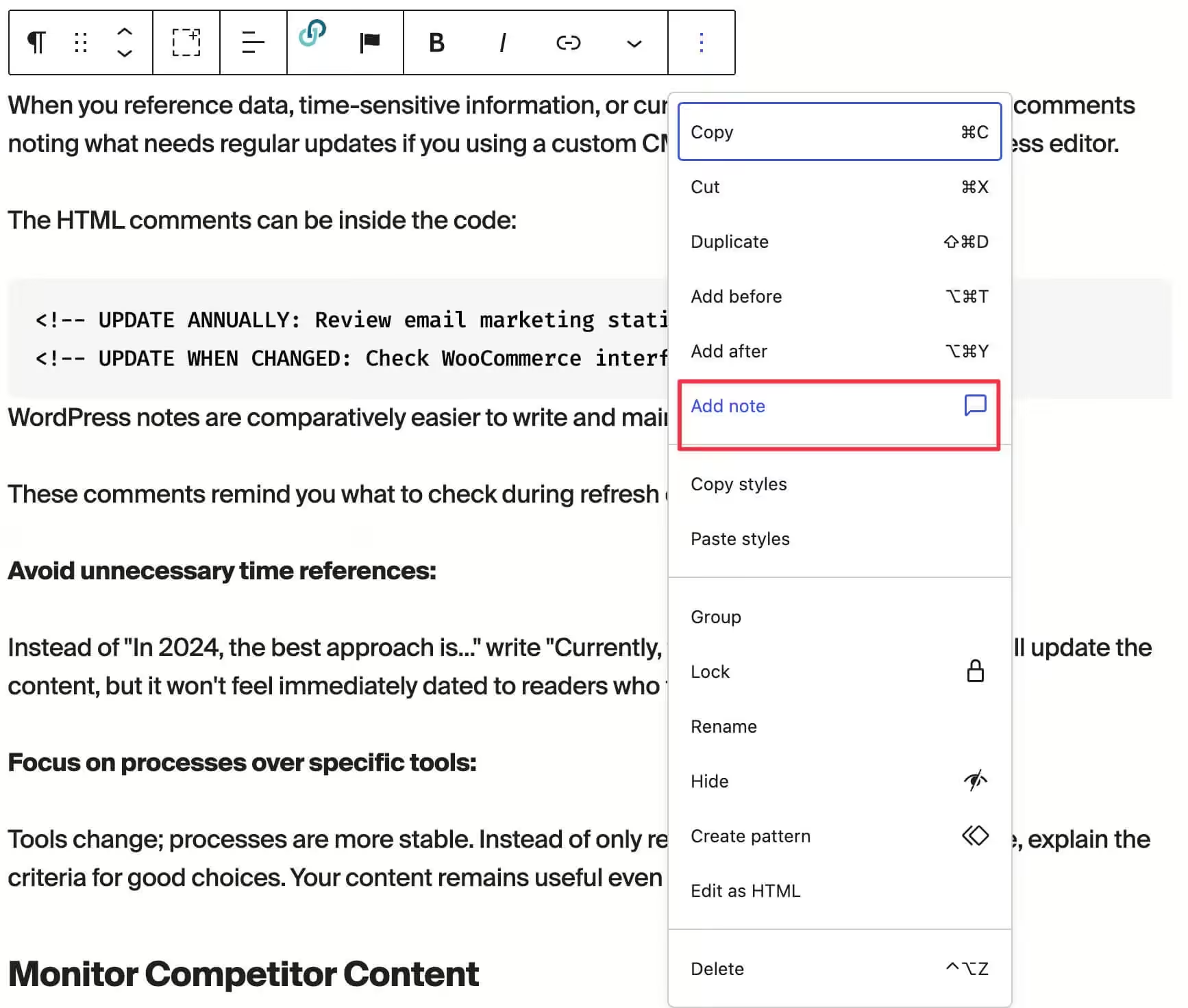
These notes and comments remind you what to check during refresh cycles.
- Avoid unnecessary time references: Instead of “In 2026, the best approach is…” write “Currently, the best approach is…” You’ll still update the content, but it won’t feel immediately dated to readers who find it later. But if you still want to add dates, specific current month and year into posts, my Dynamic Month & Year into Posts is the best plugin to use.
- Focus on processes over specific tools: Tools change; processes are more stable. Instead of only recommending specific software, explain the criteria for good choices. Your content remains useful even as specific tools evolve.
Monitor Competitor Content
Set up alerts for new content from competitors:
- Google Alerts: Create alerts for your target keywords. When new content is published, you’ll receive notifications.
- Semrush or Ahrefs: Use competitive tracking to monitor when competitors publish new content targeting your keywords. Respond before they outrank you.
- Regular SERP checks: Manually search your top 20 keywords monthly. See what’s changing in the results. If new competitors are appearing or formats are shifting, adapt before you lose ground.
Refresh Content Proactively
Don’t wait for decay. Schedule updates before they’re needed.
- High-value content: Update quarterly
- Medium-value content: Update every 6 months
- Standard content: Update annually
Proactive updates maintain freshness signals before competitors force your hand.
Tracking Recovery
After fixing decaying content, monitor whether your changes worked.
What to Track
- Rankings: Use Semrush or Rank Math to track position changes for target keywords. Positions should stabilize within 2-4 weeks and improve within 1-3 months.
- Organic traffic: Compare traffic to the same period before changes. Account for seasonality. If your content about holiday shopping drops in February, that’s not failed recovery; that’s normal seasonal variation.
- Engagement metrics: Check whether bounce rate, time on page, and scroll depth improved. Better engagement often precedes ranking improvements.
- Conversion metrics: For commercial content, track whether leads or sales recovered. Sometimes traffic recovers but conversions don’t because competitive pressure increased.
Expected Timeline
- Week 1-2: Google recrawls updated content. Rankings might fluctuate.
- Week 3-4: Positions stabilize at new levels.
- Month 2-3: If update was substantial and addressed real gaps, rankings typically improve.
- Month 3-6: Full recovery or new peak, assuming updates were comprehensive.
If you don’t see improvement after 3 months, analyze again. You might have misdiagnosed the problem or underestimated what competitors offer.
When Recovery Fails
Not all content can be saved. If comprehensive updates don’t move the needle after 3-6 months, consider:
- Keyword might be too competitive now: Market leaders entered the space, making it unrealistic for your site authority.
- Intent shifted permanently: What users want from this query has fundamentally changed.
- Technical issues elsewhere: Site-wide problems might be holding back specific pages.
- Topic no longer relevant: Market changed and search volume collapsed.
In these cases, redirect the page to related content that does perform and move on. Not every battle is worth fighting.
Content Decay Across Different Content Types
Different content types decay at different rates and require different fixes.
News and Current Events
Decay rate: Extremely fast. Traffic peaks within days and often drops 90%+ within weeks.
Fix strategy: Generally, don’t try to recover. News content serves its purpose and fades. Exception: If you can update news content into evergreen analysis (e.g., “What we learned from X event”), do so.
Product Reviews
Decay rate: Moderate to fast. Products get updated, discontinued, or superseded.
Fix strategy: Update when products change significantly. Add sections for newer versions. Remove discontinued products and add current alternatives. Comparison posts need annual overhauls.
Tutorial and How-To Content
Decay rate: Moderate. Software interfaces change, processes evolve, but core concepts often remain stable.
Fix strategy: Update screenshots when interfaces change. Revise steps when processes change. Keep core explanations stable. Annual review usually sufficient.
Comprehensive Guides
Decay rate: Slow to moderate. Evergreen topics don’t change quickly, but competitors constantly publish.
Fix strategy: Monitor rankings closely. Update every 6-12 months with new examples, current data, and expanded sections. Stay ahead of competitors.
Statistical and Research Content
Decay rate: Annual. Statistics from 2024 are useless in 2026.
Fix strategy: Build annual updates into your calendar. Update all data points with current statistics. Consider the original publish date as part of a series (“Email Marketing Statistics: 2026 Edition”).
List Posts
Decay rate: Moderate. Best-of lists need fresh entries and removal of outdated options.
Fix strategy: Review quarterly. Add new worthwhile entries. Remove options that have declined in quality or availability. Update descriptions for existing entries.
Tools Summary for Content Decay Management
Content decay is easier to catch when your SEO foundation is solid. Rank Math’s analytics surface declining posts before they fall off the map. For a deeper refresh, pair it with the blogging checklist to make sure updated content hits every mark. If you’d rather hand this off, my SEO services include content audits and recovery plans.
Here’s a quick reference for the tools discussed:
Free options:
- Google Search Console (traffic and ranking data)
- Google Analytics (engagement metrics)
- Rank Math Free (WordPress SEO with basic analytics)
Paid options for serious content marketers:
- Semrush (position tracking, content audit, competitive analysis)
- Ahrefs (ranking monitoring, content explorer)
- AIOSEO Pro (WordPress SEO with Search Console integration)
- Rank Math Pro (advanced analytics and tracking)
Content optimization after identifying decay:
- NeuronWriter (content optimization recommendations)
- Surfer SEO (content scoring and suggestions)
- Clearscope (enterprise content optimization)
Internal linking improvement:
- Link Whisper (internal link suggestions)
- Slim SEO Link Manager (automated internal linking)
Your Action Plan
Stop reading and do this:
- Open Google Search Console now. Set comparison for the last 3 months vs. previous 3 months. Export the pages report sorted by click difference.
- Review your top 10 declining pages. For each, determine whether decay is due to outdated content, competitive pressure, technical issues, or intent shift.
- Prioritize 3 pages for immediate action. Pick pages worth saving based on business value and recovery potential.
- Complete one comprehensive update this week. Not a quick tweak. A thorough update addressing every deficiency.
- Schedule monthly decay monitoring. Block 30 minutes monthly to check Search Console for new decliners.
- Review results in 60 days. Assess whether updates improved performance. Adjust strategy based on what worked.
Content decay isn’t a crisis. It’s a natural process you manage, like maintaining a garden. Regular attention keeps things healthy. Neglect leads to overgrowth and dead zones.
Your existing content is an asset you’ve already invested in. Maintaining it provides higher ROI than constantly creating new content that will also eventually decay. Build the systems, do the maintenance, and keep your content working for you.
FAQs
How long does content typically take to decay?
Decay timelines vary by content type and competitiveness. News content decays within days or weeks. Product reviews and comparison posts typically start declining within 12-18 months as products update and competitors publish fresher content. Evergreen guides might maintain rankings for 2-3 years before needing substantial updates. Statistical content decays annually as data becomes outdated. Highly competitive keywords experience faster decay because more publishers are actively trying to outrank you.
Should I change the publish date when updating old content?
Update the publish date when you’ve made substantial changes. A comprehensive rewrite, significant new sections, or thorough data updates warrant a new date. Minor edits like fixing typos or updating a single link don’t justify date changes. Some publishers use ‘Last Updated’ dates instead of changing the original publish date, which shows both freshness and original authority. Google has stated they look at when content was significantly updated, not just the displayed date, so focus on making real improvements.
Is it better to update old content or create new content?
Generally, updating existing content provides better ROI when that content has existing rankings and backlinks. A page ranking #8 that you improve has a head start over a new page starting from zero. However, create new content when topics are genuinely new, when your existing content’s angle is fundamentally wrong, or when you want to target a substantially different keyword. Many successful content strategies combine both: updating proven performers while creating new content for gaps in coverage.
How do I know if content decay is due to algorithm changes or competitors?
Check the timing against known algorithm updates. If your traffic dropped when Google confirmed a core update, that’s likely the cause. If decline is gradual over months with no correlation to updates, competitors are probably the issue. Also search your target keywords and see what’s ranking above you now. If specific competitors published comprehensive content that now outranks you, that’s competitive pressure. Tools like Semrush’s Sensor or Rank Risk Index show when algorithm volatility is high across many sites.
What metrics indicate content decay before traffic drops?
Impressions often decline before clicks do. If Search Console shows impressions dropping while position holds, Google is showing your content to fewer queries. Ranking position dropping from #3 to #6 might initially maintain similar traffic but signals trouble ahead. Engagement metrics like increasing bounce rate or decreasing time on page suggest users aren’t satisfied, which often precedes ranking drops. Click-through rate declining might indicate your title and meta description are less compelling than newer competition.
Should I delete content that can’t be recovered?
Don’t delete outright. Instead, 301 redirect to the most relevant existing page on your site. This passes any link equity the page accumulated and ensures users or links to the old URL find something useful. Only delete with no redirect if content is genuinely harmful (severely outdated information, broken functionality, or content that could damage your reputation). Removing thin content and consolidating into stronger pages is often better than creating orphan redirects to only vaguely related content.
How much should I expand content when updating for decay?
Word count isn’t the goal; comprehensiveness is. Compare your content to what currently ranks. If competing content covers five subtopics and you cover three, add the missing two. If competitors have 3,000 words of useful detail and you have 1,200 words of surface-level tips, expand substantially. Sometimes decay happens despite adequate length because competitors offer better organization, examples, or media. Focus on covering the topic thoroughly enough that users don’t need to check other results.
Can adding internal links really help recover decaying content?
Yes, internal links pass PageRank and signal topic relevance to Google. A decaying page with few internal links isn’t receiving authority from your stronger pages. Adding contextual internal links from high-authority pages can boost rankings, especially if link isolation contributed to the decay. This works best combined with content improvements. Internal links alone won’t save content that’s genuinely inferior to competitors, but they help ensure good content gets the authority signals it needs to rank.
Why did my content decay even though I regularly update it?
Regular updates don’t always address the right issues. You might be updating dates and minor details while competitors are adding substantial new sections, better examples, or improved formats. Search intent might have shifted, making your entire approach less relevant even when current. Technical issues elsewhere on your site could be affecting the page. Or the keyword simply became more competitive as bigger players entered the space. Analyze what’s now ranking and honestly assess whether your updates make your content genuinely better than alternatives.
How do I prioritize which decaying content to fix first?
Prioritize by business impact and recovery potential. Commercial pages driving revenue deserve immediate attention. Pages ranking #11-20 have higher recovery potential than pages that dropped to #50. Recent decay is easier to reverse than long-standing decline. High-traffic pages matter more than low-traffic pages in absolute terms, but percentage decline matters too. A page dropping from 100 to 50 visitors might still be more critical than one dropping from 1,000 to 900 if that small page has higher conversion rates.
Disclaimer: This site is reader-supported. If you buy through some links, I may earn a small commission at no extra cost to you. I only recommend tools I trust and would use myself. Your support helps keep gauravtiwari.org free and focused on real-world advice. Thanks. - Gaurav Tiwari