
 by
by
Most lists of tools for online entrepreneurs hand you 20 apps and leave the sorting to you. Sign up for half of them and you end up with 3 places to keep tasks, 2 email tools and a stack of monthly charges for software you open once a week. The work still gets done in a spreadsheet, only now it costs money.
The better way is to cover each business job with one tool, start on its free plan and pay only when a specific limit gets in your way. Six jobs carry most one-person online businesses: planning the work, writing things down, business email, an email list, search traffic and getting paid. These are the six picks I’d start with, one per job.
- Projects and tasks: ClickUp, a task manager that holds lists, boards, calendars and client work in one place.
- Notes, docs and SOPs: Notion, a page-and-database workspace for your processes, content plans and client notes.
- Business email and files: Google Workspace, which gives you Gmail at your own domain, Drive storage and Docs.
- Email list: Kit, an email platform built for creators that stays free up to 10,000 subscribers.
- Search traffic: Google Search Console first, then Semrush once you need competitor keyword and backlink research.
- Invoices: FreshBooks, invoicing and time tracking for client work, with Wave as the free start.
Each section below gives the free or budget option for that job and the point where the paid plan earns its fee. Prices are the vendors’ own list prices in US dollars, so check your region at checkout.
A Starter Toolkit
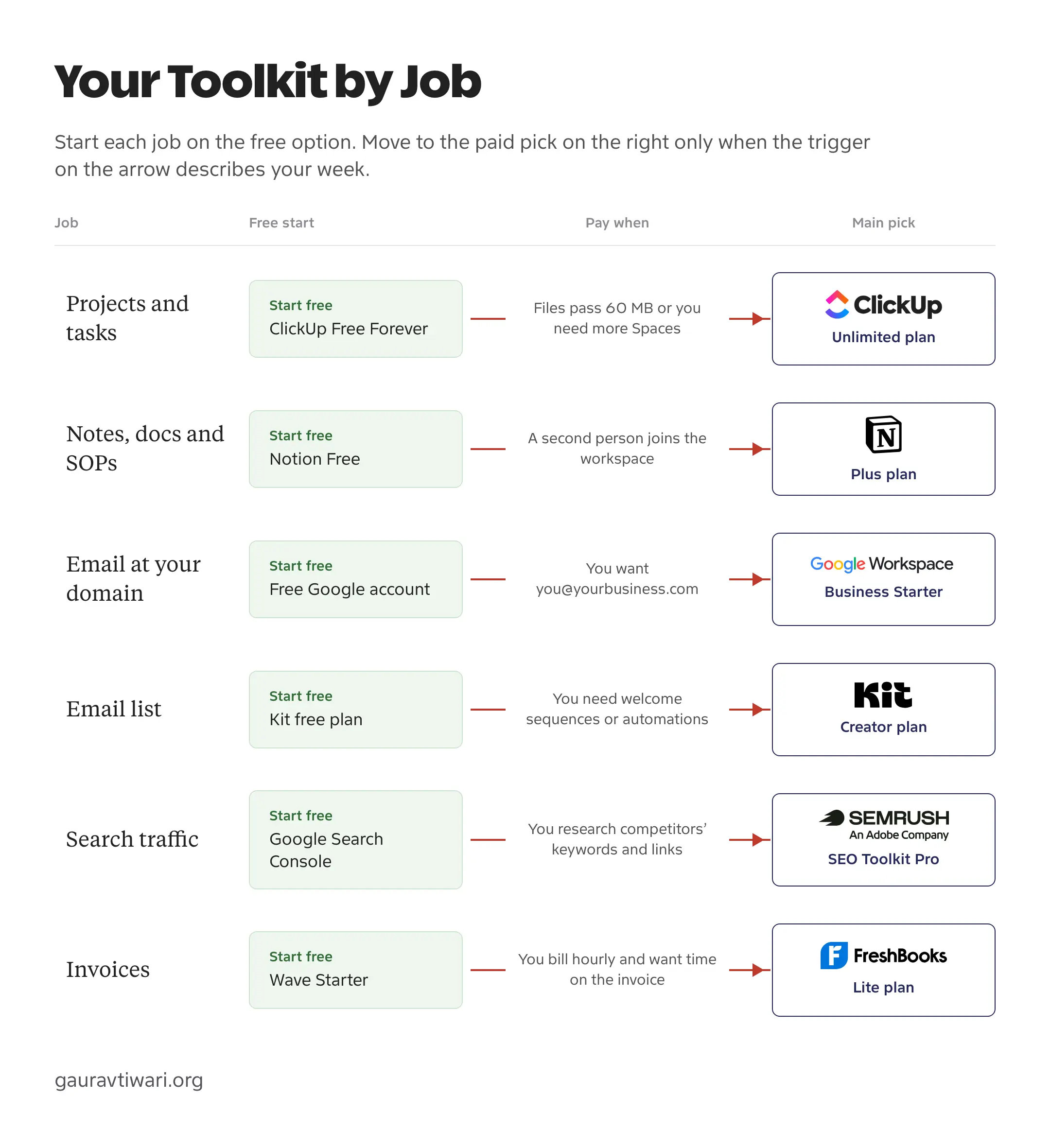
Here are the tools for online entrepreneurs from this page side by side. The free column is enough for a business that is just starting; the paid column is the entry plan you move to when that job gets busy.
| Job | Main Pick | Free or Budget Option | Entry Paid Plan |
|---|---|---|---|
| Projects and tasks | ClickUp | ClickUp Free Forever, or Trello Free | Unlimited: $7/user/month yearly, $10 monthly |
| Notes, docs and SOPs | Notion | Notion Free | Plus: $10/member/month yearly, $12 monthly |
| Business email and files | Google Workspace | A free Google account with 15 GB | Business Starter: $7/user/month yearly, $8.40 flexible |
| Email list | Kit | Kit free plan, up to 10,000 subscribers | Creator: $39/month, or $390/year, for 1,000 subscribers |
| Search traffic | Semrush | Google Search Console, or Ahrefs Starter at $29/month | SEO Toolkit Pro: $139.95/month |
| Invoices | FreshBooks | Wave Starter | Lite: $23/month for 5 billable clients |
The more useful question is when to move from the free column to the paid one. Every job has a trigger, and until it shows up in your week the free plan is doing its job.
Project Management
Project tools and note tools overlap more than their marketing admits. I’d keep them separate in a small business: ClickUp for work that has a due date and an owner, Notion for knowledge that you come back to. When both live in one app, the task list slowly turns into a wiki nobody can search.
ClickUp
ClickUp is my pick for tracking client projects, launches and recurring tasks, because the same task can be seen as a list, a board or a calendar without being copied anywhere. A freelancer with 6 active clients can keep one Space per client and still see everything due this week on one screen.
- Free Forever plan with unlimited tasks and members
- List, board and calendar views of the same tasks
- Docs, forms and automations inside the workspace
- Unlimited plan removes the 60 MB storage cap and the Space limit
The Free Forever plan is generous on tasks but tight on files: 60 MB of storage, 5 Spaces and a small automation allowance. Attach a few client PDFs and you hit the storage wall first. Unlimited costs $7 per user a month on yearly billing or $10 month to month, and that is the plan most solo businesses need.
Why it fits:
- One task can live in list, board and calendar views at the same time.
- The free plan has no member limit, so a contractor can join without a new bill.
- Docs and forms sit next to the tasks they belong to.
Watch out for:
- The number of settings is a lot for someone who only needs a to-do list.
- 60 MB of free storage fills up quickly if you attach files to tasks.
- AI features are paid add-ons on top of the plan price.
Notion
Notion is the workspace I use myself, and it is where documentation belongs: standard operating procedures, a content calendar, client onboarding notes and the swipe file you keep meaning to organize. Its databases let a page be both a document and a row you can filter, so a content plan can show only the posts due this month.
- Free plan for one person, with unlimited pages
- Databases with views, filters and relations
- Plus plan adds unlimited uploads and 30 days of page history
- Notion Calendar included on every plan
The free plan is unlimited for one person, with uploads capped at 5 MB per file. Add a second member and blocks become limited, which is the point to move to Plus at $10 per member a month yearly or $12 monthly. Notion’s full AI features sit on the Business plan at $20 per member yearly, so don’t count them in the Plus price.
Notion starts as a blank page, which is where most people stall. I built the Notion Templates Library for that problem: connected systems such as Blog OS, Affiliate Program Manager and Indian Freelancer OS, each with sample data and written playbooks, for $39 a year. If you’d rather start without paying, my list of free Notion templates covers the good free ones.
Why it fits:
- Pages and databases cover SOPs, plans and trackers in one place.
- Unlimited pages on the free plan for a single person.
- Templates make a new workspace usable on day one.
Watch out for:
- A blank workspace takes setup time before it pays off.
- Free blocks become limited as soon as a second member joins.
- Task reminders and dependencies are weaker than in a dedicated project tool.
If ClickUp feels like too much, Trello Free is the simpler budget route: boards and cards, up to 10 boards and 10 collaborators per workspace, with Standard at $5 per user a month yearly. My project management software guide compares the bigger team options, including Asana and monday.com.
Documents and File Storage
For documents and files, use the workspace your business already runs on. Paying for a separate storage brand rarely helps a one-person business, because the files you share most already sit in your email and document tools.
A free Google account gives you Gmail, Drive and Docs with 15 GB of storage. The upgrade that matters is Google Workspace Business Starter, mainly for email at your own domain: you@yourbusiness.com reads very differently from a Gmail address on an invoice. It costs $7 per user a month on an annual plan or $8.40 on the flexible plan, with 30 GB of pooled storage per user.
If your clients send Word and Excel files all day, Microsoft 365 is the equivalent choice and OneDrive comes with it. Pick one of the two and keep everything there, because two cloud drives mean two places to look for the same contract.
If you need more storage and would rather pay once, my list of cloud storage lifetime deals in 2026 covers the options worth considering.
Website and Payments
An online business needs a website it owns, and for most people that is WordPress on a decent host. For a first site I recommend Hostinger, and my WordPress hosting guide explains when a VPS or managed host is worth more. If the site does not exist yet, my guide to starting a WordPress blog walks through the setup.
For payments, Stripe charges no setup or monthly fees on its standard pricing and charges a fee on each card payment. If you sell a single ebook or a paid newsletter, Kit’s free plan can already sell digital products and subscriptions, so you may not need a separate store at the start.
Email Marketing
The right email platform depends on what you sell. A creator or service business needs a list, a welcome sequence and simple tags. A store needs product feeds, abandoned cart emails and SMS. Kit fits the first case, which describes most solo online businesses.
Kit
Kit is the email platform I’d start a creator business on, because the free plan is real: up to 10,000 subscribers, unlimited broadcasts, landing pages and forms, tagging and the ability to sell digital products. You can build a list for a year without paying anything.
- Free plan up to 10,000 subscribers
- Unlimited landing pages, forms and broadcasts
- Sell digital products and paid subscriptions
- Creator plan adds Visual Automations and email sequences
The free plan leaves out automated email sequences and Visual Automations, and those are what turn a list into sales. A welcome sequence that introduces your offer over 5 emails is the usual reason to upgrade. Creator costs $39 a month, or $390 a year, for 1,000 subscribers and rises with your list size.
Why it fits:
- The free plan carries a list to 10,000 subscribers.
- Tagging and segmentation are included on the free plan.
- Selling a product from the same account saves a separate checkout.
Watch out for:
- Welcome sequences need the paid Creator plan.
- Pricing climbs with subscriber count, so a large free list gets expensive the day you upgrade.
- Store-style features such as product feeds are not its focus.
Two exceptions change the pick. If you run an ecommerce store, Omnisend is built for product emails, abandoned carts and SMS. If you sell services through a sales pipeline, ActiveCampaign pairs email automation with a CRM. My email marketing software comparison covers both and a few more.
SEO and Keyword Research
Google Search Console comes first, and it is free. It shows the queries and pages that already bring people to your site, and that data comes from Google itself about your own site. If it isn’t connected yet, my Search Console setup guide walks through the setup.
Semrush
Semrush is what I use for keyword research and backlink audits. It answers the questions Search Console can’t: which keywords a competitor ranks for, who links to them and which of their pages bring the most traffic. That is the research you need before choosing what to write or build next.

- Keyword research with volume and difficulty
- Competitor keyword and backlink analysis
- Site audit and position tracking
- SEO Toolkit Pro: 5 websites, 500 tracked keywords
SEO Toolkit Pro costs $139.95 a month and covers 5 websites, 500 tracked keywords and 10,000 results per report. That is more than the rest of this toolkit combined, so it should wait until search is a real source of customers for you.
Why it fits:
- Competitor keyword and backlink data in one account.
- Position tracking shows whether a change helped.
- Enough limits on Pro for one business and a few side projects.
Watch out for:
- The price is hard to justify before search brings in customers.
- The number of reports takes a while to learn.
- Some newer tools, such as AI visibility tracking, are sold separately.
For occasional research, Ahrefs Starter costs $29 a month with 200 credits and 50 tracked keywords, which is enough to check a handful of competitors. My Semrush review goes deeper into the plans, and the keyword research guide shows how to use the data once you have it.
Invoices and Accounting
Invoicing is often the last tool people set up, even though slow payments hurt a small business first. Wave Starter is free and sends unlimited invoices, with card payments at 2.9% + $0.60 each. Recurring invoices and automatic overdue reminders need Wave Pro at $19 a month or online payments turned on.
FreshBooks
FreshBooks is my pick for service businesses that bill clients for time. Unlimited time tracking is included on the Lite plan, so the hours you log turn into invoice lines without a separate timer app or a spreadsheet.

- Unlimited invoices and estimates, for 5 clients on Lite
- Unlimited time tracking on every plan
- Expense tracking and mileage from the mobile app
- Card, ACH, Apple Pay and Google Pay payments
Lite costs $23 a month and lets you invoice 5 clients; Plus raises that to 50 clients for $43 a month. Each extra team member costs $11 a month, so a business that hires an assistant should add that to the price. At the time of writing FreshBooks offers Lite at $1 a month for the first year.
Why it fits:
- Time tracking flows straight into invoices.
- Clients can pay by card or bank transfer from the invoice.
- Clean reports for tax time.
Watch out for:
- Lite stops at 5 billable clients.
- Team members cost extra on every plan.
- It is invoicing-first; full bookkeeping needs more than Lite.
If you need full accounting rather than invoicing, my FreshBooks, Wave and QuickBooks comparison sorts out which one fits, and the invoice generator roundup covers simpler options.
What the Toolkit Costs
Here is a worked example for one person who has outgrown every free plan and pays month to month for the entry paid tier of all six tools.
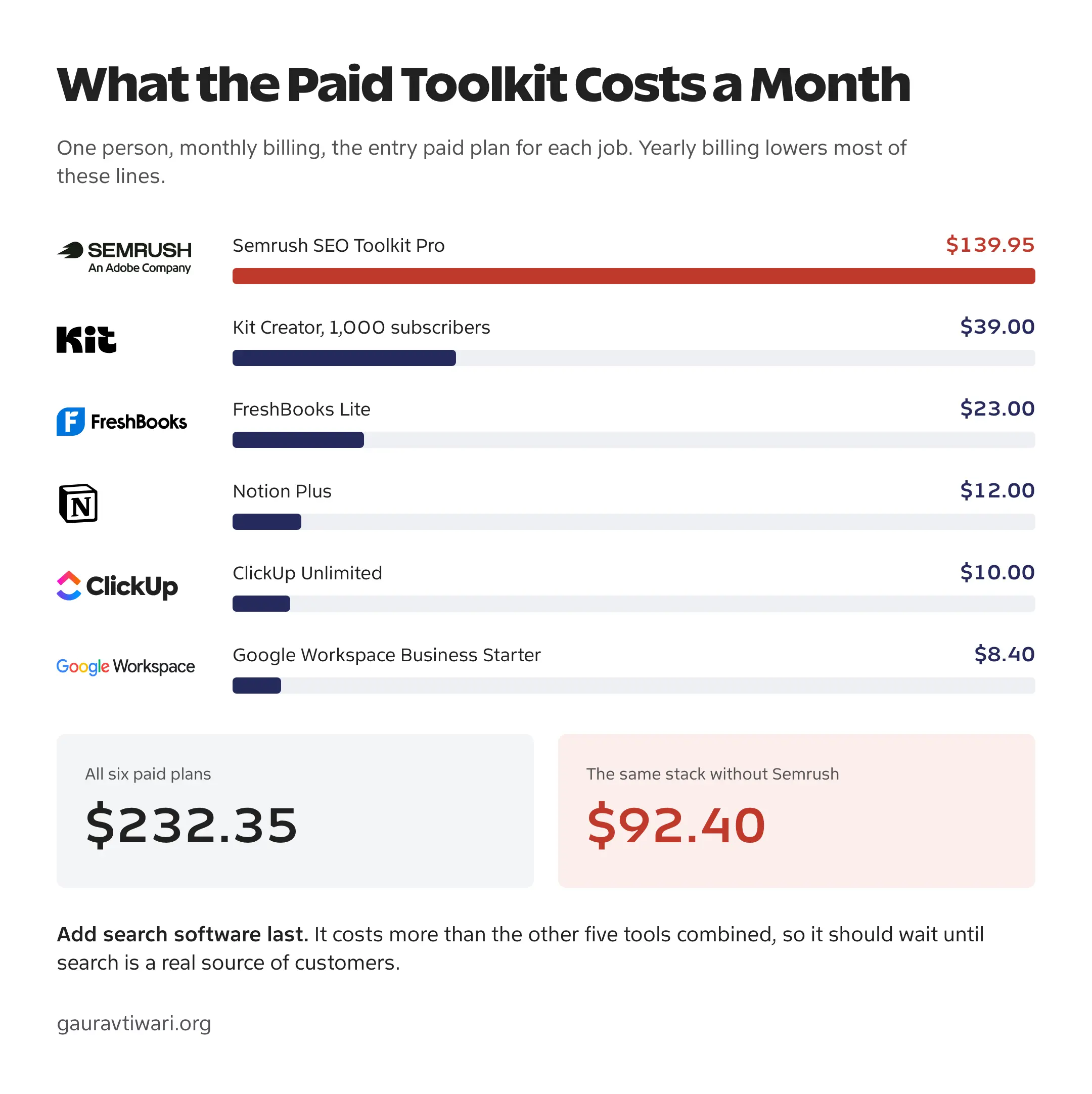
- All six paid plans: $232.35 a month.
- The same stack without Semrush: $92.40 a month.
- Yearly billing lowers ClickUp to $7, Notion to $10, Google Workspace to $7 and Kit to $32.50 a month, which takes about $13 off the non-Semrush part.
- On free plans: $0 for software, with hosting and payment fees as your only fixed costs.
Software for solopreneurs adds up without much notice, because each bill looks small on its own. Search software is the one line that changes the total, so it is wise to buy it last and only for a business where search already brings in customers.
FAQs on Entrepreneur Tools
What are the best tools for entrepreneurs who work online?
A small set covers most online businesses: ClickUp for projects, Notion for notes and SOPs, Google Workspace for email at your domain, Kit for an email list, Google Search Console followed by Semrush for search traffic and FreshBooks or Wave for invoices. Start each one on its free plan and pay when a specific limit gets in the way.
What should I check before paying for a team tool?
Check how the vendor counts paid members, guests and minimum seats. A quoted per-user rate often assumes yearly billing, so calculate the bill for your actual team on the billing period you will choose.
Does a cheap monthly price include everything on the vendor’s website?
Usually only the named plan and its allowances. AI features, extra contacts, more channels, storage and separate toolkits often cost extra, so read the plan’s feature and limit rows before you buy.
Can I move my work if I cancel a tool?
Check the export options before a tool becomes central to your business. A useful export keeps your records as CSV, Markdown or a format another tool can import, rather than a flattened PDF.
Final Remarks
A set of tools for online entrepreneurs works best when it grows one job at a time. Pick the job that causes the most friction this week, set up the free plan for it and use it for a month before you add the next tool. When a limit from the toolkit map shows up in your work, that is the day to start paying for it.
Tell Google you want more of this.
Add Gaurav Tiwari as a preferred sourceOne tap, and this site shows up more often in your own Top Stories, AI Overviews and AI Mode. Remove it any time.
Disclaimer: This site is reader-supported. If you buy through some links, I may earn a small commission at no extra cost to you. I only recommend tools I trust and would use myself. Your support helps keep gauravtiwari.org free and focused on real-world advice. Thanks. - Gaurav Tiwari