
SureCart vs WooCommerce in 2026: What to Use?
I’ve built stores on both SureCart and WooCommerce. Not test sites with dummy products, but real client stores processing real payments. And after doing this for years, I can tell you the right choice depends on what you’re actually selling. Pick wrong, and you’ll spend months migrating. Pick right, and you won’t think about your ecommerce setup again.
The SureCart vs WooCommerce debate has shifted a lot since 2024. WooCommerce used to be the only serious answer for WordPress ecommerce. It’s been around since 2011, and for most of that time, there wasn’t a credible alternative. But SureCart has changed that conversation. It’s lighter, faster, and built for a different kind of seller.
SureCart has grown up a lot since it launched. It handles physical products now, has inventory management, and supports payment gateways beyond just Stripe. WooCommerce, on its end, shipped HPOS (High-Performance Order Storage) which dramatically improved its backend speed. The SureCart vs WooCommerce comparison in 2026 looks different than it did even a year ago.
I’m going to break down features, pricing, performance, developer experience, and the stuff most reviews skip when comparing SureCart vs WooCommerce. I’ve spent time inside both dashboards, dealt with both support teams, and watched both platforms evolve. By the end, you’ll know exactly which one fits your business.
SureCart vs WooCommerce: Core Difference
Before I get into specifics, you need to understand the core architecture difference. WooCommerce is a WordPress plugin that stores everything in your WordPress database. Products, orders, customer data, all of it lives on your server. SureCart is a hybrid. It installs as a WordPress plugin, but the heavy lifting (checkout processing, payment handling, tax calculations) runs on SureCart’s cloud servers.
This matters more than most people realize. WooCommerce gives you complete data ownership and control. You can query your orders table directly, build custom reports, and modify anything at the code level. SureCart gives you speed and simplicity by offloading the resource-heavy parts to their infrastructure. But you’re also trusting a third party with your transaction data. If SureCart’s servers go down, your checkout goes down even if your WordPress site is running fine.
Neither approach is wrong. But which one works better for you depends on how much control you need versus how much maintenance you want to avoid. I’ve seen solo creators thrive on SureCart and enterprise stores that couldn’t function without WooCommerce’s flexibility.
WooCommerce

WooCommerce powers over 5 million stores. It’s backed by Automattic, the company behind WordPress.com, and it’s the most extended ecommerce platform on the web. That’s not marketing fluff. That’s a 13-year track record with a plugin library that nothing else matches.
Here’s what you can do with WooCommerce out of the box or with its official extensions:
- Sell physical, digital, or variable products with full inventory tracking
- Set up subscription billing through WooCommerce Subscriptions ($199/year)
- Create bookings, memberships, and auction-style listings through third-party plugins
- Configure shipping zones, rates, and real-time carrier calculations (UPS, FedEx, DHL)
- Manage dynamic pricing rules, bulk discounts, and wholesale tiers
- Build multivendor marketplaces with plugins like Dokan or WCFM
- Connect to ERPs, CRMs, POS systems, and pretty much any business tool
- Use the full REST API and thousands of action/filter hooks for custom development
The 2026 update that matters most is HPOS (High-Performance Order Storage). WooCommerce completely overhauled how it stores order data. Orders now live in custom tables instead of the WordPress post meta table, and the speed difference is massive. Order creation is up to 5x faster, checkout is 1.5x faster, and searching for orders is up to 40x faster. If you’ve ever managed a WooCommerce store with 50,000+ orders and watched the admin panel crawl, HPOS fixes that problem.
But WooCommerce’s strength is also its weakness. You need plugins for almost everything. Subscriptions? Plugin. Custom checkout? Plugin. Tax automation? Plugin. Every plugin adds database queries, potential conflicts, and annual renewal costs. I’ve audited client stores running 15+ WooCommerce-related plugins, and the overhead is real. Performance drops, update anxiety increases, and costs pile up.
SureCart

SureCart was built by the team behind Astra (the most popular WordPress theme), Spectra, SureMembers, and OttoKit (formerly SureTriggers). That matters because they understand the WordPress world from the inside. They didn’t build SureCart as a side project. They built it as a direct answer to WooCommerce’s complexity problem.
Here’s what SureCart handles natively without extra plugins:
- Digital downloads with instant file delivery
- Subscription billing through Stripe, PayPal, Mollie, Paystack, Mercado Pago, and RazorPay
- Physical products with inventory management and variant tracking (this is new)
- Pay-what-you-want pricing and donation collection
- EU VAT and automatic tax calculations in every plan, including free
- License key generation and management
- Order bumps and upsells (Pro plan)
- Custom checkout forms using Gutenberg blocks
- Built-in invoices and email receipts
- Dynamic pricing that adjusts at checkout based on user role, cart contents, or customer type
- Fraud detection on all plans
- Automation through OttoKit (their Zapier-style connector)
The biggest SureCart update in 2025-2026 was physical product support with inventory management. You can now track stock levels per product and per variant, handle shipping with flat-rate, weight-based, or price-based models, and process returns natively. This was the feature that kept me recommending WooCommerce for anyone selling physical goods. That gap has narrowed significantly.
SureCart still isn’t WooCommerce for physical product stores with complex shipping needs. You won’t get real-time carrier rates from UPS or FedEx without workarounds. You can’t do zone-specific pricing natively. And there’s no bulk editor for products, so if you have 500 SKUs, you’re updating them one by one. But for stores selling under 100 physical products alongside digital offerings, SureCart now handles the job.
Setup: 10 Minutes vs. 90 Minutes
I timed this on my last two client projects.
SureCart setup took 8 minutes. Install the plugin, connect your Stripe account, add a product, embed the checkout block on a page, done. The setup wizard walks you through it, and there’s no configuration maze. Tax handling works immediately. Payment processing works immediately. You don’t need to install a single additional plugin.
WooCommerce setup took about 75 minutes. Install WooCommerce, configure tax zones and rates, set up shipping methods, install and configure a payment gateway, add WooCommerce Subscriptions for recurring billing, install a checkout optimization plugin because the default checkout is bloated, and then set up caching properly because WooCommerce adds significant database weight. And that’s a basic setup. Complex stores take days.
I’m not saying WooCommerce’s setup is bad. It’s thorough. You have control over every detail. But if you’re a course creator who just wants to sell a $49 PDF and a $29/month membership, spending 75 minutes on ecommerce configuration is overkill. SureCart was built for that exact use case.
Pricing: The Real Numbers
This is where most comparison articles get it wrong. They list the base price and forget about all the plugins WooCommerce needs to match SureCart’s feature set. I’ve done the math for both.
SureCart Pricing (2026)
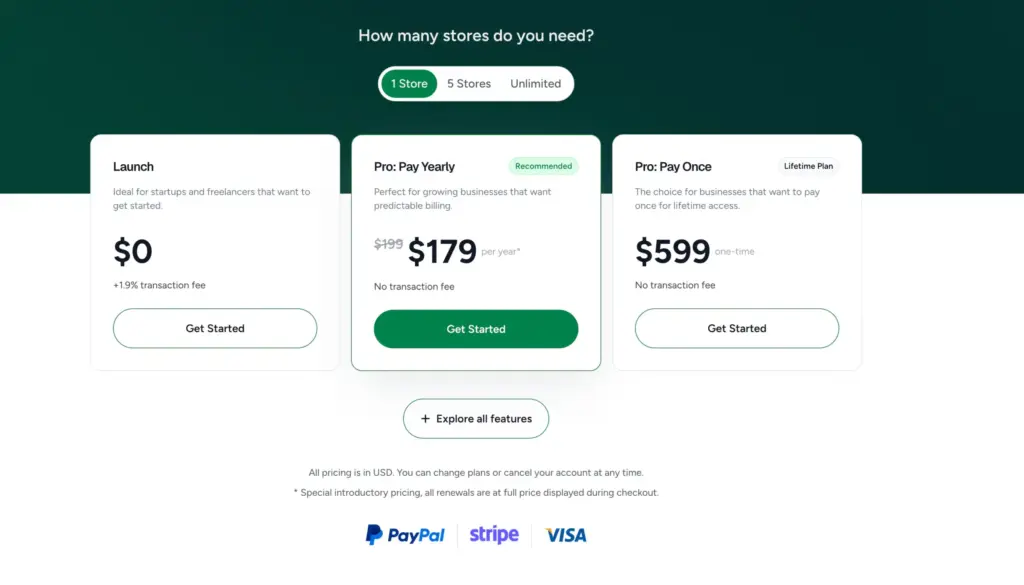
| Plan | Annual Cost | Lifetime Cost | Sites | Transaction Fee |
|---|---|---|---|---|
| Launch (Free) | $0 | N/A | Unlimited products | 1.9% per transaction |
| Pro (1 site) | $179/year | $599 one-time | 1 | 0% |
| Pro (5 sites) | $249/year | $899 one-time | 5 | 0% |
| Pro (Unlimited) | $399/year | $1,499 one-time | Unlimited | 0% |
Every plan includes tax calculations, fraud detection, subscription handling, and checkout hosting. The free plan’s 1.9% transaction fee adds up fast, so I’d move to Pro once you’re doing more than $800/month in sales. At that point, the Pro plan pays for itself in transaction fee savings alone.
The lifetime deal is worth mentioning. If you’re running a business that’ll exist in three years (and you should be), $599 one-time for a single site is cheaper than two years of Pro annual billing. I bought the lifetime deal for a client’s coaching site, and the math worked out in 18 months.
WooCommerce True Cost (2026)
| Component | Annual Cost |
|---|---|
| WooCommerce Core | Free |
| WooCommerce Subscriptions | $199/year |
| Checkout customization plugin (CartFlows or similar) | $79-149/year |
| Tax automation (TaxJar or similar) | $99-199/year |
| Advanced reporting plugin | $79-149/year |
| Payment gateway extensions (beyond basic Stripe) | $0-79/year each |
| Security plugin | $0-99/year |
| Performance/caching plugin | $0-59/year |
Realistic annual cost for a WooCommerce store with subscriptions, custom checkout, and tax automation: $500 to $1,200/year. And that doesn’t count hosting upgrades you’ll likely need because WooCommerce is database-heavy.
SureCart is cheaper for most small to mid-size stores. WooCommerce’s costs make more sense when you’re doing enough volume that the flexibility and control justify the investment. If you’re processing $50,000+/month, WooCommerce’s extension library starts paying for itself through better conversion tools, deeper analytics, and tighter CRM integration.
Performance: SureCart Wins (and It’s Not Close)
I’ve tested both on identical hosting setups. Same server, same theme (GeneratePress), same content.
SureCart product and checkout pages loaded in under 1 second consistently. The checkout form is a lightweight JavaScript component that talks to SureCart’s servers, so your WordPress database barely notices. There’s no jQuery dependency, no heavy WooCommerce frontend scripts, and no cart fragments AJAX calls killing your page speed.
WooCommerce product pages averaged 2.2 seconds without optimization. After adding FlyingPress for caching, configuring Redis object caching, and stripping unnecessary WooCommerce scripts with Perfmatters, I got that down to 1.1 seconds. But that’s three additional plugins and about two hours of configuration work.
| Metric | SureCart | WooCommerce (Optimized) | WooCommerce (Default) |
|---|---|---|---|
| Product page load | 0.8s | 1.1s | 2.2s |
| Checkout load | 0.6s | 1.4s | 2.8s |
| Cart AJAX calls | 0 | 3-5 | 3-5 |
| Database queries (product page) | ~25 | ~80-120 | ~80-120 |
| JS payload | ~45KB | ~180KB | ~280KB |
HPOS improved WooCommerce’s backend performance significantly, especially for order management. But the frontend weight is still there. WooCommerce loads cart fragment scripts on every page by default, which fires AJAX requests to check the cart status. You can disable this, but most store owners don’t know it’s happening. SureCart doesn’t have this problem because the cart lives on their servers.
If performance matters to you (and it should, because Google uses Core Web Vitals as a ranking factor), SureCart gives you a faster store with zero configuration. WooCommerce can match it, but only with caching plugins, performance tuning, and usually better hosting.
Integrations and Extensions
This is where WooCommerce pulls ahead, and it’s the main reason I still recommend it for complex businesses.
WooCommerce’s Extension Library
WooCommerce has 700+ official extensions and thousands of third-party plugins. Every CRM (HubSpot, Salesforce, ActiveCampaign), every email platform (Mailchimp, ConvertKit, Drip), every shipping service (ShipStation, Easyship), and every analytics tool (Metorik, Google Analytics Enhanced Ecommerce) has a WooCommerce plugin. If you need to connect your store to an ERP, warehouse management system, or POS, WooCommerce has a solution.
It also works with every major page builder: Elementor, Bricks Builder, Kadence, Beaver Builder. And you can go headless with Next.js, Gatsby, or any frontend framework through the REST API. The WooCommerce REST API covers everything from orders to coupons to customer data.
SureCart’s Integrations
SureCart’s integration list is smaller but growing. You get native connections to:
- Email platforms: Mailchimp, MailerLite, ConvertKit
- Payment gateways: Stripe, PayPal, Mollie, Paystack, Mercado Pago, RazorPay
- WordPress tools: SureMembers, OttoKit, Gutenberg blocks, Bricks Builder, Elementor
- Automation: OttoKit handles Zapier-style workflows within WordPress
For most creators and small business owners, SureCart’s integrations are enough. You can connect your email list, process payments through multiple gateways, and automate follow-ups. But if you need tight CRM integration, POS support, or enterprise-level analytics, WooCommerce is the only real option.
| Integration Type | SureCart | WooCommerce |
|---|---|---|
| Payment gateways | 6 native | 100+ via extensions |
| Email marketing | 3 native | 20+ native |
| CRM support | Basic (via OttoKit) | Deep (native plugins) |
| Shipping carriers | Manual/flat-rate | Real-time rates |
| POS systems | None | Multiple options |
| Page builders | Gutenberg, Bricks, Elementor | All major builders |
| Automation | OttoKit | Zapier, Uncanny Automator, WP Fusion |
| REST API | Pro plan only | Full, included |
Developer Experience
I’m a WordPress developer, so this section matters to me personally.
WooCommerce for Developers
WooCommerce wins here. No contest. You get thousands of action and filter hooks, a mature REST API, full WP-CLI support, and PHPUnit testing integration. Every line of code is open source. You can fork it, patch it, extend it, or completely override its behavior. The documentation is enormous (sometimes too enormous, because finding the right hook can take 30 minutes), and Stack Overflow has answers for almost every WooCommerce dev question you’ll run into.
If you’re building custom checkout flows, integrating with a client’s internal systems, or creating a marketplace, WooCommerce gives you the tools to do it. I’ve built everything from wholesale ordering systems to custom subscription logic to automated fulfillment pipelines on WooCommerce. The platform doesn’t get in your way.
SureCart for Developers
SureCart offers a REST API and some WordPress-style hooks, but the surface area is much smaller. The checkout and dashboard UIs are modern JavaScript components, which is nice for frontend developers but limits what you can customize server-side. The hosted backend means you can’t modify how orders are processed or stored. You work within SureCart’s API boundaries.
For quick builds, this is actually an advantage. Fewer things to configure means fewer things to break. I’ve shipped SureCart-based stores in half the time it takes to set up a comparable WooCommerce store. But if a client comes to me with a list of 15 custom requirements, I reach for WooCommerce every time.
Choose WooCommerce if: you need deep customization, heavy integrations, or you’re building for a client who’ll want custom features down the road.
Choose SureCart if: you want to ship fast, avoid plugin conflicts, and your requirements fit within SureCart’s feature set.
Support and Community
WooCommerce Support
Official support covers only Automattic-built extensions. If you’re using a third-party WooCommerce plugin (and you will be), support depends on that plugin’s developer. The community is massive, with active Reddit threads, Facebook groups, YouTube tutorials, and Stack Overflow answers. But the quality varies wildly. I’ve spent hours debugging issues where the answer on a forum was outdated by three WooCommerce versions.
The documentation is extensive but fragmented. Information about the same feature might be split across developer docs, user docs, and blog posts from different years. If you’re a developer, the WooCommerce developer blog is the best resource. If you’re a store owner, expect some trial and error.
SureCart Support
SureCart’s support team is small, responsive, and actually helpful. Email and chat support with real people who understand the product, not outsourced ticket responders reading from scripts. Their documentation is modern, searchable, and has visual guides for most features. The Facebook community is active, and the SureCart team participates directly.
For non-developers, SureCart’s support experience is better. You get faster answers, clearer documentation, and a team that’s visibly invested in user feedback. I’ve reported issues that were fixed in the next update.
When to Use SureCart
Use SureCart if you’re selling digital products, subscriptions, or services. It’s the right fit for course creators, coaches, freelancers, SaaS founders, and anyone selling digital downloads. If you’re already using the BSF product family (Astra, SureMembers, OttoKit), SureCart fits right in without plugin conflicts.
It’s also the right choice if you want a fast store without spending hours on performance tuning, if you need EU VAT handling built in, or if you want modern checkout forms that don’t look like they were designed in 2015. The free plan is generous enough to start with, and the lifetime deal makes the Pro plan a solid investment for established businesses.
I call SureCart the Gumroad of WordPress. Powerful, but it stays out of your way. If you’ve ever wished you could sell things from your WordPress site without turning it into a WooCommerce maintenance project, this is your answer.
SureCart

Pros
- Setup takes under 10 minutes. Connect Stripe, add a product, embed checkout, done.
- Cloud-based checkout loads in under 1 second without any caching configuration.
- EU VAT, tax automation, and fraud detection included in every plan, even free.
- Native subscription billing through Stripe, PayPal, Mollie, Paystack, and RazorPay.
- Lifetime Pro deal at $599/site eliminates recurring annual costs.
- Responsive support team with fast turnaround. Real people, not bots.
Cons
- Free plan charges 1.9% transaction fee on every sale.
- No real-time carrier shipping rates (UPS, FedEx, DHL). Manual shipping only.
- REST API and webhooks locked behind Pro plan.
- Cloud dependency means checkout fails if SureCart servers go down.
- No bulk product editor. Managing 100+ SKUs is tedious one-by-one.
Summary
SureCart is the best WordPress ecommerce option for digital products, subscriptions, and services. Setup takes under 10 minutes, performance is excellent because checkout processing runs on SureCart’s cloud, and EU VAT plus tax handling comes built into every plan including free. The free plan’s 1.9% transaction fee is the main catch, but the Pro lifetime deal at $599 pays for itself fast. If you’re a course creator, coach, or digital product seller, SureCart handles 90% of what you need without plugin bloat.
When to Use WooCommerce
Use WooCommerce if you’re selling physical products with complex shipping, building a marketplace, running a wholesale operation, or need deep integration with CRMs, ERPs, and POS systems. WooCommerce is the right call when you need every hook, every filter, and every customization option available.
It’s also the better choice if you have developer resources (either yourself or a team) who can handle the setup, optimization, and ongoing maintenance. WooCommerce isn’t a “set it and forget it” platform. It rewards attention and punishes neglect. But if you put in the work, there’s nothing it can’t do.
I’ve built WooCommerce stores for clients processing $200K+/month. At that scale, the extension library’s depth justifies every dollar spent on extensions and every hour spent on optimization. The Shopify alternative argument doesn’t hold at this level because WooCommerce gives you ownership that hosted platforms can’t match.
WooCommerce

Pros
- 700+ official extensions and thousands of third-party plugins for any use case.
- Full REST API with thousands of action and filter hooks for custom development.
- HPOS makes order creation 5x faster and order search 40x faster.
- Real-time shipping rates from UPS, FedEx, DHL, and other carriers.
- Deep CRM, ERP, and POS integrations for enterprise-level operations.
- Open-source code you fully own. No vendor lock-in or cloud dependency.
Cons
- Plugin costs add up fast. Expect $500-1,200/year for a standard store setup.
- Default frontend is slow (2-4 seconds). Needs caching and optimization plugins.
- Subscriptions cost $199/year as a separate paid extension.
- No built-in EU VAT or tax automation. Requires paid third-party plugins.
- Setup takes 60-90+ minutes for a basic store with essential plugins.
Summary
WooCommerce is the most flexible WordPress ecommerce platform with 700+ official extensions and thousands of third-party plugins. It handles everything from physical products with real-time shipping to marketplaces, wholesale stores, and enterprise CRM integrations. The HPOS update in 2025-2026 fixed its biggest weakness (slow order management), and the REST API is the most complete in WordPress ecommerce. The tradeoff is complexity: you’ll spend $500-1,200/year on plugins, need caching and performance tuning, and should have developer resources for anything beyond a basic store.
Side-by-Side Comparison
| Feature | SureCart | WooCommerce |
|---|---|---|
| Free core plugin | Yes | Yes |
| Subscription billing | Native (all plans) | $199/year extension |
| Digital product support | Native, instant setup | Needs configuration |
| Physical product support | Yes (with inventory) | Yes (full-featured) |
| EU VAT handling | Built-in, all plans | Needs plugin |
| Tax automation | Built-in, all plans | Needs plugin ($99+/year) |
| Custom checkout | Block editor (native) | Needs plugin |
| Order bumps/upsells | Pro plan | Needs plugin (CartFlows) |
| Real-time shipping rates | No | Yes (with extensions) |
| API and webhooks | Pro plan | All plans |
| Performance impact | Minimal | Heavy (needs optimization) |
| Setup time | 10 minutes | 60-90+ minutes |
| Payment gateways | 6 native | 100+ |
| Community size | Growing | Massive |
| Developer flexibility | Limited but growing | Full control |
| Annual cost (typical) | $0-399 | $500-1,200+ |
| Maintenance required | Low | High |
WordPress E-commerce Solutions Compared
| Feature | WooCommerce | Easy Digital Downloads | FluentCart | SureCart | MemberPress |
|---|---|---|---|---|---|
| Pricing | Free (extensions paid) | Free / $99.50/yr (Pro) | $77/yr | Free / $199/yr (Pro) | $179.50/yr |
| Product Types | Physical, digital, subscriptions | Digital downloads, SaaS | Digital, physical, subscriptions | Physical, digital, subscriptions | Memberships, courses |
| Best Feature Standout | Massive extension ecosystem | Purpose-built for digital sales | Modern UI, fast checkout | Headless commerce, no bloat | Access rules + drip content |
| Payment Gateways | Stripe, PayPal, 100+ extensions | Stripe, PayPal | Stripe, PayPal, LemonSqueezy | Stripe, PayPal (built-in) | Stripe, PayPal, Authorize.net |
| Subscriptions | Via WooCommerce Subscriptions ($199/yr) | Via Recurring Payments ($199/yr) | Built-in | Built-in | Built-in |
| Tax Handling | Via WooCommerce Tax or extensions | Basic + extensions | Built-in | Built-in (Stripe Tax) | Basic |
| Performance Impact | Heavy (many DB queries) | Moderate | Light | Light (SaaS hybrid) | Moderate |
| Gutenberg Support | Yes (blocks + patterns) | Yes | Yes | Yes (checkout blocks) | Yes |
| REST API | Full REST API | Yes | Yes | Yes (headless-first) | Limited |
| Best For | Full-scale online stores | Software, plugins, digital products | Modern digital product stores | SaaS and headless e-commerce | Membership sites and courses |
| Visit WooCommerce | Visit EDD | Visit FluentCart | Visit SureCart | Visit MemberPress |
Frequently Asked Questions
Which is better for selling digital products, SureCart or WooCommerce?
SureCart is better for digital products. Subscriptions, license keys, file downloads, and tax handling are all built in without extra plugins. WooCommerce can do all of this too, but you’ll need three to four paid extensions to match SureCart’s native feature set.
Can SureCart handle physical products with shipping in 2026?
Yes. SureCart added inventory management, variant tracking, and shipping options (flat-rate, weight-based, price-based). It works well for stores with under 100 physical products. For larger catalogs or stores needing real-time carrier rates from UPS/FedEx, WooCommerce is still the better option.
Is WooCommerce slower than SureCart?
Yes, by default. WooCommerce stores average 2-4 second load times without optimization. SureCart pages load in under 1 second because checkout and cart processing runs on SureCart’s servers. You can get WooCommerce close to SureCart’s speed with FlyingPress caching and Redis, but it takes work.
Does SureCart work with Elementor, Bricks, and Gutenberg?
Yes. SureCart has block-based checkout components that work with Gutenberg natively. It also integrates with Elementor and Bricks Builder for embedding checkout forms and product displays in your page designs.
How much does WooCommerce actually cost per year?
The core plugin is free, but a realistic WooCommerce store with subscriptions, custom checkout, tax automation, and reporting costs $500 to $1,200 per year in plugin renewals. SureCart includes most of these features in its $179/year Pro plan or $599 lifetime deal.
Can I migrate from WooCommerce to SureCart?
Yes. Services like LitExtension offer migration tools between WooCommerce and SureCart. The process isn’t fully automated for complex stores, but it handles products, customers, and basic order history. Plan for some manual cleanup on custom fields and subscription data.
What happens if SureCart’s servers go down?
Your checkout stops working even if your WordPress site is up. This is the tradeoff of SureCart’s cloud architecture. In my experience, SureCart’s uptime has been solid, but it’s a real risk to consider if checkout availability is mission-critical for your business.
Which one is better for developers?
WooCommerce, without question. It has thousands of hooks and filters, a full REST API, open-source code, and PHPUnit testing support. SureCart has a growing API and some hooks, but the customization surface is much smaller. Developers who need deep control should pick WooCommerce.
My Recommendation
If you’re starting a store from scratch and selling digital products, subscriptions, or services, go with SureCart. It’s faster to set up, cheaper to run, and handles 90% of what most WordPress-based sellers need without bloating your site. I’ve moved three client projects to SureCart this year, and none of them have missed WooCommerce.
If you’re building a store with complex physical product logistics, need real-time shipping calculations, want deep CRM and ERP integration, or you’re a developer who needs full control over every checkout interaction, WooCommerce is still the right answer. It’s flexible, battle-tested, and backed by the largest WordPress ecommerce extension library on the planet.
I should also mention FluentCart, which just entered the WordPress ecommerce space. It’s from the team behind FluentCRM and FluentForms, and it stores data in custom database tables (like HPOS WooCommerce) for better performance. It’s raw compared to both SureCart and WooCommerce right now, but the lifetime pricing and zero transaction fees make it worth watching. I’ve been testing it on a side project, and for digital products, it’s showing promise.
The wrong choice is overthinking this. If you’re a coach selling a course, use SureCart. If you’re running a product warehouse, use WooCommerce. Match the tool to the job, and you’ll be fine.
For more on building your ecommerce presence, check out my ecommerce definitive guide, my SureCart review, and the best WordPress plugins for content marketers.
Disclaimer: This site is reader-supported. If you buy through some links, I may earn a small commission at no extra cost to you. I only recommend tools I trust and would use myself. Your support helps keep gauravtiwari.org free and focused on real-world advice. Thanks. - Gaurav Tiwari