
How to Buy Bitcoin With Chime Bank (2026 Guide)
 by
by
Yes, you can buy crypto with a Chime account in 2026. The short version: fund Coinbase or Kraken with your Chime Visa debit card for an instant purchase, or link your Chime checking account by ACH and wait 1 to 3 business days for far cheaper fees. Chime is a fintech running on partner banks, not a chartered bank itself, so a few exchanges reject the link. The big change this year is that Gemini stopped accepting Chime entirely, so my old “use Gemini” advice is dead.
I’ve funded crypto buys through Chime more than a dozen times across 2024 and 2025 while testing exchange onboarding for clients, and I re-ran the whole flow in May 2026 to update this. Debit card purchases clear in under a minute. ACH transfers take longer but cut your fee from around 3.99% down to roughly free plus spread. The real obstacles are Chime’s fraud engine, the 2,500 dollar daily debit limit, and knowing which exchanges still treat Chime like a normal bank. That’s what this guide fixes.
Can you actually buy crypto with Chime in 2026?
Yes, and the process is boring in the good way. Chime issues a Visa debit card and supports ACH transfers, which is all a regulated US exchange needs. Coinbase, Kraken, Crypto.com, and eToro all process Chime payments without choking on the card. Binance.US technically accepts Chime ACH but runs stricter fraud rules on debit card top-ups, so it fails more often than the rest.
The thing that changed in 2025 is Gemini. Gemini now lists Chime on its no-longer-supported banks roster alongside Choice, Dave, Green Dot, MetaBank, National Australia Bank, and Varo. If you try to link Chime on Gemini today, the deposit gets rejected. So I’ve pulled Gemini out of every recommendation below. If you set up a Gemini-plus-Chime flow back in 2024, that link has likely already stopped working.
What Chime isn’t is a traditional bank. It runs on partner banks (The Bancorp Bank and Stride Bank), which means a few legacy compliance systems still tag it as a “fintech” and filter the routing number. In 2026, most exchanges have caught up. If you’re new to Bitcoin itself, my complete guide to Bitcoin covers the basics before you spend a dollar.
Which exchanges actually work with Chime in 2026
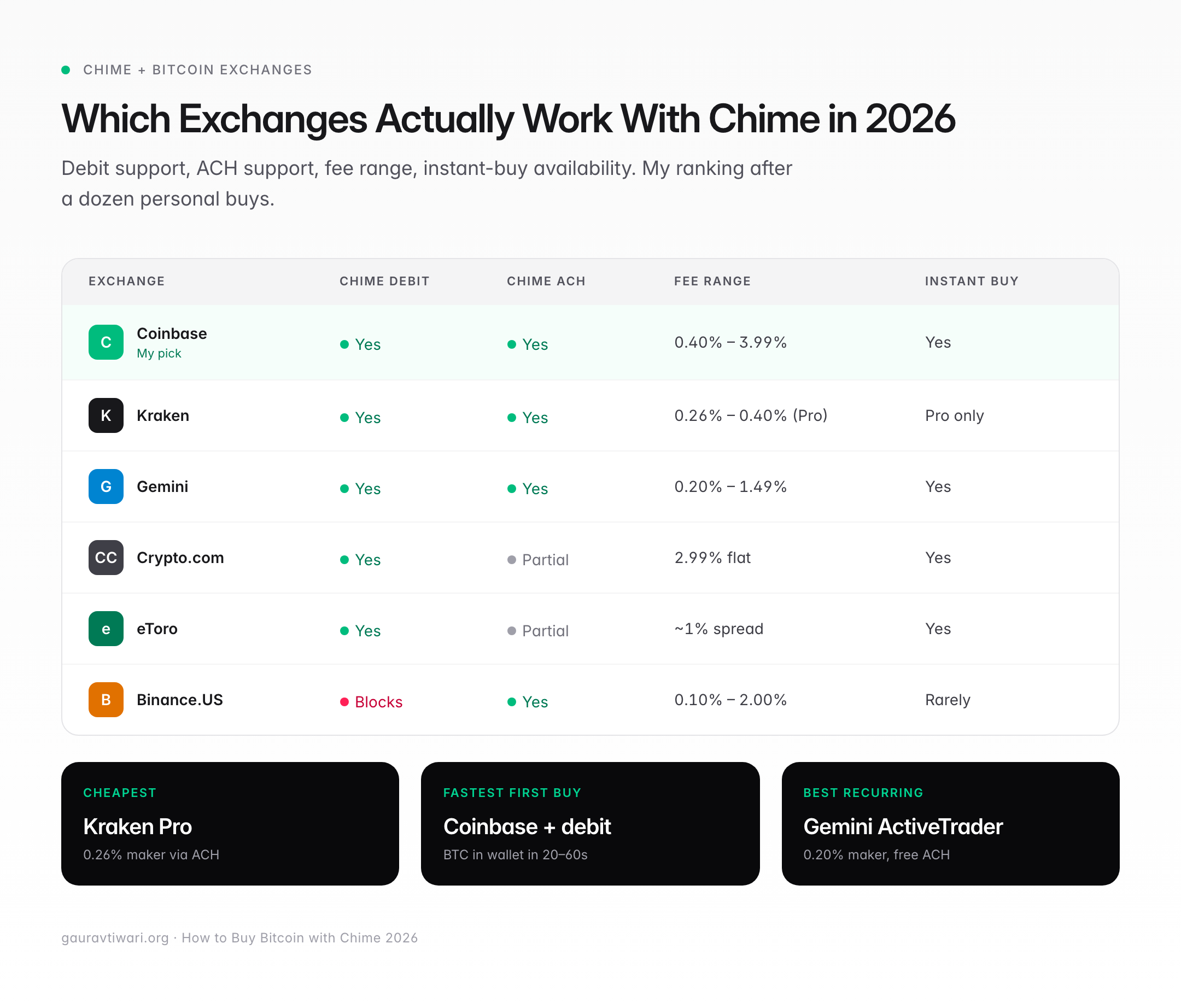
Coinbase is the most reliable. It accepts Chime Visa debit cards for instant buys at 3.99%, and it accepts Chime ACH for free, with only the order-book or spread cost on top. Kraken is the cheapest of the regulated pack once you fund by ACH: ACH deposits through Plaid are free, and Kraken Pro trades start around 0.25% maker and 0.40% taker. Kraken’s debit card route costs 3.75%, so only use the card if you need crypto this minute.
Crypto.com works cleanly with the Chime Visa debit card for instant buys and charges about 2.99% on card purchases. eToro accepts Chime debit and runs a flat 1% fee on each crypto buy or sell. Binance.US accepts Chime ACH transfers but often blocks debit card top-ups on the first attempt, which usually means a support call to whitelist the card. And to say it once more: Gemini no longer accepts Chime, full stop.
Rule of thumb: if an exchange is a registered US Money Services Business with FinCEN compliance, Chime works on at least one rail. If it’s offshore or P2P, Chime will usually block it at the debit layer. CEX.IO is a useful case study here. Its own buy Bitcoin with Chime page is upfront that it can’t pull Chime directly, so the workaround is to move Chime funds into a supported method first. That’s the same pattern you hit on any platform Chime’s rails don’t reach cleanly.
Debit card vs ACH transfer: which to use with Chime
Use your Chime Visa debit card when you want crypto in your exchange wallet in under 60 seconds. Use an ACH transfer from your Chime checking account when you care about fees and can wait 1 to 3 business days for the funds to settle.
The math matters. On a 1,000 dollar purchase, Coinbase’s 3.99% debit card fee costs you 39.90. The same 1,000 via free ACH into Coinbase Advanced Trade costs about 4 to 6 dollars at a 0.40% to 0.60% trading fee. That’s roughly 35 dollars saved for the price of waiting two sleeps.
There’s a second reason to prefer ACH: Chime’s 2,500 dollar daily debit card spending limit. If you’re buying more than that, you have to split the purchase across days or fund by ACH, which has a much higher per-transfer ceiling.
The six-step workflow to buy crypto with Chime
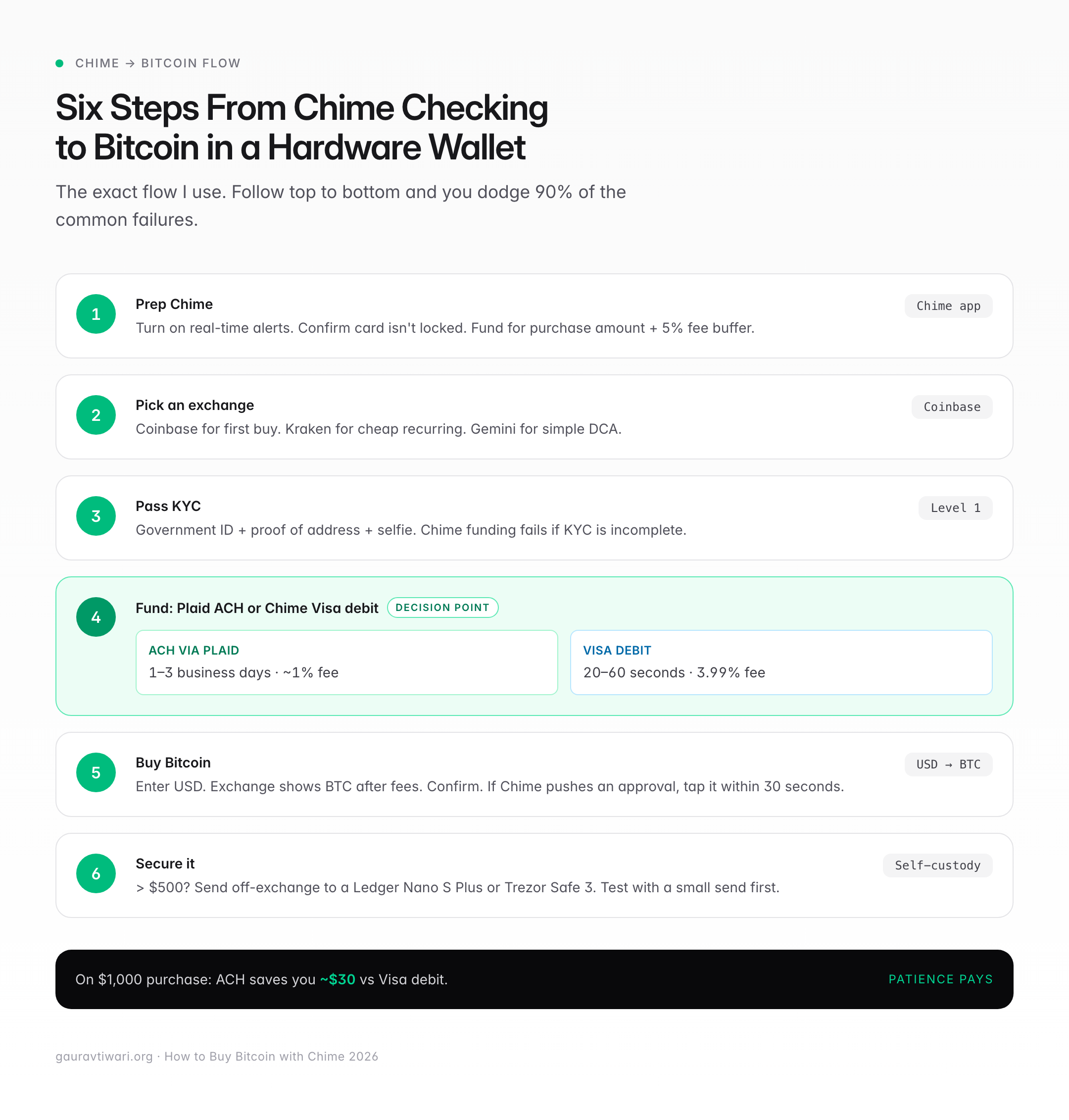
Here’s the exact flow I use. Follow it top to bottom and you’ll dodge 90% of the common problems.
- Prepare your Chime account. Turn on transaction notifications in the Chime app. Confirm your debit card isn’t locked. Verify the account is funded for at least the purchase amount plus a 5% buffer for fees.
- Choose an exchange. For most buyers, Coinbase is the cleanest first purchase. For the lowest fees on recurring buys, Kraken funded by ACH. Skip Gemini now that it has dropped Chime.
- Complete identity verification (KYC). Upload your government-issued photo ID, proof of address, and a selfie. Chime transactions get flagged for tighter review if KYC is incomplete, so finish this before you try to fund the account.
- Fund the exchange. For instant crypto, enter your Chime Visa debit card details. For cheaper purchases, link Chime through Plaid (Coinbase and Kraken both use Plaid) and start an ACH transfer. Expect 1 to 3 business days for ACH to settle.
- Buy your crypto. Enter a dollar amount. The exchange shows your coin amount after fees. Confirm. If Chime sends a real-time push notification, approve the charge in the app within 30 seconds.
- Secure your holdings. If you’re buying more than 500 dollars and plan to hold, send the crypto to a self-custody wallet. A Ledger Nano S Plus, Trezor Safe 3, or a free Muun or BlueWallet on your phone beats leaving it on the exchange. Test with a small send first.
Chime’s transaction limits you need to know
Chime caps debit card spending at 2,500 dollars per day by default. ATM withdrawals cap at 500 dollars per day. Mobile check deposits cap at 10,000 dollars per day for verified accounts, and limits reset at midnight Mountain Time. ACH transfers out of Chime don’t have a hard daily cap published, but exchanges impose their own. Coinbase allows up to 25,000 dollars per ACH transfer for verified US users. Kraken accepts large ACH deposits on verified Pro accounts, far above what the debit card allows.
The 2,500 daily debit limit is the one that trips up most first-time buyers. If you try to drop 5,000 dollars on crypto in one swipe, Chime declines the second half of the charge. You won’t get a clear error either, just a generic “transaction declined.” Split the purchase across two days or fund by ACH.
Fees to expect when buying crypto with Chime
Chime itself doesn’t charge a fee for debit card crypto purchases or ACH transfers. The cost is entirely on the exchange side. Ranges I’ve actually paid, re-checked against published 2026 schedules:
- Coinbase debit card buy: 3.99% flat
- Coinbase simple buy via free ACH: roughly 0.5% built into the spread
- Coinbase Advanced Trade via free ACH: 0.60% taker / 0.40% maker, no spread
- Kraken Pro via free ACH: about 0.40% taker / 0.25% maker
- Kraken debit card buy: 3.75%
- Crypto.com debit card buy: about 2.99%
- eToro crypto buy or sell: 1% flat
- Cash App (Chime-funded middle layer): roughly 0.75% to 3% by size, plus up to a 0.75% spread; free on buys over 2,000 dollars
If an exchange doesn’t show the final fee before you confirm, close the tab. That’s a red flag.
Why Chime declines crypto transactions (and how to fix it)
A declined Chime transaction usually comes down to one of five causes. I’ve hit every single one of them.
- First-time merchant risk flag. A first purchase on a new exchange triggers Chime’s fraud engine. Open the Chime app, approve the charge when the notification pops up, and retry within 10 minutes.
- Over the 2,500 dollar daily debit limit. Check “Spending” in your Chime app. Split the purchase or fund by ACH.
- Incomplete exchange KYC. Most exchanges won’t let a Chime payment through until you’ve passed Level 1 identity verification.
- Card is temporarily locked. Chime auto-locks cards after several declined charges on the same merchant. Unlock it in the app under “Settings” then “Card.”
- Exchange doesn’t accept Chime’s rail. Rare on debit in 2026, but some platforms still filter Chime’s ACH routing numbers, and a few (like Gemini) now reject Chime entirely.
Don’t hammer the retry button. Three failed attempts in a row will escalate the flag and can temporarily freeze crypto-related charges on your card for 24 hours.
How to send crypto off Chime and off the exchange
Chime doesn’t hold or transmit crypto directly. There’s no crypto wallet inside the Chime app. “Sending crypto on Chime” always means sending from the exchange you funded with Chime to another wallet address. Once the coins are in your Coinbase or Kraken account, the sending flow is the same regardless of how you paid.
The process: open the exchange, go to “Send” or “Withdraw,” pick the coin, paste the recipient’s address, double-check the first four and last four characters, pick the network speed, and confirm with 2FA. For Bitcoin, expect 1 to 6 on-chain confirmations, which runs 10 to 60 minutes depending on network congestion and the fee you set.
A safety note before you start sending: avoid common Bitcoin scams, especially the copy-paste address malware that swaps the address in your clipboard. Always verify the first and last characters of the pasted address on both devices.
Security setup before your first buy
Five things to lock down before the first purchase. No shortcuts.
- Enable two-factor authentication on both Chime (via the Chime app) and the exchange. Use an authenticator app like Aegis or 1Password, not SMS.
- Turn on Chime’s real-time transaction alerts so you spot unauthorized charges within seconds.
- Use a password manager. Unique, 20+ character passwords for both accounts.
- Don’t buy on public Wi-Fi. Use cellular or a VPN like Mullvad or Proton.
- Whitelist withdrawal addresses on the exchange if the feature is offered (Coinbase calls it “Address Book,” Kraken calls it “Withdrawal Address Whitelist”).
Common mistakes to avoid when buying crypto on Chime
The biggest mistake is trying to fund by ACH on an exchange that doesn’t support Chime’s routing number, then calling support in a panic. Before linking, check the exchange’s supported banks list or test with a 5 dollar deposit. This is exactly how people got burned on Gemini after it quietly dropped Chime.
The second biggest: starting with a 2,000 dollar-plus first purchase. New merchant plus large amount plus Chime plus crypto is a fraud-flag sandwich. Start with 50 to 100 dollars to season the relationship, then scale up.
Third: ignoring the spread on “instant buy” interfaces. Coinbase’s simple buy screen can cost more than Coinbase Advanced Trade for the same coins. If you’re spending real money, learn the pro interface. My post on how to buy crypto profitably covers the math in more detail.
Fourth: trying three exchanges in one sitting after a decline. That will absolutely trigger a Chime-side crypto block for 24 hours. One exchange at a time. Resolve, then move on.
Legal and regulatory notes for US Chime users
Buying crypto with Chime is legal in all 50 US states. New York residents need an exchange with a BitLicense (Coinbase, Crypto.com, and eToro qualify; Kraken restricts certain products there). Hawaii and a handful of other states have had exchange-specific restrictions that change often, so check the exchange’s restricted states page before you sign up.
Tax-wise, every crypto purchase you later sell, trade, or spend is a taxable event under IRS rules. Starting with the 2025 tax year, US brokers report your gross proceeds on the new Form 1099-DA, and from the 2026 tax year they also report cost basis. Keep records of the purchase date, USD amount, and coin amount. I’m not an accountant, so if you’re buying more than a few thousand a year, talk to one. You might also want to read whether crypto is still worth investing in before you commit serious money.
Alternatives if Chime keeps failing
If Chime won’t cooperate after two or three attempts, you have three clean fallbacks:
- Withdraw Chime to a traditional bank, then fund the exchange from there. An ACH out of Chime to a Capital One 360 or Chase checking account, then an ACH into the exchange, adds one business day but eliminates the Chime fraud layer.
- Use Cash App as a middle layer. Cash App has its own Bitcoin buy feature, and Chime even markets a debit card aimed at Cash App users. Fund Cash App with Chime, buy BTC inside Cash App, then withdraw on-chain.
- Switch exchanges, or route through a platform that converts your funding. If Coinbase rejects your Chime card, Kraken often accepts it, and vice versa. For platforms that don’t take Chime directly, like CEX.IO’s Chime workaround, you move Chime money into a supported method first, then buy.
My recommendation: the cleanest Chime-to-crypto path
Coinbase plus Chime by ACH is the cleanest path for 95% of buyers. Open Coinbase, pass KYC, link Chime through Plaid, start a free ACH deposit of the amount you want to put into crypto. Wait two business days. Buy on Coinbase Advanced Trade at 0.40% to 0.60% trading fees. Withdraw to a hardware wallet if the stack is worth more than 500 dollars.
If you need crypto now and can stomach a 3.99% fee, use the Chime Visa debit card on Coinbase for the instant buy, then migrate to ACH for future purchases. For recurring dollar-cost averaging, Kraken Pro funded by ACH will save you real money over a year. I run a weekly 100 dollar recurring buy on Kraken funded by a Chime ACH link, and the fees over 52 weeks are less than what a single 5,200 dollar debit purchase on Coinbase would cost.
Chime isn’t the best crypto-funding source if you’re buying more than 5,000 dollars a month. For that volume, a credit union account with same-day ACH and higher limits makes more sense. But for most first-time buyers, Chime plus Coinbase is the shortest path from “I want to own crypto” to “I own crypto,” and that’s the whole point.
What the exchange sees when Chime pays: the technical picture
When you enter a Chime Visa debit card on Coinbase, the exchange’s payment processor sees a Visa transaction issued by The Bancorp Bank or Stride Bank (Chime’s partner banks). It does not see the word “Chime” at all. That’s why card-level blocks are rare in 2026. If an exchange has banned Chime specifically, it’s usually at the ACH layer, where the routing number (031101279 for Bancorp, 103100195 for Stride) is visible and can be filtered. Gemini’s recent block lives at exactly this layer.
This matters because it explains a pattern I’ve seen dozens of times: the Chime debit card works, but the Chime ACH link keeps failing on the same exchange. That’s not a bug, that’s a policy difference between Visa’s network (permissive) and the exchange’s ACH compliance filter (stricter).
Speed comparison: how fast does each funding method clear
For the buyers who care about timing more than fees, here’s what I’ve measured:
- Chime debit card to Coinbase instant buy: crypto in wallet in 20 to 60 seconds
- Chime debit card to Crypto.com: 30 to 90 seconds
- Chime ACH to Coinbase (Plaid-linked): 1 to 3 business days to settle, instant trading after settle
- Chime ACH to Kraken: 2 to 5 business days for the first transfer, 1 to 3 after
- Chime to Cash App to Bitcoin withdrawal: 2 to 10 minutes end to end
The Cash App middle-layer route is underrated for sub-500 dollar buys when your Chime debit is misbehaving. It doesn’t solve the fee problem, but it reliably gets crypto into your control within minutes.
FAQs
How to buy crypto with Chime bank?
Open an account on Coinbase or Kraken. Pass identity verification. Link your Chime checking account via Plaid for free ACH transfers, or enter your Chime Visa debit card for an instant purchase. ACH takes 1 to 3 business days and costs little more than the trading fee. Debit card is instant and costs 2.99% to 3.99%. Gemini no longer accepts Chime, so skip it.
Can you buy crypto on the Chime app directly?
No. Chime doesn’t offer a built-in crypto buy feature inside the app as of 2026. You use Chime as the funding source for a separate exchange like Coinbase, Kraken, Crypto.com, or eToro. Cash App is an alternative if you want a single-app experience, funded from Chime.
How to send crypto bought with Chime?
Chime doesn’t hold or transmit crypto. To send coins after buying through a Chime-funded exchange, open the exchange (Coinbase or Kraken), go to Send or Withdraw, pick the coin, paste the recipient address, verify the first and last four characters, and confirm with 2FA. A Bitcoin transaction settles on-chain in 10 to 60 minutes.
Why does Chime keep declining my crypto purchase?
The five common reasons: a first-time merchant fraud flag, exceeding the 2,500 dollar daily debit card limit, incomplete KYC on the exchange, an auto-locked Chime card after repeated failed attempts, or an exchange that has stopped accepting Chime (Gemini is the notable one). Approve the push notification in the Chime app, check your daily limit, and don’t retry more than twice.
Is it cheaper to buy crypto with Chime debit or ACH?
ACH is cheaper. On a 1,000 dollar purchase, Coinbase’s debit card fee of 3.99% costs 39.90. The same purchase via free ACH on Coinbase Advanced Trade costs about 4 to 6 dollars at the 0.40% to 0.60% trading fee. You pay for the savings with 1 to 3 business days of waiting for the ACH transfer to settle before you can trade.
What’s the daily limit for buying crypto with Chime?
Chime’s Visa debit card caps spending at 2,500 dollars per day, resetting at midnight Mountain Time. ACH transfers out of Chime don’t have a published daily cap, but exchanges do: Coinbase allows up to 25,000 dollars per ACH transfer, and Kraken accepts large ACH deposits on verified US Pro accounts.
Does Coinbase accept Chime bank in 2026?
Yes. Coinbase accepts Chime Visa debit cards for instant purchases at a 3.99% fee and accepts Chime ACH deposits via Plaid for free, paying only the trading fee or spread. The ACH option is cheaper but takes 1 to 3 business days to settle. Complete Coinbase KYC before funding or the first transaction will fail.
Does Gemini still accept Chime in 2026?
No. Gemini stopped supporting Chime and now lists it on its no-longer-supported banks roster alongside Choice, Dave, Green Dot, MetaBank, National Australia Bank, and Varo. If you linked Chime to Gemini in 2024, that connection has likely stopped working. Use Coinbase or Kraken with Chime instead.
The bottom line on Chime and crypto
Chime works for buying crypto. Not as well as a traditional bank with same-day ACH and higher limits, but well enough that 95% of first-time buyers can get from “I have a Chime account” to “I own crypto in a hardware wallet” in under a week. Use Coinbase via free ACH if you’re patient, Coinbase via Chime Visa debit if you’re not, and move to Kraken once you’re buying recurring. Don’t bother with Gemini anymore, since it dropped Chime in 2025. If you’re brand new to all this, read the Bitcoin basics for beginners post before your first buy. The fees you save aren’t worth much if you send crypto to the wrong address.
Tell Google you want more of this.
Add Gaurav Tiwari as a preferred sourceOne tap, and this site shows up more often in your own Top Stories, AI Overviews and AI Mode. Remove it any time.