
Seven Trust Signals for WordPress Service Sites
Trust signals decide whether a service-site visitor fills out your form or closes the tab. Here are the seven that matter for WordPress service businesses (testimonials, visible security, verifiable contact details, certifications, transparent pricing, case studies with numbers, staffed live chat), each with the placement rule that makes it work and the WordPress-specific way to ship it.
 by
by
Trust signals are the on-page elements that answer the question every service-site visitor silently asks: “can I rely on these people?” Reviews, security cues, real contact details, visible pricing… small things individually, but together they decide whether a visitor fills out your form or quietly closes the tab.
For WordPress service businesses (agencies, consultants, local services, freelancers) trust signals do more heavy lifting than any redesign. I’ve watched service sites double inquiry rates without touching their traffic, purely by making existing credibility visible. Here are the seven signals that matter, with the WordPress-specific way to ship each one.
1. Customer Reviews and Testimonials
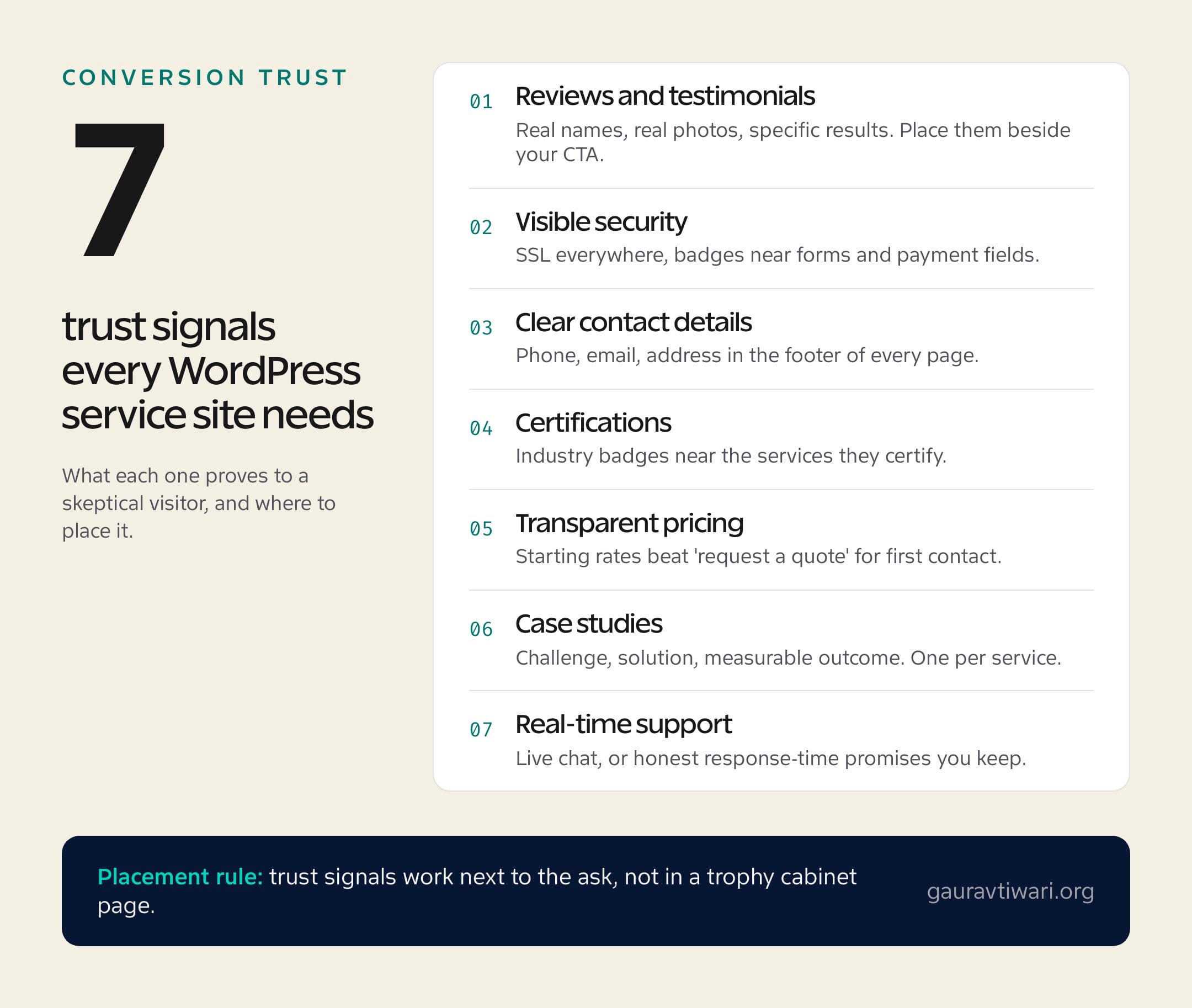
Reviews are the strongest trust signal you have, because they’re the only one where someone else does the talking. A specific testimonial (“they cut our page load from 6 seconds to 1.8”) outsells anything you could write about yourself.
Three rules make testimonials work. Use real names and photos; anonymous praise reads as invented. Prefer quotes that name a concrete result over generic kindness. And place them next to your call-to-action, not on a separate page nobody visits. In WordPress, a plugin like Strong Testimonials handles collection and display in one place; I’ve compared the options in my guide to testimonial plugins, including when you need no plugin at all. For turning casual praise into usable quotes, my piece on converting customer reviews into business opportunities goes deeper.
2. Visible Security (SSL Is the Floor, Not the Feature)
An SSL certificate stopped being a differentiator years ago; browsers now shame sites that lack one. The padlock is the entry fee. What still works as a signal is security made visible at the anxious moments: a short “your details are encrypted and never shared” line under your contact form, payment-provider logos at checkout, and a linked privacy policy that’s actually readable.
On WordPress, your host provides the free SSL certificate; your job is the reassurance layer. Add the one-line privacy note to every contact form, and if you take payments, show the Stripe or PayPal mark where the card fields live. Trust dips are local: reassure exactly where the hesitation happens.
3. Contact Information a Human Can Verify
Nothing says “we might disappear” like a service site whose only contact path is a form. A phone number, a real email address, and a physical location (if you have one) in the footer of every page signals that a real business stands behind the pixels.
The detail most sites miss: response expectations. “We reply within one business day” converts hesitant visitors better than a fourth social media icon, and it costs you nothing but the discipline to honor it. Put contact details in the footer site-wide, keep the dedicated contact page, and skip the no-reply email addresses entirely.
4. Certifications and Affiliations (Near the Claim They Support)
Industry certifications work because they’re borrowed credibility: an external body vouches for you. The placement rule matters more than the badge count, though. A certification belongs next to the service it certifies, not in a logo soup at the bottom of the homepage.
A good example outside our industry: pest control company Ax Carolinas places badges like “Public Health Certified Pest Management” and “Schools Certified Pest Management” right where prospects evaluate those exact services. The same logic applies to a WordPress agency showing a Google Partner badge on its ads service page. One relevant badge beats six decorative ones.
5. Transparent Pricing (Even When It “Depends”)
Hidden pricing reads as expensive pricing. Visitors assume the worst, and your competitors with a pricing page collect the inquiry instead. Showing numbers, even rough ones, filters out mismatched leads and signals you have nothing to hide.
“It depends” is real for service work, so publish what you can: starting rates (“audits from $500”), package tiers, or a worked example of a typical project cost. On WordPress, a simple pricing table built with core blocks does the job; the trust comes from the numbers existing, not from the design around them.
6. Case Studies With Numbers in Them
A portfolio shows that you’ve worked; a case study proves the work worked. The difference is structure: challenge, what you did, measurable outcome. “Rebuilt the site” is a portfolio line. “Rebuilt the site and organic traffic rose 64% in five months” is a case study, and it’s the version prospects remember.
Keep one strong case study per service type, organized so a visitor finds the example that matches their situation. Before-and-after visuals carry weight here: screenshots, speed scores, ranking charts. If you can’t share a client’s numbers publicly, anonymize the client rather than dropping the numbers; “a regional law firm” with real data beats a named client with vague praise.
7. Real-Time Support (or an Honest Substitute)
A live chat bubble signals “someone is home,” and for service businesses that immediacy can be the difference between capturing a question and losing the lead to whoever answers first. Tools like LiveChat install on WordPress in minutes, and I’ve covered how live chat indirectly helps SEO through engagement signals.
The honest caveat: a chat widget that nobody staffs is an anti-trust signal. “Hi! We’re away” repeated forever is worse than no chat at all. If you can’t staff it during business hours, use a chatbot that sets honest expectations or fall back to signal three: a stated response time you actually meet.
Where to Start (the One-Afternoon Version)
If you do only three things this week: put your two best testimonials next to your main call-to-action, add contact details plus a response-time promise to your footer, and publish starting prices. Those three cover the trust gaps that lose the most inquiries, and none of them needs a designer.
Trust isn’t a page on your site. It’s the accumulated answer to small questions a visitor asks on every page. Make the answers visible and the inquiries follow.
FAQs: Trust Signals for WordPress Sites
What are trust signals on a website?
Trust signals are on-page elements that prove credibility to visitors: customer reviews, security indicators, verifiable contact details, certifications, transparent pricing, case studies, and responsive support options. Together they answer the visitor’s core question (‘can I rely on this business?’) before they contact you.
Which trust signal has the biggest impact on conversions?
Customer testimonials with real names, photos, and specific results, placed next to your call-to-action. They’re the only signal where someone other than you does the persuading. Transparent pricing is the close second for service sites, because hidden pricing reads as expensive pricing.
Do SSL badges still matter for trust?
SSL itself is mandatory, but the padlock no longer differentiates you; browsers penalize sites without it. What still works is contextual reassurance: a short data-privacy note under forms and recognizable payment logos at checkout, placed exactly where visitors hesitate.
How many testimonials should a service site display?
Two or three strong, specific testimonials per key page beat twenty generic ones on a dedicated page. Rotate them as you collect better ones, and match each testimonial to the service of the page it appears on whenever possible.
Is live chat worth it for a small service business?
Only if someone actually answers it during stated hours. Staffed chat captures leads that forms lose; an abandoned chat bubble actively damages trust. If you can’t staff it, publish a response-time promise you reliably keep instead.
Tell Google you want more of this.
Add Gaurav Tiwari as a preferred sourceOne tap, and this site shows up more often in your own Top Stories, AI Overviews and AI Mode. Remove it any time.
