
How To Use Google Maps Marketing For Your Business
Local businesses are not invisible. But in 2026, they are often ignored if they don’t show up where people actually look.
And today, people don’t “browse.” They search, tap, and navigate. Mostly on their phones. That’s exactly why Google Maps marketing is no longer optional for businesses that depend on local customers.
Here’s the thing. When someone searches for a service, a shop, or a place to visit, Google Maps is usually the first screen they interact with. Not your website. Not your social media profile. The map.
In 2026, Google Maps is deeply connected with local SEO, Google Business Profile, reviews, photos, directions, and real-world intent. If your business isn’t optimized here, you’re leaving money on the table. Plain and simple.
People searching on Maps aren’t “researching.” They’re ready to act. They want to call, visit, book, or buy. That makes Google Maps marketing for local businesses a high-intent channel with insane conversion potential.
I’ve seen this play out again and again. Businesses with average websites but strong Maps visibility outperform better-designed competitors that ignore local optimization. Visibility beats polish when intent is high.
The real advantage of Google Maps marketing in 2026 is trust. Google highlights businesses with accurate information, consistent activity, real reviews, and strong proximity signals. If Google trusts you, users follow.
This is especially powerful for small business owners, service providers, consultants, restaurants, clinics, and local shops. If your customers come from a specific area, Maps should be one of your top priorities.
Another shift in 2026 is how tightly Maps is linked with AI-driven search results. Local packs, suggested places, “near me” queries, and voice searches all pull data directly from Google Maps and your Google Business Profile.
That means optimizing Maps is no longer just about pins and addresses. It’s about local relevance, search intent, behavioral signals, and ongoing activity.
Reviews matter more. Photos matter more. Updates matter more. Even how often people request directions or call your business sends signals.
This guide breaks all of that down. Step by step. No fluff.
You’ll learn how to improve local search rankings, attract nearby customers, increase foot traffic, and turn Maps visibility into real revenue. Not traffic. Revenue.
If your business depends on local discovery, this is one channel you can’t afford to ignore in 2026.
Why Google Maps Marketing Actually Works
Here’s what most business owners miss. Google Maps isn’t just a navigation tool. It’s a discovery engine with purchase intent baked in.
Think about it. When someone types “coffee shop near me” or “dentist open now,” they’re not casually browsing. They need something. Right now. And Google Maps delivers exactly what they’re looking for.
According to Google’s own data, 76% of people who search for something nearby visit a business within a day. And 28% of those searches result in a purchase.
That’s not traffic. That’s revenue waiting to happen.
I’ve worked with local businesses for years. The pattern is consistent. Businesses that invest time in Google Maps visibility see direct ROI in the form of calls, direction requests, and walk-ins. No complicated attribution. Just results.
The Local Pack Advantage
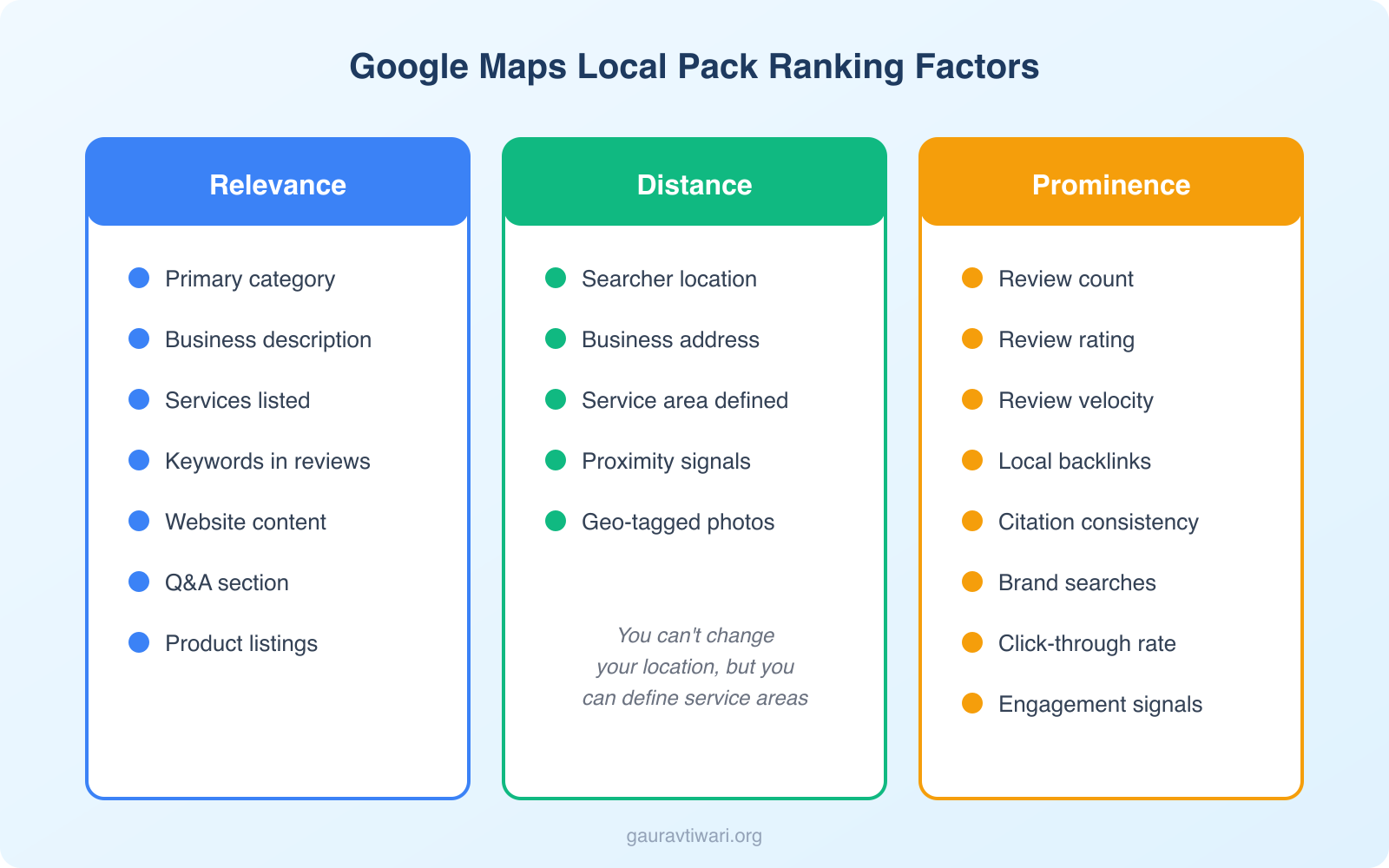
When someone searches for a local service, Google typically shows a Local Pack, those three business listings with a map snippet right at the top of search results.
Here’s the kicker. This Local Pack appears above organic search results. Even above paid ads in many cases.
If your business shows up here, you’re essentially getting premium real estate without paying for it. But getting there requires intentional optimization.
The three main ranking factors for the Local Pack are:
- Relevance — How well your listing matches what someone searched for
- Distance — How close you are to the searcher’s location
- Prominence — How well-known and trusted your business is online
You can’t change your location. But you can absolutely control relevance and prominence. That’s where the real work happens.
AI Overviews and Local Search in 2026
Google’s AI Overviews have changed how local results appear. When someone asks “best Italian restaurant near downtown” or “emergency plumber open now,” Google’s AI now generates a summary that pulls from Maps data, reviews, and business profiles.
This means your Google Business Profile isn’t just feeding the map. It’s feeding the AI-generated answers that show up before everything else.
I’ve been tracking this shift across several client accounts. Businesses with complete profiles, strong reviews, and recent activity appear in AI Overviews more consistently. Businesses with outdated or thin profiles get skipped entirely.
Here’s what this means for you:
- Your business description matters more than ever. AI Overviews pull descriptive text directly from your profile.
- Review content gets quoted. Google’s AI references specific review details when summarizing businesses.
- Service listings feed AI answers. If someone asks “who does same-day AC repair near me,” your listed services directly influence whether you show up.
- Photos with context win. Geotagged photos with proper descriptions help the AI understand what your business actually looks like.
The takeaway is simple. Everything you put into your Google Business Profile now serves double duty. It feeds the traditional Local Pack AND the AI-generated answers sitting above it. If you’re not optimizing for both, you’re only playing half the game.
Setting Up Your Google Business Profile the Right Way
Everything starts with your Google Business Profile (formerly Google My Business). If you haven’t claimed yours yet, stop reading and do it now at google.com/business.
Seriously. This is non-negotiable.
Once claimed, here’s how to set it up properly:
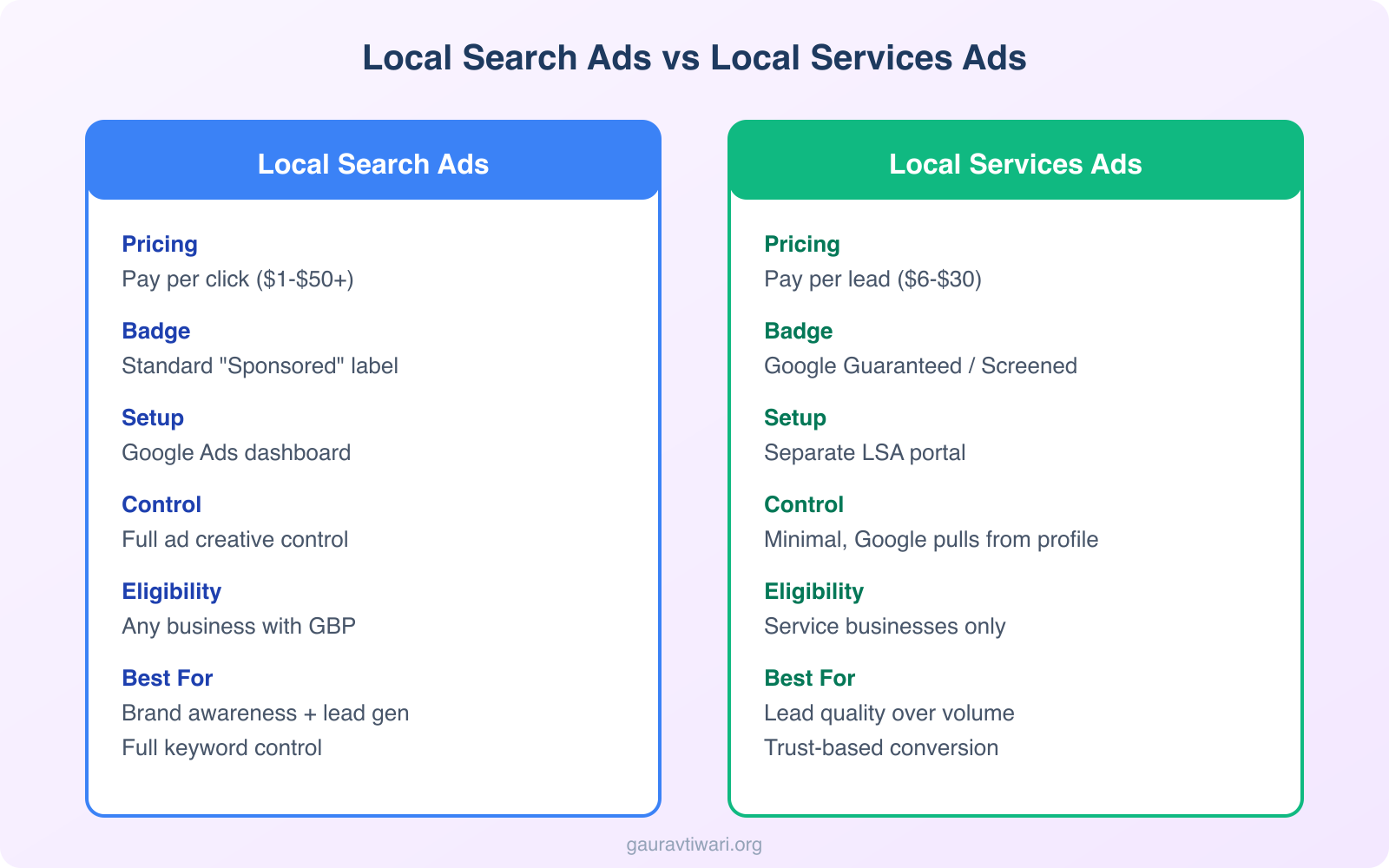
Complete Every Single Field
Google rewards completeness. A half-filled profile signals a half-committed business.
Fill out:
- Business name (exact legal name, no keyword stuffing)
- Primary category (choose the most accurate one)
- Secondary categories (add all relevant ones)
- Address (must match your website and citations exactly)
- Phone number (local number preferred over toll-free)
- Website URL
- Business hours (including special hours for holidays)
- Business description (750 characters, use keywords naturally)
- Services/Products (list everything you offer)
- Attributes (wheelchair accessible, free WiFi, etc.)
Your business description should include your primary keyword in the first 100 characters. But keep it natural. Google can detect keyword stuffing. Also, in 2026, Google Business Profile now lets you add social media profile links directly. Add them all. It strengthens your entity signals.
Choose Your Categories Wisely
Your primary category is the single most important ranking factor you control.
Don’t guess. Research what categories your top-ranking competitors use. Tools like GMB Spy can help you see competitor categories.
You can add up to 10 secondary categories. Use them. But only add categories that genuinely apply to your business.
Verify Your Listing
Google will send a postcard to your business address with a verification code. This usually takes 5-14 days.
Some businesses qualify for phone or email verification. Either way, don’t skip this step. Unverified listings have severely limited visibility.
Optimizing Your Google Maps Listing for Maximum Visibility
Setting up your profile is just the beginning. Optimization is an ongoing process.
Here’s what actually moves the needle:
NAP Consistency
NAP stands for Name, Address, and Phone number. And it needs to be identical everywhere online.
Your website. Your social profiles. Directory listings. Review sites. Everywhere.
Even small inconsistencies confuse Google. “Street” vs “St.” matters. “Suite 100” vs “#100” matters.
Use a tool like BrightLocal or Whitespark to audit your citations and fix inconsistencies.
Add High-Quality Photos
Businesses with photos receive 42% more requests for directions and 35% more clicks to their websites, according to Google.
Upload:
- Cover photo (this shows up first, make it count)
- Logo (clear, recognizable)
- Interior photos (at least 3-5)
- Exterior photos (helps people find you)
- Team photos (builds trust)
- Product/service photos (show what you offer)
Avoid stock photos. Google’s algorithm can detect them, and users find them off-putting. Real photos build real trust.
Post Regular Updates
Google Business Profile has a Posts feature. Use it.
You can share:
- What’s New updates
- Offers and promotions
- Events
- Product highlights
Posts expire after 7 days (except events), so post weekly at minimum. This signals to Google that your business is active and engaged.
I’ve seen businesses jump rankings simply by posting consistently for 30 days. It’s one of the easiest wins available.
Add Products and Services
List every product and service you offer. Include descriptions, prices (if applicable), and photos.
This helps Google understand exactly what you do. And it gives potential customers a preview before they even click through to your website.
Reviews: The Trust Engine That Drives Everything
Let me be blunt. Reviews can make or break your Google Maps visibility.
They’re not just social proof for customers. They’re a ranking signal for Google. Businesses with more reviews, and better ratings, tend to rank higher.
How to Get More Reviews
The best strategy? Ask.
Most happy customers won’t think to leave a review unless you remind them. Here’s what works:
- Ask at the point of sale — When someone thanks you, ask if they’d mind leaving a review
- Send follow-up emails — Include a direct link to your review page
- Add QR codes — Put them on receipts, menus, or table tents
- Text message requests — If you have their number, a simple SMS works wonders
Google provides a shareable review link in your Business Profile dashboard. Use it everywhere.
Review Management Automation
If you’re managing reviews manually across multiple locations, you’re wasting hours. In 2026, review management tools can automate most of this process.
Here’s what I recommend:
- Automated review requests — Tools like BirdEye, Podium, or even simple email sequences can send review requests 24-48 hours after a service is completed
- Review monitoring dashboards — Get notified instantly when someone leaves a review so you can respond quickly
- Sentiment analysis — Some tools flag negative trends before they become a problem
- Response templates — Create personalized templates for common review types to speed up responses without sounding robotic
I’ve set up automated review workflows for several local businesses. One dental clinic went from 2-3 reviews per month to 15+ just by sending a text message with a direct Google review link after each appointment. The entire system runs on autopilot.
Responding to Reviews
Respond to every single review. Positive and negative.
For positive reviews, thank them specifically. Mention something from their review to show you actually read it.
For negative reviews:
- Respond quickly (within 24-48 hours)
- Apologize for their experience
- Take the conversation offline (provide a phone number or email)
- Never argue or get defensive
Here’s the thing. How you handle negative reviews matters more than having zero negative reviews. Potential customers read your responses. A thoughtful, professional response can actually win them over.
Review Velocity Matters
Google doesn’t just look at your total review count. It looks at how consistently you’re getting reviews.
A business that gets 5 reviews per month consistently will often outrank a competitor with more total reviews but no recent activity.
Set up a system. Make review generation part of your standard operating procedure.
Local Schema Markup for Maps Rankings
Schema markup is structured data you add to your website that helps Google understand your business better. For local businesses, this is a ranking factor most competitors ignore.
At minimum, add LocalBusiness schema to your website. Here’s what it should include:
- @type — Use the most specific business type (Restaurant, Dentist, Plumber, etc.)
- name, address, telephone — Matching your Google Business Profile exactly
- openingHoursSpecification — Your business hours in structured format
- geo coordinates — Latitude and longitude of your location
- aggregateRating — If you have reviews on your site
- priceRange — Helps Google understand your market positioning
- areaServed — The geographic areas you cover
If you’re running WordPress, Rank Math makes adding LocalBusiness schema straightforward. You fill in the fields, and it generates the JSON-LD automatically. No coding required.
I’ve tested this on multiple client sites. Adding proper LocalBusiness schema alongside an optimized Google Business Profile consistently improves Local Pack visibility. Google connects the dots between your website’s structured data and your Maps listing, which reinforces your entity signals.
Google’s guidelines on local business markup are worth reading. Proper schema can significantly improve how your business appears in search.
Local SEO Signals That Impact Maps Rankings
Google Maps doesn’t exist in isolation. It’s connected to your broader local SEO presence.
Here are the signals that matter:
On-Page SEO for Local
Your website needs to support your Maps presence. This means:
- Location pages — If you serve multiple areas, create dedicated pages for each
- Local keywords — Include city and neighborhood names in your title tags, headers, and content
- Schema markup — Add LocalBusiness structured data to help Google understand your business
- Embedded Google Map — Add your Maps listing to your contact page
Local Backlinks
Links from other local businesses, chambers of commerce, local news sites, and community organizations signal local relevance.
A link from your city’s business association is worth more (for local rankings) than a generic link from a national directory.
Behavioral Signals
Google tracks how users interact with your listing:
- Click-through rate — How often people click on your listing
- Calls and direction requests — Direct engagement signals value
- Dwell time — If someone clicks through to your website, how long do they stay?
These signals are hard to game. The best strategy is simply delivering a great experience that makes people want to engage.
Google Maps Ads: When Organic Isn’t Enough
Sometimes you need faster results. That’s where Local Services Ads and Local Search Ads come in.
Local Search Ads
These are the “Sponsored” listings that appear at the top of Maps search results. You set them up through Google Ads using location extensions.
The basics:
- Link your Google Business Profile to Google Ads
- Enable location extensions
- Create search campaigns targeting local keywords
- Set location targeting for your service area
You pay per click, just like regular search ads. But these clicks come from high-intent local searchers.
Local Services Ads (LSAs)
Local Services Ads are different. They appear at the very top of search results with a “Google Guaranteed” or “Google Screened” badge.
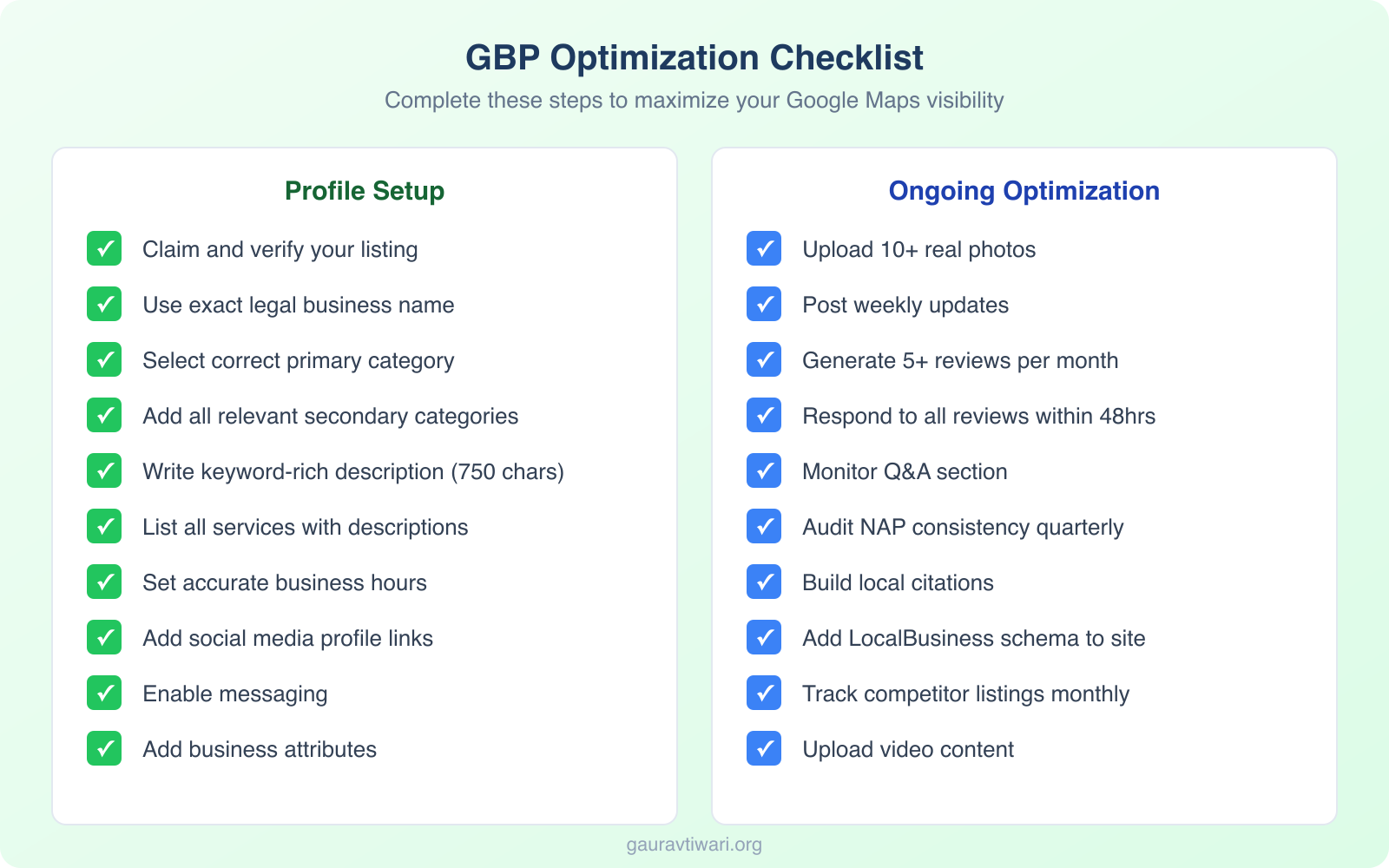
The key differences:
| Feature | Local Search Ads | Local Services Ads (LSAs) |
|---|---|---|
| Pricing Model | Pay per click (CPC) | Pay per lead |
| Average Cost | $1-$50+ per click depending on industry | $6-$30 per lead for most categories |
| Trust Badge | None, appears as standard “Sponsored” | Google Guaranteed or Google Screened badge |
| Setup Platform | Google Ads with location extensions | Separate Local Services Ads portal |
| Placement | Below LSAs, above organic in Maps | Very top of search results |
| Eligible Categories | Any business with a Google Business Profile | Service-based businesses only |
| Lead Quality | Variable, clicks don’t guarantee intent | Generally higher, users are ready to hire |
| Best For | Brand awareness + leads, full ad control | Service businesses prioritizing lead quality |
LSAs are available for service businesses like plumbers, electricians, lawyers, and cleaners. If you qualify, they’re absolutely worth testing.
The Google Guarantee badge builds instant trust. And paying per lead (rather than per click) often delivers better ROI.
Tracking and Measuring Your Results
What gets measured gets improved. Here’s how to track your Google Maps performance:
Google Business Profile Insights
Your dashboard provides built-in analytics:
- How customers find you — Direct vs Discovery searches
- Search queries — What terms people used to find you
- Customer actions — Calls, direction requests, website clicks
- Photo views — How your photos perform vs competitors
Check these weekly. Look for trends, not just absolute numbers.
For deeper keyword tracking and competitor analysis, Semrush lets you monitor local search positions and track how your business appears across different geographic locations. The local SEO toolkit shows you exactly where you rank in the Map Pack for each target keyword.
Google Search Console
Connect your website to Google Search Console to see:
- Which local keywords you’re ranking for
- Your click-through rates
- Mobile vs desktop performance
This helps you understand how your website supports your Maps presence.
Call Tracking
If phone calls matter to your business, set up call tracking. Tools like CallRail or WhatConverts can attribute calls to your Maps listing specifically.
This gives you actual ROI data, not just vanity metrics.
Competitor Analysis: Know What You’re Up Against
Before you optimize, understand your competitive landscape. This isn’t optional.
Here’s my process:
Step 1: Identify Your Top Competitors
Search for your main keyword + city on Google. Note which businesses appear in the Local Pack and the first page of organic results.
These are your targets. Not who you think your competitors are. Who Google shows as your competitors.
Step 2: Audit Their Listings
For each competitor, document:
- Total review count and average rating
- Review velocity (how many reviews per month)
- Categories they’re using
- Photo count and quality
- Posting frequency
- Response rate to reviews
I use a simple spreadsheet for this. Nothing fancy. But the data reveals patterns.
Step 3: Find the Gaps
Look for opportunities where competitors are weak:
- Do they have few recent reviews? You can overtake them with consistent review generation.
- Are their photos outdated or low quality? Professional photos can differentiate you.
- Are they not posting updates? Regular posts signal activity to Google.
Don’t just copy competitors. Learn from them, then do it better. The biggest local SEO wins I’ve seen come from finding what everyone in a market is ignoring, like Q&A responses, video uploads, or detailed service descriptions, and doing those things first.
Local Link Building for Maps Rankings
Here’s something most local businesses miss. Backlinks still matter for local SEO. They influence your prominence factor in Google’s ranking algorithm.
But local link building looks different from traditional SEO.
High-Value Local Link Sources
Focus on:
- Local business directories — Yelp, Yellow Pages, industry-specific directories
- Chamber of Commerce — Most offer member listings with links
- Local news sites — Press releases, community stories, sponsorship mentions
- Partner businesses — Reciprocal links with complementary (not competing) businesses
- Local blogs — Reach out to local bloggers for features
- Sponsor local events — Event pages often link to sponsors
- Alumni associations — If applicable, great trust signals
Citation Building Strategy
Citations are mentions of your NAP (Name, Address, Phone) across the web. Even without a link, they matter.
Start with the foundational citations:
| Platform | Priority | Notes |
|---|---|---|
| Google Business Profile | Critical | Your home base |
| Yelp | High | Second most trusted |
| Facebook Business | High | Social signal |
| Apple Maps | High | iPhone users |
| Bing Places | Medium | Don’t ignore Microsoft |
| Industry Directories | Medium | Varies by niche |
Then expand to niche-specific directories. A restaurant should be on TripAdvisor, OpenTable, and Zomato. A lawyer should be on Avvo, FindLaw, and Justia.
Common Google Maps Marketing Mistakes to Avoid
I’ve audited hundreds of local business listings. These mistakes show up constantly:
Keyword Stuffing Your Business Name
Your business name should be your actual legal business name. Not “John’s Plumbing | Best Plumber in Chicago | 24/7 Emergency Service.”
Google can suspend your listing for this. And it looks spammy to users.
Ignoring Questions & Answers
Your listing has a Q&A section where anyone can ask questions, and anyone can answer. If you’re not monitoring this, strangers might be answering questions about your business.
Check regularly. Answer questions yourself before someone else does.
Set It and Forget It Mentality
A profile you optimized two years ago isn’t optimized anymore.
Google adds new features constantly. Competitors are improving their listings. Search behavior changes. You need to stay active.
Schedule a monthly review of your listing. Update photos. Add new posts. Respond to reviews. Keep it fresh.
Fake Reviews
I get it. The temptation is real. But Google is incredibly good at detecting fake reviews.
Getting caught can result in:
- Review removal
- Listing suspension
- Permanent penalties
Not worth it. Build real reviews from real customers.
Advanced Strategies for 2026
Want to go beyond the basics? Here’s what’s working right now:
Google Maps Messaging
Enable messaging on your listing. Many customers prefer texting over calling, especially younger demographics.
Set up auto-replies for after hours. Respond quickly during business hours. Fast responses lead to better conversions.
Google Business Profile Products
If you sell products, add them with photos, descriptions, and prices. This turns your listing into a mini e-commerce experience.
Users can browse your products directly from Google Maps before visiting.
Video Content
Google now allows video uploads to your listing. A 30-second video tour of your business can dramatically increase engagement.
Keep it authentic. Smartphone footage works just fine.
GBP 2026 Changes You Need to Know
Google Business Profile keeps evolving. Here are the changes that matter most in 2026:
- Performance reporting upgrades — The new Performance section gives you clearer data on how people find and interact with your listing, replacing the older Insights dashboard
- AI-generated business descriptions — Google now creates its own description of your business based on reviews and web content. Make sure what it generates is accurate by controlling the source material
- Review response suggestions — Google offers AI-suggested replies to reviews. Use them as starting points, but always personalize
- Enhanced social media links — You can now add links to your Instagram, Facebook, LinkedIn, YouTube, TikTok, and X profiles directly in your Business Profile
- Service area expansion — Service-area businesses can now define more granular service zones
Stay on top of these changes. Businesses that adopt new features early get a visibility advantage over competitors who are slow to update.
Frequently Asked Questions
How long does it take to rank on Google Maps?
It varies. New businesses typically see results in 3-6 months with consistent optimization. Established businesses in less competitive markets can see improvements in weeks. The key is consistency: posting updates, generating reviews, and keeping your profile complete.
Is Google Maps marketing free?
The organic aspects are completely free. Setting up your Google Business Profile, getting reviews, posting updates, and adding photos cost nothing. Paid options like Local Search Ads and Local Services Ads are optional but can accelerate results.
Can I do Google Maps marketing without a physical location?
Yes, but with limitations. Service-area businesses (plumbers, cleaners, consultants) can hide their address while still appearing in relevant searches. You need to define your service area during setup. You won’t show up for searches at your hidden address, but you will appear for searches within your defined service area.
How do AI Overviews affect Google Maps marketing?
AI Overviews pull data from your Google Business Profile, reviews, and website to generate local search summaries. Businesses with complete profiles, detailed service descriptions, and strong review content appear more often in these AI-generated answers. Optimizing your Maps presence now feeds both traditional results and AI Overviews.
What is the most important Google Maps ranking factor I can control?
Your primary category is the single most important factor you can control. Choosing the right category directly affects which searches your business appears for. After that, review quantity and quality, NAP consistency, and regular activity (posts, photos, responses) have the biggest impact on rankings.
Final Thoughts
Google Maps marketing in 2026 isn’t a nice-to-have. For local businesses, it’s the foundation of visibility.
The businesses winning right now aren’t necessarily the ones with the biggest budgets or the best websites. They’re the ones showing up where customers are actually looking. Consistently. Accurately. Actively.
I’ve watched small businesses outperform well-funded competitors simply by taking their Google Business Profile seriously. By responding to reviews. By posting updates. By keeping their information accurate.
It’s not complicated. It just requires commitment.
Start with the basics. Get your profile complete. Generate reviews. Post regularly. Then build from there.
Your customers are searching right now. The only question is whether they’ll find you, or your competitor.
Make sure it’s you.
Disclaimer: This site is reader-supported. If you buy through some links, I may earn a small commission at no extra cost to you. I only recommend tools I trust and would use myself. Your support helps keep gauravtiwari.org free and focused on real-world advice. Thanks. - Gaurav Tiwari