
How to Manage Redirects and Fix 404s Without Another Plugin
A changed slug, a deleted page or a moved section leaves behind addresses that still get visits. Every visitor who follows an old link to one of those addresses lands on a 404, and the search engines that indexed it keep finding nothing.
You can manage redirects in WordPress without installing a dedicated redirect plugin. The Redirect Manager in Functionalities adds 301, 302, 307 and 308 redirects, logs the 404s visitors hit and turns any logged address into a redirect with one click.
Functionalities is my free WordPress plugin that replaces a stack of single-purpose plugins with 19 modules on one dashboard. Every module is off until you switch it on, and a module that’s off loads nothing.
Before You Start
You need these in place:
- Functionalities 1.7.0 or newer. It shows as “Dynamic Functionalities” on its dashboard and as Functionalities in the admin menu.
- An administrator account, because every module needs the
manage_optionscapability. - A list of the old and new addresses, if you’re moving a whole site. The importer takes them all at once.
If you already run a redirect plugin, export its redirects to CSV first. Two plugins redirecting the same address will fight, and the one that runs first wins.
Turn On the Redirect Manager
- Go to Functionalities in the admin menu.
- Click Configure on the Redirect Manager card.
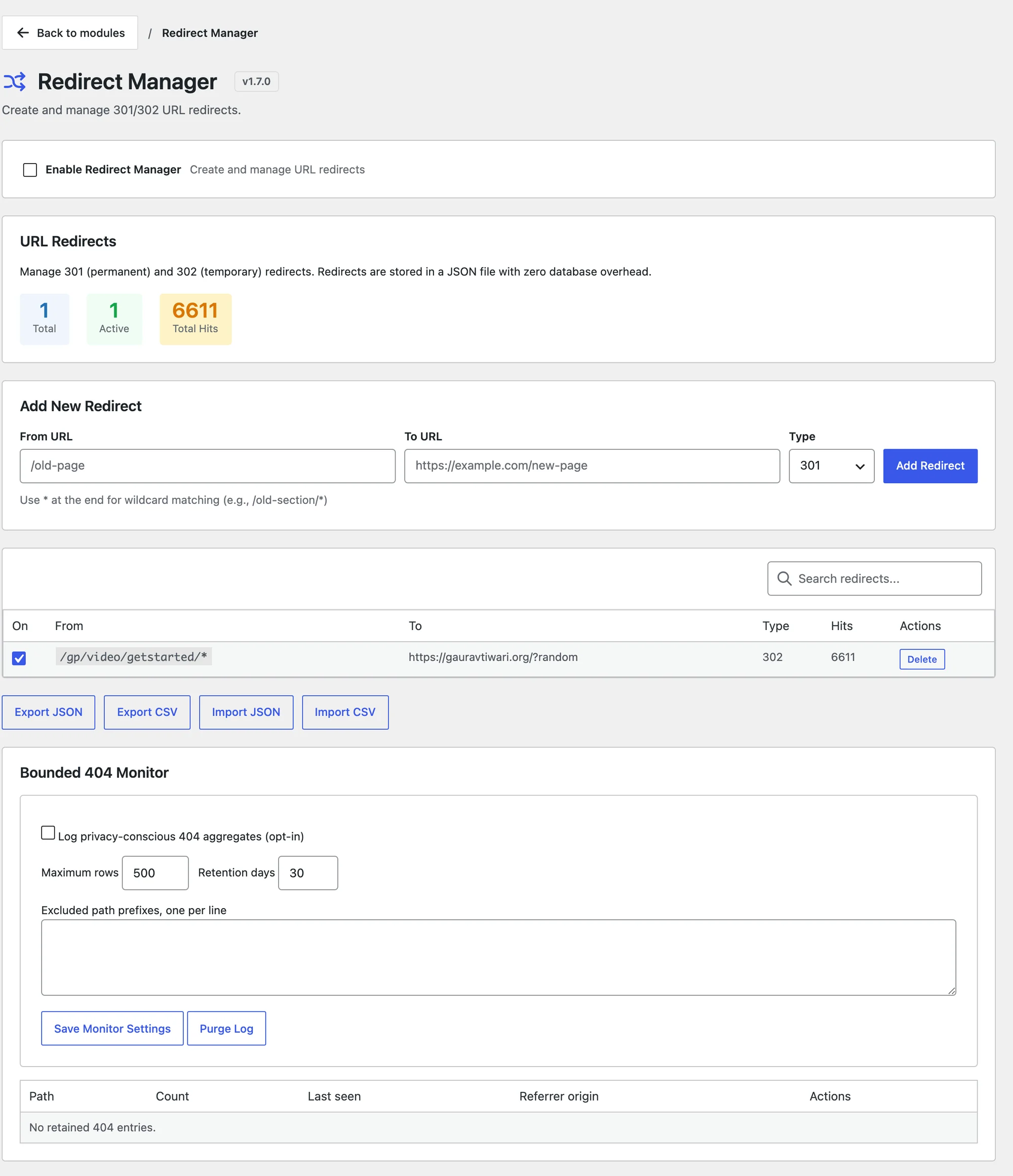
- Tick Enable Redirect Manager. The page saves on its own and shows “Settings saved.”
Add a Redirect
- Under Add New Redirect, type the old path in From URL, such as
/old-page. - Type the destination in To URL. It can be a path on your site or a full address on another site.
- Pick the Type.
- Click Add Redirect. “Redirect added.” confirms it.
The type tells browsers and search engines how long the move lasts:
| Type | Meaning | Use it for |
|---|---|---|
| 301 | Moved permanently | A changed slug or a merged post |
| 302 | Found, temporary | A page that’s coming back |
| 307 | Temporary, keeps the request method | A form endpoint that moved for now |
| 308 | Permanent, keeps the request method | A form or API endpoint that moved for good |
A 301 is right for nearly every content redirect. 307 and 308 matter only when the old address receives form posts, because they keep a POST a POST.
Redirect a Whole Section
A * at the end of From URL matches every path that starts with it:
/old-blog/*catches/old-blog/post-1and/old-blog/category/news./docs/v1/*catches everything under/docs/v1/.
The * works only as the last character. Every match goes to the same To URL, because the part the * matched isn’t carried over. To send /old-blog/post-1 to /blog/post-1, add that redirect on its own.
Exact redirects are checked before wildcards, and the longest wildcard wins, so specific rules and a catch-all can live side by side.
The visitor’s query string comes along when the destination has none. A campaign link like /old-page?utm_source=newsletter keeps its tags.
Find the 404s to Fix
The Bounded 404 Monitor at the bottom of the page shows which broken addresses real visitors hit:
- Tick Log privacy-conscious 404 aggregates (opt-in).
- Keep Maximum rows at 500 and Retention days at 30 unless you need more history. The limits are 2,000 rows and 365 days.
- Add paths you don’t care about to Excluded path prefixes, one per line, such as
/wp-content/uploads/on a site with old hotlinked images. - Click Save Monitor Settings.
The log keeps the path, a count, the last time it was seen and the referring site’s domain. It never stores IP addresses, and it skips bots, crawlers and monitors.
When a row shows up, click Create redirect. The path drops into From URL and the cursor moves to To URL, so you type the destination and click Add Redirect. Click Ignore for paths that should stay 404, such as a probe for a file you never had.
Move Many Redirects at Once
The 4 buttons under the table move redirects in and out:
- Export JSON and Export CSV download every redirect, with its type, on/off state and hits.
- Import JSON and Import CSV open a box where you paste the data.
An import from another plugin’s CSV works when the first row is a header. The importer understands common column names, such as source or from for the old path and target or to for the new one.
Click Dry-run Preview first. Import stays disabled until the preview passes, and an import either adds every row or none.
Check It Works
Open the old address in a private window. You should land on the new one.
From a terminal, curl shows the redirect without following it:
curl -sI https://example.com/old-page | grep -i -E "^(HTTP|location)"The first line shows the status, such as HTTP/2 301, and location: shows the destination. The Hits column on the Redirect Manager counts each use. Hits are saved in batches, and opening the Redirect Manager saves any that are waiting.
When a Redirect Won’t Save
| Message | Why | Fix |
|---|---|---|
| “Source and destination URLs are required.” | One of the fields is empty | Fill both |
| “Failed to add redirect. URL may already exist.” | The path already has a redirect, the rule makes a loop or the * isn’t last | Search the table for the path, check the destination doesn’t point back, keep * at the end |
wildcard_must_be_last in an import preview | A row has * in the middle | Move the * to the end or split the row |
redirect_chain in an import preview | A row points to another redirect | Point it straight at the final address |
| “The redirect set changed before import. Preview it again.” | Someone changed redirects after your preview | Run Dry-run Preview again |
What It Won’t Do
The Redirect Manager is deliberately small:
- No 410 or other error codes. A 410 row in an import is treated as missing its target, or as a 301 if it has one.
- No regular expressions, and no carrying the wildcard part into the destination.
- No editing. To change a redirect, delete it and add it again.
- No automatic redirects on slug change. WordPress itself already redirects changed post slugs for posts it knows about, and the plugin leaves that alone.
- No redirects for
/wp-admin,/wp-json,/wp-login.php,/wp-cron.phpor/xmlrpc.php.
Paths match exactly as typed, with capital letters counting, so /Old-Page and /old-page are 2 different redirects. The Redirect Manager reference covers storage and performance details.