Changelogs

Follow the improvements and fixes in each product release.

Osmium

A free WordPress block theme for writers and independent publishers. Includes 37 inserter patterns, 4 styles, 11 templates and a review kit built with core blocks.

Explore Product

Release History

Permalink

0.4.2

The phone menu’s full-screen sheet has its padding back, so the close button and the links no longer touch the edge of the screen.

This zip is the direct build. It updates itself for free from gauravtiwari.org, with no account or license key. That channel arrived in 0.4.1, which shipped only through the product page.

Checked before release: Theme Check (no required failures), PHPCS, block validation on all 22 templates, 11 parts, and 138 patterns, the contrast check, axe with no violations at desktop and mobile, and a clean install over 0.4.0 with no PHP messages.

SHA-256: 9e028cf733eb44dfe23fb0ade9d74527fd01919930863b918ed514a52d984a44

Permalink

0.4.0

Four sample sites now ship inside the theme. Their six pages are patterns in a new group, Full Pages. You can start an author site, a book review blog, a bookshop, or a literary magazine from the inserter instead of from a blank page.

Install

Download osmium-0.4.0.zip below, then go to Appearance → Themes → Add New → Upload Theme. Upgrading from 0.3.x is a straight replace: upload the zip and confirm the replace when WordPress asks.

New in this release

Full Pages, a new pattern group. It has six complete pages, the same ones that run the sample sites on the demo:

  • Author site: home. The new book, praise, the backlist, an about section, events, and a newsletter signup.
  • Author site: book page. The details in a table, the opening page, praise, and notes for reading groups.
  • Book review blog: home. Your latest reviews, a best-of list, genres to browse, and how the ratings work.
  • Bookshop: home. Staff picks, a book club on three plans, events, and opening hours.
  • Bookshop: staff picks. Recommendations grouped by bookseller.
  • Literary magazine: home. The current issue, past issues, a submissions call, the masthead, and subscriptions.

They’re offered when you create a new page. Your site’s header and footer wrap them, the post lists pull in your own posts, and every word is translatable.

Covers that ship with the theme. Ten book covers, three magazine covers, and two bookshop shelf images, 210 KB in all as WebP. The books, people, and publishers on them are made up, ready for you to swap in your own.

The Theme URI points to the theme’s page. It now goes to https://gauravtiwari.org/product/osmium/ instead of the GitHub repository.

The theme now ships

| | | |—|—| | Templates | 22 | | Template parts | 11 | | Patterns | 128, in eleven groups | | Designs | 6, plus 5 palettes and 4 type presets | | Pattern images | 27, all generated for Osmium | | Theme JavaScript | none |

Checked, not assumed

All 637 blocks in the new patterns validate in the WordPress 7.1 block editor, and PHPCS is clean. axe-core reports zero WCAG 2.2 AA violations on each new pattern at desktop and mobile, and every image loads. The zip was installed over 0.3.0 on a clean site, and every pattern registered.

Known limits

  • The post lists on the review blog and magazine pages show your latest posts from every category. To narrow one, set a category in its Query Loop settings.
  • Links in the new pages point to #, and the email links use made-up .example addresses. Change both after you insert a page.
  • Each full page opens with its own main heading. Use the “Page, no title” template for these pages, so the page title isn’t printed twice.
Permalink

0.3.1

Headers, footers, and breadcrumbs now line up with the rest of the page.

In 0.3.0 their rows sat at the reading width, 42rem, while wide sections, featured images, and the front page ran at 72rem. On a large screen the logo and menu sat well inside the edges of everything below them. Now they span the wide width too.

Install

Download osmium-0.3.1.zip below, then Appearance → Themes → Add New → Upload Theme. Upgrading from 0.3.0 is a straight replace: upload the zip and confirm the replace when WordPress asks.

Changed

  • All nine headers and all nine footers span the wide width, so logos, menus, and footer columns line up with the edges of wide content.
  • Footer text keeps its readable line length. A heading, a short paragraph, and buttons in a footer band start at the wide edge but don’t stretch across it.
  • Breadcrumbs at the foot of posts, pages, and archives span the wide width, so they line up with the footer beneath them.

Checked

Every changed pattern and template validates in the WordPress 7.1 block editor, and PHPCS is clean. axe-core reports zero WCAG 2.2 AA violations on the front page, the four post templates, a page, a category archive, and search results, at desktop and mobile. At a 1280px window, the header, footer, and breadcrumbs now run from 64px to 1216px, the same edges as wide content.

Known limits

  • If you edited your header or footer in the Site Editor, your saved copy wins and keeps the old width. Reset the template part to get the new one, or set its rows to wide width yourself.
  • A header or footer pattern you inserted by hand keeps the width it had when you inserted it.
Permalink

0.3.0

The library is now big enough to build a whole publication from: 122 patterns and 22 templates, up from 37 and 11, plus two more dark designs, five palettes, and four type presets.

Install

Download osmium-0.3.0.zip below, then Appearance → Themes → Add New → Upload Theme. Requires WordPress 7.0 and PHP 7.4. Upgrading from 0.2.0 is a straight replace. Templates you customised in the Site Editor keep your version.

New in this release

Templates, now 22. Category, tag, date, privacy policy, and attachment templates join the hierarchy. Six more can be picked per post or page: a cover header, a split header, a sidebar, a wide page, a landing page with a minimal header and footer, and a blank canvas.

Posts end properly. An author box and related posts sit under every article. Breadcrumbs sit at the foot of posts, pages, and archives rather than above the title.

Four new pattern groups. Post lists: grids, lists, a magazine front, cover cards, and a timeline. An Article kit: key takeaways, contents, notes, warnings, numbered steps, definitions, code samples, and before-and-after images. Sidebar blocks. And Post layouts, which give a new post a starting structure for a review, a roundup, a how-to guide, a comparison, an interview, a news post, or an essay.

A bigger review kit. Eighteen patterns: scores, an at-a-glance box, roundup picks, top picks, alternatives, plan comparisons, a buyer’s checklist, a disclosure note, a final verdict band, and tabbed details on the core Tabs block.

More openers, sections, and pages. Thirteen openers, twenty-eight sections including pricing, services, team, timeline, gallery, and events, and twelve full pages including contact, work with me, portfolio, advertise, link in bio, coming soon, and an affiliate disclosure. Every pattern image ships with the theme.

Designs. Graphite and Espresso join Midnight as dark designs that keep dark sections dark. Five palettes (Ink, Moss, Plum, Harbor, Rose) and four type presets use the same two fonts and the same spacing, so switching never breaks a layout.

Headings open every section. Small labels above headings are gone throughout, and a post’s category now sits in the meta line under its title.

Fixed

  • Category lists built on the Terms Query block pass their settings the way WordPress 7.1 reads them.
  • The feed link follows the site address, so it works on a subdirectory install.
  • Striped tables follow the palette instead of a fixed light grey, so they stay readable in the dark designs.
  • Header, footer, and sidebar text is translatable.

The theme now ships

| | | |—|—| | Templates | 22 | | Template parts | 11 | | Patterns | 122, in ten groups | | Designs | 6, plus 5 palettes and 4 type presets | | Section and block styles | 6 of each | | Theme CSS | 8.2 KB | | Theme JavaScript | none |

Checked, not assumed

Every pattern, template, and part validates in the WordPress 7.1 block editor. PHPCS is clean, and Theme Check raises nothing beyond an informational note. Color contrast passes in all eleven palettes, measured by script. axe-core reports zero WCAG 2.2 AA violations on every template, at desktop and mobile, in the default design and in Graphite.

Known limits

  • Patterns are copied into a post when you insert them, so anything you built from 0.2.0 patterns keeps its old layout until you insert the pattern again.
  • First-paint CSS on a post is about 84 KB, most of it core’s Navigation block and global styles. It gets a closer look before 1.0.
  • Built and tested on WordPress 7.1. The 7.2 beta opens on 20 October and this will be retested then.
  • The Front Page template takes precedence over a static front page you set yourself. To use your own page, edit or delete that template in Appearance → Editor → Templates.
  • Not submitted to the WordPress.org theme directory yet.

Permalink

0.2.0

Fifteen more patterns, and somewhere to find them. The library had two visible groups while the headers and footers sat under core’s categories where nobody looks. There are now six Osmium groups in the inserter.

Install

Download osmium-0.2.0.zip below, then Appearance → Themes → Add New → Upload Theme. Requires WordPress 7.0 and PHP 7.4. Upgrading from 0.1.0 is a straight replace; nothing you have built changes.

New in this release

Headers, now five. Alongside centered and minimal: one with a call to action for a site that sells, one with a notice strip for an announcement, and one with search in the open for a site with a deep archive.

Footers, now five. A signup band, a centered stack for a personal site, and a dark closing band that follows whichever palette is active rather than turning white.

Openers, a new group of five. The newsletter band moves here, joined by a text and image split, a centered statement with one clear next step, a single sentence for an essayist, and one that leads with whatever you published last so the top of the page changes on its own.

Five more sections. A numbers row, a three-step explainer, a section with the heading beside the text so a long passage keeps its measure, a callout note for inside an article, and a keep-reading block for the end of one.

Every pattern that pulls posts carries an empty state, so a new site never renders a heading with nothing under it.

The theme now ships

| | | |—|—| | Templates | 11 | | Patterns | 42, in six groups | | Style variations | 4, plus 3 section styles | | Theme CSS | 8.0 KB | | Theme JavaScript | none |

Checked, not assumed

Every pattern and template validates in the block editor. PHPCS is clean. Colour contrast passes in all four palettes, measured by script. axe-core reports zero WCAG 2.2 AA violations across every template and every new pattern, at desktop and mobile, on a fresh install and a populated one.

Known limits

  • Tested on WordPress 7.0 and 7.1. The 7.2 beta opens on 20 October and this will be retested then.
  • The Front Page template takes precedence over a static front page you set yourself. To use your own page, edit or delete that template in Appearance → Editor → Templates.
  • Not submitted to the WordPress.org theme directory yet.
Permalink

0.1.0

First public release. Early, but complete enough to run a real site, and everything in it has been checked rather than assumed.

Install

Download osmium-0.1.0.zip below, then in your WordPress admin go to Appearance → Themes → Add New → Upload Theme. Requires WordPress 7.0 and PHP 7.4.

On activation you get a designed front page straight away, filled with your own posts. Nothing is created in your database and no settings are changed.

What is in it

  • 11 templates: front page, blog home, index, single, single with sidebar, page, page without a title, archive, author, search, and 404
  • 27 patterns, including a review kit of seven: verdict, pros and cons, spec table, comparison table, best-for cards, product call to action, and a deal strip
  • Four page-creation patterns: homepage, about, newsletter landing, and tools
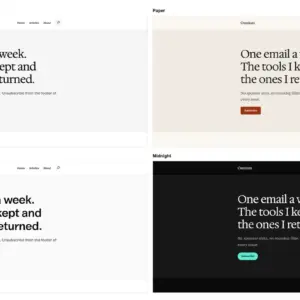
  • Four style variations: Editorial by default, plus Paper, Signal, and Midnight for dark
  • Three section styles for tinted, dark, and card sections, so patterns stay core blocks
  • Two bundled fonts, Valley Sans and Hedvig Letters Serif, self-hosted and served from your own domain under the SIL Open Font License

No JavaScript ships with the theme. No post types, no blocks, no shortcodes, no settings page. Everything you build keeps working if you switch themes.

Checked, not assumed

| | | |—|—| | Theme Check | 0 required, warning, or recommended issues | | PHPCS, WordPress standards | clean across 27 files | | axe-core, WCAG 2.2 AA | 0 violations on every template, desktop and mobile, on a fresh install and a populated one | | Colour contrast | every pair in all four palettes measured by script | | Theme CSS | 8.0 KB |

Known limits

  • Tested on WordPress 7.0 and 7.1. WordPress 7.2 beta opens on 20 October and this will be retested then.
  • The Front Page template takes precedence over a static front page you set yourself. To use your own page, edit or delete that template in Appearance → Editor → Templates.
  • Not submitted to the WordPress.org theme directory yet.

Feedback and bug reports are welcome in the issues.